The best indoor cameras watch the inside of a home, from the front door to the nursery to the room where the dog sleeps, and they do it with clear video, motion alerts, and two-way audio that lets the owner see and speak from anywhere. An indoor camera is smaller and simpler than an outdoor camera, since it never faces rain or cold, but it must still see well in low light, hear clearly, and respect the privacy of the people in the home. The six cameras in this guide cover the whole indoor range: security cameras for the living room and hallway, baby cameras for the nursery, and pet cameras for the room where the dog waits.
Indoor cameras differ from each other in ways that matter every day. Some plug into a wall outlet and record all day, some pan across the whole room, some watch in 4K, and some work as a baby monitor with cry detection. The right choice depends on the room and the job: a camera by the front door needs a wide view and fast alerts, a nursery camera needs clear night vision and gentle audio, and a pet camera needs motion tracking that follows the animal around the room. The guide below explains where each camera fits, so a buyer can pick the right one for each room.
Every camera below is a genuine indoor camera with the exact brand and model verified against the product listing, and each one suits a different indoor job. The Ring Indoor Cam 2K and the Blink Mini 2K+ cover the living room and hallway, the Wyze Cam v4 covers the whole home at a low cost, the Tapo C100 covers the nursery and the dog, the Arlo Essential Indoor covers the family room with smart detection, and the eufy E30 covers the whole room in 4K with pan and tilt.
In this guide
Quick picks: best indoor cameras
| # | Product | Where to buy |
|---|---|---|
| 1 | Ring Indoor Cam 2K | Check on Amazon |
| 2 | Blink Mini 2K+ Indoor Security Camera | Check on Amazon |
| 3 | WYZE Cam v4 Security Camera | Check on Amazon |
| 4 | Tapo C100 Indoor Security Camera | Check on Amazon |
| 5 | Arlo Essential Indoor Security Camera 2K (2nd Gen) | Check on Amazon |
| 6 | eufy Security 4K Indoor Camera E30 | Check on Amazon |
How the picks were chosen for best indoor cameras
Video quality and night vision came first. An indoor camera must see clearly in a dim hallway, a dark nursery, and a living room at night, so resolution, low-light performance, and color night vision were checked for every pick. Cameras that record in 2K or better earned extra credit, since the extra detail helps the owner see a face or read a label, while cameras with poor night vision were left out, because most indoor watching happens after dark.
Audio and detection came next. A good indoor camera hears as well as it sees, with two-way audio for talking to family or pets, and detection that tells people from pets and motion from shadows. Baby cry detection matters for the nursery, pet tracking matters for the dog room, and person detection matters for the hallway. Cameras with no audio, or with alerts for every passing shadow, did not make the list.
Privacy and ease of use were the third check. An indoor camera sits inside the home, so it must be easy to turn off, easy to cover, and easy to share with family without sharing the whole home. Cameras with a privacy shutter, a clear off switch, or a simple app earned extra credit, and cameras that need a subscription for basic features lost points. Every pick here works out of the box with a simple plug-in setup and a phone app.
The six best indoor cameras
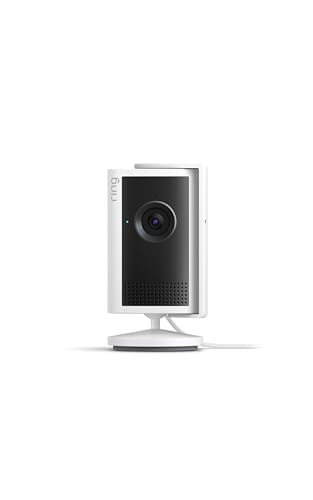
Ring Indoor Cam 2K
The Ring Indoor Cam 2K is the sharpest plug-in indoor camera in this guide, with Retinal 2K video that shows fine detail across a room, and a 6x enhanced zoom that lets the owner look closer at a face, a pet, or a package by the door. Low-light sight keeps the picture in true color with only a little ambient light, so the camera sees well in a dim hallway without switching to black-and-white night vision. It plugs into any outlet, mounts on a shelf or a wall, and ties into the Ring app for owners who already use Ring at the door.
This camera suits buyers who want a simple, sharp camera for the living room, the hallway, or a small business, and who already use the Ring system. The 2K video and the zoom make it easy to check details from the phone, and the plug-in power means it never needs charging. Buyers who want the camera to pan across a room should look at the eufy E30 instead, since the Ring Indoor Cam 2K watches a fixed view, and buyers who want a camera for the nursery should look at the Tapo C100 for its baby features.
Key specs: Retinal 2K video; 6x enhanced zoom; night vision; low-light sight; plug-in power; white
Strengths:
- Retinal 2K video shows fine detail, with 6x enhanced zoom for a closer look
- Low-light sight keeps the picture in color with only a little light
- Plug-in power means it never needs charging, and it fits the Ring app
Trade-offs:
- Fixed view with no pan or tilt, so it cannot sweep a whole room
- Works best for owners already in the Ring system
- Needs a subscription for full recording history and some features
Best for: Buyers who want a sharp plug-in camera for the living room or hallway.
Not suited for: Buyers who need pan and tilt, or a dedicated baby monitor.
Check price on Amazon: Ring Indoor Cam 2K
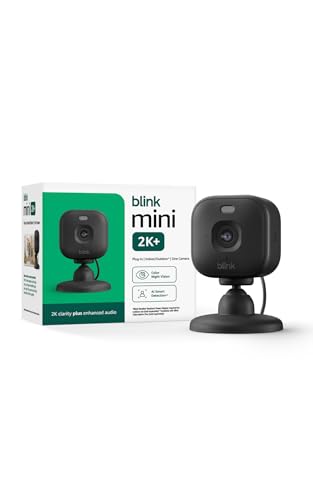
Blink Mini 2K+ Indoor Security Camera
The Blink Mini 2K+ is the smallest camera in this guide, a compact plug-in camera with 2K video, night vision, and enhanced audio that fits on a shelf, a desk, or a bookcase without drawing attention. It is the third generation of the Blink Mini, with sharper video and clearer sound than the older model, and it works as a home camera and a pet camera at once, with motion detection that alerts the phone when something moves. The 4x zoom lets the owner look closer at the dog, the door, or the crib from across the room.
This camera suits buyers who want a small, affordable indoor camera that disappears into the room, and renters who need a camera that plugs in and comes down without tools. The setup takes minutes in the Blink app, and the small size means it fits where larger cameras cannot. The fixed view cannot pan, so buyers who need to sweep a room should look at the eufy E30, and buyers who want the sharpest video should look at the Ring Indoor Cam 2K or the eufy E30.
Key specs: 2K video; plug-in power; night vision; enhanced audio; motion detection; 4x zoom; home and pet camera
Strengths:
- Small size fits on a shelf or a bookcase without drawing attention
- 2K video with night vision and enhanced audio for clear day and night watching
- Quick plug-in setup, easy to move between rooms or take when moving home
Trade-offs:
- Fixed view with no pan or tilt
- Needs a subscription for cloud recording and some features
- Small size means a narrow field of view compared with pan-tilt cameras
Best for: Renters and buyers who want a small, affordable camera that blends in.
Not suited for: Buyers who need pan and tilt, or the sharpest video available.
Check price on Amazon: Blink Mini 2K+ Indoor Security Camera

WYZE Cam v4 Security Camera
The WYZE Cam v4 is the best-value camera in this guide, a 2.5K camera with a 120 degree field of view and color night vision that works indoors and outdoors for the cost of a budget indoor-only camera. It records in 2560 by 1440 video, which shows faces, labels, and small details that 1080p cameras miss, and the enhanced two-way audio lets the owner speak clearly through the camera. The wide view covers a whole room from one corner, and the color night vision keeps the picture useful after dark without a bright light.
This camera suits buyers who want the most camera for the least money, and owners who want one camera model for the whole home, inside and out. The Wyze app covers live view, alerts, and recording, and the camera works with voice assistants for hands-free checks. It needs 2.4 GHz Wi-Fi, so buyers with a 5 GHz-only network should check their router first, and buyers who want a privacy shutter or a pan-tilt head should look at the Arlo or eufy picks instead.
Key specs: 2.5K QHD video; 120 degree field of view; color night vision; 2.4 GHz Wi-Fi; enhanced 2-way audio; indoor and outdoor use
Strengths:
- 2.5K video with a wide 120 degree view covers a whole room from one corner
- Color night vision keeps the picture clear and useful after dark
- Low cost for the features, and works indoors and outdoors
Trade-offs:
- Needs 2.4 GHz Wi-Fi, so it cannot join a 5 GHz-only network
- No pan or tilt, and no built-in privacy shutter
- Some features need a subscription for full use
Best for: Buyers who want the most features for the least money, inside or out.
Not suited for: Buyers on a 5 GHz-only network, or who need a privacy shutter.
Check price on Amazon: WYZE Cam v4 Security Camera

Tapo C100 Indoor Security Camera
The Tapo C100 is the best nursery and pet camera in this guide, a 1080p indoor camera with baby crying detection, motion alerts, two-way audio, and a built-in siren, all for a low cost. It works as a baby monitor, a dog camera, and a home security camera at once, with night vision that keeps the picture clear in a dark nursery, and free AI detection that tells motion from a person. Storage covers both cloud and a microSD card, so the buyer can pick local storage with no monthly cost, or cloud storage for backup.
This camera suits parents who want a camera in the nursery that also watches the dog and the living room, and buyers who want local storage without a subscription. The baby crying detection sends an alert when the baby wakes, and the two-way audio lets a parent soothe from another room. The 1080p video shows less detail than the 2K cameras in this guide, so buyers who want the sharpest picture should look at the Ring or eufy picks, but for nursery and pet watching the C100 covers the job well.
Key specs: 1080p video; baby monitor; dog camera; wired; motion detection; 2-way audio; siren; night vision; cloud and SD card storage
Strengths:
- Baby crying detection and two-way audio suit the nursery and the dog room
- Free AI detection and local SD card storage with no monthly cost
- Siren and motion alerts cover home security as well as baby watching
Trade-offs:
- 1080p video shows less detail than the 2K and 4K cameras here
- Wired power means it needs an outlet near the mounting spot
- Fixed view with no pan or tilt
Best for: Parents who want a nursery camera that also watches pets and the home.
Not suited for: Buyers who want the sharpest video, or a pan-tilt camera.
Check price on Amazon: Tapo C100 Indoor Security Camera

Arlo Essential Indoor Security Camera 2K (2nd Gen)
The Arlo Essential Indoor Security Camera 2K is the smartest detection camera in this guide, with person recognition and animal detection that tell the owner what moved, not just that something moved. It records in 2K with wired plug-in power, so it never needs charging, and the two-way audio lets the owner listen and talk through the camera. The Arlo app ties it into a wider Arlo system for owners who already use Arlo outdoors, and the privacy features let the owner control when the camera watches and when it rests.
This camera suits families who want clear alerts without the noise of false alarms, and owners who already use Arlo cameras outside. Person recognition cuts the alerts for pets and shadows, while animal detection keeps an eye on the dog without crying wolf. The wired power means it needs an outlet, so buyers should plan the mount near one, and buyers who want pan and tilt should look at the eufy E30, while buyers who want the lowest cost should look at the Wyze or Tapo picks.
Key specs: 2K video; wired plug-in power; person recognition; animal detection; 2-way audio; privacy features; Arlo app
Strengths:
- Person and animal detection cut false alerts and say what moved
- 2K video with wired power that never needs charging
- Privacy features and the Arlo app suit families already in the Arlo system
Trade-offs:
- Wired power needs an outlet near the mounting spot
- Fixed view with no pan or tilt
- Full recording history needs a subscription plan
Best for: Families who want smart alerts and already use Arlo cameras.
Not suited for: Buyers who need pan and tilt, or the lowest possible cost.
Check price on Amazon: Arlo Essential Indoor Security Camera 2K (2nd Gen)

eufy Security 4K Indoor Camera E30
The eufy Security 4K Indoor Camera E30 is the sharpest and most flexible indoor camera in this guide, with 4K video, a 360 degree pan and tilt head, and AI tracking that follows people and pets around the room on its own. It works as a pet camera, a baby camera, and a nanny camera at once, with color night vision that keeps the picture clear after dark, and two-way audio for talking to family or pets from anywhere. There is no subscription for local storage and basic features, so the camera keeps working without a monthly cost.
This camera suits buyers who want one camera to watch a whole room, and parents or pet owners who want the camera to follow movement on its own. The pan and tilt head covers the full room from one mount, and the 4K video shows the finest detail of any camera in this guide. The camera needs a power outlet and a steady Wi-Fi signal, and buyers who want the simplest plug-and-watch camera should look at the Ring or Blink picks, since the E30 offers more features to learn.
Key specs: 4K video; 360 degree pan and tilt; AI tracking; color night vision; pet, baby, and nanny camera; 2-way audio; no subscription
Strengths:
- 4K video with 360 degree pan-tilt and AI tracking follows people and pets
- Color night vision and two-way audio suit baby, pet, and nanny watching
- No subscription needed for local storage and basic features
Trade-offs:
- Needs a power outlet and a steady Wi-Fi signal to work well
- More features to learn than the simplest plug-in cameras
- Pan-tilt head needs a clear swing path with no blocked corners
Best for: Parents and pet owners who want one camera to follow the whole room in 4K.
Not suited for: Buyers who want the simplest camera, or a battery-powered one.
Check price on Amazon: eufy Security 4K Indoor Camera E30
Comparison table
| Camera | Video | Pan / tilt | Power | Best job |
|---|---|---|---|---|
| Ring Indoor Cam 2K | 2K | No | Plug-in | Living room, hallway |
| Blink Mini 2K+ | 2K | No | Plug-in | Small rooms, renters |
| WYZE Cam v4 | 2.5K | No | Plug-in | Whole home, low cost |
| Tapo C100 | 1080p | No | Wired | Nursery, pets |
| Arlo Essential Indoor 2K | 2K | No | Plug-in | Smart alerts, family room |
| eufy E30 | 4K | Yes, 360 degree | Plug-in | Whole room, baby, pets |
For more camera options on this site, see our guides to security cameras for home indoor and outdoor, security cameras for indoor and outdoor, security cameras for home under 150, and security cameras under 100.
best indoor cameras: how to choose
Start with the room and the job, because an indoor camera for the hallway is not the same as one for the nursery. A hallway camera needs a wide view, fast alerts, and good night vision, while a nursery camera needs baby cry detection, gentle audio, and a clear night picture. A pet camera needs motion tracking that follows the animal, while a living room camera needs to blend in and watch a wide area. Pick the room first, then the camera that fits it, and buyers who need more than one room should mix models rather than forcing one camera to do every job.
Check the video quality in low light, not just in daylight. Most indoor watching happens in the evening or at night, when the room is dim and the camera switches to night vision. A camera with color night vision or good low-light sight shows far more than one with basic infrared, and a 2K or 4K camera shows faces and details that 1080p misses. Buyers should look for sample night footage in the listing and check the field of view, since a narrow camera in a big room misses the corners.
Think about power and placement together. Every camera in this guide plugs into an outlet, so the mounting spot must be near one, or the buyer must run a cable. A camera on a high shelf sees the whole room but may miss faces, while a camera at eye level sees faces but covers less of the room. Pan-tilt cameras like the eufy E30 cover a whole room from one spot, while fixed cameras need careful aiming at the door or the area that matters most.
Weigh the subscription before buying. Some cameras need a monthly plan for cloud recording, full history, or smart detection, while others store video locally on a card with no monthly cost. The eufy E30 and the Tapo C100 work well without a subscription, while the Ring, Blink, and Arlo cameras offer their fullest features with a plan. Buyers should add the yearly plan cost to the camera cost and compare the true total before deciding.
Plan for privacy from the start. An indoor camera watches the home, so the buyer should know who can see the feed, how to turn the camera off, and where never to place one. Cameras with a privacy shutter or a clear off switch make this easy, and the app should let the owner share access with family without sharing the whole account. The guide below covers privacy in more detail, since it matters as much as video quality for an indoor camera.
Setting up and caring for best indoor cameras
Mount the camera where it sees the room without being in the way. A shelf, a bookcase, or a wall mount near an outlet works well, with the lens aimed at the door or the area that matters. Keep the camera out of direct sun through a window, since glare blinds the sensor, and keep it away from heat sources that can fog the lens. A pan-tilt camera needs a clear swing path, so check that no shelf or curtain blocks the head before final mounting.
Keep the lens clean and the firmware current. Dust on an indoor lens blurs the picture and can trigger false motion alerts, so a quick wipe with a soft cloth every few weeks keeps the video clear. Firmware updates improve detection, fix bugs, and add features, and most install through the app in minutes. Check for updates monthly, and restart the camera after an update to make sure it comes back online.
Manage storage and alerts on a schedule. Check the memory card or cloud history weekly at first, so the buyer learns how much video the camera keeps and how long the history lasts. Set motion zones in the app to cover the door and the walkway, and exclude windows with moving trees or a busy street outside, since those cause endless alerts. Lower the sensitivity if pets trigger alerts all day, and raise it if the camera misses people at the door.
Protect the account and the network. Use a strong password for the camera app, turn on two-step verification where the app offers it, and keep the home Wi-Fi password private. Share access with family through the app sharing feature, not by sharing the account password, so access can be removed later. A camera on a secure network is a helpful tool, while a camera on a weak password is a risk to the whole home.
Common mistakes when buying best indoor cameras
The most common mistake is placing the camera where it cannot see what matters. A camera aimed at a blank wall, a ceiling, or a window with glare will miss the door and the people who use it, while a camera mounted too high sees the tops of heads instead of faces. Buyers should test the view on the phone before fixing the mount, walk through the room as a visitor would, and check the picture day and night.
Another common mistake is ignoring the subscription cost until the first bill. A camera that looks cheap can cost more over a year than a costlier camera with free local storage, once the monthly plan is added. Buyers should read the plan terms before buying, check what works without a plan, and pick the camera whose true yearly cost fits the budget.
A third mistake is putting an indoor camera in the wrong room. Cameras do not belong in bathrooms, guest bedrooms, or any place where people expect privacy, and the law in many places limits recording in such rooms. Buyers should keep cameras in shared spaces like the living room, the hallway, and the nursery, tell household members and regular visitors where the cameras are, and use the privacy shutter or the off switch when the camera is not needed.
A fourth mistake is leaving alerts at full sensitivity with no zones. A camera that alerts for every pet, curtain, and shadow will train the owner to ignore alerts, so the one alert that matters gets missed. Buyers should set motion zones, tune the sensitivity for the room, and check the alerts daily for the first week, so the camera learns the room and the owner learns the camera.
Our final recommendation
For most buyers, the eufy Security 4K Indoor Camera E30 is the strongest all-around pick, because it watches a whole room in 4K, follows people and pets with AI tracking, and works without a subscription. Buyers who want a sharp plug-in camera for the hallway should pick the Ring Indoor Cam 2K, renters should pick the Blink Mini 2K+, value buyers should pick the WYZE Cam v4, parents should pick the Tapo C100 for the nursery, and Arlo owners should pick the Arlo Essential Indoor for smart alerts.
Whatever the choice, buy the exact model in this guide, test the view on the phone before fixing the mount, and set the privacy and alert settings on the first day. A good indoor camera should show a clear picture day and night, alert the phone only when it matters, and respect the privacy of everyone in the home. The six cameras above do exactly that, each in its own corner of the indoor camera world.
Indoor cameras, privacy, and the people in the home
An indoor camera is different from an outdoor camera in one key way: it watches people the owner knows, in the place where they live. That makes privacy a feature, not an afterthought. Buyers should tell everyone in the household where the cameras are, what they record, and how to turn them off, and regular visitors should be told too. A camera that surprises people erodes trust, while a camera that everyone knows about becomes a normal part of the home.
Placement rules matter more indoors than outdoors. Cameras belong in shared spaces like the living room, the kitchen, the hallway, and the nursery, where watching is expected and useful. They do not belong in bathrooms, in guest bedrooms, or in any room where people change clothes or expect to be alone. The law in many places also limits audio recording, so buyers should check local rules before turning on two-way audio recording, and never record audio where the law needs consent from everyone in the room.
The camera own controls help a lot. A privacy shutter that covers the lens, a clear off switch in the app, and a schedule that turns the camera off at set hours all let the owner control when the home is watched and when it is not. The Arlo Essential Indoor and the eufy E30 both offer privacy controls, and every camera in this guide can be turned off from the app. Buyers should use these controls every day, not just once, so the camera watches when it should and rests when it should not.
Frequently asked questions
Do indoor cameras need Wi-Fi?
Yes. Every camera in this guide connects to the home Wi-Fi to send video and alerts to the phone, and most need a 2.4 GHz network. The camera will not work without Wi-Fi, so buyers should check the signal strength in the room before mounting the camera.
Can an indoor camera work as a baby monitor?
Yes. The Tapo C100 and the eufy E30 both work as baby cameras, with night vision, two-way audio, and cry or motion detection that alerts the phone. A dedicated baby monitor may offer a local screen with no Wi-Fi, while a camera offers remote viewing from anywhere.
Do indoor cameras record all the time?
It depends on the camera and the plan. Some cameras record continuously to a memory card or the cloud, while others record only when they detect motion. Continuous recording uses more storage and power, while motion-only recording saves storage but can miss quiet moments.
Are indoor cameras safe for privacy?
Yes, when used with care. Buyers should use a strong password, turn on two-step verification, share access through the app rather than sharing the password, and use the privacy shutter or off switch when the camera is not needed. Cameras should never go in bathrooms or guest bedrooms.
Can I watch my indoor camera when I am away?
Yes. Every camera in this guide sends a live feed to the phone app over the internet, so the owner can check the home from work, from travel, or from anywhere with a phone signal. The feed needs a steady home Wi-Fi connection and a phone with internet access.


