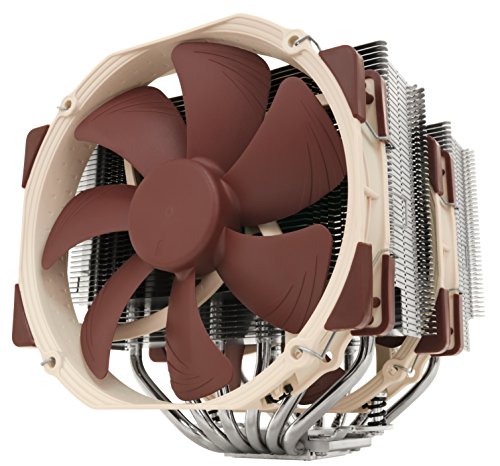
The best CPU and GPU coolers are the parts that keep a gaming PC running at full speed. The processor and the graphics card are the two hottest parts in a PC, and when either one overheats, it slows down to protect itself. That slowdown shows up as stuttering in games, longer render times, and a PC that feels slower than it should. Good cooling is not a luxury: it is what lets the hardware you paid for run at its rated speed.
This guide covers both sides of PC cooling in one place. The first three picks are CPU coolers: the Noctua NH-D15 and NH-U12S, and the Thermalright Peerless Assassin, which cover the range from flagship air cooling to best-value cooling. The last three picks are GPU coolers: two replacement fans for graphics cards and a magnetic backplate fan, which keep a graphics card cool without replacing it.
The picks span the brands and designs that matter. Noctua sets the standard for air cooling, Thermalright sets the standard for value, and the GPU coolers in this guide are the practical parts that repair or improve a graphics card. Every cooler below is verified from its listing, with the brand, model, size, fan setup, and socket or card support confirmed.
Use the comparison table to narrow the list by the part you need to cool, then read the section for the cooler that fits your case and your hardware. The buying guide explains how to choose between air and liquid cooling, how to check fit, and what to watch for during installation.
Use the comparison table to narrow the list by the part you need to cool, then read the section for the cooler that fits your case and your hardware. The buying guide explains how to choose between air and liquid cooling, how to check fit, and what to watch for during installation.
One more point before the picks: cooling is a system, not a single part. The CPU cooler, the GPU cooler, and the case fans work together to move air through the PC, and the weakest link sets the temperature. A good cooler in a case with blocked airflow will still run hot, while a modest cooler in a case with good airflow can perform well. Keep that in mind as you read: the cooler matters, but so does the case it sits in.
In this guide
Quick picks: best cpu and gpu coolers
| # | Product | Where to buy |
|---|---|---|
| 1 | Noctua NH-D15 chromax.black | Check on Amazon |
| 2 | Noctua NH-U12S chromax.black | Check on Amazon |
| 3 | Thermalright Peerless Assassin 120 SE ARGB | Check on Amazon |
| 4 | GDSTIME 87mm GPU Cooler | Check on Amazon |
| 5 | SCCCF 12V Graphics Card Cooler | Check on Amazon |
| 6 | Pomya GPU Backplate Cooler Fan | Check on Amazon |
How the picks were chosen
We started with the CPU coolers that builders actually buy: the Noctua NH-D15 and NH-U12S, and the Thermalright Peerless Assassin 120 SE. These are the air coolers with the longest track records, the deepest support, and the most consistent recommendations. For GPU coolers, we looked at the replacement fans and add-on coolers that owners actually use: GDSTIME, SCCCF, and Pomya.
Then we checked each candidate listing to confirm it was a new unit of the exact model named, with the brand, model, size, fan setup, and socket or card support stated in the listing itself. Any listing marked renewed or used was excluded, as were listings for the wrong model or the wrong size. The specifications quoted in each section come from those listings.
We required every CPU cooler to be a complete cooler, not a fan or a part: a heatsink, a fan, and mounting hardware, ready to install. We required every GPU cooler to be a real cooler or fan assembly, not a mount or a bracket. A graphics card mount is not a cooler, and a replacement fan that does not fit the listed cards is not useful.
Finally, we spread the picks across the two jobs: cooling a processor and cooling a graphics card. The CPU coolers cover flagship, compact, and value choices. The GPU coolers cover a single-fan replacement, a dual-fan replacement for popular cards, and a magnetic backplate add-on. No pick in this guide is a compromise: each one is a strong choice in its class.
Finally, we spread the picks across the two jobs: cooling a processor and cooling a graphics card. The CPU coolers cover flagship, compact, and value choices. The GPU coolers cover a single-fan replacement, a dual-fan replacement for popular cards, and a magnetic backplate add-on. No pick in this guide is a compromise: each one is a strong choice in its class.
We also confirmed that each cooler is available new at the time of writing, rather than a discontinued model sold only as old stock. A cooler that is hard to buy is not a useful recommendation, however good its cooling. Every pick below is available new, with its full mounting hardware and warranty.
Quick comparison
| Product | Standout feature | Best for |
|---|---|---|
| Noctua NH-D15 chromax.black | The air cooler benchmark | best air cooling overall |
| Noctua NH-U12S chromax.black | Compact Noctua quality | compact Noctua cooling |
| Thermalright Peerless Assassin 120 SE | Best value dual tower | best cooling per dollar |
| GDSTIME 87mm GPU Cooler | Fan replacement that saves a card | graphics card fan replacement |
| SCCCF Graphics Card Cooler | Dual-fan fix for popular cards | mid-range card fan replacement |
| Pomya GPU Backplate Cooler Fan | Magnetic backplate cooling | extra graphics card cooling |
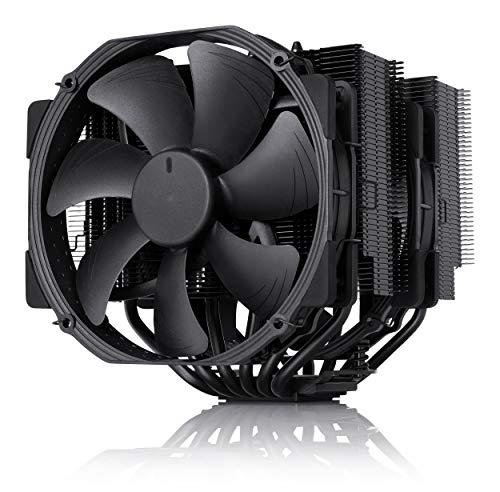
Noctua NH-D15 chromax.black — Dual Tower CPU Cooler, 2x NF-A15 Fans, 6 Heatpipes
The Noctua NH-D15 chromax.black is the air cooler that every other air cooler is measured against. It is a dual tower CPU cooler with two NF-A15 HS-PWM fans and six heatpipes, standing 165mm tall, and it cools as well as many 240mm liquid coolers. If your case fits it, there is no better air cooler.
For a high-end gaming or workstation PC, the NH-D15 is the pick that ends the cooler debate. Its dual tower design spreads heat across a huge surface, its two large fans move air quietly, and its build quality is the best in the category. Noctua coolers are known for lasting for years and for mounting kits that support new sockets.
The chromax.black version is the all-black edition, so it fits builds where the brown and tan of the standard Noctua fans would clash. It is tall and heavy, and it needs a case with 165mm of clearance and memory that clears the front fan. But if it fits, it is the air cooler to buy.
Key specifications: Dual tower CPU cooler; 2 x NF-A15 HS-PWM fans; 6 heatpipes; maximum height 165mm; chromax.black.
A good fit for high-end gaming and workstation PCs with room for it.
Strengths
- Best-in-class air cooling performance
- Quiet even under heavy load
- Premium build quality and long support
Trade-offs
- Needs 165mm of case clearance
- Heavy, so handle with care during installation
- Premium price for an air cooler
Builders who want the best air cooling available.
Best for: best air cooling overall / Not suited for: compact cases
Check price on Amazon: Noctua NH-D15 chromax.black
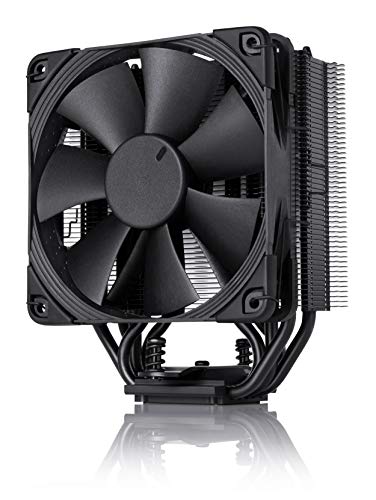
Noctua NH-U12S chromax.black — Single Tower CPU Cooler, NF-F12 PWM Fan, 158mm
The Noctua NH-U12S chromax.black is the single tower cooler for builders who want Noctua quality in a smaller package. It is a single tower CPU cooler with an NF-F12 PWM fan, standing 158mm tall, and it cools well while fitting cases and memory layouts that the NH-D15 cannot.
For a mid-range gaming PC or a compact build, the NH-U12S is the sensible pick. Its single tower leaves room for tall memory, its 158mm height fits more cases, and its single fan keeps noise low. It does not cool as well as the dual tower NH-D15, but it cools better than most coolers in its size class.
The chromax.black finish keeps the cooler looking clean in a windowed build. It is a premium single tower cooler, and its price reflects that, but the build quality, the mounting system, and the long socket support are worth it for a cooler that will move to the next build.
Key specifications: Single tower CPU cooler; NF-F12 PWM fan; maximum height 158mm; chromax.black.
A good fit for mid-range builds and compact cases.
Strengths
- Noctua quality in a compact package
- Fits more cases and memory layouts
- Quiet single-fan design
Trade-offs
- Less cooling than the dual tower NH-D15
- Premium price for a single tower cooler
- Single fan means less headroom for overclocking
Builders who want Noctua quality without the size.
Best for: compact Noctua cooling / Not suited for: heavy overclocking
Check price on Amazon: Noctua NH-U12S chromax.black

Thermalright Peerless Assassin 120 SE ARGB — 6 Heatpipes, TL-C12C ARGB Fans, 155mm
The Thermalright Peerless Assassin 120 SE ARGB is the value cooler that made the whole category rethink prices. It is a dual tower cooler with six 6mm heatpipes and TL-C12C ARGB fans, standing 155mm tall, and it cools nearly as well as coolers that cost twice as much. For most builders, it is the smart buy.
For a gaming PC on a budget, the Peerless Assassin is hard to beat. Its dual tower design and six heatpipes handle hot-running processors, its ARGB fans look good in a windowed case, and its 155mm height fits more cases than the NH-D15. It is the cooler that reviewers recommend when price matters.
The Peerless Assassin is not as quiet or as refined as the Noctua coolers, and its fans are louder under load. But for the price, its cooling performance is remarkable. Builders who want the best cooling per dollar should start here.
Key specifications: Dual tower CPU cooler; 6 x 6mm heatpipes; TL-C12C ARGB fans; height 155mm.
A good fit for gaming PCs where cooling per dollar matters.
Strengths
- Near-flagship cooling at a value price
- ARGB fans for windowed builds
- 155mm height fits more cases
Trade-offs
- Louder under load than Noctua coolers
- Less refined mounting system
- ARGB lighting needs compatible software
Budget-conscious builders who want strong cooling.
Best for: best cooling per dollar / Not suited for: silent builds
Check price on Amazon: Thermalright Peerless Assassin 120 SE ARGB
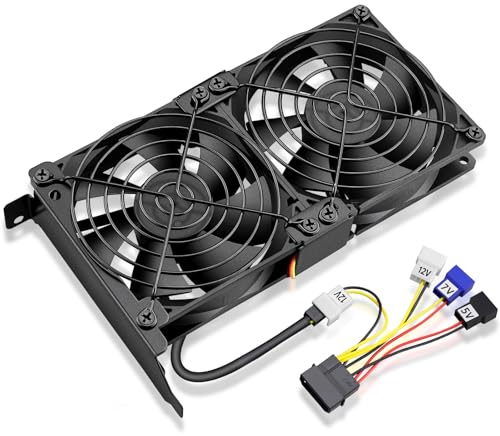
GDSTIME 87mm x 25mm 12V 2Pin GPU Cooler — 4Pin PWM, Dual Ball Bearing, 8015 DC 12V 0.5A
The GDSTIME 87mm GPU cooler is the replacement fan for a graphics card whose stock fan has failed or grown noisy. It is an 87mm by 25mm cooler with a 4Pin PWM connector and dual ball bearings, rated for 12V and 0.5A, model 8015, and it is the kind of part that saves a graphics card from an early retirement.
For a graphics card with a dead or noisy fan, this cooler is the fix. A replacement fan costs far less than a new graphics card, and a dual ball bearing fan lasts longer than the sleeve bearing fans that many cards ship with. The 87mm size fits a range of graphics cards, and the PWM connector lets the card control the fan speed.
Buyers should confirm the size, the connector, and the mounting before ordering, since graphics card fans vary by model. Measure the old fan, check the connector type, and confirm the screw holes line up. A replacement fan that does not fit is useless, whatever its quality.
Key specifications: 87mm x 25mm GPU cooler; 4Pin PWM; dual ball bearing; DC 12V 0.5A; model 8015.
A good fit for graphics cards with a dead or noisy fan.
Strengths
- Saves a graphics card with a failed fan
- Dual ball bearings for longer life
- PWM control from the graphics card
Trade-offs
- Must match size, connector, and mounting
- No heatsink, fan only
- Fits only cards designed for this size
Owners repairing a graphics card instead of replacing it.
Best for: graphics card fan replacement / Not suited for: new cooler upgrades
Check price on Amazon: GDSTIME 87mm GPU Cooler

SCCCF 12V 0.55A Graphics Card Cooler — Dual 75mm, 4 Pin, for GTX 1060/1070 and RX 580
The SCCCF graphics card cooler is the dual-fan replacement for a specific range of popular graphics cards. It is a 12V, 0.55A cooler with dual 75mm fans and a 4 Pin connector, made for cards such as the GTX 1060 and 1070 and the RX 580, among others. It is the part that brings a noisy or overheating card back to life.
For a mid-range graphics card that has started to run hot or loud, this cooler is the practical fix. The dual 75mm fans move more air than a single fan, the PWM control lets the card manage the speed, and the replacement costs a fraction of a new card. Cards like the GTX 1060 and RX 580 are still capable for many games, and a new cooler keeps them running.
Compatibility is the key check. The listing names the cards it fits, and buyers should confirm their exact card model before ordering. A fan assembly made for one card rarely fits another, even if the size looks similar. Check the model, the connector, and the mounting.
Key specifications: 12V 0.55A graphics card cooler; dual 75mm fans; 4 Pin connector; for GTX 1060/1070, RX 580.
A good fit for GTX 1060, 1070, and RX 580 cards with worn fans.
Strengths
- Dual fans for better cooling
- Fits popular mid-range cards
- Costs far less than a new card
Trade-offs
- Compatibility limited to listed card models
- Fan assembly only, no heatsink
- Must match the exact card model
Owners keeping a mid-range graphics card alive.
Best for: mid-range card fan replacement / Not suited for: other card models
Check price on Amazon: SCCCF 12V Graphics Card Cooler

Pomya GPU Backplate Cooler Fan — ARGB 12V-5V Dual Interface, Magnetic Cooling Fan for Graphics Card
The Pomya GPU backplate cooler fan is the add-on cooler that cools a graphics card from the back. It is an ARGB fan with a 12V-5V dual interface, designed to mount magnetically on the backplate of a graphics card, and it moves air across the hottest part of the card: the back of the processor and memory.
For a graphics card that runs hot under load, a backplate fan is a simple, effective add-on. The back of a graphics card can get very hot, especially on high-end models, and a fan that blows air across it lowers temperatures and reduces thermal throttling. The magnetic mounting makes installation easy, and the ARGB lighting adds a clean look.
The backplate fan is an add-on, not a replacement for the card stock cooler. It works best when the card already has adequate cooling and needs a little more, or when the case airflow is limited. Buyers should confirm the backplate is metal and flat enough for the magnetic mount, and that the fan does not conflict with other parts.
Key specifications: ARGB GPU backplate cooler fan; 12V-5V dual interface; magnetic mounting; for graphics card backplates.
A good fit for hot-running graphics cards that need extra cooling.
Strengths
- Cools the hot back of the graphics card
- Magnetic mounting for easy installation
- ARGB lighting for windowed builds
Trade-offs
- Add-on, not a replacement for stock cooling
- Needs a metal backplate for magnetic mount
- Effectiveness depends on case airflow
Gamers who want a simple add-on cooler.
Best for: extra graphics card cooling / Not suited for: replacing a failed stock fan
Check price on Amazon: Pomya GPU Backplate Cooler Fan
Best CPU and GPU coolers: what matters most
Cooler height is the first thing that matters for a CPU cooler, because it determines whether the cooler fits the case. The NH-D15 needs 165mm, the NH-U12S needs 158mm, and the Peerless Assassin needs 155mm. Measure the clearance in your case before ordering, and remember that the cooler plus fans is taller than the heatsink alone. A cooler that does not fit is useless, whatever its performance.
Fan size and noise are the second check. Larger fans move more air at lower speeds, which is why the NH-D15 with its 140mm fans is quieter than most coolers with 120mm fans. The Peerless Assassin is louder under load than the Noctua models, which is the trade-off for its price. If the PC sits in a bedroom or an office, noise matters more than a small difference in cooling.
For GPU coolers, compatibility is the first thing that matters. Graphics card fans vary by model, and a fan assembly made for one card rarely fits another. The SCCCF cooler names the cards it fits, and buyers should confirm their exact card model before ordering. The GDSTIME fan needs the right size, connector, and mounting. Measure the old fan and check the listing before you buy.
Socket and card support should be confirmed before ordering. The CPU coolers in this guide cover modern Intel and AMD sockets, but the exact list varies by model. The GPU coolers cover specific card models. Confirm the listing names your socket or your card, and keep the mounting hardware from the box.
Finally, think about the whole cooling system. A CPU cooler and a GPU cooler work together with the case fans to move air through the PC. A good CPU cooler in a case with no airflow will still run hot, and a GPU cooler cannot fix a case that has no intake. Check that the case has intake fans at the front and exhaust fans at the back or top, and that cables are routed out of the airflow path.
Finally, think about the whole cooling system. A CPU cooler and a GPU cooler work together with the case fans to move air through the PC. A good CPU cooler in a case with no airflow will still run hot, and a GPU cooler cannot fix a case that has no intake. Check that the case has intake fans at the front and exhaust fans at the back or top, and that cables are routed out of the airflow path.
Warranty length is worth checking too, since a cooler is a part that runs every time the PC is on. Most CPU coolers in this guide carry multi-year warranties, and the Noctua models carry the longest support, with mounting kits available for new sockets. A longer warranty signals confidence from the maker and protects the investment if a fan fails. Keep the receipt and the box until the cooler has run for a few weeks.
Buying guide: choosing CPU and GPU cooler
Start by deciding which part needs cooling. If the processor runs hot, buy a CPU cooler. If the graphics card runs hot or its fan has failed, buy a GPU cooler. The two are different parts with different mounting systems, and a cooler made for one will not fit the other. The comparison table shows which picks cool the processor and which cool the graphics card.
For a CPU cooler, measure the case clearance first. The cooler height is listed in each section, and the case specifications state the maximum cooler height. A cooler that is too tall will not fit, and a cooler that is too short may not cool enough. The NH-D15 is the best cooler here, but it is also the tallest, and it needs a case with 165mm of clearance.
For a GPU cooler, confirm the exact card model before ordering. The SCCCF cooler names the cards it fits, and the GDSTIME fan needs the right size and connector. Measure the old fan, check the connector type, and confirm the screw holes line up. A replacement fan that does not fit is useless, whatever its quality.
Think about noise as a feature. A cooler with large fans and a good design stays quiet at idle and ramps up only under load. The Noctua coolers in this guide are the quietest, and they are worth the extra money if the PC sits in a bedroom, an office, or a recording setup. A value cooler that is loud under load is a fair trade for its price, but know that before you buy.
Consider whether you need air or liquid cooling. The CPU coolers in this guide are all air coolers, which are simpler, more reliable, and easier to install than liquid coolers. Liquid coolers cool better at the top end, but they have a pump that can fail and tubes that can leak. For a stock or mildly overclocked processor, a good air cooler is enough.
Buy from a listing that states the full configuration clearly. For CPU and GPU coolers, prefer new listings from sellers who name the exact model, size, fan setup, and socket or card support. Avoid listings that hide the model in small print or that show a different cooler in the photos. Keep the receipt and the mounting hardware until the cooler is installed and tested.
Using and caring for your CPU and GPU cooler
Install the CPU cooler carefully, following the instructions in the box. Mount the cooler squarely on the processor with a small amount of thermal paste in the center, and tighten the mounting screws in a cross pattern. Connect the fan to the CPU fan header on the motherboard, and set a sensible fan curve in the BIOS.
Install a GPU replacement fan by removing the old fan and mounting the new one in its place. Take a photo of the wiring before you disconnect anything, and route the new fan cable the same way. Connect the fan to the same header on the graphics card, and check that the fan spins freely before you close the case.
Keep the coolers and the case clean. Dust on the heatsink fins and the radiator reduces cooling performance and increases noise over time. Blow the dust out with compressed air every few months, and check that the fans are still spinning freely. A clean cooler is a quiet cooler.
Watch the temperatures after installation. Run a stress test or a demanding game and check the processor and graphics card temperatures. If either is higher than expected, check that the cooler is seated properly, that the fans are running, and that the case has enough airflow. A fan that is not running is the most common cause of sudden overheating.
Listen to the fans after installation. A healthy fan makes a soft, steady sound; a fan that rattles, clicks, or whines may be faulty or obstructed. Check for cables touching the fan blades, and if the noise persists, contact the seller during the return window.
Common mistakes to avoid
The most common mistake is buying a cooler that does not fit. A CPU cooler that is too tall will not fit the case, and a GPU fan that is the wrong size will not mount on the card. Measure the case clearance and the old fan before ordering, and do not assume that a cooler that looks similar will fit.
Another frequent mistake is installing a CPU cooler without thermal paste, or with too much or too little. Use a small amount in the center of the processor and let the mounting pressure spread it. If you remove the cooler, clean off the old paste and apply fresh paste before reinstalling.
Buyers also connect the CPU fan to the wrong header. The CPU fan should connect to the CPU fan header on the motherboard, so the motherboard can control it based on processor temperature. A fan connected to a chassis header will not follow the processor temperature, and the processor may overheat.
Do not ignore a noisy fan. A fan that rattles or whines after installation may be obstructed by a cable, or it may be faulty. Check for obstructions first, and if the noise persists, contact the seller during the return window. A noisy fan rarely gets better on its own.
Finally, do not forget the case airflow. A CPU cooler and a GPU cooler work together with the case fans to move air through the PC. A good cooler in a case with no airflow will still run hot. Check that the case has intake fans at the front and exhaust fans at the back or top, and that cables are routed out of the airflow path.
Budget and value
CPU and GPU coolers span a wide range of prices, and the right budget depends on the hardware. A stock or mildly overclocked processor is happy on a value cooler like the Peerless Assassin, which costs little and cools well. A hot-running or heavily overclocked processor needs a premium cooler like the NH-D15, and the extra cost is worth it.
Think in terms of cost per year of service. A good CPU cooler lasts for several years and several builds, since only the mounting kit changes. The Noctua coolers in this guide have the best long-term support, with mounting kits available for new sockets. A budget cooler is cheaper today but may not move to the next build.
GPU coolers are cheap compared with graphics cards, and a replacement fan is one of the best value repairs in PC building. A fan that costs a small fraction of a new card can keep a capable card running for years. The backplate fan is also cheap for the cooling it adds, and it is worth trying before replacing a hot-running card.
If two coolers are close in price, choose the one with the better noise profile and build quality rather than the one with the brighter lighting. For a PC that sits in a room with people, those are the differences you notice every day, while a lighting difference is cosmetic.
Final recommendation
If you want one answer, start with the Noctua NH-D15 chromax.black. It is the most capable air cooler in this guide, and it cools as well as many liquid coolers. If your case fits it, it is the cooler to buy. If it does not fit, take the Noctua NH-U12S for a compact build, or the Thermalright Peerless Assassin for the best cooling per dollar.
If your graphics card needs help, take the cooler that matches the problem. A dead or noisy fan on a single-fan card calls for the GDSTIME replacement. A dual-fan card like the GTX 1060 or RX 580 calls for the SCCCF dual-fan assembly. A hot-running card that needs extra cooling calls for the Pomya backplate fan.
Whichever you choose, measure before you buy, confirm compatibility, install carefully with fresh thermal paste, and watch the temperatures after installation. Good cooling is what lets the hardware you paid for run at its rated speed.
Frequently asked questions
What is the difference between a CPU cooler and a GPU cooler?
A CPU cooler cools the processor, and a GPU cooler cools the graphics card. They are different parts with different mounting systems, and a cooler made for one will not fit the other. The CPU coolers in this guide are heatsinks with fans that mount on the processor. The GPU coolers are replacement fans and a backplate fan that mount on a graphics card.
Is air cooling enough for a gaming PC?
Yes, for most gaming PCs. A good air cooler like the NH-D15 cools as well as many 240mm liquid coolers, and it is simpler, more reliable, and easier to install. Liquid cooling is better at the top end for heavily overclocked processors, but a stock or mildly overclocked processor is happy on air.
Can I replace a graphics card fan myself?
Yes, in most cases. A replacement fan is usually held on by a few screws and a small connector. Take a photo of the wiring before you disconnect anything, remove the old fan, and mount the new one in its place. Confirm the size, the connector, and the mounting before you order, since graphics card fans vary by model.
How do I know if my cooler fits my case?
Check the cooler height against the maximum cooler height in the case specifications. The NH-D15 needs 165mm, the NH-U12S needs 158mm, and the Peerless Assassin needs 155mm. Also check that the cooler does not conflict with tall memory or a long graphics card, and that the case has enough airflow.
Does a backplate fan really help?
Yes, for a graphics card that runs hot. The back of a graphics card can get very hot, especially on high-end models, and a fan that blows air across it lowers temperatures and reduces thermal throttling. It is an add-on, not a replacement for the stock cooler, and it works best when the card already has adequate cooling and needs a little more.
CPU coolers and memory clearance
Memory clearance is a common problem with large CPU coolers, and it is worth checking before you buy. A dual tower cooler like the NH-D15 overhangs the memory slots, and its front fan can conflict with tall memory modules. The NH-U12S and the Peerless Assassin are narrower and leave more room for memory, which is why they fit more builds. Before ordering, check the height of your memory modules and the cooler dimensions in the listing. If the memory is tall, look for a cooler with an offset design or a single tower, or plan to move the front fan up a few millimeters, which some coolers allow. A cooler that fits the case but blocks the memory is not a good cooler for that build.
GPU coolers and case airflow
A GPU cooler is part of the case airflow system, not separate from it. The graphics card pulls air from inside the case and exhausts it back into the case, so the case needs intake fans at the front and exhaust fans at the back or top to move that air out. A replacement fan on a graphics card cannot fix a case with no airflow, and a backplate fan works best when the case already has good airflow. Before you blame a graphics card fan, check that the case fans are running and that cables are routed out of the airflow path. A clean case with good airflow makes every cooler work better, and it is the cheapest cooling upgrade available.
More guides from KajuanDouglas
Best 1151 CPU Coolers Best CPU Coolers for Intel 12th Gen Best Compact CPU Coolers Best Coolers for Gaming Laptops