Intel’s twelfth generation, the Alder Lake family, asks more of a cooler than any mainstream Intel line before it, and it asks different things depending on which chip sits under the socket lid. At one end of the range an i3-12100 sips power and will run happily under almost any tower that bolts down correctly. At the other end, an unlocked i9 works its cooler hard for as long as the motherboard lets it, and a cooler that merely fits will spend its life at full fan speed while the processor trims its own clocks. Between those poles sit the locked and unlocked i5 and i7 models that most builders actually buy, each with its own appetite. This guide therefore refuses to rank six coolers on a single ladder. It sorts them by the class of chip they can honestly serve, and it applies one entry gate before anything else is considered: the cooler’s name must appear on the manufacturer’s own socket list for LGA1700, in writing, for the exact model and revision being sold.
Kaju and Douglas may earn an affiliate commission when you buy through links on this page. That commission funds the research behind guides like this one and never changes the price you pay. Every compatibility claim, height and thermal figure in this article comes from the cooler makers’ own specification pages, socket lists and manuals, because this is a category where retail listings routinely copy socket support from a sibling model or repeat a wattage figure the manufacturer never published. Where a maker publishes no thermal figure at all, this guide says so plainly and judges the cooler by its structure instead of inventing a number.
In this guide
Quick picks: best cpu coolers for intel 12th gen
| # | Product | Where to buy |
|---|---|---|
| 1 | Noctua NH-D15 G2 | Check on Amazon |
| 2 | be quiet! Dark Rock Pro 5 | Check on Amazon |
| 3 | Thermalright Peerless Assassin 120 SE | Check on Amazon |
| 4 | Scythe Fuma 3 (SCFM-3000) | Check on Amazon |
| 5 | Cooler Master Hyper 212 Black (current version RR-S4KK-25SN-R1) | Check on Amazon |
Why the manufacturer’s own LGA1700 list is the only gate that matters
LGA1700 changed two things at once, and both of them defeat the habit of assuming that yesterday’s Intel cooler carries over. The first is geometry. The mounting holes around an LGA1700 socket sit on a wider square than the pattern used by the LGA115x family and by LGA1200, so a backplate and bracket set drilled for the older sockets physically cannot line up with the new board. The second change is subtler: the processor package sits slightly lower relative to the board, which alters how much mounting pressure a carried-over bracket would apply even if its holes could be persuaded to fit. A cooler that served an eleventh-generation build for years may therefore be entirely unusable on a twelfth-generation board, not because it has worn out, but because the socket underneath it was redesigned.
This is why the entry gate for this guide is documentary rather than mechanical. Each of the six coolers below earns its place because its manufacturer names LGA1700 on the socket list for that specific model, and the notes under each pick record exactly where that support comes from. Support for LGA1151 or LGA1200 is never treated as evidence of LGA1700 support, and a retailer or roundup claiming compatibility carries no weight here when the maker’s own page is silent. The distinction matters most with long-lived models that have been in production across several socket generations: the box on a shelf may predate Alder Lake entirely and lack the newer bracket, a trap examined in the buying notes for two of the picks below. Readers coming from an older platform should also be clear-eyed about the reverse direction: our guide to 1151 socket CPU coolers covers that legacy socket on its own terms, and nothing in it — no pick, no order, no compatibility claim — transfers to a twelfth-generation build.
Once the gate is passed, the sorting principle is the chip. Intel publishes two power figures for its unlocked processors: a base figure and a much higher turbo figure that the processor may draw for sustained periods when the motherboard allows it. The i9-12900K, for example, carries a turbo power figure well beyond three times the appetite of a locked 65-watt i5, and a cooler chosen for the locked chip will be overwhelmed by the flagship even though both processors share the same socket and the same mounting holes. So the top of this list belongs to dual-tower flagships with published thermal ratings or flagship structures, the middle belongs to dual towers and tall single towers suited to the i7 and unlocked i5 classes, and the final place belongs to a modest single tower that is honestly framed for the 65-watt chips only. Height is the second axis: two of these coolers stand 168 millimetres tall and will simply not fit inside narrower cases, whatever their thermal virtues, so each pick states its height and the case clearance it demands.
How Alder Lake’s design shapes the cooler decision
Twelfth-generation processors are not simply hotter versions of what came before; their layout changes where the heat is and how the cooler meets it. Alder Lake introduced Intel’s hybrid arrangement of performance and efficiency cores on mainstream desktop chips, and the performance cores that carry games and heavy single-threaded work occupy a compact area of the die. The practical consequence is that heat arrives at the cooler’s base concentrated rather than spread evenly, which rewards coldplates and mounting systems that make full, even contact across the processor’s integrated heat spreader. A cooler can have generous fin area and strong fans and still disappoint if the junction between its base and the chip is the bottleneck, which is one reason this guide pays as much attention to mounting documentation as to tower dimensions.
The socket itself became part of that conversation. The LGA1700 retention mechanism presses on an elongated processor package, and the contact behaviour of that arrangement has been discussed throughout the platform’s life — it is precisely the context in which Noctua’s decision to offer the NH-D15 G2 with different base curvatures makes sense. Rather than pretending one base shape is ideal for every socket, the maker shaped variants for different surfaces and documented which belongs where. Builders do not need to take a position in the technical debate to benefit from it: they need only follow the maker’s assignment for this socket, which this guide has already applied in the first pick below. The wider lesson generalises across the list. On a platform where contact quality is a live variable, the coolers with the most careful mounting systems and the clearest documentation hold an advantage that fin counts alone do not capture.
The range’s spread matters as much as its peak. Because the same socket hosts a modest i3 and a flagship i9 whose turbo appetite is several times larger, the second-hand and upgrade markets for LGA1700 coolers are full of mismatched pairings: capable chips throttled by coolers bought for lesser processors, and flagship towers idling over chips that never trouble them. Neither error is a failure of the cooler. Both are failures of matching, and matching — chip class first, case second, taste third — is the order in which the rest of this guide proceeds.
The six coolers, matched to the chips they can honestly serve

Noctua NH-D15 G2
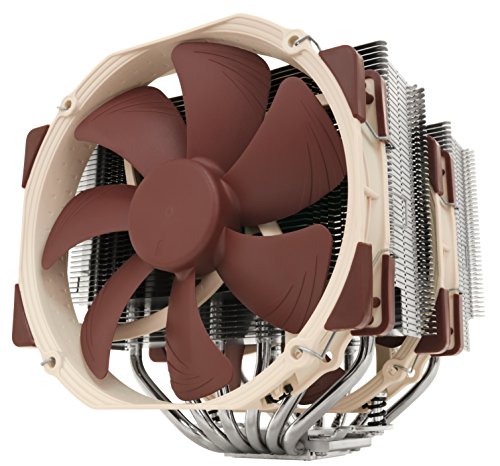
The NH-D15 G2 is Noctua’s flagship air cooler and the reference point against which every other large tower is measured, and for a twelfth-generation build it arrives with one complication that buyers must understand before ordering: the G2 is built in three versions that differ in the curvature of the coldplate, and they are not interchangeable recommendations. Noctua’s own guidance assigns the standard version and the HBC version, whose base has the higher convexity intended for sockets whose processors sit slightly concave under mounting pressure, to LGA1700 builds. The third version, the LBC, is documented by Noctua itself as not recommended for LGA1700, because its flatter base is shaped for other applications. A listing that says simply NH-D15 G2 without naming the version is therefore not a complete description of the product, and the version check is the first thing a buyer should perform. With the correct version chosen, the support paperwork is impeccable: Noctua’s SecuFirm2+ mounting system lists LGA1700 directly, and the company’s socket documentation for this cooler is among the most detailed in the industry.
Structurally, this is a dual-tower, dual-fan cooler of the largest class, standing 168 millimetres tall in its two-fan configuration, and that height is the price of admission. The fin stacks are wide as well as tall, and Noctua’s long-standing answer to memory clearance is that the front fan can be slid upward on its clips to clear tall memory modules — a real solution, but one that adds height beyond the published figure, so a case that barely accepts 168 millimetres may not accept the cooler once the fan has been raised. Inside a case with genuine clearance, though, the G2’s appeal is the combination of capacity and composure: it belongs to the small group of air coolers that can be entrusted with an unlocked i9 without the conversation turning to compromises, and it does so with the quiet, low-frequency fan character that has defined the NH-D15 line for a decade. It is also the cooler in this list most likely to outlive the build, since Noctua’s mounting kits have historically followed the cooler across later sockets.
Installation deserves a word, because a cooler of this size tests a builder’s patience in ways its performance never will. The mounting system itself is methodical — a backplate, spacers and two spring-loaded screws that draw the base down evenly — and Noctua’s instructions are written with unusual care, including guidance on thermal paste quantity for this socket’s elongated heat spreader. The physical reality is that the fin stacks are wide enough to make the motherboard’s upper connectors and the first memory slot awkward to reach once the cooler is seated, so experienced builders connect the awkward cables before the cooler goes on. None of this is a defect; it is the standard choreography of the flagship class, and the G2 is no worse than its peers. It is simply worth knowing that the reward for the choreography is a cooler that, once installed, tends to disappear from the owner’s thoughts entirely.
Strengths
- LGA1700 support documented by Noctua for the SecuFirm2+ mounting system, with the standard and HBC versions explicitly suited to this socket
- Flagship dual-tower structure with the thermal headroom an unlocked i9 demands
- Front fan can be raised to clear tall memory, at the cost of added height
- Detailed manufacturer documentation, including per-version guidance most brands never publish
Trade-offs
- The LBC version is documented by Noctua as not recommended for LGA1700, so the exact version must be confirmed before buying
- At 168 millimetres tall it needs a case with more than 170 millimetres of cooler clearance
- Raising the front fan for memory clearance pushes the installed height beyond the published figure
- It is the premium-priced option in this list by a clear margin
Who it suits: Builders pairing an unlocked i9 or i7 with a spacious case who want the strongest air-cooling headroom available for this socket and are willing to verify the version before ordering. Confirm the listing names the standard or HBC version, then check price on Amazon.
Check price on Amazon: Noctua NH-D15 G2

be quiet! Dark Rock Pro 5
The Dark Rock Pro 5 is the pick for readers who want the flagship class expressed in numbers rather than reputation, because be quiet! does something refreshingly direct: it publishes a thermal rating for this cooler of 270 watts, the highest manufacturer figure in this guide, and it lists the socket support in full on the technical data — Intel 1851, 1700, 1200 and the 115x family. That published rating is what places this cooler, alongside the Noctua flagship, in the tier this guide trusts with the i9-12900K class, whose turbo power appetite is exactly the sort of sustained load a figure like that is meant to describe. There is no inference required and no borrowed benchmark: the maker states the cooler’s capacity and names the socket, and both statements are the entry requirements this guide set out at the start.
The cooler itself is a dual-tower design standing 168 millimetres tall, the joint-tallest in this list, with two fans working the fin stacks and a front fan frame shaped to draw air across the memory area. Its character is distinct from the Noctua’s: the Dark Rock line is styled as deliberately as it is engineered, with a dark finish, a brushed top cover and a mesh panel that gives the installed build a finished look through a case window. Under load the fans are tuned for a smooth, even acoustic profile rather than the last degree of cooling, which suits builders who keep a machine on the desk beside them. The same height warning applies with full force — a case needs clearance beyond 170 millimetres before this cooler belongs on the shopping list, and mid-towers with tight cooler limits should be measured rather than assumed. For the builder with the room, though, the Dark Rock Pro 5 offers the clearest paperwork in the guide: a named socket list, a published thermal ceiling, and a flagship structure to back both.
The ownership experience leans into the same polish. The fans are the maker’s own quiet-running designs, the mounting hardware is presented like a product rather than an afterthought, and the top cover conceals the heat pipe ends that give lesser towers an unfinished look from above. Builders who show their machines through glass will notice the difference every day; builders who close the panel and forget the internals will notice only that the machine stays composed under loads that would have a lesser cooler announcing itself. Either way, the Dark Rock Pro 5 makes its case on the combination this guide values most: documented capacity, documented compatibility, and a structure with nothing to apologise for. Its one non-negotiable demand remains the tape measure — this is a flagship in physical fact as much as in performance class, and the case must be chosen, or confirmed, accordingly.
Strengths
- Manufacturer-published thermal rating of 270 watts, the clearest capacity statement in this guide
- Full socket list published by be quiet!, naming LGA1700 alongside 1851, 1200 and 115x
- Dual-tower structure sized for the unlocked i9 class without qualification
- Refined acoustic tuning and a finished appearance for windowed cases
Trade-offs
- At 168 millimetres it is excluded from any case with less than about 170 millimetres of clearance
- The wide fin stacks and front fan require attention to memory height during planning
- Its size and weight make installation a deliberate, two-handed job
- Premium pricing, though generally a step below the Noctua flagship
Who it suits: Builders with an unlocked i7 or i9 and a full-size case who prefer a cooler whose capacity is stated by its maker in plain figures. Measure the case clearance first, then check price on Amazon.
Check price on Amazon: be quiet! Dark Rock Pro 5

Thermalright Peerless Assassin 120 SE
The Peerless Assassin 120 SE is the value landmark of the dual-tower class, and it passes this guide’s entry gate cleanly: Thermalright’s own documentation for the model lists Intel sockets 115X, 1200, 1700 and 17XX, so LGA1700 support is stated by the maker rather than inferred from the older entries. The structure explains its following. Two fin towers, six heat pipes running through a nickel-plated copper base, and a pair of 120-millimetre fans deliver the architecture of a flagship at a fraction of flagship pricing, in a package 155 millimetres tall that fits cases the two 168-millimetre flagships cannot enter. For the great middle of the twelfth-generation range — the i7 models and the unlocked i5-12600K class — this is the cooler that makes the strongest case that money saved here is better spent on the graphics card or the memory kit.
One piece of paperwork discipline is required, and this guide insists on it. Thermalright does not publish a thermal rating for this cooler on its own product page, yet a wattage figure circulates widely in retail listings as though it were the manufacturer’s specification. It is not, and it is deliberately not printed here as one. The honest basis for recommending the Peerless Assassin is structural: dual towers, six heat pipes and two fans place it in the same architectural class as coolers whose makers do publish flagship figures, and its documented dimensions and socket support are verifiable facts. Readers should apply the same scepticism anywhere they shop — when a listing states a precise thermal ceiling that the manufacturer’s page never mentions, the number has been invented somewhere along the chain. Judged by what can be verified, this remains the easiest recommendation in the guide for a mid-range Alder Lake build, with the usual dual-tower caveat that the front fan’s position relative to the memory slots deserves a thought before ordering tall, RGB-lit memory.
The value proposition deserves framing in build terms rather than cooler terms. The saving against the flagship picks is large enough to fund a meaningful upgrade elsewhere in a twelfth-generation machine — a step up in memory capacity, a larger solid-state drive, a better power supply — while the cooling surrendered is, for the i5 and i7 classes, largely theoretical. That arithmetic is why this cooler has become the reflexive recommendation of the platform’s building community, and nothing in its documented specifications contradicts the reputation. The disciplines it asks in return are the ones this guide applies everywhere: confirm the exact variant when ordering, since the family includes versions with different fans and finishes, and judge its capacity by the structure the maker documents rather than by numbers the maker never claimed. A buyer who does both gets the dual-tower class at its most efficient price.
Strengths
- LGA1700 named directly in Thermalright’s own socket documentation for this model
- Dual-tower, six-heat-pipe structure at a fraction of flagship pricing
- 155 millimetres tall, fitting many cases the 168-millimetre flagships cannot
- Well matched to the i7 and unlocked i5 classes that most builders actually buy
Trade-offs
- Thermalright publishes no thermal rating, so capacity must be judged by structure rather than a maker figure
- Front fan position can crowd tall memory modules, as with most dual towers
- Fit and finish are workmanlike rather than premium beside the flagship picks
- The many sibling variants of this cooler make exact-model checking essential when ordering
Who it suits: Builders with an i5 or i7 twelfth-generation chip who want dual-tower cooling capacity without flagship pricing, and who are comfortable judging a cooler by its documented structure. Verify the listing is the 120 SE exactly, then check price on Amazon.
Check price on Amazon: Thermalright Peerless Assassin 120 SE
DeepCool AK620
The AK620 is DeepCool’s dual-tower answer to the flagship class, and its paperwork is as explicit as this guide could ask. DeepCool publishes a model code for the cooler, R-AK620-BKNNMT-G, and the application list attached to that code names LGA1700 outright, which is exactly the model-level specificity the entry gate demands. The maker also publishes a heat dissipation figure of 260 watts, placing the AK620 in the small group of coolers in this list whose capacity for the unlocked i9 class rests on the manufacturer’s own statement rather than on structural inference. At 160 millimetres tall it stands between the flagships and the shorter dual towers — tall enough to demand a clearance check, short enough to fit a meaningfully wider range of cases than the two 168-millimetre picks.
Two fans work the twin fin stacks, and the design adds a considered touch for memory clearance: the front fan sits within a frame that keeps the cooler’s footprint over the memory slots slimmer than its overall width suggests, though builders with the tallest memory heatspreaders should still compare figures before committing. One caution belongs to this model’s history rather than its design. The AK620 has been in production since before Alder Lake launched, and early stock shipped before LGA1700 existed cannot contain the newer mounting hardware. A listing that states LGA1700 support in its title is the safer purchase, and the box contents are worth confirming on arrival — the bracket in the box, not the age of the listing copy, decides whether the cooler mounts. With that check performed, the AK620 stands as the flagship-class alternative for readers who want a published capacity figure and a slightly less demanding height than the top two picks impose.
DeepCool’s design choices give the AK620 a distinct personality among the flagships. The fin stacks wear a chequered top pattern that reads as deliberate styling rather than decoration, the fans are the maker’s own high-pressure designs, and the whole assembly feels engineered to a price without feeling cheapened by it. In a build it behaves like the flagship its paperwork claims: the twin towers give it the surface area to absorb the turbo behaviour of an unlocked chip without the fans needing to live at their ceiling, and the published dissipation figure means that expectation rests on the maker’s word rather than on hope. For a builder who wants the top tier’s substance, accepts the bracket-history check as the price of a long production run, and measures value in documented figures, the AK620 is the most direct route in this guide.
Strengths
- LGA1700 named in the application list for the exact model code R-AK620-BKNNMT-G
- Manufacturer-published heat dissipation figure of 260 watts supports the unlocked i9 class
- 160 millimetres tall, easing case fit compared with the 168-millimetre flagships
- Dual-tower, dual-fan structure with attention paid to memory-side clearance
Trade-offs
- Production predates Alder Lake, so early stock may lack the LGA1700 bracket in the box
- Still tall enough to require a deliberate case clearance check
- Tall memory modules can remain tight beneath the front fan
- Sibling models with different heights make exact-model confirmation important
Who it suits: Builders targeting the unlocked i7 or i9 who want a manufacturer-stated capacity figure in a slightly shorter flagship-class tower. Choose a listing that states LGA1700 support, then check price on Amazon.

Scythe Fuma 3
The Fuma 3 solves the dual-tower problem from the opposite direction: instead of asking how much cooler a case can be persuaded to accept, Scythe asked how much dual-tower structure can be fitted into a height that ordinary cases already allow. The answer is 154 millimetres, the shortest dual tower in this guide, with the socket paperwork in order — Scythe’s specification for the model, code SCFM-3000, lists Intel LGA 1700, 1200 and the 115X family. The front fan is a slim design, chosen specifically so that the fan’s thickness does not reach across the memory slots, which removes the most common dual-tower annoyance entirely: with the Fuma 3, tall memory and a dual-tower cooler stop being a negotiation. For a build centred on an i7 or an unlocked i5 in a mid-tower of ordinary proportions, this is the cooler that asks the fewest favours from the rest of the parts list.
The trade for that compactness is headroom at the very top of the chip range. The Fuma 3 is a genuine dual tower with the structure to serve the middle classes of Alder Lake with composure, but this guide does not place it in the tier entrusted with an unlocked i9 running sustained all-core loads; the flagships above exist for that conversation, and the Fuma 3’s virtues lie elsewhere. Scythe’s character shows in the details — the mounting system is straightforward, the fan pairing is tuned for a restrained acoustic signature, and the whole cooler has the unfussy, engineered feel the brand is known for. Buyers should take care with the model code, because the preceding generation of this cooler remains on sale under a similar name and a different code; the pick here is the SCFM-3000 specifically. For the builder whose case or memory kit ruled out the taller dual towers, the Fuma 3 is not a consolation prize but a coherent design that happens to fit.
There is a quieter virtue worth naming: proportion. A great many twelfth-generation builds are assembled around an i5, housed in a case chosen for the desk rather than the specification sheet, and cooled by towers whose size was dictated by a flagship the owner never bought. The Fuma 3 restores the balance — dual-tower substance sized for the machines most people actually assemble, with the memory clearance those machines usually need and an acoustic character that suits a shared room. Scythe has built its reputation on exactly this kind of judgement, and the Fuma 3’s specification sheet, which names this socket for this model without ambiguity, shows the same care on paper. Builders whose shortlist keeps collapsing on a tape measure or a memory heatspreader will find that this is the pick where the compromises stop.
Strengths
- LGA1700 listed in Scythe’s own specification for the exact model code SCFM-3000
- At 154 millimetres, the shortest dual tower in this guide
- Slim front fan avoids the memory slots, ending the usual tall-memory conflict
- Restrained acoustics and an unfussy mounting system
Trade-offs
- Not the pick for an unlocked i9 under sustained all-core load; the flagships own that tier
- The previous-generation model with a similar name remains on sale, so the code must be checked
- Less thermal headroom in reserve for future chip upgrades within the socket
- Availability can be patchier than the largest brands in some regions
Who it suits: Builders with an i5 or i7 and tall memory, or a mid-tower that cannot accept the taller dual towers, who still want dual-tower structure. Confirm the model code reads SCFM-3000, then check price on Amazon.
Check price on Amazon: Scythe Fuma 3 (SCFM-3000)

Cooler Master Hyper 212 Black
The Hyper 212 name has been the default first upgrade from a stock cooler for so long that its presence here needs its framing stated precisely. The current version of the Hyper 212 Black, model code RR-S4KK-25SN-R1, lists LGA1700 among its supported sockets alongside 1200 and the 115x family, so it passes this guide’s entry gate on the manufacturer’s own paperwork. It stands 152 millimetres tall, the shortest cooler in this list, and its single-tower, four-heat-pipe design is a proven and honest piece of engineering. What it is not is a cooler for the top of the Alder Lake range. This guide recommends it for one class of build only: the locked 65-watt chips, such as the i3-12100 and the non-K i5 models, whose power draw sits comfortably within what a tower of this size dissipates quietly. Cooler Master’s own positioning language reaches higher up the range, but sustained all-core loads on an unlocked i7 or i9 would leave this cooler at full fan speed with the processor managing its own temperatures, and a recommendation that pretends otherwise would fail the reader.
Within its proper tier, the Hyper 212 Black is easy to recommend. It is quiet where a stock cooler is not, it installs without drama, its height fits essentially any case that accepts a tower cooler at all, and its price leaves budget for the parts of a locked-chip build that matter more. One historical caution mirrors the note attached to the AK620 above: the Hyper 212 Black name has been carried by more than one version, and the earlier Black Edition, sold under a different model code, predates LGA1700 — stock from before the socket existed cannot contain its bracket. The current version’s code is the one to match when ordering. Readers whose build brief is a cool, quiet office or family machine around a 12100 or a locked 12400 will find this the most sensible money in the guide; readers with a K-suffix chip should return to the dual towers above and spend accordingly. And readers whose real constraint is not the chip but the case itself — a genuinely small enclosure where even 152 millimetres will not fit — should step sideways to our guide to compact CPU coolers, which sorts that category by installed height from the very smallest designs upward.
It is worth pausing on why a modest tower transforms a locked-chip machine so noticeably, because the reason is not raw capacity. The coolers bundled with retail processors are designed to a cost and a size that leave them working near their limits under ordinary loads, which is why their fans announce every game launch and software update. A tower like this one moves the same modest heat through a far larger fin area with a bigger, slower fan, and the machine’s whole acoustic character changes with it — the processor is no better cooled in any way that alters its performance, but the room is quieter and the system feels a class above its price. That transformation, honestly bounded to the chips that need no more, is the Hyper 212 Black’s enduring appeal, and it survives every fashion in the category.
Strengths
- LGA1700 support listed by Cooler Master for the current version, code RR-S4KK-25SN-R1
- At 152 millimetres, the shortest and easiest-fitting cooler in this guide
- Proven single-tower design that runs locked 65-watt chips quietly
- Low pricing that leaves budget for the rest of a value build
Trade-offs
- Recommended here for locked 65-watt chips only; not framed for unlocked i7 or i9 loads
- An earlier Black Edition under a different code predates LGA1700 and lacks its bracket
- Four-heat-pipe structure leaves little headroom for a later chip upgrade
- Single fan and modest fin area cannot match the dual towers under sustained load
Who it suits: Builders assembling a quiet machine around an i3-12100 or a locked i5 who want a dependable tower at a modest price. Match the current model code before ordering, then check price on Amazon.
Check price on Amazon: Cooler Master Hyper 212 Black (current version RR-S4KK-25SN-R1)
How the six compare
The table below is qualitative on purpose. The figures that can be verified from manufacturer documents — socket support, published thermal figures where they exist, and installed height — are stated as such, and the judgements are expressed in words rather than invented scores, because the honest differences between these coolers are differences of class and fit more than of degree.
| Cooler | LGA1700 evidence | Published thermal figure | Height | Chip classes served | Defining trait |
|---|---|---|---|---|---|
| Noctua NH-D15 G2 | Named by Noctua for SecuFirm2+; standard and HBC versions | Not stated as a single wattage; flagship class | 168 mm | Unlocked i9 and i7, unlocked i5 | Version choice is part of the specification |
| be quiet! Dark Rock Pro 5 | Named in be quiet! technical data | 270 watts, published by the maker | 168 mm | Unlocked i9 and i7, unlocked i5 | The clearest capacity statement in the guide |
| Thermalright Peerless Assassin 120 SE | Named in Thermalright socket documentation | None published by the maker | 155 mm | i7 and unlocked i5 classes | Dual-tower structure at value pricing |
| DeepCool AK620 | Named for model code R-AK620-BKNNMT-G | 260 watts, published by the maker | 160 mm | Unlocked i9 and i7, unlocked i5 | Flagship paperwork in a shorter tower |
| Scythe Fuma 3 | Named in Scythe specification for SCFM-3000 | Not emphasised by the maker | 154 mm | i7 and unlocked i5 classes | Slim front fan ends the memory conflict |
| Cooler Master Hyper 212 Black | Named for current version RR-S4KK-25SN-R1 | Not the basis of this recommendation | 152 mm | Locked 65-watt i3 and i5 chips | The sensible tower for modest builds |
What to look for when choosing a cooler for a 12th gen build
Start with the socket list, not the search results
The single most valuable habit in this category is to read the manufacturer’s own socket list for the exact model and revision under consideration, and to treat every other source — marketplace titles, roundup tables, forum assurances — as a hint to be verified rather than a fact to be relied on. Long-lived cooler models pass through silent revisions, production runs that predate a socket cannot contain its bracket, and sibling models with nearly identical names routinely carry different support. The six picks in this guide were each admitted because the maker’s documentation names LGA1700 for that model, and two of them carry an additional instruction to confirm what is in the box, because the model’s history spans the socket’s introduction. Five minutes with the specification page is the cheapest insurance in the entire build.
Match the cooler to the chip’s turbo appetite, not its base figure
Intel’s published base power figures describe a floor, not a workload. Unlocked twelfth-generation processors carry turbo power figures far above their base numbers — the flagship’s turbo figure is roughly double its base, and several times the total draw of a locked 65-watt chip — and a motherboard that does not enforce strict limits will let the processor live at that higher figure through long renders, compiles and game loads. A cooler chosen against the base figure will therefore spend its life overwhelmed. The practical reading of this guide’s tiers follows from that: dual towers with published ratings or flagship structures for the unlocked i9, dual towers for the i7 and unlocked i5, and an honestly framed single tower for the locked chips, whose modest ceilings a smaller cooler genuinely satisfies.
Treat height as a hard limit, and published height as a starting point
Case manufacturers publish a maximum cooler height, and a cooler that exceeds it by a millimetre does not fit at all. Two picks here stand 168 millimetres tall and should only enter a shortlist once the case’s clearance is known to exceed 170 millimetres. Published heights also deserve a sceptical reading: they describe the cooler as configured from the factory, and designs whose front fan can be raised for memory clearance grow taller in that configuration. The safe method is to compare the case limit against the cooler’s height in the configuration the build will actually use, with memory installed, rather than against the most flattering number available.
Plan the memory before the cooler, or choose a cooler that ignores it
Wide fin stacks overhang the memory slots nearest the socket, and tall memory heatspreaders are the most common cause of a cooler failing to seat as intended. Builders have three honest options: choose low-profile memory and keep the full choice of coolers, accept raising a front fan where the design allows it and re-check the height that results, or choose a cooler engineered around the problem, as the Fuma 3 is with its slim front fan. What does not work is ordering a flagship tower and exhibition memory in the same basket and hoping the two negotiate on the day.
Respect the version and the model code
Three picks in this guide carry a version warning of one kind or another: a flagship sold in three base variants of which one is documented as unsuited to this socket, and two long-lived models whose earlier production lacks the current bracket. These are not edge cases but the normal texture of a mature category, and they share a single defence — buy against the model code and version name, not against the product family name alone. The codes recorded in this guide and its companion notes exist so that the listing in the basket can be checked character by character against the documentation that earned the pick its place.
Read structure plainly: pipes, fin area and fans
When a manufacturer publishes no thermal figure — as with one pick in this guide — structure is the evidence available, and it can be read sensibly. Heat pipes move heat from the base into the fin stacks; more pipes, well distributed across the base, generally serve a concentrated heat source better than fewer. Fin area dissipates what the pipes deliver, which is why the dual towers dominate the top of this list: two stacks present roughly twice the surface of one. Fans decide how much air that surface sees and at what acoustic cost, and two fans working gently will usually move air more quietly than one fan working hard. None of these observations produces a number, and this guide does not pretend otherwise — but together they explain why the structural classes in this article are drawn where they are, and they let a reader sanity-check any cooler, listed here or not, against the class of chip it claims to serve.
Treat noise as behaviour, not a headline figure
Published fan noise figures are measured under conditions no two makers share, so this guide ranks no cooler by them. What a buyer can reason about is behaviour. A cooler with generous headroom for its chip class will run its fans slowly through most workloads and reserve its voice for genuine peaks, while a cooler at its limit is loud precisely when the machine is busiest. That is the practical meaning of the tier discipline running through this article: the quietest cooler for a given processor is usually not the one with the softest fan, but the one with the most capacity in reserve for that processor’s real appetite. Builders sensitive to noise should therefore buy a tier above their minimum, within the case’s limits, rather than shopping for silence as a specification.
Leave liquid cooling out of an air shortlist deliberately
Nothing in this guide is an argument against liquid cooling, which serves many twelfth-generation builds well. It is an argument for comparing like with like: an air shortlist answers the needs of builders who value the absence of a pump, a radiator’s case demands and a coolant loop’s long-term considerations, and the dual towers at the top of this list reach far enough into the flagship class that the air-versus-liquid decision can be made on preference rather than necessity for all but the most extreme overclocking ambitions.
Matching the shortlist to the processor ranges
For an i9-12900K or 12900KF build, the conversation begins and ends with the three coolers whose capacity is documented or flagship-grade: the NH-D15 G2 in its standard or HBC version, the Dark Rock Pro 5 with its published rating, and the AK620 with its own published figure — each in a case that accepts its height. For the i7 models and the unlocked i5-12600K, the whole dual-tower field opens up, and the choice turns on case height and memory: the Peerless Assassin 120 SE for value, the Fuma 3 where clearance or tall memory narrows the options. For the locked i5 range and the i3-12100, the Hyper 212 Black in its current version is the proportionate answer, quiet and sufficient, with the money saved better directed at storage or memory. A builder planning to begin with a locked chip and upgrade to an unlocked one later within the same socket should buy the cooler for the second chip, not the first; coolers are among the longest-lived components in a build, and buying the tier twice costs more than buying it once.
A final word belongs to the second-hand market, where several of these models circulate at tempting prices. A used cooler is only as good as its mounting kit, and a kit missing the LGA1700 pieces — or containing only the brackets for an older socket — turns a bargain into a paperweight until the correct hardware is sourced. Sellers rarely photograph brackets, so ask specifically, and treat a complete, socket-correct kit as part of the product being bought.
Fitting notes specific to this socket
Three habits separate a smooth LGA1700 installation from a frustrating one. The first is sequence: with any of the larger towers in this guide, the cooler is effectively the last major component to go in and the first obstacle to everything behind it, so memory, the processor power cable and any top-mounted case fans should be dealt with before the fin stacks take their place. The second is even pressure. Modern mounting systems draw the base down with spring-loaded screws for a reason — tightening each side a little at a time, in alternation, seats the coldplate flat against the heat spreader, and on a platform where contact quality is a live topic, that flatness is worth the extra minute. The third is verification before the case is closed: confirm the fans are oriented to move air toward the rear of the case, confirm the fan cable reaches its header without strain, and confirm the mounting hardware used was the set the manual assigns to this socket, since most of these kits include brackets for several sockets whose pieces look deceptively alike. A builder who observes those three habits will rarely need to reopen the machine, which is the true measure of a cooler installation.
Frequently asked questions
Will a cooler bought for LGA1200 fit a 12th gen LGA1700 board?
Not on the strength of its LGA1200 support alone. LGA1700 uses a wider mounting-hole pattern and a lower package height than the sockets before it, so an older bracket physically cannot be assumed to fit, and in most cases cannot. The only reliable test is the manufacturer’s own documentation: some makers certified specific older models for LGA1700 and supplied the bracket, and those models say so on their socket lists. If the maker’s page for the exact model does not name LGA1700, treat the cooler as incompatible and choose one whose paperwork does.
Which of these coolers can handle an i9-12900K?
Three of the six are framed for that class in this guide: the Noctua NH-D15 G2 in its standard or HBC version, the be quiet! Dark Rock Pro 5, whose maker publishes a 270-watt thermal rating, and the DeepCool AK620, whose maker publishes a 260-watt figure. Each also needs a case with the clearance its height demands. The remaining three are excellent coolers for the classes beneath the flagship, and recommending them for a 12900K under sustained load would misrepresent what their structures are for.
Why does the NH-D15 G2 version matter so much?
Because the G2 is manufactured with three different coldplate curvatures, matched to different applications, and Noctua documents the LBC version as not recommended for LGA1700 while assigning the standard and HBC versions to this socket. The contact between coldplate and processor is where a cooler’s capacity is either delivered or lost, so a version shaped for a different surface quietly undermines the flagship performance the buyer paid for. The version is part of the product name on complete listings, and confirming it takes seconds.
Do I need to buy a separate LGA1700 mounting kit for any of these?
For current production of all six picks, the LGA1700 hardware is part of the product as documented. The caution in this guide concerns older stock of the two long-running models, the AK620 and the Hyper 212 Black, whose production began before the socket existed: a box from that era cannot contain a bracket that had not been designed. Buying a listing that states LGA1700 support, and checking the box contents against the manual on arrival, closes the risk entirely.
Is a dual tower wasted on a locked i5?
Not wasted, but rarely necessary. A dual tower will run a locked 65-watt chip very quietly, since its fans will barely stir, and it leaves the door open to an unlocked upgrade within the socket. Against that, the price difference buys real improvements elsewhere in a value build, and the Hyper 212 Black already serves the locked chips quietly. The deciding question is the upgrade plan: builders who expect to move up the range should buy the dual tower once, and builders who will stay with the locked chip should save the difference without regret.
Every cooler in this guide earned its place the same way, by having its name written on its maker’s own list for this socket — and a build that starts from paperwork rather than promises tends to be the build that boots once, cools quietly, and never needs its side panel opened in frustration.