A college laptop leads a harder life than almost any other computer. It is carried across campus in the rain, set down on lecture hall floors, wedged into crowded buses, opened and closed a dozen times a day, and asked to survive four years of that treatment while holding every essay, dataset and photo library its owner owns. The backpack around it is not an accessory to that machine; it is the machine’s housing, its shock absorption and its weather seal, all in one. That is why this guide is organised around a single feature before anything else: the laptop holder, meaning a dedicated, padded compartment or sleeve that the manufacturer built specifically for a computer, rather than a loose pocket that a laptop happens to fit inside.
Kaju and Douglas may earn an affiliate commission when you buy through links on this page. That commission funds the research behind guides like this one and never changes the price you pay. Every pick below was chosen from the manufacturer’s own catalogue and documentation, and every figure quoted — laptop size, capacity in litres, compartment dimensions — is a documented specification from the maker, checked against the maker’s own product pages rather than copied from a retail listing.
The six packs below span the real range of student life. At one end sits an 18 litre pack built for a laptop, a notebook and little else; at the other, a 34 litre hauler with two main compartments for the student who carries a library. Between them are packs optimised for back comfort on long walks, for organisation, for travel through airport security, and for a tight budget. What they share is the entry requirement: each one holds its laptop in a dedicated padded space of its own, documented by the brand that made it. Read the picks against three questions — how large is your laptop, how much else do you carry, and how far do you walk — and the right one usually identifies itself.
Why the laptop holder decides the whole purchase
The phrase laptop holder covers three quite different structures, and the differences matter more than any other specification on the page. The strongest design is a separate compartment: a zippered section of the bag, usually against the back panel, that contains nothing but the computer. The laptop never touches books, chargers or a water bottle, the padding of the back panel doubles as one wall of the compartment, and the machine can be removed at a library desk without unpacking anything else. The second design is a dedicated sleeve inside the main compartment — a padded, often fleece-lined pocket built to laptop dimensions, sometimes raised off the floor of the bag so the computer does not take the impact when the pack is set down. The third design, a simple slip pocket with no padding of its own, is not a laptop holder in any protective sense, and no pack in this guide relies on one.
Padding earns its keep in specific, unglamorous ways. The corners of a laptop are where screens crack and chassis bend, and corners are exactly what a shared main compartment exposes: a textbook spine, a charger brick and a metal bottle all migrate towards the lowest, widest object in the bag, which is the computer. A padded compartment walls those objects off. A raised or suspended sleeve bottom addresses the other classic accident, the bag dropped or thumped onto a hard floor in the last second of sitting down. And a compartment against the back panel keeps the heaviest single item closest to the wearer’s centre of gravity, which is why two packs of identical weight can feel completely different across a twenty minute walk.
Fit is the other half of the holder question, and it is a physical measurement, not a marketing label. A 15 inch laptop class covers machines of quite different widths and thicknesses, and a gaming laptop with a 15.6 inch screen can be far bulkier than a slim ultrabook with the same display. The honest figures are the compartment dimensions the manufacturer publishes — several makers in this guide list them to the centimetre — set against the actual width, depth and thickness of your own machine, charger bulge excluded. A sleeve that closes easily around the computer, without forcing the zip, is the target; a compartment that has to be stretched shut is a compartment that will fail at the seam or squeeze the screen.
In this guide
What to look for in a college backpack with a laptop holder
Laptop size: 15, 15.6 and 17 inch compartments
Most student laptops fall into the 15 to 15.6 inch class, and most packs in this guide are built for exactly that class — but the exceptions are instructive. One pick below stops at a strict 15 inches and publishes tight internal dimensions, which suits slim machines and excludes chunky ones. Another accepts 15.6 inch models, the size of many mainstream Windows laptops. One pick goes to 17 inches, for the engineering or gaming machine that simply has no other home. Start with your own laptop’s physical dimensions, compare them with the compartment dimensions in each pick’s documentation, and treat any pack whose stated class is smaller than your machine as eliminated, however much you like the rest of it.
Padding, suspension and the bottom of the bag
Ask three questions of any laptop holder. Is the padding on both faces of the computer, or only against the back? Does the compartment or sleeve reach the floor of the bag, so the laptop’s edge takes the shock of every set-down, or is it raised, suspended or given a padded base? And does the compartment close — with a zip, a strap or a flap — or does the machine rely on gravity to stay put during a run for the bus? The picks below answer these questions differently: one uses a fleece-lined sleeve raised off the bag’s floor, one a fully zippered separate compartment, one a lay-flat section engineered for airport scanners. None of those answers is wrong, but they protect against different accidents, and your own routine decides which accidents are likely.
Capacity in litres, matched to a real college day
Litre figures are the industry’s standard shorthand for volume, and the spread in this guide — from 18 litres to 34 — maps onto recognisably different student days. Around 18 to 25 litres carries a laptop, a notebook or two, a charger, a bottle and a light layer: the seminar day. Around 28 to 31 litres adds textbooks, a lunch box, gym clothing or a change of shoes without strain. At 34 litres a pack swallows the heavy day whole — multiple textbooks, a packed lunch, sports kit — at the cost of a larger silhouette that crowds a bus seat and a lecture row. Capacity also interacts with the laptop holder: in the biggest packs the computer gets its own compartment precisely because everything else has somewhere else to go, while in the smallest, the main compartment is little more than the space the laptop leaves behind.
Organisation for chargers, bottles and small things
A college bag is opened in a hurry, in the dark of a cinema-row lecture seat, with one hand. Organisation is what makes that survivable: an organiser panel with pen slots and a key clip, a fleece-lined pocket that keeps a phone screen or sunglasses off the metal clutter, a stash pocket for a travel pass, and side pockets that hold a bottle upright and reachable without removing the pack. Judge organisation by your own inventory. The student carrying a laptop, tablet, calculator, two chargers, a battery pack and a notebook set needs divided storage; the student carrying a laptop and one folder needs a clean open space and will only be annoyed by a dozen tiny pockets. Both students exist in this guide, at opposite ends of the pick order.
Back panels, straps and the walk or ride to campus
The walk is where a cheap pack confesses. Weight carried daily should sit on a padded back panel that holds the load flat and close, through shoulder straps shaped or padded well enough not to saw at the collarbone by the third week of term. The makers here take different routes: a full suspension system with a flexible yoke and moulded straps, simple S-curved straps over a padded panel, contoured straps over air mesh, or plain padded straps on a very light bag. Cyclists should look for a panel that vents and straps that stay put when leaning forward; walkers covering a mile or more should weight back comfort as heavily as any pocket layout. A sternum strap, where fitted, is worth more than it looks on a specification sheet.
Weather honesty: water resistant is not waterproof
No pack in this guide is waterproof, and any guide that calls a college backpack waterproof should be read with suspicion. What the makers here offer is resistance, in several forms: a durable water-repellent finish that makes rain bead on ripstop nylon, water-repellent polyester that shrugs off a shower, and one fabric whose fibres swell when damp to tighten the weave against rain. All of that handles the dash between buildings. None of it handles a soaked half-hour walk, and the laptop — sitting against the back panel, behind seams and a zip — is the item at risk. Students with long wet commutes should plan on a rain cover or a waterproof liner inside the main compartment, whichever pack they choose, and should treat the holder’s padding as protection against knocks, not against water.
Extras that earn their place, and extras that do not
Three extras recur in this guide and deserve a clear-eyed account. A USB charging port on a backpack is a pass-through socket: it connects, by a cable inside the bag, to a power bank you supply yourself, and its value is charging a phone while walking without holding the battery — convenient, but it adds no power of its own. A lay-flat laptop compartment, built for airport security lanes, opens the bag flat so the computer can be scanned inside it, which matters to students who fly home each term. And hidden or protected pockets — a back-panel pocket that sits against the wearer, a scan-blocking pocket for cards — are genuinely useful in crowded transit. Weigh each extra against its costs in weight, price and complexity, because an unused feature is just something else to carry.
A second device: tablet sleeves and shared space
Many students carry a tablet beside the laptop — for readings, for notes, for the second screen in the library. A tablet has the same enemies as a laptop and less structural strength, so where it rides matters. The strongest arrangement in this guide gives the tablet its own floating pocket, separate from the laptop compartment; the common arrangement is a sleeve inside the main compartment, which is acceptable if the sleeve is padded and the tablet is not left loose against chargers and bottles. If you carry two devices daily, count the protected spaces before you count the pockets: a pack with one genuine holder and one padded tablet sleeve serves you better than a pack with fifteen organiser pockets and nowhere safe for the second screen.
Closures, zips and how fast you can get in
Access speed is a daily quality-of-life figure that no specification sheet prints. A zippered separate compartment opens in seconds at a desk, which encourages the habit that protects laptops best: putting the machine away properly every time, rather than leaving it on a chair while you fetch coffee. A drawstring top under a flap is slower and asks for two hands, and in exchange offers a top opening that sheds rain and swallows an awkwardly shaped load. Magnetic straps sit between the two — instant to open, instant to close, and worth checking for security if you habitually overfill the bag. Match the closure to your patience and your route: the student who docks a laptop six times a day should buy the fastest access in this guide, while the student who packs once each morning can spend that budget elsewhere.
The six picks

The North Face Borealis
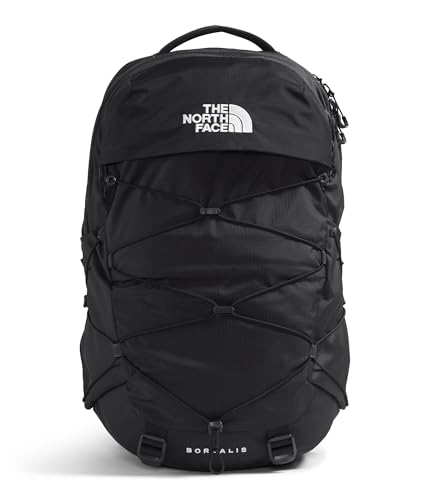
The Borealis is the pack this guide would hand to the student who walks a long way with a full load, because its design effort went into the two things that student feels every day: the laptop compartment and the back panel. The North Face gives the Borealis a dedicated, padded laptop compartment for machines up to 15 inches — the sleeve measures 13.75 by 11.25 inches in the maker’s documentation — set apart from the main compartment so the computer does not share space with textbooks and a lunch box. Around it sits a 28 litre main body in recycled ripstop nylon with a water-repellent finish, a front compartment with internal organisation, a fleece-lined pocket for a phone or sunglasses, and two external water bottle pockets, which is a more generous bottle arrangement than most rivals manage.
The carrying system is the other half of the design. The FlexVent suspension pairs custom injection-moulded shoulder straps with a padded mesh back panel and a flexible yoke, a construction The North Face has certified through the American Chiropractic Association, and it shows its value precisely on the loaded walk: the panel holds the pack’s weight flat against the back, the straps spread it, and the laptop, riding in its compartment against that panel, stays where it was packed. External bungee cords take a jacket or a helmet, and a sternum strap with a whistle buckle and a removable waist belt appear on a pack at a level where rivals usually omit both.
The supporting details hold up the same way. The front compartment carries an internal organisation panel with a tablet sleeve and a secure zippered pocket, so the second device and the small inventory each get a defined home instead of a shared jumble. The shell fabric is a recycled 210 denier ripstop nylon in the maker’s current documentation, light for its strength, and reflective detailing is worked into the exterior for the ride home after dark. Buyers should note the line’s structure before ordering: the standard Borealis is the 28 litre unisex model documented here, a women’s version adjusts the fit and volume slightly, and a smaller Mini model exists that is a different, smaller bag and not a colour variant of this one.
Strengths
- Dedicated padded laptop compartment for machines up to 15 inches, separate from the main load
- FlexVent suspension with moulded shoulder straps and a padded mesh back panel, built for long loaded walks
- Two external water bottle pockets, plus a fleece-lined pocket that keeps a phone screen off hard clutter
- Recycled ripstop nylon shell with a water-repellent finish, external bungee storage and a sternum strap
Trade-offs
- The 15 inch ceiling is firm: a 15.6 inch machine is outside the documented sleeve dimensions
- At 28 litres it covers the ordinary day well but is not the pack for the heaviest textbook loads
- Men’s and women’s versions differ slightly in volume and fit, so the version matters when ordering
Who it suits
The Borealis suits the student with a 15 inch or smaller laptop, a walk or bike ride long enough for back comfort to matter, and a daily load of books, bottle and layers rather than a full library. If that is your day, the Borealis is the most complete answer in this guide, so check price on Amazon.
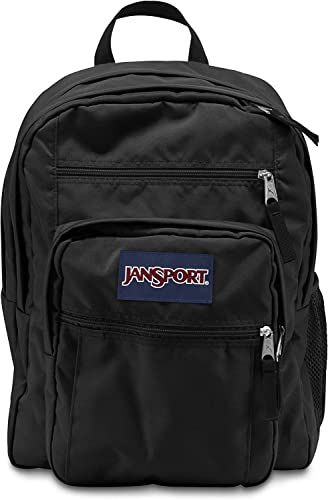
JanSport Big Student
The Big Student is the capacity answer. JanSport builds it around two large main compartments and a total volume of 34 litres — the largest figure in this guide — and the current version adds the feature older generations of the design lacked: a dedicated 15 inch padded laptop compartment with its own zip closure, dimensioned at 15.5 by 12.5 inches in the maker’s listing. That combination is rarer than it sounds. Very large school packs often treat the laptop as an afterthought in the main space; here the computer gets a padded, zippered compartment of its own while the two main sections divide the rest of the load between them, books in one, clothing and lunch in the other.
The rest of the design is the classic JanSport formula executed at scale. The main body fabric is recycled 600 denier polyester, the shoulder straps are the brand’s ergonomic S-curve pattern, and the back panel is fully padded. A front utility pocket carries an organiser panel with a key clip, a pleated front stash pocket and a zippered stash pocket handle the small inventory, and a single mesh side pocket takes a water bottle. JanSport’s lifetime promise on its bags is part of the proposition for a student buying once for a whole degree: the brand commits to repairing or replacing bags that fail in service, under the terms of that promise.
For a bag of this volume it is also respectably light — JanSport’s current page lists it at about one pound seven ounces — because the design spends its weight on fabric and padding rather than on frames and hardware. The published dimensions, 17 by 13 by 7.5 inches, describe a tall, straightforward school silhouette, and the two main compartments reward a simple packing system: books and the laptop’s supporting cast in the rear section, clothing, lunch and sports gear in the front one, so the heavy flat items ride near the back panel and the soft items take the knocks. One caution from the documentation trail: dimensions and weights for this long-running model vary between older listings and the maker’s current page, so the current JanSport page, not a marketplace listing, is the reference that counts.
Strengths
- 34 litres across two main compartments — the most carrying capacity in this guide
- Dedicated padded 15 inch laptop compartment with its own zip, separate from both main sections
- Ergonomic S-curve shoulder straps and a fully padded back panel
- Recycled 600 denier polyester body, organiser panel with key clip, and the maker’s lifetime promise
Trade-offs
- Only one water bottle pocket, where several rivals in this guide provide two
- The loaded silhouette is large; a full 34 litres crowds a bus seat and a narrow lecture row
- The laptop ceiling is 15 inches, so 15.6 inch machines are outside the documented fit
Who it suits
The Big Student suits the student whose problem is volume: heavy textbook days, a laptop plus sports kit, or one bag that must also handle a weekend at home. If your 15 inch laptop travels with a library, this is the pack built for that load, so check price on Amazon.

Herschel Little America
The Little America is the style-led pick, and the useful thing about it is that the laptop protection is not a styling exercise. Herschel fits the pack with a padded, fleece-lined sleeve for laptops up to 15 inches, and the sleeve is raised off the floor of the bag — a suspended bottom, in the maker’s description — so when the pack is set down hard on a lecture hall floor, the computer is not the part that lands. That single detail puts its laptop holder ahead of many technically fancier packs, because the set-down thump is the most common impact a student laptop ever takes. The main compartment holds 25 litres, closes with a drawstring cinch under a flap, and is lined with the brand’s signature striped fabric.
The mountaineering silhouette is the rest of the proposition: strap closures that look like buckled leather but fasten with magnets and metal pin clips, a front pocket with a hidden zipper and key clip, an internal media pocket, contoured shoulder straps and an air mesh back panel. Access is the honest cost of the design — a drawstring top under a flap is slower than a zip, and the magnetic straps can release if the bag is packed to bursting — but for a student whose route is short and whose load is a laptop, a notebook and a novel, the trade is reasonable, and the pack looks like nothing else in this guide while making it.
Inside, the details continue in the same heritage register. An internal media pocket with a headphone port belongs to an earlier era of product design, yet it still serves a student who keeps a phone buried safely in the bag. Current production versions are built in the brand’s EcoSystem 600D fabric, which Herschel documents as made entirely from recycled water bottles, with the signature striped liner now also recycled. The cinch top under the flap does quiet practical work as well: drawn tight, it closes the top opening against drizzle far better than an open bucket top would. The colour range is the widest in this guide by a distance, which matters more than it should and everyone knows it.
Strengths
- Padded, fleece-lined 15 inch laptop sleeve, raised off the floor of the bag against set-down impacts
- 25 litres in a distinctive mountaineering design with magnetic strap closures and metal pin clips
- Front pocket with hidden zipper and key clip, internal media pocket, signature striped liner
- Contoured shoulder straps and ventilated air mesh back padding
Trade-offs
- Drawstring-and-flap access is slower than a zip, and the magnetic straps can pop open when the bag is overfilled
- The sleeve lives inside the main compartment rather than in a separate zippered section
- No external water bottle pocket in the classic layout, so a bottle rides inside with the books
Who it suits
The Little America suits the student with a slim 15 inch laptop, a light daily load and a short route to class, who wants the bag itself to look like a deliberate choice. If that description fits and the suspended sleeve answers your main worry, check price on Amazon.

Fjällräven Kånken Laptop 15
The Kånken Laptop 15 exists because the classic Kånken, for all its virtues, has no padded laptop protection at all — and this version is the answer Fjällräven built for exactly that gap. It is essential to order the right bag: the pick here is the Laptop 15 model, which adds a separate padded compartment at the back of the pack, with its own access, sized for laptops up to 15 inches. Fjällräven publishes the compartment’s maximum machine dimensions as 36 by 26 by 3 centimetres, and that thickness figure deserves attention: slim notebooks fit the design’s intent, while a thick gaming chassis at the same screen size may not. Behind that compartment sits an 18 litre main compartment that opens widely, in the boxy Kånken manner, so books and folders load flat rather than being posted through a narrow top.
The material is the other half of the story. Vinylon F is a vinylal fabric whose fibres swell slightly when damp, tightening the weave so it sheds rain without a waterproof coating — resistance by construction rather than by chemical finish, and the reason these packs keep their weather behaviour for years. The Laptop 15 adds padded shoulder straps where the classic model makes do with plain webbing, keeps the front zippered pocket and two side pockets, and includes the removable seat pad that doubles as extra back padding. At well under half a kilogram empty by the maker’s figures, it is by far the lightest structure in this guide, and its compact footprint suits crowded trains and small lockers.
Care is part of the Kånken bargain and Fjällräven documents it plainly: clean the fabric with a soft brush and lukewarm water, keep it out of the washing machine, and do not apply the wax treatments sold for the brand’s other fabrics, because Vinylon F neither needs nor accepts them. The design itself has been in production since 1978 in its classic form, which is why the silhouette reads as familiar on campuses far from Sweden. The seat pad, stored in an inside pocket against the back, is a small Scandinavian practicality that earns its keep at outdoor lectures, cold benches and train platforms — and when it is left in place, it adds one more layer between the laptop compartment and the wearer’s back.
Strengths
- Separate padded laptop compartment with its own access, sized to published dimensions of 36 by 26 by 3 centimetres
- Vinylon F fabric sheds rain by fibre construction and wears for years without a coating to fail
- Padded shoulder straps, a wide-opening 18 litre main compartment and a very light empty weight
- The removable seat pad doubles as back padding and as exactly what its name suggests
Trade-offs
- The 3 centimetre thickness ceiling excludes chunky laptops even at 15 inches; measure before ordering
- 18 litres is a light day only — laptop, notebooks and a layer, not a textbook library
- Side pockets are open and slim, better for an umbrella or a narrow bottle than a wide gym bottle
Who it suits
The Kånken Laptop 15 suits the student with a slim laptop, a short list of daily cargo and a crowded commute, who values a light, compact bag that shrugs off rain. If your machine fits its published dimensions, this is the minimalist answer in the guide, so check price on Amazon.

MATEIN Travel Laptop Backpack
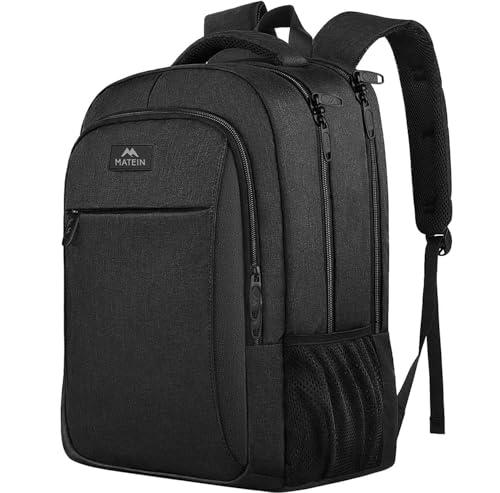
The MATEIN is the budget pick, and its laptop arrangement is more serious than its price suggests: a separate padded compartment at the back of the bag, with a securing strap, sized for laptops up to 15.6 inches. That 15.6 figure matters, because it covers the mainstream Windows laptops that the 15 inch packs in this guide exclude, and the compartment keeps the machine out of the main space entirely. In front of it, the layout divides into a large main compartment for books and clothing, a front organiser compartment with pen slots and a key fob, a small front stash pocket, and elastic mesh pockets on both sides for a bottle and a compact umbrella. The external dimensions, 18 by 12 by 7.8 inches in the maker’s listing, keep the whole thing in carry-on territory.
The extras are where the MATEIN makes its case. An external USB port connects by an internal cable to a power bank you supply, so a phone can charge in a pocket while you walk. A hidden pocket in the back panel sits against the wearer for a passport, wallet or phone in crowded places. A luggage strap slides the bag over a suitcase handle, and the fabric is a water-repellent polyester with metal zippers. None of this is exotic, but the combination — real laptop compartment, real organisation, travel hardware — at the softest price level in this guide is the point. The compromises are the expected ones: padding and structure are everyday-grade rather than heavy-duty, and the straps and back panel are simpler than the suspension systems higher up this list.
Look closer at the compartment and the budget engineering stays sensible. A hook-and-loop strap secures the laptop inside its padded section so the machine does not slide when the bag tips, and a tablet sleeve inside the main compartment gives a second device a defined place rather than a loose ride. The internal charging cable for the USB port routes from the main compartment, which is where the power bank lives among the books — worth knowing before the first trip, since the bank’s position decides whether the cable reaches. Because MATEIN sells this design in more than one size, including a larger version for 17 inch machines, the size in the listing title is part of the product: the pick here is the 15.6 inch model, and the larger sibling is a different purchase, not an upgrade of it.
Strengths
- Separate padded laptop compartment for machines up to 15.6 inches, covering mainstream Windows laptops
- External USB charging port with internal cable, ready for your own power bank
- Hidden back-panel pocket for valuables, a luggage strap, and organiser storage across three compartments
- Water-repellent polyester with metal zippers, at the budget end of this guide
Trade-offs
- Padding and structure are lighter-duty than the premium packs here; very thick gaming laptops are outside the fit
- The USB port is a pass-through only — the power bank is yours to buy, charge and remember
- MATEIN sells several sizes and near-identical variants, so the 15.6 inch version must be selected deliberately
Who it suits
The MATEIN suits the student with a 15.6 inch laptop and a small budget, who still wants a genuine padded compartment rather than a shared pocket, plus travel hardware for trips home. If value per feature is your deciding measure, this is the obvious place to start, so check price on Amazon.
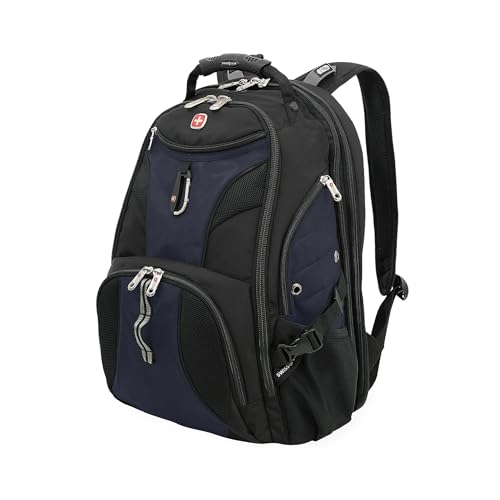
SwissGear 1900 ScanSmart
The SwissGear 1900 ScanSmart is the organisation and big-laptop pick, built around a dedicated compartment that accepts computers up to 17 inches — the only holder in this guide that can — with an adjustable divider to take up the slack around a smaller machine. The compartment is the ScanSmart design: it unzips and lays flat, so at an airport checkpoint the laptop can be scanned inside the bag rather than removed into a tray, a feature aimed at travellers that serves a student flying home each term just as well. Capacity is 31 litres, the shell is 1200 denier ballistic polyester, and the whole structure is engineered rather than styled, at a noticeably heavier empty weight than the lighter packs here.
Organisation is the deepest in this guide. A floating TabletSafe pocket holds a tablet separately from the laptop, an organiser compartment adds a scan-blocking pocket for cards, divider pockets and a removable key and fob clip, and the main compartment includes an accordion-style file section that keeps papers and folders upright and uncreased — a small feature that students carrying printed coursework will appreciate weekly. The carry system matches the load: an airflow back panel, contoured padded straps with built-in suspension, compression straps at the sides, two water bottle pockets and a trolley strap for rolling luggage. It is, in short, the pack for the student whose bag is a mobile office.
The travel detailing runs deeper than the headline compartment. Side compression straps pull a part-empty load tight so it does not shift on the move, reflective accents are built into the exterior for visibility on dark streets, and a moulded top handle gives a clean grab point for overhead racks and security trays. The adjustable divider inside the laptop compartment deserves a second mention, because it answers the obvious objection to a 17 inch holder: a 14 inch laptop in an unpartitioned 17 inch space would slide and tilt, while the divider closes the space down around the machine actually being carried. Students who fly with the bag should still remember that checkpoint staff may ask for the laptop to come out regardless of the bag’s design, which the maker itself notes in its documentation.
Strengths
- Dedicated laptop compartment for machines up to 17 inches, with an adjustable divider for smaller laptops
- ScanSmart lay-flat opening lets the laptop stay in the bag through airport security scanning
- The deepest organisation here: tablet pocket, scan-blocking card pocket, key clip and an accordion file section
- 1200 denier ballistic polyester shell, airflow back panel and contoured straps with built-in suspension
Trade-offs
- The heaviest empty bag in this guide; the structure that protects and organises also adds weight
- 31 litres of engineered compartments is more bag than a light seminar day needs
- The utilitarian travel styling will not appeal to anyone choosing with their eyes first
Who it suits
The SwissGear suits the student with a 17 inch or gaming laptop, a tablet and paperwork to keep in order, or regular flights where the lay-flat compartment earns its keep. If your machine is too large for every other holder in this guide, this is your pick, so check price on Amazon.
The six holders at a glance
The table below compresses the comparison into the four questions that decide it: how the laptop is held, how much the bag carries, what the design does best, and where it asks for compromise. It is a summary, not a substitute for the compartment dimensions in each maker’s documentation, which remain the final word on fit.
| Backpack | Laptop holder | Capacity | Stands out for | Watch out for |
|---|---|---|---|---|
| The North Face Borealis | Dedicated padded compartment, up to 15 in | 28 litres | Back comfort over long loaded walks | Firm 15 inch ceiling |
| JanSport Big Student | Dedicated padded compartment with zip, up to 15 in | 34 litres | Sheer volume across two main compartments | One bottle pocket, large loaded silhouette |
| Herschel Little America | Padded fleece-lined sleeve, raised off the floor, up to 15 in | 25 litres | Design, and protection against set-down knocks | Slower drawstring access, no bottle pocket |
| Fjällräven Kånken Laptop 15 | Separate padded compartment, published machine limit 36 by 26 by 3 cm | 18 litres | Light weight and rain-shedding fabric | Thickness ceiling excludes chunky laptops |
| MATEIN Travel Laptop Backpack | Separate padded compartment, up to 15.6 in | Carry-on footprint | Value, USB port and travel hardware | Lighter-duty padding and structure |
| SwissGear 1900 ScanSmart | Dedicated lay-flat compartment, up to 17 in | 31 litres | Organisation and the largest laptop fit | Heaviest empty weight here |
How to read the numbers before you order
Three measurements, all taken at home, settle most of the decision before any money moves. First, measure your laptop itself — width, depth and thickness with the lid closed — rather than trusting the screen size printed on its box, because bezels and chassis design have decoupled the two numbers. Second, find the compartment dimensions in the manufacturer’s documentation for the pack you are considering; the makers in this guide publish them, and a pack whose maker will not state a compartment size is telling you something about the holder’s seriousness. Third, weigh your packed worst day on a bathroom scale. That figure, set against the empty weights the makers publish, tells you whether the carry system should be your first priority or your last. Students who do these three things almost never return a backpack; students who shop by photograph and screen size do it every term.
One more reading skill is worth naming: separate the maker’s figures from the marketplace’s. Long-running models accumulate listings written years apart, with dimensions, weights and even fabric descriptions that drift from the current product. The manufacturer’s own page for the exact model — not a sibling size, not last year’s version — is the reference this guide used for every figure quoted, and it is the reference to check again at ordering, particularly where a brand sells near-identical variants at several sizes.
Matching the pack to your timetable
Start from the day, not the bag. The light-day student — laptop, notebook, charger, bottle — is served by the smallest holders here, and will feel the benefit of a light, compact pack on every crowded staircase; carrying 34 litres to hold 8 litres of cargo means carrying an empty cave that swings. The heavy-day student, with textbooks that rotate by weekday, should count the worst day rather than the average one, because a pack bought for Tuesday’s light load fails on Thursday. Students who split the week between campus and a job or placement should look hardest at the organisation picks, since the bag becomes a twice-daily unpacking exercise. And the student whose term includes regular flights home should weigh the travel hardware — lay-flat compartments, luggage straps, hidden pockets — that the rest of the year makes easy to forget.
The term itself changes the load, and a pack chosen in the quiet first fortnight gets examined by the rest of the year. Deadline season adds library books that stay out for weeks, printed drafts, and the charger that can no longer be left behind because the battery no longer lasts a full day of writing. Field courses, lab rotations and placements add their own cargo — a change of clothes, safety shoes, a packed lunch eaten standing up — on top of the same laptop that attends everything. Group projects move the working day into other people’s rooms, which turns the backpack into the office itself rather than transport to one. None of this argues for buying the largest bag by default; it argues for measuring your course at its busiest rather than its calmest, and for choosing the holder first and the volume second, because the laptop is the one item that attends every version of the day.
Dorm life adds two loads students rarely predict. The first is entertainment cargo: the walk to a friend’s room or a common room carrying the laptop that will play the film, which is where the projector question joins the backpack question best home movie projectors, and the laptop holder suddenly has to protect the evening’s cinema as well as the day’s coursework. The second is the desk that the bag feeds: a laptop that lives half its life docked beside speakers and a soundbar best 5 1 surround sound speakers under 500 travels the same corridor twice a day, and a compartment with quick, separate access is worth more in that routine than one extra pocket. Neither load changes the holder rule — padded, dedicated, correctly sized — but both reward the packs that open fast and close securely.
Packing and care habits that protect the laptop
Even the best holder works better with sensible packing. Keep the charger brick out of the laptop compartment wherever the design allows a separate home for it, because a hard adapter pressed against a lid through a crowded bus ride is a screen claim waiting to happen. Close the compartment zip fully rather than leaving the machine held by a strap alone. Set the bag down on its base, not dropped the last few inches, and keep it off the floor in lecture rows where feet and bags shuffle. In wet weather, a simple waterproof liner or a spare dry bag inside the main compartment is cheap insurance that no water-repellent finish can replace. Finally, empty the crumbs and paper clips out of the laptop compartment monthly; grit trapped against a chassis does slow damage that padding cannot prevent.
Two habits deserve their own emphasis because they cost nothing. The first is the closed-lid rule: a laptop carried asleep with the lid fully shut presents its strongest face to the world, while a machine carried half-awake with a pen or a coin trapped against the screen can be damaged by nothing more dramatic than a crowded doorway. The second is the one-bag rule for wet days: on the walk home in real rain, the laptop compartment faces the wearer’s back and is the driest volume in the pack, which is one more argument for a holder built into that position — four of the six picks in this guide put it there for exactly that reason.
What a laptop holder cannot do
Honesty about limits protects laptops better than enthusiasm does. Padding absorbs knocks, bumps and short set-downs; it is not crush protection, and a laptop compartment at the bottom of a pile of luggage or under a stack of hardback books in a car boot is under a load no foam was designed to carry. Padding is also not drop armour from height — a bag falling from a luggage rack can defeat any holder in this guide. Heat is the quieter limit: a padded compartment insulates, so a laptop put away warm and still running will stay warm, and the machine should be asleep or shut down before it is zipped in. And no holder substitutes for a backup. The compartment guards the machine; only a copy of the work, kept somewhere else, guards the degree. Buy the best holder your routine justifies, then behave as though it were ordinary foam — because that is what it is, arranged intelligently.
Frequently asked questions
What laptop sizes do these college backpacks actually fit?
Four of the six holders are documented for laptops up to 15 inches, one accepts up to 15.6 inches, and one — the SwissGear — accepts up to 17 inches. Those classes are screen sizes, and the fit that matters is physical: compare your machine’s width, depth and thickness with the compartment dimensions the manufacturer publishes, as Fjällräven does to the centimetre for the Kånken Laptop 15. A slim 15.6 inch ultrabook and a thick 15.6 inch gaming laptop are different cargo, and only the dimensions settle which holders they can use.
Is a padded sleeve inside the main compartment as good as a separate compartment?
It protects against most of the same accidents, with two differences. A separate compartment isolates the laptop from everything else you carry and lets you remove it without unpacking, which suits students who dock the machine several times a day. A well-built sleeve inside the main compartment — padded, fleece-lined and raised off the bag’s floor, like the Little America’s — guards the set-down impact just as well, but shares its space with books and bottles, so packing discipline matters more. Either structure qualifies as a real laptop holder; an unpadded slip pocket does not.
How many litres does a college backpack need?
For a laptop, charger, notebook, bottle and a light layer, 18 to 25 litres is enough, and the smaller figure keeps the bag compact on crowded transport. Add textbooks, a lunch box or gym clothing and the honest range becomes 28 to 31 litres. At 34 litres a pack covers the heaviest combined days and weekend trips, at the cost of size. The reliable method is to pack your worst ordinary day on a bed, measure the pile against these figures, and buy for that day rather than for the average one.
Are any of these backpacks waterproof?
No. Every pack in this guide is water resistant in some documented form — a water-repellent finish, water-repellent fabric, or fibres that swell when damp to tighten the weave — and none is sold by its maker as waterproof. Resistance handles showers and short dashes between buildings. For a long wet commute, add a rain cover or a waterproof liner inside the bag, whichever pick you choose, because the laptop sits behind zips and seams that sustained rain will eventually find.
Does the USB port on a backpack charge a phone by itself?
No, and the MATEIN’s documentation is clear about the arrangement: the external port is a pass-through. A cable inside the bag connects the port to a power bank that you supply and keep charged, and the phone draws from that bank while you walk. The convenience is real — no battery to hold, no cable draped from a pocket — but the power is yours, and a forgotten, empty power bank turns the port back into decoration.
Six packs, six answers, one rule that never changed across any of them: the laptop goes in its own padded space, sized from the maker’s own dimensions, or the bag does not make the list. Choose the holder that fits your machine, the volume that fits your worst day, and the carry that fits your walk, and the backpack stops being a purchase you revisit every September and becomes the quiet piece of infrastructure your whole degree leans on.