kajuandouglas.com is reader-supported. When you buy through links on our site, we may earn an affiliate commission.
Where to Buy
Starting a YouTube channel is not a filming problem; it is a sustainability problem wearing a filming problem’s clothes. The best cameras for youtube creating, as this guide defines the job, are the ones a new creator can build a durable creative practice around — cameras that make the fiftieth video as easy to start as the first, that grow from the bedroom launch through the channel’s changing formats, and that never become the reason a promising creator quietly stops. Equipment is the smallest part of a channel, and the right equipment is the part that stays small.
A scope note matters here, because this site already hosts a companion guide about cameras for uploading to YouTube, written from the home-production angle — the set, the desk, the finished video’s journey to the platform. This guide takes the earlier and later questions instead: the launch itself, the first channel decisions a camera must serve, and the creative workflow — ideation, batching, filming rhythm, sustainable pace — that determines whether a channel exists in month twelve. Read the other for the studio; read this one for the start and the long road after it.
The six picks are arranged as a channel’s biography. Two are the simple, confidence-building cameras a launch deserves. Two are the mirrorless platforms most growing channels standardise on, where lenses and audio mature with the catalogue. One is the pocket gimbal for the creator whose channel concept is movement itself. And one is a humble desk camera — because a large family of channels, from commentary to software teaching, is built entirely at a desk, and its creators should hear their format taken seriously from the first page.
The promise of method: these cameras were judged against a new channel’s actual calendar — the launch month of experiments, the third month of doubt, the sixth month of a format finding itself, the twelfth month of a workflow that either runs like a system or runs on willpower. Willpower is a terrible production strategy. The picks below are the ones that replace it with routine.
Key Takeaways
- The Canon EOS R50 is the launch camera: kind colour, guided handling, and a platform to grow on.
- The Sony ZV-E10 II is the growth platform, with lenses and audio pathways for the channel’s second year.
- The Sony ZV-1F is the zero-excuse starter for creators whose barrier is complexity, not budget.
- The Nikon Z30 serves long-form creators — podcasts, study sessions, calm tutorials — with patient recording manners.
- The DJI Osmo Pocket 3 is the launch camera for channels built on movement and travel.
- The Elgato Facecam anchors desk-native channels whose format is a face, a voice, and a screen.
In this guide
Quick Picks
| Badge | Pick | Why it stands out |
|---|---|---|
| Best Launch Camera | Canon EOS R50 | Flattering colour and friendly guidance for a channel’s first fifty videos. |
| Best Growth Platform | Sony ZV-E10 II | E-mount lenses, product focus, and monitored audio for the channel that takes off. |
| Best Zero-Excuse Starter | Sony ZV-1F | Fixed lens and simple controls — the idea is the only remaining obstacle. |
| Best for Long-Form Launches | Nikon Z30 | Calm long-recording manners and natural colour for podcasts and tutorials. |
| Best for Movement Channels | DJI Osmo Pocket 3 | Gimbal-smooth travel and city footage from a pocket, with face tracking for solo work. |
| Best Desk-Native Starter | Elgato Facecam | Locked, honest desk image for commentary, software, and screen-led channels. |
How We Chose These Picks
Evaluation followed a channel’s first year rather than a reviewer’s week. Each camera was asked to support the launch pattern — short experiments in several formats while the creator finds the one that fits — and then the production pattern that follows: a repeatable setup, a batch-filming day, a weekly publishing rhythm sustained without heroics. Cameras that shone in the experiment phase but taxed the production phase, or the reverse, were marked accordingly.
Sustainability was scored as a technical property. Startup friction, setup repeatability, battery and storage logistics, the reliability of autofocus when the creator is also the presenter, editor, and entire crew — these decide whether video thirty happens, and they were weighted as heavily as image quality. A channel’s scarcest resource is the creator’s willingness to begin again each week, and equipment either subsidises that willingness or taxes it.
The third judge was the growth path’s honesty: what the second year costs on this platform, in lenses, audio, and accessories, and whether the first year’s habits transfer or must be unlearned. A launch camera is a platform decision made by a beginner on behalf of an expert they have not yet become; this guide tried to choose platforms the expert would thank them for.
What Does a New Channel Actually Need From Its First Camera?
Forgiveness, in four specific forms. The camera must forgive bad light, because new creators film in the rooms they have. It must forgive divided attention, because the presenter is also the crew. It must forgive inconsistency while the format is being discovered, producing usable footage across desk, room, and street experiments. And it must forgive the creator’s budget, leaving room for the microphone and the lamp that the audience will notice long before they notice the sensor.
It must also be honest about the one thing it cannot supply: a reason to publish. Cameras do not create channels; repeated decisions do. The equipment’s role in that repetition is to make each decision cheap — cheap to start, cheap to repeat, cheap to resume after a missed week. Every pick in this guide was chosen for the cheapness of its repetitions, which is why simple cameras rank beside sophisticated ones without apology.
Notice what the launch brief does not include: the capacity for cinematic masterpieces. A new channel’s audience arrives for a person and a promise, stays for consistency, and only much later develops opinions about dynamic range. The camera that serves the launch is the one that makes the person clear, the promise visible, and the consistency effortless. Ambition can be purchased later, with the channel’s own earnings, aimed by the channel’s own experience — which is the correct order of operations in every creative industry.
How Should a Creator Choose a Format the Camera Can Sustain?
Format choice is where camera advice and channel strategy become the same conversation. A format is a repeatable promise — the desk tutorial, the walking city essay, the two-person conversation, the screen-led commentary — and each format has a native camera in this guide. Choosing the format first and the camera second is the order this article recommends, because the reverse order produces the classic launch failure: a beautiful camera pointed at a format its owner cannot repeat weekly.
Test formats the way scientists test hypotheses: small, cheap, and in sequence. Film three videos in each candidate format during the launch month, on the simplest setup that serves it, and watch two numbers — the audience’s response and your own willingness to make the fourth. The second number matters more in month one. A format you love making at modest views will out-produce a format you endure at higher ones, because endurance has a half-life and love, properly formatted, does not.
The camera implications follow naturally. Desk formats standardise on the mirrorless bodies or the Facecam; movement formats on the Pocket 3; conversation formats on bodies with monitored audio and stamina; screen-led formats on the desk camera and a good microphone. The picks below are written as format answers wearing camera names, and reading them that way will make the right choice feel less like shopping and more like planning.
One more strategic mercy: formats can migrate. The channel that launches at a desk may discover its audience loves the walking episodes; the travel channel may settle into studio essays. Platforms with growth paths — the mirrorless picks above all — forgive migration, while the specialist picks serve their format superbly and retire gracefully into second-camera duty. Plan for the launch you can see; buy the flexibility you can afford.
Which of the Best Cameras for YouTube Creating Fits Your Channel’s First Year?

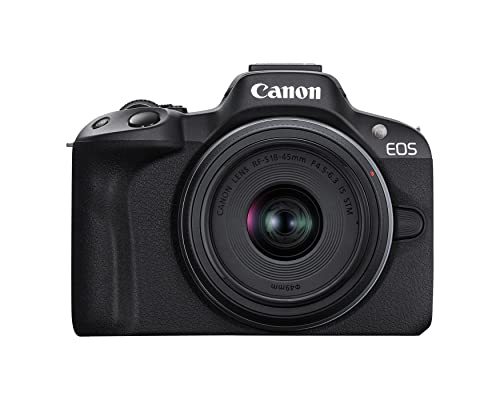
Canon EOS R50 — Best Launch Camera
The R50 is the launch camera because a launch is a confidence problem before it is an image problem, and this Canon manufactures confidence. Its guided menus teach the camera to its owner in plain language; its colour renders a new presenter’s face the way their friends recognise it, warmly and kindly, in the unkind light of a real room; and its autofocus minds the subject while the creator minds the terrifying business of having something to say. Channels launched on the R50 tend to look established several months before they feel established, and that illusion, honestly earned, carries creators through the doubt season.
The substance beneath the kindness is a real platform. The RF mount’s staircase — an affordable wide for the small room, a fast prime for the evening set — lets the channel’s look mature without a camera change, and the body’s webcam behaviour covers the live sessions and community streams that gather around a growing catalogue. Vertical recording serves the short-form outposts that feed a modern channel’s discovery, from the same setup and the same afternoon as the main videos.
Its second angle for this guide is rhythm. The R50 starts fast, behaves identically across sessions, and asks so little setup that a batch-filming day is limited by the creator’s voice rather than by the equipment’s temperament. Launch workflows live or die on that repeatability: the set that takes four minutes to restore gets restored; the set that takes forty gets postponed, and postponed sets are where channels go to be remembered fondly.
The compromises are the class’s standard ones — a spare battery for long days, a kit lens that teaches rather than dazzles, stabilisation that leans on lens and elbows. For the launch year, they are the right compromises, priced into a body that leaves budget for the microphone and lamp the audience will actually judge.
- Sensor: APS-C, Canon RF mount
- Handling: guided menus for first-time owners
- Colour: flattering skin tones in home light
- Focus: face and eye detection throughout
- Live use: webcam behaviour for community streams
Strengths
- The kindest first fifty videos in this guide
- A lens staircase the channel can climb for years
- Setup repeatability that protects the rhythm
Trade-offs
- Spare battery advised for batch days
- Kit lens is a teacher, not a low-light hero
- Stabilisation leans on lens and technique
Best for: new creators launching desk, room, and lifestyle channels. Not suited for: movement-first formats or production teams needing deep audio tools.

Sony ZV-E10 II — Best Growth Platform
If the R50 is the launch, the ZV-E10 II is the platform a channel grows into without ever moving house. Its creator engineering is the most complete in this guide: autofocus that holds a face through a presentation and glides to a product raised toward the lens, a screen that faces the solo creator, background-blur control for instant production value, and an audio pathway — microphone input, headphone monitoring, a digital shoe for cable-free microphones — that matures through every stage of a channel’s sound ambitions.
The E-mount lens catalogue is the growth argument in its purest form. A channel can begin on the kit lens, add the wide its room demands, add the fast prime its evenings demand, and rent or borrow its way into speciality glass for special projects — all on the body it launched with, all with the habits it has already learned. Platforms are purchased once and lenses forever; Sony’s shelf is the deepest in this guide, and depth is what a growth platform is.
Hold a product up to the lens mid-sentence and you have found this body’s home turf. Reviews, unboxings, tutorials with objects, cooking with ingredients held to the lens — the formats where the camera must arbitrate between a face and a thing — are this body’s home turf, thanks to focus behaviour designed for exactly that arbitration. A creator whose channel concept involves showing things should weight this pick heavily, because its signature trick is their format’s daily bread.
Concede the familiar limits: no in-body stabilisation, a compact grip, menus that reward an evening’s study. A channel that knows it will live at a desk and grow for years will find the ZV-E10 II the most defensible single purchase in this guide — the body least likely to be replaced for any reason except triumph.
- Sensor: APS-C, interchangeable E-mount lenses
- Focus: face tracking with product-showcase shifts
- Audio: input, monitoring, and digital shoe
- Screen: fully articulating for solo creators
- Catalogue: the deepest lens shelf in this guide
Strengths
- Growth in every direction from one body
- Product formats served by design
- Audio pathway matures with the channel
Trade-offs
- Walking footage needs technique or support
- Menus reward study over intuition
- Small grip for large hands
Best for: channels expecting to grow in format, catalogue, and production value. Not suited for: creators who want the simplest possible launch and nothing more.

Sony ZV-1F — Best Zero-Excuse Starter
The ZV-1F exists for the creator whose channel has been “about to launch” for a year. Its argument is subtraction: a fixed wide lens, automatic focus care, a screen that faces the speaker, and almost no decisions anywhere. When the camera removes every obstacle except the idea, the creator discovers whether the idea was ever the obstacle — and for a surprising number of stalled channels, that discovery, delivered kindly by a simple camera, is the launch itself.
The wide lens is composed for the launch’s actual geography: a face at arm’s length, a room around it, a life visible behind the talking. Product-showcase focus covers the held-up object of a first review or haul. The footage is bright, clean, and finished-looking with no grading, which matters more than it sounds — a new creator’s editing hours are scarce, and a camera that hands over publishable files protects the weekly rhythm this guide keeps preaching.
That little microphone socket is the difference between a starter camera and a dead end. The channel can begin on the built-in microphones, tuned for a clear voice at vlogging distance, and graduate to a first external microphone — the upgrade audiences notice most — without replacing the camera. Our audio guide maps that staircase; here it is enough that the staircase exists inside the simplest body in the list.
The ceiling is plain: no lens growth, no monitoring, evenings handled willingly rather than brilliantly. The ZV-1F is a launch instrument, and it should be bought as one — with the cheerful expectation that a successful channel will outgrow it into a second-camera role, where its simplicity remains useful for the rest of its life.
- Lens: fixed wide for arm’s-length framing
- Handling: minimal decisions, automatic care
- Audio: microphone input for the first upgrade
- Files: finished-looking footage, minimal editing
- Role: the launch that cannot be postponed by setup
Strengths
- Removes every excuse except the idea
- Publishable footage with no grading step
- An audio future inside a simple body
Trade-offs
- No growth path within the body
- No headphone monitoring
- Low light is willing, not brilliant
Best for: stalled launches and simplicity-first creators. Not suited for: channels already planning lenses, monitoring, and production growth.

Nikon Z30 — Best for Long-Form Launches
A large and underserved family of channels is built on duration: the video podcast, the study-with-me stream, the calm two-hour tutorial, the commentary that thinks in paragraphs. The Z30 is their launch camera. Nikon’s creator body was designed with extended recording in its brief — a tally lamp, a flip screen, webcam fluency over USB — and its manners across a long, quiet session are the calmest in this guide, which is precisely the temperament long-form production runs on.
The value argument reinforces the format argument. The Z30 delivers the mirrorless essentials — interchangeable lenses, a microphone input, natural Nikon colour that flatters faces across long conversations — at a price that leaves a new channel’s budget where it belongs: on the microphone, the light, and the chair the audience will see for two hours. Long-form channels are judged by endurance and sound far more than by spectacle, and this body’s budget arithmetic respects that.
Working alone, all day, at one desk changes what a camera body owes you. A proper grip for the handheld introductions, controls that behave as experience expects, and a compact body that lives on a desk without annexing it — the Z30 fits the one-person production company that most long-form channels are. Batch days of conversations and tutorials proceed without the camera ever becoming the session’s most demanding participant.
Boundaries, honestly: the DX lens shelf is narrower than Sony’s or Canon’s catalogues, stabilisation leans on the lens, and the body’s ceiling for fast-moving or cinematic formats is real. For the patient formats — the ones whose audiences arrive with tea and stay for hours — the Z30 is the most temperamentally correct launch in this guide.
- Sensor: APS-C, Nikon Z mount
- Design: tally lamp, flip screen, creator layout
- Recording: long-form and webcam-friendly manners
- Audio: microphone input for the key upgrade
- Value: leaves budget for sound and light
Strengths
- Long sessions handled with unusual calm
- Natural colour across long conversations
- Honest value for endurance formats
Trade-offs
- Narrower lens shelf than its rivals
- Stabilisation is lens-dependent
- Not built for fast-moving formats
Best for: podcasts, tutorials, study and commentary channels. Not suited for: travel, action, or cinematic short-form formats.

DJI Osmo Pocket 3 — Best for Movement Channels
Some channels are not filmed in a place; they are filmed in motion — the city guide, the travel diary, the walking interview, the neighbourhood explorer. For those launches, the Pocket 3 is not a compromise but the correct professional instrument: a mechanical gimbal that makes walking footage glide, face tracking that keeps a solo presenter framed while the world moves, and a pocketable body that can be carried every day of a trip rather than on the days a bag was planned.
The launch virtues compound for a movement channel. It wakes instantly, which suits a format built from found moments. Its rotating screen serves the vertical outposts and the horizontal main videos from the same walk. Set on a café table, it tracks the speaker like a tiny crew; paired directly with DJI’s wireless microphone transmitters, it records a collar-distance voice over the moving picture with no receiver in sight. A one-person travel production company, complete, weighs less than a paperback.
Channels like this rarely die of soft footage; they die of tired arms and slow setups. Movement channels die of exhaustion more often than of image quality — the heavy kit left at the hotel, the setup too slow for the light — and the Pocket 3’s entire design is an argument against exhaustion. The creator who films daily because filming is easy will out-publish the creator with the finer sensor and the heavier bag, a sentence this guide has now written in three dialects because it is the closest thing channel-building has to a law.
Its limits are the pocket’s physics: a fixed lens, a sensor that concedes the darkest evenings, a gimbal that prefers not to meet concrete or seawater. A movement channel that also needs a studio flagship later will find the Pocket 3 retires into the perfect second camera. As a launch, for its format, it has no rival in this list.
- Stabilisation: three-axis mechanical gimbal
- Tracking: face follow for solo presenters
- Screen: rotates for vertical and horizontal
- Audio: direct pairing with DJI wireless mics
- Carry: pocketable, instant wake, all-day light
Strengths
- Movement footage that glides from video one
- A one-person travel crew in a pocket
- Wireless voice without a receiver rig
Trade-offs
- Fixed lens and one framing personality
- Dark evenings exceed its sensor
- Gimbal mechanism asks for basic care
Best for: travel, city, and walking-format channel launches. Not suited for: desk productions needing lenses and depth.

Elgato Facecam — Best Desk-Native Starter
Not every channel needs a camera that can leave the desk, and the Facecam is this guide’s respect paid to the ones that do not. Commentary, software teaching, data and finance explainers, language instruction, the face-in-the-corner formats — these channels are a voice, a face, and a screen, and the Facecam was engineered for exactly that geometry by people who studied streamers professionally. Its fixed focus keeps a seated presenter sharp across the natural range of leaning and gesturing, with no autofocus hunting while a point is being made.
The launch virtue is permanence. The Facecam’s manual exposure and white balance lock down and stay locked — its settings are stored on the device itself — so video fifty looks like video five, the set never needs rebuilding, and the creator’s entire setup ritual is sitting down. For a desk-native channel, that is the sustainability argument in its purest form: the camera behaves like furniture, in the best sense, and furniture never gives you a reason to skip a recording day.
Facecam footage does not flatter, and for a teaching channel that is a compliment. The processing favours a true rendering over a beautified one, which suits instruction and commentary, where the audience reads the presenter’s face for emphasis, doubt, and sincerity. Paired with a real microphone — there is none built in, by design, because its intended users own proper ones — the desk-native channel’s two judged qualities, face and voice, are both served at a professional standard for a fraction of a mirrorless budget.
The boundaries define the format rather than diminish the camera: it will not travel, demonstrate, or reframe in post, and it expects the lit desk its whole design assumes. A creator whose channel concept is the desk should buy it without the slightest sense of settling — it is the specialist the format would design for itself.
- Focus: fixed, deep field for a seated presenter
- Controls: exposure and white balance that lock
- Settings: stored on the device across sessions
- Image: honest rendering under desk lighting
- Audio: external microphone required by design
Strengths
- A setup ritual consisting of sitting down
- Identical image across the whole catalogue
- Professional desk standard at a modest price
Trade-offs
- No built-in microphone at all
- The desk is its whole world, by design
- Expects deliberate desk lighting
Best for: commentary, software, and screen-led channel launches. Not suited for: any format that stands up, walks, or demonstrates.
Launch Platforms Compared: The Table
| Pick | Channel shape | Growth path | Defining virtue |
|---|---|---|---|
| Canon EOS R50 | Desk, room, lifestyle | RF lens staircase | Confidence and colour |
| Sony ZV-E10 II | Product, tutorial, generalist | E-mount and audio depth | Completeness that grows |
| Sony ZV-1F | Simple personal channels | Microphone first | Zero-excuse launch |
| Nikon Z30 | Podcast and long-form | Z mount value | Calm endurance |
| DJI Osmo Pocket 3 | Travel and movement | DJI audio ecosystem | Gliding solo production |
| Elgato Facecam | Desk-native commentary | Microphone and light | Permanent, locked setup |
The table should be read as six channel biographies rather than six products. Each row is a bet about what your second year looks like — the formats you will be filming, the skills you will have, the audience you will have earned. The cheapest mistake in channel-building is buying the first row that photographs well; the wisest purchase is the row whose biography you recognise as your own future.
The growth column is the tiebreaker, as it was in our general guide, but with a launch-specific twist: prefer the platform whose next purchase is obvious. A channel grows by a sequence of small, well-aimed upgrades, and a platform that makes the next step legible — this lens for this frustration, this microphone for this format — keeps the creator spending on answers rather than on experiments.
How Do You Build a Filming Workflow That Survives Month Six?
Design the workflow for your worst week, not your best. The batch day that works when you are tired, busy, and uninspired is the workflow your channel will actually have; the elaborate production that requires a free Saturday and a good mood is a hobby wearing a schedule. Concretely: a set that restores in minutes, a camera whose settings live in one saved configuration, a filming block short enough to survive a working day, and an editing template that turns footage into a video without a single new decision.
Batching is the engine. Film several videos in one session while the set stands and the light agrees — the mirrorless picks and the Facecam all reward this with identical framing across a month of uploads — and edit across the following days in smaller, fresher sittings. Batching converts filming from a daily negotiation into a weekly appointment, and appointments are how adults with jobs build channels.
Keep an ideas system with the same seriousness as the camera bag. A running list, longer than the schedule, from which batch days draw — because the workflow’s real enemy is not filming but the blank morning of “what would this week’s video even be?” The cameras in this guide can make filming cheap; only the list can make starting cheap, and starting is the whole game.
Finally, build the resume ritual before you need it. Missed weeks happen to every channel; the ones that return are the ones whose setup forgives the gap — nothing to rebuild, nothing to relearn, the set as it was left. This is a concrete argument for the simpler and more repeatable picks, and against any setup whose restoration requires remembering twelve decisions. Design for the comeback, and you will rarely need a second one.
How Should a New Creator Spend the First Equipment Budget?
In the audience’s order of perception: voice, light, camera, and only then lenses. A channel’s first viewers will forgive an ordinary image on a clear voice indefinitely; they will forgive neither an echoing voice nor a face lit like a cave interrogation, however expensive the sensor behind them. The picks in this guide were partly ranked on how much budget they leave for the first two items — which is why honest mid-range bodies outrank flagships here, and why the Facecam-plus-microphone combination is a legitimate launch rather than a compromise.
Sequence the spending across the first season rather than detonating it at the launch. The camera and the microphone first, because they define the product; the light when the first month’s footage names its absence; the lens when a specific frustration — the small room, the dark evening — has repeated itself enough to be a diagnosis rather than a mood. Each purchase then answers a question the channel has actually asked, and the kit that results fits the channel like a biography rather than a catalogue.
Keep a small reserve for the unglamorous: the spare battery, the second card, the storage that holds the growing archive in two places. Channels lose more to logistics than to image quality, and the reserve is the cheapest insurance in this entire article. A creator whose files are safe and whose batteries are charged is a creator whose only problems are creative ones, which is the correct set of problems to have.
How Do Titles, Thumbnails, and the First Thirty Seconds Change the Camera Brief?
A channel is discovered through a thumbnail and a title, and kept through its first thirty seconds — and both facts reach back into the camera purchase. The thumbnail is usually a frame or a still from the production, which argues for a camera whose colour makes a face read clearly at postage-stamp size: expressive, well-lit, and separated from its background. The mirrorless picks earn their keep here with the fast prime’s gentle blur, but even the simple cameras serve the thumbnail honestly when the creator lights the face and steps away from the wall.
The first thirty seconds argue for setup repeatability in a less obvious way. A returning viewer’s trust is built on recognition — the same frame, the same light, the same voice, promising the same kind of video — and a camera and set that reproduce themselves exactly make that recognition effortless. This is a production argument for the locked-down desk cameras and the saved mirrorless configurations alike: consistency is not merely efficient, it is the channel’s brand rendered in furniture.
Retention also disciplines the filming itself. The hook is filmed, not edited into existence: a presenter who begins on camera, in the established frame, with the promise stated to the lens, gives the editor material that no amount of post-production can synthesise from a wandering opening. Cameras that start instantly and frame reliably serve the hook the way a good first sentence serves an essay — by existing, ready, at the moment of beginning.
None of this requires cinematic equipment, and that is the point worth keeping. The discovery machinery rewards clarity, consistency, and a face the audience learns to recognise — all of which are workflow properties the picks in this guide were chosen to support, and none of which appear on a specification sheet.
How Should a Creator Plan a Month of Videos Around One Camera?
Plan the month as a production season in miniature. Choose the batch days first — two or three filming blocks in which the standing set earns its keep — and let the rest of the month organise itself around them: scripting before, editing after, community and live sessions in the gaps. The camera’s role in the plan is to be a constant: same body, same saved settings, same frame, so that a month’s uploads look like a series rather than a sequence of experiments, even while the topics roam.
Vary the month’s shapes deliberately within that constant frame. A tutorial, a story, a response, a demonstration — the formats rotate while the production stays identical, which keeps the creator’s interest alive at no workflow cost. Channels stall when every video is the same labour; they also stall when every video is a new production. The monthly plan threads between those failures, and a repeatable camera setup is what makes the threading cheap.
Build one buffer video into every month — an evergreen piece filmed on a batch day and held against illness, travel, and the week the idea well runs dry. The buffer is the difference between a channel that has missed a week and a channel that has never missed one, and audiences forgive almost anything except disappearance. Filming it costs one extra slot on a day when the set already stands; not filming it costs, eventually, the streak that the channel’s trust is built on.
Review the month as a producer, not as a critic: which setup decision saved time, which cost it, which frustration repeated often enough to deserve the next purchase. That review, kept to a page, is how a channel’s equipment evolves by diagnosis rather than by envy — and it is the habit that makes every later buying guide, including this one, genuinely useful rather than merely tempting.
How Do Live Streams and Community Videos Fit the Same Camera?
A modern channel is two publications sharing one audience: the edited catalogue and the live room. The cameras in this guide were partly chosen for fluency in both — the mirrorless bodies stream through USB or capture with their production quality intact, the Z30 was designed with webcam duty in its brief, and the Facecam was born in the live world entirely. One camera serving both formats keeps the channel’s visual identity continuous, which returning viewers register as professionalism without ever naming it.
The live format changes the risk profile rather than the equipment list. There is no second take, so the virtues that matter are the boring ones: a connection tested before the announcement, a frame that cannot drift, audio monitored or proven, and a setup identical to the recording setup so that no new variable enters on the night. Creators who rehearse the live chain once, quietly, before advertising it, rarely have a live disaster story; creators who debut the chain in public usually acquire one.
Community videos — the updates, the Q&As, the behind-the-scenes pieces — are the live room’s recorded cousins, and they forgive production almost everything except absence. Film them on the same set with the same camera, at lower ceremony, and let their informality contrast with the catalogue’s polish. The audience reads the contrast as intimacy, and the creator gains a low-cost format that keeps the channel warm between productions.
Together, these formats argue for the platform virtues this guide has ranked throughout: repeatability, audio honesty, and a setup that restores in minutes. A channel is a small media company with one employee; its camera should behave like reliable plant equipment in a factory that runs on schedule — unglamorous, indispensable, and never the story.
What Mistakes Do New YouTube Creators Make With Their First Camera?
Buying the flagship first leads the list, because it spends the microphone and light budget on dynamic range the launch audience cannot perceive, while adding setup complexity exactly when the creator’s confidence is most fragile. The second mistake is the mirror image: buying a camera with no growth path because it was cheap, then rebuying the platform at full price in year two. The ladder in this guide exists to make both mistakes unnecessary.
Copying a successful channel’s exact kit is the subtler error. That kit answers that channel’s format, rooms, and skills; transplanted to a different format, it is an expensive costume. Extract the principles from the channels you admire — their light, their sound discipline, their repeatability — and buy your own answers to them.
The third mistake is treating the launch as a reveal rather than a process: waiting for the perfect camera, the perfect set, the perfect first video, while the algorithm and the audience wait for nothing but consistency. Publish the imperfect tenth video’s predecessors. The cameras above were chosen so that “good enough to start, good enough to grow” is a true sentence about every one of them — the starting is the creator’s part, and it cannot be delegated to equipment.
How Does a Channel’s Camera Needs Change in Year Two?
Year two usually adds a second angle before it replaces the first camera: the overhead shot for the demonstration channel, the wide for the interview show, the pocket camera for the desk channel’s excursions. This is where first purchases prove their wisdom — the simple starter becomes the B-camera, the launch mirrorless body becomes the main chair, and nothing is wasted. Buy year one’s camera imagining its year-two job, and the kit compounds instead of churning.
Audio matures in year two as well: the second microphone for the guest, the monitored workflow for the interview format, the room treatment that no microphone can substitute for. The platforms in this guide with honest audio pathways — the Sony and Canon bodies above all — absorb that maturation without a camera change, which is the deepest sense in which they are growth platforms.
What rarely changes is the workflow. The batch rhythm, the standing set, the ideas list, the template edit — year two’s channel runs on year one’s systems with better stories. Creators who built those systems early discover that growth feels like continuation; creators who relied on willpower discover that year two is where willpower’s invoice arrives. The camera was never the system, but the right camera never obstructed it, either — and that, in the end, is what this guide was ranking.
How Should a Creator Think About the Channel’s Look as a Brand?
Sooner than expected, a channel’s frame becomes its logo. The background’s colour, the lens’s depth, the light’s direction — repeated across fifty thumbnails, they become the visual signature a subscriber recognises in a crowded feed before reading a word. The camera’s contribution to that signature is consistency more than beauty: a modest look, reproduced exactly, brands a channel more effectively than a gorgeous look that wanders from video to video as settings and rooms change.
This is a practical argument for decisions new creators often postpone. Choose the frame — the seat, the backdrop, the camera’s height and distance — as deliberately as a title font, photograph the arrangement, save the camera’s configuration, and defend the arrangement against restlessness for the first season. The signature needs repetitions to register, and every rebuild spends them. When the channel eventually redesigns its look, it should do so the way publications redesign: once, completely, and announced by the work itself.
The signature also disciplines purchasing. A lens that matches the established frame’s rendering is a brand investment; a camera whose colour science fights the channel’s grade is a brand tax, however fine its specifications. Creators who think of their look as an asset buy equipment the way editors choose typefaces — for fit with what exists, not for isolated excellence.
None of this requires the look to be elaborate. Some of the most recognisable channels on the platform are a face, a wall, and a lamp, repeated with monastic fidelity for a decade. The camera that serves such a channel best is the one that makes the fidelity effortless — which is, the reader will notice, the same virtue this guide has been ranking under different names since its first page.
Final Recommendation
Launch on the Canon EOS R50 if your channel lives at a desk or in a room and your first year needs kindness, colour, and a platform to climb. Choose the Sony ZV-E10 II when you already know the channel will grow — products to show, formats to widen, audio to mature — and you want one body to grow on. Take the Sony ZV-1F if the launch itself is the obstacle and simplicity is the kindest possible producer.
Match the specialists to their channels without apology: the Nikon Z30 for the long-form and podcast launches, the DJI Osmo Pocket 3 for the channel that walks and travels, and the Elgato Facecam for the desk-native formats that never stand up. Whichever you choose, spend next on the microphone and the light, build the batch rhythm before the catalogue, and publish the early videos before they feel ready — a channel is a practice, and the right camera is simply the one that never gives the practice an excuse to stop.
Frequently Asked Questions
How much should a first YouTube camera cost?
Enough to be a platform, not so much that it consumes the microphone and light budget. Every pick in this guide sits in that honest middle by design. A useful test: if the camera’s price leaves nothing for sound, it is the wrong camera at any specification, because the audience will meet your voice before they ever judge your sensor.
Can I start a channel with just a webcam?
For desk-native formats — commentary, software, teaching over a screen — yes, and the Facecam’s presence in this guide is the respect that answer deserves. Pair it with a real microphone and deliberate light, and the format is fully professional. Channels that demonstrate, travel, or interview in person will need a camera that can leave the desk, which is what the rest of the ladder is for.
Should I buy a camera or upgrade my phone setup?
Film the first few videos on whatever you have; the friction you meet will write the shopping list. When the phone’s limits — light, focus control, interruptions, audio path — start costing ideas rather than merely annoying you, the ladder in this guide is the answer, entered at the rung your format names. Buying before filming risks solving problems your channel does not have.
How many videos before the equipment pays for itself?
The honest answer is that consistency pays and equipment merely permits it. Channels that publish on a rhythm for a year routinely outgrow channels with finer cameras and sporadic uploads, which is why this guide ranked sustainability alongside image quality. Judge the purchase at video fifty, not video five — by then the camera will either have become invisible infrastructure or a recurring excuse, and you will know which you bought.
Do I need a second camera for interviews and demonstrations?
Not at launch. One well-placed camera covers most early interviews and demonstrations, especially with autofocus that arbitrates between faces and held objects. The second angle earns its budget when the format’s grammar demands it — intricate hand work, two speakers who both matter, cutting away from mistakes. Most channels add it in year two, often by promoting the starter camera rather than buying new.
When should a growing channel upgrade its camera?
When a named limitation starts costing videos rather than merely decorating complaints: the interviews the current audio path cannot serve, the evening format the sensor cannot hold, the second angle the production now needs weekly. Upgrade against a diagnosis, in the order the audience perceives — sound, light, then image — and let the old camera retire into the second-angle role it is suited for. Channels that upgrade by diagnosis build kits that fit like biographies; channels that upgrade by launch event build shelves.
What is the single best habit to build alongside the camera?
The batch rhythm: a standing set, a filming block on the calendar, an ideas list longer than the schedule, and an editing template that asks no new questions. Equipment amplifies habits; it does not replace them. Build the rhythm in month one, on whichever pick you choose, and the channel you are imagining becomes a matter of time rather than of luck.
A final encouragement, because launch guides should end with one: the distance between the channel you are imagining and the channel that exists is a pile of ordinary filming days, each one cheaper to start than your hesitation claims. The cameras in this guide were chosen to make those days as cheap as equipment can make them. The rest — the ideas, the rhythm, the nerve to publish the early ones — was always yours, and it is worth more than everything on this page combined.
One practical footnote before the companion reading, because launch budgets are real and waste at the start is uniquely discouraging: buy the camera from a seller whose returns policy forgives a changed mind, film your first three videos inside that window, and judge the purchase by those videos rather than by the unboxing. A camera that serves your actual format will prove it within three uploads; a camera bought for an imagined format will confess just as quickly, and an honest returns window turns that confession into an exchange instead of a regret. Due diligence, in channel-building as in everything else, is a filming activity before it is a shopping one.
Related Guides
Continue with the companion reading: best cameras for vlogging and video for the general creator’s map, best cameras for vlog external mic for the audio pathway your channel will grow into, and best cameras for vlogigng for the compact everyday kit that keeps a channel filming between productions.


