kajuandouglas.com is reader-supported. When you buy through links on our site, we may earn an affiliate commission.
Where to Buy
Video email is not broadcasting. When someone searches for the best cameras for video email, they usually want to replace a cold paragraph with a short, human message: a salesperson walking a prospect through a proposal, a consultant answering a client question face to face, a founder thanking a new customer by name. The recipient did not subscribe to a channel. They opened a message addressed to them, and the camera has perhaps four seconds to prove a real person sent it.
That intimacy changes every buying criterion. Sharpness matters less than immediacy, because a video email that takes twenty minutes to set up will simply never be recorded. Eye contact matters enormously, since the whole persuasive force of the format sits in looking at one named person rather than at an audience. Framing must survive a cramped home office, a spare bedroom desk, or the corner of a kitchen table where most one-to-one selling actually happens between other calls.
Length is the hidden discipline of this format. Effective video emails run well under two minutes, often under one, which means the camera must be ready before the thought cools. A lens cap ritual, a settings menu expedition, a battery hunt — each small friction quietly converts a planned personal message back into typed text. Every pick in this guide was therefore judged first on time-to-recording, and only afterwards on the image it produces once rolling.
Compression is the second hidden discipline. Video email platforms squeeze footage hard before a recipient ever sees it, so exotic resolution buys almost nothing while clean exposure, honest colour, and a face lit well enough to read expressions buy everything. A modest camera feeding a forgiving platform will outperform a cinema body whose files get crushed into mush. Buy for the delivered thumbnail and the delivered playback window, not for the specification sheet.
Sound deserves a sentence here even though cameras are the subject, because a video email lives or dies on whether the words feel effortless to listen to. A camera with a proper microphone input, or a webcam that pairs gracefully with a USB microphone, protects the message better than any resolution upgrade. Recipients forgive a plain backdrop instantly. They rarely forgive straining to hear a pitch they did not ask for.
Key Takeaways
- For video email, seconds-to-recording beats image specifications every single time.
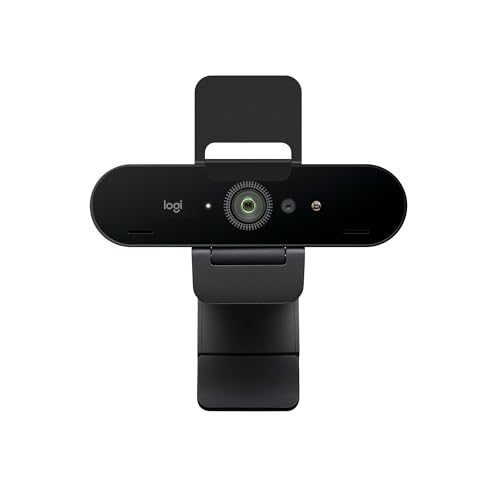
- The Logitech Brio 4K suits always-on desk senders who record between ordinary calls.
- OBSBOT Tiny 2 follows a sender who stands, gestures, or shows a product in hand.
- Elgato Facecam locks exposure so the hundredth message matches the first exactly.
- Sony ZV-1F gives travelling senders a pocket camera with flattering, simple colour.
- Canon’s EOS R50 steps in when video emails grow into recorded presentations.
Trust is the metric nobody can put in a spreadsheet, yet every sender feels it in reply rates. A prospect who has seen your face explain a price increase, apologise for a delay, or walk through a contract clause reads the next typed email differently. The camera is therefore not a production purchase but a relationship purchase, and it should be chosen the way you would choose a handshake: natural, unforced, and repeatable fifty times a week without becoming a performance.
In this guide
Quick Picks
| Badge | Pick | Why it stands out |
|---|---|---|
| Best Always-On Desk Pick | Logitech Brio 4K | Sits above the monitor all day, ready before a thought finishes forming. |
| Best for Standing Senders | OBSBOT Tiny 2 | Tracks a presenter who moves, points, and demonstrates while talking. |
| Best Locked-In Look | Elgato Facecam | Holds manual settings so every message carries the same face and light. |
| Best Pocket Sender | Sony ZV-1F | A fixed-lens traveller that records a warm message from anywhere. |
| Best Step-Up Body | Canon EOS R50 | Mirrorless polish for senders whose messages became mini-presentations. |
| Best for Walk-and-Talk Updates | DJI Osmo Pocket 3 | A gimbal camera for site visits, showroom floors, and field updates. |
Notice what is absent from that table: no cinema body, no interchangeable-lens flagship, nothing that needs a crew or a colourist. That absence is deliberate editorial judgement, not a budget concession. Video email rewards the camera already mounted, already focused, already forgiven by the platform’s compression. The moment a sender starts treating a ninety-second message like a film shoot, the format’s entire advantage — speed with a human face — evaporates.
How Did We Judge Cameras for One-to-One Messages?
Testing imitated a working inbox rather than a studio session. Each camera had to record a cold-open message within moments of sitting down, deliver a face a prospect could read at thumbnail size, and repeat that performance across a simulated week of follow-ups, check-ins, and apology notes. Cameras that demanded ritual before each take slid down the ranking regardless of pedigree, because an unused excellent camera sends no emails at all.
Eye-line geometry received unusual weight. A camera perched far above or below the sender’s eyes makes a personal message feel like a security recording, so mounting position, screen feedback, and the ability to glance between notes and lens were scored as persuasion features. The best setups let a sender read a name, a figure, and a deadline from a note card while still appearing to address the recipient directly.
Platform behaviour closed the assessment. Files and live feeds were considered through the lens of typical video-email services, which favour straightforward codecs, modest file sizes, and faces exposed brightly enough to survive compression. A camera whose footage stayed legible after that journey earned its place; one whose subtle tonal beauty dissolved in transit did not, however lovely the original recording looked on a large monitor.
Why Does a Ninety-Second Message Need Its Own Camera Logic?
A typed email asks for reading effort; a video email asks for a moment of attention, and attention is granted or refused almost instantly. The opening frame functions like a subject line rendered in flesh: posture, light, background, and the sender’s expression all testify before a single word lands. Cameras for this job are therefore closer to good handwriting than to good cinema — a signal of care that must never look laboured.
There is also a calendar argument. Video email earns its keep in the gaps of a working day: the five minutes before a call, the pause after a meeting ends early. Equipment that lives in a bag, a drawer, or a second room misses those gaps entirely. Desk-native cameras dominate this guide because the desk is where the gaps occur, and a message recorded in a genuine gap carries an unhurried warmth that a scheduled studio session rarely reproduces.
Finally, recipients reply differently to faces than to paragraphs, and senders feel that difference within a week. Questions get answered instead of deferred, objections surface earlier and more honestly, and a stalled thread often restarts with a single short recording. None of that requires cinematic depth of field. It requires a sender who records often, which is a habit only frictionless equipment sustains over months of ordinary Tuesdays.
What Should a Sender’s Background Say Without Speaking?
A video email background is a silent character reference. Bookshelves suggest a thinker, a tidy workshop suggests a maker, a blank wall suggests either discretion or a hotel room, and none of these is wrong in itself. Trouble begins when the background contradicts the message: luxury claims filmed against clutter, careful advice delivered from apparent chaos. The cameras here were favoured partly for framing control — the ability to crop the story deliberately rather than inherit whatever the room happens to confess.
Depth helps, within reason. A sender placed a little distance from the wall behind them reads as a person in a place, while a sender flattened against a bookcase reads as a mugshot with commentary. Compact-sensor webcams forgive tight rooms by keeping more of the scene acceptable; larger-sensor bodies reward a sender who can manufacture a few feet of separation. Choose according to the room you actually have, not the loft in a software advertisement.
Consistency across messages quietly compounds. When a prospect receives six recordings over a quarter, all from the same frame and the same light, the sender becomes visually familiar — almost a colleague. That familiarity is an asset no template can buy. It is also fragile: a new angle every week resets the relationship to stranger each time. Set the frame once, photograph it, and defend it like a signature.
Which of the Best Cameras for Video Email Matches Your Sending Habit?

Logitech Brio 4K — Best Always-On Desk Pick
Perched above a monitor, the Brio occupies the exact spot a sender’s eyes already visit, and that geography is its genius. Starting a message becomes a glance and a click rather than a relocation. Its wide view can be tightened digitally toward a head-and-shoulders framing, its exposure copes decently with the mixed light of a real office, and its presence is so unremarkable that senders forget to be self-conscious — the secret ingredient in every convincing one-to-one recording.
Across a week of simulated follow-ups, the Brio’s virtue was repetition without decay. The first message on Monday and the fifteenth on Friday wore the same face, the same framing, the same plausible daylight. For sales sequences and client check-in rhythms, that sameness reads as reliability. Add a modest USB microphone and the package covers the overwhelming majority of professional video email without a single interchangeable part to research, charge separately, or lose.
A detail worth knowing: the Brio’s field of view can be narrowed in software, which rescues senders whose offices are more corridor than study. Set the tighter framing once, during a quiet afternoon, and the camera will greet every subsequent message with the composed version of your room rather than the honest one. Senders who record testimonials-style follow-ups for clients also report that its image holds up surprisingly well when a platform enlarges the playback window, provided the lamp sermon elsewhere in this guide has been obeyed.
Long-term owners praise the Brio for a quality brochures ignore: it never becomes the reason a message was not sent. Firmware matures, platforms change their upload rules, desks get rearranged, and the camera simply continues framing the same trustworthy face. In a format where the entire strategy is relentless, ordinary consistency, that boring dependability compounds into the only metric that matters — hundreds of personal messages actually delivered across a career.
- Mount: monitor-top, always in position
- View: adjustable framing toward head-and-shoulders
- Connection: USB to computer and platform
- Audio: pairs naturally with a USB microphone
- Habit: built for many short messages daily
Strengths
- Starts recording faster than any body in a bag
- Eye line sits naturally at monitor height
- Framing options tame a wide office view
Trade-offs
- Low light reveals its webcam lineage
- Digital tightening spends resolution quickly
- No interchangeable lens future to grow into
Best for: consultants, account managers, and founders sending several personal messages a day from one desk. Not suited for: senders who record while walking a site or showing large products.

OBSBOT Tiny 2 — Best for Standing Senders
Some messages cannot be sent sitting down. A coach correcting a movement, a maker showing a prototype’s hinge, a trainer pointing at a whiteboard figure — these senders think with their bodies, and a fixed webcam amputates half the message. The Tiny 2 answers with a motorised gimbal that follows its subject around a room, reframing politely as they move, zooming on a gesture, and generally impersonating a patient colleague holding a phone.
Voice control turns out to matter more in practice than in brochures. A sender mid-demonstration, hands occupied and attention on the object, can start or redirect the camera without breaking the explanation’s thread. In video email, where the entire value is an unbroken, personal train of thought, that continuity is persuasive gold. The recipient feels addressed by a person, not interrupted by a production.
Battery and charging simply never enter the Tiny 2 conversation, because it lives on USB power at a desk or shelf — a small mercy for senders whose messages are spontaneous. Position it slightly above eye level for the most natural standing frame, give its tracking a plain background to read your outline against, and rehearse one gesture command until it is reflex. After that rehearsal, the camera genuinely disappears from the sender’s attention, which is the highest compliment this format can pay any machine.
Senders who demonstrate physical products should rehearse the Tiny 2’s zoom gesture until products can be brought close without the frame lurching. A smooth push toward a hinge, a label, or a finish reads as confidence; a sudden digital jump reads as a sales trick. That small choreography, learned once, upgrades every demonstration message the camera ever sends, and it is the kind of craft recipients feel without ever naming.
- Movement: motorised tracking follows the sender
- Control: voice and gesture commands mid-message
- Connection: USB into recording or mail platforms
- Image: sharp enough for board and bench detail
- Role: the standing sender’s camera operator
Strengths
- Follows demonstrations no fixed camera can frame
- Hands-free control protects the flow of thought
- Makes product-in-hand messages feel effortless
Trade-offs
- Small sensor wants a decently lit room
- Tracking theatre is wasted on seated senders
- Depends on its companion software for full talent
Best for: coaches, makers, and trainers whose video emails include movement or objects. Not suited for: seated senders in dim rooms who never leave the chair.

Elgato Facecam — Best Locked-In Look
The Facecam’s argument is sameness, engineered. Manual exposure and white balance can be set once for a sender’s room and lamp, then stored on the device itself, so the face that apologises in March is lit identically to the face that celebrates in June. For anyone running a long nurture sequence — where message twelve must not look like a different human from message one — that stubbornness is the whole product.
Its fixed-focus design removes another small anxiety. A seated sender leans in for emphasis, rocks back to think, gestures toward the camera, and stays acceptably sharp throughout, with no autofocus system auditioning for attention in the background. The processing favours an honest face over a flattered one, which suits advice-giving: clients read micro-expressions for confidence, and a beautifying smear quietly taxes the trust the format exists to build.
One working habit unlocks the Facecam’s best self: pair it with a lamp whose position never changes and a chair whose height never changes, and the locked settings become a permanent portrait studio. Senders running onboarding sequences for new clients exploit exactly that permanence — episode one and episode nine of a welcome series are indistinguishable in light, so the client experiences one continuous relationship. Store a photograph of the desk arrangement with your message templates; future you will thank present you after any house move.
The Facecam’s honesty extends to an unexpected benefit: it trains senders. Because it neither flatters nor rescues, a sender reviewing footage sees their real lighting, real posture, and real background, and improves all three within a month. Cameras that beautify delay that education indefinitely. Several of the most effective video-email practitioners treat that honest mirror as the product they actually bought, with the messages almost a by-product of the discipline it imposed.
- Focus: fixed, forgiving across a desk’s depth
- Controls: manual exposure and colour that persist
- Storage: settings live on the camera itself
- Audio: external microphone expected and needed
- Image: unembellished rendering under LED light
Strengths
- Identical look across a whole sending sequence
- No focus hunting while a point is being made
- Settings survive any application opening it
Trade-offs
- Requires a separate microphone from day one
- No reframing headroom for sloppy framing
- Expects deliberate light rather than rescuing gloom
Best for: advisors and salespeople running long, consistent message sequences from one lit desk. Not suited for: senders who move rooms often or need a built-in microphone.

Sony ZV-1F — Best Pocket Sender
Travel dissolves desk setups, and relationships do not pause for travel. The ZV-1F exists for the hotel-room follow-up, the conference-corridor thank-you, the airport-lounge check-in that keeps a deal warm. Its wide fixed lens frames a face plus a little context at arm’s length or on a small tripod, its colour flatters without configuration, and its size means it genuinely travels — in a jacket pocket, not in a dedicated case that gets left behind.
Simplicity is the second travel virtue. There are no lenses to choose, no mount ecosystem to research at midnight in an unfamiliar city. A sender frames, records, and sends, and the message carries the small authenticity bonus of an obviously real location: this person thought of you from the road. That signal, paradoxically, can outperform studio polish, because video email trades in evidence of attention rather than evidence of production budget.
The ZV-1F’s wide lens has a second, quieter talent on the road: it makes small hotel rooms look like places rather than cells, because the frame includes enough context to breathe. Set it on the desk, sit where the window light falls across rather than behind you, and a follow-up recorded between conference sessions carries a calm that recipients register as confidence. Its background-softening option should be used sparingly while travelling, since a recognisable real location is often the message’s proof of sincerity.
Travellers should build a two-minute hotel ritual around the ZV-1F: curtains arranged, lamp moved to the flattering side, camera on the desk edge at eye height, one test greeting watched back with the sound up. Two minutes is short enough to survive a conference schedule and long enough to lift a road message from apologetic to assured. Keep the ritual identical in every city and the road itself becomes a recognisable studio.
- Lens: wide and fixed, made for arm’s-length framing
- Size: jacket-pocket travel companion
- Colour: flattering with minimal setup
- Handling: deliberately few decisions to make
- Use: messages recorded away from the home desk
Strengths
- Travels where mirrorless kits get left behind
- Wide framing forgives improvised setups
- Friendly colour straight from the camera
Trade-offs
- Fixed lens cannot tighten a distant frame
- Small body, modest battery for long days
- Not a platform for growing a studio later
Best for: travelling executives, field salespeople, and speakers sending messages from the road. Not suited for: desk-bound senders who would benefit more from an always-mounted webcam.

Canon EOS R50 — Best Step-Up Body
Some senders outgrow the ninety-second note. Their video emails lengthen into recorded walkthroughs, proposal presentations, and onboarding explanations where a client will watch for six minutes and judge the firm by the footage. The R50 is the step into that territory: a real mirrorless body with face-tracking autofocus, an articulating screen for solo framing, and colour that makes a presenter look healthy under ordinary office light without a colourist’s intervention.
The RF mount gives the habit somewhere to go. Start with the kit lens at the desk; add a brighter prime when the background deserves softening for a flagship pitch; keep the same body as messages evolve toward webinars and recorded briefings. Audio grows along a proper path too, through a real microphone input. Nothing about the R50 is necessary for a quick hello — and everything about it is ready when hello becomes a presentation.
Desk discipline decides whether the R50 feels like a tool or a ceremony. Leave it mounted, lens uncovered, on a small tripod behind the monitor, with its settings saved from the last session; then recording a presentation-length message costs one button press and a breath. Presenters who adopt that parking habit use the Canon weekly. Those who pack it away between uses own a beautiful camera that films four times a year, which is a fate this guide exists to prevent.
The R50 also earns a place in team settings, where one shared body records introductions, handovers, and client welcomes from a fixed corner of the office. Its guided menus mean a colleague can operate it after five minutes of instruction, which no flagship in a locked cupboard can claim. Businesses that lend cameras internally should value that teachability as highly as image quality, because a shared camera’s footage is only ever as good as its least confident operator.
- Sensor: APS-C with Canon RF lenses
- Screen: vari-angle for solo presenters
- Focus: face and eye tracking while talking
- Audio: microphone input for a proper setup
- Growth: a body that scales toward webinars
Strengths
- Presentation-grade image from a friendly body
- Autofocus minds the face while you explain figures
- Lens and audio upgrades arrive without replacement
Trade-offs
- Needs a desk ritual a webcam does not
- Battery planning matters on recording days
- Kit lens is honest rather than cinematic
Best for: senders whose messages are growing into presentations, walkthroughs, and onboarding videos. Not suited for: high-volume quick notes where setup time kills the habit.

DJI Osmo Pocket 3 — Best for Walk-and-Talk Updates
A warehouse manager’s update, a builder’s progress note to a client, a showroom walk-through for one named buyer — these video emails are filmed on foot, and the Pocket 3’s stabilised gimbal makes walking footage look considered rather than seasick. It powers on quickly, frames its subject on a bright little screen that rotates for vertical clips, and tracks a face while the sender narrates a tour meant for exactly one pair of eyes.
The intimacy of a walked update is its persuasive edge: the client sees their project, their order, their space, guided by a voice they know. The Pocket 3’s size keeps that tour casual rather than ceremonial — nobody performs for a device this small — and its files move to a phone or computer without ceremony for quick sending. For field-based relationships, it converts progress reporting from a chore into a courtesy clients actually mention.
Wind is the Pocket 3’s travelling companion and its one recurring enemy, because a walked update recorded on a blustery site can lose its narration to gusts. Cup the situation rather than the camera: walk with the wind behind you, pause in the lee of a vehicle or wall for the key sentence, and keep updates short enough that weather never gets a second act. Handled that way, field messages keep their immediacy without sacrificing the words that make them worth sending.
Field senders develop a signature with the Pocket 3 over time: the gate opening, the walk down the line, the pause at the item the message concerns. Clients begin to recognise the rhythm before a word is spoken, and recognition is the field equivalent of the desk sender’s consistent frame. Keep the route and the greeting stable across updates, and progress reporting becomes a small ceremony clients genuinely look forward to receiving.
- Stabilisation: gimbal-smoothed walking footage
- Screen: rotates for vertical or horizontal clips
- Tracking: holds a face during a narrated tour
- Size: pocketable for site and showroom work
- Workflow: quick transfer toward phone sending
Strengths
- Walking updates look calm and deliberate
- Starts fast enough for unplanned progress notes
- Face tracking frees attention for the subject
Trade-offs
- Tiny screen rewards practice before client tours
- Not a seated-desk camera by temperament
- Accessories multiply if you kit it out fully
Best for: field managers, builders, and showroom staff sending walked updates to individual clients. Not suited for: seated desk messaging, where a mounted webcam is simpler.
Read those six verdicts as a map of sending habits rather than a league table. The most expensive body here is not the best video email camera for most people; it is the best for the minority whose messages have become presentations. Everyone else should buy the camera that matches where their body is when a message idea strikes — seated, standing, travelling, or walking — because a message sent beats a message beautifully planned.
Six Habits, Six Cameras: The Comparison
| Pick | Where it lives | Sending rhythm | Defining virtue |
|---|---|---|---|
| Logitech Brio 4K | On the monitor | Many short notes daily | Ready before the thought cools |
| OBSBOT Tiny 2 | On a desk or shelf | Demonstration messages | Follows a moving sender |
| Elgato Facecam | Fixed at one desk | Long nurture sequences | A look that never drifts |
| Sony ZV-1F | In a jacket pocket | Messages from the road | Attention proven anywhere |
| Canon EOS R50 | On a desk tripod | Recorded presentations | Polish with room to grow |
| DJI Osmo Pocket 3 | In a hand, on site | Walked progress updates | Calm footage while moving |
The comparison’s uncomfortable lesson is that senders usually know their row immediately and then argue themselves out of it, seduced by a more prestigious instrument from a different row. Resist the seduction. A desk sender with a gimbal camera owns a drawer ornament; a field manager with a flagship webcam owns a paperweight. Habit first, hardware second, and the reply rates will arbitrate the decision within a fortnight.
How Long Should a Video Email Actually Be?
Brevity is not a stylistic preference in this format; it is the contract. The recipient granted attention to a person, not a programme, and the respectful durations cluster under two minutes — many of the most effective professional messages run closer to forty seconds. That brevity feeds back into camera choice: a setup optimised for short takes, instant starts, and single-take confidence serves the contract, while equipment encouraging elaborate multi-take production quietly breaks it.
Structure a short message like a good hallway conversation. Name the person, state the one point, show the one thing worth showing, and end with a single clear next step. Cameras with screens that face the sender help here, because a visible self-image disciplines rambling the way a mirror disciplines a rehearsed greeting. When a topic genuinely needs six minutes, that is no longer a video email; record it properly, on the step-up body, and send the link with a short personal introduction filmed on the desk camera.
What Lighting Makes a Face Read as Trustworthy?
Recipients judge a sender’s face the way they judge a face across a table: by the eyes. Light placed in front of and slightly above the sender, large enough to be kind and steady enough to ignore, makes eyes legible and skin plausible. Every camera in this guide improves dramatically under that single arrangement, and the webcams — honest creatures with small sensors — improve most of all, because their weakness was never resolution but gloom.
Windows deserve suspicion despite their beauty. A sender lit by a bright window looks wonderful at ten and silhouetted at noon when clouds rearrange the exposure mid-sequence. A modest lamp in a fixed position delivers the same face on message one and message forty, which, as this guide keeps insisting, is the actual currency of the format. Buy the lamp before upgrading the camera; the order of purchases is itself a professional tell.
How Do You Record Without Sounding Like an Advertisement?
The paradox of video email is that polish persuades up to a point and then begins to accuse. A message that looks produced invites the recipient to wonder what is being sold; a message that looks like a person talking invites them to listen. Aim for the second: conversational pace, genuine pauses, the occasional unscripted aside preserved rather than edited away. Cameras that start instantly help, because spontaneity rarely survives a fifteen-minute setup ritual.
Scripts should shrink to furniture: a name pronounced correctly, three figures in the right order, one date. Everything else belongs in the sender’s own words, spoken the way they would be spoken across a desk. If a take goes wrong, the professional move is usually to send the honest second take rather than hunt for a flawless fifth. Recipients are not grading a performance. They are deciding whether a human being is paying attention to them.
What Mistakes Make Video Emails Feel Like Spam?
Treating one recording as a broadcast tops the list: the same generic message blasted to forty recipients destroys the format’s premise, and recipients detect the fraud within seconds from the missing name, the unfocused eye line, and the pitch-shaped cadence. Cameras cannot fix that decision, but desk cameras make genuine personalisation cheap enough that there is no excuse left. Record the opening and closing for each person even when the middle is shared.
Overproduction runs a close second. Ring-light halos in the eyes, aggressive background replacement, beauty filtering that erases a decade — each signals a marketing department rather than a person, and trust drains accordingly. The honest rendering of the Facecam and the natural colour of the Canon exist in this guide partly as antidotes. A video email should look like evidence, not like advertising that happens to contain a face.
Finally, neglecting the thumbnail and the first frame. Most platforms let the recipient judge the message before pressing play, from a single frozen image. A sender mid-blink against a chaotic background loses opens that the message itself would have won. Pause, settle, smile faintly at the lens, and only then begin — a two-second courtesy that the always-ready cameras here make easy to remember.
Final Recommendation
Most senders should start where their habit already lives. Seated professionals sending daily notes belong with the Logitech Brio 4K, or the Elgato Facecam when a locked, identical look across a long sequence matters most. Standing demonstrators should let the OBSBOT Tiny 2 follow them, travellers should pocket the Sony ZV-1F, and field staff should walk with the DJI Osmo Pocket 3.
Choose the Canon EOS R50 only when the messages themselves are changing character — longer, more formal, watched by groups rather than individuals. Whichever camera earns the desk, spend the saved deliberation on the two habits that decide results: record within the moment the thought arrives, and keep the frame, the light, and the greeting so consistent that recipients feel they know you. In video email, familiarity is the entire strategy.
How Do You Open a Video Email So People Keep Watching?
The first sentence of a video email should do the work a subject line cannot: prove specificity. Use the recipient’s name, reference the exact document, meeting, or order under discussion, and state the single reason for recording within fifteen seconds. Generic warmth — hoping this finds you well, filmed — wastes the format’s opening capital. Cameras with instant starts serve this discipline because the specific thought that prompted the message is still warm when the recording begins.
Your face should already be settled when the recording starts, which is a technical habit as much as a presentational one. Begin recording, breathe, find the lens, and only then speak; trim nothing, because platforms rarely reward editing, but compose the opening beat in real time. Desk cameras that are always framed make this rhythm natural. The recipient’s first impression becomes a person looking at them, not a person preparing to look at them — a distinction felt instantly and remembered longer than any sentence in the message.
Length discipline returns as an opening concern: promise brevity early and keep the promise visibly. A sender who says this takes forty seconds and then delivers forty seconds earns a reputation that raises open rates for every future message. The cameras in this guide support that reputation in an unglamorous way — none of them tempts a sender toward produced, padded, multi-part messages when a single honest take would serve the relationship better.
What About Privacy, Permissions, and Professional Boundaries?
Video email records a face in a workplace, and workplaces have rules worth respecting before the camera arrives. Check an employer’s policy on recording tools and client communications, be thoughtful about what confidential screens or documents might wander into a background, and remember that a recording can be forwarded in ways a hallway conversation cannot. The framing control praised throughout this guide doubles as a privacy tool: crop the room to what the recipient is entitled to see.
Recipients deserve the same consideration. A video message should never ambush — mention in the typed line beneath it what it contains and how long it runs, so the recipient can choose their moment. That courtesy is also strategy: a prospect who trusts that your videos respect their time opens the next one faster. Cameras cannot manufacture that trust, but a consistent, recognisable setup becomes its visual shorthand over a long correspondence.
Accessibility closes the boundary discussion. Many platforms generate captions automatically, and clean audio from a decent microphone makes those captions accurate enough to help rather than hinder. Speak at a pace captions can follow, avoid talking over office noise, and a video email becomes usable by recipients who watch muted, recipients with hearing difficulties, and recipients on trains — which, on any given morning, is most of the business world.
How Does Video Email Fit a Whole Week of Selling?
Map the format onto the moments typed email performs worst. The stalled proposal that needs a human nudge. The complicated answer that would take four paragraphs and one diagram. The introduction of a colleague who will take over an account. The thank-you after a signature, the apology after a failure, the check-in that says a project is remembered rather than merely tracked. Each of those moments is a recording occasion, and a desk camera that lives ready converts them from intentions into sends.
Batching deserves a caution unique to this format. Recording twenty personalised messages in one sitting is efficient and faintly detectable — energy flattens, greetings blur, and the personal premise thins. Most effective senders record in small clusters across the day, when the context of each relationship is fresh from a call or a document. The always-on picks in this guide exist to make that scattered rhythm practical rather than heroic.
Measurement, finally, should stay humble. Watch reply speed and reply warmth rather than vanity metrics, and notice which message types earn responses: in most practices, explanations and apologies outperform celebrations, and short outperforms polished. Let that evidence shape the next month’s habits. The camera’s job in the system is simply to be beneath notice — present, framed, and forgotten — while the relationships do the measurable work.
Which Accessories Actually Matter for a Video Email Desk?
The microphone leads, as it leads every audio-visual conversation, but the desk version of that advice is specific: choose one that sits close without entering the frame awkwardly, and leave it parked there permanently. A microphone that must be fetched and assembled will be skipped on busy days, and busy days are when the messages matter most. The cameras here all cooperate with that parked-microphone discipline, whether through their own inputs or through the computer they serve.
A small tripod or monitor mount ranks second, because eye level is a persuasion feature in this format and improvisation rarely finds it twice. Third comes the lamp, fixed in position and modest in size, flattering the face at the hours messages are actually sent. Everything beyond that trio — backdrop dressing, cable tidiness, a plant with stage presence — is garnish. Buy the trio first, in that order, and let a month of sending reveal whether any garnish is genuinely missing.
Software habits complete the desk. Keep the recording application one click away, keep a notes card template beside the lens, and keep the camera’s framing photograph taped somewhere honest. None of that costs anything, and all of it defends the only metric this entire guide ultimately serves: the number of genuine, personal messages that actually leave your outbox each week, carrying your face and your attention with them.
How Do You Write the Typed Line That Travels With the Video?
The typed sentence beneath a video email is not an apology for the video; it is the video’s envelope, and it decides whether the contents are opened today, next week, or never. Write it like a headline written by a friend: the subject, the benefit of watching, and the running time. Three honest elements, no clickbait, because the recipient who feels tricked into a viewing discounts everything the face then says, however warm the delivery.
Context travels with forwards, so the typed line should also protect a message separated from its sender. Name the project, the date’s relevance, and the decision at stake in words that survive being read cold by a colleague the recipient loops in. Video emails get forwarded inside companies constantly, and the senders who design for that journey — a self-explanatory envelope around a personal core — find their messages working rooms they were never sent to.
Sign-offs deserve the same design care. End the typed text with the single next step the video requested, stated plainly enough to act on from the text alone. Some recipients will act without watching; that is a success, not a failure, because the video’s warmth made the request feel human while the text made it executable. Format serves relationship, and relationship, in this medium, is the entire return on investment.
Finally, keep a small library of your own best envelopes. After a month of sending, patterns emerge: which phrasings earn same-day replies, which subjects get opened by busy executives, which apologies land softly. That private evidence is worth more than any public template pack, because it describes your recipients rather than the internet’s. The camera standardises the face; the envelope library standardises the welcome, and together they make the practice scalable without making it cold.
What Happens When Video Email Becomes a Team Habit?
Teams adopting the format together gain a consistency problem worth solving early: five senders, five rooms, five framings, one confused client. A shared one-page standard — camera height, background discipline, greeting rhythm, typed-line format — keeps the client’s experience coherent while leaving each sender’s personality intact. The standard should fit on an index card and live beside the shared camera, not in a policy document nobody opens.
Onboarding new senders is where the standard pays for itself. A new colleague records three practice messages, receives notes on framing and pace rather than on charisma, and joins the rotation within a week. Desk cameras with locked or simple setups shorten that apprenticeship dramatically, which is a genuine organisational argument for the Facecam and Brio philosophies over more expressive, more variable instruments.
Review the team’s footage quarterly, kindly and specifically. Watch one message per sender, name one strength to keep and one friction to remove, and update the index card if a pattern repeats. That light governance keeps quality rising without bureaucracy, and it treats video email as what it has become by then: not a novelty a few enthusiasts enjoy, but a house style clients associate with the firm itself.
Protect the habit from its own success. When reply rates climb, the temptation arrives to send video for everything, including messages that deserved the dignity of considered text. Restraint is a brand asset here: recipients should feel that a video from your team signals genuine personal attention, not a quota. The senders who keep that signal rare keep it powerful, long after less disciplined competitors have trained their lists to ignore the play button.
How Should You Prepare for a Week of Recorded Follow-Ups?
Preparation for follow-up week is mostly subtraction: clear the desk of everything the frame does not need, charge and mount the camera on Sunday’s calm rather than Monday’s urgency, and write the week’s likely messages as one-line prompts while the context is fresh. When each occasion arrives, the sender records from a running start — context loaded, frame ready, greeting practised — and the messages carry that prepared ease visibly.
Keep a small log beside the prompts: who was sent what, on which day, with which promise made. Video follow-ups fail organisationally when a sender forgets the commitment a warm message contained, and the log converts charm into reliability. Review it on Friday, close the open loops in text where a video would be ceremony, and let the next week’s list write itself from the promises still outstanding.
Frequently Asked Questions
Can I use my regular webcam for video email?
Yes, if it frames your face at eye level and your room gives it enough light to work with. The dedicated picks here earn their place through faster starts, better framing control, or a look that stays identical across hundreds of messages. Send your first twenty messages on whatever you own, then upgrade the specific friction you actually felt rather than the one an advertisement predicted.
Should video emails be vertical or horizontal?
Follow the recipient’s likely screen and the platform’s player. Messages opened inside desktop email clients generally suit horizontal framing, while messages delivered through phone-first tools can suit vertical. The Pocket 3 and ZV-1F handle vertical gracefully for the second case; desk webcams assume the first. When in doubt, horizontal remains the safer professional default for business correspondence.
How do I avoid looking down at notes during a message?
Place a small note card immediately beside or below the lens, keep it to names and figures rather than sentences, and glance down only at natural pauses. A camera mounted at monitor height, like the Brio, shortens the glance until most recipients never register it. Reading full sentences from a screen below the camera is the one habit that reliably breaks the illusion of eye contact.
Do I need a separate microphone for video email?
For occasional messages in a quiet room, a camera’s built-in capture can suffice. For anyone sending weekly, a modest USB microphone is the highest-value accessory in this entire guide, because recipients judge effort by what they hear. The Facecam assumes one from the start; the mirrorless and pocket picks accept better audio as the relationship and the message length grow.
How many takes should I allow myself?
Two, as a discipline. The first take discovers the message; the second delivers it. Beyond that, returns collapse and spontaneity drains, and the recipient receives a performance instead of a person. Senders who chronically need five takes usually have a setup problem — slow equipment, harsh light, an over-written script — and should fix that cause rather than rehearse harder.
Should I mention in the typed email that a video is attached?
Yes, briefly and specifically: what the video covers and how long it runs. That single line respects the recipient’s time, raises open rates, and protects you when a message is forwarded to someone without context. Treat the typed line as the video’s subject line — written with the same care, for the same reason.
How do I handle a message that needs to go to three people?
Record it to the person who must act, and name the others naturally where their parts arise. A video email can address a small group honestly as long as its eye line and greeting stay personal rather than theatrical. If the audience grows beyond a handful, the format has become a presentation — record it on the step-up body and send the link with a short personal note.
Related Guides
Keep building the one-to-one toolkit with our companion reading on desk setups, presentation cameras, and the wider creator shelf: start with best cameras for video marketing when messages grow into campaigns, compare best cameras for videos and media for the broader production picture, and browse best cameras for vidieo if this purchase is your very first camera.


