kajuandouglas.com is reader-supported. When you buy through links on our site, we may earn an affiliate commission.
Where to Buy
The photograph used to end at the print; now it ends at the post, and the distance between those two finishes has quietly rewritten what a camera is for. The best cameras for social media and posting are judged by a workflow as much as by a sensor: how fast a moment becomes a vertical clip on a phone, how little editing the colours demand before they can face an audience, and whether the camera helps its owner publish today rather than admire a card full of someday.
That workflow punishes some famous virtues. A magnificent sensor married to a miserable phone app produces a creator who posts phone pictures and archives camera pictures, which is a diary, not a channel. Meanwhile a modest compact that beams a finished-looking clip to a handset in the café where the moment happened can build an audience out of sheer consistency. Posting rewards the camera that shows up daily, and this guide ranks accordingly — output quality first, but transfer speed, vertical thinking and straight-from-camera colour never far behind.
Honesty about platforms belongs at the top. Feeds compress, crop and re-encode everything they are given, which means the last increments of laboratory image quality are spent on an audience that will never see them, while framing, light, sound and immediacy survive every compression pass intact. The cameras below were chosen for what survives: clean files that start strong, microphones and inputs that respect how much social video is actually speech, and shapes — flip screens, pocket bodies, instant prints — that fit the way posting actually happens, which is everywhere, briefly, and usually one-handed.
Six cameras cover the posting life between them: two creator mirrorless bodies, two compacts built around the selfie-and-share ritual, a pocket gimbal that films like a tiny crew, and an action camera for the posts that happen at speed. Each is linked for checking the current listing, and each review names the kind of poster it serves — because the right camera for a daily vlogger, a product photographer and a travelling storyteller are three different objects wearing similar boxes.
Key Takeaways
- Posting is a workflow before it is a picture: transfer speed to the phone decides whether camera content ever reaches the feed.
- The Sony ZV-E10 II leads for creators who film themselves — flip screen, creator-first controls and interchangeable lenses to grow into.
- DJI’s Osmo Pocket 3 is the fastest route from a moment to a polished vertical clip, with gimbal smoothness no handheld rival matches.
- Straight-from-camera colour matters more than laboratory quality, because feeds compress away fine detail and keep colour, framing and sound.
- The Canon PowerShot G7 X Mark III remains the café-table compact of the posting era: small, flattering and instantly shareable.
- Fujifilm’s X100VI posts the slowest and photographs the best — its film looks are a signature in a feed of identical phone pictures.
In this guide
Quick Picks
| Badge | Pick | Why it stands out |
|---|---|---|
| Best Creator Workhorse | Sony ZV-E10 II | A mirrorless body designed from the viewfinder out for people who film themselves — flip screen, creator controls, lenses to grow with. |
| Fastest Moment-to-Post Camera | DJI Osmo Pocket 3 | A pocket gimbal that turns walking, talking and travelling into smooth vertical clips before a phone has finished focusing. |
| Best Café-Table Compact | Canon PowerShot G7 X Mark III | The pocket compact that defined an era of posting: flattering colour, a flip-up screen, and live-streaming manners in a jacket-sized body. |
| Simplest First Creator Camera | Sony ZV-1F | A fixed wide lens, one-button background blur and a face-first design that removes every excuse between a beginner and their first post. |
| Best Signature Look for Stills | Fujifilm X100VI | Film simulations and a fixed prime lens give a feed something algorithms cannot: photographs that look like one person’s work. |
| Best for Posts at Speed | GoPro HERO13 Black | For the feeds built on motion — rides, runs, water, work sites — a rugged action camera with reframing headroom and mounts for everything. |
How We Chose These Posting-First Picks
We timed the journey, not just the picture. Each candidate was judged on the full path from shutter to shared: how the files reach a phone, whether the maker’s app behaves like a tool or an obstacle course, whether vertical framing is a first-class citizen with guides and tall-sensor options or an afterthought cropped in regret, and whether the camera can hand over a file that is finished — colour, exposure, sound — because the majority of social posting is not edited so much as released.
Creator ergonomics carried the second tranche of marks. A posting camera is operated by its subject: flip screens that face the talent, tally lights that confirm recording, microphones that privilege a voice over a room, product-showcase focusing that understands an object held to the lens. Cameras designed for a photographer standing behind them, however excellent, were marked down for a job that is mostly performed in front of the glass, talking.
The final filter was growth without punishment. Feeds evolve — today’s vertical clip is tomorrow’s long-form series — so we favoured cameras whose lenses, audio inputs and recording depth let a poster develop without replacing the body, while still respecting the opposite virtue: a fixed-lens compact that cannot grow can also never be misconfigured, and for many posters that simplicity is the entire point. Both philosophies appear below, labelled honestly.
What Actually Survives a Platform’s Compression, and What Never Does?
Post a file and the platform will re-encode it to its own recipe, indifferent to your sensor’s feelings. Fine texture is the first casualty — the micro-detail reviewers measure is largely ironed away — followed by subtle gradation in skies and skin. What survives is everything a viewer actually judges by: whether the framing was deliberate, whether faces are lit kindly, whether the colour has a point of view, whether the sound is intelligible without effort, and whether the clip begins at the interesting second rather than three seconds before it. A camera strategy for posting is therefore a strategy of strong inputs: clean, well-exposed, well-framed files compress gracefully, while marginal files fall apart publicly.
This is liberating news disguised as a limitation. It means the mid-priced creator cameras in this guide genuinely rival flagships inside a feed, and it relocates the creator’s effort to where it pays: a window’s light over a laboratory’s lens chart, a thirty-second framing decision over an evening of noise reduction. It also means audio deserves budget before resolution does. Viewers forgive a soft picture with clear speech and abandon a sharp picture with echoing, distant sound in the same heartbeat, on every platform, every time.
One more survivor deserves naming: consistency. A feed is read as a body of work, and the camera whose colour and framing feel like a signature — Fujifilm’s film simulations are the standing example — builds recognition that no single spectacular post can buy. Choose a look your camera makes easy, because the look you must fight for will be abandoned by February, and the feed will drift back to looking like everyone else’s phone.
Vertical, Square or Wide: How Should a Posting Camera Think About Shape?
The feed’s native shape is vertical, the story’s shape is vertical, and yet the camera industry spent a century building for the horizontal. The picks below bridge that mismatch in different ways: tall or open-gate recording that yields a full vertical frame without amputating the sides, rotating gimbals that turn the whole sensor portrait with a flick, flip screens with vertical tripod threads, and frame guides that let a creator shoot wide for one platform while protecting the vertical crop for another. The right answer depends on whether you post one shape everywhere or shoot once and slice for several destinations.
Shoot-once-slice-everywhere is the professional pattern, and it argues for resolution headroom and disciplined framing — subject centred, margins respected, nothing essential living at the frame’s edges where crops will kill it. Native-vertical shooting is the intimate pattern: faster, more honest, framed exactly as the audience will see it, at the cost of a horizontal version that must be faked or forgone. Neither is a moral position. What fails is drifting between them accidentally, discovering in the edit that the wide shot’s subject is standing exactly where the vertical crop cannot go.
Stills obey the same geometry with a stills answer: shoot loose. A photograph composed with air around its subject can become a vertical post, a square grid tile and a wide banner from one frame, and the cameras here — the X100VI and G7 X Mark III especially — provide the resolution to crop with dignity. The grid, meanwhile, rewards a different discipline entirely: a feed’s nine-tile face is a composition of its own, and posters who curate it treat every third post as a design decision. Your camera cannot do that thinking for you, but a camera whose colour is consistent makes the grid cohere almost by itself.
Which of the Best Cameras for Social Media and Posting Fits the Way You Publish?

Sony ZV-E10 II — Best Creator Workhorse
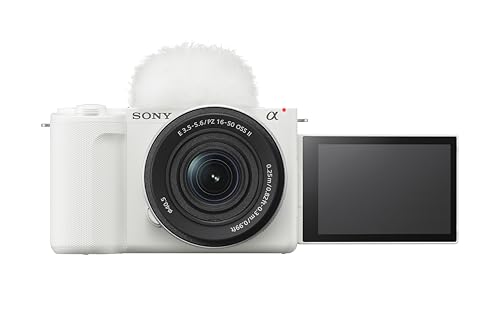
Most cameras are designed for a photographer; the ZV-E10 II is designed for a protagonist. Its screen flips to face the person talking, its controls assume that person is also the crew, and its focusing — including a product-showcase mode that snaps to an object held toward the lens and back to a face when the object leaves — understands the grammar of posting better than bodies costing several times more. For a creator whose feed is built on talking, demonstrating and reviewing, this is the camera that stops being equipment and becomes staff.
The interchangeable-lens mount is its long game. Start with the kit zoom the budget allows, and the same body later accepts the wide vlogging prime, the portrait lens, the macro for product work — the feed’s ambitions change the glass, not the camera. Recording depth grows with the creator too, from quick vertical clips to longer, graded productions, and the audio path — a good built-in array plus a proper microphone input — respects the finding, repeated throughout this guide, that audiences judge speech before sharpness.
Its compromises are the honest costs of a real system. It is not pocketable, it wants a lens budget acknowledged rather than discovered, and its stills, while strong, play second instrument to its video in the design’s priorities. Creators ready to build — a channel, a shop’s content engine, a personal brand with a future — should start here and stop renting capability from a phone. Posters who need the camera to vanish into a jacket should keep reading; two excellent vanishings follow.
- Form: interchangeable-lens mirrorless creator body
- Screen: fully articulating, faces the presenter
- Focus: face, eye and product-showcase modes
- Audio: multi-capsule built-in mic plus input
- Growth: a deep native lens catalogue
Strengths
- Designed for the person in front of the lens
- One body serves the feed’s whole future
- Focusing that understands demonstrations
Trade-offs
- Not a pocket camera by any generosity
- Lens spending continues after the body
- Stills play second to video in its design
Best for: creators building a channel or a business’s content around themselves. Not suited for: posters who need the camera to disappear into a coat pocket

DJI Osmo Pocket 3 — Fastest Moment-to-Post Camera
Hold the Pocket 3 and the argument makes itself: a camera on a three-axis gimbal the size of a chocolate bar, awake in a second, whose rotating screen turns the sensor vertical with a flick of the thumb. Walking footage that would seasick a handheld camera’s audience glides. A market tour, a property walkthrough, a travel morning — the material of half the world’s feeds — comes home stabilised by machinery rather than by hope, and the distance from moment to post shrinks to the length of a coffee order.
Its one-inch-class sensor and DJI’s colour give those clips a finished look straight off the card, and the wireless path to the phone is among the least argumentative in this guide, which matters more than any specification when posting is a daily habit. Face tracking keeps a walking presenter centred without a crew. For the creator whose content is movement — through cities, kitchens, workshops, coastlines — no other device here converts a day into publishable material at anything like its rate.
The boundaries are physical and should be respected. A gimbal is a mechanism: it dislikes being dropped, stuffed unprotected into a bag’s sandy corner, or asked to zoom beyond its modest digital reach. Battery is built in, so a long day is planned around charging rather than swapping. And its stills are souvenirs beside its video. None of that dents its central claim. For posting at the speed of life, the Pocket 3 is not the best camera in this guide so much as the least avoidable one.
- Form: pocket camera on a 3-axis gimbal
- Screen: rotating, switches to vertical instantly
- Sensor: large one-inch class for its size
- Tracking: face and subject following built in
- Transfer: wireless path to the phone app
Strengths
- Smooth walking footage with zero rig
- Vertical clips are a thumb-flick away
- Awake and filming before moments escape
Trade-offs
- Gimbal mechanism wants careful handling
- Built-in battery shapes the shooting day
- Stills are a souvenir feature
Best for: travel, walkthrough and daily-life creators who post on the move. Not suited for: studio creators who need interchangeable lenses and long sessions

Canon PowerShot G7 X Mark III — Best Café-Table Compact
Before creator cameras had their own product lines, this little Canon was the posting era’s default instrument, and its virtues have not expired. It slips into a jacket, its screen flips up for the selfie-framed video that remains the feed’s vernacular, and its colour — warm, kind to skin, finished in-camera — produces files that can be posted from the café table where the moment happened, which is where this category of camera either lives or dies.
Canon built in courtesies that still read as foresight: vertical video treated as a real mode, live-streaming support for the creator who broadcasts from the same device they vlog with, a microphone input on a body small enough that rivals omitted it for years. The lens covers the honest range of a posting life — wide enough for a room and a face, long enough for a detail across a market stall — without ever asking its owner to think about glass at all.
Age shows in the expected places. Autofocus, while serviceable, lacks the face-locking sorcery of the newest Sony, the body asks to be charged rather than fed fresh batteries, and a creator who outgrows fixed glass has nowhere to grow except a new camera. But for the poster whose whole requirement is a beautiful, immediate, pocketable witness — the food writer, the traveller, the weekend creator — the G7 X Mark III remains the compact this entire category is still measured against, usually by people holding one.
- Form: pocket compact with fixed zoom lens
- Screen: tilts up for selfie framing
- Video: vertical mode and live-streaming support
- Audio: microphone input on a compact body
- Colour: warm, flattering, finished in-camera
Strengths
- Posts from the café table, not the desk
- Skin tones that need no apology or edit
- A whole posting life in a jacket pocket
Trade-offs
- Autofocus trails the newest creator bodies
- Fixed lens is the ceiling as well as the charm
- Charging, not swapping, on a long day
Best for: food, travel and lifestyle posters who publish in the moment. Not suited for: creators planning a lens collection and a studio

Sony ZV-1F — Simplest First Creator Camera
Every creator category needs its honest doorway, and the ZV-1F is this one’s: a camera that assumes its owner has never owned one. The lens is fixed and wide — the framing of a vlog, an unboxing, a desk tour — so there is nothing to choose and nothing to mis-set. A single button summons the blurred background that beginners associate with looking professional, a product-showcase mode handles the held-up object, and the screen, microphone and tally arrangements all face the same direction: toward the person talking, who is also the entire crew.
That simplicity is a genuine editorial position. The first fifty posts of any channel are limited by the creator’s nerve and consistency, never by their sensor, and a camera that removes configuration removes the most respectable excuse for not publishing. Files move to the phone without ceremony, colour arrives finished, and the whole device asks so little that the habit of daily posting can form around it — which is the actual product being bought, whether the box says so or not.
Growth is where its honesty must be quoted back. The fixed lens’s framing is the framing forever; low light leans on the lens’s brightness rather than a big sensor’s grace; and a creator who catches the bug seriously will meet its ceiling within a year or two, exactly as its designers intended. Buy it as a first instrument and a future second camera — the desk-angle view in a two-camera setup — and it will never have been a mistake. Buy it as a final camera and it will become one politely, around post ninety.
- Form: fixed-lens compact for vlogging
- Lens: wide, framed for talking to camera
- Controls: one-button background blur mode
- Focus: face priority with product showcase
- Screen: flips to face the presenter
Strengths
- Nothing to configure, nothing to fear
- The beginner’s first fifty posts, unblocked
- Becomes a second camera rather than waste later
Trade-offs
- Fixed framing is forever
- Low-light grace is modest
- Serious creators will outgrow it on schedule
Best for: first-time creators whose bottleneck is starting, not quality. Not suited for: established channels planning lenses, lights and a set

Fujifilm X100VI — Best Signature Look for Stills
In a feed built from a billion identical phone photographs, the X100VI posts difference. Its film simulations — colour recipes with decades of photographic memory in them — give stills a finished, recognisable character straight from the camera, and its fixed prime lens imposes the oldest creative discipline there is: one focal length, one way of seeing, a body of work that coheres because it cannot help itself. Posters whose medium is the photograph — street, travel, food, the documented life — will find no faster route to a signature.
The camera’s physicality is part of the signature. Dials for the exposure decisions, a hybrid viewfinder that can show the world optically or electronically, a leaf-quiet shutter and a body that invites being carried daily — the X100VI gets taken to the ordinary Tuesday that phone cameras photograph and dedicated cameras miss, and a feed is built from Tuesdays. Its files transfer to the phone for posting with the usual app courtesies, and its resolution forgives the crops that vertical and square formats demand.
Video is where the romance files its disclaimer: capable, certainly, but plainly the second language of a stills-first instrument, without the creator scaffolding — flip screen, showcase focusing, gimbal grace — that the Sonys and the DJI treat as home. Availability has also been famously strained, so the linked listing deserves a patient check. Buy the X100VI when your feed is a gallery and your ambition is a look. Buy anything else in this guide when your feed is a broadcast and your ambition is a schedule.
- Lens: fixed prime, one focal length discipline
- Colour: film simulations finished in-camera
- Controls: tactile dials, hybrid viewfinder
- Stills: high resolution for vertical and square crops
- Carry: a body designed to be taken everywhere
Strengths
- A recognisable look no phone filter replicates
- Carried daily, so it witnesses the real material
- Crops for every format without falling apart
Trade-offs
- Video is its second language
- Availability can require patience
- One focal length is a discipline, not a zoom
Best for: photographers whose feed is a gallery with a point of view. Not suited for: video-first creators on a daily posting schedule

GoPro HERO13 Black — Best for Posts at Speed
Some feeds do not sit still to be photographed. The cyclist’s dawn descent, the surfer’s one good wave, the maker’s hands inside a machine, the dog’s-eye view of the trail — these posts are filmed by a camera that can be mounted, soaked, dropped and ignored, and the HERO13 Black is that camera’s current flagship form. Its tall sensor is the posting-specific detail: one ride yields the wide film for a channel and the vertical cut for the feed, reframed from the same file rather than filmed twice.
Stabilisation turns amateur motion into watchable motion, slow-motion modes turn a jump, a splash or a trick into the three seconds a feed actually stops scrolling for, and the accessory universe — chest, helmet, handlebar, suction, magnet — means the camera can be placed wherever the action’s grammar requires, including places no other pick in this guide survives. Voice control and simple modes keep it operable with gloves on, hands busy, or attention properly elsewhere.
Its posting workflow asks one honest effort: the files reward a pass through GoPro’s app, where the reframing and trimming happen, rather than falling onto the phone finished. Battery swaps punctuate long days, and as a talking-to-camera instrument it is a blunt tool beside the ZV bodies. But inside its native territory — motion, weather, water, speed — it does not merely lead this guide’s list; it is effectively unopposed, and the feeds built on it could not be made with anything else here.
- Sensor: tall format for wide and vertical versions
- Stabilisation: smooths violent real-world motion
- Mounts: the deepest accessory catalogue in cameras
- Modes: slow motion for scroll-stopping moments
- Build: rugged and waterproof for action duty
Strengths
- One take becomes every format’s post
- Survives the activities other cameras watch
- Mounts anywhere the action actually happens
Trade-offs
- Files want an app pass before posting
- Battery swaps punctuate a long day
- A blunt instrument for talking to camera
Best for: sport, outdoor and maker feeds filmed in motion. Not suited for: desk-based creators whose stage is a chair and a window
What Does a Posting Kit Look Like Beyond the Camera Body?
The honest kit is smaller than the internet suggests. A mini tripod that doubles as a grip, because half of posting happens at arm’s length and the other half on café tables. A microphone matched to the camera’s input once speech becomes the product. A spare battery or a power bank, because a posting camera dies at events, not at desks. A card reader or a tested wireless path, whichever your actual phone prefers. And a small pouch that holds all of it, because a kit that lives assembled gets carried, and a kit that lives in four drawers stays home.
Resist the second wave of accessories until the feed asks for it by name. Lights earn their purchase when faces are failing, not when a studio aesthetic is being imagined. Extra lenses earn theirs when a framing is repeatedly impossible. The creators whose kits impress working creators are the ones whose every item has a scar and a story; the rest is retail. Let the first hundred posts write the shopping list — they will, accurately, in the specific frustrations they hand you.
How Should a Small Business Post Differently From a Creator?
A business feed is a shop window with a schedule, and its camera priorities tilt accordingly: consistency over novelty, product truth over personality, and a workflow several staff members can operate rather than one enthusiast’s art. The interchangeable-lens Sony or the G7 X on a fixed product-corner setup — same light, same background, same framing — lets a café, a maker or a salon produce a week of posts in one seated hour, which is the only sustainable rhythm most businesses ever find. Batching is the business creator’s whole secret, and it is a camera decision before it is a calendar one.
Measure differently too. A creator chases reach; a business chases the post that made the phone ring, the table book, the item sell out — a smaller, richer signal that should steer the camera’s subjects ruthlessly. Photograph what customers ask about in person. Film the process they cannot see. Answer, in posts, the questions the counter hears weekly. A camera serving those subjects, however modest, outperforms a flagship producing beautiful content about nothing the business sells.
How Do You Build a Shoot-to-Post Routine That Survives a Busy Week?
Decide the post before the shoot, in one sentence: the platform, the shape, the single thing the audience should feel or learn. That sentence chooses the camera settings for you — vertical or protected-wide framing, the colour look, whether the good microphone comes out — and it chooses the first three seconds, which is where feeds are won. Creators who shoot hopefully and decide later own hard drives of almost-posts; creators who decide first own feeds. The cameras in this guide all support the second habit and none can supply it.
Process in batches at the speed of the moment’s decay. A story-shaped clip is worth most within the hour and should travel the shortest path — camera to phone, one trim, one caption, posted from the location. A considered post earns an evening batch: several clips reviewed together, the grid’s composition checked, captions written while the day is still legible. Mixing the two rhythms deliberately — immediacy for stories, curation for the grid — is the workflow pattern behind most durable feeds, and it asks the camera only for fast transfer and consistent colour, which is why those two traits anchor this guide’s judging.
Keep a rescue drawer. Every creator accumulates strong material that missed its moment — the market clip from the trip, the workshop detail from last month — and a labelled reserve of it converts a sick day, a travel day or a creative drought from a broken streak into a scheduled post. Review the drawer monthly, delete without sentimentality, and note which reserves actually performed: they are market research about your own audience, written in your own footage, and they should steer what the camera gets pointed at next.
How Do the Six Posting Picks Compare Side by Side?
Read the shape column as each camera’s native language and the transfer column as its temperament; a posting camera is chosen by its workflow long before its files are compared.
| Pick | Form | Strongest suit | Watch out for |
|---|---|---|---|
| Sony ZV-E10 II | Mirrorless system | Channels and businesses that grow | Pocketability |
| DJI Osmo Pocket 3 | Pocket gimbal | Movement, travel, instant vertical | Fragility and stills |
| Canon PowerShot G7 X Mark III | Pocket compact | Café-table lifestyle posting | Autofocus vintage |
| Sony ZV-1F | Fixed-lens compact | Beginners publishing daily | A ceiling by design |
| Fujifilm X100VI | Fixed prime stills | Signature photographic feeds | Video scaffolding |
| GoPro HERO13 Black | Action camera | Motion, weather and speed | App-dependent workflow |
What Mistakes Make Good Cameras Produce Forgettable Feeds?
Buying for the laboratory instead of the feed is the founding error. A creator who spends the budget on sensor increments the platform will compress away, while recording speech through a distant built-in microphone in an echoing room, has optimised the invisible and neglected the obvious. The audience’s entire experience is framing, light, colour, sound and pace. Spend on those — a window-facing desk, the microphone input used, the camera whose colour is finished in-body — and let the spec sheet finish last for once.
Shooting every post as an afterthought to the day is the second failure, and no camera cures it. Feeds built from leftovers look like leftovers. The fix is embarrassingly small: ten deliberate minutes, a decided sentence about the post, the camera set for it on purpose. The Pocket 3’s instant readiness and the ZV-1F’s one-button manners exist to shrink the distance between intention and execution, but the intention itself remains, stubbornly, a human input.
Neglecting the transfer path until the trip ends converts a posting camera into an archiving camera. Cards fill, moments stale, and the feed goes quiet at exactly the time — the journey, the event, the launch — when it should be loudest. Test the camera-to-phone journey at home, on your actual phone, before it matters; keep the app signed in and updated; and treat a failed transfer the way a journalist treats a missed deadline, as a systems problem to be fixed that evening rather than a personality trait.
Inconsistency of look is the slow leak. A feed that alternates colour philosophies weekly — phone one day, a film simulation the next, a graded production the third — reads as three strangers sharing an account. Choose the camera whose default output you can love undefended, post from it relentlessly, and let recognisability compound. Audiences follow a point of view. The camera’s job is to make yours cheap to maintain, and every pick above was chosen because, in its own way, it does exactly that.
How Much Does Audio Decide a Social Video’s Fate?
More than any specification on the camera box, which is why this guide keeps returning to it. Social video is predominantly speech — reviews, tutorials, stories, explanations — consumed on phone speakers and earbuds in noisy places. Intelligibility is the whole game: a voice close to a microphone, in a room whose echo has been tamed by soft furnishings or a closer camera position, survives compression and a bus ride. The same voice from across a hard room does not, and viewers leave without ever knowing why the post felt tiring.
The practical ladder is short. Start with position — the camera closer, the presenter facing it, the room’s softest corner as the set. Add the camera’s own best microphone arrangement and learn its directionality. Then, when the feed justifies it, add a proper microphone into the inputs the ZV bodies and the G7 X provide, and hear the channel’s perceived quality jump a class in a single post. Lighting gets the compliments in the comments; audio does the retaining in the analytics, and the wise creator budgets accordingly.
A Note on Faces, Consent and the People Inside the Posts
A posting camera points at other people constantly — customers, companions, strangers at the next café table — and the ethics deserve the same deliberateness as the exposure. Ask before a stranger becomes content, keep the camera’s presence obvious rather than sneaky, and remember that a person’s tolerance for being in your story is not measured by whether they noticed the lens. Businesses carry the heavier version of the duty: staff and customers inside a commercial feed should know it, agree to it, and be able to step out of frame without stepping out of favour.
The camera choices in this guide quietly help. Tally lights that show when recording is happening, screens that make the filming visible, a physical camera rather than a hidden phone — these are consent technologies as much as conveniences. Use them visibly, delete cheerfully when someone asks, and let the feed’s reputation for decency compound alongside its production values. Audiences can tell, over time, which creators’ subjects look comfortable. Comfort, on camera, is a production quality no lens sells separately.
What Happens to a Feed When the Camera Changes Mid-Year?
It hiccups, visibly, and the hiccup is manageable if it is treated as a relaunch rather than a swap. Colour shifts, framing habits change, the audience’s pattern-recognition stumbles for a fortnight. Creators survive it by introducing the new camera on-camera — the unboxing, the first impressions, the honest comparison — converting a discontinuity into content and letting the audience migrate with the story. Businesses survive it by re-shooting the evergreen catalogue in the new look over one quiet week, so the grid never shows two eras arguing.
The deeper lesson is to change cameras for workflow reasons, not restlessness. Every pick in this guide was chosen because its way of working suits a kind of poster; switching kinds mid-year means relearning habits at exactly the moment the feed needs fluency. Buy the camera whose daily handling you can imagine loving in month nine, because month nine — not the launch week — is where feeds are actually built, one unglamorous, well-transferred post at a time.
How Do Trends, Sounds and Formats Change What the Camera Must Do?
Platforms move in fashions that punish rigid equipment. A format season arrives — duets, stitches, long vertical explainers, silent captioned clips for sound-off scrolling — and the camera that adapts is the one whose framing, audio and transfer habits were flexible before the fashion landed. This is the quiet argument for the system cameras in this guide: the ZV-E10 II does not know what next year’s format is either, but its lenses, inputs and recording depth give its owner moves to make. The fixed cameras answer differently, with speed — the Pocket 3 and the compacts can join a trend the same afternoon it appears, which is its own kind of future-proofing.
The sound half of a trend deserves its own sentence, because most formats are carried by audio the camera never records: platform music, borrowed sounds, voiceover laid over footage in the app. That shifts the camera’s job toward clean, well-exposed, generously framed raw material that an editor — often the phone itself — can bend to the week’s shape. Shoot a little wider, hold shots a little longer, and keep the camera’s own audio clean anyway for the posts where your voice is the sound. Versatility, in the trend economy, is mostly headroom: in the frame, in the file, in the schedule.
Finally, let trends pass through the feed without redecorating it. The signature this guide keeps recommending — a colour, a framing habit, a way of beginning a clip — is what makes a trend-post recognisably yours rather than a costume. Audiences follow accounts through format seasons the way they follow a friend through hairstyles: by the continuity underneath. Choose the camera that protects that continuity cheaply, join the fashions that fit it, and let the others trend without you. A feed with a spine can afford to skip a dance.
Final Recommendation
Match the camera to the feed’s true shape. Talking creators building something durable should take the ZV-E10 II and grow inside its lens system; beginners should take the ZV-1F and its merciful simplicity, and start today rather than after one more comparison video. Life filmed in motion belongs to the Pocket 3’s gimbal or, where the motion turns violent and wet, to the HERO13 Black’s tall-sensor reframing.
Let the G7 X Mark III serve the lifestyle poster who publishes from the table where life happens, and the X100VI serve the photographer whose ambition is a look the feed recognises before the name is read. Whichever you choose, test its road to your phone before its first real day, decide each post in a sentence before shooting it, and post the ordinary Tuesdays. Audiences are not built by the best camera. They are built by the camera that made publishing easy enough to become a habit.
Frequently Asked Questions
Is a camera really better than a phone for posting?
For the post itself, the phone’s convenience is real — which is exactly why this guide ranked transfer speed so heavily. A dedicated camera earns its place in what the phone cannot easily do: interchangeable lenses and real depth of field, gimbal-stabilised walking footage, rugged mounted action shots, a signature stills look, and long recording without cooking the device your life runs on. The winning setup for many creators is both: phone for immediacy, camera for the posts that define the feed.
Which matters more for social video, 4K or good light?
Good light, and it is not close. Platforms compress resolution aggressively, but they cannot invent the modelling, colour and clarity that decent light gives a face or a product. A window, a shaded doorway, the hour after sunrise — these outperform a resolution tier every day of the week. Choose 4K for cropping headroom if your workflow slices one take into several shapes; choose light for everything the audience will actually perceive.
How do I post vertical video from a normal camera?
Three routes, in descending order of grace: shoot on a camera that treats vertical as native, like the Pocket 3’s rotating screen or the compacts’ vertical modes; shoot wide with the subject centred and margins protected, then crop in the phone’s editor; or use a tall-sensor camera like the HERO13 and reframe both versions from one file. What fails is shooting wide carelessly and discovering the subject lives outside every possible vertical crop.
Do I need to edit colours, or can I post straight from the camera?
You can post straight from every camera in this guide, and most successful posters mostly do. In-camera colour — Sony’s creator looks, Canon’s warmth, Fujifilm’s film simulations — exists precisely to make the file finished at the shutter. Editing earns its time on flagship posts: launches, collaborations, the portfolio pieces. Building a daily habit on an editing pipeline is how feeds quietly die in week three.
What is the best first upgrade after the camera?
Sound, then light, then glass — in that order for almost every talking feed. A microphone that fits your camera’s input transforms perceived quality overnight; a simple light or a rearranged desk does the same for faces; a second lens matters when the first one’s framing starts refusing shots you can already see in your head. Posters who upgrade in specification order buy lenses first and microphones never, and their analytics file the dissent.
How often should I post for the camera to be worth it?
Often enough that the workflow stays warm — for most creators, several times a week beats a weekly epic, because each post is also practice with the camera, the transfer and the audience’s responses. The arithmetic of this guide’s picks assumes a habit, not an event: a camera used daily pays for itself in fluency within a month. If posting is a monthly ceremony, a phone and one excellent borrowed camera day will serve better than any purchase here.
Can I live-stream from these cameras?
Several are built for it: the G7 X Mark III carries live-streaming support as a headline feature, the Sony creator bodies are designed to serve as high-quality streaming cameras, and the Pocket 3 streams through DJI’s app ecosystem. Check the specific platform path for your service before a scheduled broadcast, test with a private stream, and remember that streaming magnifies the audio rule — a live audience forgives a soft picture for an hour and a muffled voice for about ninety seconds.
Should I shoot photos in JPEG or raw for posting?
JPEG, for most posters, most days — the in-camera colour this guide praised is a JPEG virtue, the files move to the phone faster, and the feed will not reward raw’s extra latitude. Keep raw for the flagship stills: the X100VI’s portfolio pieces, the product shots a business will reuse for a season. A hybrid habit — JPEG daily, raw deliberately — matches how feeds are actually built and keeps the transfer path, that recurring hero of this article, unclogged.
How do I keep a feed looking consistent across two cameras?
Give one camera the signature and the other the supporting role, and grade the supporter toward the leader rather than meeting in the middle. Match white balance deliberately instead of trusting two auto systems to agree, shoot the same scenes with both on a test afternoon, and build one saved adjustment that brings the second camera’s files into the family. Audiences notice colour arguments between posts far more than they notice which camera took which shot.
Is an instant camera any use for posting?
As a prop and a delight, yes; as a workflow, indirectly. Instant prints photograph beautifully as objects — the print held in frame, the wall of prints growing across a series — and the physical ritual gives a feed a texture digital files cannot fake. Several creators use instant cameras exactly that way, as content rather than capture. But the posting pipeline itself still runs through a real camera or a phone, so buy the instant for the joy and the aesthetic, and let the picks above carry the publishing.
How long should a social video be, and does the camera care?
The platforms keep moving the answer, but the camera cares in one practical way: longer formats reward the system cameras — swappable batteries, deep recording, comfortable ergonomics across an hour — while short formats reward the instant-on compacts and the Pocket 3. Match the body to the format you actually publish rather than the one you admire. A creator of ninety-second explainers and a creator of twenty-minute tours are shopping in the same guide for different cameras, and both are right.
What should I do when a post filmed on the good camera underperforms the phone posts?
Read it as information, not verdict. Phone posts often win on immediacy and intimacy — the audience can feel the lower production distance — while camera posts win on craft, rewatchability and the work a brand can build on. One underperforming post says almost nothing; a month of them says your audience is voting for closeness, and the correct response is to bring the camera closer — handheld, quicker, less polished — rather than to abandon it. The tool serves the relationship, and the relationship is the metric underneath every other metric.
Should I keep my camera’s location data on for posts?
Decide per post rather than by default. Location helps travel and local-business content enormously — discoverability is a real currency — and it quietly advertises home addresses and daily routines when left running everywhere. Most creators keep location off at home and on at the landmark, which is less a setting than a habit. Build the habit the same week you build the transfer habit, while the workflow is still young enough to shape.
When is a second camera worth it for a solo creator?
When the single viewpoint starts costing you posts — the tutorial that needs the overhead angle, the interview that needs a face and a reaction, the product film that needs a detail shot the main camera cannot reach while it holds the wide. A second body, even the humble ZV-1F pressed into service as the B-camera, multiplies formats more cheaply than any single upgrade. Buy it when the missing angle has a name and a queue of posts waiting for it, not before.
Related Guides
Keep the publishing habit growing with the best cameras for reels the best cameras to use for instagram the best cameras for vlogging and video.


