kajuandouglas.com is reader-supported. When you buy through links on our site, we may earn an affiliate commission.
Where to Buy
Lock-up time in a small office has its own small ceremony: the till drawer counted, the shutters or blinds drawn, one last walk past the stockroom door. The best cameras for small office use are the ones that keep walking that round after you leave — watching the entrance, the cash point and the back corridor with a steadiness no rota can match, and presenting what they saw in a form a busy owner can review between customers rather than instead of serving them.
A small office is not a small house, and the differences decide this list. The space is empty for long, predictable stretches, which makes schedules and arming routines genuinely useful. Several people may legitimately need access — a manager, a cleaner, a co-owner — while nobody needs a live view of colleagues working, which makes privacy modes and honest placement an ethical matter, not a settings page. And the footage has a job beyond reassurance: deliveries disputed, a till discrepancy, an insurer asking questions after a break-in attempt.
Budget behaves differently here too. An office camera is a business tool competing with every other business tool, so the five-year arithmetic — hardware, storage, any plan, the hours spent reviewing — matters more than the sticker on the box. Several picks below record locally and ask for no monthly rent at all, which suits a lean operation. Others sell polished search and alerts that a time-poor owner may rationally prefer to pay for.
Six cameras made the cut, and they divide the office between them: sharp wired bricks for the door and till, a pan-and-tilt for open-plan geometry, a wide outdoor sentinel for the yard or car park behind the premises, and one platform camera whose event sorting saves a manager real minutes. Follow the links to confirm today’s listing before ordering, and read each review for the one viewpoint that camera should own — and the one it should never be given.
Key Takeaways
- Give every camera one named question — entrance, till, stockroom, back door — and buy only as many cameras as you have questions.
- Wyze Cam v4 does the office heavy lifting here: sharp, wired, recording to its own card, and cheap enough to cover every choke point.
- Pan-and-tilt coverage suits open-plan rooms, while fixed cameras serve tills and doors where the frame must never wander.
- Local recording keeps an office’s history on the premises and off a subscription, which suits lean operations and patchy internet alike.
- The REOLINK Argus PT Ultra watches the yard or rear car park from one mounting point, so the outside gets covered without a wiring project.
- Staff deserve to know the cameras exist, where they point, and that private spaces stay private — put it in writing from day one.
In this guide
Quick Picks
| Badge | Pick | Why it stands out |
|---|---|---|
| Best Office Workhorse | Wyze Cam v4 | Sharp wired coverage with a card in every unit, priced so the entrance, till and stockroom can each have their own witness. |
| Best Pan-and-Tilt for Open-Plan Rooms | TP-Link Tapo C210 | A rotating view that covers a whole open-plan floor from one corner, then returns to its guard position when the office empties. |
| Fastest Event Searching | Google Nest Cam Indoor (Wired, 3rd Gen) | Google’s sorted, searchable history lets a manager find the delivery, the visitor or the incident in seconds instead of scrubbing. |
| Best Privacy Shield for Staff Areas | Arlo Essential Indoor Pan Tilt | A physical shield closes over the lens in view of everyone, making it the easiest camera to justify in rooms where staff spend their day. |
| Sharpest Subscription-Free Detail | eufy 4K Indoor Camera E30 | 4K clarity and on-device detection with local recording — the camera for the office that wants evidence quality without a monthly toll. |
| Best for the Yard and Rear Door | REOLINK Argus PT Ultra | A battery pan-and-tilt sentinel with a solar option that watches the car park, delivery yard and back entrance from one post. |
How We Chose These Small-Office Picks
Viewpoint honesty came first. Each candidate was judged for a named office job rather than general excellence: could it identify a face at the entrance, read the story of a transaction at the till without pretending to read banknotes, hold a stockroom aisle in one frame, or sweep a rear yard without leaving the important corner unwatched while it gazed elsewhere? Cameras that were merely good were passed over for cameras that were right for a specific chair at this particular table.
Review burden came second, because an office owner does not employ a security team. We weighted how quickly a morning’s events can be triaged — thumbnails in alerts, event types separated, timelines that can be searched rather than scrubbed — and how completely the camera keeps working when nobody is watching it: local recording through an internet outage, schedules that arm at closing time without being asked, and storage that does not silently stop when a trial expires.
The third test was workplace fit. Cameras here had to offer privacy controls a manager can demonstrate to staff, mounting that survives a commercial space’s knocks and cleaning routines, and account sharing that gives a deputy access without handing over the owner’s password. Subscription costs were counted as part of each product, in the open, because an office buys the whole arrangement or it buys a surprise.
Which Corners of a Small Office Actually Need a Camera?
The entrance earns the first camera almost everywhere, because nearly every office question eventually becomes a question about that doorway: who arrived, when the courier really came, whether the visitor who claims they called on Tuesday actually did. Mount for faces rather than for drama — a view that catches people entering at conversational distance, at something near head height, identifies; a lofty corner view of departing haircuts merely narrates. Pair the entrance camera with the office’s busiest hours in mind, since backlight from a glass door at noon defeats more cameras than darkness ever will.
The till, safe or cash-handling point earns the second camera in any office that touches money, and its framing is a discipline of its own. You want the transaction zone — hands, drawer, counter — inside a frame tight enough to reconstruct an event, while accepting that no consumer camera reads denominations reliably and none should be asked to. What this camera proves is sequence and presence: who was at the drawer, when it opened, what else was happening in the room. That is usually exactly what a discrepancy investigation needs.
After those two, let your building argue. A stockroom with one door wants a camera over that door, not inside among the shelves. A rear fire exit that opens onto an alley wants coverage of the alley approach. A server or records cupboard wants a view of its door in the corridor. What an ordinary open-plan desk area usually does not want is a dedicated camera of its own: the entrance and corridor views already answer who was in the building, and adding a lens over people’s working shoulders buys resentment at a price of almost no evidence.
Wired, Battery or Solar: What Powers an Office System Honestly?
Offices reward wired cameras more than homes do, because offices have predictable empty hours in which a cable can be run, ceilings that accept fixings, and viewpoints — the door, the till — that justify one afternoon of installation for years of unattended service. A wired camera never misses its shift for a flat battery, supports the continuous recording a till viewpoint may deserve, and removes the charging calendar from a business that already keeps enough calendars. Where a cable can sensibly reach, this guide’s wired picks are the default answer.
Battery cameras solve the office’s awkward leftovers: the rented unit where the lease forbids drilling, the temporary storage cage, the outbuilding across the yard. Their discipline is the rota — batteries checked on a fixed day, not discovered dead after the one weekend something happened. Choose them where the viewpoint is genuinely temporary or genuinely unreachable, and write the charging day into the same closing checklist that handles the alarm and the shutters, so the habit inherits an existing routine instead of inventing one.
Solar belongs to the yard and the car park, where the REOLINK pick below can sit above the rear door and watch vehicles and approaches without any cable at all. Judge the panel’s position with a winter eye — the sun that floods a wall in June may barely visit it in January — and treat solar as a way to stretch battery intervals from weeks to seasons rather than as a promise of eternal life. An annual hands-on inspection remains part of the deal, and it doubles as the moment to clean the lens and check the mount.
Which of the Best Cameras for Small Office Belong at Your Door, Till and Stockroom?

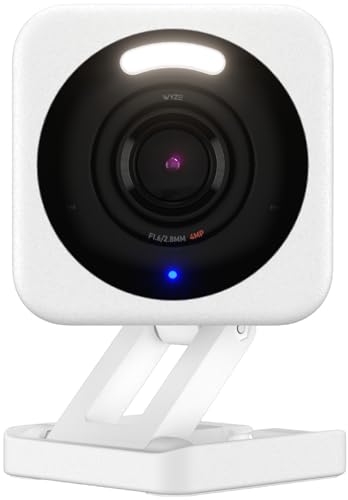
Wyze Cam v4 — Best Office Workhorse
If a small office could only standardise on one camera, this is the one the arithmetic keeps choosing. The Wyze Cam v4 delivers a picture sharp enough for entrance identification, records to a microSD card inside its own body so no hub and no plan stand between the office and its history, and costs little enough that covering three viewpoints is a decision rather than a project. In a business where the camera budget competes with the coffee budget, that combination is not a compromise — it is the strategy.
Assign it the fixed, honourable jobs. Over the entrance it identifies callers in colour through the day and by infrared after closing. At the till its wired power supports the continuous or dense event recording that a cash point deserves, with the card holding a rolling local archive an owner can pull after a discrepancy surfaces. In the stockroom doorway it simply watches the threshold, which is where stockroom questions are always answered. Its small spotlight can light a dark corridor clip usefully, or be switched off where it would glare.
The stewardship it asks is modest and should be accepted knowingly. The app will try to sell the wider Wyze world to whoever manages it; the finest detection refinements live in the optional plan; and local-first recording means the owner, not a cloud, is responsible for checking that cards are healthy. Build a five-minute monthly habit — glance at each camera’s stored timeline, confirm the clocks, apply updates — and these bricks will out-serve installations that cost the business three times as much.
- Power: wired, suited to continuous office duty
- Storage: microSD card inside every camera
- Picture: high-resolution with colour night option
- Placement: indoor or sheltered outdoor positions
- Extras: small spotlight for dark corridors
Strengths
- Three viewpoints for the price of one premium camera
- History stays on the premises, no rent owed
- Wired reliability through every closing time
Trade-offs
- App promotes the wider Wyze catalogue
- Smartest detection sits in the optional plan
- Cards need an owner’s monthly health check
Best for: cost-conscious offices covering door, till and stockroom with wired local recording. Not suited for: managers who want a fully managed cloud archive with no upkeep at all

TP-Link Tapo C210 — Best Pan-and-Tilt for Open-Plan Rooms
Open-plan offices defeat fixed cameras by shape: the room is one space, but the questions live in different corners — the entrance lobby this morning, the meeting end this afternoon, the printer and post corner by evening. The Tapo C210 answers with a motorised head that pans and tilts across the whole floor from a single high corner, letting a manager check the entire room from one device and letting the camera patrol preset positions through the empty night hours.
Its manners suit a workplace. Motion tracking can follow an after-hours intruder across the floor, keeping the event in one continuous clip instead of a relay race between fixed views. Privacy mode turns the lens away on command or schedule — the feature to demonstrate to staff on day one, because an office camera that visibly stands down during working hours earns a trust that no policy document can buy. Local card recording keeps the archive on site, and Tapo’s app manages several cameras without demanding a subscription for basic competence.
Respect the geometry’s limit: while the head is admiring the meeting corner, the entrance is unwatched, so a pan-and-tilt should be the room’s overview rather than its only witness. Pair it with one fixed camera at the door — the Wyze above is the natural partner — and keep its night expectations honest, since its infrared reach covers an office floor rather than a warehouse. Deployed as the roaming eye above two fixed sentinels, it gives a small office a coverage map that feels professionally planned.
- Movement: pan-and-tilt with preset guard positions
- Tracking: follows movement across the room
- Storage: local card recording, cloud optional
- Privacy: lens-away mode for working hours
- Audio: two-way talk for deliveries and warnings
Strengths
- One device surveys an entire open-plan floor
- Visible privacy mode builds staff trust
- Local archive without compulsory subscription
Trade-offs
- Cannot watch two corners at the same moment
- Night reach suits offices, not warehouses
- Motor adds a moving part to maintain
Best for: open-plan offices wanting one roaming overview above fixed door coverage. Not suited for: tiny offices where a single fixed camera already sees everything
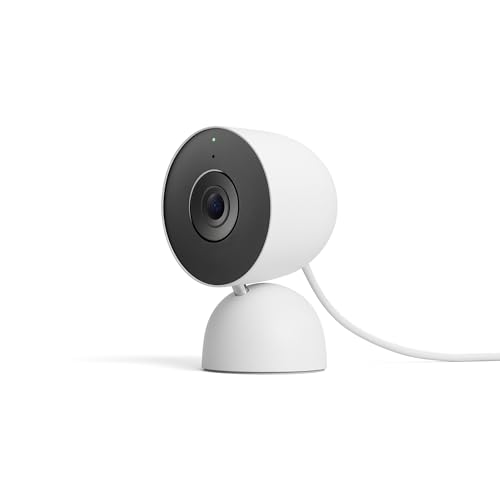
Google Nest Cam Indoor (Wired, 3rd Gen) — Fastest Event Searching
Some office cameras are bought for their lenses; this one is bought for its index. The Nest Cam records an always-awake wired view and Google’s intelligence files the day into labelled events — people, vehicles at the glass frontage, animals, packages — inside a history a manager can search by type rather than scrub by thumb. When the question is specific and the morning is busy, that difference is measured in real minutes: the courier’s visit found before the customer on hold gives up, the after-hours entry isolated from a night of moths and headlights.
Put it where comprehension matters most. At a reception or entrance with a glass door, its handling of mixed light — bright street behind a visitor’s silhouette — keeps faces usable where lesser cameras surrender to contrast. Familiar-face style sorting can learn the regular cast of staff and couriers, softening the alert stream to the genuinely unusual. Two-way talk through the app handles the locked-door conversation with a delivery driver gracefully, from wherever the owner happens to be.
The arrangement’s price is structural, so read it before affection sets in: the searchable history lives in Google’s subscription, the free window is brief, and there is no card slot to forgive a cancelled plan. An office already inside Google’s ecosystem, or one whose manager’s time is genuinely the scarcest resource in the building, will find the trade rational. An office counting every monthly outgoing should take the Wyze or Tapo and spend the difference on a second viewpoint.
- Power: wired and always awake
- Intelligence: labelled events with searchable history
- Picture: strong dynamic range for glass doors
- Audio: natural two-way conversation quality
- Ecosystem: Google Home app and displays
Strengths
- Finds a named event in seconds, not footage-hours
- Alerts sorted into a stream a manager can triage
- Handles backlit entrances better than rivals
Trade-offs
- Searchable history depends on the subscription
- No local recording route exists
- Ties the office to Google’s platform terms
Best for: busy owner-managers whose scarcest resource is review time. Not suited for: businesses refusing monthly plans on principle

Arlo Essential Indoor Pan Tilt — Best Privacy Shield for Staff Areas
Every office camera purchase includes a second, invisible purchase: the staff’s opinion of it. The Arlo Essential Indoor Pan Tilt is the pick that takes that transaction seriously. Its privacy shield physically covers the lens — visibly, verifiably, in a way a new starter can be shown during induction — and its pan-and-tilt head covers connected spaces, the reception that flows into the workroom, the studio that opens into storage, from one device that can demonstrably stand down when the working day begins.
Arlo’s platform polish supports the diplomacy. Detection and alerts are mature, two-way talk is clear enough for the doorstep negotiation with a courier, and the wider Arlo family — doorbells, outdoor cameras, floodlights — lets an office grow a coherent system outward from this indoor citizen without changing apps. For a customer-facing small business, where the camera must look as professional as the premises feel, the hardware’s tidy presence counts more than specification tables admit.
Buy it with the plan priced in, because Arlo’s recorded history and richest detection live behind the subscription and there is no local card to soften a cancellation. Offices that accept that arithmetic get the most staff-legible camera in this guide. Offices that do not should look at the Tapo, which offers a software version of the same privacy gesture with local recording attached, and accept a little less platform sheen in exchange.
- Privacy: physical shield covering the lens
- Movement: pan-and-tilt across connected rooms
- Detection: mature person-style alerts under plan
- Audio: clear two-way talk for the doorstep
- Ecosystem: Arlo doorbells and outdoor siblings
Strengths
- A stand-down gesture every employee can verify
- One camera covers reception flowing into workroom
- Platform polish suits customer-facing premises
Trade-offs
- Recorded history requires the Arlo plan
- No local storage fallback at all
- Shield discipline depends on management habit
Best for: customer-facing offices where staff trust is part of the purchase. Not suited for: owners determined to pay for a camera exactly once
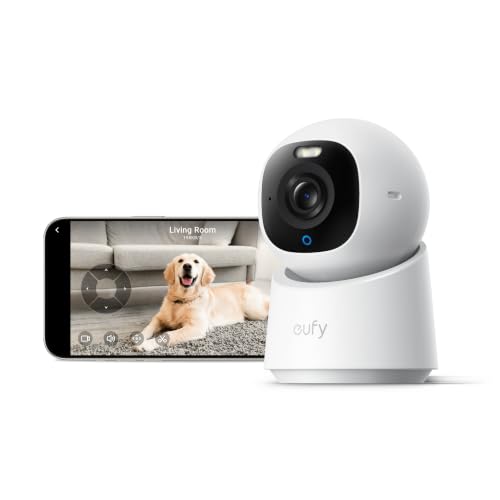
eufy 4K Indoor Camera E30 — Sharpest Subscription-Free Detail
Some office viewpoints justify maximum detail: the counter where contracts are signed and packages change hands, the entrance of a clinic or studio where a disputed arrival time matters, the workshop bench where high-value items are repaired. The E30 is this guide’s detail pick, recording in 4K so a recorded moment can be zoomed afterwards and still answer questions, while its person and pet detection runs on the camera itself and its archive lives on local storage under the business’s own roof.
The pan-and-tilt head gives that detail mobility, sweeping from the counter to the door on demand or holding a preset guard position through the night. Colour night viewing covers the lamplit edges of the working day, infrared takes the closed hours, and the absence of a compulsory plan means the camera’s competence on day one is its competence in year three, unaffected by anyone’s pricing department. For an owner burned before by a gadget whose features evaporated with a subscription, that stability is the product.
Its compromises are ecosystem-shaped rather than optical. The app asks more patience than Google’s, integrations with the big voice platforms are thinner, and a business standardising on one vendor’s cloud archive will find the E30 determinedly independent. As the designated high-detail witness inside a locally recorded system — or as the only camera in a one-room practice — it is the most satisfying device here simply to own outright.
- Picture: 4K recording for after-the-fact zooming
- Movement: pan-and-tilt with preset positions
- Detection: person and pet recognition on-device
- Storage: local recording; cloud strictly optional
- Night: colour and infrared modes
Strengths
- Detail that survives cropping a recorded moment
- No plan between the office and its archive
- Detection keeps working through internet outages
Trade-offs
- App polish trails the largest platforms
- Assistant integrations are comparatively thin
- Independence cuts both ways for cloud users
Best for: practices and counters where recorded detail settles disputes. Not suited for: offices standardising everything inside one cloud platform

REOLINK Argus PT Ultra — Best for the Yard and Rear Door
Every small office has an outside it worries about and rarely wires: the rear door onto the alley, the small car park, the delivery yard where pallets wait. The Argus PT Ultra is built for exactly that territory. Its motorised 4K head sweeps the whole yard from one mounting point, tracks a person or vehicle across the frame, and runs on battery with a solar panel option that can stretch charging visits into a seasonal non-event when the panel catches honest sun.
Reolink’s local-first philosophy suits business ground. Recording stays on the camera or its hub rather than in a rented cloud, detection separates people, vehicles and animals so the owner’s phone buzzes for the van that matters rather than the cat that does not, and the built-in spotlight and siren give the rear door an active voice at 11 p.m. — often the difference between a completed break-in attempt and a abandoned one. For workshops, small warehouses and offices with outbuildings, one of these replaces a small fleet of fixed outdoor cameras.
Place it with its limits engineered in. A panning camera can be studying the far fence when something begins at the door beneath it, so the rear entrance itself still deserves a fixed wired view indoors. The unit is substantial, the solar promise depends on the panel’s actual sky, and battery discipline in a shaded, sunless installation remains a calendar item. As the wide outdoor sentinel of a system whose interior is covered by the picks above, it completes the map most small offices draw and few finish.
- Form: battery pan-and-tilt for outdoor duty
- Picture: 4K with colour night view and spotlight
- Power: battery, solar panel pairing available
- Detection: person, vehicle and animal, with tracking
- Extras: siren and spotlight deterrence
Strengths
- One post watches a whole yard or car park
- Solar pairing can end routine charging visits
- Tracking keeps a crossing subject in frame
Trade-offs
- May be facing away when a second event starts
- Too bulky for a neat reception area
- Solar depends on the panel’s real sunlight
Best for: workshops and offices with yards, alleys and rear doors to watch. Not suited for: indoor-only premises with no outside territory
What Should the Morning Review Look Like for a Busy Owner?
The review that survives contact with a real working week is short, scheduled and mostly about exceptions. Two minutes with coffee: open the overnight event list, glance at the thumbnails, and let anything ordinary — the cleaner’s round, the owner’s own late departure — pass without opening a single clip. What earns a click is the event that breaks pattern: an entry outside the schedule, a long presence in the stockroom, a vehicle in the yard at an hour when the yard should be scenery. Pattern-breaking review scales because it asks the owner to notice one strange thing, not to audit eight quiet hours.
Weekly, give it ten minutes and a different question: not what happened, but whether the system still works. Check that each camera’s stored history reaches back as far as your retention decision says it should, that the yard camera’s battery or solar charge is healthy, that nobody’s new shelving has eaten a viewpoint. Most office camera failures are discovered by this small ritual weeks before they would otherwise surface — which is to say, before the night they matter.
Monthly, review the cast of characters. Familiar faces the system has learned, staff accounts still active, a cleaner’s changed schedule that now reads as an anomaly every Thursday — these drifts are normal, and pruning them keeps the alert stream believable. An owner who trusts the alerts acts on them; an owner buried in false familiarity mutes the app, and a muted system is a wall ornament with a recording habit. The review routine is not administration added to the cameras. It is the mechanism by which the cameras remain security at all.
Deliveries, Visitors and the Evidence an Office Actually Uses
In practice, the footage a small office replays most is not crime at all. It is the delivery that the supplier swears arrived complete, the visitor who insists their appointment was Tuesday, the customer certain they left an umbrella, a bag, a signed form. An entrance camera with an honest clock settles these small disputes in minutes, and the goodwill saved across a year of them quietly exceeds the camera’s cost. This is why the entrance pick’s picture and timestamp discipline matter more than its night heroics, and why searching by time — arriving with the delivery note’s hour already known — should be effortless in whichever app you choose.
Build the habit that makes that evidence usable: when something worth keeping happens, export the clip the same day into the business’s ordinary files, named by date and event, rather than trusting the camera’s rolling archive to still hold it when the dispute matures. Archives overwrite; disputes ripen slowly. The two-minute export is the cheapest insurance in this entire guide, and the offices that adopt it stop having the argument about what the camera might have seen.
Share carefully when you share at all. A clip sent to a supplier should show the delivery, not the whole morning’s customers; most apps allow trimming, and the discipline of sending the minimum is both courtesy and data hygiene. Keep a simple log of what was exported, to whom and why. It takes seconds, it impresses insurers and investigators disproportionately, and it turns the camera system from a gadget into a business record — which, in the end, is the standard a small office should hold it to.
How Do You Install Office Cameras Over One Weekend?
Walk the building at closing time on Friday with a notebook before touching a drill. Stand at each planned position, look along the intended view, and write down the question that camera must answer, in words — who entered, what happened at the drawer, did the rear door open. Photograph each view with your phone from the camera’s height; the picture you get is the honest preview of the picture you are buying, including the glass-door glare and the corridor’s dark end that the spec sheet never mentioned.
Saturday is for the wired backbone: entrance, till, any viewpoint deserving continuous recording. Run cables where they cannot be casually reached or unplugged, seal any penetration that meets weather, and label both ends of every run with the camera’s question rather than its model name. Set the clocks and time zone before the first recording exists, because an archive whose timestamps drift is an archive that argues with every other record the business keeps, from till receipts to alarm logs.
Sunday belongs to configuration and consent. Name each camera by its question, draw motion zones that retire the street and the neighbouring unit, set the arming schedule to the office’s real closing routine, and invite the staff accounts with the least access each role needs. Then hold the five-minute staff briefing — cameras exist, here is where, here is what is never recorded, here is who can view — and put the same sentences in the office handbook. Installation ends when the humans understand the system, not when the last screw tightens.
How Do the Six Office Picks Compare Side by Side?
Match the camera to the viewpoint’s question first and its power source second; the table’s last column is the mistake each pick most easily becomes when it is given the wrong chair.
| Pick | Form | Strongest suit | Watch out for |
|---|---|---|---|
| Wyze Cam v4 | Fixed, wired | Door, till and stockroom coverage cheaply | Neglected card checks |
| TP-Link Tapo C210 | Pan and tilt | Open-plan overview with privacy mode | Sole witness at the door |
| Google Nest Cam Indoor | Fixed, wired | Searchable event history | Lapsed plan, lost archive |
| Arlo Essential Indoor Pan Tilt | Pan, tilt, shield | Staff-legible privacy in shared rooms | Plan priced out of the deal |
| eufy 4K Indoor Camera E30 | Pan and tilt | Maximum detail, no subscription | Platform isolation |
| REOLINK Argus PT Ultra | Outdoor pan-tilt | Yard, car park and rear door | Facing away at the key moment |
What Mistakes Make Office Cameras a Liability Instead of a Witness?
Recording the wrong rooms is the error with legal and human interest attached. Cameras have no business in toilets, changing areas or anywhere staff have a reasonable expectation of privacy, and audio recording of conversations is restricted in many places in ways silent video is not. The defensible map is entrances, cash points, stock thresholds and yards — places where the camera’s purpose is the building’s security — announced to staff, signposted for visitors, and documented. Anything beyond that map should be argued for in writing before it is installed, and most such arguments lose.
Leaving the admin password as the installer’s default, or sharing one login across the whole business, converts a security system into an attack surface with lenses. Give each viewer their own account, use two-factor sign-in, remove access the week a staff member leaves, and keep firmware current. The office that cannot be bothered with this paragraph owns cameras that watch the business on behalf of whoever guesses first — a category of viewer no guide can recommend.
Buying cameras before counting questions produces the third classic failure: a ceiling full of overlapping views of the open floor and no camera on the stockroom door, because the bundle was on offer and the map was never drawn. The fix costs one notebook page. List the events the business actually fears or disputes — break-in, till discrepancy, delivery argument, yard damage — assign each a viewpoint, and buy exactly that list. Cameras without a question become décor that records, and décor is cheaper without the lens.
Never reviewing the system is the slow mistake that completes the set. A camera whose view filled with stacked boxes in March has been guarding cardboard all year. Put a monthly five-minute pass in the diary: open each view, confirm it still matches its name, check the stored history reaches back as far as the retention you chose, and apply waiting updates. Security in a small office is not an installation; it is a small recurring habit that an installation makes possible.
How Long Should a Small Office Keep Its Footage?
Retention should follow the business’s discovery speed. A till discrepancy surfaces within days, a stock shrinkage pattern within a stocktake cycle, a disputed delivery within the supplier’s claims window, and an insurance question after an incident may arrive weeks later with a reference number attached. For most small offices, a month of accessible history covers the realistic pattern with room to spare; businesses with quarterly stocktakes or slow-moving disputes should stretch the stockroom and entrance views further and let the yard camera forget sooner.
Local recording makes retention a purchasing decision about card or drive size rather than a subscription tier, which is one more reason the local-first picks suit lean operations. Whatever you choose, write it down next to the camera map: which viewpoints record continuously, which record events, how far back each reaches, and who may export a clip and for what. When an insurer, an accountant or a police officer asks — usually on the worst week of the year — that single page is the difference between a system and a shrug.
A Closing Note on Cameras and the People Who Work Beside Them
The offices that get this right treat the camera system as part of the workplace’s furniture of trust: declared, bounded, maintained, and boring. Staff who were briefed before the first recording, who can point to the rooms that are never watched, and who see the footage used fairly — to settle the delivery dispute, not to audit tea breaks — stop noticing the cameras within a month, which is precisely the outcome a healthy system wants. The camera that remains a topic of staffroom conversation after a month is a management problem wearing a lens, and no resolution upgrade will fix it.
How Do Office Cameras Sit Alongside Locks, Lights and Insurance?
A camera is the third layer of a small office’s physical security, not the first. The first is the building itself — locks that resist, a rear door that is not the soft option, windows whose latches mean something. The second is light and visibility: a yard a passer-by can see into, an entrance that is lit without blinding the camera above it. Cameras document what the first two layers fail to prevent, and they deter the opportunist who prefers an unwatched target. Money spent reversing that order — lenses everywhere, a stockroom door that opens with a firm push — buys excellent footage of an easy burglary.
Insurers think in exactly those layers, and a camera system earns its discount, where one exists, as part of a documented whole: alarm maintained, locks graded, lighting working, footage retained for a stated period and viewable on request. Tell your insurer what you have installed rather than hoping a discount finds you, keep the camera map and retention page with the policy documents, and test once a year that a named human can actually retrieve a named clip. The test takes four minutes and is the entire difference between owning evidence and owning equipment.
Finally, rehearse the bad morning once, calmly, before it happens for real. Arrive to a simulated break-in: who is called, which clips are exported before the rolling archive moves on, what the insurer and police are handed, who changes the access list if a keyholder’s phone is missing. Offices that have walked that hour in peacetime perform it in crisis without improvisation. The cameras will do their part — they are patient, literal and awake. The rehearsal makes sure the humans do theirs.
What About Multi-Site Owners, Pop-Ups and Seasonal Premises?
A business with two small sites — the original shop and the unit across town, the studio and the storage space it outgrew into — should resist the temptation to run two unrelated systems bought in two unrelated years. Standardising on one family of cameras across both premises means one app on the owner’s phone, one set of habits, one spare camera on the shelf that fits anywhere. The local-recording picks in this guide travel especially well, because a new site needs no account restructuring: install, name by question, set the retention, brief whoever works there.
Temporary premises argue the opposite way on hardware and the same way on discipline. A pop-up shop, a market-season kiosk or a short-let workshop wants cameras that mount without damage, run from a plug or a battery, and leave with the stock when the lease ends — the battery and compact picks earn their keep here. What should not be temporary is the paperwork: even a six-week premises deserves the one-page map, the staff sentence, and an end date on which recordings are exported for the business’s records and the cameras wiped for their next posting.
Seasonal closures deserve a line of their own, because an office watched most carefully when it is busiest often goes dark exactly when it stands empty for a month. Before any long closure, walk the system as the monthly ritual writ large: batteries charged or solar panels cleaned, cards with room to roll, alerts routed to whoever actually holds the keys this season, and a neighbour or landlord who knows the cameras exist and whom to call. The break-in that matters is disproportionately likely to choose the quiet weeks, and it should find the system at its most awake.
Final Recommendation
Build the core from Wyze Cam v4 units at the entrance, the till and the stockroom door, where wired power and local cards give a small office its archive without rent. Add the Tapo C210 or the Arlo pan-tilt where one room must be surveyed whole, choosing between them on whether local recording or a physical shield matters more to your staff. Give the E30 to the counter where detail settles arguments, and the REOLINK to the yard that every plan forgets.
If review time is your scarcest resource and the business already lives in Google’s world, the Nest Cam’s searchable history can anchor the entrance instead — priced honestly, plan included. Whichever cast you choose, draw the map first, brief the staff before the first recording, and keep the monthly five-minute pass. An office camera system earns its keep in the one week everything goes wrong, and it earns it entirely on habits built during the ordinary weeks.
Related guides
Frequently Asked Questions
How many cameras does a small office really need?
Most small offices land between three and five: the entrance, the cash or stock point, the rear door or corridor, and optionally an open-plan overview and a yard view. Count questions rather than corners — each camera should own a named event the business fears or disputes. A sixth camera usually duplicates an existing answer while adding alerts, storage and upkeep, so add viewpoints only when a real question goes unanswered by the current map.
Are office cameras legal to use with staff present?
Generally yes for security purposes in work areas, with duties that vary by place: tell staff the cameras exist and where they point, keep them out of private spaces entirely, be careful with audio, and handle recordings as business records with limited access. This guide is not legal advice — check your local rules and any employment agreements, put the camera policy in the handbook, and let the privacy-mode and shield picks do visible good faith on the wall.
Should an office record continuously or only on motion?
Match the mode to the viewpoint. The till and the entrance during opening hours justify continuous or dense recording, because disputes there turn on sequence and context that event clips can miss. Stockroom doors, corridors and yards are usually served well by event recording, which stretches storage and shortens review. Local-card cameras make the continuous choices affordable; cloud plans charge for them, which should be priced per viewpoint rather than assumed.
Who in the business should be able to view the cameras?
As few people as the operation allows: typically the owner and one deputy, each with their own account, plus temporary access granted deliberately and removed on schedule. Cleaners, contractors and junior staff rarely need viewing rights even when they appear in frame. Review the access list whenever someone leaves or changes role — the leaver’s phone in the car park is the most common real-world failure of office camera security.
What happens to office cameras when the internet fails?
Locally recording picks — Wyze, Tapo, eufy and REOLINK in this guide — keep recording through an outage; what pauses is remote viewing and cloud backup. Cloud-dependent cameras may stop building history entirely until service returns. If your premises’ connection is unreliable, or your insurer cares about continuity, weight the local-first picks heavily and consider a router with a mobile-data fallback for alerts.
Can these cameras replace an alarm system?
No — they complement one. Cameras witness, identify and document; alarms detect intrusion through doors and glass and raise an immediate response. The strongest small-office setup pairs both, with cameras covering the alarm’s zones so an activation comes with pictures attached. Several picks here add spotlights and sirens that discourage, but discouragement is not detection, and an insurer will usually ask about the alarm first.
Can one camera cover both the entrance and the till?
Only in the smallest single-room offices, and even there it compromises both jobs: the entrance wants a face-level view of people arriving, the till wants a tight frame on hands and drawer, and one lens placed between them usually identifies nobody and reconstructs nothing. Two inexpensive wired cameras — the Wyze pattern in this guide — outperform one premium camera stretched across both questions, which is the recurring arithmetic of this whole article.
Should office cameras record sound?
Decide deliberately and default to caution. Audio rules are stricter than video rules in many places, staff conversations are not the business’s security concern, and a microphone rarely adds evidence that the picture lacks. Most small offices do best with audio recording off, two-way talk available for live moments at the door, and the decision written into the staff policy so nobody has to guess what the red light means.
What is the cheapest credible setup for a one-room practice?
One wired camera with local recording aimed at the entrance and the reception counter’s transaction zone — the Wyze Cam v4 or the eufy E30 from this guide — plus the owner’s phone as the viewing screen. That single viewpoint answers who came in and what changed hands, records through internet outages, and asks for no subscription. Add the second camera, over the rear or stock door, when the building rather than the budget asks the next question.
How should an office handle a camera request from police or an insurer?
Cooperate through the front door: confirm what period and viewpoint are being asked for, export exactly that material, note what was handed over and when, and keep your own copy. A system with named cameras, honest clocks and a written retention page makes this a ten-minute task instead of an archaeological dig. If a request reaches beyond your own premises or your own incident, take advice before complying — helpfulness and other people’s privacy can both be served by checking.
Do office cameras need signs for visitors?
In many places, yes — and everywhere, signs are simply good practice. A small notice at the entrance saying recording is in use for security, with a contact for questions, satisfies most legal duties, reassures honest visitors, and quietly discourages dishonest ones. Keep the wording factual and the placement honest, at the door rather than discovered at the desk. Several owners find the sign does a noticeable share of the deterrent work the cameras get credited for.
When should an office upgrade a camera rather than add another?
Upgrade when an existing viewpoint keeps failing its own question — faces unidentifiable at the entrance, the till frame too wide to reconstruct an event — because a sharper or better-placed camera at the same post fixes the evidence where it is actually used. Add when a new question has genuinely appeared: a second entrance, a new stock area, a yard the business did not previously hold. The distinction keeps systems lean, because most offices need better answers more often than they need more questions.
Can a landlord or a neighbouring business share our cameras?
Share a view, not an account. Where a yard or an entrance genuinely serves two premises, most platforms let you grant one named person access to one named camera, which keeps the arrangement bounded and revocable. Put the understanding in writing — who views, for what, and when it ends — and resist the informal password swap that outlives the neighbourly moment by years.
Related Guides
Round out the premises with the best cameras for security systems the best cameras for gas station the best document cameras for business.


