The best amplified indoor antennas with ATSC 3.0 ready reception solve a simple problem: the broadcast towers are far away, the walls are in the way, and the signal arriving at the TV is too weak to hold a picture. An amplified indoor antenna adds a low-noise booster to a flat or hover-style element, lifting weak UHF and VHF signals to a level the tuner can lock onto. ATSC 3.0, the NextGen TV standard now rolling out across the United States, uses the same UHF and VHF bands as the older ATSC 1.0 broadcasts, so an antenna does not need a new kind of element to receive it. What it needs is the range, the amplification, and the placement flexibility to deliver a clean signal to a TV with an ATSC 3.0 tuner. The six antennas below were verified as new listings with their full titles checked, and any renewed or used listing was dropped, so the links here lead to new antennas with their amplifiers and cables complete.
The six antennas below are all amplified indoor models with 4K and NextGen TV support stated in their listings, and each one was verified as a new, non-renewed listing with its full title checked before it was included. The set mixes flat panel antennas that stick to a wall or window with hover-style antennas that sit on top of the TV, and ranges from 40 to 60 miles. None of them decodes ATSC 3.0 by itself, because decoding is the tuner's job; what they do is make sure the tuner has a signal worth decoding.
In this guide
Quick picks: best amplified indoor antennas with atsc 3 0 ready
| # | Product | Where to buy |
|---|---|---|
| 1 | Winegard FlatWave FL5500A Amplified Indoor TV Antenna | Check on Amazon |
| 2 | Winegard FlatWave Amped Pro TH-3000 | Check on Amazon |
| 3 | GE Hover Amplified HD Digital TV Antenna | Check on Amazon |
| 4 | Philips Hover Amplified HD TV Antenna | Check on Amazon |
| 5 | RCA Amplified Indoor Flat HDTV Antenna ANT1360E | Check on Amazon |
| 6 | Naxa NAA-308 High-Power Amplified Antenna | Check on Amazon |
How the picks were chosen
The picks were chosen on five points. First, amplification: every antenna here has a built-in amplifier or signal booster, because the keyword is amplified indoor antennas and an unamplified panel would not meet it. Second, indoor design: flat or hover form factors that sit on a wall, a window, or the top of the TV, with no outdoor mounting required. Third, stated range: 40 to 60 miles, which covers metro and suburban homes, the places where indoor antennas are actually used. Fourth, NextGen TV support: each listing states 4K, Ultra-HD, or NextGen TV compatibility, which is the practical marker that the antenna is sold for current broadcasts rather than old stock. Fifth, verification: every ASIN was checked by its full listing title, and any renewed or used listing was dropped, so the links here lead to new antennas.
Quick comparison
| Product | Key detail | Best for |
|---|---|---|
| Winegard FlatWave FL5500A Amplified Indoor TV Antenna | 60-mile amplified flat antenna, NextGen TV | Homes within 60 miles of the towers that want a discreet indoor panel |
| Winegard FlatWave Amped Pro TH-3000 Indoor TV Antenna | 60-mile amplified antenna with a signal meter | Homes that want placement guidance built into the antenna |
| GE Hover Amplified HD Digital TV Antenna | Hover design sits on top of the TV, amplified | TV-top installs where a wall panel is unwanted |
| Philips Hover Amplified HD TV Antenna SDV7219N/27 | Philips hover antenna with booster and AC adapter | Simple top-of-TV setups with everything in the box |
| RCA Amplified Indoor Flat HDTV Antenna ANT1360E | 40-mile amplified flat antenna, 4K and 8K | City homes close to the broadcast towers |
| Naxa NAA-308 High-Power Amplified Antenna for HDTV/ATSC | High-power amplified antenna for HDTV and ATSC | Weak-signal homes that want strong amplification and ATSC wording |
Best amplified indoor antennas with ATSC 3.0 ready reception: what matters most
Range ratings are the first thing to read and the first thing to discount. A 60-mile rating is measured under good conditions with a clear line to the tower, and a real home with walls, trees, and interference will see less. Amplification helps most at the edge of reception, where it lifts a weak but clean signal above the tuner's noise floor; it cannot create a signal that is not there, and too much gain can overload a tuner when the towers are close. Placement matters as much as the antenna: a window facing the towers usually beats a wall, height beats low, and a few feet of movement can be the difference between a solid lock and a breaking picture. VHF versus UHF matters too: many stations still broadcast on VHF, so an antenna that only does UHF well will miss channels. Finally, the cable and the amplifier power matter: a long coax run loses signal, and an amplifier that needs its own power adapter must sit near an outlet. The number of televisions matters too: one antenna can feed several televisions through a splitter, but splitting divides the signal, so a weak signal needs amplification before the split rather than after it.
Winegard FlatWave FL5500A Amplified Indoor TV Antenna
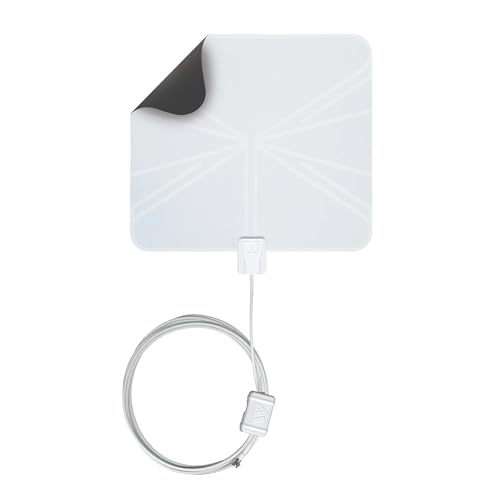
The FlatWave FL5500A is the reference flat antenna in this guide, and the one the rest are measured against. It is a thin, dual-color panel that mounts on a wall or window, with a built-in amplifier and a 60-mile range rating that suits metro and suburban homes. Winegard states NextGen TV support directly, which is what the ATSC 3.0 part of this roundup needs, and the multidirectional design means it does not have to be aimed precisely at the towers. It is the pick for the common case: a home within 60 miles of the towers that wants a discreet panel and a stable picture. The dual-color design is a practical detail rather than a cosmetic one: the panel can be flipped to the color that blends with the wall or the window frame, so the antenna disappears into the room instead of standing out against it.
Key specs: Amplified; 60-mile range; multidirectional; ultra-thin; dual-color; indoor rated; 4K Ultra-HD and NextGen TV. The ultra-thin dual-color panel mounts on a wall or window, and the 60-mile range rating suits metro and suburban homes.
Strengths:
- 60-mile range covers most metro and suburban homes
- Ultra-thin panel mounts discreetly on a wall or window
- Stated NextGen TV support for ATSC 3.0 broadcasts
Trade-offs:
- Needs mains power for the amplifier, so it must sit near an outlet
- Flat panel placement is fussy; a few inches can change reception
- 60-mile rating assumes good conditions and a clear path
A home within 60 miles of the broadcast towers that wants a proven flat amplified antenna with NextGen TV support and no outdoor install. It is also the safest first purchase in this guide, because it is the most proven flat antenna here.
Best for: Homes within 60 miles of the towers that want a discreet indoor panel
Not suited for: Fringe homes beyond 60 miles, where an outdoor antenna is the honest answer
Check price on Amazon: Winegard FlatWave FL5500A Amplified Indoor TV Antenna
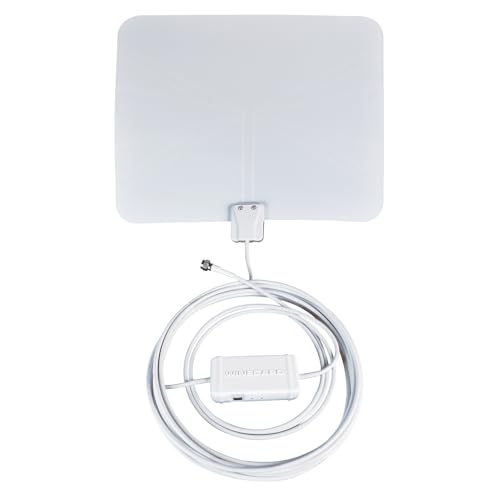
Winegard FlatWave Amped Pro TH-3000 Indoor TV Antenna
The Amped Pro TH-3000 is the FlatWave with a tool built in: a smart signal meter that shows, in real time, whether the antenna is in the right spot. That single feature fixes the most common indoor antenna problem, which is guessing where to put the panel. The rest of the package matches the FL5500A: 60-mile range, amplified, ultra-thin, dual-color, multidirectional, and NextGen TV support. For anyone who has moved a flat antenna around the room and watched the picture break up, the meter turns a frustrating chore into a two-minute job. The smart signal meter is the feature that justifies this antenna over the standard FlatWave, because it turns placement from a guessing game into a measurement: move the panel, watch the meter, and stop where the signal is strongest.
Key specs: Amplified; 60-mile range; multidirectional; smart signal meter; ultra-thin; dual-color; indoor rated; 4K Ultra-HD and NextGen TV. The smart signal meter shows the best placement in real time, and the 60-mile amplified range matches the standard FlatWave.
Strengths:
- Signal meter shows the best placement instead of guessing
- Same 60-mile amplified performance as the standard FlatWave
- Thin dual-color panel blends into a living room
Trade-offs:
- The meter adds cost over the standard FlatWave
- Still an indoor antenna; it cannot beat a hill or a distant tower
- Needs power for the amplifier and the meter
A home that has struggled with antenna placement and wants a meter to find the strongest signal quickly. It suits a home where placement has already been a struggle, because the meter removes the guesswork.
Best for: Homes that want placement guidance built into the antenna
Not suited for: Anyone who already knows their best window and wants the cheapest panel
Check price on Amazon: Winegard FlatWave Amped Pro TH-3000

GE Hover Amplified HD Digital TV Antenna
The GE Hover takes a different approach to the placement problem: instead of sticking to a wall, it sits on top of the television. That puts the element high, keeps the cable run short, and removes the wall-mount chore entirely. The amplifier is built in, the listing states VHF and UHF support with 4K and 1080P, and the 5-foot coax cable is long enough to reach the tuner without a trip to the store for an extension. It is the pick for a living room where a flat panel on the wall would look wrong and the TV itself is the natural home for the antenna. The 5-foot coax cable is long enough to reach the tuner from the top of most televisions without an extension, and the hover form keeps the antenna high, which is where indoor antennas work best.
Key specs: Amplified; hover design mounts on top of the TV; long range; supports 4K 1080P HDTV, VHF and UHF; indoor amplified signal booster; 5-foot coax cable; model 37075. The 5-foot coax cable reaches the tuner from the top of most televisions, and the hover design needs no wall mounting.
Strengths:
- Sits on top of the TV, so no wall mounting and a short cable run
- Built-in amplifier with stated VHF and UHF support
- Simple setup: place it, plug in the booster, scan for channels
Trade-offs:
- Top-of-TV placement only works if the TV has a flat top and space
- Hover position may be lower than a high window, which can cost range
- 5-foot cable limits how far the antenna can move from the TV
A living room where the antenna should sit on the TV rather than on the wall, with the towers within normal indoor range. It suits a living room where the television is the natural home for the antenna and a wall panel would look wrong.
Best for: TV-top installs where a wall panel is unwanted
Not suited for: Homes needing a high window placement to clear an obstruction
Check price on Amazon: GE Hover Amplified HD Digital TV Antenna

Philips Hover Amplified HD TV Antenna SDV7219N/27
Philips answers the same top-of-TV idea with the SDV7219N/27, a hover antenna with its own signal booster and AC adapter in the box. The design is the same pitch as the GE Hover: the antenna lives on the television, the booster lifts weak signals, and the whole thing sets up in minutes. Philips states 4K and 1080P support with VHF and UHF reception, and the included adapter means there is no separate power supply to buy. Choose between the GE and the Philips on price and availability; both do the same job, and both are honest amplified indoor antennas. The included AC adapter is worth noting because some hover antennas ship without one and leave the buyer hunting for a power supply; here the booster and its power are in the box, and the setup is complete out of the box.
Key specs: Amplified; hover design mounts on top of the TV; long range; supports 4K 1080P HD, VHF and UHF; signal booster; coax cable and AC adapter included; model SDV7219N/27. The signal booster and AC adapter are included in the box, and the model number is SDV7219N/27.
Strengths:
- Top-of-TV design with no wall mounting needed
- Signal booster and AC adapter included in the box
- Stated VHF and UHF support with 4K and 1080P
Trade-offs:
- Top-of-TV height may be lower than a good window spot
- Hover form suits flat-top TVs best
- Amplifier needs a nearby outlet
A home that wants a complete top-of-TV kit with the booster and power adapter included and no extra parts to buy. It suits a buyer who wants everything in the box, with no extra power supply or cable to buy separately.
Best for: Simple top-of-TV setups with everything in the box
Not suited for: Fringe reception, where a higher window or outdoor antenna is needed
Check price on Amazon: Philips Hover Amplified HD TV Antenna

RCA Amplified Indoor Flat HDTV Antenna ANT1360E
The RCA ANT1360E is the compact pick of the set. It is a flat amplified indoor antenna with a 40-mile range rating, multi-directional VHF and UHF reception, and 4K and 8K support stated in the listing. Forty miles is less than the 60-mile models here, but it is an honest rating for city and near-suburb homes, and the smaller panel is easier to place and easier to hide. If the towers are within 40 miles, this antenna gives up nothing in picture quality and costs less in space and fuss than the bigger panels. The 40-mile rating is the honest one for a city antenna, and the compact flat panel is easier to place on a small wall or a narrow window than the larger 60-mile panels, which matters in a small room.
Key specs: Amplified; multi-directional VHF and UHF reception; 4K, 8K, and 1080P; 40-mile range; flat indoor design; model ANT1360E. The 40-mile range rating is honest for city and near-suburb homes, and the flat panel is compact and easy to place.
Strengths:
- Honest 40-mile rating suits city and near-suburb homes
- Compact flat panel is easy to place and hide
- 4K and 8K support stated, plus VHF and UHF reception
Trade-offs:
- 40-mile range is the shortest in this guide
- Flat placement still needs a good window or wall spot
- Amplifier needs power, like every amplified antenna here
A city or near-suburb home within 40 miles of the towers that wants a small, simple amplified flat antenna. It suits a city apartment where the towers are close and a small, simple antenna is all that is needed.
Best for: City homes close to the broadcast towers
Not suited for: Suburban or fringe homes beyond 40 miles
Check price on Amazon: RCA Amplified Indoor Flat HDTV Antenna ANT1360E

Naxa NAA-308 High-Power Amplified Antenna for HDTV/ATSC
The Naxa NAA-308 is the specialist of the set: a high-power amplified antenna sold explicitly for HDTV and ATSC digital television. That ATSC wording is the point for this roundup, because ATSC is the broadcast family that ATSC 3.0 belongs to, and an antenna built for ATSC reception covers the bands ATSC 3.0 uses. It is a more traditional amplified antenna shape than the flat panels here, which suits a shelf or a tabletop better than a window, and its high-power amplification is aimed at the homes where the signal is weak but present. It is the pick for a buyer who wants the ATSC wording on the box and strong amplification rather than a designer panel. The high-power amplification is the reason to choose the Naxa over a flat panel when the signal is weak but present, and the ATSC wording on the listing is the marker that it is sold for digital television rather than as a generic antenna.
Key specs: High-power amplified; for HDTV and ATSC digital television; amplified indoor antenna. The high-power amplification is aimed at weak-but-present signals, and the listing states HDTV and ATSC digital television.
Strengths:
- Sold explicitly for HDTV and ATSC digital television
- High-power amplification for weak-but-present signals
- Traditional shape suits a shelf or tabletop
Trade-offs:
- Bulkier and less discreet than the flat panels
- Fewer placement options than a window-mount flat antenna
- High gain can overload a tuner if the towers are very close
A home with a weak signal that wants a high-power amplified antenna sold specifically for ATSC reception, placed on a shelf or tabletop. It suits a shelf or tabletop install where a flat panel would be awkward and strong amplification is wanted.
Best for: Weak-signal homes that want strong amplification and ATSC wording
Not suited for: A living room where a discreet flat panel is the priority
Check price on Amazon: Naxa NAA-308 High-Power Amplified Antenna
Buying guide: choosing amplified indoor antennas with ATSC 3.0 ready reception
Start with distance. Look up the broadcast towers for the area and note how far away they are and which direction they sit in; a home within 40 miles has a wide choice, a home at 50 to 60 miles needs the strongest amplified indoor antenna it can place well, and a home beyond 60 miles should be looking at an outdoor antenna instead. Next, check the tuner: ATSC 3.0 needs a NextGen TV tuner in the television or a separate tuner box, and no antenna can add that by itself. Then choose the form: a flat panel for a window or wall, a hover antenna for the top of the TV, or a traditional amplified antenna for a shelf. Place the antenna high and facing the towers, run a channel scan, then move the antenna a few feet and scan again; the best spot is often not the first spot tried. Keep the coax run short, keep the amplifier powered, and rescan after moving furniture or after a storm, because reception changes with the room. Avoid amplified antennas when the towers are very close, because too much gain can overload the tuner and make reception worse, not better.
Using and caring for your amplified indoor antennas with ATSC 3.0 ready reception
An amplified indoor antenna needs little care, but it does need its amplifier powered and its placement kept. Dust the panel and the booster occasionally, keep the coax connectors finger-tight, and do not kink the coax cable, because a kinked cable loses signal and can fail outright. If reception degrades, rescan for channels before blaming the antenna: stations move, and a rescan is free. Check the amplifier power adapter is still plugged in and warm, and try the antenna in a different window if a new building, a new tree canopy, or a new appliance has appeared between the home and the towers. Keep the antenna out of direct sun if it is a flat panel on a window, because heat can warp a thin panel over time, and keep it away from LED lights and motors, which can throw interference into the VHF band.
Common mistakes to avoid
The most common mistake is buying on the mileage number alone. A 60-mile rating is a laboratory figure, and a home with walls, hills, and trees will see less. The second mistake is placing the antenna behind the TV or low on a wall and never trying a window. The third is forgetting the tuner: an ATSC 3.0 ready antenna still needs an ATSC 3.0 tuner to show NextGen TV channels, and an older TV will show the ATSC 1.0 versions of the same stations instead. The fourth is over-amplifying a strong signal, which overloads the tuner and causes breakups that look like weak reception. The fifth is never rescanning: channels move, new stations appear, and a scan from six months ago is out of date. Move the antenna, scan, and compare, and keep notes on which spot worked best.
ATSC 3.0 and your indoor antenna: what ready really means
ATSC 3.0, sold as NextGen TV, is the new broadcast standard rolling out across the United States, and it brings better pictures, better sound, and interactive features to over-the-air television. It also brings confusion, because the phrase ATSC 3.0 ready appears on antenna boxes and it is easy to read it as a promise that the antenna decodes the new standard. It does not. An antenna is a piece of metal that receives radio waves, and ATSC 3.0 uses the same UHF and VHF bands that ATSC 1.0 used, so any good UHF and VHF antenna can receive an ATSC 3.0 signal. What decodes ATSC 3.0 is the tuner, which lives in the television or in a separate tuner box, and a television without an ATSC 3.0 tuner will not show NextGen TV channels no matter which antenna is connected. That is the first thing to understand, and it saves money: do not buy a new antenna to get ATSC 3.0, buy a tuner, or a television that has one. The second thing is that ATSC 3.0 is rolling out gradually, and most stations still broadcast in ATSC 1.0 alongside their ATSC 3.0 signal, so an older television will keep working for years. The third thing is that the antenna still matters, because ATSC 3.0's better picture needs a clean signal just as ATSC 1.0 did, and a weak or noisy signal will break up in the new standard as surely as in the old one. That is why this guide emphasizes amplification, placement, and VHF support rather than the ATSC 3.0 wording on the box: a good amplified indoor antenna delivers the clean signal that any tuner needs, and a bad one does not, whatever the box says. When shopping, look for three things on the listing: a stated range that matches the home's distance from the towers, an amplifier that is actually included rather than implied, and VHF as well as UHF reception. If the listing also says 4K, Ultra-HD, or NextGen TV, that is a useful sign that the antenna is current stock sold for today's broadcasts, but it is not a guarantee of anything the tuner does not already do. Check the television's specifications for an ATSC 3.0 or NextGen TV tuner, and if it is not there, budget for a tuner box before spending more on an antenna. Finally, remember that the broadcast landscape changes: stations move, new channels appear, and ATSC 3.0 coverage grows every year, so rescan for channels every few months and keep the antenna in the best spot found, not the first spot tried.
Amplifier placement and power: getting the booster right
An amplified indoor antenna is really two products in one box: an antenna element and an amplifier, and the amplifier has its own rules. The first rule is placement of the amplifier itself. On most flat amplified antennas, the amplifier is built into the panel or into a small box on the cable, and it should sit as close to the antenna as possible, because the amplifier's job is to lift a weak signal before the cable loses more of it. An amplifier at the far end of a long cable amplifies a signal that the cable has already weakened, and it amplifies the noise the cable picked up along the way. The second rule is power. An amplifier needs mains power, and an amplifier that is unplugged is just a passive antenna, so the power adapter is part of the antenna and should be treated as one: keep it plugged in, keep it near an outlet, and check it first when reception fails. The third rule is gain. Amplifiers are rated in decibels, and more is not always better: too much gain overloads the tuner when the towers are close, and the symptom looks like weak reception, which tempts the buyer to add even more gain. If the towers are within a few miles, try the antenna with the amplifier off or bypassed, because a strong signal needs no help. The fourth rule is noise. A good amplifier is a low-noise amplifier, and the established brands in this guide use better amplifier designs than the no-name panels, which is why a brand-name amplified antenna holds a picture where a cheap one breaks up. The fifth rule is the cable. A long coax run loses signal, and the loss is worse at UHF frequencies, so keep the run short and use a good-quality cable; a cheap thin cable can lose more signal than the amplifier adds. The sixth rule is interference. An amplifier will amplify whatever the antenna picks up, including interference from LED lights, motors, and nearby electronics, so keep the antenna away from those sources and try switching suspect devices off during a test. Put together, the rules are simple: put the amplifier near the antenna, power it properly, use only as much gain as the distance needs, keep the cable short, and keep interference away. An amplified antenna set up that way will do its job, and an amplified antenna set up any other way will disappoint.
Final recommendation
For most homes, the Winegard FlatWave FL5500A is the best amplified indoor antenna with ATSC 3.0 ready reception in this guide: 60-mile amplified range, a discreet flat panel, and stated NextGen TV support. If placement has been a struggle, the Amped Pro TH-3000 and its signal meter earn the extra cost. For a top-of-TV install, the GE Hover or the Philips Hover are the simple answers, the RCA ANT1360E covers city homes within 40 miles, and the Naxa NAA-308 is the high-power ATSC specialist. Whichever one is chosen, remember the tuner does the ATSC 3.0 decoding; the antenna's job is to deliver a clean signal, and these six do that. Measure the distance, check the tuner, and place the antenna high and facing the right way, and the picture will follow.
Frequently asked questions
Do I need a special antenna for ATSC 3.0?
No. ATSC 3.0 broadcasts use the same UHF and VHF bands as ATSC 1.0, so any good UHF/VHF antenna can receive them. What is needed is a TV or tuner with an ATSC 3.0 decoder, which is a separate part from the antenna. No, any good UHF and VHF antenna can receive ATSC 3.0 signals, because the new standard uses the same bands; what is needed is a television or tuner with an ATSC 3.0 decoder.
What does ATSC 3.0 ready mean on an antenna box?
It means the antenna is sold for current broadcasts, with the range, amplification, and 4K and NextGen TV support that pair with an ATSC 3.0 tuner. The antenna itself does not decode ATSC 3.0; the tuner in the TV or set-top box does that. Ready means the antenna is sold for current broadcasts, with the range, amplification, and 4K and NextGen TV support that pair with an ATSC 3.0 tuner; the tuner does the decoding, not the antenna.
Will an amplified antenna help if my signal is weak?
Often, yes, if the signal is weak but present. The amplifier lifts it above the tuner's noise floor. It cannot create a signal that is not there, and if the towers are close, too much amplification can overload the tuner and make things worse. It often helps when the signal is weak but present, because the amplifier lifts it above the tuner's noise floor; it cannot create a signal that is not there, and it can overload the tuner when the towers are close.
Where should I put an amplified indoor antenna?
High and facing the broadcast towers, usually in a window. Try several spots and run a channel scan at each one, because a few feet can make a large difference. Avoid placing it behind the TV or low on an inside wall. High and facing the towers, usually in a window, and a few feet of movement can make a large difference, so try several spots and run a channel scan at each one.
Why do I get some channels but not others?
Stations broadcast on different frequencies and from different towers, and VHF and UHF behave differently indoors. An antenna that does well on UHF can still miss a VHF station, and a station in a different direction may need the antenna moved. A rescan after moving the antenna is the fastest check. Stations broadcast on different frequencies and from different towers, so an antenna can do well on UHF and miss VHF, or hear one tower group and miss another; direction and placement are the fixes to try first.
Can I use an amplified antenna without plugging in the amplifier?
It will work as a passive antenna, but the amplifier is the point of the product, and an unplugged amplified antenna is usually worse than a passive antenna of the same size, because the amplifier circuit adds loss when it has no power.
Why does my amplified antenna work worse than my old passive one?
The usual cause is too much gain overloading the tuner, because the towers are close. Try the antenna with the amplifier off or bypassed, and if the picture improves, the amplifier was the problem rather than the solution.
How long should the coax cable be on an indoor antenna?
As short as practical. A long coax run loses signal, and the loss is worse at UHF frequencies, so keep the run to the length needed and no more, and use a good-quality cable rather than the thinnest one available.
How often should I rescan for channels?
Every few months, and after any move of the antenna, because stations move, new channels appear, and ATSC 3.0 coverage grows every year.
More guides from KajuanDouglas
If this guide helped, these related roundups go deeper on the same topics: the best 4K indoor TV antennas the best indoor antennas for TVs the best TV antennas.