The best 5G antennas solve the most frustrating problem of 5G: a signal that is fast outside and weak inside. A good 5G antenna pulls in a distant tower, passes the signal to a router or gateway, and turns a flickering connection into a stable one. The six antennas in this guide are all built for 5G, from outdoor panels that mount on a roof to compact antennas that sit beside a router, and each one suits a slightly different kind of setup.
Many buyers only learn how much an antenna matters after installing a 5G home internet gateway and finding the signal bars low. A gateway tucked behind a television or in a basement gets a weak signal, while the same gateway with an external antenna on a window or a roof can double its speed. The antennas below are current models from known brands, with exact brand and model names, so buyers can find the same antenna again. They cover the range of what a 5G antenna can be, from a small indoor antenna to a weatherproof outdoor panel.
This guide judges 5G antennas by signal improvement first, then by the rest of the hardware. An antenna that boosts signal but uses the wrong connector, or that falls apart in the first storm, will still disappoint, and an antenna with a great build but the wrong frequency range will not help a 5G connection at all. The picks below balance gain, frequency support, build, and ease of install, and each one fits a different buyer, from the rural homeowner to the apartment renter with a 5G gateway.
In this guide
Quick picks: best 5g antennas
| # | Product | Where to buy |
|---|---|---|
| 1 | Waveform QuadPro | Check on Amazon |
| 2 | Waveform QuadMini | Check on Amazon |
| 3 | Poynting XPOL-2-5G | Check on Amazon |
| 4 | Poynting XPOL-1-5G | Check on Amazon |
| 5 | Proxicast 10 dBi antenna | Check on Amazon |
| 6 | Maswell 4×4 MIMO antenna | Check on Amazon |
How the picks were chosen for best 5g antennas
An antenna earns a place in this guide when it is a current 5G antenna that improves a real connection, judged by frequency support, gain, build, and connector fit. First, the antenna must cover the 5G bands that matter, including the common mid bands and low bands, because an antenna that misses the band the tower uses cannot help at all. Second, the antenna must offer real gain, with a directional design for distant towers or an omnidirectional design for areas with several nearby towers.
Build and connectors were checked next. Every pick here is built for its place of use, with weatherproof housings for outdoor models and stable bases for indoor models, and uses standard connectors that fit common routers and gateways. Antennas that cover only older bands, that use rare connectors, that are built for phones instead of routers and gateways, or that are refurbished were left out. The result is a shortlist of six 5G antennas that genuinely strengthen a 5G connection.
The six best 5g antennas

Waveform QuadPro 4×4 MIMO Panel Antenna
The Waveform QuadPro is the strongest directional 5G antenna in this guide, and it is built for homes with one distant tower. The directional 4×4 MIMO panel delivers up to 9.1 dBi gain across 600 to 6000 MHz, covering every 4G and 5G band from every carrier, including AT and T, Verizon, T-Mobile, and US Cellular. That focus matters: by aiming at a single tower, the QuadPro pulls in a weak signal and turns it into a stable fast connection for a 4G or 5G router or gateway. The complete kit includes the panel and the parts needed to mount it, and it works with T-Mobile Home Internet, Verizon, and AT and T gateways.
For rural homes and homes far from a tower, the QuadPro is the first antenna to try. Aiming takes patience: mount it high, point it toward the tower, and adjust slowly while watching signal bars or the gateway app until the signal peaks. The payoff is faster data rates, greater reliability, and lower latency, because a directional antenna with real gain beats an omnidirectional antenna when the tower is far away. It needs a clear view toward the tower and a router with external antenna ports, but for a distant tower it is the most effective pick here.
Installing the QuadPro well matters as much as choosing it. Mount it as high as practical with a clear view toward the tower, aim it using the signal bars or the gateway app, and adjust slowly until the signal peaks. Keep cable runs short, since long cables lose signal, and seal outdoor connections against rain. Check speeds at different times of day, because 5G speeds change with network load, and a small aim adjustment can make a large difference. Clean the panel every few months, and check mounts and cables after storms. The complete kit includes the mounting parts, so the install needs no extra hardware beyond a short low loss cable. For rural homes, a careful install turns a weak flickering connection into a stable fast one.
Key specs: Directional 4×4 MIMO panel antenna; up to 9.1 dBi gain; 600 to 6000 MHz; supports every 4G and 5G band; complete kit; works with 4G and 5G routers and gateways
Strengths:
- Highest gain here for distant towers
- Full 4×4 MIMO for faster data and lower latency
- Complete kit with mounting parts included
Trade-offs:
- Needs aiming at one tower, no good for several towers
- Needs a clear view and a high mount for best results
- Needs a router or gateway with external antenna ports
Best for: Rural homes with one distant 5G tower
Not suited for: Homes with several nearby towers in different directions
Check price on Amazon: Waveform QuadPro

Waveform QuadMini 4×4 MIMO Antenna
The Waveform QuadMini is the easy 5G antenna in this guide, and it suits buyers who want better signal without aiming anything. The low profile omnidirectional 4×4 MIMO design offers up to 5.2 dBi gain, and because it gathers signal from every direction, it needs no aiming at all: place it on the side of the house that gets the best signal and let it work. The ultra thin and lightweight profile mounts discreetly, and the complete kit includes what is needed for a 4G or 5G router with four antenna ports. It works with T-Mobile Home Internet G5AR and other common gateways.
For town homes and suburbs with several nearby towers, the QuadMini is the practical pick. Its MIMO isolation and polarization improve data rates and reliability even when the signal bars look decent already, because data speed depends on signal quality as well as strength. The low profile design suits renters and buyers who do not want a large panel on the wall, and the lack of aiming makes setup fast. It will not match a directional panel for a very distant tower, but for most homes with reasonable coverage, it is the simplest upgrade here.
The QuadMini is the easiest 5G antenna in this guide to install, and that simplicity is the point. Place it on the side of the house that gets the best signal, connect the four cables to the router ports, and let the omnidirectional design gather signal from every direction. No aiming is needed, so setup takes minutes rather than an afternoon on a ladder. Check speeds before and after install to see the improvement, and try a second spot if the first is weak, since a small move can change the signal a lot. Keep the antenna away from metal objects and thick walls that block signal. For renters and town homes, the low profile design mounts discreetly and comes down easily when moving. It is the simplest upgrade here.
Key specs: Low-profile omnidirectional 4×4 MIMO antenna; up to 5.2 dBi gain; ultra-thin lightweight profile; complete kit; no aiming required; works with 4G and 5G routers and gateways
Strengths:
- No aiming needed, gathers signal from every direction
- Low profile design mounts discreetly
- MIMO design improves speed and reliability
Trade-offs:
- Lower gain than the directional QuadPro for distant towers
- Needs a router with four antenna ports for full MIMO
- Needs a spot with decent signal to improve on
Best for: Town and suburban homes with several nearby towers
Not suited for: Rural homes with one very distant tower
Check price on Amazon: Waveform QuadMini

Poynting XPOL-2-5G Antenna
The Poynting XPOL-2-5G is a directional cross polarised 5G antenna built for homes and vehicles that need a focused signal boost. The 2×2 MIMO design covers 698 to 3800 MHz with up to 11dBi gain, which suits the mid bands that carry most 5G speed, and the directional pattern focuses on one tower for the strongest possible link. It connects with an N connector and a 5 metre cable on the common variants, and it is a proven design used on routers, gateways, and mobile setups across many carriers. For buyers who know where their tower is, this antenna turns that knowledge into speed.
For fixed and mobile use, the XPOL-2-5G is a versatile pick. It mounts on a wall or a pole outdoors, aims at the tower, and feeds a router or gateway with a cleaner stronger signal. The cross polarised design handles signal reflections well, which helps in hilly areas and towns with many surfaces. Buyers should check the connector and cable length against their router before ordering, and note that the No T-Mobile variants are tuned for other carriers, so the exact variant matters. For a focused directional upgrade, it is a strong choice.
The XPOL-2-5G suits buyers who know where their tower is and want a focused link. Mount it on a wall or a pole outdoors, aim it toward the tower, and check the signal with the gateway app while adjusting slowly. The cross polarised design handles reflections well in hilly areas, and the N connector with a 5 metre cable on common variants reaches the router without a long lossy run. Check the exact variant before ordering, since some variants exclude T-Mobile, and confirm the connector matches the router. Seal outdoor connections against rain, and check the mount after storms. For a focused directional upgrade on a known tower, this antenna turns location knowledge into speed.
Key specs: Directional cross-polarised 5G antenna; 2×2 MIMO; 698 to 3800 MHz; up to 11dBi gain; N connector; 5 metre cable on common variants
Strengths:
- High 11dBi gain for a focused tower link
- Cross polarised design handles reflections well
- Proven design for routers, gateways, and mobile use
Trade-offs:
- Directional, needs aiming at one tower
- Exact variant matters, some variants exclude T-Mobile
- Needs matching connector and cable check before ordering
Best for: Homes and vehicles with one known tower direction
Not suited for: Homes with towers in several directions
Check price on Amazon: Poynting XPOL-2-5G

Poynting XPOL-1-5G Hotspot Antenna
The Poynting XPOL-1-5G is the hotspot antenna in this guide, and it is built to attach directly to a mobile hotspot or a small router. The omnidirectional 2×2 MIMO design covers 617 to 3800 MHz, capturing all carrier 4G and LTE and 5G bands, and it adds up to 3.5dBi gain to turn a weak hotspot signal into a usable one. It attaches directly to most hotspots, and it fits any hotspot on the market with a TS-9 or SMA female adapter, so buyers are not locked to one device. For travellers and remote workers who rely on a hotspot, this small antenna makes a real difference.
For hotspot use, the XPOL-1-5G is simple and effective. It captures cell signal from miles away and boosts both upload and download speeds by connecting directly to the hotspot, rather than relying on the tiny internal antenna. The omnidirectional pattern needs no aiming, which suits a hotspot that moves from a car to a desk to a campsite. A 4×4 MIMO variant is available for hotspots with four ports, so buyers with a high end hotspot can double the benefit. It is a small antenna with a focused job, and it does that job well.
The XPOL-1-5G is made for hotspots on the move, so setup is simple by design. Attach it directly to the hotspot, or use a TS-9 or SMA female adapter for hotspots with other connectors, and place the hotspot near a window or in open air. The omnidirectional pattern needs no aiming, which suits a hotspot that moves from a car to a desk to a campsite. Check speeds with and without the antenna to see the gain, and try the 4×4 MIMO variant for hotspots with four ports. Keep the antenna upright and clear of metal objects, and store it in a protective sleeve when travelling. For remote workers who live on a hotspot, this small antenna makes the connection usable in places where the internal antenna gives up.
Key specs: Omnidirectional hotspot antenna; 2×2 MIMO; 617 to 3800 MHz; up to 3.5dBi gain; SMA male connector; attaches directly to most hotspots; 4×4 MIMO variant available
Strengths:
- Attaches directly to a hotspot, no router needed
- Omnidirectional, no aiming while travelling
- Boosts both upload and download speeds
Trade-offs:
- Modest 3.5dBi gain compared with large outdoor panels
- Needs a TS-9 or SMA adapter for some hotspots
- Built for hotspots, not for large home routers
Best for: Travellers and remote workers who rely on a hotspot
Not suited for: Homes with a large fixed router and distant tower
Check price on Amazon: Poynting XPOL-1-5G
Proxicast High Gain 10 dBi Antenna
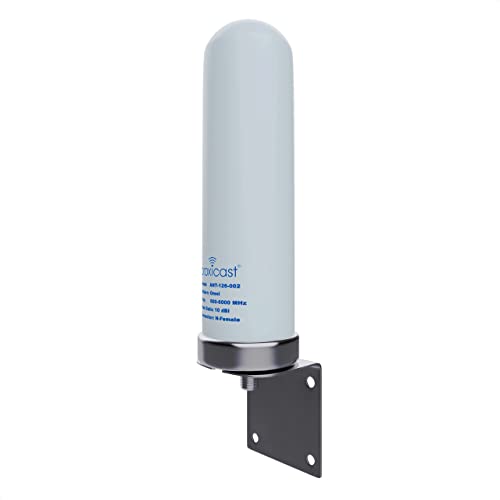
The Proxicast High Gain 10 dBi antenna is a compact outdoor omnidirectional antenna built for routers, modems, and gateways that need a wide band boost. It covers 600 to 6000 MHz, so it works with 4G LTE and 5G sub 6 services and as a Wi-Fi antenna, and its 10 dBi gain pulls in signal from every direction. The 9 inch white ABS radome is weather and impact resistant, and it includes a stainless steel two way pole and wall mounting bracket with hardware, so it mounts outside with no extra parts. It works with routers and gateways from Cradlepoint, Digi, Peplink, Sierra, Netgear, and many other brands.
For outdoor installs, this antenna is a practical all rounder. The integrated female N connector needs no additional ground plane, which simplifies mounting on a pole or a wall, and the compact 9 inch size suits homes where a large panel would stand out. It improves signal strength and speed on Verizon, AT and T, T-Mobile, Telus, Bell Canada, and Rogers networks. Buyers should check that their router has an N connector or the right adapter, and note that the mast is sold separately. For a compact outdoor antenna that covers every direction, it is a solid pick.
The Proxicast 10 dBi antenna is a compact outdoor all rounder, and install is straightforward. Mount it on a pole or a wall with the included stainless steel bracket, connect the female N connector to the router or gateway, and check the signal. The 9 inch size suits homes where a large panel would stand out, and the weather resistant radome handles rain and sun. Note that the mast is sold separately for pole mounting, so order one with the antenna when needed. Keep cable runs short, and use the right adapter when the router has a different connector. For homes that need an outdoor antenna covering every direction, this compact design delivers a solid boost with a tidy install.
Key specs: Omnidirectional outdoor antenna; 10 dBi gain; 600 to 6000 MHz wide band; 4G LTE, 5G sub-6, and Wi-Fi; 9 inch weather resistant ABS radome; stainless steel pole and wall bracket; female N connector
Strengths:
- 10 dBi gain from a compact 9 inch outdoor antenna
- Wide 600 to 6000 MHz band covers 4G, 5G, and Wi-Fi
- Mounting bracket and hardware included
Trade-offs:
- Mast sold separately for pole mounting
- Needs an N connector or adapter on the router
- Omnidirectional gain is lower than a directional panel
Best for: Homes that need a compact outdoor antenna for all directions
Not suited for: Rural homes with one very distant tower
Check price on Amazon: Proxicast 10 dBi antenna

Maswell 4×4 MIMO Antenna 5G
The Maswell 4×4 MIMO antenna, known as the Cubic-4C, is a modern omnidirectional 5G antenna with a very wide frequency range. It covers 600 to 8000 MHz, so it supports all Wi-Fi and cellular frequency bands, including future Wi-Fi 6E and Wi-Fi 7, and it offers gain up to 6dBi with cross polarised MIMO for better throughput and signal quality. The kit includes a 2 metre professional cable with four SMA male connectors and TS9 adapters, so it fits most 4G LTE and 5G routers and gateways for T-Mobile, Verizon, and AT and T. The mini form factor mounts on a wall or a pole, and the housing is IP67 rated against dust and water.
For routers and gateways, the Maswell is a flexible upgrade. Its ultra wide bandwidth means one antenna covers every band a carrier might use, and the patented MIMO design improves both speed and stability. The rugged ASA housing with UV stabilisation survives hot and cold weather, and the mounting options include screws, brackets, waterproof adhesive, and M24 screw holes. Buyers should enable external antenna mode on the router after connecting and restart it, and use a good quality cable for any extension. For a future proof antenna that covers everything, it is a strong pick.
The Maswell 4×4 MIMO antenna is a future proof pick for routers and gateways, and setup needs one extra step. After connecting the four SMA male connectors and TS9 adapters to the router, enable external antenna mode on the router and restart it, or the router will keep using its internal antennas. Mount the antenna on a wall or a pole with the included screws, brackets, or waterproof adhesive, and keep cable runs short for best signal. The 600 to 8000 MHz range covers every band a carrier might use, including future Wi-Fi 6E and Wi-Fi 7, so one antenna serves for years. The IP67 housing survives dust and water, and the mini form factor fits discreetly. For a single antenna that covers everything, it is a strong choice.
Key specs: Omnidirectional 4×4 MIMO antenna; up to 6dBi gain; 600 to 8000 MHz ultra-wide bandwidth; 2 metre cable with 4x SMA male and TS9 adapters; IP67 rated housing; Wi-Fi 6E and Wi-Fi 7 ready
Strengths:
- Widest frequency range here, 600 to 8000 MHz
- IP67 housing survives dust, water, and weather
- Fits most routers with SMA and TS9 adapters included
Trade-offs:
- Needs external antenna mode enabled on the router
- Omnidirectional gain is lower than a directional panel
- Long cable runs need quality cable to avoid loss
Best for: Routers and gateways that need one antenna for every band
Not suited for: Homes with one very distant tower needing a panel
Check price on Amazon: Maswell 4×4 MIMO antenna
Comparison table
| Product | Design | Gain | Best use |
|---|---|---|---|
| Waveform QuadPro | Directional panel | Up to 9.1 dBi | Distant tower |
| Waveform QuadMini | Omni, low profile | Up to 5.2 dBi | Several nearby towers |
| Poynting XPOL-2-5G | Directional | Up to 11dBi | Focused tower link |
| Poynting XPOL-1-5G | Omni hotspot | Up to 3.5dBi | Mobile hotspots |
| Proxicast 10 dBi | Omni outdoor | 10 dBi | All direction outdoor |
| Maswell 4×4 MIMO | Omni, wide band | Up to 6dBi | Routers and gateways |
Best 5g antennas: how to choose
Start with the setup, because the right antenna depends on where the signal comes from and where it needs to go. A rural home with one distant tower needs a directional antenna aimed at that tower, while a town home with several nearby towers suits an omnidirectional antenna that gathers signal from every direction. Check the router or gateway first: it must have external antenna ports, and the antenna connectors must match, because an antenna with the wrong connector cannot be used at all.
Next, look at frequency support and gain. The antenna must cover the 5G bands the carrier uses in the area, including the mid bands that carry most 5G speed, and the gain figure should suit the distance: higher gain helps a distant tower, but too much gain in a strong signal area can overload the receiver. Cable length matters too: a long cable loses signal, so the antenna should sit as close as possible to the router, with a short low loss cable.
Finally, check the mounting and the weather rating. Outdoor antennas need a weatherproof housing and a mount that survives wind, while indoor antennas need a stable base and a cable long enough to reach a window. Avoid antennas that cover only old bands, that use the wrong connector, or that have no mounting hardware at all.
Installing and caring for a 5g antenna
When a new 5G antenna arrives, check the connectors against the router or gateway before mounting anything, and confirm the antenna covers the bands the carrier uses. For outdoor antennas, mount as high as practical with a clear view toward the tower, and aim a directional antenna using the signal bars or the gateway app, adjusting slowly until the signal is strongest. Keep cable runs short, and seal outdoor connections against rain.
After install, check speeds at different times of day, because 5G speeds change with network load, and a small aim adjustment can make a large difference. Clean the antenna surface every few months, and check mounts and cables after storms, because wind loosens brackets and water creeps into unsealed joints. For indoor antennas, place near a window facing the tower, away from metal objects and thick walls that block signal.
For long term care, keep spare cables and adapters on hand, and replace a cable that shows wear, because a damaged cable loses more signal than a weak antenna. A 5G antenna that is mounted well and kept clean will strengthen a connection for years.
Common mistakes when buying a 5g antenna
The most common mistake is buying an antenna without checking the connectors, which leaves the buyer with an antenna that cannot plug into the router or gateway at all. Another common mistake is choosing a directional antenna in an area with several towers in different directions, where an omnidirectional antenna would gather more signal. A third mistake is using a very long cable, which loses so much signal that it cancels the antenna gain.
Buyers also forget to check the exact model code and the frequency range. Similar names can hide different bands, different connectors, and different gain, and the wrong variant can miss the band the carrier uses. Finally, many buyers expect an antenna to create signal where none exists: an antenna strengthens a weak signal, but it cannot invent coverage in a true dead zone.
Our final recommendation
For most buyers, the best 5G antenna in this guide is a model that covers the carrier bands, matches the router connectors, and suits the location, directional for a distant tower and omnidirectional for several nearby towers. That combination turns a weak 5G connection into a stable fast one. Rural buyers should choose the outdoor directional model with the highest practical gain, while apartment buyers should choose the indoor model that sits by a window.
Whatever the choice, buy the exact model code in this guide, check the connectors before ordering, and keep the receipt until the antenna has been aimed and the speeds checked. A 5G antenna should make video calls smooth, downloads fast, and the connection stable from morning to night. For more antenna options, see our guides to 5G antennas for cell phones, antennas for 5GHz Wi-Fi, TV antennas, and antennas for TVs.
Aiming and cabling a 5G antenna well
A good 5G antenna with a poor install performs worse than a basic antenna installed well, so the install deserves as much care as the choice. Start by confirming the router or gateway has external antenna ports and that the connectors match, since an antenna with the wrong connector cannot be used at all. For a directional antenna, find the tower direction first using a coverage map or the gateway app, mount the antenna as high as practical with a clear view, and adjust slowly while watching the signal until it peaks. For an omnidirectional antenna, place it on the side of the house that gets the best signal, away from metal objects and thick walls. Keep cable runs as short as practical, since long cables lose signal and can cancel the antenna gain, and use a low loss cable when a longer run is unavoidable. Seal outdoor connections against rain, check mounts and cables after storms, and recheck speeds at different times of day, since 5G speeds change with network load. A small aim adjustment can make a large difference, so patience during install pays off for years.
When an antenna cannot help
An antenna strengthens a weak signal, but it cannot invent coverage where none exists, and knowing the difference saves money and frustration. Before buying, check the coverage map for the area and look for at least a faint signal outdoors, since an antenna needs something to work with. When the gateway shows no signal at all in any spot, even on the roof, the area may be a true dead zone, and no antenna will fix it. In that case, a different carrier, a wired connection, or a satellite option may serve better. When the gateway shows a weak but real signal, an antenna is the right fix, and a directional model aimed at the tower gives the biggest improvement. Test the gateway in several spots first, note the best signal, and then choose the antenna that suits that spot. An honest check before ordering avoids disappointment.
Frequently asked questions
What does a 5G antenna actually do?
A 5G antenna gathers more of the radio signal from a distant tower and passes it to a router or gateway. It strengthens a weak signal, which improves speed and stability, but it cannot create coverage where no tower signal reaches at all.
Do I need a directional or an omnidirectional 5G antenna?
A directional antenna suits a home with one distant tower, because it focuses on that direction. An omnidirectional antenna suits an area with several nearby towers, because it gathers signal from every direction. Check tower locations before choosing.
Will a 5G antenna work with my router or gateway?
Only when the router or gateway has external antenna ports and the connectors match. Check the ports and the connector type before ordering, and confirm the antenna covers the 5G bands the carrier uses.
How long should the antenna cable be?
As short as practical. Long cables lose signal, which can cancel the antenna gain. Mount the antenna close to the router, and use a low loss cable when a longer run is unavoidable.
Can I mount a 5G antenna indoors?
Yes, indoor antennas work well near a window facing the tower. Outdoor mounting usually gives a stronger signal, because walls and roofs block 5G, but an indoor antenna is easier to install and suits renters.


