The best laptops i7 Intel business buyers need are built around one decision that has barely changed in years: a Core i7 processor in a business chassis. The i7 is the chip that keeps a laptop fast when the work grows, with more cores and more headroom than an i5, and the business chassis is what keeps it working: a ThinkPad keyboard, a Latitude build, or an X1 Carbon frame that survives years of travel and meetings. This guide names six of them, all with genuine Intel Core i7 processors, all verified as new listings with their full titles checked, and all in the 14-inch business class that offices actually buy. The six laptops below were verified as new listings with their full titles checked, and any renewed or used listing was dropped, which removed many i7 listings in this category before the six here were settled.
Every laptop below carries a Core i7 processor, and the exact chip is named in each section, because the i7 name alone is not enough: an i7-1355U and an i7-1265U are different chips with different performance, and a buyer should know which one is being bought. The set spans Dell Latitude, Lenovo ThinkPad T14, and ThinkPad X1 Carbon, with 16GB or 32GB of memory and 512GB, 1TB, or 2TB of storage. No renewed or used listing is included, and no Ultra processor is counted as an i7 here, because the keyword is Core i7 and the picks should match it exactly.
In this guide
Quick picks: best laptops i7 intel business
| # | Product | Where to buy |
|---|---|---|
| 1 | Lenovo ThinkPad T14 Intel Core i7 | Check on Amazon |
| 2 | Dell Latitude 5440 Intel Core i7-1355U | Check on Amazon |
| 3 | Lenovo ThinkPad T14 Gen 4 Intel Core i7-1355U | Check on Amazon |
| 4 | Lenovo ThinkPad T14 Intel Core i7 40GB | Check on Amazon |
| 5 | Lenovo ThinkPad X1 Carbon Gen 11 Intel Core i7-1365U | Check on Amazon |
| 6 | Dell Latitude 7430 Intel Core i7-1265U | Check on Amazon |
How the picks were chosen
The picks were chosen on five points. First, processor: every laptop here has a genuine Intel Core i7, with the exact chip code named in the listing, and no Ultra or Ryzen chip is counted as an i7. Second, business class: ThinkPad, Latitude, and X1 Carbon lines only, with the build, keyboard, and security features that separate business machines from consumer laptops. Third, configuration: 16GB or 32GB of memory and 512GB or more of storage, which is the range that stays useful for years. Fourth, variety: the set spans Dell and Lenovo, 14-inch standards and a premium X1 Carbon, and 13th-generation and 12th-generation chips, so different budgets and needs are covered. Fifth, verification: every ASIN was checked by its full listing title, and renewed or used listings were dropped, which removed many i7 listings in this category.
Quick comparison
| Product | Key detail | Best for |
|---|---|---|
| Lenovo ThinkPad T14, Intel Core i7, 16GB RAM, 1TB SSD | ThinkPad T14, Core i7, 16GB RAM, 1TB SSD | The standard Core i7 business laptop |
| Dell Latitude 5440, Intel Core i7-1355U | Latitude 5440, i7-1355U, 16GB, 512GB, 14-inch | Current-generation i7 Latitude laptops |
| Lenovo ThinkPad T14 Gen 4, Intel Core i7-1355U | T14 Gen 4, i7-1355U, 32GB, 1TB SSD, WUXGA | Complete i7 ThinkPads with 32GB and 1TB |
| Lenovo ThinkPad T14, Intel Core i7, 40GB RAM, 2TB SSD | ThinkPad T14, Core i7, 40GB RAM, 2TB SSD | Heavy multitasking and virtual machines |
| Lenovo ThinkPad X1 Carbon Gen 11, Intel Core i7-1365U vPro | X1 Carbon Gen 11, i7-1365U vPro, 32GB, 1TB, touchscreen | Premium i7 business laptops with the best screen |
| Dell Latitude 7430, Intel Core i7-1265U, Touchscreen | Latitude 7430, i7-1265U, 32GB, 1TB SSD, touchscreen | Touchscreen Dell business laptops |
Best laptops i7 Intel business: what matters most
The i7 chip code matters more than the i7 badge. A 13th-generation i7-1355U and a 12th-generation i7-1265U are both ten-core chips, but they differ in speed and efficiency, and a buyer should compare the code, not the badge. The generation matters too: a current chip with DDR5 memory will stay useful longer than an older chip with DDR4. Memory is next: 16GB is the floor for office work, 32GB is comfortable, and 40GB on one pick here is unusual but real. Storage is third: 512GB is the minimum, 1TB is comfortable, and 2TB suits anyone who keeps large files locally. Build and keyboard matter daily, and the ThinkPad and Latitude lines are the reason business buyers pay more than consumer prices. Finally, the listing itself: renewed i7 laptops are everywhere, and the word renewed hides at the end of long titles, so the full title must be read before buying. The screen matters alongside the chip: a bright WUXGA panel is worth more to most workers than a faster processor, because the screen is looked at all day while the processor is only stressed occasionally.
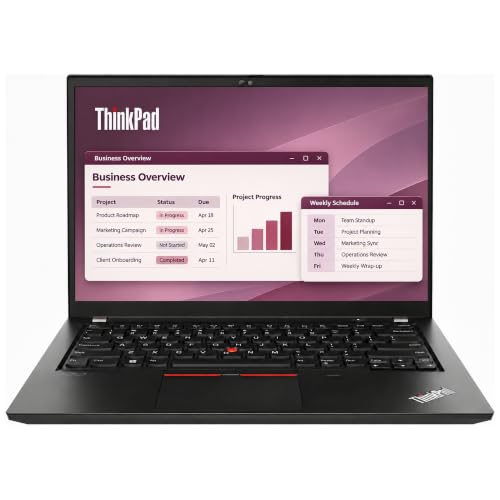
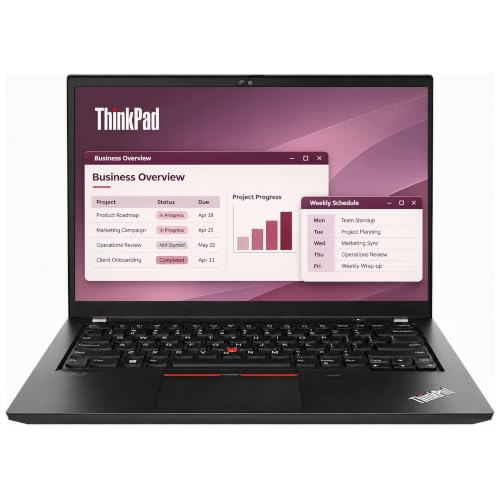
Lenovo ThinkPad T14, Intel Core i7, 16GB RAM, 1TB SSD
The ThinkPad T14 with a Core i7 processor, 16GB of memory, and a 1TB SSD is the standard i7 business laptop, and the one most office workers should start with. The listing names the processor as Intel Core i7 without a specific chip code, so the section names it the same way, and the rest of the specification is complete: a 14-inch Full HD display, a backlit keyboard, a fingerprint reader, Wi-Fi 6, Thunderbolt 4, USB 3.2, and Windows 11 Pro. A 1TB SSD is the detail that sets it apart from the 512GB models, because it removes storage worry for years. It is the safe default i7 business laptop. The 1TB SSD is the detail that sets this T14 apart from the 512GB models, because it removes storage worry for years, and the Thunderbolt 4 port covers a dock and a monitor in one cable.
Key specs: 14-inch Full HD display; Intel Core i7; 16GB RAM; 1TB SSD; backlit keyboard; fingerprint reader; Wi-Fi 6; Thunderbolt 4; USB 3.2; Windows 11 Pro. Thunderbolt 4 covers a dock and a monitor in one cable, and the 1TB SSD removes storage worry for years.
Strengths:
- Core i7 with 16GB of memory and a 1TB SSD
- ThinkPad keyboard, fingerprint reader, and Thunderbolt 4
- 1TB of storage removes storage worry for years
Trade-offs:
- No specific i7 chip code stated in the listing
- 14-inch Full HD display is practical rather than striking
- No touchscreen on this configuration
An office worker who wants the standard Core i7 ThinkPad with plenty of storage, and anyone who wants a safe default without studying chip codes. It suits an office worker who wants the standard Core i7 ThinkPad with plenty of storage.
Best for: The standard Core i7 business laptop
Not suited for: Anyone who needs to know the exact i7 chip code before buying
Check price on Amazon: Lenovo ThinkPad T14 Intel Core i7

Dell Latitude 5440, Intel Core i7-1355U
The Dell Latitude 5440 with the Core i7-1355U is the Dell answer to the ThinkPad T14, and the chip code is the point: a 13th-generation i7 with ten cores, which is the current generation of i7 for business laptops. The 14-inch Full HD display, 16GB of memory, and a 512GB SSD give it the standard business configuration, and the Titan Gray finish is the professional look Dell's business line is known for. Latitude machines are fleet staples, which means docks, parts, and support are easy to find, and the 5440 is the 14-inch size that offices buy most. The ten-core i7-1355U is the current generation of i7 for business laptops, and the Titan Gray finish is the professional look that Dell's business line is known for in offices.
Key specs: 14-inch Full HD 1920×1080 display; Intel Core i7 13th Gen i7-1355U, deca-core, 10 cores; 16GB total RAM; 512GB SSD; Titan Gray. The ten-core i7-1355U is the current generation of i7 for business laptops, and the Titan Gray finish is Dell's professional look.
Strengths:
- 13th-generation i7-1355U with ten cores
- Standard 14-inch business configuration with a Full HD display
- Latitude fleet staple, so docks and support are easy to find
Trade-offs:
- 16GB of memory is the floor rather than the comfortable choice
- 512GB of storage is the minimum for a working machine
- No touchscreen or Thunderbolt stated in this listing
A Dell shop or an office worker who wants a current-generation i7 Latitude in the standard 14-inch size. It suits a Dell shop or an office worker who wants a current-generation i7 Latitude in the standard 14-inch size.
Best for: Current-generation i7 Latitude laptops
Not suited for: Heavy multitaskers who should take 32GB of memory
Check price on Amazon: Dell Latitude 5440 Intel Core i7-1355U

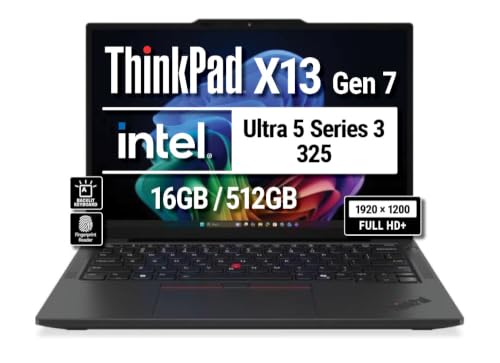
Lenovo ThinkPad T14 Gen 4, Intel Core i7-1355U
The ThinkPad T14 Gen 4 pairs the same 13th-generation i7-1355U chip with the configuration that makes it the strongest value in this guide: 32GB of memory and a 1TB SSD, with a 14-inch WUXGA display that gives a little more vertical room than a standard Full HD panel. Thirty-two gigabytes is the memory size that keeps a laptop fast when the browser, the email, the documents, and the video call are all open at once, and a 1TB SSD means storage is not a worry. The Gen 4 designation is the generation of the chassis, and it is a proven one. For a buyer who wants the most complete i7 ThinkPad for the money, this is the pick. The WUXGA display is the detail that gives this T14 more vertical room than a standard Full HD panel, which suits documents and web pages, and the 32GB of memory is what keeps it fast under a heavy load.
Key specs: 14-inch WUXGA 1920×1200 display; Intel Core i7 13th Gen i7-1355U, deca-core, 10 cores; 32GB total RAM; 1TB SSD; Storm Gray. The WUXGA display gives more vertical room than Full HD, and 32GB of memory keeps a heavy multitasking load moving.
Strengths:
- i7-1355U with 32GB of memory and a 1TB SSD
- WUXGA display gives more vertical room than Full HD
- ThinkPad keyboard and build in a proven generation
Trade-offs:
- Gen 4 chassis is a generation behind the newest T14
- Heavier than the X1 Carbon in this guide
- No touchscreen on this configuration
A buyer who wants the most complete Core i7 ThinkPad, with 32GB and 1TB, and does not need the newest chassis. It suits a buyer who wants the most complete i7 ThinkPad for the money, with 32GB and 1TB.
Best for: Complete i7 ThinkPads with 32GB and 1TB
Not suited for: Anyone who wants the lightest laptop in this guide
Check price on Amazon: Lenovo ThinkPad T14 Gen 4 Intel Core i7-1355U

Lenovo ThinkPad T14, Intel Core i7, 40GB RAM, 2TB SSD
The ThinkPad T14 with 40GB of memory and a 2TB SSD is the outlier of this guide, and the one for a buyer whose work genuinely needs the headroom. Forty gigabytes is an unusual configuration, built from a 32GB stick and an 8GB stick, and it suits virtual machines, large data sets, and the kind of multitasking that makes a 16GB machine slow down. Two terabytes of storage is the largest here, and it suits anyone who keeps large files locally. The processor is named as Intel Core i7 without a specific code in the listing, so the section names it the same way. It is the most memory and storage in this guide, and the price reflects that. The 40GB of memory is built from a 32GB stick and an 8GB stick, which is unusual but real, and it suits virtual machines and large data sets that would slow a 16GB machine to a crawl.
Key specs: 14-inch Full HD display; Intel Core i7; 40GB RAM; 2TB SSD; backlit keyboard; fingerprint reader; Wi-Fi 6; Thunderbolt 4; USB 3.2; Windows 11 Pro. The 40GB of memory suits virtual machines and large data sets, and the 2TB SSD is the largest storage in this guide.
Strengths:
- 40GB of memory and 2TB of storage, the most in this guide
- Core i7 with ThinkPad keyboard and Thunderbolt 4
- Suits virtual machines and large data sets
Trade-offs:
- No specific i7 chip code stated in the listing
- 40GB is more memory than most office work needs
- Premium price for the memory and storage
A power user who runs virtual machines or large data sets and wants the most memory and storage in a ThinkPad. It suits a power user who runs virtual machines or large data sets and wants the most memory and storage in a ThinkPad.
Best for: Heavy multitasking and virtual machines
Not suited for: Standard office work, where 16GB is enough
Check price on Amazon: Lenovo ThinkPad T14 Intel Core i7 40GB

Lenovo ThinkPad X1 Carbon Gen 11, Intel Core i7-1365U vPro
The ThinkPad X1 Carbon Gen 11 is the premium laptop in this guide, and the one that shows what a business laptop can be when weight and screen quality are the priorities. The Intel Core i7-1365U vPro processor, 32GB of LPDDR5 memory, and a 1TB Gen4 performance SSD give it the speed for any office work, and the 14-inch WUXGA touchscreen with 100 percent sRGB and an anti-glare finish is the best screen here. vPro brings the remote management and hardware security that IT departments need, and the X1 Carbon's carbon-fiber build is famously light. It is the most expensive machine here, and the most refined. The 100 percent sRGB touchscreen is the best screen in this guide, and the vPro processor brings the remote management and hardware security that IT departments need in a premium machine.
Key specs: 14-inch WUXGA 100% sRGB anti-glare touchscreen; Intel Core i7-1365U vPro processor; 32GB LPDDR5 RAM; 1TB Gen4 performance SSD; Thunderbolt; Windows 11 Pro. The vPro processor brings remote management for IT departments, and the 100 percent sRGB touchscreen is the best screen here.
Strengths:
- Best screen in this guide: WUXGA touchscreen, 100% sRGB, anti-glare
- i7-1365U vPro with 32GB of LPDDR5 memory and a 1TB Gen4 SSD
- X1 Carbon build is famously light and durable
Trade-offs:
- Premium price, the highest in this guide
- LPDDR5 memory is soldered and cannot be upgraded later
- Touchscreen and premium screen add cost for buyers who will not use them
A buyer who wants the best screen and the lightest premium business laptop, and an IT buyer who needs vPro. It suits a buyer who wants the best screen and the lightest premium business laptop, and an IT buyer who needs vPro.
Best for: Premium i7 business laptops with the best screen
Not suited for: Budget buyers, who should look at the Latitude 5440 above
Check price on Amazon: Lenovo ThinkPad X1 Carbon Gen 11 Intel Core i7-1365U

Dell Latitude 7430, Intel Core i7-1265U, Touchscreen
The Dell Latitude 7430 closes this guide with a 12th-generation i7-1265U, a touchscreen, 32GB of memory, and a 1TB SSD. The 12th-generation chip is a generation behind the 13th-generation models here, but it is still a ten-core i7 with plenty of speed for office work, and the configuration around it is complete: a Full HD touchscreen, 32GB of memory, and a 1TB SSD. The Latitude 7430 is a proven business machine, and this configuration is the one for a buyer who wants a touchscreen Dell with big memory and storage. It is the pick for the Dell buyer who wants touch. The Full HD touchscreen is the feature that sets the Latitude 7430 apart from the non-touch Latitudes here, and the 32GB of memory with a 1TB SSD makes it a complete configuration rather than a base model.
Key specs: 14-inch Full HD Touch display, 1920×1080; Intel 12th Gen Core i7-1265U, 10 cores; 1TB SSD; 32GB RAM; Windows 11 Pro. The Full HD touchscreen suits presenters, and 32GB of memory with a 1TB SSD makes it a complete configuration.
Strengths:
- Touchscreen with 32GB of memory and a 1TB SSD
- Ten-core i7 with plenty of speed for office work
- Proven Latitude business build
Trade-offs:
- 12th-generation chip is a generation behind the newest
- Touchscreen adds weight and cost
- Full HD display is practical rather than striking
A Dell buyer who wants a touchscreen business laptop with 32GB of memory and a 1TB SSD. It suits a Dell buyer who wants a touchscreen business laptop with 32GB of memory and a 1TB SSD.
Best for: Touchscreen Dell business laptops
Not suited for: Anyone who needs the newest processor generation
Check price on Amazon: Dell Latitude 7430 Intel Core i7-1265U
Buying guide: choosing laptops i7 Intel business
Start with the chip code, not the badge. A Core i7-1355U and a Core i7-1265U are both ten-core chips, but they are different generations with different speeds, and the code is the only way to tell them apart. Check the generation first: a 13th-generation i7 with DDR5 memory will stay useful longer than a 12th-generation chip with DDR4. Then check the memory: 16GB is the floor for office work, 32GB is comfortable, and more than that is for virtual machines and large data sets. Storage should be a 512GB NVMe SSD at minimum, with 1TB the comfortable choice. Then check the business features: a ThinkPad or Latitude keyboard, a fingerprint reader, an IR camera for Windows Hello, and Thunderbolt 4 for docking. Screen size is next: 14 inches is the business standard, and a touchscreen is worth paying for only if it will be used. Finally, read the full listing title before buying, because renewed and used hide at the end of long titles, and an i7 laptop that is renewed is a different purchase from a new one. Buy the exact chip code, memory, and storage named in the listing, and keep the receipt and the return window in mind.
Using and caring for your laptops i7 Intel business
A Core i7 business laptop lasts longest with simple habits. Keep the battery between roughly 20 and 80 percent when it can be managed, keep the vents clear, and do not use the machine on a soft surface that blocks airflow, because heat is what ages a battery and a processor. Update Windows and the drivers, use Windows Hello or the fingerprint reader, and keep a backup of the work files. Clean the keyboard and the screen with a soft cloth, keep liquids away, and carry the machine in a padded sleeve. If the machine slows down, check the startup programs and the storage space before blaming the hardware, because a full SSD and a dozen startup apps are the usual causes. For a touchscreen model, clean the screen with a soft, slightly damp cloth and avoid harsh cleaners.
Common mistakes to avoid
The most common mistake is buying the i7 badge and ignoring the chip code, which is how a buyer ends up with an older or slower i7 than expected. The second is buying 8GB of memory with an i7 processor, which wastes the chip on a machine that cannot multitask. The third is trusting a shortened listing title: renewed and used hide at the end of long titles, and this category is full of them. The fourth is paying for a touchscreen or a premium screen that will never be used, when the money would have been better spent on memory. The fifth is buying a consumer laptop with an i7 and missing the keyboard, the build, and the security features that make a business machine worth its price. The sixth is assuming an i7 makes any laptop fast: a slow SSD or too little memory will hold back even the best processor. Check the chip code, the memory, the storage, and the full title, in that order.
Core i7 generations explained: what the chip code really says
The Intel Core i7 badge has been around for so long that it is easy to treat it as one thing, but it is not: it is a family of chips that spans generations, core counts, and power levels, and the code after the i7 is the only part that says which one is being bought. The code has three parts. The first number is the generation: an i7-1355U is 13th-generation, an i7-1265U is 12th-generation, an i7-1185G7 is 11th-generation, and an i7-10610U is 10th-generation. The generation matters because each one brings a faster and more efficient design, and a newer generation usually pairs with newer memory and newer wireless. The second part is the model number, which says where the chip sits inside its generation: a 1355U is a mainstream business chip, a 1365U is a step up, and a 1370P is a higher-performance chip with more power. The letter at the end is the power class: U means ultra-low power, the 15-watt class that business laptops use for battery life, P means a higher-performance 28-watt class, G7 means a chip with better integrated graphics, and H means a high-performance chip for workstations and gaming laptops. A U chip is the right choice for a business laptop, because it balances speed and battery life, while a P chip is faster and hungrier, and an H chip belongs in a machine that does not need to last a day on battery. The core count is the other number that matters, and it has changed: a modern i7-1355U has ten cores, a mix of performance cores and efficiency cores, while an older i7-10610U has four cores, and the difference shows up in multitasking rather than in a single task. A ten-core i7 will keep a browser, a video call, and a spreadsheet open together without slowing down, while a four-core i7 will struggle with the same load. Memory matters alongside the chip: a 13th-generation i7 usually pairs with DDR5 memory, which is faster than the DDR4 of older generations, and the combination is what keeps the machine feeling fast. The practical advice is simple: buy the newest generation that fits the budget, check the chip code rather than the badge, and make sure the memory is 16GB or more, because an i7 with too little memory is a fast chip waiting on a slow machine. The laptops in this guide follow that advice: the 13th-generation i7-1355U machines are the current picks, the 12th-generation i7-1265U is the value pick, and the X1 Carbon's i7-1365U vPro is the premium pick with the management features an IT department needs.
i7 vs i5 vs Ultra: which Intel chip for which work
The Intel badge on a business laptop is a family, not a single chip, and the choice between i7, i5, and Ultra decides how long the machine stays fast and how much it costs. The Core i7 is the chip for heavy multitasking: more cores and more headroom than an i5, which shows up when the browser, the email, the documents, and the video call are all open at once. The Core i5 is the chip for standard office work: it handles documents, email, and video calls comfortably, and the money saved against an i7 can go to more memory or a larger SSD, which often matters more. The Core Ultra is the newest family, and it is really an i7 or i5 by another name: an Ultra 7 is roughly an i7, an Ultra 5 is roughly an i5, and the Ultra badge marks the current generation with its AI features and its newer efficiency cores. The practical difference between the families is smaller than the difference between generations: a current Ultra 5 will outperform an older i7 in many tasks, because the generation matters more than the badge. The power class matters too: a U chip is the 15-watt class for battery life, a P chip is the 28-watt class for more speed, and an H chip is the high-performance class for workstations. A business laptop wants a U chip, because it balances speed and battery life, while a P chip is faster and hungrier. The core count is the other number: a modern ten-core i7 will keep a heavy multitasking load moving, while an older four-core i7 will struggle with the same load, whatever its clock speed. The memory matters alongside the chip: a 13th-generation i7 usually pairs with DDR5 memory, which is faster than the DDR4 of older generations, and the combination is what keeps the machine feeling fast. The advice is simple: for standard office work, an i5 with 16GB of memory is enough, and the money is better spent on memory and storage; for heavy multitasking, virtual machines, or large data sets, an i7 with 32GB is the right buy; for the newest hardware and the longest useful life, a Core Ultra 7 with DDR5 is the current answer. The laptops in this guide are all i7 machines, because the keyword is Core i7, but the buyer should know that an i5 would serve many of them just as well, and that the generation and the memory matter more than the badge.
Final recommendation
For most office workers, the ThinkPad T14 Gen 4 with the i7-1355U, 32GB of memory, and a 1TB SSD is the best laptop in this guide: the most complete i7 configuration for the money. The ThinkPad T14 with 16GB and 1TB is the safe default, the Latitude 5440 with the i7-1355U is the Dell answer, the T14 with 40GB and 2TB is the power user's pick, the X1 Carbon Gen 11 is the premium choice with the best screen, and the Latitude 7430 is the touchscreen Dell. Buy the exact chip code named here, read the full listing title, and the laptop will do its job for years. The i7 badge is a starting point, not a decision, and the six laptops here show why: the same badge covers different generations, different memory sizes, and different storage, and the right choice is the configuration that matches the work. Check the chip code, the memory, and the storage, read the full listing title, and buy the exact configuration named here. The generation, the memory, and the storage are the numbers that decide how long the laptop stays fast, and they are all printed in the listing for anyone who reads it.
Frequently asked questions
Is a Core i7 better than a Core i5 for business work?
Yes, for heavy multitasking and demanding work, because the i7 has more cores and more headroom. For standard office work with documents and email, an i5 is often enough, and the money saved can go to more memory or storage instead. Yes, for heavy multitasking and demanding work, because the i7 has more cores and more headroom; for standard office work, an i5 is often enough, and the money saved can go to more memory or storage.
What is the difference between an i7-1355U and an i7-1265U?
They are different generations: the i7-1355U is 13th-generation and the i7-1265U is 12th-generation. Both are ten-core chips, but the newer one is faster and more efficient, and it usually pairs with DDR5 memory. Check the code, not just the i7 badge. They are different generations, because the i7-1355U is 13th-generation and the i7-1265U is 12th-generation; both are ten-core chips, but the newer one is faster and more efficient and usually pairs with DDR5 memory.
How much memory do I need with a Core i7 laptop?
16GB is the floor for office work, and 32GB is the comfortable choice for heavy multitasking. An i7 with only 8GB of memory is a waste of the processor, because the machine will slow down on memory before it slows down on the chip. 16GB is the floor for office work, and 32GB is the comfortable choice for heavy multitasking; an i7 with only 8GB of memory is a waste of the processor.
Are renewed Core i7 laptops worth buying?
They can be, from a reputable seller with a warranty, but they are a different purchase from a new laptop. Check the battery health, the exact chip code, and the warranty, and read the full listing title, because renewed hides at the end of long titles. They can be, from a reputable seller with a warranty, but they are a different purchase from a new laptop; check the battery health, the exact chip code, and the warranty, and read the full listing title.
Does an i7 laptop need a dedicated graphics card?
No, for office work. The integrated graphics in a modern Core i7 handle documents, video calls, and presentations easily. A dedicated graphics card matters for video editing, 3D work, and gaming, not for business laptops. No, for office work, because the integrated graphics in a modern Core i7 handle documents, video calls, and presentations easily; a dedicated graphics card matters for video editing, 3D work, and gaming.
Is a Core Ultra 7 the same as a Core i7?
Roughly, yes: an Ultra 7 is the current-generation equivalent of an i7, with newer efficiency cores and AI features, while an Ultra 5 is the equivalent of an i5. The generation matters more than the badge.
Do I need an i7 for video calls?
No. Video calls need a good webcam, a good microphone, and enough memory, not a fast processor. An i5 with 16GB of memory handles video calls easily, and the money saved can go to a better screen.
What does the U in i7-1355U mean?
It means ultra-low power, the 15-watt class that business laptops use for battery life. A P chip is a higher-performance 28-watt class, and an H chip is a high-performance class for workstations.
How long will a Core i7 business laptop stay fast?
A current-generation i7 with 16GB or 32GB of memory and a fast SSD should stay fast for office work for several years, because the processor is rarely the bottleneck; the memory and storage matter more over time.
More guides from KajuanDouglas
If this guide helped, these related roundups go deeper on the same topics: the best Dell laptops for business the best business laptops under 1500 the best laptops for business under 1000.