The best antennas for 5GHz WiFi fix the exact weakness of the 5GHz band: it is fast, but it does not travel through walls and floors the way 2.4GHz does. A better antenna does not change the laws of physics, but it does change the link budget. More gain in the right direction, a better position away from the case or the wall, and a connector that actually fits the router or the wireless card can turn a connection that drops in the next room into one that holds. This guide covers the antennas that do that work: dual-band replacement antennas for routers and PC cards, a magnetic-base antenna that moves where the signal is, a directional panel for a fixed link, and an outdoor omni antenna for the far end of the property. Every antenna below was verified as a new listing with its full title checked, and every one is a genuine antenna rather than a USB adapter or a complete access point, because an adapter is a different product with a different job.
Every antenna below is a genuine antenna, not a USB adapter and not a complete access point, and every one was verified as a new listing with its full title checked. The set mixes 8dBi and 9dBi dual-band antennas with RP-SMA connectors, a tri-band WiFi 6E antenna that also covers 6GHz, and two Alfa antennas for the jobs where a panel or an outdoor omni is the right tool. Gain figures, connectors, and cable lengths are taken from the listings themselves, so the numbers here are the numbers that arrive in the box.
In this guide
Quick picks: best antennas for 5ghz wifi
| # | Product | Where to buy |
|---|---|---|
| 1 | Bingfu Dual Band WiFi Antenna 8dBi | Check on Amazon |
| 2 | Eightwood WiFi 6E Tri-Band Antenna | Check on Amazon |
| 3 | Eightwood 9dBi Dual Band WiFi Antenna | Check on Amazon |
| 4 | Alfa Network APA-M25 Dual Band Panel Antenna | Check on Amazon |
| 5 | Alfa AOA-2458-79AF Dual Band Outdoor Omni Antenna | Check on Amazon |
| 6 | Eightwood Dual Band WiFi Antenna | Check on Amazon |
How the picks were chosen
The picks were chosen on five points. First, product type: only antennas, never USB adapters or complete access points, because an adapter is a different product with a different job. Second, 5GHz coverage: every antenna here states 5GHz or dual-band 2.4GHz and 5GHz operation, and the tri-band models add 6GHz as well. Third, gain: 8dBi and 9dBi models for the main picks, because that is the useful range for a router or PC antenna without turning the pattern into a narrow beam. Fourth, connector: RP-SMA for the router and PC card antennas, which is the connector those devices use, and N-Female for the outdoor omni, which is the outdoor standard. Fifth, verification: every ASIN was checked by its full listing title, and any renewed or used listing was dropped.
Quick comparison
| Product | Key detail | Best for |
|---|---|---|
| Bingfu Dual Band WiFi Antenna 8dBi, 4-Pack | 8dBi dual-band RP-SMA antennas, four-pack | Upgrading router and PC card antennas in one order |
| Eightwood WiFi 6E Tri-Band Antenna, Magnetic Base | Tri-band 6GHz, 5GHz, 2.4GHz antenna with magnetic base | Desktop PCs with WiFi 6E cards |
| Eightwood 9dBi Dual Band WiFi Antenna, Magnetic Base | 9dBi dual-band antenna, magnetic base, 6.5-foot cable | Desktop PCs in dead spots that need gain and height |
| Alfa Network APA-M25 Dual Band Panel Antenna | Directional dual-band panel antenna, 8 and 10dBi | Fixed point-to-point 5GHz links |
| Alfa AOA-2458-79AF Dual Band Outdoor Omni Antenna | 9dBi outdoor omni antenna, N-Female connector | Outdoor 5GHz coverage for yards and workshops |
| Eightwood Dual Band WiFi Antenna, 6.5ft Cable | Dual-band antenna with 6.5-foot cable for PC cards | Single-PC antenna upgrades with a long cable |
Best antennas for 5GHz WiFi: what matters most
Gain is the first number to read, and it needs a translation. A dBi figure says how much the antenna focuses the signal compared with a theoretical point source; more gain means a stronger signal in the favored direction and a weaker one elsewhere, so a very high-gain antenna can be worse in a room where devices sit in every direction. Connector type is the second number: most routers and PC wireless cards use RP-SMA, and an SMA antenna will not fit without an adapter, so check the connector before ordering. Cable length is the third: a magnetic-base antenna with a 6.5-foot cable can sit on top of a desk or a shelf where the signal is, while a direct screw-on antenna lives where the router lives. Indoor versus outdoor is the fourth: an outdoor omni needs weatherproofing and the right connector, and a panel antenna is directional, so it suits a fixed link between two points rather than a room full of devices. The number of antennas matters too: a router with several antennas uses them together, so replacing only one leaves the others as the weak link, and a four-pack that upgrades the whole set is usually the better buy.

Bingfu Dual Band WiFi Antenna 8dBi, 4-Pack
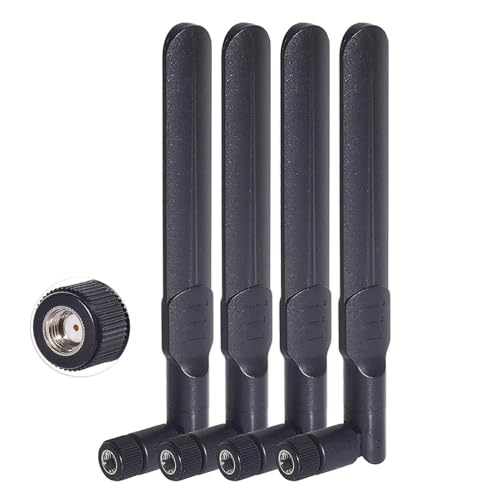
The Bingfu 8dBi four-pack is the best starting point in this guide, because it solves the most common 5GHz problem in the cheapest way: the stock antennas on a router or a PC card are small, and four higher-gain replacements cover a router, a card, and a camera or two in one order. Each antenna is dual band across 2.4GHz, 5GHz, and 5.8GHz with 8dBi gain and an RP-SMA male connector, which is the connector most routers and wireless cards use. The MIMO design suits modern routers that use multiple antennas at once. Screw them on, aim them in different directions, and the 5GHz signal that was dying at the bedroom door has a better chance of arriving intact. The four-pack is the detail that makes this the best starting point: a router, a PC card, and a camera or two can all be upgraded in one order, and the MIMO design suits modern routers that use several antennas at once.
Key specs: Dual band 2.4GHz, 5GHz, and 5.8GHz; 8dBi; MIMO; RP-SMA male; four-pack; for WiFi routers, wireless network cards, USB adapters, security IP cameras, and video surveillance monitors. Four antennas cover a router and more in one order, and the RP-SMA male connector fits most routers and wireless cards.
Strengths:
- Four antennas cover a router and more in one order
- 8dBi gain is a real step up from small stock antennas
- RP-SMA connector fits most routers and wireless cards
Trade-offs:
- 8dBi gain narrows the pattern, so aiming matters
- No cable, so the antenna lives where the device lives
- Four-pack means spares if only one or two are needed
A home whose router or PC card has weak 5GHz range and RP-SMA connectors, and who wants to upgrade several devices at once. It suits a home with several devices to upgrade at once, because four antennas cover a router and more in one order.
Best for: Upgrading router and PC card antennas in one order
Not suited for: A single fixed link, where a directional panel is the better tool
Check price on Amazon: Bingfu Dual Band WiFi Antenna 8dBi

Eightwood WiFi 6E Tri-Band Antenna, Magnetic Base
The Eightwood tri-band antenna is the pick for a desktop PC with a WiFi 6E card. It covers 6GHz, 5GHz, and 2.4GHz in one antenna, so it suits the newest cards as well as the older bands, and the magnetic base is the feature that earns its place: instead of screwing the antenna to the back of a case buried under a desk, the antenna sits on top of the desk or on a shelf, where the signal actually is. The RP-SMA connector fits standard PCIe WiFi and Bluetooth cards and many routers. It is a single antenna rather than a pack, which is the right shape for a PC that needs one good antenna in a good position. The tri-band coverage is the reason to choose this antenna for a WiFi 6E card, because it covers 6GHz as well as 5GHz and 2.4GHz in one unit, so the newest cards and the older bands are both served.
Key specs: Tri-band 6GHz, 5GHz, and 2.4GHz; RP-SMA; magnet mount base; for PC desktop computers, gaming motherboards, PCIe Bluetooth cards, and WiFi routers. The magnet mount base puts the antenna where the signal is, and the tri-band design covers 6GHz, 5GHz, and 2.4GHz.
Strengths:
- Tri-band coverage includes 6GHz for WiFi 6E cards
- Magnetic base puts the antenna where the signal is, not where the case is
- RP-SMA connector fits PCIe WiFi and Bluetooth cards
Trade-offs:
- Single antenna, so a router needing several costs more per unit
- Magnetic base needs a metal surface or a flat spot to sit on
- No gain figure stated in the listing, so the improvement is positional as much as electrical
A desktop PC with a WiFi 6E card under a desk that needs its antenna up on the desk where the signal is. It suits a desktop PC with a WiFi 6E card, because the tri-band design covers the newest band as well as the older ones.
Best for: Desktop PCs with WiFi 6E cards
Not suited for: A router that needs four screw-on antennas at once
Check price on Amazon: Eightwood WiFi 6E Tri-Band Antenna

Eightwood 9dBi Dual Band WiFi Antenna, Magnetic Base
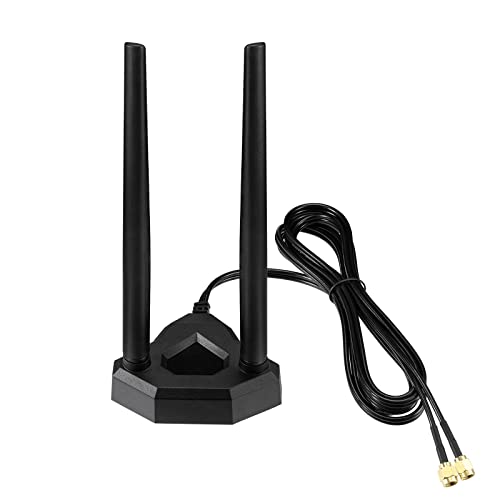
The Eightwood 9dBi magnetic-base antenna pairs the highest gain in this guide with the longest cable. Nine dBi is a meaningful step up from 8dBi, and the 6.5-foot extension cable is what makes that gain usable: the antenna can sit on a high shelf or on top of a cabinet, well away from the case and the wall, while the card stays where it is. The magnetic base keeps it stable on a metal surface, and the RP-SMA connector fits PCIe cards, gaming motherboards, and routers. It is the pick for a desktop that sits in a dead spot and needs both gain and position to fix it. The 6.5-foot cable is what makes the 9dBi gain usable: the antenna can sit on a high shelf or on top of a cabinet, well away from the case and the wall, while the card stays where it is.
Key specs: 9dBi; dual band 2.4GHz and 5GHz; RP-SMA; magnetic base; 6.5-foot extension cable; for PC desktop computers, PCIe Bluetooth cards, gaming motherboards, and WiFi routers. The 6.5-foot extension cable puts the antenna high and clear of the case, and the magnetic base holds it steady on a metal surface.
Strengths:
- 9dBi gain, the highest in this guide
- 6.5-foot cable puts the antenna high and clear of the case
- Magnetic base holds it steady on a metal surface
Trade-offs:
- 9dBi gain narrows the pattern, so placement and aiming matter
- Needs a metal surface or a flat spot for the magnetic base
- A long cable run can lose a little signal if it is coiled or pinched
A desktop PC in a weak-signal spot that needs both more gain and a better antenna position. It suits a desktop in a dead spot, because the 9dBi gain and the long cable fix both the strength and the position at once.
Best for: Desktop PCs in dead spots that need gain and height
Not suited for: A room where devices sit in every direction at close range
Check price on Amazon: Eightwood 9dBi Dual Band WiFi Antenna

Alfa Network APA-M25 Dual Band Panel Antenna
The Alfa APA-M25 is the directional pick of the set, and the one to buy when the job is a fixed link rather than a room. It is a panel antenna, so it focuses its 8 to 10dBi of gain in one direction, which is exactly what a link between two fixed points needs: a router in one room and a PC or an access point in another, or a camera at the far end of a building. The dual-band design covers 2.4GHz and 5GHz, and the RP-SMA connector fits standard routers and cards. It is not a general-purpose room antenna, and it should not be bought as one, but for a fixed point-to-point link it is the strongest tool here. The panel form is the whole point of the Alfa APA-M25: it focuses its 8 to 10dBi of gain in one direction, which is exactly what a fixed link between two points needs and exactly what a room antenna should not do.
Key specs: Dual band 2.4GHz and 5GHz; 8 and 10dBi high gain; directional indoor panel antenna; RP-SMA connector. The directional panel focuses 8 to 10dBi of gain in one direction, and the RP-SMA connector fits standard routers and cards.
Strengths:
- Directional panel focuses 8 to 10dBi of gain where it is aimed
- Dual band covers 2.4GHz and 5GHz in one antenna
- RP-SMA connector fits standard routers and cards
Trade-offs:
- Directional, so it is wrong for a room full of devices in every direction
- Needs aiming and a fixed position to work well
- Panel form needs a wall or a mount, not just a screw-on fitting
A fixed wireless link between two points, such as a router and a distant PC, camera, or access point. It suits a fixed link between two points, such as a router and a distant camera or access point.
Best for: Fixed point-to-point 5GHz links
Not suited for: General room coverage, where an omni antenna is the right tool
Check price on Amazon: Alfa Network APA-M25 Dual Band Panel Antenna

Alfa AOA-2458-79AF Dual Band Outdoor Omni Antenna
The Alfa AOA-2458-79AF is the outdoor pick: a 9dBi dual-band omni antenna built for outside, with an N-Female connector, which is the outdoor standard. Omni means it hears and transmits in every direction, so it suits the far end of a property, a yard, a workshop, or an outdoor access point that needs to cover an area rather than a single point. Nine dBi is strong for an omni, and the outdoor build is made to live in weather. The N-Female connector is the detail to check before ordering: it fits outdoor access points and outdoor-rated cable, not a standard home router, so this antenna belongs on outdoor gear. The N-Female connector is the detail to check before ordering, because it fits outdoor access points and outdoor-rated cable rather than a standard home router, so this antenna belongs on outdoor gear.
Key specs: 9dBi; dual band 2.4 and 5GHz; outdoor; N-Female connector; omni antenna. The N-Female connector suits outdoor access points and cable, and the 9dBi omni design covers an area in every direction.
Strengths:
- 9dBi outdoor omni covers an area in every direction
- Built for outdoor use in weather
- N-Female connector suits outdoor access points and cable
Trade-offs:
- N-Female connector does not fit a standard home router directly
- Outdoor install needs a mount, a cable run, and weatherproofing
- Omni pattern trades peak gain in one direction for coverage everywhere
An outdoor access point, workshop, or yard setup that needs 5GHz coverage outside with a proper outdoor connector. It suits an outdoor access point or a workshop that needs 5GHz coverage outside.
Best for: Outdoor 5GHz coverage for yards and workshops
Not suited for: A standard indoor router with RP-SMA connectors
Check price on Amazon: Alfa AOA-2458-79AF Dual Band Outdoor Omni Antenna
Eightwood Dual Band WiFi Antenna, 6.5ft Cable
The Eightwood dual-band antenna with a 6.5-foot cable is the straightforward pick for a PC wireless card. It is a dual-band 2.4GHz and 5GHz antenna with an RP-SMA connector, and the long cable is the feature: the antenna can sit on the desk, on a shelf, or on top of the case, away from the metal box and the wall that block the signal. It is simpler than the magnetic-base models and cheaper than a four-pack, which makes it the right buy for a single PC that needs a better antenna position. There is no gain figure stated in the listing, so buy it for the position and the cable, and expect a modest gain improvement rather than a dramatic one. The 6.5-foot cable is the feature that earns this antenna its place: it puts the antenna on the desk, away from the metal case and the wall that block the signal, and the dual-band design covers 2.4GHz and 5GHz.
Key specs: Dual band 2.4GHz and 5GHz; RP-SMA; 6.5-foot extension cable; for PC desktop computers, PCI and PCIe WiFi Bluetooth cards, motherboards, wireless network cards, and routers. The 6.5-foot extension cable puts the antenna on the desk, and the RP-SMA connector fits PCI and PCIe WiFi and Bluetooth cards.
Strengths:
- 6.5-foot cable puts the antenna on the desk, away from the case
- Dual band covers 2.4GHz and 5GHz
- RP-SMA connector fits PCI and PCIe WiFi and Bluetooth cards
Trade-offs:
- No gain figure stated, so the improvement is mostly positional
- Single antenna, so a router needing several costs more per unit
- Cable needs routing so it is not pinched or coiled tightly
A single desktop PC whose wireless card sits under a desk and needs its antenna up where the signal is. It suits a single desktop PC whose wireless card sits under a desk and needs its antenna up where the signal is.
Best for: Single-PC antenna upgrades with a long cable
Not suited for: A router that needs several high-gain antennas at once
Check price on Amazon: Eightwood Dual Band WiFi Antenna
Buying guide: choosing antennas for 5GHz WiFi
Start with the connector. Most home routers and PC wireless cards use RP-SMA, and an antenna with the wrong connector will not fit without an adapter, so check the device first. Next, decide the job: a room full of devices wants omni antennas with moderate gain, a fixed link between two points wants a directional panel, and an outdoor area wants an outdoor omni with an N connector. Gain is a trade, not a score: 8dBi to 9dBi is the useful range for a router or a PC, and more gain narrows the pattern, which helps a distant device and hurts a nearby one in another direction. Position is half the job: an antenna on top of a desk or a shelf beats one buried behind a case, and a magnetic-base or cabled antenna exists precisely to fix that. Keep cables short and uncoiled, keep antennas away from metal cases and walls where possible, and test with the devices in their real positions, not next to the router. If the router has several antennas, point them in different directions rather than all the same way.
Using and caring for your antennas for 5GHz WiFi
WiFi antennas need almost no care, but they do need their position kept. Dust them occasionally, keep the connectors finger-tight, and do not bend a rigid antenna at its base, because the joint is the weak point. Keep cables uncoiled and unkinked, and keep a magnetic-base antenna on a stable surface so it does not fall and pull the connector. For an outdoor omni, check the mount and the connector weatherproofing once a season, and look for water in the connector, which shows up as a sudden loss of range. If performance drops, check first that the antenna is still screwed on tight and still pointing where it was, because a loose or moved antenna is the most common cause and the cheapest fix.
Common mistakes to avoid
The most common mistake is buying an antenna with the wrong connector. RP-SMA and SMA look identical and do not mate, so check the device before ordering. The second is buying a USB adapter when an antenna was needed, or an antenna when the problem is the router's position; an antenna cannot fix a router locked in a cupboard. The third is chasing the highest gain number for a room full of devices, which narrows the pattern and makes nearby devices worse. The fourth is mounting a directional panel and never aiming it, which wastes its gain. The fifth is coiling a long antenna cable tightly or running it past power cables, which loses signal. The sixth is expecting 5GHz to behave like 2.4GHz: it is faster and shorter-range, and no antenna turns it into a long-range band, so a distant room may still need an access point or a wired link.
5GHz WiFi, gain, and the wall problem
The 5GHz band is fast and short-range, and that trade is the whole story of this guide. A 5GHz signal carries more data than a 2.4GHz signal, which is why a nearby device on 5GHz feels faster, but it also loses more energy passing through walls, floors, and furniture, which is why the same device in the next room can struggle. A better antenna does not change that physics, but it does change the link budget, which is the accounting of signal lost and gained between the router and the device. Every decibel of antenna gain is a decibel added to that budget, and every wall is a decibel taken away, so the question is always whether the antenna gains more than the walls take. That is why position matters as much as gain: an antenna on top of a desk has one fewer wall between it and the device than an antenna buried behind a case under the desk, and that one wall can be worth several decibels. It is also why a magnetic-base or cabled antenna earns its place: it moves the antenna to where the signal is, rather than leaving it where the device happens to be. Gain itself needs a translation. A dBi figure compares the antenna with a theoretical point source that radiates equally in every direction, and a higher number means the antenna focuses more of its energy in a favored direction and less elsewhere. An 8dBi omni focuses its energy sideways, which suits devices on the same floor, while a 9dBi omni focuses it more tightly still, which suits a distant device on the same floor and hurts a device directly above or below. A panel antenna with 8 to 10dBi focuses its energy forward, which suits a fixed link and fails as a room antenna. None of this is visible on the box, which is why the guide names the pattern for every pick. The connector is the other half of the buying decision. Most home routers and PC wireless cards use RP-SMA, and an SMA antenna will not fit without an adapter, even though the two look identical. Outdoor gear uses N connectors, which are larger and weatherproof, and a panel antenna for a fixed link usually comes with RP-SMA for indoor use. Check the device before ordering, because a wrong connector is the most common and most avoidable mistake in this category. Finally, remember that 5GHz is not the only band, and a dual-band antenna that covers 2.4GHz as well is more useful than a 5GHz-only antenna, because the device can fall back to 2.4GHz when 5GHz is blocked, and the tri-band models that add 6GHz cover the newest WiFi 6E and WiFi 7 cards as well. Buy the antenna that covers the bands the devices actually use, with the connector they actually have, and put it where the signal is.
Router antennas vs PC antennas: what fits where
A WiFi antenna is a small part, but it lives in two very different places, and the antenna that fits a router does not always fit a PC card. A router antenna screws directly onto the router, usually with an RP-SMA connector, and it lives where the router lives, which is often on a shelf, in a corner, or in a cupboard, none of which is a good place for an antenna. That is why a router benefits from a replacement antenna with more gain, and why a router with several antennas should have them pointed in different directions: one vertical, one at an angle, and one horizontal, so devices at different heights and orientations all get a good signal. A PC wireless card is a different case. The card lives inside a metal case under a desk, which is about the worst place for an antenna, and the antenna that screws directly onto the card is buried with it. That is why a PC benefits most from a magnetic-base or cabled antenna: the antenna moves to the top of the desk or a high shelf, where the signal is, while the card stays where it is. The connector is usually the same RP-SMA, but the form is different, and a screw-on antenna on a PC card is a wasted opportunity. A laptop is a third case, and it rarely needs an external antenna at all, because the antennas are built into the screen bezel, which is high and clear of the case. A USB adapter is a fourth case, and it is not an antenna: it is a complete wireless device, and buying one when an antenna was needed is a common mistake in this category. An access point is a fifth case, and its antennas are part of a system designed to cover an area, so replacing them needs care. The practical rule is simple: for a router, buy screw-on antennas with more gain and point them in different directions; for a PC card, buy a magnetic-base or cabled antenna and put it where the signal is; for a fixed link between two points, buy a directional panel and aim it; for outdoor coverage, buy an outdoor omni with the right connector and mount it properly. The six antennas in this guide cover all four cases, and the choice is the job, not the gain number.
Final recommendation
For most homes, the Bingfu 8dBi four-pack is the best buy: four dual-band RP-SMA antennas that upgrade a router and more in one order. For a desktop PC, take the Eightwood 9dBi magnetic-base antenna with its 6.5-foot cable, or the Eightwood tri-band antenna if the card is WiFi 6E. For a fixed link between two points, the Alfa APA-M25 panel is the right tool, and for outdoor coverage the Alfa AOA-2458-79AF omni is the outdoor answer. Check the connector first, aim a directional antenna properly, and put the antenna where the signal is.
Frequently asked questions
Will a better antenna make my 5GHz WiFi faster?
It can make the connection more reliable, which often feels faster, because fewer retries and fewer dropouts mean more of the speed the router already offers. It does not raise the router's maximum speed, and it cannot make 5GHz travel through walls the way 2.4GHz does. It can make the connection more reliable, which often feels faster, because fewer retries and fewer dropouts mean more of the speed the router already offers; it does not raise the router's maximum speed.
What is the difference between RP-SMA and SMA?
They look the same but do not mate. RP-SMA has the pin on the opposite side from SMA, and most home routers and PC wireless cards use RP-SMA. Check the device before ordering, because an antenna with the wrong connector will not fit. They look the same but do not mate, because RP-SMA has the pin on the opposite side from SMA, and most home routers and PC wireless cards use RP-SMA, so check the device before ordering.
How much gain do I need in a WiFi antenna?
For a router or a PC, 8dBi to 9dBi is the useful range. More gain focuses the signal in one direction, which helps a distant device and hurts nearby devices in other directions, so higher is not always better. For a router or a PC, 8dBi to 9dBi is the useful range, because more gain focuses the signal in one direction, which helps a distant device and hurts nearby devices in other directions.
Should I choose a directional or an omni antenna?
Choose omni for a room full of devices in different directions, and directional for a fixed link between two points, such as a router and a distant camera or access point. A directional antenna that is never aimed is wasted. Choose omni for a room full of devices in different directions, and directional for a fixed link between two points; a directional antenna that is never aimed is wasted.
Does a magnetic-base antenna work better than a screw-on one?
It can, because the base lets the antenna sit on a desk or a shelf where the signal is, instead of on the back of a case under the desk. The gain may be similar; the improvement comes from position. It can, because the base lets the antenna sit on a desk or a shelf where the signal is, instead of on the back of a case under the desk; the gain may be similar, and the improvement comes from position.
Can I replace the antennas on any router?
Most routers with external RP-SMA antennas can take replacements, but a router with internal antennas cannot, and a router with SMA rather than RP-SMA connectors needs an adapter, so check the router before ordering.
Will a WiFi antenna help a laptop?
Usually not, because a laptop's antennas are built into the screen bezel, which is already high and clear. A laptop with weak WiFi usually needs a better position or a USB adapter rather than an external antenna.
What is MIMO and does it matter for antennas?
MIMO means the router uses several antennas at once to send and receive more data, and it matters because replacing only one antenna in a MIMO set leaves the others as the weak link; replace the set together for the best result.
Can I use a 5GHz antenna for 2.4GHz as well?
Yes, if it is a dual-band antenna, because it covers both bands in one unit, and the device can fall back to 2.4GHz when 5GHz is blocked by a wall.
More guides from KajuanDouglas
If this guide helped, these related roundups go deeper on the same topics: the best access point antennas the best 5G antennas for cell phones the best antenna wireless security cameras.