The best access point antennas are the replacement antennas that make a wireless access point cover more space: the small stock antennas that come with most access points are built to a price, not to a range, and a better antenna is the cheapest way to fix a weak corner, a dead spot, or a slow link. Access points and routers use the same RP-SMA connectors, so the upgrade antennas in this guide fit both, and the choice comes down to gain, bands, and whether the signal should spread in all directions or focus in one. This guide covers six access point antennas from TP-LINK, Alfa, Bingfu, Eightwood, and Slinkdsco, each one checked against current listings with verified product details.
Every antenna here connects by RP-SMA and serves an access point or a router, and each one serves a different buyer: a desktop omni antenna for all-round coverage, a dual-band panel for one direction, a tri-band panel for Wi-Fi 6E, a two-pack for replacing stock antennas, a magnetic-base antenna with a long cable for a bad location, and a white pair made for mesh access points. The six antennas cover a range of gains, bands, and mounting options, so you can choose by the room, the devices, and the access point you own rather than by the specification sheet alone.
One honest note before the picks: a better antenna helps only when the antenna is the weak link. If the access point sits in a basement, the internet connection is slow, or the network is overloaded, a new antenna will not fix it, and the money is better spent on a better location or a second access point. But when the location is right and the coverage is still short, a replacement antenna is the cheapest fix available, and the difference it makes in a weak corner can be striking.
In this guide
Quick picks: best access point antennas
| # | Product | Where to buy |
|---|---|---|
| 1 | TP-LINK TL-ANT2408C | Check on Amazon |
| 2 | Alfa APA-M25 | Check on Amazon |
| 3 | Alfa APA-M25-6E | Check on Amazon |
| 4 | Bingfu Dual Band WiFi Antenna (2-Pack) | Check on Amazon |
| 5 | Eightwood 9dBi Dual Band WiFi Antenna | Check on Amazon |
| 6 | Slinkdsco Dual Band WiFi Antenna (2-Pack) | Check on Amazon |
How the picks were chosen
We started with antennas that fit access points, because the connector and the purpose are the whole point of this guide. An antenna that cannot connect to an access point does not belong here, even if it looks similar on the outside, and we excluded those even when they appeared in the same search results. We also excluded renewed and used listings, since a used antenna is a different purchase from a new one, with a different condition.
Gain and pattern came next. A good access point antenna should match the coverage needed: an omni-directional antenna for a whole room, a directional panel for one direction, and a high-gain antenna for distance. We favored antennas whose gain and pattern are stated in the listing, since a buyer deserves to know what the antenna does, and we favored dual-band and tri-band models, since modern access points serve devices on more than one band.
Finally, we balanced the list by mounting, bands, and price. The six antennas cover desktop, wall, magnetic, and panel mounting, with a mix of single antennas and two-packs, dual-band and tri-band designs, and different strengths in gain, flexibility, and value, so a buyer can choose by the access point, the room, and the budget, rather than settling for whatever is available.
Quick comparison
| Product | Standout feature | Best for |
|---|---|---|
| TP-LINK TL-ANT2408C | 8dBi desktop omni antenna for indoor access points | small offices and homes that need all-round 2.4GHz coverage |
| Alfa APA-M25 | Dual-band directional panel, 8/10dBi | offices and homes with devices in one direction |
| Alfa APA-M25-6E | Tri-band panel with Wi-Fi 6E support | Wi-Fi 6E networks that need tri-band directional coverage |
| Bingfu Dual Band WiFi Antenna (2-Pack) | Two 3dBi MIMO antennas for routers and access points | owners replacing stock antennas on dual-antenna devices |
| Eightwood 9dBi Dual Band WiFi Antenna | 9dBi magnetic-base antenna with a 6.5-foot cable | buyers who need to move the antenna away from the access point |
| Slinkdsco Dual Band WiFi Antenna (2-Pack) | White RP-SMA antennas made for mesh access points | mesh access point owners who want replacement antennas |

TP-LINK 2.4GHz 8dBi Indoor Desktop Omni-directional Antenna – TL-ANT2408C
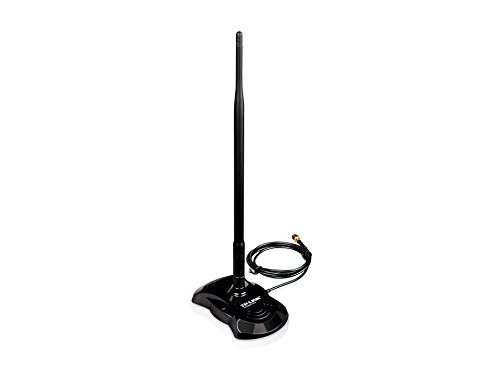
The TP-LINK TL-ANT2408C is the desktop omni-directional antenna in this guide, an 8dBi indoor antenna that sits on a desk or a shelf and spreads its signal in all directions. That omni pattern is what an access point needs in a single room or a small office: instead of aiming the signal at one spot, it covers the whole area around the access point, so laptops, phones, and tablets all get a usable signal wherever they sit. The 2.4GHz band in the listing reaches further through walls than 5GHz, which suits a room with obstacles between the access point and the devices.
The desktop design is the practical advantage: it stands on its own base, connects with a standard RP-SMA fitting, and can be placed where the signal is needed rather than where the access point is mounted. It is a simple passive antenna with no power and no configuration, so it works as soon as it is screwed on. For a small office or a home access point that needs better coverage in one room, it is the most straightforward upgrade here.
Key specifications: 2.4GHz, 8dBi, indoor desktop, omni-directional antenna, TL-ANT2408C
The antenna story here is all-round coverage: an 8dBi desktop omni that spreads the access point signal in every direction.
Strengths
- Omni-directional pattern covers a whole room
- 8dBi gain for better range than a stock antenna
- Desktop base places easily where signal is needed
Trade-offs
- 2.4GHz only, so no 5GHz band
- Indoor desktop use only
- Single antenna, so MIMO setups need more than one
A small office or home access point that needs better coverage in one room will get the most from this antenna.
Best for: small offices and homes that need all-round 2.4GHz coverage / Not suited for: buyers who need dual-band or 5GHz coverage
Check price on Amazon: TP-LINK TL-ANT2408C

Alfa Network APA-M25 Dual Band 2.4GHz/5GHz 8 / 10dBi High Gain Directional Indoor Panel Antenna with RP-SMA Connector
The Alfa APA-M25 is the dual-band directional panel in this guide, an indoor antenna that focuses its signal in one direction instead of spreading it everywhere. That focus is what a directional antenna is for: when the devices are all in one direction from the access point, such as down a hallway or across an open office, a panel antenna pushes more signal that way and less where it is not needed. The 8dBi gain on 2.4GHz and 10dBi on 5GHz in the listing cover both bands, so it serves devices on either frequency.
The panel shape mounts on a wall or a shelf facing the devices, and the RP-SMA connector fits the access points and routers that take detachable antennas. It is a passive antenna with no power, so it works as soon as it is connected, and its directional pattern also helps in a noisy environment, since it hears less interference from the sides and behind. For an access point serving one direction, it is the most effective pick here.
Key specifications: Dual band 2.4GHz/5GHz, 8/10dBi high gain, directional indoor panel antenna, RP-SMA connector
The antenna story here is focus: a dual-band panel that pushes the signal in one direction, where the devices are.
Strengths
- Dual-band coverage for 2.4GHz and 5GHz
- Directional gain reaches further in one direction
- RP-SMA connector fits detachable-antenna access points
Trade-offs
- Directional only, so devices behind it get little signal
- Needs aiming at the devices
- Indoor panel, not weather resistant
An access point serving devices in one direction, such as down a hallway, will suit this panel well.
Best for: offices and homes with devices in one direction / Not suited for: buyers who need all-round coverage in every direction
Check price on Amazon: Alfa APA-M25

ALFA APA-M25-6E Tri-Band 2.4 GHz/5 GHz/6E High Gain Directional 10 dBi Indoor RP-SMA Panel Antenna
The Alfa APA-M25-6E is the tri-band panel in this guide, covering 2.4GHz, 5GHz, and the 6GHz band used by Wi-Fi 6E, with 10dBi of directional gain in the listing. That third band matters for a modern access point, because Wi-Fi 6E devices use 6GHz for fast, uncongested connections, and an antenna that does not cover 6GHz cannot serve them at all. The directional panel focuses the signal where the devices are, and the RP-SMA connector fits access points and routers with detachable antennas.
The 6E support is the reason to choose this model over the standard APA-M25: it future-proofs the access point for the newest devices while still serving 2.4GHz and 5GHz clients. The indoor panel mounts on a wall or a shelf facing the devices, and its high gain helps in a large room or an open office where the access point must reach across a distance. For a buyer building a network with Wi-Fi 6E devices, it is the most forward-looking pick here.
Key specifications: Tri-band 2.4 GHz/5 GHz/6E, high gain directional 10 dBi, indoor RP-SMA panel antenna
The antenna story here is the third band: a tri-band panel that covers 6GHz for Wi-Fi 6E devices.
Strengths
- Tri-band coverage including Wi-Fi 6E
- 10dBi directional gain for distance
- RP-SMA connector fits detachable-antenna access points
Trade-offs
- Directional only, so devices behind it get little signal
- 6GHz band has shorter range through walls
- Costs more than dual-band panels
A network with Wi-Fi 6E devices that needs a directional panel will get the most from this antenna.
Best for: Wi-Fi 6E networks that need tri-band directional coverage / Not suited for: buyers with no 6GHz devices who want the lowest cost
Check price on Amazon: Alfa APA-M25-6E

Bingfu Dual Band WiFi 2.4GHz 5GHz 5.8GHz 3dBi MIMO RP-SMA Male Bluetooth Antenna (2-Pack)
The Bingfu two-pack is the replacement antenna set in this guide, with two dual-band 3dBi MIMO antennas that screw onto any router or access point with RP-SMA male connectors. The 2.4GHz and 5GHz coverage in the listing matches the two bands most access points use, and the MIMO design means the two antennas work together for better throughput than a single antenna. The two-pack suits a dual-antenna access point, since both antennas can be replaced at once, or a pair of devices that each need one.
The 3dBi gain is modest next to the panel antennas here, but it is an honest upgrade over the small stock antennas that come with most access points, and the low cost makes it the cheapest way to improve a network. The antennas are small and unobtrusive, so they suit a living room or an office where a large panel would look out of place. For a buyer who wants a simple, cheap replacement for worn or weak stock antennas, it is the most practical pick here.
Key specifications: Dual band WiFi 2.4GHz 5GHz 5.8GHz, 3dBi, MIMO, RP-SMA male, Bluetooth antenna, 2-pack, for PC computer WiFi router wireless network card
The antenna story here is replacement: two dual-band MIMO antennas that upgrade a router or access point cheaply.
Strengths
- Two antennas included for dual-antenna devices
- Dual-band coverage for 2.4GHz and 5GHz
- Low cost for a simple replacement
Trade-offs
- 3dBi gain is modest next to panel antennas
- Small size limits range improvement
- RP-SMA male only, so check the connector
An owner replacing worn stock antennas on a router or access point will get the most from this two-pack.
Best for: owners replacing stock antennas on dual-antenna devices / Not suited for: buyers who need high-gain directional coverage
Check price on Amazon: Bingfu Dual Band WiFi Antenna (2-Pack)

Eightwood 9dBi Dual Band WiFi Antenna 2.4GHz 5GHz RP-SMA WiFi Antennae, Magnetic Base, 6.5ft Extension Cable
The Eightwood 9dBi antenna is the magnetic-base model in this guide, with a 6.5-foot extension cable that lets the antenna sit where the signal is best rather than where the access point is mounted. The magnetic base sticks to a metal shelf, a filing cabinet, or a case, and the cable gives room to place the antenna high on a shelf or near a window, away from the clutter around the access point. The 9dBi dual-band gain in the listing covers 2.4GHz and 5GHz, so it serves devices on either band with a stronger signal than a stock antenna.
The cable is the practical advantage: an access point tucked behind a TV or inside a cabinet can have its antenna placed outside, where the signal is clear, without moving the access point itself. The RP-SMA connector fits routers, access points, and PCIe cards with detachable antennas, and the magnetic base means no screws or mounts are needed. For a buyer whose access point is stuck in a bad spot, it is the most flexible pick here.
Key specifications: 9dBi, dual band WiFi 2.4GHz 5GHz, RP-SMA, magnetic base, 6.5ft extension cable, for PC desktop computer PCIe Bluetooth card gaming motherboard WiFi router
The antenna story here is placement: a 9dBi antenna on a 6.5-foot cable with a magnetic base, for a bad access point location.
Strengths
- Magnetic base sticks to metal without screws
- 6.5-foot cable places the antenna where signal is best
- 9dBi dual-band gain for both bands
Trade-offs
- Magnetic base needs a metal surface
- Cable adds clutter if the run is short
- Single antenna, so MIMO setups need more than one
An access point stuck behind a TV or inside a cabinet will benefit most from this antenna.
Best for: buyers who need to move the antenna away from the access point / Not suited for: buyers who want a clean install with no cable
Check price on Amazon: Eightwood 9dBi Dual Band WiFi Antenna

Dual Band 2.4GHz/5GHz 5.8GHz White WiFi Antenna with RP-SMA Connector for TP-Link Ubiquiti AC Mesh Wireless Access Point, Desktop PC Computer and Reolink Security Cameras (Pack of 2)
This white dual-band antenna pair is the mesh access point pick in this guide, because its listing names TP-Link and Ubiquiti AC mesh wireless access points explicitly, along with desktop PCs and security cameras. Mesh access points use several units around a home or office, and their antennas are often small and weak, so a replacement pair with proper RP-SMA connectors can improve the link between the mesh units and the devices they serve. The white color suits a ceiling or wall-mounted access point, where a black antenna would stand out.
The two-pack covers a pair of antennas on one access point, or one antenna on each of two mesh units, and the dual-band 2.4GHz and 5GHz coverage matches the bands mesh systems use. The RP-SMA connector is the standard for detachable-antenna access points, so it fits the TP-Link Omada and Ubiquiti units named in the listing directly. For a mesh network owner who wants better links between units, it is the most targeted pick here.
Key specifications: Dual band 2.4GHz/5GHz 5.8GHz, white WiFi antenna, RP-SMA connector, for TP-Link Ubiquiti AC mesh wireless access point, desktop PC computer, Reolink security cameras, pack of 2
The antenna story here is mesh: a white RP-SMA pair made for TP-Link and Ubiquiti mesh access points.
Strengths
- Made for TP-Link and Ubiquiti mesh access points
- Two antennas included for a pair
- White color suits ceiling and wall mounts
Trade-offs
- Generic brand, so build varies
- No gain figure stated in the listing
- RP-SMA only, so check the connector
A mesh network owner with TP-Link or Ubiquiti access points will get the most from this pair.
Best for: mesh access point owners who want replacement antennas / Not suited for: buyers who need a stated gain figure on the box
Check price on Amazon: Slinkdsco Dual Band WiFi Antenna (2-Pack)
Best access point antennas: what matters most
The connector is the first thing to confirm, because it decides whether the antenna fits your access point at all. Most access points and routers with detachable antennas use RP-SMA connectors, which means the antenna needs an RP-SMA fitting, and an access point with fixed antennas cannot take a replacement at all. Check the connector on your access point before buying, and confirm the antennas are detachable, since a fixed-antenna access point needs a different solution, such as a second access point or a mesh unit.
Gain decides how far the signal reaches, but it is not the whole story. A higher-gain antenna reaches further in its pattern, which helps in a large room or across a distance, while a lower-gain antenna covers a wider area close by, which suits a small room. Check the gain in the listing, and match it to the space: a 9dBi antenna suits a long room, while a 3dBi antenna suits a small office. A gain figure without a pattern is incomplete, so check both.
Omni-directional or directional is the next decision. An omni antenna spreads the signal in all directions, which suits a central access point serving a whole room, while a directional panel focuses the signal in one direction, which suits an access point serving devices down a hallway or across an open office. Decide by where the devices are: if they surround the access point, choose omni, and if they are all in one direction, choose directional.
Bands matter for a modern network. An access point that serves 2.4GHz, 5GHz, and 6GHz devices needs antennas that cover all three bands, and an antenna that covers only 2.4GHz will leave the 5GHz and 6GHz clients with a weak signal or none at all. Check which bands your access point and your devices use, and favor a dual-band or tri-band antenna when any device uses the higher bands, since the antenna must cover every band the network uses.
Placement rounds out the decision. An antenna on a high shelf with a clear view will outperform the same antenna behind a TV or inside a cabinet, whatever its gain, and a magnetic-base antenna on a long cable can fix a bad access point location without moving the access point itself. Place the antenna high, clear of metal objects, and away from other electronics, and test the signal after moving it, since a small move can make a large difference.
Buying guide: choosing access point antennas
Start with the access point, because the antenna you need depends on the connector and the bands it uses. A TP-Link Omada, a Ubiquiti, or a router with detachable RP-SMA antennas can take any antenna in this guide, while an access point with fixed antennas cannot take a replacement at all. Check the connector and the bands on your exact access point model before buying, since a different connector needs a different antenna or an adapter.
Check the coverage needed before buying. A small room needs an omni antenna with modest gain, a long hallway needs a directional panel, and a large open office needs a high-gain antenna or several access points. Decide by the space and the devices, not by the biggest gain figure on the shelf, since a high-gain antenna in a small room can overshoot the devices and waste its signal on the walls.
The number of antennas is the next check. A dual-antenna access point needs two antennas for MIMO, and replacing only one leaves the other as the weak link, so buy a two-pack or two singles when the access point has two connectors. A single-antenna access point needs one, and a mesh system with several units may need a pair for each unit. Count the connectors before ordering, and buy the right number.
Cable length and mounting are easy to overlook. A magnetic-base antenna on a long cable can sit where the signal is best, while a panel antenna needs a wall or a shelf facing the devices, and a desktop antenna needs a flat surface. Check the mounting options and the cable length for the exact model, and favor the antenna that fits the place you have, since an antenna that cannot be placed well will not perform well.
Finally, check the seller and the listing details before paying. Confirm the exact model name, including the gain and the bands, since one number can mean a different antenna: the Alfa APA-M25 and APA-M25-6E are different models, with different band coverage. A listing that says renewed or used is a different purchase from a new antenna, and the condition is different too. Buy from a listing that names the exact model you want, and keep the box and receipt in case the antenna needs warranty service.
Using and caring for your access point antennas
Fit the antenna carefully on the first day. Screw it onto the access point by hand, snug but not forced, and check that it sits straight and does not wobble, since a loose antenna will perform poorly and can damage the connector. Test the Wi-Fi signal on a phone or laptop in the areas that matter, and note the difference against the stock antenna, so you know what the upgrade bought you. Keep the stock antennas as spares, since they are better than no antenna at all.
Place the antenna well by testing different positions. An antenna on a high shelf with a clear view will outperform the same antenna behind a TV, and a directional panel should face the devices it serves. Move the antenna a little and test again, since a small move can make a large difference, and use the signal meter on a phone app to measure rather than guessing. A magnetic-base antenna on a long cable makes this easy, since it can be moved without moving the access point.
Look after the antennas and the access point together. Keep the antennas clear of metal objects and other electronics, since both can block or interfere with the signal, and check the connectors for dirt or damage before fitting, since a dirty connector can cause poor performance. Restart the access point after fitting new antennas, so it can renegotiate the best connection with the devices.
Protect the installation and your network. Use a surge protector on the access point, since a power surge can damage it through the mains, and keep the antenna cables tidy and secured, so they do not get pulled or tripped over. Change the default Wi-Fi password if you have not already, since a better antenna also reaches further outside the building, and a strong password matters more when the signal does.
Common mistakes to avoid
The most common mistake is buying an antenna with the wrong connector. An access point with RP-SMA connectors needs an RP-SMA antenna, and an access point with SMA or fixed antennas needs a different solution. Check the connector on your exact access point model before buying, and do not assume that all access points use the same fitting, since they do not.
Another common mistake is choosing gain over pattern. A high-gain omni antenna in a small room can overshoot the devices and waste its signal, while a directional panel aimed the wrong way will miss the devices entirely. Choose by the pattern first and the gain second, since the shape of the coverage matters more than the size of the number.
A third mistake is replacing only one antenna on a MIMO access point. A dual-antenna access point uses both antennas together for throughput, and replacing one leaves the other as the weak link, so the improvement is smaller than expected. Replace all the antennas on an access point at once, or buy a two-pack, so the set is matched.
Finally, do not expect an antenna to fix a bad access point location. An access point in a basement, behind a metal cabinet, or at one end of a large building will struggle whatever the antenna, and the fix is usually a better location or a second access point, not a bigger antenna. Check the location first, and add an antenna when the location is right but the coverage is still short.
Budget and value
A budget two-pack makes the most sense when the buyer wants to replace worn stock antennas without spending much. Pair it with a good placement and a restart of the access point, and the result is better coverage for far less than a new access point. The money saved can go to a second access point or a better router, which affect the network more than a small gain difference.
Spending more on a high-gain panel or a tri-band antenna buys coverage and future-proofing, which is worth it if the network has Wi-Fi 6E devices or the access point must reach across a large space. The jump from a replacement two-pack to a directional panel is the best value step for a large room, since it brings the focus most owners actually notice. Spending more than that buys refinements rather than big changes, so choose by the access point, the room, and the bands, not by the specification sheet alone.
Final recommendation
For most access point owners, the Alfa APA-M25 is the best all-round choice among the best access point antennas: dual-band coverage with 8/10dBi of directional gain in a panel that focuses the signal where the devices are. If the network has Wi-Fi 6E devices, the APA-M25-6E adds the 6GHz band. If the budget is tight, the Bingfu two-pack replaces stock antennas for less. Any of the six antennas here will improve an access point, so choose by the connector, the pattern, and the bands, and test the signal after fitting.
Frequently asked questions
What is the best access point antenna?
The best antenna depends on the access point and the room. A directional panel like the Alfa APA-M25 suits devices in one direction, an omni antenna like the TP-LINK TL-ANT2408C suits a whole room, and a tri-band panel like the APA-M25-6E suits Wi-Fi 6E networks. Check the connector and the bands first.
Will a better antenna improve my Wi-Fi?
In most cases, yes, when the antenna is the weak link. A higher-gain or better-placed antenna can extend coverage and improve the link, but it cannot fix a bad access point location, a slow internet connection, or an overloaded network. Check the location first, then the antenna.
What connector do access point antennas use?
Most access points and routers with detachable antennas use RP-SMA connectors. Check the connector on your exact access point model before buying, since some use SMA or fixed antennas that cannot be replaced.
Do I need a dual-band antenna?
Yes, if your access point and devices use both 2.4GHz and 5GHz. A single-band antenna will leave the other band weak, so favor a dual-band antenna for a modern network, and a tri-band antenna when any device uses the 6GHz Wi-Fi 6E band.
How many antennas do I need?
Match the number of connectors on the access point. A dual-antenna access point needs two for MIMO, and replacing only one leaves the other as the weak link. Count the connectors before ordering, and buy a two-pack or two singles when the access point has two.
Omni-directional vs directional antennas
An omni-directional antenna spreads its signal in all directions, which suits an access point in the middle of a room serving devices all around it. It is the simplest choice, since it needs no aiming, and it works well in a small office or a living room where the devices move around. The trade-off is range: the signal is shared in every direction, so it does not reach as far in any one direction as a panel antenna.
A directional panel focuses its signal in one direction, which suits an access point serving devices down a hallway, across an open office, or toward a specific area. It reaches further in that direction than an omni antenna, and it hears less interference from the sides and behind. The trade-off is aiming: it must face the devices, and devices behind it will get little signal.
For most buyers, the decision is practical: if the devices surround the access point, choose omni, and if they are all in one direction, choose directional. A panel antenna is also the right choice when the access point must reach across a distance, while an omni antenna is right when the access point sits in the middle of the space it serves.
Matching an antenna to your network
An antenna should match the network and the space, because the best antenna for a small office is not the best antenna for a large warehouse. A small office with one access point needs an omni antenna with modest gain, while a large open space needs a directional panel or several access points, and a mesh network needs replacement antennas that match the mesh units. A buyer with Wi-Fi 6E devices needs a tri-band antenna, while a buyer with older devices can use a dual-band model.
Gain is a good example. A buyer who needs to reach across a long room will notice the extra range of a 9dBi or 10dBi antenna, while a buyer in a small room may notice no difference at all, since the signal is already strong enough. Choose by the distance the signal must travel, not by the specification sheet.
Connectors add another layer. A network with several access points needs a matched set of antennas, and a mesh system needs a pair for each unit that takes detachable antennas. Check the connectors, the bands, and the number of antennas for the exact access points you own, and favor the set that matches all three, even if a single antenna looks tempting. The right antenna is the one that fits and covers, not the one with the longest specification.
More guides from KajuanDouglas
Best Access Point for Home Wireless Cameras Best Wi-Fi Router for a Lot of Cameras Best 5G Wi-Fi Extenders Best Wi-Fi Extender for Phones and Laptops