An all-purpose laptop is the one machine that has to do everything: work documents, video calls, web browsing, streaming, and study, without being a gaming laptop or a specialized workstation. The best all-purpose laptops balance a comfortable screen, enough memory and storage for daily multitasking, and a design that travels well, at a level that suits most budgets. This guide covers six laptops that fit that brief, each checked against current listings with verified product details.
Every laptop here is a genuine general-purpose machine with a clear strength, whether that is portability, a large screen, extra memory, or included software. The picks suit students, home users, and remote workers alike.
In this guide
Quick picks: best all purpose laptops
| # | Product | Where to buy |
|---|---|---|
| 1 | HP Everyday Slim Laptop with Intel N150 | Check on Amazon |
| 2 | Dell 15.6 Laptop with Intel Core 3 100U | Check on Amazon |
| 3 | Lenovo IdeaPad Slim 3i 15.6-Inch Laptop | Check on Amazon |
| 4 | Lenovo V15 Laptop with AMD Ryzen 5 7520U | Check on Amazon |
| 5 | HP OmniBook 3 17.3-Inch Laptop with Intel Core 5 120U | Check on Amazon |
| 6 | Dell 15.6 Laptop with Intel Core Ultra 5 225U | Check on Amazon |
How the picks were chosen
We started with laptops that are explicitly general-purpose machines, because the all-purpose brief is the whole point of this guide. A gaming laptop, a Chromebook, or a specialized workstation does not belong here, and we excluded those even when they appeared in the same search results.
Balance came next. An all-purpose laptop needs a processor, memory, and storage that keep up with everyday multitasking, so we favored 8GB or 16GB of memory and a fast SSD in every pick, with screens from 15.6 to 17.3 inches that suit work and study.
Finally, we balanced the list by size and purpose. The six laptops cover a slim portable model, mainstream 15.6-inch machines, a 16GB workhorse, and a 17.3-inch desktop replacement, so a student, a traveler, and a home office worker each have a real option.
Quick comparison
| Product | Standout feature | Best for |
|---|---|---|
| HP Everyday Slim, Intel N150 | Slim, cloud storage, Office 365 | Light everyday carry |
| Dell 15.6, Core 3 100U | 512GB SSD, anti-glare screen | Dependable mainstream use |
| Lenovo IdeaPad Slim 3i | Office included, 15.6-inch | Students |
| Lenovo V15, Ryzen 5 7520U | 16GB DDR5, numeric keypad | Business and multitasking |
| HP OmniBook 3, 17.3-inch | Large screen, Core 5 | Desktop replacement |
| Dell 15.6, Core Ultra 5 225U | 16GB, backlit keyboard | Modern, future-proof use |

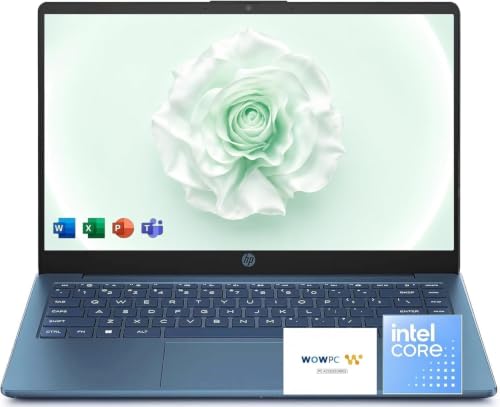
HP Everyday Slim Laptop with Intel N150
The HP Everyday Slim is the lightest, simplest laptop in this roundup, built for the everyday tasks that make up most of computing: browsing, email, documents, video calls, and streaming. An Intel N150 processor, 128GB of SSD storage, and 1TB of cloud storage cover those jobs well, while Windows 11 and the included Microsoft 365 keep the laptop ready for work and study from the first boot. The slim, thin design is easy to carry, and the long battery life means it lasts through a day away from an outlet.
Key specifications: HP Everyday Slim Laptop; Intel N150 processor; 128GB SSD; 1TB cloud storage; Windows 11; Microsoft 365 included; thin and portable; long battery life.
This laptop suits a student, a home user, or a remote worker who needs a light, affordable machine for everyday tasks. The slim design fits in a small bag, the cloud storage keeps files accessible from anywhere, and the included Microsoft 365 covers documents, spreadsheets, and presentations without extra software to buy.
Set up Windows 11, sign in to the cloud storage, and install the programs you need before the first workday. Keep the 128GB SSD free for the operating system and the most-used apps, storing larger files in the cloud. A laptop sleeve protects the slim body during travel.
Strengths
- Slim, thin design is easy to carry all day
- Cloud storage and Microsoft 365 included for work and study
- Long battery life suits a day away from an outlet
Trade-offs
- 128GB SSD is small for large files or many programs
- Entry-level processor is not built for heavy editing or gaming
- Thin design means fewer ports than a larger laptop
A student or a home user who wants a light, simple laptop for everyday tasks will find the HP Everyday Slim the easiest pick here. It is the portable everyday choice.
Best for: students and home users who need a light laptop for daily tasks / Not suited for: gamers or creators who need a powerful processor
Check price on Amazon: HP Everyday Slim Laptop with Intel N150

Dell 15.6 Laptop with Intel Core 3 100U
The Dell 15.6 laptop is the dependable mainstream pick of this roundup, with a full HD display, an Intel Core 3 100U processor, 8GB of memory, and a 512GB SSD. The 300-nit anti-glare screen stays readable in a bright room, the DDR5 memory keeps multitasking smooth, and Wi-Fi 6 and Bluetooth cover modern connectivity. Model DC15250 is the configuration to look for, with the carbon black finish and the three-cell battery that suits a day of work.
Key specifications: 15.6-inch full HD laptop; Intel Core 3 100U; 8GB RAM; DDR5; 512GB SSD; Wi-Fi 6; Bluetooth; Windows 11 Home; 300-nit anti-glare display; model DC15250.
This laptop suits a home office, a student, or a small business user who wants a solid, no-surprises machine. The 15.6-inch screen is comfortable for documents and video calls, the 512GB SSD holds a good library of files and programs, and the anti-glare display works well near a window. It is a laptop that does everything adequately and nothing badly.
Set up Windows 11, update the drivers, and organize files on the 512GB SSD so the most-used programs load quickly. Use the anti-glare screen at a comfortable brightness, and keep the laptop on a hard surface for airflow during long sessions.
Strengths
- Full HD anti-glare display stays readable in bright rooms
- 512GB SSD and 8GB DDR5 cover everyday work and study
- Wi-Fi 6 and Bluetooth for modern connectivity
Trade-offs
- Intel Core 3 is an entry-level processor for heavy tasks
- Design is plain compared with premium ultrabooks
- Integrated graphics are not built for gaming
A buyer who wants a dependable, mainstream laptop for work, study, and home use will find this Dell the safest choice here. It is the all-round pick.
Best for: home offices, students, and small businesses needing a solid laptop / Not suited for: gamers or video editors who need a faster processor
Check price on Amazon: Dell 15.6 Laptop with Intel Core 3 100U

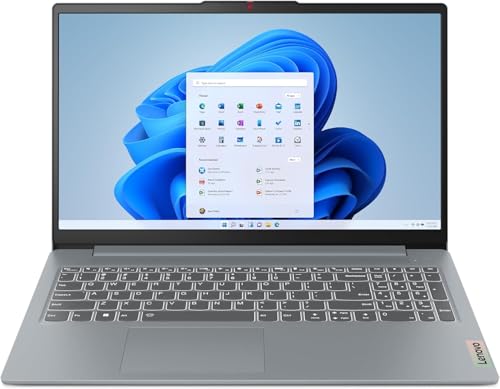
Lenovo IdeaPad Slim 3i 15.6-Inch Laptop
The Lenovo IdeaPad Slim 3i is the value pick of this roundup, with a 15.6-inch full HD display, Microsoft Office included, 128GB of SSD storage, and 1TB of cloud storage in a slim, portable body. The 2027 edition runs Windows 11, and the included Office software means the laptop is ready for documents, spreadsheets, and presentations from the first boot. It is a straightforward laptop for a student or a home user who wants Office without buying it separately.
Key specifications: 15.6-inch full HD laptop; Microsoft Office included; 128GB SSD; 1TB cloud storage; Windows 11; 2027 edition; slim design.
This laptop suits a student or a home user who needs Microsoft Office for school or work and wants a laptop that is ready to go. The 15.6-inch screen is comfortable for writing and video calls, the cloud storage keeps files safe and accessible, and the slim design travels well in a backpack.
Sign in to Microsoft Office and the cloud storage during setup, and store larger files in the cloud to keep the 128GB SSD free for the operating system and the most-used apps. Keep the laptop in a sleeve during travel, and update Windows regularly for security.
Strengths
- Microsoft Office included, ready for school and work
- 15.6-inch full HD screen in a slim, portable body
- Cloud storage keeps files accessible and backed up
Trade-offs
- 128GB SSD is small for large files or many programs
- Entry-level configuration is not built for heavy tasks
- Processor details are basic, so check the listing for specifics
A student who needs Office included and a simple, portable laptop will find the IdeaPad Slim 3i the best value here. It is the student pick.
Best for: students who need Microsoft Office ready from the first boot / Not suited for: creators or gamers who need more power and storage
Check price on Amazon: Lenovo IdeaPad Slim 3i 15.6-Inch Laptop

Lenovo V15 Laptop with AMD Ryzen 5 7520U
The Lenovo V15 is the workhorse of this roundup, with an AMD Ryzen 5 7520U processor, 16GB of DDR5 memory, and a 512GB SSD behind a 15.6-inch full HD display. That combination handles business, study, and everyday multitasking with room to spare, and the numeric keypad, the webcam with a privacy shutter, and Windows 11 Pro with Copilot make it a proper work machine. It is a laptop for someone who wants more memory and more power than an entry-level model without paying for a premium ultrabook.
Key specifications: 15.6-inch full HD laptop; AMD Ryzen 5 7520U; 16GB DDR5 RAM; 512GB SSD; numeric keypad; webcam with shutter; Windows 11 Pro with Copilot.
This laptop suits a business user, a student with heavy multitasking, or a home office worker who keeps many tabs and programs open at once. The 16GB of memory is the key feature: it keeps the laptop smooth when the browser, the documents, and the video call all run together. The numeric keypad helps with spreadsheets and data entry, and the webcam shutter adds privacy.
Set up Windows 11 Pro, enable the features you need, and organize the 512GB SSD so work files and programs are easy to find. Use the webcam shutter when not on a call, and keep the laptop ventilated during long work sessions.
Strengths
- 16GB DDR5 memory handles heavy multitasking smoothly
- Ryzen 5 processor and 512GB SSD cover work and study well
- Numeric keypad, webcam shutter, and Windows 11 Pro add work features
Trade-offs
- Design is practical rather than premium or stylish
- Heavier than the slim ultraportable models here
- Integrated graphics are not built for gaming
A business user or a heavy multitasker who wants more memory and a proper work laptop will choose the Lenovo V15. It is the workhorse pick here.
Best for: business users and heavy multitaskers who need 16GB of memory / Not suited for: travelers who need the lightest possible laptop
Check price on Amazon: Lenovo V15 Laptop with AMD Ryzen 5 7520U
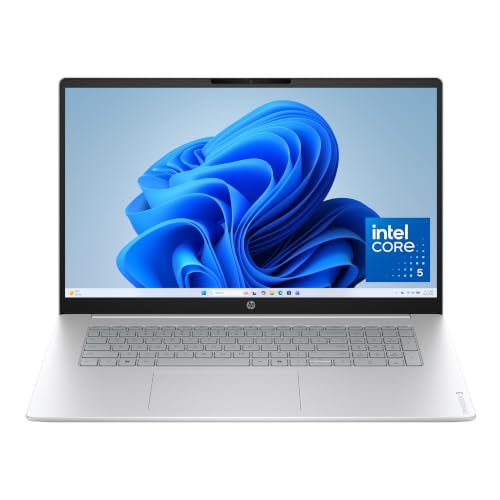
HP OmniBook 3 17.3-Inch Laptop with Intel Core 5 120U
The HP OmniBook 3 is the big-screen pick of this roundup, with a 17.3-inch full HD display, an Intel Core 5 120U processor, 8GB of memory, and a 512GB SSD. The large screen makes documents, spreadsheets, and video calls easier to read, and the Glacier Silver finish gives the big body a clean, modern look. Model 17-dk0099nr is the configuration to look for, with Windows 11 Home and Intel graphics for everyday tasks.
Key specifications: 17.3-inch full HD laptop; Intel Core 5 120U; 8GB RAM; 512GB SSD; Intel graphics; Windows 11 Home; Glacier Silver; model 17-dk0099nr.
This laptop suits a home user, a student, or a worker who wants the largest screen here and does not need to carry the laptop far. The 17.3-inch display is comfortable for long reading and writing sessions, the 512GB SSD holds a good library, and the Core 5 processor handles everyday work well. It is a desktop replacement for a desk that stays in one place.
Set the display scaling to a comfortable level for the large screen, update Windows and the drivers, and organize the 512GB SSD for work and media. Use the laptop on a desk or a table rather than on a lap for long sessions, since the large body is best on a stable surface.
Strengths
- 17.3-inch display is the largest screen in this roundup
- Core 5 processor and 512GB SSD handle everyday work well
- Glacier Silver finish looks clean and modern
Trade-offs
- Large size is heavy and less portable than a 15-inch laptop
- 8GB memory is less than the 16GB models here
- Integrated graphics are not built for gaming
A buyer who wants the biggest screen and a comfortable desktop replacement will choose the HP OmniBook 3. It is the big-screen pick here.
Best for: home users who want a large screen and a desk-based laptop / Not suited for: travelers who need a light, portable machine
Check price on Amazon: HP OmniBook 3 17.3-Inch Laptop with Intel Core 5 120U

Dell 15.6 Laptop with Intel Core Ultra 5 225U
The Dell 15.6 laptop with the Intel Core Ultra 5 225U is the most modern pick of this roundup, with a newer Ultra processor, 16GB of memory, a 512GB SSD, and a backlit keyboard in a carbon black body. The 300-nit anti-glare display stays readable in a bright room, the DDR5 memory keeps multitasking smooth, and Wi-Fi 6 and Bluetooth cover connectivity. Model D15260 is the configuration to look for, with Windows 11 Home and a business-ready design.
Key specifications: 15.6-inch full HD laptop; Intel Core Ultra 5 225U; 16GB RAM; DDR5; 512GB SSD; backlit keyboard; Wi-Fi 6; Windows 11 Home; 300-nit anti-glare display; model D15260.
This laptop suits a buyer who wants the newest processor here and a laptop that will stay current for years. The Ultra 5 processor handles everyday work and multitasking well, the 16GB of memory keeps many programs open at once, and the backlit keyboard helps in a dim room. It is a good fit for a home office, a student, or a small business.
Set up Windows 11, update the drivers, and use the backlit keyboard in dim rooms. Keep the 512GB SSD organized, and take advantage of the 16GB of memory by keeping work programs open rather than closing them constantly.
Strengths
- Newest processor here with 16GB of memory for multitasking
- Backlit keyboard helps in dim rooms and evening work
- Anti-glare display and Wi-Fi 6 suit a modern home office
Trade-offs
- Design is practical and business-like rather than stylish
- Integrated graphics are not built for gaming
- Newer processor may need driver updates for older software
A buyer who wants the most modern laptop here, with a newer processor and 16GB of memory, will choose this Dell. It is the future-proof pick.
Best for: buyers who want a modern laptop with 16GB and a backlit keyboard / Not suited for: gamers or creators who need a dedicated graphics card
Check price on Amazon: Dell 15.6 Laptop with Intel Core Ultra 5 225U
Best all purpose laptops: what matters most
Memory is the first thing to check on an all-purpose laptop, because it defines how smoothly the machine multitasks. 8GB is enough for everyday work and study, while 16GB is better for heavy multitasking with many tabs, documents, and video calls open at once. A laptop with 16GB will stay smooth longer as software grows more demanding.
Storage comes next. A 512GB SSD holds a comfortable library of programs and files, while a 128GB SSD needs cloud storage or an external drive for larger files. Check the drive size before ordering, and plan for cloud storage if the drive is small.
Screen size is a trade-off between comfort and portability. A 15.6-inch screen is the sweet spot for most users, a 17.3-inch screen is more comfortable for long reading and writing but heavier to carry, and a slim 14-inch or smaller design travels best. Choose the size for how the laptop will actually be carried.
Finally, think about the software and the details. Included Microsoft Office or Microsoft 365 saves a separate purchase, a backlit keyboard helps in dim rooms, and Wi-Fi 6 keeps the laptop current. Small details like a webcam shutter and a numeric keypad add up over a long workday.
Buying guide: choosing all purpose laptops
Start with the work you actually do. Documents, email, browsing, and video calls run well on an entry-level processor with 8GB of memory, while heavy multitasking, large spreadsheets, and photo editing benefit from 16GB and a stronger processor. Match the laptop to the work, not to a benchmark.
Choose the screen size by how you travel. A slim 15-inch laptop fits most bags and desks, a 17-inch laptop is best on a desk, and a very light model is best for a student who carries the laptop all day. If the laptop mostly stays at home, the larger screen is the better buy.
Check the exact configuration before ordering. Model numbers like DC15250, D15260, and 17-dk0099nr identify the specific processor, memory, and storage, and a similar-looking laptop with a different configuration can have a different drive or less memory. Verify the configuration in the listing.
Think about the extras. Included Office software, cloud storage, and a backlit keyboard add real value, while a laptop sleeve and a mouse improve daily use. Budget for those if the laptop will be carried daily.
Using and caring for your all purpose laptops
Keep the laptop updated with the latest Windows updates and drivers, since updates improve security and fix bugs. Check for firmware updates from the maker at the same time, and keep the operating system current.
Store files in the cloud or on an external drive as well as on the laptop, so a lost or damaged machine does not lose irreplaceable work. A regular backup is the cheapest insurance for a laptop that holds school or work files.
Clean the screen with a soft, dry cloth and keep the keyboard free of crumbs and dust. Carry the laptop in a padded sleeve, avoid putting heavy items on top of it in a bag, and keep it away from liquids.
Common mistakes to avoid
The most common mistake is buying too little storage. A 128GB SSD fills quickly with programs and files, and a buyer who does not plan for cloud storage will run out of room. Check the drive size and plan for cloud or external storage if it is small.
Another mistake is choosing a laptop by the processor name alone. An entry-level processor with 8GB of memory is fine for everyday work, but a buyer who needs heavy multitasking will be happier with 16GB. Read the full configuration, not just the processor.
Finally, many buyers forget portability. A 17-inch laptop is comfortable on a desk but heavy in a backpack, while a slim laptop is easy to carry but has fewer ports. Choose the size for how the laptop will actually travel.
Budget and value
An all-purpose laptop is a value buy, and the best value is usually a mainstream 15.6-inch model with 8GB or 16GB of memory and a 512GB SSD. Entry-level models cost less but have smaller drives, while premium ultrabooks cost more for a lighter body. Pay for the memory and storage you will use daily.
Value also comes from longevity. A laptop with 16GB of memory, a 512GB SSD, and a modern processor will stay useful longer than a cheaper model with a small drive and an old processor. Buy the configuration you will still be happy with in two years.
Final recommendation
For most buyers, the Dell 15.6 with the Intel Core 3 100U is the best all-round all-purpose laptop: a dependable screen, a 512GB SSD, and a solid design. If you need more memory, the Lenovo V15 with 16GB is the workhorse pick, and if you want the newest processor, the Dell with the Core Ultra 5 225U is the modern choice.
Students should look at the Lenovo IdeaPad Slim 3i with Office included, travelers should look at the HP Everyday Slim, and anyone who wants the biggest screen should look at the HP OmniBook 3 with its 17.3-inch display.
Frequently asked questions
How much memory does an all-purpose laptop need?
8GB of memory is enough for everyday work, study, and browsing, while 16GB is better for heavy multitasking with many programs open at once. If you keep many browser tabs and documents open, favor 16GB for a smoother experience.
Is a 128GB SSD enough for a laptop?
A 128GB SSD is enough for the operating system and the most-used programs if larger files are stored in the cloud or on an external drive. A 512GB SSD is more comfortable and holds a larger library without needing extra storage.
What screen size is best for an all-purpose laptop?
A 15.6-inch screen is the sweet spot for most users, balancing comfort and portability. A 17.3-inch screen is more comfortable for long sessions but heavier to carry, while a smaller screen travels best.
Do I need a dedicated graphics card for everyday use?
No, integrated graphics handle everyday work, video calls, streaming, and light photo editing well. A dedicated graphics card is only needed for gaming, video editing, or 3D work.
Is Microsoft Office included with these laptops?
Some laptops in this guide include Microsoft Office or Microsoft 365, while others do not. Check the listing for the specific model, since the included software varies by configuration.
Can an all-purpose laptop handle photo editing?
Yes, an all-purpose laptop with 8GB or 16GB of memory handles light photo editing well, especially with a fast SSD. For heavy editing of large raw files or 4K video, a laptop with more memory and a dedicated graphics card is a better choice.
How do I keep my laptop running fast over time?
Keep the operating system and drivers updated, uninstall programs you no longer use, keep the SSD at least twenty percent free, and restart the laptop regularly. A clean laptop with free storage runs noticeably faster than a cluttered one.
Setting up a new all-purpose laptop
Setting up a new laptop takes less than an hour and makes the first week far smoother. Start by connecting to Wi-Fi and running Windows Update, since a new laptop often needs security and driver updates before it is fully ready. Sign in with a Microsoft account to sync settings and files, then install the programs you need: a browser, an office suite, and any work tools. If the laptop includes Microsoft Office or Microsoft 365, sign in during setup so the software is ready when you need it.
Storage deserves a plan from day one. Keep the operating system and the most-used programs on the SSD, store larger files in the cloud or on an external drive if the SSD is small, and create folders by purpose rather than dumping everything on the desktop. A tidy file system is easier to back up and easier to search, and it keeps the laptop running faster than a cluttered drive. Set up cloud sync for documents so a lost or damaged laptop does not lose your work.
Security and comfort complete the setup. Turn on Windows Hello or a PIN for quick, secure sign-in, enable the firewall and the built-in antivirus, and set up a backup routine, whether that is cloud backup or an external drive. Adjust the display brightness and scaling to a comfortable level, test the webcam and the microphone before the first video call, and keep the laptop in a padded sleeve when traveling. A good setup on day one saves hours of frustration later.
Extending battery life on an everyday laptop
Battery life is one of the most practical features of an all-purpose laptop, and a few habits make a real difference. Lower the screen brightness to a comfortable level rather than leaving it at maximum, since the display is the biggest power draw. Turn off Bluetooth and Wi-Fi when they are not needed, close programs that run in the background, and use the battery saver mode when the charge gets low. A laptop that is managed well can last noticeably longer away from an outlet than one left on default settings.
Charging habits matter too. Avoid leaving the laptop plugged in at full charge for weeks at a time, since a battery kept at maximum charge degrades faster than one kept in the middle range. If the laptop stays on a desk, unplug it occasionally and let the battery discharge to around half before plugging it back in. Most modern laptops manage charging automatically, but a little attention helps the battery stay healthy for years.
The screen and the processor settings are the other levers. A 144Hz or high-refresh display uses more power than a 60Hz display, so lowering the refresh rate when gaming is not needed saves battery. A performance power plan keeps the processor running fast and drains the battery, while a balanced plan is better for everyday work. Choose the plan for the task: performance for demanding work, balanced for everything else.
All-purpose laptops vs specialized laptops
An all-purpose laptop and a specialized laptop serve different buyers, and the difference is focus. An all-purpose laptop does everything adequately: work, study, browsing, streaming, and video calls, without excelling at any one thing. A gaming laptop excels at games but is heavier, louder, and more expensive, while a workstation excels at video editing or 3D work but costs far more. A Chromebook is simpler and cheaper but cannot run full Windows software. The all-purpose laptop is the middle ground that suits most people.
The trade-offs are real. An all-purpose laptop will not play demanding games at high settings, will not edit 4K video quickly, and will not last as long on battery as a thin ultrabook. But it will handle the tasks most people actually do, every day, without fuss and without a premium price. A buyer who plays games occasionally can still enjoy older or less demanding titles on an all-purpose laptop, and a buyer who edits photos occasionally will find it adequate for light work.
The decision comes down to honesty about your needs. If you game daily, buy a gaming laptop. If you edit video professionally, buy a workstation. If you write documents, browse the web, join video calls, and stream movies, an all-purpose laptop is the right choice and the money saved can go to a better monitor, a good chair, or a backup drive. Most buyers are all-purpose buyers, even if they do not think of themselves that way. The monitor and the accessories around an all-purpose laptop matter as much as the laptop itself. A second monitor at a desk doubles the workspace for documents and video calls, a comfortable mouse and a good keyboard reduce strain during long sessions, and a laptop stand improves both cooling and screen height. A buyer who spends the savings from a sensible laptop on those accessories often ends up with a better daily setup than a buyer who spent everything on the laptop alone. Privacy and security deserve attention on a laptop that travels. A webcam shutter or a small cover protects privacy in shared spaces, a strong password or a fingerprint keeps the laptop secure if it is left unattended, and encryption protects files if the laptop is lost. Avoid public Wi-Fi for sensitive work without a secure connection, and keep the operating system updated so security fixes are applied promptly. A laptop that holds your work and your personal files deserves the same care as the files themselves.
All-purpose laptops for students
Students are the classic all-purpose laptop buyers, and their needs are specific: a laptop that survives a backpack, lasts through a day of classes, runs Office and a browser, and handles video calls without fuss. Weight and battery life matter more than raw power, since the laptop travels between lectures, libraries, and dorm rooms, and a heavy laptop that dies by midday is a burden rather than a tool. A 15.6-inch laptop with a slim design and a long battery is the sweet spot for most students.
Software matters as much as hardware for a student. Microsoft Office or Microsoft 365 covers essays, spreadsheets, and presentations, while cloud storage keeps files safe if the laptop is lost or damaged. A laptop with Office included, like the IdeaPad Slim 3i here, saves a separate purchase and means the laptop is ready for the first assignment. Check the software before buying, since the included programs vary by model and configuration.
Durability and support complete the student picture. A laptop that will be carried daily needs a solid hinge, a sturdy lid, and a keyboard that survives constant typing, while a good warranty and accessible support matter when something breaks during exam season. A padded sleeve, a careful packing habit, and a regular backup routine protect the laptop and the work on it. A student laptop is an investment in the degree, and it deserves the same care as the studies themselves. A final tip for students: use the laptop's included software and cloud storage from the first week, not the week before exams. Set up automatic backups, organize files by course from the start, and keep a charger in your bag and one at your desk so a dead battery never costs you a lecture. A laptop that is set up well in September will still be serving you well in May, and the habits you build around it matter as much as the hardware itself. A second charger is a small investment that pays off for a student who moves between a dorm, a library, and a classroom. Keeping one charger at the desk and one in the bag means the laptop is never stranded, and a compact charger that fits in a side pocket is easier to carry than a bulky brick. Check that any spare charger matches the laptop's power requirements before buying, since the wrong charger can charge slowly or not at all.
More guides from KajuanDouglas
Best Low Cost Laptops Best All Purpose Laptops Under 800 Best Business Laptops Under 1000 15 Inch