Typing on a Kindle Fire tablet screen works for a short message, but it is a poor way to write anything longer. A physical keyboard changes the tablet completely: emails get written faster, documents stop being a chore, and the Fire HD becomes a small laptop for the price of an accessory. The best keyboards for a Kindle Fire tablet connect by Bluetooth, pair in seconds, and are sized to travel with the tablet rather than against it.
This guide compares eight keyboards that work with Kindle Fire tablets, from Fire-specific models built for the Fire HD 8, Fire HD 10, and Fire Max 11 to universal Bluetooth keyboards that pair with any tablet. The Fire-specific picks fit the tablet exactly and are the simplest choice for a single device. The universal picks from Logitech, Arteck, and iClever cost more and do more: they pair with several devices, switch between them at the touch of a key, and keep working when the tablet changes.
The first decision is between a keyboard made for the Fire tablet and a universal keyboard. A Fire-specific keyboard is shaped for the tablet, often with the right size and layout for the Fire HD 10, and it is usually the cheapest option. A universal keyboard is a better keyboard in itself: better keys, better build, and the ability to switch between a tablet, a phone, and a laptop. Buyers who type only on the Fire should buy the Fire-specific keyboard. Buyers who type on several devices should buy the universal one.
A note on what this guide does not cover: keyboard cases. A case with a built-in keyboard protects the tablet and keeps everything together, but the keyboard inside is usually cramped, and the case only fits one tablet. The eight keyboards below are separate Bluetooth keyboards, which type better, work with more than one device, and can be replaced without replacing the case. For buyers who type seriously on a Fire tablet, the separate keyboard is the better investment.
In this guide
Quick picks: best keyboards for tablet kindle fire
| # | Product | Where to buy |
|---|---|---|
| 1 | EDIVIA Fire HD 10 Wireless Keyboard | Check on Amazon |
| 2 | EVACH Ultra Slim Mini Wireless Bluetooth Keyboard | Check on Amazon |
| 3 | EVACH Mini Bluetooth Keyboard | Check on Amazon |
| 4 | BoxWave SlimKeys Bluetooth Keyboard for Fire HD 10 Kids Pro | Check on Amazon |
| 5 | Logitech Pebble Keys 2 K380s | Check on Amazon |
| 6 | Logitech K480 Multi-Device Keyboard | Check on Amazon |
| 7 | Arteck Compact Wireless Bluetooth Keyboard | Check on Amazon |
| 8 | iClever BK10 Bluetooth Keyboard | Check on Amazon |
Quick Comparison
| Product | Key spec | Best for |
|---|---|---|
| EDIVIA Fire HD 10 Wireless Keyboard | Slim portable Bluetooth keyboard for Fire HD 10/11/8 | Best Fire HD keyboard |
| EVACH Ultra Slim Mini Wireless Bluetooth Keyboard | Compatible with Fire HD 10/8, Fire Max 11, iPad | Best slim mini keyboard |
| EVACH Mini Bluetooth Keyboard | For Fire HD 10/8, Max 11, Samsung tablets | Best compact keyboard |
| BoxWave SlimKeys Bluetooth Keyboard for Fire HD 10 Kids Pro | Backlit Bluetooth keyboard for Fire HD 10 Kids Pro | Best keyboard for Fire HD 10 Kids Pro |
| Logitech Pebble Keys 2 K380s | Slim portable Bluetooth keyboard, multi-device | Best premium portable keyboard |
| Logitech K480 Multi-Device Keyboard | Multi-device Bluetooth, Windows, macOS, iPadOS, Android | Best multi-device keyboard |
| Arteck Compact Wireless Bluetooth Keyboard | Compact Bluetooth keyboard for tablets and phones | Best budget compact keyboard |
| iClever BK10 Bluetooth Keyboard | Bluetooth 5.1, number pad, multi-device | Best full-size Bluetooth keyboard |
All eight keyboards connect by Bluetooth, which every Fire HD tablet supports. Check the size against the tablet: a full-size keyboard is comfortable at a desk, while a compact keyboard travels better. None of these keyboards needs a cable or a receiver.
Quick Picks
The short list: the EDIVIA Fire HD 10 keyboard for the simplest Fire pick, the BoxWave SlimKeys for the Kids Pro, the EVACH Ultra Slim Mini for Fire and iPad together, and the Logitech Pebble Keys 2 K380s for the best typing.
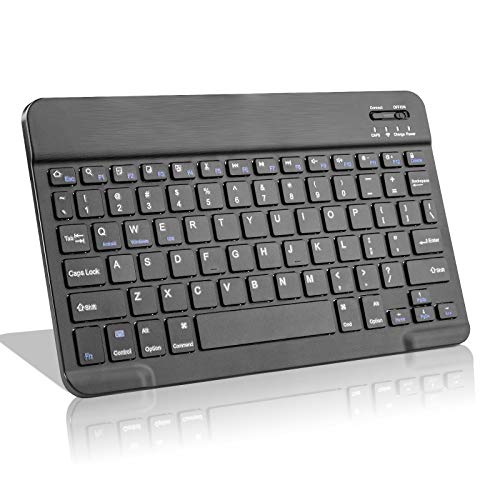
1. EDIVIA Fire HD 10 Wireless Keyboard
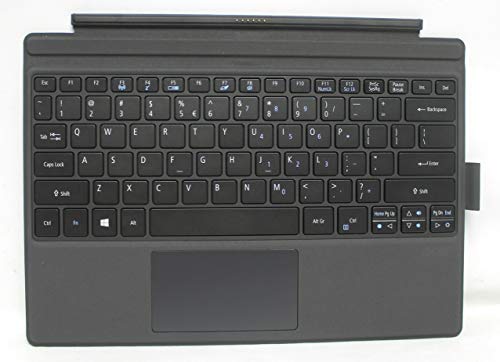
The EDIVIA Fire HD 10 Wireless Keyboard is the most direct answer to this guide: a slim, portable Bluetooth keyboard made for the Amazon Fire HD 10, Fire HD 11, and Fire HD 8. It pairs by Bluetooth, needs no cable and no receiver, and is sized to travel with the tablet. For a Fire owner who wants to type properly without buying a keyboard built for another device, it is the simplest and cheapest good choice.
What makes the EDIVIA the best Fire HD keyboard is the fit. It is built for the Fire HD range, so the size matches the tablet and the layout suits tablet typing rather than desktop typing. The slim body slips into the same bag as the tablet, and the Bluetooth connection pairs in seconds from the Fire settings menu. The keys are quiet and low-profile, which suits typing in a quiet room or a library. It is not a premium keyboard, and the feel is lighter than a Logitech, but for the price it turns a Fire tablet into a writing machine with no fuss and no learning curve.
The EDIVIA keyboard also works with a Fire tablet in a case, which matters because many Fire tablets live in a protective case. The Bluetooth connection does not care about the case, and the slim keyboard sits beside the tablet on a table or a lap. It is a keyboard that suits a Fire tablet as it is actually used, rather than as it looks in a product photo, and that practical fit is why it is the best Fire-specific choice here.
What stands out:
- Made for Fire HD tablets: sized and laid out for the Fire HD 10, Fire HD 11, and Fire HD 8.
- Slim and portable: a thin body that travels with the tablet in the same bag.
- Simple Bluetooth pairing: connects in seconds with no cable, no receiver, and no software.
Trade-offs to weigh: The key feel is lighter and less substantial than the Logitech models here, and it has no backlight, so typing in a dark room is harder.
Who it fits: Fire HD owners who want the cheapest straightforward keyboard that fits the tablet and just works.
Fire tablets run Android, so any Bluetooth keyboard that works with Android works with a Fire tablet. That is why the universal keyboards here pair with a Fire HD as easily as with an iPad.
Test the pairing before a trip. Pair the keyboard at home, type a few lines, and confirm it reconnects after being switched off. A keyboard that fails on the road is far more annoying than one that fails at home.
Check price on Amazon: EDIVIA Fire HD 10 Wireless Keyboard

2. EVACH Ultra Slim Mini Wireless Bluetooth Keyboard
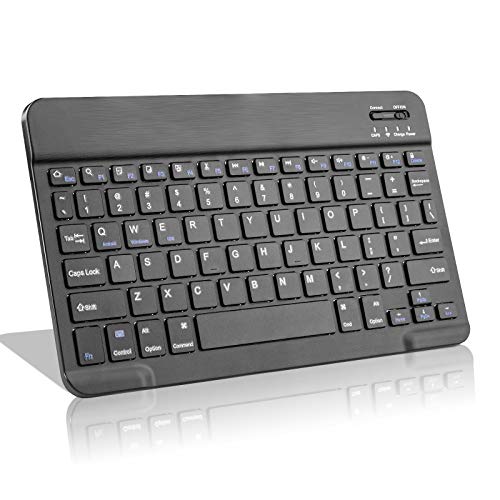
The EVACH Ultra Slim Mini Wireless Bluetooth Keyboard is a compact keyboard that works with the Amazon Kindle Fire HD 10, Fire HD 8, Fire Max 11, and iPad tablets. It is ultra-slim, genuinely portable, and pairs by Bluetooth with any of those devices. For a Fire owner who also uses an iPad or another tablet, it is the one keyboard that covers all of them.
The EVACH mini succeeds by being small without being cramped. The ultra-slim body fits in a small bag or even a large pocket, yet the keys are large enough to type on comfortably for an hour or more. It pairs with the Fire HD 10, Fire HD 8, and Fire Max 11, and the same keyboard also works with an iPad, which makes it the practical choice for households with more than one tablet. The Bluetooth connection is stable, the battery lasts for weeks of normal use, and the keyboard wakes instantly when a key is pressed. It is the best mini keyboard here for buyers who want one keyboard for every tablet they own.
The EVACH Ultra Slim Mini also folds flat into a bag without adding bulk, which makes it the keyboard for travellers who carry a Fire tablet and an iPad together. The keys are quiet enough for a library or a shared room, and the keyboard wakes instantly, so there is no waiting when an idea needs typing. It is a keyboard that disappears until it is needed, and then it simply works.
What stands out:
- Works with Fire and iPad: pairs with Fire HD 10, Fire HD 8, Fire Max 11, and iPad tablets alike.
- Ultra-slim and light: a compact body that disappears into a bag.
- Long battery life: weeks of normal use on one charge, with instant wake on a key press.
Trade-offs to weigh: The mini layout means smaller keys and no number pad, so long typing sessions are less comfortable than on a full-size keyboard.
Who it fits: Buyers with more than one tablet who want a single slim keyboard that pairs with Fire HD and iPad alike.
A keyboard with a number pad, like the iClever BK10, is worth choosing for spreadsheets and budgeting. Compact keyboards save space but give up the number pad entirely.
A small stand helps more than a better keyboard. A cheap tablet stand holds the Fire HD at a readable angle, which matters more for comfort than the difference between two good keyboards.
Check price on Amazon: EVACH Ultra Slim Mini Wireless Bluetooth Keyboard

3. EVACH Mini Bluetooth Keyboard
The EVACH Mini Bluetooth Keyboard is a second compact option from the same maker, built for the Amazon Fire HD 10, Fire HD 8, Fire Max 11, and Samsung tablets. It is a mini wireless keyboard that pairs by Bluetooth, travels easily, and costs little. For a Fire owner who wants a spare keyboard, or a keyboard that also works with a Samsung tablet, it is a practical and affordable pick.
This EVACH mini covers the same ground as its sibling with a slightly different balance: it is built for Fire HD tablets and Samsung tablets together, which suits households where the tablets come from different makers. The Bluetooth pairing is quick, the keyboard is light enough to carry daily, and the key layout is the familiar compact arrangement that most tablet users learn in minutes. It is not backlit and it is not full-size, so it suits short and medium typing rather than all-day writing. But for notes, emails, and documents on a Fire tablet, it does the job at a price that makes it easy to keep one in every bag.
This EVACH mini is also a good spare keyboard for a household. At its price, keeping one in the living room and one in a bag is practical, and the Bluetooth pairing means either keyboard works with any tablet in the house. It is not the keyboard for an all-day writing session, but for notes, messages, and short documents, it is more than enough, and the low price makes it easy to own two.
What stands out:
- Fire and Samsung support: pairs with Fire HD tablets and Samsung tablets from one keyboard.
- Compact and light: easy to carry daily without noticing the weight.
- Affordable spare: cheap enough to keep one at home and one in the bag.
Trade-offs to weigh: No backlight and no number pad, and the compact keys are less comfortable than a full-size keyboard for long sessions.
Who it fits: Fire HD owners who also use a Samsung tablet, or buyers who want an affordable compact keyboard for notes and email.
Keep the keyboard charged and switched off when not in use. A Bluetooth keyboard left on in a bag can wake the tablet and drain both batteries.
Check the key layout before buying. Some compact keyboards move the punctuation keys to save space, which slows typing until the layout is learned.
Check price on Amazon: EVACH Mini Bluetooth Keyboard

4. BoxWave SlimKeys Bluetooth Keyboard for Fire HD 10 Kids Pro
The BoxWave SlimKeys Bluetooth Keyboard is made for the Amazon Fire HD 10 Kids Pro tablet, and it is the only keyboard here with a backlight. It is a slim Bluetooth keyboard with backlit keys, which means it works in a dark car, a dim room, or a bedtime reading session. For a family whose child uses the Fire HD 10 Kids Pro for schoolwork, it is the most thoughtful keyboard in this guide.
The SlimKeys stands out for two reasons: the fit and the backlight. It is compatible with the Fire HD 10 Kids Pro tablet from 2024, so it matches the device exactly rather than approximately. The backlit keys make typing possible in low light, which matters for homework in a car or a shared room where the lights are off. The slim body keeps the whole setup portable, and the Bluetooth connection pairs without a cable. It is a specialist keyboard for one tablet, and that focus is its strength: nothing here fits the Kids Pro better, and nothing here lights the keys.
The BoxWave SlimKeys also helps with homework in a car, where the backlight matters most. A child doing schoolwork on a Fire HD 10 Kids Pro in the back seat needs to see the keys, and the backlight makes that possible without a roof light that distracts the driver. The slim body fits in the same bag as the tablet, so the whole setup travels as one.
What stands out:
- Backlit keys: the only backlit keyboard here, for typing in dark cars and dim rooms.
- Made for the Kids Pro: compatible with the Fire HD 10 Kids Pro tablet from 2024.
- Slim and portable: a thin body that travels with the tablet.
Trade-offs to weigh: It is made for one specific tablet, so it is the wrong choice for a Fire HD 8 or a Fire Max 11, and it costs more than the generic mini keyboards.
Who it fits: Families with a Fire HD 10 Kids Pro tablet, especially for schoolwork in cars, dim rooms, and evenings.
Fire tablets run Android, so any Bluetooth keyboard that works with Android works with a Fire tablet. That is why the universal keyboards here pair with a Fire HD as easily as with an iPad.
Test the pairing before a trip. Pair the keyboard at home, type a few lines, and confirm it reconnects after being switched off. A keyboard that fails on the road is far more annoying than one that fails at home.
Check price on Amazon: BoxWave SlimKeys Bluetooth Keyboard for Fire HD 10 Kids Pro

5. Logitech Pebble Keys 2 K380s
The Logitech Pebble Keys 2 K380s is the premium portable keyboard in this guide. It is a slim, compact Bluetooth keyboard with a quiet, comfortable key feel that no budget keyboard matches, and it pairs with several devices at once. It works with a Fire tablet, a phone, and a laptop, and switching between them takes one key press. For buyers who type on more than one device, it is the best keyboard here.
The K380s earns its premium position through the typing experience. The keys are round, quiet, and softly sprung, with a feel that stays comfortable over a long document. The slim body is genuinely portable, and the design is the most attractive here, with a tonal graphite finish that looks good on any desk. Multi-device pairing is the real advantage: it connects to a Fire tablet, a phone, and a laptop, and a single key switches between them. That turns one keyboard into the typing station for every screen in the house. It costs more than the Fire-specific keyboards, but the typing feel and the flexibility justify it for anyone who types daily.
The Pebble Keys 2 K380s also has shortcut keys that can be customised, which saves time for buyers who use the same functions repeatedly. The round keys are easy to find by touch, which helps touch typists, and the keyboard is quiet enough for a shared office. It is a keyboard that rewards daily use, and the more it is used, the more the premium feel shows.
What stands out:
- Best typing feel here: quiet, comfortable keys that stay pleasant over long documents.
- Multi-device pairing: connects to a tablet, a phone, and a laptop, and switches with one key.
- Slim and attractive: a compact, well-finished design that travels well.
Trade-offs to weigh: It costs more than the Fire-specific keyboards, and it has no backlight, so dark-room typing is harder than on the BoxWave.
Who it fits: Daily typists who use a Fire tablet alongside a phone or laptop and want one excellent keyboard for all of them.
A keyboard with a number pad, like the iClever BK10, is worth choosing for spreadsheets and budgeting. Compact keyboards save space but give up the number pad entirely.
A small stand helps more than a better keyboard. A cheap tablet stand holds the Fire HD at a readable angle, which matters more for comfort than the difference between two good keyboards.
Check price on Amazon: Logitech Pebble Keys 2 K380s

6. Logitech K480 Multi-Device Keyboard
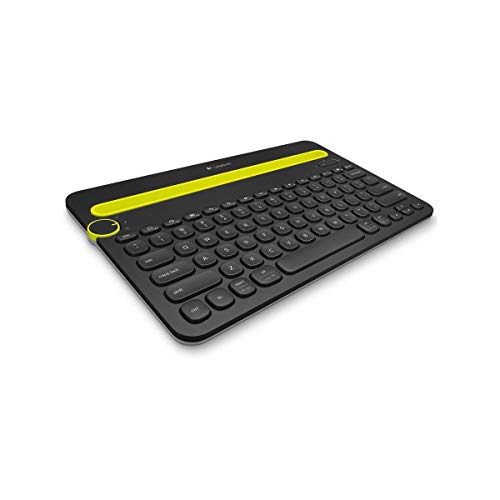
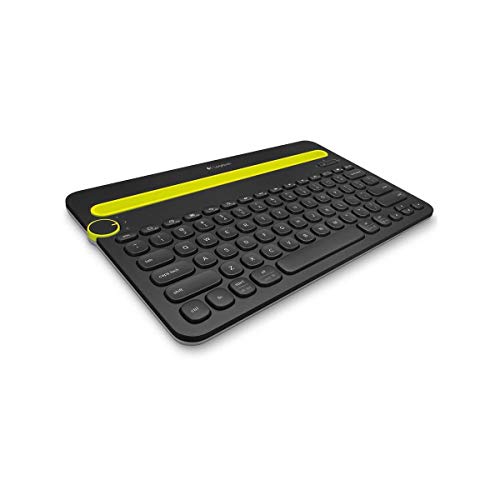
The Logitech K480 is the multi-device workhorse in this guide. It is a wireless Bluetooth keyboard that pairs with Windows, macOS, iPadOS, Android, and Chrome OS, which covers a Fire tablet and almost everything else. It switches between three devices with a dial, and it is built for a desk rather than a bag. For a Fire owner with a desk setup, it is the most capable keyboard here.
The K480 is the keyboard for a desk where several devices live. The dial on the left switches between three paired devices, so a Fire tablet, a phone, and a laptop can share one keyboard without re-pairing. It works with Android, which is what a Fire tablet runs, and with every major desktop and mobile system besides. The keys are full-size and comfortable, with a solid feel that budget mini keyboards cannot match. It is larger and heavier than the portable models, so it suits a desk rather than a travel bag, but for a home setup where the Fire tablet sits beside a laptop, it is the most practical keyboard in the guide.
The K480 also has a built-in cradle that holds a phone or a tablet upright, which turns the desk into a proper workstation. The Fire tablet sits in the cradle at a readable angle, the keyboard sits in front, and the whole setup works like a small computer. It is a simple idea that makes a real difference to comfort over a long session.
What stands out:
- Three-device switching: a dial switches between three paired devices instantly.
- Works with everything: Bluetooth support for Android, Windows, macOS, iPadOS, and Chrome OS.
- Full-size comfortable keys: a proper desktop typing feel that mini keyboards cannot offer.
Trade-offs to weigh: It is larger and heavier than the portable keyboards here, so it suits a desk rather than a bag, and it has no backlight.
Who it fits: Home desk setups where a Fire tablet shares the desk with a phone or laptop and one keyboard should serve them all.
Keep the keyboard charged and switched off when not in use. A Bluetooth keyboard left on in a bag can wake the tablet and drain both batteries.
Check the key layout before buying. Some compact keyboards move the punctuation keys to save space, which slows typing until the layout is learned.
Check price on Amazon: Logitech K480 Multi-Device Keyboard

7. Arteck Compact Wireless Bluetooth Keyboard
The Arteck Compact Wireless Bluetooth Keyboard is the budget pick in this guide. It is a small, light Bluetooth keyboard that pairs with a Fire tablet, an iPad, an iPhone, or a PC, and it costs less than the Logitech models while typing far better than its price suggests. For a Fire owner who wants a decent compact keyboard at the lowest sensible price, it is the obvious choice.
Arteck has built its reputation on affordable compact keyboards, and this model shows why. The keys are quiet and responsive, the body is thin and light, and the Bluetooth connection is stable across tablets and phones. It pairs with a Fire tablet as easily as with an iPad, which makes it a good spare keyboard for a household with mixed devices. The battery lasts for weeks, and the keyboard wakes with a key press. It does not have the premium feel of the Logitech K380s, and it has no backlight, but for the price it is the best value compact keyboard here, and it is the one to buy when the budget is tight.
The Arteck compact keyboard also runs for weeks on a charge, which means it is ready whenever the tablet is. There is no daily charging routine, and no worry that the keyboard will be flat when it is needed. The battery life is one of those details that only shows its value over months, when the keyboard simply keeps working without attention.
What stands out:
- Lowest sensible price: a capable compact keyboard at a fraction of the Logitech price.
- Wide compatibility: pairs with Fire tablets, iPads, iPhones, and PCs alike.
- Quiet, responsive keys: a typing feel that beats its price by a clear margin.
Trade-offs to weigh: The key feel is good for the price but not premium, and there is no backlight or multi-device switching.
Who it fits: Budget buyers who want a capable compact keyboard for a Fire tablet without paying a premium brand price.
Fire tablets run Android, so any Bluetooth keyboard that works with Android works with a Fire tablet. That is why the universal keyboards here pair with a Fire HD as easily as with an iPad.
Test the pairing before a trip. Pair the keyboard at home, type a few lines, and confirm it reconnects after being switched off. A keyboard that fails on the road is far more annoying than one that fails at home.
Check price on Amazon: Arteck Compact Wireless Bluetooth Keyboard

8. iClever BK10 Bluetooth Keyboard
The iClever BK10 is the full-size keyboard in this guide. It is a Bluetooth 5.1 wireless keyboard with a number pad, an ergonomic design, and multi-device support, which makes it the closest thing to a desktop keyboard that still pairs with a Fire tablet. For a Fire owner who types numbers, writes long documents, or works at a desk, it is the most complete keyboard here.
The BK10 is built for buyers who find compact keyboards cramped. The full-size layout includes a number pad, which matters for spreadsheets, budgeting, and any work with figures. Bluetooth 5.1 gives a stable connection with low delay, and the multi-device support means it pairs with a Fire tablet, a phone, and a laptop. The ergonomic design keeps the wrists comfortable over long sessions, and the keys are quiet enough for a shared room. It is the largest keyboard here and the least portable, but for desk work on a Fire tablet, the full-size layout is worth the size.
The iClever BK10 also has a number pad that makes a real difference for budgeting and spreadsheets. Entering figures on a number pad is faster and more accurate than using the number row, and for a Fire tablet used for household accounts or schoolwork with figures, the pad earns its place. The full-size layout also means the keys are where a typist expects them to be.
What stands out:
- Full-size layout with number pad: the only keyboard here with a number pad, for spreadsheets and figures.
- Bluetooth 5.1: a stable, low-delay connection that stays paired reliably.
- Multi-device support: pairs with a Fire tablet, a phone, and a laptop.
Trade-offs to weigh: It is the largest keyboard here, so it suits a desk rather than a bag, and it has no backlight.
Who it fits: Desk workers who use a Fire tablet for documents and spreadsheets and want a full-size keyboard with a number pad.
A keyboard with a number pad, like the iClever BK10, is worth choosing for spreadsheets and budgeting. Compact keyboards save space but give up the number pad entirely.
A small stand helps more than a better keyboard. A cheap tablet stand holds the Fire HD at a readable angle, which matters more for comfort than the difference between two good keyboards.
Check price on Amazon: iClever BK10 Bluetooth Keyboard
Buying Guide
Pairing with a Fire tablet
Open the Fire tablet settings, choose Bluetooth, and put the keyboard in pairing mode. The tablet lists the keyboard by name, and one tap connects it. The connection stays paired, so the keyboard reconnects automatically next time it is switched on. If the keyboard does not appear, switch it off and on again, then try once more.
Size: compact or full-size
A compact keyboard travels with the tablet and fits in the same bag, while a full-size keyboard is more comfortable at a desk and usually adds a number pad. Buyers who type on the move should choose compact; buyers who type at a desk should choose full-size. A mini keyboard is fine for notes and email, but a long document deserves full-size keys.
Backlight: worth paying for
Only the BoxWave SlimKeys here has backlit keys, and the backlight matters more than it sounds. Typing in a dark car, a dim room, or a bedroom at night is difficult without it. Buyers who type after dark should treat the backlight as essential rather than a luxury.
Multi-device switching
A keyboard that pairs with several devices and switches between them saves buying a keyboard per device. The Logitech Pebble Keys 2 K380s and the Logitech K480 both do this well. Check how switching works before buying: a key or a dial is quick, while re-pairing every time is not.
Battery and charging
Most Bluetooth keyboards here run for weeks on a charge, and some run for months. A keyboard that needs charging every few days becomes a chore, while one that lasts weeks is forgotten about. Keep a charging cable in the bag for travel, and switch the keyboard off when it is not in use.
Keyboard cases: when they make sense
A keyboard case makes sense for a child or for travel, where protection and tidiness matter more than typing feel. For everyone else, a separate keyboard types better and lasts longer, because it can be replaced without replacing the case and it works with the next tablet too.
Frequently Asked Questions
Do these keyboards work with the Fire HD 8 and Fire HD 10?
Yes. The Fire-specific models are made for the Fire HD 10, Fire HD 11, and Fire HD 8, and the universal Bluetooth keyboards pair with any Fire tablet that supports Bluetooth, which covers the whole Fire HD range.
How do I connect a Bluetooth keyboard to a Kindle Fire tablet?
Open Settings on the Fire tablet, choose Bluetooth, switch the keyboard on and put it in pairing mode, then tap the keyboard name when it appears. The tablet remembers the keyboard, so later connections are automatic.
Can one keyboard work with a Fire tablet and an iPad?
Yes. The universal keyboards here, including the EVACH models, the Logitech Pebble Keys 2 K380s, and the Arteck compact keyboard, pair with Fire tablets, iPads, and phones, and several of them switch between devices.
Is a keyboard case better than a separate keyboard?
A keyboard case protects the tablet and keeps the keyboard attached, but the keyboard is usually smaller and the case adds weight. A separate Bluetooth keyboard types better and works with other devices, while a case is tidier for travel. This guide covers separate keyboards, which type better.
Do I need a mouse with a Fire tablet keyboard?
No. A keyboard alone covers typing, and the Fire tablet screen handles pointing and tapping. A mouse can help for spreadsheets and precise work, but most buyers will not miss one.
Will a Bluetooth keyboard drain the Fire tablet battery?
Barely. Bluetooth Low Energy uses very little power, and a keyboard draws far less than the screen. The tablet battery will last almost as long with a keyboard connected as without one.
Getting comfortable typing on a Fire tablet
A keyboard is only half of the setup. A tablet stand holds the Fire HD at a readable angle, which matters more for comfort than the difference between two good keyboards, because a tablet lying flat forces the neck down. A stand costs little and changes the posture completely. Add a quiet room, a charged keyboard, and a few minutes to learn the layout, and the Fire tablet becomes a writing machine. The best keyboard is the one that fits the tablet, the bag, and the routine, and the eight keyboards above cover every combination of those three things. A final tip: buy the keyboard from a seller with a good return policy, because the feel of the keys only shows in use, and a keyboard that looks right in a listing can still feel wrong in the hand for notes and typing alike, so the option to return it matters.
Conclusion
The best keyboard for a Kindle Fire tablet depends on how it will be used. The EDIVIA Fire HD 10 Wireless Keyboard is the simplest choice for Fire HD owners, and the BoxWave SlimKeys is the best pick for the Fire HD 10 Kids Pro, thanks to its backlight. The EVACH mini keyboards cover Fire and iPad together, while the Logitech Pebble Keys 2 K380s is the best keyboard here for anyone who types daily across several devices. Choose the fit first, then the size, and the typing will take care of itself.