Thirty dollars is a fascinating budget for a keyboard, because it sits exactly at the point where mechanical keyboards become possible. Below it, the choice is a basic membrane keyboard. At it, the market opens up: compact mechanical keyboards with real switches, backlighting, and anti-ghosting, from brands that specialise in affordable gear. The eight keyboards below prove that a tight budget does not mean a bad keyboard, and that the right thirty-dollar keyboard can feel better than a keyboard costing three times as much.
This guide focuses on what thirty dollars actually buys: mostly compact 60 percent mechanical keyboards, which drop the number pad and the function row to keep the size and the cost down, plus one full-size model for buyers who need every key. The keyboards here use linear red switches, clicky blue switches, and one Hall effect design, and they cover wired and wireless connections. Every one of them is a real product in the budget class, chosen for typing feel and build rather than for decoration.
The most important thing to understand about budget keyboards is what the money goes to. In a thirty-dollar keyboard, the money goes to the switches and the build, not to the packaging or the brand. A good budget keyboard has switches that feel consistent, keycaps that do not wobble, and a case that does not flex when it is picked up. A bad one has mushy keys, a hollow sound, and stabilisers that rattle. The sections below call out the switch type and the layout for every keyboard, because those two facts decide the typing experience.
There is one more consideration that buyers at this budget often miss: the keyboard is the part of the computer that is touched the most, for the longest time, every single day. A monitor is looked at, a mouse is held, but a keyboard is pressed thousands of times a day. Spending the budget on the thing that is touched most is the best value in computing, and thirty dollars is enough to feel the difference. There is one more thing that thirty dollars buys that is easy to overlook: the freedom to experiment. At this price, a buyer can try a compact layout, a clicky switch, or a Hall effect board without a serious commitment, and learn what their fingers actually prefer. That knowledge is worth more than any single keyboard, because the next keyboard, bought with experience, will be the right one.
In this guide
Quick picks: best keyboards for 30 dollars
| # | Product | Where to buy |
|---|---|---|
| 1 | TMKB 60% Mechanical Gaming Keyboard White | Check on Amazon |
| 2 | TMKB T68SE Gaming Keyboard 60% Mechanical | Check on Amazon |
| 3 | TMKB T68 60% Wireless Mechanical Gaming Keyboard | Check on Amazon |
| 4 | Lovskoo Gaming Keyboard Wired Mechanical 60% | Check on Amazon |
| 5 | MageGee Portable 60% Mechanical Gaming Keyboard MK-Box | Check on Amazon |
| 6 | Redragon K521 Rainbow LED Gaming Keyboard | Check on Amazon |
| 7 | Newmen GM611 Mechanical Keyboard | Check on Amazon |
| 8 | AULA Win68 HE Mechanical Gaming Keyboard | Check on Amazon |
Quick Comparison
| Product | Key spec | Best for |
|---|---|---|
| TMKB 60% Mechanical Gaming Keyboard White | 60%, red linear switch, wired, LED backlight | Best budget mechanical keyboard |
| TMKB T68SE Gaming Keyboard 60% Mechanical | 60%, 68 keys, LED backlit, wired, separate arrow keys | Best compact keyboard with arrow keys |
| TMKB T68 60% Wireless Mechanical Gaming Keyboard | 60%, wireless tri-mode, red linear switch, RGB | Best wireless budget keyboard |
| Lovskoo Gaming Keyboard Wired Mechanical 60% | 60%, wired mechanical, portable, light-up keys | Best portable budget keyboard |
| MageGee Portable 60% Mechanical Gaming Keyboard MK-Box | 60%, 68 keys, blue backlit, wired, compact | Best keyboard with blue switches |
| Redragon K521 Rainbow LED Gaming Keyboard | Full-size, 104 keys, rainbow LED, wired | Best full-size budget keyboard |
| Newmen GM611 Mechanical Keyboard | 61 keys, red switch, LED backlit, wired, compact | Best mini budget keyboard |
| AULA Win68 HE Mechanical Gaming Keyboard | 60%, Hall effect magnetic switch, 8000Hz, wired | Best Hall effect budget keyboard |
Switch descriptions below come from the product listings. Linear switches press smoothly with no bump; clicky switches give a tactile bump and an audible click; Hall effect switches use magnets for adjustable actuation. The feel is a matter of taste, and there is no universally best switch. Layout figures describe the proportion of a full-size keyboard that each board keeps. A 60 percent board has the main keys and the number row; a 68-key board adds arrow keys; a full-size board has every key. The missing keys on a compact board are reached through a function layer.
Quick Picks
For a first mechanical keyboard, take the TMKB 60 percent in white. For arrow keys, take the T68SE. For wireless, take the TMKB T68. For clicky switches, take the MageGee MK-Box. For full-size, take the Redragon K521. For competitive speed, take the AULA Win68 HE.

1. TMKB 60% Mechanical Gaming Keyboard White
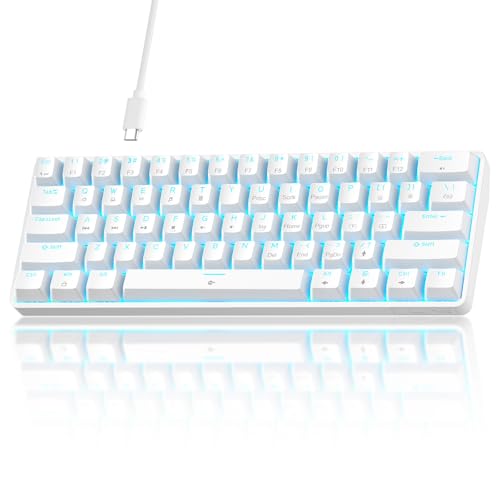
The TMKB 60% Mechanical Gaming Keyboard in white is the budget mechanical keyboard to start with: a compact 60 percent board with red linear switches, a wired USB-C connection, LED backlighting, and anti-ghosting, all in a clean white design. It is the keyboard for buyers who want a real mechanical feel at the lowest sensible cost.
Red linear switches are the right choice for a first mechanical keyboard, because they press smoothly with no bump and no click, which suits both typing and gaming. The 60 percent layout drops the number pad and the function row, which keeps the board small enough for a crowded desk and brings the mouse closer to the body, improving the ergonomics of the whole setup. The detachable USB-C cable makes the board easy to carry and easy to replace if the cable fails, and the LED backlighting keeps the keys visible in a dark room. For thirty dollars, it is a remarkable amount of keyboard.
The white design also deserves a note, because a white keyboard changes the look of a desk completely. It brightens a dark room, matches a white monitor or a light-coloured setup, and shows dust less obviously than a black board. For a desk that is also a workspace, that brightness is a genuine advantage.
What stands out:
- Red linear switches: a smooth press with no bump, suited to both typing and gaming.
- 60 percent layout: a compact board that frees desk space and brings the mouse closer.
- Detachable USB-C cable: easy to carry and easy to replace if the cable fails.
Trade-offs to weigh: The 60 percent layout has no number pad or function row, and the LED backlighting is simpler than RGB.
Who it fits: First-time mechanical keyboard buyers who want a real mechanical feel at the lowest sensible cost.
Give any new keyboard a week before judging it, since the fingers need time to learn a new layout. Try the keyboard for a full week before judging it, since the fingers need time to learn a new layout.
A keyboard that feels good will be used for years; a keyboard that feels cheap will be replaced within months. The switch matters more than the brand: press the keys before committing when possible.
Check price on Amazon: TMKB 60% Mechanical Gaming Keyboard White

2. TMKB T68SE Gaming Keyboard 60% Mechanical
The TMKB T68SE is the compact keyboard for buyers who cannot live without arrow keys: a 60 percent mechanical board with 68 keys, LED backlighting, and a separate arrow cluster, so navigation does not need a function layer. It is the keyboard for writers and coders who want a small board without giving up the keys they use most.
The missing arrow keys are the most common complaint about 60 percent keyboards, and the T68SE answers it directly. Sixty-eight keys squeeze a dedicated arrow cluster into the compact layout, so moving through a document or a spreadsheet works exactly as it does on a full-size board. The mechanical switches give the same satisfying feel as the larger TMKB boards, the LED backlighting keeps the keys visible, and the ultra-compact size still frees a surprising amount of desk space. For a writer or a coder who wants a small keyboard without relearning navigation, it is the most practical board in this roundup.
The arrow keys also help in a specific situation that compact keyboard owners know well: editing a document. Moving the cursor word by word, selecting text, and navigating a spreadsheet all depend on the arrows, and having them as real keys rather than a function combination makes the work noticeably faster.
What stands out:
- Separate arrow keys: navigation works without a function layer, as on a full-size board.
- 68-key compact layout: small enough to free desk space, complete enough for daily work.
- LED backlighting: the keys stay visible in a dark room.
Trade-offs to weigh: It has no number pad, and the compact layout still takes a day or two to learn.
Who it fits: Writers and coders who want a compact mechanical keyboard without giving up dedicated arrow keys.
Clean the keyboard regularly: dust and crumbs under the keys are the most common cause of a key that stops working. Keep the box and receipt, since a keyboard that fails early should be returned rather than tolerated.
The layout matters more than the brand: buy for the keys used every day. A keyboard that feels good will be used for years, and a keyboard that feels cheap will be replaced within months.
Check price on Amazon: TMKB T68SE Gaming Keyboard 60% Mechanical

3. TMKB T68 60% Wireless Mechanical Gaming Keyboard
The TMKB T68 is the wireless budget keyboard: a 60 percent mechanical board with tri-mode connectivity, red linear switches, RGB backlighting, and anti-ghosting, all in a compact design. It connects over Bluetooth, 2.4GHz wireless, or USB-C, which makes it the most flexible keyboard in this roundup.
Tri-mode connectivity is a feature that rarely appears at this price, and it changes how the keyboard is used. Bluetooth connects to a tablet or a phone, 2.4GHz wireless connects to the desktop with no lag, and USB-C covers wired play and charging. Switching between devices takes a keypress, not a cable swap, which suits a desk with more than one machine. The red linear switches keep the typing feel smooth, the RGB backlighting adds colour that the wired TMKB boards lack, and the anti-ghosting keeps every keypress registering in fast games. For a buyer who wants one keyboard for everything, it is the most capable board here.
The tri-mode design also suits a household with more than one computer, since the keyboard can switch between a desktop, a laptop, and a tablet without unplugging anything. One keyboard for every device is simpler than three keyboards, and it keeps the desk clear of the clutter that multiple boards create.
What stands out:
- Tri-mode connectivity: Bluetooth, 2.4GHz wireless, and USB-C cover every device on the desk.
- RGB backlighting: customisable colour that the wired TMKB boards do not offer.
- Red linear switches: a smooth press suited to typing and gaming alike.
Trade-offs to weigh: Wireless adds a battery to manage, and the 60 percent layout has no number pad.
Who it fits: Buyers who want one compact keyboard for a desktop, a laptop, and a tablet, with wireless freedom included.
Try the switches before committing if possible, since the feel of a switch is personal and cannot be judged from a photograph. Clean under the keys regularly, since dust and crumbs are the most common cause of a dead key.
Keep the receipt and the box, since a keyboard that fails early should be returned, not tolerated. The layout used every day is the layout to buy for, not the layout that looks best in a photograph.
Check price on Amazon: TMKB T68 60% Wireless Mechanical Gaming Keyboard

4. Lovskoo Gaming Keyboard Wired Mechanical 60%
The Lovskoo Gaming Keyboard is the portable budget keyboard: a wired mechanical 60 percent board with light-up keys, built for a computer, a laptop, or a desk setup where space is tight. It is the keyboard for students, travellers, and anyone whose desk is smaller than their ambition.
Portability is the Lovskoo strength, and it comes from the same 60 percent layout that defines this roundup: a board small enough to slip into a laptop bag alongside the machine it serves. The wired connection means there is no battery to charge and no pairing to manage, which suits a keyboard that moves between machines. The light-up keys keep the board usable in a dark dorm room or a dim lecture hall, and the mechanical switches give the typing feel that membrane keyboards cannot match. For a student or a traveller who wants a real keyboard in a small bag, it is the most portable board here.
The portability also matters for a student who studies in different places: a library, a classroom, and a dorm room all have different desks, and a keyboard that travels in the bag makes every one of them feel familiar. The Lovskoo is the board that turns any table into a proper workspace.
What stands out:
- Highly portable: a 60 percent board that slips into a laptop bag with ease.
- Wired and simple: no battery, no pairing, and no charging to manage.
- Light-up keys: visible in a dark room, a dorm, or a lecture hall.
Trade-offs to weigh: It is a basic board with fewer features than the TMKB models, and the 60 percent layout has no number pad.
Who it fits: Students and travellers who want a real mechanical keyboard that fits in a laptop bag.
Give any new keyboard a week before judging it, since the fingers need time to learn a new layout. Try the keyboard for a full week before judging it, since the fingers need time to learn a new layout.
A keyboard that feels good will be used for years; a keyboard that feels cheap will be replaced within months. The switch matters more than the brand: press the keys before committing when possible.
Check price on Amazon: Lovskoo Gaming Keyboard Wired Mechanical 60%

5. MageGee Portable 60% Mechanical Gaming Keyboard MK-Box
The MageGee MK-Box is the clicky budget keyboard: a portable 60 percent mechanical board with 68 keys, blue backlit keys, and a compact design built for gaming and office work. It is the keyboard for typists who like to hear and feel every keypress.
Blue switches are the divisive ones: they click audibly and give a tactile bump with every press, which some typists love and others cannot stand. The MK-Box is the board for the lovers. The click gives a clear confirmation that the key registered, which helps touch typists keep their rhythm, and the tactile bump makes the board feel precise rather than mushy. The 68-key layout includes the arrow keys that the smallest boards lack, the blue backlighting suits a dark room, and the compact size fits any desk. For a typist who wants feedback from every key, it is the most satisfying board in this roundup.
The click also has a practical benefit beyond the feel: in a quiet room, the sound confirms each keypress without looking at the screen, which helps touch typists maintain their rhythm. The click is the feedback that tells the fingers the key registered, and for a typist who types without looking, that feedback is essential.
What stands out:
- Clicky blue switches: a tactile bump and an audible click that confirm every keypress.
- 68-key layout: includes arrow keys, so navigation works without a function layer.
- Blue backlighting: the keys stay visible and look sharp in a dark room.
Trade-offs to weigh: The click is loud enough to disturb others in a shared room, and the board has no wireless option.
Who it fits: Typists who love clicky switches and want a compact board with arrow keys included.
Clean the keyboard regularly: dust and crumbs under the keys are the most common cause of a key that stops working. Keep the box and receipt, since a keyboard that fails early should be returned rather than tolerated.
The layout matters more than the brand: buy for the keys used every day. A keyboard that feels good will be used for years, and a keyboard that feels cheap will be replaced within months.
Check price on Amazon: MageGee Portable 60% Mechanical Gaming Keyboard MK-Box

6. Redragon K521 Rainbow LED Gaming Keyboard
The Redragon K521 is the full-size budget keyboard: a 104-key wired board with rainbow LED lighting, multimedia keys, and a mechanical feel, built for buyers who need every key. It is the only full-size keyboard in this roundup, and the right choice for anyone who cannot give up the number pad.
The number pad is the feature that decides this purchase. Accountants, data entry workers, and anyone who types numbers all day need it, and no compact keyboard can replace it. The K521 gives them a full 104-key layout with a mechanical feel, rainbow LED lighting, and dedicated multimedia keys for volume and playback. The wired connection keeps it simple, and the full-size layout means no relearning: every key is where a lifetime of typing expects it to be. For a buyer who needs a complete keyboard at a budget price, it is the only board here that qualifies, and it does the job well.
The full-size layout also matters for a home office that doubles as a gaming setup, since the same keyboard serves both roles. The number pad handles spreadsheets by day, the rainbow lighting suits games by night, and the multimedia keys control music throughout. One keyboard for both jobs is the most economical choice.
What stands out:
- Full 104-key layout: a number pad and a function row, with every key where it belongs.
- Rainbow LED lighting: colourful backlighting that suits a gaming setup.
- Multimedia keys: volume and playback controls within easy reach.
Trade-offs to weigh: It uses a mechanical feel rather than true mechanical switches, and the full-size board takes up the most desk space here.
Who it fits: Buyers who need a number pad and a full-size layout, including number-heavy work and data entry.
Try the switches before committing if possible, since the feel of a switch is personal and cannot be judged from a photograph. Clean under the keys regularly, since dust and crumbs are the most common cause of a dead key.
Keep the receipt and the box, since a keyboard that fails early should be returned, not tolerated. The layout used every day is the layout to buy for, not the layout that looks best in a photograph.
Check price on Amazon: Redragon K521 Rainbow LED Gaming Keyboard

7. Newmen GM611 Mechanical Keyboard
The Newmen GM611 is the mini budget keyboard: a compact 61-key mechanical board with a red switch, LED backlighting, and a wired connection, built for a minimal desk. It is the keyboard for buyers who want the smallest board that still types properly.
Sixty-one keys is the minimum for a usable keyboard, and the GM611 makes that minimum work. The red switch gives a smooth, quiet press that suits both typing and gaming, the LED backlighting keeps the keys visible, and the compact size leaves the maximum desk space for the mouse. The wired connection keeps it simple, and the portable design means the board travels well. For a minimalist desk, a small room, or a setup where the mouse matters more than the keyboard, it is the most compact board in this roundup.
The mini design also suits a gaming setup where the mouse does most of the work, since the keyboard can be pushed aside to make room for large mouse movements. In a low-sensitivity FPS setup, the mouse needs a wide area, and a 61-key board is the keyboard that gets out of its way.
What stands out:
- Ultra-compact 61-key design: the smallest board here, leaving maximum space for the mouse.
- Red switch: a smooth, quiet press suited to typing and gaming.
- LED backlighting: the keys stay visible in a dark room.
Trade-offs to weigh: It has no arrow keys, no function row, and no number pad, so navigation needs a function layer.
Who it fits: Minimalist desk owners and gamers who want the smallest keyboard that still types properly.
Give any new keyboard a week before judging it, since the fingers need time to learn a new layout. Try the keyboard for a full week before judging it, since the fingers need time to learn a new layout.
A keyboard that feels good will be used for years; a keyboard that feels cheap will be replaced within months. The switch matters more than the brand: press the keys before committing when possible.
Check price on Amazon: Newmen GM611 Mechanical Keyboard

8. AULA Win68 HE Mechanical Gaming Keyboard
The AULA Win68 HE is the technical standout in this roundup: a 60 percent mechanical gaming keyboard with Hall effect magnetic switches, fast trigger mode with adjustable actuation, and an 8000Hz polling rate. It is the keyboard for competitive gamers who want the newest switch technology at a budget price.
Hall effect switches are the newest idea in keyboards, and they work differently from every other switch here: magnets detect the keypress, which means the actuation point can be adjusted and the key can trigger faster than a mechanical switch. Fast trigger mode lets a key reset the instant it starts to rise, which is exactly what competitive FPS players need for rapid counter-strafing. The 8000Hz polling rate means the keyboard reports to the computer eight thousand times a second, removing the last trace of input delay. For a competitive gamer on a budget, it is the most advanced keyboard in this roundup by a clear margin.
The Hall effect design also has a durability advantage that matters over time: magnetic switches have no metal contacts to wear out, so they last longer than mechanical switches. For a keyboard that will be pressed millions of times, that longevity is a real benefit, and it is one of the reasons Hall effect is becoming the standard for competitive gaming.
What stands out:
- Hall effect magnetic switches: adjustable actuation and a faster trigger than mechanical switches.
- 8000Hz polling rate: the keyboard reports eight thousand times a second, removing input delay.
- Fast trigger mode: keys reset instantly, which suits rapid competitive movement.
Trade-offs to weigh: The Hall effect features need software to configure, and the 60 percent layout has no number pad.
Who it fits: Competitive FPS gamers who want the newest switch technology and the fastest response at a budget price.
Clean the keyboard regularly: dust and crumbs under the keys are the most common cause of a key that stops working. Keep the box and receipt, since a keyboard that fails early should be returned rather than tolerated.
The layout matters more than the brand: buy for the keys used every day. A keyboard that feels good will be used for years, and a keyboard that feels cheap will be replaced within months.
Check price on Amazon: AULA Win68 HE Mechanical Gaming Keyboard
Buying Guide
Layout first: 60 percent or full-size
The layout decides more than any other feature. A 60 percent board is compact and brings the mouse closer, which improves ergonomics, but it drops the number pad, the function row, and sometimes the arrow keys. A full-size board keeps every key but takes up the desk. Choose based on the keys actually used every day, not on the size that looks best in a photograph.
Switches: linear, clicky, or Hall effect
Linear switches press smoothly with no bump, which suits gaming and quiet typing. Clicky switches give a bump and a sound, which suits typists who like feedback. Hall effect switches use magnets and allow adjustable actuation, which suits competitive gamers. There is no best switch, only the switch that matches the fingers using it.
Wired or wireless
Wired keyboards never need charging and never lag, which suits gaming and a fixed desk. Wireless keyboards free the desk from cables and work with tablets and laptops, which suits a multi-device setup. At this budget, wired boards offer more keyboard for the money, while wireless boards offer more freedom.
Backlighting: LED or RGB
Backlighting matters in a dark room, and it matters for finding keys without looking down. Single-colour LED is simpler and cheaper; RGB offers customisable colour. Neither affects typing, but both affect the look of the desk. Choose the lighting that suits the room, not the specification sheet.
Build quality at a budget price
A good budget keyboard feels solid when it is picked up, with keycaps that do not wobble and a case that does not flex. A bad one feels hollow and rattles. Check the reviews for build comments, and remember that a keyboard that feels good will be used for years, while a keyboard that feels cheap will be replaced within months.
Try before buying when possible
The feel of a switch cannot be judged from a photograph or a specification. If possible, try the keyboard in a shop, or buy from a retailer with a good return policy. A switch that feels perfect to one person can feel wrong to another, and the only way to know is to press the keys.
Hot-swappable switches and upgrades
Some budget keyboards allow the switches to be pulled out and replaced without soldering, which is called hot-swappable. That feature turns a thirty-dollar keyboard into a platform: the switches can be changed later for a different feel, a broken switch can be replaced in seconds, and the board can grow with the owner. It is worth checking whether a board is hot-swappable before buying, since the feature costs little and adds years to the useful life of the keyboard.
Frequently Asked Questions
Are mechanical keyboards better than membrane keyboards?
For most users, yes. Mechanical keyboards have individual switches under each key, which gives a more consistent feel, a longer life, and a better typing experience than the rubber dome of a membrane keyboard. At thirty dollars, a mechanical keyboard is now within reach, and the difference is immediately noticeable.
What does 60 percent mean for a keyboard?
It means the keyboard has about 60 percent of the keys of a full-size board: the main keys and the number row, but no number pad, no function row, and sometimes no arrow keys. The missing keys are accessed through a function layer. The advantage is a compact size that frees desk space and brings the mouse closer.
Are red switches good for typing?
Yes. Red linear switches press smoothly with no bump and no click, which makes them quiet and fast for both typing and gaming. They are the most popular switch for a first mechanical keyboard, because they suit the widest range of uses without any strong downside.
Can a thirty-dollar keyboard be good for gaming?
Yes. The keyboards in this roundup offer anti-ghosting, fast polling, and mechanical or Hall effect switches, which are the features that matter for gaming. A thirty-dollar keyboard will not have the premium materials of a flagship, but it will play games well and last for years of normal use.
What is a Hall effect keyboard?
A Hall effect keyboard uses magnets to detect keypresses instead of metal contacts. That allows the actuation point to be adjusted, so a key can trigger with a light touch or a deep press, and it enables fast trigger mode, where the key resets the instant it starts to rise. It is the newest switch technology and the fastest available.
Do I need a wrist rest with a budget keyboard?
It depends on the typing style. A wrist rest helps if the wrists rest on the desk while typing, and it can reduce fatigue over a long day. Many budget keyboards are low enough not to need one, but a simple foam rest is cheap and worth trying if the wrists ache after a day of typing.
How do I clean a mechanical keyboard?
Turn it upside down and shake out loose debris, then use compressed air between the keys. For a deep clean, the keycaps can be removed and washed, and the board wiped with a damp cloth. Unplug the keyboard first, and let everything dry completely before using it again.
A Note on Keycap Quality
Keycaps are the part of the keyboard that the fingers actually touch, and their quality matters more than most buyers realise. Cheap keycaps become shiny and slippery with use, and their legends wear off. Good keycaps stay textured and legible for years. At this budget, the keycaps will not be premium, but they should feel solid and stay legible. If the legends wear off within months, the keyboard was not worth the saving, no matter how good the switches felt on the first day. The same advice applies to the keycaps. The legends on cheap keycaps wear off within months, and shiny keycaps become slippery with use. If the keycaps wear out, they can often be replaced without replacing the whole keyboard, which is one of the advantages of a mechanical board. A set of replacement keycaps costs little and makes an old keyboard feel new again, which extends the life of a thirty-dollar purchase far beyond what the price suggests.
Conclusion
The best keyboard for thirty dollars is the one that matches the hands and the desk it serves. The TMKB boards cover the budget mechanical basics, the T68 adds wireless, the MageGee adds clicky switches, the Redragon K521 covers full-size needs, and the AULA Win68 HE brings Hall effect speed to the budget tier. Choose the layout first, then the switch, and the right keyboard becomes obvious. Thirty dollars buys a real mechanical keyboard today, and the choice comes down to layout, switch, and connection. Compact boards suit small desks and gaming, full-size boards suit number work, and Hall effect suits competitive play. Buy the layout first, the switch second, and the keyboard that feels right will be obvious within a week.