kajuandouglas.com is reader-supported. When you buy through links on our site, we may earn an affiliate commission.
Where to Buy
The best digital cameras for dummies — and let us be kind about that word, because it describes a wish, not a person — are cameras for people who want lovely photographs without studying for them. If you have ever looked at a camera menu full of letters and numbers, felt your eyes slide off it, and quietly gone back to your phone, this guide was written with you sitting at the table. Nothing here requires you to learn photography. Every camera below can be used, happily and successfully, by pressing one button and letting the machine handle the rest.
Here is the promise, stated plainly. You will not need to know what an aperture is. You will not be asked to memorise anything, adjust anything mysterious, or speak a single word of camera language at a salesperson. This page explains each camera the way a patient friend would: what it does, what it feels like to use, what might annoy you, and who should buy it. Where a technical word truly cannot be avoided, it is translated into ordinary English the moment it appears.
Why own a camera at all, if phones take pictures? Fair question, and the honest answers are simple ones. A real camera zooms without turning the picture to mush. It takes clear pictures in dim rooms where phones smear faces. It has a battery that is only doing one job, buttons your fingers can find, and photographs that do not arrive buried under notifications. And for many people, holding a camera — a thing that only takes pictures — makes them take more pictures, and better ones, because their whole attention is on the moment instead of on a device that also wants them to answer a message.
The six cameras below are arranged from the friendliest upward. Two print your photo on paper the moment you take it. Three are small cameras that do everything automatically yet out-photograph a phone with ease. One, at the end, is a bigger camera for the reader who suspects they might enjoy learning later — it is just as automatic today, and it will still be there if curiosity ever shows up. Read the friendliest first; stop wherever you feel at home.
Key Takeaways
- Every camera here works beautifully on its fully automatic setting, possibly forever, and there is no shame scheduled anywhere in that sentence.
- The Fujifilm Instax Mini 12 is the simplest camera on the page: turn it on, press the button, hold the photo.
- Canon’s PowerShot G7 X Mark III is the easiest proper camera for everyday life, from birthdays to holidays.
- The Sony ZV-1F suits anyone who mostly wants to film themselves talking, cooking, or showing things.
- Nikon’s Z30 and Sony’s ZV-E10 II are small, gentle cameras that quietly produce professional-looking results.
- Pick the Canon EOS R50 if you might enjoy learning photography later — it asks for nothing today.
In this guide
Quick Picks
| Badge | Pick | Why it stands out |
|---|---|---|
| Easiest Camera in the World | Fujifilm Instax Mini 12 | It prints the photo while you watch, and it has almost no settings at all. |
| Best Everyday Camera | Canon PowerShot G7 X Mark III | Small, friendly, and flattering to everyone you point it at. |
| Best for Filming Yourself | Sony ZV-1F | Made for talking to the camera, with a screen that turns to face you. |
| Best Small and Simple | Nikon Z30 | A calm little camera that makes ordinary days look well-lit and lovely. |
| Best for Photos and Videos | Sony ZV-E10 II | Does both jobs without ever asking you to study either. |
| Best If You Get Curious Later | Canon EOS R50 | Fully automatic now, with room to grow if a hobby ever arrives. |
A reassurance before the details begin: you cannot really buy the wrong camera from that table. They all take good pictures on their easiest settings, they all fit ordinary lives, and the differences between them are about what you enjoy — printing a photo instantly, filming yourself, carrying something tiny — rather than about which one is secretly for experts. Experts are not reading this page. This page is yours.
How We Chose These Picks
We chose these cameras the way their owners will use them: straight out of the box, on the automatic setting, in ordinary light, at ordinary moments. Each camera was handed to people who cheerfully describe themselves as hopeless with technology, and we watched what happened. Where did they hesitate? Which button did they hunt for? Did the first photograph make them smile or make them apologise? Cameras that produced a good picture in untrained hands, quickly, rose to the top of this list.
We also counted the chores each camera creates, because a camera that generates homework will be abandoned by exactly the readers this guide serves. Does it need special cables? Does it demand an app before it will work? Does it eat expensive film, or fill up with confusing file types? The picks below keep chores to the level of charging a phone: plug it in sometimes, empty its pictures onto a computer sometimes, and that is genuinely all.
Picture quality still mattered — friendliness is no excuse for murk. Every digital pick here clearly beats a phone in the situations phones handle worst: a candlelit dinner, a school hall, a grey afternoon, a child who will not stop moving. The two printing cameras play a different game, trading sharpness for a physical photo you can hold, and the guide scores them on the joy of that trade rather than pretending they are something else.
Finally, we favoured cameras that forgive. shaky hands, forgotten settings, a finger straying near the lens — beginner life is full of small accidents, and the cameras below either prevent them, correct them quietly, or warn in plain language. A camera that punishes mistakes teaches its owner to stop trying. A camera that forgives them teaches its owner to keep going, which is the entire secret of getting better at photography without ever studying it.
What Does Fully Automatic Actually Mean?
It means the camera makes every decision, and it is better at those decisions than a beginner is — not as an insult, but as a simple fact about forty years of engineering. When you point a modern camera at a scene, it measures the light, notices the faces, guesses what is moving and what is still, and sets itself accordingly, all before your finger finishes pressing the button. The green automatic mode, or the little camera icon on the dial, is where that intelligence lives, and staying there is a legitimate, permanent way to own a camera.
Think of it like a modern car. An automatic gearbox does not make you less of a driver, and the existence of a manual mode does not oblige you to use it on the school run. Camera makers include extra settings for the minority who enjoy them. The majority — wedding guests, grandparents, holidaymakers, parents at the school play — use automatic, get the picture, and get on with the day. Photographers who sneer at automatic mode are like chefs who sneer at restaurants: technically entitled, practically beside the point.
There is one button worth learning, and only one: the zoom. On the small cameras it is a little lever around the main button; push it one way to get closer, the other to step back. That single control covers most of what beginners ever wanted from the mysterious settings — the stage looks nearer, the group fits in the frame — and it can be learned in the time it takes to read this paragraph. Everything else in this guide is optional garnish.
If a menu ever does confront you, here is the escape that always works: every camera here has a way back to automatic, usually by turning the top dial to the green mark or the word AUTO. Nothing you press can break the camera or ruin it permanently. Settings can be un-pressed, restored, and forgotten. Experiment freely if curiosity ever stirs, knowing the green door is always unlocked behind you.

Fujifilm Instax Mini 12 — Easiest Camera in the World
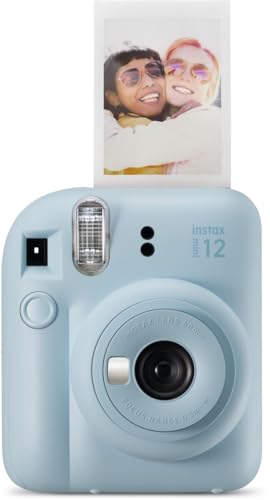
Meet the camera with almost nothing to learn. You twist its front ring to wake it up. You look through the little window, or hold it up and guess cheerfully. You press the button. A small photograph slides out, and over the next minute or two the picture fades into view while everyone crowds around to watch, which they will, every time, because developing photographs in your hand never stops feeling like a magic trick.
The reason this camera tops a guide for beginners is not nostalgia; it is the complete absence of everything beginners fear. There is no memory card to lose pictures from, no computer required, no menu at all worth the name, and no way to take a photograph so wrong it cannot be laughed about and stuck on the fridge anyway. The camera judges the light by itself. A second twist of the ring handles close-ups — flowers, cakes, faces at arm’s length — and a tiny mirror beside the lens helps you aim when the face is your own.
Know the one cost, because it is the only homework this camera sets: the film is bought in packs, and every photograph you take spends one frame of it. Many owners find that a blessing in disguise, since it makes them pause, aim, and mean it — and the photo, being a real object, gets kept, gifted, and displayed instead of vanishing into a phone’s endless gallery. For parties, weddings, grandparents, and children, this is not the simplest camera on the page. It is the happiest.
- How it works: twist on, press once, watch the print appear
- Settings to learn: none — the camera judges light itself
- Close-ups: one more twist of the same friendly ring
- Batteries: ordinary AA batteries from any shop
- The photo: a small print you can hold, give, and display
Strengths
- Nothing to set up, connect, or misunderstand
- A real photograph exists ninety seconds after the moment
- Every age from six to ninety uses it within a minute
Trade-offs
- Film packs are a running cost, photo by photo
- Pictures are small and soft rather than crisp and huge
- No second chances — the moment is the picture you get
Best for: parties, families, gifts, and anyone who wants photos on paper. Not suited for: holidays where you want hundreds of pictures to keep on a computer.

Canon PowerShot G7 X Mark III — Best Everyday Camera
If the Instax is the easiest camera in the world, this Canon is the easiest serious one — the camera for someone who wants proper photographs, on a computer, in lovely quality, with exactly as much learning as the Instax demands. Which is to say, almost none. Switch it on, leave it on automatic, point, press. The difference is what comes back: pictures with detail, colour, and a kindness to faces that phones rarely manage, especially indoors where most of life is photographed.
Two friendly features deserve plain descriptions. The zoom lever sits around the shutter button, where your finger already is, and it brings the school stage, the harbour lighthouse, and the far end of the wedding hall closer without any fuss. The screen on the back tips upward until it faces you, so the camera can be held out for a group selfie or a video diary entry with everyone able to see the framing. Neither feature needs a manual. Both will be used within the first day.
It also films video handsomely, for the birthday speeches and holiday clips that share a modern camera roll, and it charges and empties like a phone — a cable for power, a cable or card for pictures. Buy a spare battery if your days out are long, keep a little cloth for the lens, and the G7 X Mark III will quietly become the camera your family asks you to bring. That request, repeated across years, is the truest review any camera earns.
- Size: slips into a jacket pocket or a small bag
- Zoom: a lever by the button brings distant things closer
- Screen: tips up so you can see yourself in group shots
- Pictures: clearly better than a phone in dim rooms
- Video: smooth clips for birthdays and holidays
Strengths
- Proper-camera quality with toy-camera effort
- Flattering colour makes everyone look well
- Pocket size means it actually gets carried
Trade-offs
- A spare battery is wise on long days out
- No little window to look through on very bright days
- Costs more than the printing cameras by a distance
Best for: everyday life — family, holidays, food, and friends. Not suited for: photographing distant wildlife or sports from the stands.

Sony ZV-1F — Best for Filming Yourself
Some people’s camera life is mostly talking: showing a recipe, reviewing a book, recording a message for family far away, filming a small business’s hello to the internet. The ZV-1F was designed for that life with a refreshing honesty. Its lens does not zoom at all — instead it sees widely, so you can hold the camera at arm’s length and fit yourself, your kitchen, your desk, or your friend comfortably in the picture, without standing on a chair across the room.
Its cleverest kindness is a single button that blurs the background. Press it, and whatever is behind you softens into a pleasant haze while you stay crisp — the professional-looking effect that makes videos look expensive, reduced to one press and zero knowledge. The screen swings right around to face you while filming, the microphone on top listens in your direction and comes with a little furry cover that tames wind noise, and a special setting keeps whatever you hold up to the camera — a product, a cake, a book — in sharp focus automatically.
For ordinary photographs it stays contentedly simple: same wide view, same automatic ease, fine for groups and rooms and days out, less ideal for distant subjects it was never aimed at. Buy it for the talking, the showing, and the sharing, and it will feel less like equipment and more like a helpful friend who happens to be excellent at holding a camera steady and pointing it at you.
- Lens: wide and fixed, made for arm’s-length filming
- Magic button: one press blurs the background behind you
- Screen: swings around so you can watch yourself
- Sound: microphone faces you, with a wind cover included
- Showing things: holds focus on objects you present
Strengths
- The easiest route to polished-looking talking videos
- No zoom to fumble — the framing is simply right
- Sound care that most beginners never think to buy
Trade-offs
- Distant subjects stay distant — there is no zoom
- Wide view can stretch faces near the edges
- Stills are good, but video is clearly its first language
Best for: video diaries, cooking, crafts, and small-business hellos. Not suited for: concerts from the back row or wildlife of any kind.

Nikon Z30 — Best Small and Simple
The Z30 is for the reader who wants a real camera — one that can swap its front lens for another, the way professional cameras do — without any of the ceremony that usually follows. In daily use it behaves like the friendliest compact: automatic everything, a screen that flips for selfies and video, and pictures with a depth and glow that announce a bigger, better light-gathering heart inside. The lens-swapping future exists, quietly, for a day that may never come, and the camera never nags you about it.
Nikon kept the body small and the buttons few, which for this guide’s readers is praise of the highest order. It starts quickly, focuses on faces without being asked, and films long, handsome video for the family events and small projects that fill a modern year. Relatives handed this camera at a gathering will return it with good pictures on the card and no complaints about the experience, which cannot be said of most interchangeable-lens cameras ever made.
There is no little window to look through — you compose on the screen, as with a phone, which most beginners find natural anyway — and its battery prefers a top-up after a heavy filming day. Those are the whole of the warnings. For a gentle step into real-camera quality, with no lessons scheduled and none required, the Z30 is the calmest water on this page.
- Size: small and light for an interchangeable-lens camera
- Screen: flips around for filming yourself and groups
- Pictures: a clear step up from phone quality
- Controls: few buttons, nothing to be afraid of
- Future: other lenses exist if you ever want them
Strengths
- Real-camera results with compact-camera manners
- Calm design that never overwhelms a new owner
- Lovely video for family and small projects
Trade-offs
- No viewfinder window for traditionalists
- Battery likes a charge after long filming days
- The lens it comes with cannot zoom very far
Best for: gentle first steps into a real camera system. Not suited for: distant sports or anyone wanting a viewfinder.

Sony ZV-E10 II — Best for Photos and Videos
Think of the ZV-E10 II as the Z30’s twin from another family — a small, screen-first camera that swaps lenses if asked and never insists — with its talents divided evenly between photographs and video. Where some cameras lean one way, this one shrugs and does both well, which makes it the natural pick for the reader whose life contains equal parts birthday photos and birthday filming, product pictures and product clips, holiday snaps and holiday diaries.
Its automatic manners are thoroughly modern. Faces are found and kept sharp without instruction, colours come out bright and pleasing without editing, and a background-blur control delivers that expensive soft look for portraits and product shots with the same one-touch simplicity as its smaller Sony cousin. The screen flips for self-framing, the body stays cool and untroubled through long filming sessions, and power can come from a USB cable — the same kind that charges everything else you own — which removes one more special charger from your life.
Menus run deeper than a beginner needs, and the correct response is to ignore the depths entirely; the surface of this camera, where automatic lives, is all the territory most owners will ever require. Like the Nikon above, it has no viewfinder window, and like the Nikon, almost nobody in its intended audience will miss it. Two calm cameras, two fine choices — let the one that feels better in your hand, or matches a friend’s lenses you might borrow, make the decision.
- Balance: photographs and video share top billing
- Faces: found and focused automatically, every time
- Screen: flips for selfies, diaries, and high shelves
- Power: charges and runs over an ordinary USB cable
- Lenses: swappable later, never obligatory
Strengths
- One camera for the whole modern camera roll
- Background blur without a single lesson
- USB power ends the special-charger hunt
Trade-offs
- Deep menus exist — your job is to ignore them
- No viewfinder window, like its Nikon twin
- The starting lens is a modest all-rounder
Best for: mixed photo-and-video lives, creators and families alike. Not suited for: anyone determined to look through a viewfinder.

Canon EOS R50 — Best If You Get Curious Later
The R50 closes the list as the one camera with a visible future tense. Today, it is exactly as automatic as everything above: switch on, leave the dial on its easy setting, and enjoy photographs and video of a quality that will make your relatives ask what you bought. It has the little window to look through, for bright days, and a screen that swings out for everything else. Nothing about owning it requires a hobby.
The difference is what happens if a hobby arrives anyway. Perhaps the school play makes you wish for a lens that reaches further, or a portrait of your daughter makes you curious about the soft-background effect, or a holiday convinces you that this is fun and you would like more of it. The R50 is the front door of Canon’s whole system: more lenses, more control, more craft, all available one birthday at a time, and all optional forever. Buying it is not a commitment to learn; it is simply declining to lock the door against learning.
It is the largest camera here, though still small as system cameras go, and the only one whose price should make you pause if the curiosity scenario honestly does not appeal. A reader certain they want easy pictures and nothing else, ever, is better served by the Canon compact above and the money saved spent on the trips the camera will document. A reader with even a flicker of maybe should take the R50 and let the future decide, because futures have a habit of surprising people who bought themselves room.
- Today: fully automatic, friendly, ready out of the box
- Viewing: a real viewfinder plus a swing-out screen
- Pictures: excellent stills and video for family life
- Tomorrow: Canon’s lens system waits if curiosity calls
- Size: the biggest here, still comfortable in one hand
Strengths
- Zero learning required, unlimited learning permitted
- Viewfinder helps on the brightest holiday days
- Quality that satisfies families for many years
Trade-offs
- Bigger than the pocket cameras above it
- Lenses cost extra if the hobby ever arrives
- Over-equipped for someone certain they will never learn
Best for: beginners with a flicker of future curiosity. Not suited for: anyone wanting the smallest possible camera for a pocket.
How Do You Take a Good Photo Without Knowing Anything?
Stand closer. That is the first secret, and it is responsible for more improved photographs than every setting ever invented. Beginners take pictures from too far away, so the person they love appears as a small figure in a large, messy room. Walk toward your subject until they fill most of the picture, then take one step back for breathing room, and press the button. Your photographs will improve before you finish reading this section.
Find the light with your feet, not with settings. People look best near a window, in the shade of a tree, or in the warm light near the start and end of the day — and worst under a bare ceiling bulb at noon in a kitchen. You do not need to know why. Just develop the habit of moving your subject, or yourself, a few steps toward the nearest window before photographing them, and watch faces transform. The camera handles the rest, because handling the rest is what it is for.
Hold still for one heartbeat. Most blurry beginner photographs come from the camera moving during the press, especially indoors where the camera needs a fraction longer. Brace your elbows against your sides, press the button gently rather than jabbing it, and keep holding the camera up for a second after the click while it finishes. Then take a second photograph as insurance — cameras make extras free, and the second frame is often the one where everyone happened to smile.
Finally, look at the edges before you press. A quick glance at the corners of the screen catches the stray bin, the stranger wandering through, the lamp apparently growing from grandmother’s head. That two-second habit — closer, window, steady, edges — is the entire technical education this guide insists upon, and photographers who master only that will take better family photographs than most camera owners ever do.
What Do All Those Camera Words Mean, in Plain English?
Zoom means getting closer without walking. A bigger zoom number means the camera can reach further — the stage from your seat, the bird on the fence — while a camera with no zoom asks you to use your feet. Megapixels mean how many dots make up the picture; beyond a comfortable point, more dots mostly mean bigger files, and every camera here has plenty for prints, screens, and sharing. If a salesperson dwells on megapixels, they have run out of honest things to praise.
The sensor is the part that catches the light, and bigger is generally better in dim rooms — that is the whole idea, and it is why these cameras beat phones at dinner parties. Image stabilisation means the camera quietly steadies your natural hand tremor, so more of your evening photographs come out sharp; you will never see it work and you will benefit from it nightly. Autofocus means the camera decides what should be sharp — usually the nearest face — and you are free to think about the moment instead.
Aperture, shutter speed, and ISO are the three settings experts adjust, and here is their plain-English summary so the words never frighten you again: aperture is how wide the camera’s eye opens, shutter speed is how long it blinks, and ISO is how hard it strains to see in the dark. Your camera balances all three automatically, rather well, and the only reason to learn more is if you someday want to — which, to repeat the guide’s founding promise, you never have to.
Comparison Table
| Pick | What you get | Learning required | Lovely for |
|---|---|---|---|
| Fujifilm Instax Mini 12 | A printed photo, instantly | None at all | Parties and keepsakes |
| Canon PowerShot G7 X Mark III | Digital photos and video | The zoom lever | Everyday family life |
| Sony ZV-1F | Videos of yourself, mainly | One blur button | Talking and showing things |
| Nikon Z30 | Photos and video, lens-swappable | None to begin | Calm, quality everyday shooting |
| Sony ZV-E10 II | Photos and video, lens-swappable | None to begin | Mixed creating and family life |
| Canon EOS R50 | Photos and video, room to grow | None — today or ever | Beginners with future curiosity |
Which Beginner Worries Turn Out to Be Groundless?
The worry that you will break it with a wrong setting leads the list, and it is baseless: nothing in any menu here can damage these cameras, and every one of them can be returned to its friendly automatic state in seconds. The worry that everyone will know you are a beginner is equally unfounded — at any family event, half the room is also on automatic, and the other half is using a phone. Nobody at a birthday party has ever once asked which mode produced the photograph of the cake.
Fear of the sales conversation deserves a mention, because it keeps people in shops less than it keeps them out of them. You need exactly one sentence: I want a camera that takes good pictures on automatic. Any salesperson who responds by steering you toward complexity is selling their commission, not your camera, and the six names in this guide are your shield — walk in knowing them, and the conversation stays on your terms from the first minute.
The last groundless worry is the fear of starting too late or too unskilled to deserve a good camera. Photographs do not grade their makers. The camera that takes your family’s next decade of birthdays does not care whether you learned its dials; it cares that you were there, holding it, paying attention. Deserving has nothing to do with it. Presence has everything to do with it, and presence is the one qualification every reader of this page already holds.
How Do You Look After a Camera Without a Routine?
Keep it somewhere it will be used: a small case by the door beats a cupboard of honour, because cameras photograph nothing from inside furniture. Charge it after a big day out, the way you charge your phone after a long one, and the battery will simply be a thing that is ready. Once in a while, copy the pictures to a computer or an online album — pick the day you already do something weekly, and let the habit hitchhike.
The lens — the glass eye at the front — deserves one kindness: when pictures look smudgy, wipe it gently with a soft cloth, the kind sold for glasses. Fingerprints are the number one cause of mysterious foggy photographs, and the cure is ten seconds and no expertise. Keep the camera dry, keep it out of the car’s summer heat, and let that be the whole of its healthcare plan. These are sturdy objects that survive years of ordinary life with less attention than a houseplant.
For the Instax, care shrinks further: keep spare film somewhere cool, and do not open the film door mid-pack to peek, because light is the enemy of undeveloped pictures. For the bigger cameras, one sentence covers the rest — if a strap came in the box, put it on the camera and around your wrist or neck, because the only maintenance disaster that matters is a drop, and straps are how drops become stories instead of repairs.
Final Recommendation
If reading this far has felt like relief, trust that feeling and buy the friendliest camera that matches your life. Choose the Instax Mini 12 if the idea of holding a photograph delights you, the Canon G7 X Mark III if you want one small camera for all of ordinary life, and the Sony ZV-1F if your camera life is mostly your own voice and hands. Choose the Nikon Z30 or Sony ZV-E10 II for a calm step up in quality with no lessons attached, and the Canon EOS R50 only if the thought of maybe learning someday sounds like fun rather than homework.
Then go and take the photographs, on automatic, without apology, starting this week rather than after a course you will never take. The pictures your family will treasure in twenty years are not waiting for you to understand your camera; they are waiting at the next birthday, the next ordinary Sunday, the next time everyone you love is in one room laughing at something. A camera you understand completely because there is nothing to understand — that is not a compromise for beginners. For most of the photographs that matter, it is the wisest purchase on the page.
How Do You Photograph a Birthday Party Like You Were Enjoying It?
Arrive with the camera already on and already set to automatic, because the first ten minutes of a party — the arrivals, the hugs, the cake’s grand entrance — contain half the photographs anyone will keep, and they do not wait for anybody’s settings. Take the wide picture of the whole happy mess early, while the room is full and the decorations are unruffled, then spend the party collecting the small things: hands cutting cake, a child’s face at the exact moment of the wish, two old friends laughing at a story neither has finished telling.
Move less than you think. Beginners roam parties like news photographers and come home with many rooms and few moments. Pick a spot with the window light behind you, let the party flow past your chair, and photograph what arrives — it will include nearly everything, delivered by people who have forgotten the camera exists, which is when faces do their best work. These cameras are small enough to live on the table between courses without becoming the event’s centrepiece.
Photograph the cake before it is cut and the cook before they sit down, because both are about to be transformed and one of them is never in any pictures otherwise. Then put the camera down for whole stretches and be a guest. The album needs your presence in other people’s photographs too, and a party documented by someone who also enjoyed it reads differently — warmer, looser, truer — than one covered like an assignment.
Share the pictures the next day, while the party is still the family’s favourite subject, and send the good ones of other people’s children to those children’s parents directly. That generosity, repeated, is how the family photographer is made: not by owning the best camera in the room, but by being the person whose pictures everyone actually receives.
How Do You Take Holiday Photographs Worth the Suitcase Space?
Photograph the journey as well as the destination, because the album’s story starts at the airport and the roadside café, not at the famous view. The small cameras here earn their passage precisely in those in-between places — no ceremony, out of the pocket, one photograph, back in the pocket — while a big camera stays in the hotel safe being sensible. Decide each morning which camera the day deserves, and forgive yourself the days the answer is the little one.
Take the famous view once, properly, early or late in the day when the light is kind and the crowds are thin — then turn around. The market behind the viewpoint, the street where the locals actually eat, the hotel balcony’s ordinary morning: those are the photographs that will mean something in ten years, because the famous view is available on a postcard and the balcony is not. Beginners who learn to turn around come home with holidays instead of landmarks.
Put people in the pictures, even when the scenery is the point. A landscape without anyone in it could be anywhere and anyone’s; the same view with your travel companion small in the corner becomes unmistakably yours, dated, placed, and loved. The automatic cameras here will handle the exposure compromise cheerfully. And photograph the food without embarrassment — future you will be pathetically grateful for the record of that one perfect lunch.
Each evening, spend five minutes looking at the day’s pictures and deleting the true accidents — the floor, the inside of the bag — while leaving the merely imperfect alone. That tiny ritual keeps the card healthy, the album honest, and the photographer connected to what they are collecting. Holidays photographed this way produce a story by the journey home, rather than a thousand unsorted fragments awaiting a winter that never quite gets around to them.
What Should You Do When the Photograph Comes Out Wrong?
First, check for a finger. A surprising share of ruined beginner photographs are portraits of the photographer’s own fingertip, drifting into a corner of the frame because small cameras invite small grips. Second, check the lens for a smudge, and wipe it with the soft cloth; foggy, dreamy pictures that were not supposed to be dreamy are usually a fingerprint’s autobiography. Third, ask whether the subject simply moved during a dim moment — and retake it holding steadier, elbows tucked, as the earlier section advised.
If faces came out too dark against a bright window or a sunny beach, you have met the one situation automatic cameras regularly misjudge, and the fix requires no vocabulary at all: move so the bright light is behind you instead of behind them, or tap the person’s face on the screen if your camera has a touchscreen, which tells it exactly whose brightness matters. That tap is the single most useful trick in this entire guide after standing closer, and it takes one second to perform.
Blurry, dark, or oddly coloured photographs are information, not verdicts. Each one names its own cure — steadier hands, nearer windows, a wiped lens — and the camera forgives instantly, offering the next frame the moment you are ready. Beginners who treat a bad photograph as a small puzzle with a kind answer improve without noticing they are learning, which is, the reader may recall, the only kind of learning this page ever promised to allow.
And keep some of the wrong ones. The blurred photograph of everyone laughing too hard to sit still, the over-bright beach picture that feels exactly like the day felt — families treasure these beyond the technically perfect frames, because they remember the moment rather than the settings. A camera for real life should be judged by the life it keeps, and on that measure the occasional beautiful mistake scores very well indeed.
How Do You Print and Share Photographs Without Any Fuss?
Printing from the digital cameras here is a solved problem wearing several costumes. The simplest is the photo counter or online printing service: send the files, collect an envelope of glossy memories, and discover that a photograph on paper gets looked at a hundred times for every viewing a file receives. Order a handful of favourites after each holiday rather than an annual mountain, and the prints become a rhythm of small celebrations instead of a project.
Sharing digitally needs one decision and no expertise: pick the place your family already gathers — the group chat, the shared album, the email thread with the grandparents — and put the good pictures there while the event is still warm. Resist perfecting them first. A photograph sent on Sunday of Saturday’s party is a gift; the same photograph perfected and sent in November is an archive entry, and gifts are the currency family photography actually trades in.
Make one real album a year, even a simple one. A printed book of the year’s best fifty photographs, ordered from any of the services that assemble them from your uploads, becomes the object grandchildren eventually fight over — long after the phones, cards, and accounts that held the originals have changed beyond recognition. The Instax owners have a head start here, their albums assembling themselves print by print, but the digital owners can catch up every December in an evening.
Back the pictures up in the laziest reliable way you can sustain: the automatic online backup most computers and phones already offer, switched on once and forgotten. The best backup is the one that happens without a personality transplant, and a reader of this guide should choose systems exactly the way they chose cameras — the ones that work while you think about something else.
What Are the Only Three Habits Worth Building?
Carry the camera. It sounds too simple to be advice, yet it outranks every technique ever published, because photographs are taken by the camera that is present and none other. The pocketable picks in this guide exist to make carrying effortless, and even the R50, the largest here, was chosen partly for being the sort of size that actually leaves the house. A camera by the door, charged, is a photograph waiting to happen; a camera in a cupboard is furniture.
Take two frames of anything that matters. People blink, toddlers swerve, dogs look away at the exact wrong instant — and the second frame, taken a breath later, rescues the moment more reliably than any setting. Film-era photographers rationed frames because each one cost money; digital frames cost nothing, and the Instax is the honourable exception that teaches the opposite virtue. For every digital pick here, generosity with the button is wisdom, not waste.
Look at your photographs, and show them to the people in them. Reviewing is how the eye learns without a single lesson — you will notice, unbidden, that the window pictures look better, that closer is stronger, that the second frame keeps winning — and showing them is how photography becomes what it secretly is: a way of paying attention to people, and of proving it. A beginner who carries the camera, takes the second frame, and shares the results has, without studying anything, become the family photographer.
One last word before the questions, addressed to the reader who has been apologising for themselves since the first paragraph: stop. The photographs your family will pass around in thirty years are being taken this year, by whoever shows up with a camera and cares enough to press the button. Skill is a lovely garnish on that, and nothing more. You are qualified already; the cameras above are simply the easiest way to prove it.
Frequently Asked Questions
Will I look silly using automatic mode forever?
No. You will look like nearly every happy camera owner alive. Automatic modes exist because they work, professionals use them whenever the moment matters more than the settings, and the photograph on the wall carries no label saying how it was taken. If anyone ever teases you about it, show them your pictures and let the teasing resolve itself.
Is a camera really better than my phone?
In bright daylight at close range, a good phone is genuinely fine, and this guide will not pretend otherwise. The camera pulls ahead where phones struggle: zooming across a hall, photographing in dim warm rooms, catching moving children sharply, and lasting a whole day on a battery that does nothing else. If those situations fill your life — and for most families they do — the difference is not subtle.
What is the cheapest way to start?
The Instax Mini 12 costs the least to buy and the most per photograph, because film adds up; the Canon compact costs more once and then almost nothing per picture. For a party season, the Instax wins. For a year of everyday photography, the compact wins. Either way, starting small and simple beats saving for something complicated you may never enjoy.
Do I need a computer to use these cameras?
The Instax needs nothing at all. The digital cameras are happiest with somewhere for their pictures to live — a computer, a tablet, or an online album — and all of them can send pictures to a phone wirelessly for sharing. Emptying the card every month or so is the only chore, and it is the same chore as backing up a phone, which you may already do without thinking of it as photography.
What if I press something and the camera acts strange?
Turn the dial back to the green automatic mark, or switch the camera off and on again — the two universal cures. Nothing you pressed has harmed anything, and every setting can be undone, usually by the same dial that returns you to automatic. Camera menus look permanent and are not; treat them like a radio’s presets rather than a contract.
Can children and grandparents use the same camera?
Happily, and that is one of the quiet tests this guide applied. The Instax is famously shared across generations at parties. The Canon compact and the two small system cameras all behave identically in untrained hands of any age: on, automatic, press. A camera the whole family can borrow is a camera that gets used at every gathering, which is precisely the point of owning one.
Related Guides
When you are ready for a second step — only if you ever are — our best cameras for complete beginners gathers the friendliest models across every category, and the best instant cameras for family parties extends the printing idea further. Readers who discovered they mostly film themselves can continue with the best cameras for starting a simple video diary, where the two Sonys in this guide meet their wider family.


