kajuandouglas.com is reader-supported. When you buy through links on our site, we may earn an affiliate commission.
Where to Buy
The best cinematic cameras for Arma 3 require one honest clarification before any ranking can begin, and this guide makes it in the first paragraph rather than the fine print: Arma 3 is a military simulation game, not a film set. Nobody mounts a cinema body inside it. When players and creators search for a “cinematic camera” for Arma 3, they mean the camera tools the game itself provides — the free camera instruments inside its editor and its live curator mode, with which machinima makers compose the sweeping tracking shots, slow dollies, and battlefield tableaus that fill Arma’s film community — together with the real-world capture hardware that turns those in-game shots into published, watchable films.
This guide therefore ranks two kinds of picks and labels each kind plainly. The first two rows are the in-game instruments themselves, covered without purchase links because they ship with the game: the Splendid Camera, Arma 3’s dedicated cinematic camera tool, and the Eden editor and Zeus curator workflow that surrounds it. The remaining four rows are physical cameras from the verified pool, each in the role it genuinely plays in an Arma film production: the presenter camera for the director’s commentary and facecam, the clean streaming cameras for broadcasting cinematics live, and the budget creator camera for channels built around the game.
A word about who this hybrid guide serves, because its two halves attract two tempers. The simulation purist, deep in Eden at 2 a.m., may scroll past the desk cameras as commerce; the aspiring channel owner may scroll past the camera tools as homework. Both scrolls are mistakes the guide was structured to prevent: the purist’s films deserve the audience the desk builds, and the channel owner’s desk deserves films worth presenting. Arma’s film scene is healthiest exactly where the two tempers meet in one person.
Readers who arrived hoping for a DSLR recommendation for filming their monitor should close the tab with the guide’s blessing and its one-sentence answer: film the game’s output, not the screen — capture the rendered frames directly, and let the in-game camera do the cinematography. Everything below expands that sentence into a working method.
Key Takeaways
- The Splendid Camera is Arma 3’s true cinematic instrument: a free camera with cinematic controls, already inside the game, and the first pick for any machinima shot.
- The Eden editor and Zeus curator mode are the production department around it — staging, scripting, and live direction of the scenes the camera films.
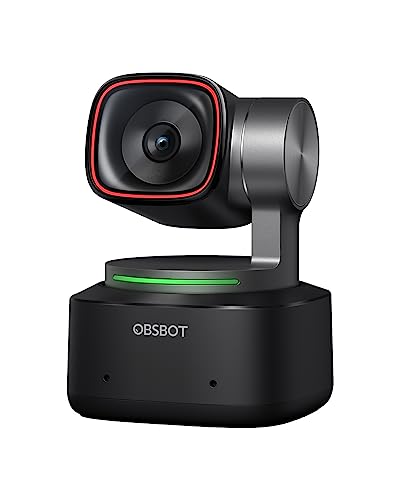
- The OBSBOT Tiny 2 is the best physical camera here for the Arma creator’s own face: it tracks the presenter through commentary and reaction without a camera operator.
- The Logitech Brio 4K is the facecam connoisseur’s choice, with the resolution to survive being shrunk into a corner overlay and enlarged for full-screen moments.
- The Elgato Facecam serves creators who broadcast their cinematics live, with fixed-focus simplicity and streaming-first software manners.
- The Logitech StreamCam is the budget creator’s route to the same desk setup, rotating to portrait for the vertical clips that promote the long films.
Terminology, once, so the rows stay honest: “machinima” is the community’s word for films made inside games, and this guide uses “Arma film” and “cinematic” in that tradition — cinema as a method applied to a simulated world, not as a claim that a product category exists. Readers who keep that definition in mind will find every verdict below lands where it promises to.
The takeaways encode the guide’s division of labour: the game makes the film; the desk makes the channel. In-game tools decide composition, movement, and light; physical cameras decide whether the human presenting the work looks like a filmmaker or a hostage. Both halves are ranked, and neither half is allowed to impersonate the other.
In this guide
Quick Picks
| Badge | Pick | Why it stands out |
|---|---|---|
| The Actual Cinematic Camera | Arma 3 Splendid Camera (In-Game Tool) | The free camera built into the game for exactly this: composed, moving, cinematic shots of staged scenes. |
| The Production Department | Eden Editor and Zeus Curator Workflow | Where Arma films are staged, scripted, rehearsed, and directed live before and while the camera rolls. |
| Best Presenter Camera | OBSBOT Tiny 2 | A gimbal camera that follows the creator’s face through commentary, freeing the desk of an operator. |
| Best Facecam Detail | Logitech Brio 4K | 4K headroom for overlays that zoom, crop, and occasionally take the whole screen. |
| Best for Live Premieres | Elgato Facecam | Fixed-focus, streaming-native, and happiest inside a broadcast software ecosystem. |
| Best Budget Desk Route | Logitech StreamCam | The affordable all-rounder for commentary channels, with a portrait trick for short-form promotion. |
Two rows cost nothing because they are already installed with the game, and four rows cost money because they film the one thing the game cannot: you. The table refuses to rank those categories against each other on a single scale, because they are not substitutes. A creator needs the first two rows to make a film at all, and one of the last four to build the channel that gives the film an audience.
How We Chose These Picks
The in-game rows were judged inside actual Arma film work: staged scenes in the editor, a convoy ambush choreographed for the camera, a village at dawn built purely for its light, and the long, unglamorous business of repositioning a free camera until a shot’s geometry confesses. The criteria were a cinematographer’s, translated into the game’s terms — freedom of placement, smoothness of movement, control over the frame’s depth and focus behaviour, and the ability to save, repeat, and refine a shot rather than improvise it once and lose it.
The physical rows were judged at the desk where Arma channels are actually produced: commentary recorded over edited films, live premieres with chat running, facecam overlays shrunk to a corner and judged at that size, and the vertical clipping sessions that feed short-form platforms. Webcam virtues that matter for a spreadsheet worker — looking acceptable on a call — were ignored in favour of the ones that matter here: focus that survives a creator leaning toward the screen at a climax, exposure that holds against a bright game scene behind them, and software that plays politely with broadcast tools.
Capture honesty governed the whole guide. Advice was tested against the way Arma films are really finished: rendered frames captured at the game’s own output, edited in ordinary software, and judged on a television rather than in the capture preview. Any method that looked fine in the preview and fell apart in the render — and screen-filming is the ancestral example — was excluded from recommendation no matter how often forums suggest it.
Community evidence closed the loop: finished Arma films were studied as deliverables — their shot grammar, their staging fingerprints, their presenters’ desk setups where channels showed them — and the rows were checked against what finished work actually used, rather than what aspirational shopping lists contain. The gap between those two lists is where buying guides go to mislead, and this one was written from the finished side of it.
Finally, the guide weighed learning curve as a production cost. Arma’s camera tools are powerful and famously under-documented in spirit, so the rows below were written for the creator who will invest evenings in them; the physical cameras, by contrast, were required to be innocent — tools that disappear so the creator’s limited patience can be spent inside the game, where the film actually is.
What Does “Cinematic” Actually Mean Inside a Game?
It means the same things it means on a film set, translated into a world where physics is negotiable and the sun takes orders. Composition: the deliberate placement of a frame’s elements, which Arma’s free camera grants completely, since it can hover at any height, distance, and angle a director can imagine. Movement: the slow push-in, the lateral track, the crane’s rise — camera motions with grammar, each implying a feeling, all achievable once the tool’s controls become reflexes. And light: Arma’s time-of-day is a dial, its weather a menu, which means the golden hour can be scheduled, repeated, and held indefinitely — a luxury no location cinematographer has ever been offered.
Depth is the fourth element, and the subtlest. Cinematic images separate subject from background; games render everything sharp by default, so the Arma filmmaker manufactures separation with distance, fog, framing against sky or smoke, and the camera settings the tools provide. The creators whose films get called “cinematic” in the community are, almost without exception, the ones who learned to manage depth and light deliberately rather than the ones with the most expensive capture hardware — a fact this guide’s structure honours by ranking the free tools first.
Sound is the element nobody lists and everybody hears. Arma’s world is loud with designed audio — engines with distance in them, weather, the crack and echo of far-off fire — and cinematic work treats that soundscape as a score to be conducted: levels ridden in the edit, wild lines recorded clean, silence used as deliberately as any explosion. A film whose sound was an afterthought looks worse than it is, because audiences experience muddy audio as muddy pictures. The capture method below protects the game’s audio as a separate, respected track for exactly this reason.
There is a fifth element, patience, and it is the one the hardware rows exist to protect. An Arma film is built from dozens of staged fragments, each rehearsed; the creator’s on-camera presence — the commentary, the premiere, the channel around the films — is what converts that patience into an audience. The desk cameras below are therefore not accessories to the craft. They are the craft’s public face, and they were chosen like it.
Which Tools Actually Compose an Arma 3 Film?
Arma 3 Splendid Camera — The Actual Cinematic Camera
Meet the only pick in this guide that can honestly be called a cinematic camera for Arma 3, because it is one: a dedicated camera instrument built into the game by its developers, offering a free-moving viewpoint with cinematic controls — the ability to place the frame anywhere in the world, move it smoothly, manage its field of view from wide battlefield vistas to compressed telephoto portraits of soldiers against smoke, and attend to the depth cues that separate a screenshot from a shot. Every celebrated Arma machinima the reader has ever admired was composed through this instrument or its close relations. It costs nothing beyond the game itself, and no other pick in this guide is even a rival.
Its working character rewards a cinematographer’s habits. Shots can be scouted by flying the camera through a staged scene before a single unit moves; compositions can be refined in stillness, the frame adjusted by degrees; movements can be rehearsed until the push-in’s pace matches the scene’s breathing. The tool’s philosophy is deliberation — it assumes a director, not a spectator — and creators who approach it with a shot list find it fluent, while creators who expect it to improvise beauty on its own find it mute. That muteness is no defect in the instrument; it is the definition of a camera, in a game as on a set.
The honest limitations are the game’s, worn openly. The camera films what the engine renders, so its ceiling is the scene’s own fidelity — the mods, settings, and staging the production brings. Real-time rendering means the smoothest movements ask for a machine that can hold the scene’s frame rate while capturing, and complex scripted battles may need to be simplified, slowed, or staged in passes for the camera’s benefit. Professional Arma filmmakers treat those as production constraints, the way film crews treat weather: planned around, budgeted for, occasionally cursed, never surprising.
Learning it is the price, and the price is evenings. The interface belongs to a simulation’s lineage rather than a phone app’s, and fluency — placing, moving, and saving shots without thinking about the controls — arrives through repetition on small projects: a single vehicle patrol filmed three ways, a dawn scene composed ten times. The community’s tutorials and the editor’s own rehearsal space shorten the road, but the road is walked by every Arma filmmaker whose work gets called cinematic, and there is no toll booth that lets a purchase skip it. This guide states that plainly because the hardware rows below are sometimes bought in the hope of skipping it, and they cannot help with that.
- Nature: in-game cinematic camera tool, included with Arma 3
- Movement: free placement with deliberate, rehearsed motion
- Optics: field of view from vista to telephoto compression
- Cost: evenings of practice, no money
- Role: the primary camera of every Arma film
Strengths
- Complete compositional freedom inside the world
- Shots can be scouted, saved, and repeated
- The instrument the community’s best work uses
Trade-offs
- Fluency demands real practice
- Ceiling is the scene’s own rendering
- Demanding scenes may need staging in passes
A director’s habit worth adopting from the first project: storyboard on paper, in thumbnails, before opening the tool. Arma’s world is seductive — every valley begs to be flown over — and unfocused sessions produce beautiful wandering footage that edits into nothing. The creators who finish films are the ones who arrive knowing their twelve shots and leave having filmed fourteen, the two extra being the world’s gifts to the prepared. The Splendid Camera rewards the prepared with a fidelity no other row in this guide can offer, because it is not filming the film. It is the film.
Best for: every Arma machinima creator, without exception. Not suited for: anyone unwilling to practise — there is no substitute row for this one.
Eden Editor and Zeus Curator Workflow — The Production Department
If the Splendid Camera is the camera, Eden and Zeus are everything around the camera: the set, the cast, the rehearsal, and — in Zeus’s case — the live director’s hand. Eden, Arma 3’s 3D editor, is where cinematic scenes are built before they are filmed: units placed, vehicles dressed, weather and hour set, triggers and scripts arranged so the ambush happens on the camera’s cue rather than the simulation’s whim. A scene staged in Eden can be reset identically after every take, which converts Arma filmmaking from wildlife photography — waiting for the game to do something beautiful — into studio work, where beauty is scheduled.
Zeus changes the tense. As the game’s live curator mode, it lets a director intervene in a running scene — spawning, moving, and commanding units in real time — which suits a particular production shape: the live or semi-live film, the community event staged for cameras, the battle whose broad shape is planned and whose details are directed as they unfold. Paired with a camera operator running the Splendid Camera and a comms channel between them, Zeus direction is the closest Arma comes to a film set’s actual division of labour, and productions that adopt it report the same discovery film sets made a century ago: a director who is not also operating the camera directs better.
The workflow’s demands are organisational rather than financial. Scenes must be built, saved, and versioned like documents; scripted elements must be tested before the camera crew — even if the crew is one friend — assembles; and multiplayer sessions for filming need the discipline of a call sheet, because five volunteers’ free evening is a production resource that evaporates when the first hour is spent troubleshooting a mod list. The guide’s counsel is unfashionable and absolute: lock the mod list before the shoot, publish it to the crew, and let nobody’s last-minute addition aboard.
Why does a workflow earn a pick’s row in a camera guide? Because readers searching this keyword are really asking how Arma films get their shots, and the truthful answer is that the shots are manufactured here — in staging, scripting, and direction — and merely recorded by the camera row above. Omitting the production department would be like reviewing a cinema camera while pretending sets build themselves. The camera is the glamorous fraction of the answer; this row is the fraction that decides whether there is anything worth filming.
- Nature: the game’s editor and live curator mode
- Function: staging, scripting, resetting, directing
- Crew shape: enables a director separate from the operator
- Discipline: locked mod lists and saved scene versions
- Role: the department that gives the camera something to film
Strengths
- Scenes reset identically, take after take
- Live direction for events and community films
- Turns gameplay luck into scheduled production
Trade-offs
- Scene-building is its own craft to learn
- Multiplayer shoots need call-sheet discipline
- Scripting ambitions can outgrow a weekend
Start smaller than your ambition: a two-vehicle patrol, one bend in one road, dawn light, filmed from three prepared positions. A finished ninety-second film teaches the Eden-to-camera pipeline completely, while the unwritten epic teaches only frustration. The community’s respected filmmakers are, to a person, the ones who finished small films until finishing became a habit — the workflow in this row is simply what finishing looks like from the inside.
Best for: creators staging scenes rather than hoping for them, and any crew of two or more. Not suited for: pure gameplay capture with no staging ambitions.

OBSBOT Tiny 2 — Best Presenter Camera
Cross now to the physical desk, where the Arma creator’s second job lives: being watched. Commentary tracks, premiere hosting, behind-the-scenes explanations of how a scene was staged — the modern Arma channel is a person as much as a filmography, and the Tiny 2 is the best camera in the pool for that person. Its gimbal head and tracking intelligence keep the presenter framed while they do what commentators do — lean toward the monitor at a climax, gesture at a replay, stand to fetch a prop — without a camera operator, a fixed chair, or the haunted stillness of a presenter afraid to leave a webcam’s frame.
The tracking deserves a precise description, because it is the product. The camera pans and tilts on its gimbal to follow the subject’s face and upper body, with a smoothness that reads as a deliberate camera move rather than a security system’s swivel, and it accepts gesture and voice direction for its common tricks — start tracking, stop, zoom a step — so the presenter’s hands stay on the story. For an Arma creator whose other hand is usually on a mouse replaying a scene, that obedience is the difference between a commentary that flows and one interrupted by its own equipment.
Image quality serves the format’s real geometry. In the corner overlay it is crisp and well-exposed against the bright game footage beside it; expanded to full screen for the introduction and the post-film discussion, it holds up with the dignity of a small-sensor camera used in good light — and the desk of a gaming creator, ringed by monitors, is rarely short of light. Its low-light manners suit the evening premiere, and its privacy behaviour — a camera that can be told to sleep and turns its eye away — suits a desk that is also a bedroom, a consideration this guide raises because gaming desks so often are.
The compromises are a gimbal’s compromises. It is a machine with moving parts on a desk that gets bumped by headsets, mugs, and elbows, and it prefers a stable mount and a moment of calibration to being knocked and ignored. Its field of view is chosen for a presenter, not a room tour. And its talents are wasted on creators who never appear on camera — a channel of pure films with voiceover should spend this money inside the game, on the production side, and let a lesser camera hold the rare desk appearance.
- Form: gimbal webcam with subject tracking
- Control: gesture and voice direction for common moves
- Frame: follows a moving presenter automatically
- Privacy: sleep behaviour for dual-purpose desks
- Role: the solo creator’s camera operator
Strengths
- Presenter freedom without an operator
- Tracking that reads as a camera move
- Full-screen dignity for discussions
Trade-offs
- Moving parts want a stable, respected mount
- Presenter framing only — not a room camera
- Wasted on channels that never show a face
Position it once, properly: at monitor height, close enough that the tracking has an easy life, far enough that the overlay’s crop has air around the shoulders. Then forget it for a month. The Tiny 2’s deepest virtue for an Arma creator is cognitive — every unit of attention it saves at the desk is attention returned to the editor, the staging, the shot list, where films are actually decided.
Best for: commentary-led Arma channels and solo creators who appear on camera. Not suited for: faceless channels or desks where a gimbal will be treated as furniture.

Logitech Brio 4K — Best Facecam Detail
The Brio’s argument is arithmetic. A facecam lives most of its life shrunk into a corner of a gameplay frame, then — in the edit’s important moments — is punched in, enlarged, or cut to full screen for the reaction the whole video was building toward. A 4K sensor gives the editor that freedom: crop the overlay tighter without it dissolving, reframe a slightly off-centre presenter, hold detail when the small box becomes the big picture. For Arma channels whose format is the director’s commentary over their own cinematics — face small during the film, face large during the explanation — that headroom is not vanity. It is the format’s grammar.
Its exposure and colour manners suit the gaming desk’s peculiar light: a bright monitor in front, a dim room behind, sometimes a window conspiring at the side. The Brio handles that mixed contract with a steadiness that keeps the presenter’s face readable without the background performing, and its adjustable field of view lets a creator choose between the intimate head-and-shoulders of a commentary and the wider desk shot of a hardware segment. Autofocus is decisive at desk distances, which matters more than it sounds — the presenter who leans in to point at a detail on the replay should not blur for their enthusiasm.
Where it concedes to the row above is choreography: the Brio is a fixed camera, and its presenter is framed by sitting in the frame rather than being followed around it. Creators whose presentation style is physical — standing, demonstrating, moving between desk and shelf — will feel the frame’s edges; creators whose style is the seated director’s will never notice them. It also asks for light to show its best, since small sensors at high resolution divide their photons finely; the monitor-lit desk usually provides, and a modest key light completes the contract.
As a long-term desk citizen it has the webcam aristocracy’s virtues: it mounts anywhere, survives being ignored for years, and its software ecosystem is mature enough that any broadcast tool a creator adopts will already know its name. In a guide full of instruments that demand practice, the Brio’s offer is the opposite — detail without devotion — and for the creator whose devotion is spent inside Arma’s editor, that offer is correctly priced.
- Sensor: 4K for overlay cropping freedom
- View: adjustable field for desk framings
- Light: composed in monitor-lit rooms
- Form: fixed webcam, mount-anywhere
- Role: the commentary channel’s detail reserve
Strengths
- Punch-ins stay clean in the edit
- Decisive focus at desk distance
- Mature software citizenship everywhere
Trade-offs
- Fixed frame — the presenter must sit in it
- Wants decent light for its best work
- No tracking theatre for physical presenters
One editing habit multiplies its value: record the facecam at full resolution on its own track, even when the published overlay is small. Storage is cheaper than regret, and the day a reaction deserves the whole screen — the ambush reveal, the perfect landing — the full-resolution track is the difference between a moment and a missed one. The Brio is bought for exactly that day.
Best for: commentary formats that punch in and directors who present seated. Not suited for: standing, roaming presentation styles.

Elgato Facecam — Best for Live Premieres
Some Arma films are not uploaded; they are premiered — broadcast live to a community that watched the staging happen, with the director narrating and chat interrogating the choices in real time. The Facecam is built for that room. Elgato’s camera comes from the streaming ecosystem’s heartland, and its design decisions all lean the same way: a fixed-focus lens that removes hunting from the list of live accidents, a sensor and processing tuned for the lit-desk look, and software control that lives comfortably beside the broadcast tools the premiere is already running on.
Fixed focus deserves defending, because specification readers mistake it for poverty. At a streaming desk, the subject sits within a known metre of the lens for hours; a focus system that cannot hunt cannot be caught hunting, and live television has always preferred the lens that simply holds. The Facecam’s depth of field covers the desk’s honest range — lean in for emphasis, lean back for the wide reaction — and its image arrives with the contrasty, ready-to-broadcast character that live work wants, sparing the colour-fiddling that recorded commentary can postpone to the edit.
Its ecosystem citizenship is the deeper reason for the row. A creator already running Elgato’s capture and control world gains a camera that behaves like a family member — settings remembered, software unified, one less translation layer between intention and broadcast. Arma premieres are technically busy evenings: the game or its edit on one input, the director on another, chat, alerts, and scene switches choreographed live. Every component that simply agrees with the others is a small mercy at minute forty of a live show, and mercies compound.
The boundaries are a fixed camera’s boundaries, plus a specialist’s: it is a desk instrument with no ambitions beyond it, its fixed focus assumes the desk geometry it was designed for, and creators who record more than they broadcast will find the rows above and below more flexible friends. Buy it for the premiere calendar and it is the right tool with a clear conscience; buy it as a general camera and its specialisation becomes a list of things it declines to do.
- Focus: fixed by design — cannot hunt live
- Character: broadcast-ready contrast out of the box
- Ecosystem: native citizen of streaming software
- Form: desk webcam, unapologetically
- Role: the live premiere and live staging camera
Strengths
- Live-proof focus behaviour
- Settings and software that unify the desk
- Image tuned for broadcast, not for calls
Trade-offs
- Desk geometry assumed, permanently
- Recorded-work flexibility trails rivals
- Specialist in a generalist’s price conversation
Premiere-night counsel: rehearse the scene switches with the Facecam’s framing in the layout, not as an afterthought, because live layouts are compositions too — the director’s box placement during a film’s climax is an editorial decision the audience reads unconsciously. The Facecam rewards that rehearsal with the highest compliment a live tool can earn: nobody in chat mentions the camera all night.
Best for: creators who premiere and broadcast Arma work live. Not suited for: record-first channels or any use beyond the desk.

Logitech StreamCam — Best Budget Desk Route
The StreamCam closes the hardware rows as it closed the YouTube guide elsewhere on this site — as the honest budget door into a creator desk — but its Arma-specific virtue deserves its own paragraph: vertical. Arma films are long, widescreen, and slow to build an audience; the audience is built, in this era, by short vertical clips — the perfect ambush in forty seconds, the dawn shot that stops a scroll — and the StreamCam’s rotating mount turns from the commentary’s landscape to the clip’s portrait without a second camera, a second setup, or a second thought. For a one-person Arma production, that rotation is a marketing department in a hinge.
Its core manners are the ones this guide required of every desk row: autofocus that behaves, exposure that survives the bright game scene glowing beside the presenter, and software assistance that keeps a tired creator looking deliberate at midnight. The picture is Full HD rather than the Brio’s 4K, which costs the punch-in freedom described above; the commentary overlay at its published size will not confess the difference, and creators should buy the Brio’s headroom only when their format truly enlarges the face.
Against the Facecam it trades live specialisation for general flexibility — it records as happily as it streams, travels between desk and laptop without an ecosystem’s permission, and asks less of the wallet while doing it. Against the Tiny 2 it trades the tracking theatre for stillness and simplicity. These are not defeats; they are the budget row’s traditional bargains, and for the Arma creator whose money is better spent inside the production — a mod-free second copy of the game for a camera account, a better microphone for the commentary — they are the correct bargains.
Buy it as the channel’s first desk camera with a clear conscience and a clear upgrade story: it remains useful forever as the second angle, the laptop camera, the guest’s camera on a collaboration night. Budget cameras that retire into useful second jobs were never really expenses; they were the first instalment of a desk that grows.
- Format: Full HD webcam with rotating mount
- Signature: portrait mode for short-form clips
- Manners: focus and exposure that behave at midnight
- Career: retires gracefully into second-angle duty
- Role: the first desk camera of a growing channel
Strengths
- Vertical clips without a second setup
- Records and streams with equal ease
- The pool’s gentlest price of admission
Trade-offs
- No 4K headroom for punch-ins
- Fixed frame, like its desk siblings
- Software polish a step behind the specialists
A final desk note that applies to every hardware row and is cheapest to learn here: the presenter’s microphone and the room’s quiet matter more than any of these cameras’ differences. An Arma director’s commentary recorded close and clean will carry a modest camera’s picture; the reverse has never once been true. Buy the StreamCam, keep the change, and spend it on the voice.
Best for: new Arma channels and clip-driven growth. Not suited for: formats built on full-screen facecam detail.
How Do You Direct a First Arma 3 Cinematic Scene From Start to Finish?
Begin in Eden with the smallest story that has a shape: a patrol leaves a village at dawn, crosses one bridge, and arrives somewhere changed — three beats, one location family, no dialogue. Place the units, set the hour for the light you want rather than the hour the mission implies, and dress the route with the two or three details the camera will actually see: a parked truck, a clothesline, smoke from one chimney. Beginners dress entire towns and film none of them; directors dress the frame’s edges and film everything they dressed.
Scout with the camera before staging the action. Fly the route at the heights your shots will use and mark — on paper, in words — the four positions the film needs: the wide that establishes, the track that follows, the close that feels, the final frame that ends. Note what each position sees behind the subject, because backgrounds are where Arma shots go to die: the perfect tracking angle with a power line through the hero’s head is a reshoot wearing a disguise. Only when the positions are chosen should the patrol’s timing be rehearsed against them, trigger by trigger, until the convoy crosses the bridge inside the wide shot’s patience.
Film in the order the light prefers, not the story’s order — cinema’s oldest scheduling trick, and Arma’s time dial makes it effortless. Capture the dawn shots while the scene is set for dawn, reset for the later beats, and keep the shot log open beside the keyboard, marking takes with the honesty of a script supervisor who knows the editor personally, because the editor is you, in three weeks, with no memory of this evening. Record handles at both ends of every take. Then record the scene’s wild sound — the engine idle, the wind, the distant world — because a minute of clean atmosphere is the glue that makes edited fragments feel like one continuous morning.
Review the rushes the same night, at full screen, with the sound up, and be a stranger about it. The shots that survive a stranger’s viewing go to the edit; the ones that need excuses go to the reshoot list while the scene file still exists and the staging is warm. This rhythm — stage, scout, film, review, reshoot — is the entire professional method, and Arma’s gift is that the reshoot costs an evening rather than a location budget. Creators who adopt the rhythm finish films; the films teach the next rhythm. That is the whole ladder, and the first rung is the small patrol at dawn.
How Do the Game’s Tools and the Desk’s Cameras Divide the Work?
| Pick | Kind | What it films | Skill it demands | Cost shape |
|---|---|---|---|---|
| Arma 3 Splendid Camera | In-game tool | The film itself | Cinematography inside the editor | Included with the game |
| Eden Editor and Zeus Workflow | In-game workflow | The scenes the camera films | Staging, scripting, directing | Included with the game |
| OBSBOT Tiny 2 | Desk camera | The moving presenter | Almost none — it follows you | One camera purchase |
| Logitech Brio 4K | Desk camera | The presenter’s detail | Framing discipline | One camera purchase |
| Elgato Facecam | Desk camera | The live host | Broadcast rehearsal | One camera purchase |
| Logitech StreamCam | Desk camera | The growing channel | Showing up regularly | The gentlest purchase |
One row of that table repays a second look: the Eden and Zeus row is the only pick whose “skill demanded” is really three crafts wearing one coat, and it is where collaborations are born. A creator who stages brilliantly but shoots indifferently, paired with a friend who shoots patiently but stages chaotically, is a complete production company waiting for a shared mod list. Arma’s film community runs on such pairings, and the guide mentions it because several readers of this page are one message away from their other half.
The table’s lesson is sequencing. The first two rows must be learned before the last four matter, because a channel presenting films that were never properly staged is a shop with a beautiful sign and empty shelves. Spend the first season inside the game; let the desk camera be the simplest row that covers your presentation style; and upgrade the desk only when the films are good enough to make the desk the bottleneck. For most creators, that day arrives later than their impatience predicts — and the films are better for the wait.
How Do You Capture an Arma 3 Film So It Survives the Edit?
The capture chain deserves a method, because more Arma films die between the game and the editor than in either place. Rule one is the guide’s opening sentence, repeated as procedure: capture the rendered output directly with proper capture software, at the game’s own resolution and a frame rate the machine can hold without stutter — a locked, honest rate beats an ambitious one that breathes. A stutter inside a slow cinematic push-in is forever; a slightly lower rate, held perfectly, is invisible.
Stage for the capture, not for the gameplay. Turn off every interface element the film does not need, rehearse the scene once with the camera watching rather than participating, and record a few seconds of stillness at the head of each shot — handles, the editor calls them, and future-you will bless present-you for every one. Record the game’s audio cleanly and separately from the commentary, because the mix you want in the edit is never the mix that happened live, and a director’s narration recorded afterwards, in a quiet room, over the finished cut is the professional shape of nearly every respected Arma film.
Back the project up like a production, because it is one: scene files, mod list, capture masters, and project files in two places before the session ends. Arma films take weeks; hard drives fail on their own schedule; the arithmetic is not complicated. And keep a shot log — a plain document naming each captured take, its scene, and your one-line verdict — because by the third weekend the difference between take four and take five will be a mystery only the log can solve.
What Mistakes Make Arma Films Look Like Gameplay?
Filming the monitor is the original sin, and it survives because it feels easy. A camera pointed at a screen records the screen — its refresh, its glare, its moiré — and demotes a rendered world into a photograph of a rectangle. The guide’s first paragraph answered this keyword’s literal misreading with the correct method; the mistake section merely adds that every other error in this list is forgivable by comparison, and this one is not.
Unstaged chaos is the second. Gameplay footage, however dramatic the firefight, reads as gameplay because the camera was a participant — placed at a soldier’s eye, shaken by the simulation’s priorities, framed by survival. Cinematic footage reads as cinema because a director chose the frame before the event and let the event happen inside it. The distance between the two is not equipment; it is the Eden row’s whole discipline, and it is why this guide ranked a workflow as a pick.
Interface residue completes the trio: the crosshair’s ghost, the stray notification, the map glimpse, the frame counter a capture tool left burning in the corner. Each is a small tear in the film’s world, and audiences forgive them exactly once per video. The pre-flight habit — a ten-second test capture watched with a sceptic’s eyes before the real session — catches all three mistakes while they are still free to fix, and it is the cheapest professionalism in this entire guide.
Final Recommendation
Build the production in the guide’s order. Learn the Splendid Camera until shot placement is a reflex; learn Eden until your scenes reset like a stage; add Zeus direction when a second human joins the crew. That free, demanding foundation is the Arma film itself, and no purchase in this guide substitutes for a single evening of it. Then, when the films deserve an audience, choose the desk camera by presentation style: the OBSBOT Tiny 2 for the physical presenter, the Logitech Brio 4K for the commentary that punches in, the Elgato Facecam for the live premiere calendar, and the Logitech StreamCam for the channel still spending its money inside the game.
Arma 3 hands its filmmakers something no camera shop can sell: a world where the golden hour waits for you, the convoy resets on your word, and the camera can stand anywhere physics would forbid. The creators who honour that gift with patience are the ones whose work stops looking like a game at all — and starts looking like the cinema the keyword was reaching for.
Frequently Asked Questions
Can I use a real camera to film Arma 3 gameplay on my monitor?
You can, and this guide advises against it in the strongest terms it owns. Filming a screen records the screen’s flaws — flicker, glare, pixel structure — and throws away the clean rendered frames the game is already producing. Capture the output directly with capture software, compose with the in-game camera tools, and the same scene becomes footage instead of evidence. The only honourable exception is filming the human at the desk, which is what the physical rows in this guide are for.
Do I need a second copy of the game or a second account to film?
Not to begin. A single installation, the editor, and the camera tools are a complete film studio for solo machinima, and many respected Arma films are one-person productions staged entirely in Eden. A second machine or account becomes useful at the crew stage — a dedicated camera operator in a multiplayer session while a director runs Zeus — which is an upgrade to buy when a collaborator exists, not a prerequisite to start without one.
What computer performance does cinematic Arma filming need?
Enough to hold your chosen frame rate steady in your most complex staged scene while capturing — steadiness matters more than altitude. If the machine breathes under a full battle, stage the battle in passes, thin the scene’s background life, or lower the capture’s ambition until the rate locks. Audiences forgive a modest resolution in a smooth film and forgive nothing in a stuttering one; the camera moves in this genre are slow, and slow movement is where stutter goes to be noticed.
Are mods necessary for cinematic Arma 3 films?
No — the vanilla game’s editor, camera, and environments have produced excellent films, and beginning unmodded teaches the core craft without a compatibility fog. Mods enter most productions later, for specific needs: a unit, a vehicle, a map, an effect the scene genuinely requires. When they enter, they enter as a locked, documented list shared by the whole crew, because a film shot across three weekends cannot survive its world changing between sessions.
Should the presenter appear on camera at all, or stay a voice?
Both shapes have honourable histories, and the choice is a channel strategy rather than a quality judgement. Pure-voice channels let the films carry everything and scale beautifully; presenter-led channels build a face the audience subscribes to, which premieres, commentary, and community events all reward. The practical counsel is to decide before buying: the desk rows in this guide serve the presenter-led shape, and a voice-only creator should let the in-game rows have the whole budget of money and attention until the films themselves argue otherwise.
How do Arma filmmakers get that shallow, blurry-background look?
Mostly by staging rather than by settings: distance between subject and background, framing against sky, fog, or smoke, long apparent focal lengths chosen in the camera tool, and scenes composed so the background is far and simple. The game’s world renders honestly and deep by default, so the cinematic separation audiences recognise is manufactured with placement — one more reason this guide insists the cinematography is in the staging decisions, not in any purchasable box.
Related Guides
Creators equipping the wider desk may also find our guides to the cheapest cameras that can start a YouTube channel, Canon cameras arranged for live streaming, and cameras chosen for shooting video every day useful companions — the first for the channel economics around the films, the second for premiere-night rigs, and the third for the general video craft that Arma’s directors quietly practise outside the game as well.


