kajuandouglas.com is reader-supported. When you buy through links on our site, we may earn an affiliate commission.
Where to Buy
Anyone hunting for the best car cameras for youtube quickly discovers that the phrase hides two different purchases wearing one coat. Dedicated dashcams record the road for evidence: loop recording, parking surveillance, incident locks. Cameras for a motoring channel record the road for an audience: stabilised POV driving, road-trip storytelling, cabin conversation that viewers can actually hear. Dashcam specialists from the big road-safety brands sit outside this site’s verified camera pool, so they appear here as prose-only guidance — named by type and judged honestly — while the linked picks are the action cameras that genuinely carry a car channel, because a viewer subscribes to the journey, not to the insurance file.
That split shapes everything below. Road footage for YouTube lives or dies on three things a dashcam never promises: image stabilisation smooth enough to watch at full screen, microphones that keep a driver’s voice ahead of tyre roar, and batteries or power arrangements that survive a six-hour driving day. Each pick in the ranking was chosen against those tests, mounted the way a creator actually mounts a camera — suction cup on glass, clamp on a headrest bar, magnet on a door panel — and driven over the surfaces that expose weak cameras: cobbled old-town streets, washboard gravel, motorway expansion joints at speed.
Budget honesty matters here too. A channel’s car camera is rarely its only camera; the walkaround segments at fuel stops, markets, and viewpoints need a second tool, and one pick below exists purely for that job. Totals should therefore be planned as a small kit — camera, mounts, cards, power — rather than as a single heroic purchase, and the guide sections keep returning to that kit logic because it is how road channels actually get built.
One more distinction belongs at the door, because it decides returns. A camera can be a superb road recorder and a poor channel camera if its files fight the editing tools a creator already owns, if its app demands an account and a phone signal at a mountain car park, or if its batteries are proprietary shapes that vanish from shops in three years. The ranking quietly punished all three sins. Road filming happens far from desks and delivery vans; the kit that survives there is the kit whose consumables, cables, and software behave like infrastructure rather than like a subscription.
Key Takeaways
- Dashcams serve evidence; action cameras serve audiences — a YouTube car channel needs the second kind as its main camera.
- Stabilisation, voice-forward audio, and all-day power decide road footage quality far more than resolution numbers.
- GoPro’s HERO13 Black and DJI’s Osmo Action 5 Pro lead for windscreen POV work, with different strengths in colour and low light.
- Insta360’s X4 adds the reframe-later freedom that solo drivers cannot get from a fixed camera while driving.
- A gimbal pocket camera covers the stops between drives, where road-trip channels are actually won or lost.
- Dedicated dashcams still earn a prose-only mention as a silent witness camera and legal safety net.
Solo creators feel the constraint most sharply: the driver cannot direct. Whatever records the drive must be started before departure, trusted for hours, and reviewed only at the destination — a discipline that favours simple controls, honest battery gauges, and files that need little rescue in the edit. Crew-shot channels can tolerate fussier tools; the one-person road channel cannot, and the verdicts below quietly assume the one-person case unless a pick says otherwise.
In this guide
Quick Picks
| Badge | Pick | Why it stands out |
|---|---|---|
| Best Overall for Car Channels | GoPro HERO13 Black | Benchmark stabilisation and the deepest mount ecosystem a windscreen ever met. |
| Best for Dawn and Dusk Drives | DJI Osmo Action 5 Pro | Large-sensor low-light calm and marathon battery manners for long driving days. |
| Best for Solo Drivers | Insta360 X4 | Shoot everything around the car now, choose the frame at the desk later. |
| Best for Crisp Talking Segments | Insta360 Ace Pro 2 | Sharp, colour-confident footage and a flip screen that suits parked-car pieces to camera. |
| Best Proven Value | GoPro HERO12 Black | The previous benchmark, still fluent in every mount and workflow the newer model uses. |
| Best for the Stops Between Drives | DJI Osmo Pocket 3 | Gimbal-smooth walkarounds and the best pocket audio story in the table. |
Notice what the table refuses to do: crown a dashcam. Road-safety recorders earn their paragraph later in this guide, and many channels should run one as an always-on witness. But a channel built from dashcam footage alone reads like surveillance, because that is literally what the tool was designed to produce. The six cameras above were designed to be watched — and on a platform where watch time is the currency, design intent is destiny.
How We Chose These Picks
Testing meant driving, repeatedly, with a boot full of mounts. Each camera recorded the same mixed route: a cobbled centre, a fast dual carriageway, a gravel lane to a viewpoint, and the return leg after dark. Files were compared on a large screen at full size, because phone-sized previews forgive judder and noise that a television audience will see immediately. Audio was judged with windows both closed and cracked open, the second case being where cabin microphones go to die.
Power discipline formed the second test day. Cameras ran from their internal batteries, then from USB power delivered by the car, and the practical differences — heat behaviour on a sunlit dashboard, willingness to record while charging, the honesty of the remaining-time display — were logged rather than assumed. A camera that quits at hour three of a five-hour leg has failed a road channel regardless of its specifications.
Mounting reality closed the selection. Suction mounts were applied to glass cleaned and glass merely wiped; magnetic mounts were tried on steel doors and, pointedly, on the aluminium and plastic panels where magnets simply refuse to work. Picks that demanded perfect conditions lost ground to picks that forgave ordinary ones, because road filming happens at lay-bys and fuel stations, not in studios with prep time.
Why Does a Car Channel Need More Than a Dashcam?
Loop recording is the dashcam’s founding idea and the creator’s first problem. Evidence cameras overwrite their oldest files by design, protect only the moments around an impact, and treat the drive between incidents as disposable. A creator’s drive is the opposite: the unremarkable hour through beautiful country is the content, and a tool that discards footage by philosophy will eventually discard the one unrepeatable moment — the deer at the verge, the rainbow over the pass — that the episode needed.
Field of view tells the same story from the other side. Dashcams stare ultra-wide so that number plates at the edges stay legible; the price is a curved, distant, surveillance-flavoured image in which scenery shrinks and the driver becomes a rumour at the frame’s edge. Action cameras offer narrower, more natural views alongside the wide ones, letting a channel choose between the road-as-evidence look and the road-as-cinema look per segment instead of being sentenced to the former.
Audio completes the divide. A dashcam microphone exists to prove a horn sounded; it clips, rattles in its housing, and buries speech under road noise. Channels live on speech — narration, reaction, the passenger’s joke at the border crossing. Every pick below can keep a voice intelligible at motorway speed with the windows shut, and most accept external microphones for the parked segments where a channel’s personality is actually performed.
None of this makes dashcams useless to creators; it makes them specialists. Running a modest dashcam as a silent, always-on second recorder gives a channel legal protection and an occasional cutaway, while the action camera does the storytelling. Buy the witness cheaply and the storyteller well — the reverse allocation is the classic beginner’s error this guide exists to prevent.
What Should a Driving Camera Survive on a Real Road Trip?
Heat arrives first in any honest list. A camera behind a windscreen in summer sun works inside a greenhouse, and thermal shutdown mid-pass is a known failure of ambitious little recorders. Ventilation, a mount that keeps the body out of the fiercest direct sun, and a test recording at home on a hot afternoon all belong in a channel’s preparation. The picks below were chosen partly for their composure in exactly this abuse, but no action camera repeals physics; shade and airflow remain the creator’s job.
Vibration arrives second and never leaves. Engine idle shakes a suction mount, gravel roads shake the whole car, and electronic stabilisation can only spend so much of its crop rescuing chaos. A short, stiff mount arm beats a long elegant one; a second contact point beats hope. Footage judged in the selection process was shot from deliberately ordinary mounting, because a pick that needs a machined rig to look smooth is a pick that will disappoint at a rainy lay-by.
Glare and reflections form the third trial. Dashboards reflect into windscreens, windscreens reflect into lenses, and the resulting milky veil ruins more amateur road footage than any other single cause. A polarising filter where the system offers one, a dark cloth on the dash, and a camera angle a few degrees off the glass’s reflection axis rescue contrast more cheaply than any editing slider invented later.
Which of the Best Car Cameras for YouTube Earns the Windscreen?

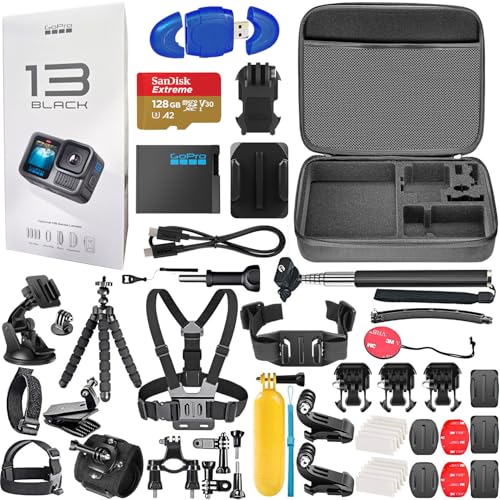
GoPro HERO13 Black — Best Overall for Car Channels
Mountains of motoring footage have passed through GoPro’s stabilisation over the years, and the HERO13 Black shows why the brand remains the default answer behind a windscreen. Washboard gravel that turned rival footage into soup rendered as a calm, forward glide; cobbles became texture rather than trauma. For a channel whose signature shot is the road unwinding ahead, that composure is not a feature among features — it is the product.
Beyond the headline steadiness, the details suit car work specifically. The tall sensor options let an editor crop vertical shorts from the same master file that fills a widescreen episode, a genuine economy for a one-person channel feeding two formats. Magnetic mounting in the newer accessory line speeds the move from windscreen to door panel to roof, and the battery story, while never generous in this class, is at least predictable — the gauge tells the truth, which on a long leg matters more than raw minutes.
Colour asks a small favour in return. The flatter profile rewards creators who grade; the standard profile serves those who publish from the passenger seat of their own schedule. Either way, dusk files hold together respectably for an action sensor, though the DJI below walks further into the dark before noise starts negotiating. Voice pickup inside a closed cabin proved clear at motorway pace, with wind management that keeps narration ahead of the roar without strangling its tone.
Heat remains the standing caution, shared by the breed: parked in fierce sun with the engine off, any of these cameras will eventually protect itself by stopping. Working channels develop the habit — camera shaded, camera ventilated, camera started as the car starts — and under that ordinary discipline the HERO13 ran full legs without complaint. It earns the top badge the way defaults usually do: by failing at nothing a road channel actually does.
- Stabilisation: benchmark composure on gravel and cobbles
- Sensor: tall capture for vertical crops from one master
- Mounts: the deepest accessory ecosystem in the class
- Audio: clear cabin voice at motorway speed
- Role: the windscreen default for driving channels
Strengths
- Smooths genuinely rough roads into watchable glide
- One recording serves episode and short alike
- Mounts exist for every panel and bar in a car
Trade-offs
- Dashboard heat still demands shade discipline
- Battery life is honest rather than long
- Flattest colour needs grading to shine
Best for: POV driving and road-trip channels wanting the proven default. Not suited for: creators filming mostly after dark.

DJI Osmo Action 5 Pro — Best for Dawn and Dusk Drives
Golden hour is the road film’s richest light and its cruelest test, and the Osmo Action 5 Pro was built as if DJI had read that sentence. Its larger sensor keeps shadow detail alive in the tree-lined lanes where smaller action cameras smear into watercolour, and its colour science flatters the low sun rather than fighting it. Channels that schedule drives around dawn departures and dusk arrivals — which is to say, channels with taste — will feel the difference in every episode.
Endurance argues just as strongly. Across the test route’s longest leg, the DJI’s battery outlasted its rivals by a margin that changes behaviour: fewer swaps, fewer anxious glances, more willingness to keep recording through the unplanned detour that becomes the episode’s best ten minutes. Cold mornings, which quietly tax small batteries, bothered it least of the group as well.
Dual screens serve the parked segments handsomely. A driver framing a piece to camera beside the car can compose from the front display without the walk-back-and-check ritual, and the touch response stayed willing with light gloves on — a small mercy anyone filming a winter pass will appreciate. Stabilisation runs a close second to the GoPro’s benchmark; on the very worst gravel the DJI judders a breath sooner, a gap most viewers will never catch and perfectionists should weigh honestly.
Audio through the DJI microphone ecosystem is this pick’s quiet triumph. Wireless mic pairing turns the parked interview, the campsite debrief, and the walkaround review into properly recorded segments rather than shouted ones, and the in-car voice capture on the internal microphones alone still placed second in the group. A road channel is half driving, half talking about driving; the Osmo serves both halves with unusual evenness.
- Sensor: larger, for dusk and shadow detail
- Battery: the group’s marathon manners
- Screens: front and rear, glove-tolerant touch
- Audio: wireless mic pairing for parked segments
- Role: the golden-hour road camera
Strengths
- Low-light footage with real shadow life
- Fewer battery swaps across a driving day
- Front screen ends the framing guesswork
Trade-offs
- Stabilisation yields slightly on extreme gravel
- Accessory shelf younger than GoPro’s
- Best audio asks for the wireless mic extra
Best for: scenic-route channels filming at the day’s edges. Not suited for: mount collectors already deep in GoPro hardware.

Insta360 X4 — Best for Solo Drivers
Solo driving creates a directing problem no fixed camera solves: the interesting thing happens where the lens is not pointing. The X4 dissolves the problem by recording in every direction at once. Mounted high in the cabin or on a short arm outside the glass, it captures the road ahead, the driver’s reaction, and the landscape sliding past the side window in a single take — and the framing decisions move to the editing desk, where the driver is safely parked.
Reframing in the app feels like a second crew member. A single mountain-pass recording yielded the forward driving shot, a cutaway of hands at the wheel, and a sweeping pan across the valley, each exported as an ordinary flat clip for the timeline. For a one-person channel, that multiplies the apparent production value of every mile without adding a single decision to the drive itself — the safest kind of sophistication there is.
Honesty requires the workflow tax to be named. Spherical files are larger, exports take longer, and the final resolution per direction sits below a dedicated forward camera’s best. Stitching lines can appear when a subject crosses close to the lens, so cabin mounting position deserves one careful experiment rather than a guess. Channels publishing daily on a laptop of modest power will feel these costs; channels publishing twice a week will mostly feel the freedom.
Weather and mounting flexibility round out the case. The body shrugs off rain at an open window, the invisible-stick trick gives drone-flavoured chase views from a car-mounted pole where local rules allow, and the whole arrangement packs into a jacket pocket at the destination. As the solo driver’s force multiplier, nothing else in the table attempts its job, let alone does it this well.
- Capture: full sphere, reframed after the drive
- Workflow: app exports flat clips per angle
- Mounting: cabin, glass, or external arm
- Files: larger, with slower exports
- Role: the one-person channel’s second crew
Strengths
- Never misses the moment at the frame’s edge
- One take becomes several finished shots
- Keeps the driver’s attention on driving
Trade-offs
- Editing pipeline is heavier and slower
- Per-direction resolution trails fixed cameras
- Close subjects can reveal stitch lines
Best for: solo road-trippers and reaction-driven formats. Not suited for: daily uploaders on modest computers.

Insta360 Ace Pro 2 — Best for Crisp Talking Segments
Some car channels are really conversation channels that happen to move. The Ace Pro 2 serves that format with the sharpest, most confident image in the table: clean detail in bright conditions, colour that flatters skin inside a cabin’s mixed light, and processing that rescues faces from the shadow a sunroof leaves behind. Parked at a viewpoint, flipped screen up, it becomes a genuinely polished piece-to-camera machine.
The flip screen deserves its own paragraph because it changes a habit. Creators check framing, glance at exposure, and start talking in one motion, without the selfie-mode guesswork of rear-screen cameras or the extra phone-as-monitor dance. Across a shooting day of twenty short segments, that saved motion compounds into a calmer presenter and better takes — production value measured in behaviour rather than specifications.
Driving footage proper remains fully respectable. Stabilisation handles ordinary roads with ease and rough ones with minor protest; low-light performance, helped by the line’s processing heritage, stays cleaner than its sensor size suggests. Wind reduction on the internal microphones kept roadside narration usable on a breezy ridge, though a furry cover remains the professional’s friend for anything beyond a breeze.
Where rivals specialise — the DJI in endurance, the GoPro in mounts, the X4 in omniscience — the Ace Pro 2 specialises in looking finished. Channels whose episodes alternate driving with direct address, reviews delivered from the driver’s seat, and commentary recorded at the destination will find its balance of sharpness and convenience pointed exactly at their format.
- Image: crisp detail, confident cabin colour
- Screen: flip-up for pieces to camera
- Audio: capable wind handling, external options
- Stabilisation: strong on ordinary roads
- Role: the conversation channel’s camera
Strengths
- Faces look polished straight from the camera
- Flip screen streamlines solo segments
- Clean files in mixed cabin light
Trade-offs
- Roughest roads test its steadiness
- Mount ecosystem still growing
- No spherical second chances in framing
Best for: commentary, review, and talking-format car channels. Not suited for: pure POV channels that never address the lens.

GoPro HERO12 Black — Best Proven Value
Yesterday’s benchmark is today’s bargain, and the HERO12 Black’s road manners have not aged a day. The stabilisation that defined the class still irons gravel into glide, the mount ecosystem it shares with its successor means every accessory a channel buys today survives tomorrow’s upgrade, and its files cut seamlessly beside the newer model’s in a two-camera cabin setup.
Value here is not a euphemism for compromise; it is a strategy. The money saved against the current flagship buys the suction mount, the headrest clamp, the spare batteries, and the polarising filter that together influence finished footage more than one generation of sensor progress. Channels are built from kits, and this pick builds the most complete kit at its tier of spending.
Endurance and heat want the same respect as its successor: plan shade, plan airflow, carry charged spares, and the camera repays the discipline with uneventful reliability. Its colour profiles reward the same light grading touch, and creators who publish ungraded will still find the standard look cheerful and clean in daylight, only surrendering the dusk argument to the DJI as the light truly fails.
Longevity of support seals the recommendation. Firmware maturity means the bugs are known and mostly gone; the secondhand and refurbished market means a replacement body is a day away rather than a budget event. A working channel values that boring resilience, because episodes are promised to an audience on a schedule, and the HERO12 is the pick least likely to make its owner break one.
- Stabilisation: former benchmark, still fluent
- Compatibility: shares the flagship mount world
- Value: leaves budget for the full kit
- Support: mature firmware, deep used market
- Role: the sensible channel-builder’s GoPro
Strengths
- Kit-building arithmetic beats bare flagships
- Cuts cleanly beside newer GoPro footage
- Replacement bodies are easy to source
Trade-offs
- Dusk files trail the class leaders
- Battery swaps remain a driving-day ritual
- No tall-sensor tricks of the newest model
Best for: new channels equipping a complete kit at once. Not suited for: night-drive specialists.

DJI Osmo Pocket 3 — Best for the Stops Between Drives
Road-trip episodes are remembered for their stops: the bakery in the village the motorway bypassed, the mechanic who explained the noise, the viewpoint nobody signposted. The Osmo Pocket 3 exists for exactly those minutes. Its gimbal turns a walking tour of a market into floating footage, its face tracking keeps a presenter framed while hands carry coffee, and its audio story — especially paired with its wireless microphone — embarrasses every other pick in the table.
Inside the car, honestly, it is the wrong tool, and the review should say so plainly. A gimbal fights vehicle vibration rather than absorbing it, the body is not weather-sealed for an external mount, and leaving it recording on a dashboard wastes its genius. Channels should resist pressing it into windscreen duty; its kingdom begins when the handbrake goes on.
That kingdom is large. Hotel-room debriefs, campsite cooking segments, interviews with fellow travellers, the walk from car park to waterfall — the Pocket 3 covers the connective tissue of a road series with a polish that makes the driving footage around it look more expensive by association. Audiences binge the journey, not the motorway, and the journey lives in these segments.
Carry is the final argument. The whole instrument rides in the case it came in, smaller than the fuel receipts folder, ready in the two seconds between seeing a scene and losing it. Paired with any windscreen pick above, it completes the two-camera road kit this guide recommends — one camera for the miles, one for everything the miles were for.
- Gimbal: three-axis mechanical smoothness
- Audio: the table’s best pocket recording story
- Tracking: faces and subjects held automatically
- Limits: not a dashboard or weather camera
- Role: the stops, interviews, and walkarounds
Strengths
- Walkaround footage with floating calm
- Presenter audio that needs no rescue
- Ready in seconds, carried in a pocket
Trade-offs
- Wrong tool for windscreen recording
- Delicate gimbal asks for its case
- No weather sealing for external mounts
Best for: road-trip storytellers and interview-led formats. Not suited for: channels that film only from the driver’s seat.
Windscreen to Walkaround: The Comparison
| Pick | Primary seat | Signature strength | Watch-out |
|---|---|---|---|
| GoPro HERO13 Black | Windscreen | Stabilisation and mounts | Dashboard heat discipline |
| DJI Osmo Action 5 Pro | Windscreen | Dusk detail, endurance | Younger accessory shelf |
| Insta360 X4 | Cabin or arm | Reframe after the drive | Heavier editing pipeline |
| Insta360 Ace Pro 2 | Driver’s seat | Sharp talking segments | Extreme gravel protest |
| GoPro HERO12 Black | Windscreen | Kit-building value | Ageing low-light manners |
| DJI Osmo Pocket 3 | Handheld at stops | Gimbal and audio polish | Never a dashboard camera |
Seat is the column to read first. Every disappointment traced during testing came from a camera asked to work outside its seat — a gimbal shaken on glass, a spherical camera judged on pixel-peeping, a value pick blamed for dusk. Matched to their seats, all six picks produce footage a channel can publish proudly; the table’s real job is preventing the mismatch, not ranking the worthy.
Pairing is the second reading. One windscreen camera plus the Pocket 3 covers a whole road series; the X4 can substitute for either in a solo kit at the price of editing time; two fixed cameras — one forward, one on the driver — remain the classic two-angle cabin for commentary formats. Buy the pair your format uses weekly, not the trio a fantasy format might use once.
What Mistakes Do Car-Channel Beginners Make?
Mounting once and trusting forever leads the list. Suction cups lose their grip across a hot afternoon, adhesive pads creep, and a camera that falls at speed takes its card — and sometimes its lens — with it. Working channels tug-test every mount at every fuel stop, a five-second ritual that has saved more footage than any stabilisation algorithm. A safety tether on external mounts is not paranoia; it is the difference between a scare and a loss.
Recording everything at maximum settings runs second. The highest resolution and frame rate drain batteries, fill cards, heat bodies, and slow edits, while most road footage publishes beautifully at moderate settings. Reserve the ceiling modes for the signature pass, the hero segment, the thumbnail shot — and let the honest miles roll at settings the whole pipeline can sustain for a week on the road.
Neglecting the parked audio is the quiet channel-killer. Beginners lavish attention on driving footage, then record the episode’s explanations beside a noisy road with the camera’s bare microphones, and viewers leave during the talking they cannot comfortably hear. A modest wireless microphone, or even a wired lavalier into an action camera’s adapter, transforms retention more reliably than any camera upgrade at this level.
Finally, beginners forget the law and the courtesy around filming on roads. Rules on windscreen obstruction, handheld devices, and recording in certain places vary by country and sometimes by state; a mounted, set-before-departure camera is both the legal and the safe pattern almost everywhere. Audiences forgive a missed shot. Nobody forgives a creator who filmed themselves driving carelessly — the channel’s reputation rides in the car with the camera.
How Do You Power and Store Footage Across a Long Driving Day?
USB power from the car solves the battery ceiling and introduces two smaller problems: heat and cable management. A camera recording while charging runs warmer, so airflow matters more, not less, on plugged-in legs; and a cable crossing the driver’s space is a hazard dressed as convenience. Route power along the headliner’s edge, secure it with clips, and keep the arrangement identical every day so that setup becomes reflex rather than fiddling.
Cards should be sized for the whole day and swapped at the evening stop, never formatted on the road. The working pattern is dull and perfect: today’s card goes into a labelled case, tonight’s backup copies it to a laptop or portable drive, and the card returns to service only after the copy verifies. Road series are lost in car parks and cafés far more often than on roads, usually in the five minutes when a card was being clever instead of being copied.
File naming at the day’s end repays its two minutes all winter. Date, route, and camera in the folder name turn an archive of ten thousand clips into a searchable library, and the creator who can find last March’s coastal pass in thirty seconds is the creator who actually makes the retrospective episode. Storage discipline is invisible in every published video and decisive in a channel’s second year.
Where Does a Dedicated Dashcam Still Fit?
Prose-only in this guide, by design: the verified pool behind these pages covers cameras, and the dashcam specialists — the road-safety brands with their parking modes and incident locks — sit outside it, so no links pretend otherwise. Their role in a creator’s car is nonetheless real. A modest dashcam runs always, asks nothing, and holds the evidence if the day goes wrong; some channels also mine its forward view as an emergency cutaway when the main camera’s battery died at the wrong summit.
Choose one by witness virtues rather than creator virtues: reliable loop recording, a supercapacitor rather than a battery for hot cabins, honest night plate legibility, and a mount that stays out of the main camera’s frame and the driver’s sightline. Spend storyteller money on the picks above; spend only witness money here, and let each tool do the job its designers intended.
How Do You Film a Complete Road Episode, Start to Finish?
Dawn finds the prepared channel already rolling. The opening shot of a road episode is rarely the road itself; it is the departure — the loaded boot closing, the map on the bonnet, the first cold start of the morning. The Pocket 3 or a parked action camera covers those thirty seconds while the windscreen camera waits, and an episode that begins with a human moment earns the patience it will later spend on long driving sequences.
Rolling segments should be gathered in deliberate variety, because a single unbroken windscreen view numbs even devoted viewers. Forward road for the journey’s spine, a cabin angle for the driver’s running commentary, the occasional side-window landscape from a 360 camera or a safely mounted second body — three textures alternating in the edit make an hour’s drive feel like a programme rather than a recording. Gather more of each than feels necessary; the edit’s appetite always exceeds the day’s estimate.
Stops deserve a shooting habit of their own. Arrive, and before the coffee order, take the establishing shot: the village sign, the harbour wall, the odd little museum’s front door. Interview energy is highest in the first minutes at a place, before familiarity dulls reaction, so the presenter segments belong early in each stop, with the wandering detail shots — hands, textures, menus, weather vanes — gathered afterwards as the light and the mood allow.
Evenings close the production day twice over. First comes the debrief segment, recorded while the day’s surprises are still fresh in the voice; a tired presenter at a campsite table, speaking honestly about what the road did, gives the episode its emotional punctuation. Then comes the unglamorous ceremony: cards copied, batteries charging in a row, tomorrow’s route glanced over, mounts inspected for the cracks and loosening that a day of vibration writes into plastic and suction rubber.
Publishing rhythm shapes all of it. Channels that film an episode per driving day edit lean and publish close to the journey; channels that bank a whole expedition before editing can afford richer structure but must log footage nightly or drown in undifferentiated hours. Either model works. What never works is filming without a model — the hard drive of beautiful, unlogged, unpublished miles is the road channel’s most common monument.
What Changes at Night, in Rain, and in Winter?
Darkness reorders the ranking in ways the daylight tests only hint at. Small sensors gather little light, and electronic stabilisation leans on shutter speeds that night refuses to provide, so after-dark driving footage from any action camera carries more noise and softer detail than its daytime self. The DJI’s larger sensor handles the transition most gracefully, which is why it holds the dusk badge, but every channel should treat full-night motorway footage as atmosphere rather than showcase — headlights, signs, the rhythm of passing lights — and save its presenters’ faces for lit stops.
Rain tests sealing claims and windscreen behaviour together. All six picks tolerate weather on their bodies; the harder problem is the droplet field between lens and world. A hydrophobic-coated windscreen area in the camera’s view, a wiper arc that actually covers the lens’s sightline, and the discipline to stop once and clear the glass transform rainy footage from smeared abstraction into moody, watchable travel. Cabin-facing cameras escape the problem entirely, one reason wet days push formats toward conversation.
Cold is the silent battery thief. Lithium cells deliver less in a freezing car, mounts’ suction cups stiffen, and condensation fogs a lens brought from a warm cabin into cold air at a viewpoint stop. Working winter habits are unglamorous: batteries carried in an inside pocket until the moment of use, cameras acclimatised in their cases, a microfibre cloth treated as essential as fuel. The picks above all survived the cold-morning tests; the differences lay in how much of their rated endurance the cold confiscated, and the DJI again surrendered least.
Salt and grit finish the seasonal survey. Winter roads coat everything in abrasive film, and a lens wiped carelessly with a dry glove wears the journey permanently in its coating. Rinse or flood-wipe first, blot rather than scrub, and keep a sacrificial clear filter or lens cover between the glass and the grit where the system allows. Road channels are made across years, and a camera’s second winter should look as clear as its first.
How Should Road Footage Be Edited So Viewers Stay Aboard?
Pace is the editor’s first gift to a driving video. Real journeys unfold slowly; published journeys must merely feel unhurried while actually moving briskly. The working pattern cuts driving sequences to their changes — the light shifting, the landscape turning, the weather arriving — and lets narration carry the miles between. A viewer should always be able to answer, ten seconds into any driving shot, what is different about this stretch of road from the last one.
Sound design quietly separates amateur uploads from channels. Cabin recordings carry tyre roar and wind pressure that fatigue ears across a long episode; gentle noise reduction, a low music bed mixed well beneath speech, and the deliberate retention of some honest road sound — indicators, gravel under tyres at the viewpoint, rain beginning on the roof — build the sense of being aboard without the punishment of actually sitting in a noisy car for forty minutes.
Geography must never confuse. Road audiences forgive modest images and abandon muddled journeys, so the edit owes them orientation: a map graphic at departure, place names spoken or captioned as they arrive, distances treated as story beats. The creator who says where the car is, where it is going, and why that matters has done more for retention than any camera in this guide can do.
Endings deserve the same craft as openings. A road episode that simply stops at a car park teaches viewers that the series has no shape; one that closes with the debrief, tomorrow’s promise, and a single lingering shot of the car at rest teaches them to return. Retention across a series is built in these closing minutes, and channels that plan the ending before departure film the footage the ending needs.
Why Does Audio Decide Whether a Car Channel Feels Professional?
Viewers describe the difference vaguely — one channel feels polished, another feels like a dashcam dump — and the variable is usually sound. The voice sits forward, steady in level, free of the boom that a hard cabin interior adds to bare camera microphones. Achieving that in a car is mostly placement: a small microphone near the speaker’s chest hears the voice before the cabin’s reflections arrive, which is why the wireless and lavalier options threaded through the picks matter more than another increment of video resolution.
Consistency across segments is the second half of the craft. An episode that cuts between booming cabin audio, crisp parked interviews, and wind-blasted viewpoints exhausts its audience with constant recalibration. Matching levels and tone in the edit, recording room tone at each stop for smooth joins, and keeping one microphone as the voice of the series wherever possible give a channel an audible identity as recognisable as its thumbnail style.
Music licensing belongs in this conversation because road channels live on long, music-friendly sequences. Use libraries whose licences genuinely cover commercial publication, keep the paperwork with the episode’s project files, and favour tracks that leave space for narration. A claim or a muted segment discovered months later costs more — in re-edits and in audience trust — than the modest discipline of licensed music from the start.
One Camera or Two: How Should a Cabin Be Covered?
Plenty of respected road series run a single windscreen camera and nothing else, and their secret is honesty about format. Scenery-led channels — alpine passes, desert highways, coastal routes — ask the road to be the presenter, and a second angle would dilute rather than enrich. When the landscape carries the episode, one excellent forward camera, well mounted and well powered, is not a compromise; it is the correct instrument, and the budget it spares belongs in cards, fuel, and time.
Personality-led channels live by the cutaway. The driver’s face at the moment the pass opens, the passenger’s scepticism at the ferry queue, the shared silence when the weather turns — these reactions are the episodes audiences quote, and they require either a cabin-facing second camera, a 360 unit reframed in the edit, or the discipline of parked re-tellings. None of the three is superior in the abstract; each taxes a different resource, money, editing hours, or spontaneity respectively.
Synchronisation is the two-camera tax nobody mentions at purchase. Two recorders started at different moments drift across a long leg, and matching a reaction to its cause in the edit becomes archaeology. Working pairs develop rituals — a clap or a spoken marker at each departure, both cameras set to the same clock, files named by camera at ingest — and those rituals, dull as they sound, are what make multi-angle road footage sustainable across a hundred episodes rather than three.
Growth argues for sequencing rather than simultaneity. Launch with one camera and a format it can carry alone; add the second angle when the audience’s comments start asking for it, which they will, in almost those words. A channel that grows its kit in answer to its viewers spends on evidence, and the second camera arrives as a celebration rather than a gamble. The picks in this guide were ranked with that sequence in mind — every windscreen choice stands alone honourably before it ever becomes half of a pair.
What About Passengers, Plates, and Privacy?
Every cabin camera records people who did not start a channel. Passengers deserve a plain conversation before the first rolling take — what gets published, whether they can ask for a cut, how the camera behaves on the boring stretches — and children deserve a stricter version of the same courtesy, with some families deciding that young faces stay out of published footage entirely. A channel built on consent keeps its friendships; one built on ambush eventually films an empty passenger seat.
Number plates and street detail raise the outward-facing version of the question. Public-road filming is broadly accepted in many places and restricted in some, particularly where continuous recording and publication of identifiable plates or faces meet strict privacy law. Creators travelling across borders should learn each country’s posture before the trip, blur plates in incident footage as a matter of routine, and treat other drivers’ worst moments as material that demands a reason beyond mere availability.
Local rules deserve one practical habit: before a cross-border series, spend an evening reading each country’s guidance on recording from vehicles and publishing the results, then write the conclusions into the trip plan beside the fuel stops. Regulations encountered mid-journey, at a border official’s window, have a way of costing footage and temper alike; regulations read at a kitchen table cost an hour and a cup of tea.
None of this needs to smother spontaneity. The habits are light: ask, explain, blur where sensible, and keep the camera’s presence ordinary rather than secret. Audiences, interestingly, reward the visible courtesy — a channel that treats the people inside and outside the car decently reads as trustworthy, and trust is the entire business model of a series that asks strangers to spend their evenings riding along.
Final Recommendation
Build the kit by seat. The GoPro HERO13 Black takes the windscreen for most channels, the DJI Osmo Action 5 Pro takes it for dawn-and-dusk storytellers, and the HERO12 Black takes it when the budget must also buy the mounts. Solo drivers should seriously consider the Insta360 X4’s reframe-later freedom, conversation-led formats belong with the Ace Pro 2, and every road series grows richer the day a DJI Osmo Pocket 3 starts covering the stops. Add a plain dashcam as the silent witness, power the rig from the car with tidy cables, back up every night — and the road will do the rest.
Frequently Asked Questions
Can I just use a dashcam for a car YouTube channel?
You can publish with one, and some incident-compilation formats do exactly that. For driving, travel, or commentary content, though, the dashcam’s surveillance look, weak audio, and loop recording work against you from the first episode. Treat it as the witness and let an action camera tell the story; the audience numbers will explain the distinction within a month.
Which mount is safest for a windscreen camera?
A quality suction mount on clean glass, positioned outside the driver’s direct sightline, tug-tested at every stop, is the working standard. Adhesive mounts hold harder but commit you to one position; headrest clamps excel for cabin-facing angles. Whatever you choose, add a short tether where the camera could fall into the footwell or out of a window.
How do I stop dashboard reflections ruining the shot?
Attack the reflection, not the symptom. A dark, matte cloth laid on the dashboard kills most of the glare at its source; a polarising filter where the camera system offers one handles the rest; and shifting the camera a few degrees off the windscreen’s reflection axis often clears the remaining veil. Editing sliders can polish contrast, but they cannot invent detail the reflection washed away.
Is 360 footage worth the extra editing time?
For solo drivers, usually yes: the X4’s ability to choose angles after the drive replaces a second camera and a second pair of hands. For crewed channels or daily upload schedules, the heavier files and export steps can cost more than they return. Judge it by your publishing rhythm — the freedom is real, and so is the tax.
What settings should I use for driving footage?
Start with a moderate resolution your editing machine handles happily, a standard frame rate for driving and a higher one only for hero segments, stabilisation on, and exposure locked once the light settles so the image does not pulse through tunnels and tree shade. Consistency across a whole leg matters more to viewers than any single setting’s bragging rights.
Do I need a second camera for the driver?
Commentary formats benefit enormously: cutting between the road and the driver’s face is the grammar of the genre. A second fixed camera, the X4’s reframing, or disciplined parked segments with a flip-screen pick like the Ace Pro 2 all solve it. Pure scenery channels can skip the face camera entirely and spend the money on mounts and cards instead.
Related Guides
Continue with best action cameras for travel for the wider adventure field, best cameras for vlogging when the talking segments take over, and best budget cameras for youtube for the full creator ladder.


