kajuandouglas.com is reader-supported. When you buy through links on our site, we may earn an affiliate commission.
Where to Buy
First, the spelling, because it matters for your search results: “cannon” in best cannon cameras for videography is a typo for Canon, the camera maker — not artillery, and not a rival brand. Every camera below is a Canon, and this guide treats videography as a technical discipline rather than a hobby setting. That means the questions here are the working questions: Which bodies record 10-bit colour with a log profile you can actually grade? Which ones overheat during a wedding speech, an interview, a livestream? Which accept proper audio, external recording, and rigging without fighting you? If your interest is casual family filming, lighter guides exist; this one is for shooters building toward paid, repeatable, colour-graded video work.
Canon’s video line splits into three families that outsiders constantly confuse. The RF mirrorless bodies — R50, R10, R6 Mark II — are hybrids: stills cameras whose video arms have grown muscular. The Cinema EOS bodies — the R5 C and the C70 in these pages — are film tools first, with cooling, timecode thinking, and interfaces designed for crews and long takes. The PowerShot row is a pocket B-camera that earns professional respect in specific, narrow jobs. Choosing between families is choosing a workflow, not a winner, and the reviews below keep returning to workflow: codecs, cards, rigs, heat, and the grade.
A note on honesty before the table: specifications seduce, but delivered footage is the currency. A body that records a spectacular format for eleven minutes before a thermal shutdown delivers less than a body recording a humbler format all afternoon. This guide therefore weights sustained performance, audio provisions, and colour flexibility above headline resolution, and it labels the two cinema bodies — which sit outside the linked pool — as prose-only step-ups, described fully but sold nowhere on this page.
Key Takeaways
- Canon Log and 10-bit recording are the real dividing line for videography: they decide how far footage can be graded, matched, and rescued.
- The Canon EOS R6 Mark II is the strongest linked all-rounder — oversampled 4K, 10-bit C-Log3, stabilisation, and external RAW for crews that grow.
- Heat is a workflow specification, not a footnote: cinema bodies with active cooling exist because long takes are a professional requirement.
- The Canon EOS R5 C and EOS C70 appear as prose-only cinema step-ups for shooters whose work has outgrown hybrid compromises.
- The EOS R10 and EOS R50 form the sensible entry ramp, while the PowerShot G7 X Mark III survives as a pocket B-camera and streaming tool.
- Budget for cards, audio, and rigging alongside the body; videography’s hidden costs live outside the camera box.
Terminology will be defined where it is used, because this field hides simple ideas behind intimidating initials. Log means a flat, low-contrast recording designed to be coloured later. Ten-bit means vastly finer colour gradations than standard eight-bit, which is what keeps skies smooth and skin tones separable during that colouring. Oversampling means the camera reads more pixels than it outputs, buying sharpness and cleaner noise. Keep those three definitions and the rest of this guide — waveforms, false colour, dual-gain sensors, internal ND filters — unfolds as variations on them.
In this guide
Quick Picks
| Badge | Pick | Why it stands out |
|---|---|---|
| Best Overall for Semi-Pro Video | Canon EOS R6 Mark II | Oversampled 4K, 10-bit C-Log3, strong stabilisation, and external RAW headroom. |
| Best Cinema Step-Up | Canon EOS R5 C | A Cinema EOS body with active cooling and 8K RAW ambition for long, serious takes. |
| Best Dedicated Cinema Body | Canon EOS C70 | Super 35 dual-gain sensor, internal ND filters, and audio provisions built for sets. |
| Best Value Video Hybrid | Canon EOS R10 | High-frame-rate 4K and Canon colour in the most attainable RF video body. |
| Best Compact Creator Body | Canon EOS R50 | Oversampled 4K and forgiving automation for solo shooters learning the craft. |
| Best Pocket B-Camera | Canon PowerShot G7 X Mark III | Streaming-ready pocket camera for cutaways, travel inserts, and vertical clips. |
Two rows carry no purchase link, deliberately. The R5 C and C70 are described from their published capabilities so that readers planning a cinema step-up can compare honestly, but they are not in this site’s verified pool for this guide, so they appear as prose-only picks. Everything else links to the exact model named, and nothing in the detailed reviews invents a variant, bundle, or specification to make a row sound stronger than the camera is.
How We Chose These Picks
Selection began with colour architecture. Any body pretending to serious videography had to offer a log profile with 10-bit recording, or — in the pocket row — a clearly defined supporting role where that requirement relaxes. Bit depth and log together decide whether footage survives a grade, a mixed-light rescue, or a match between two cameras on the same job; bodies limited to baked eight-bit colour were excluded from the main rows no matter how sharp their footage looked on a phone.
Thermal behaviour came second, judged by design intent rather than rumour. Sealed hybrid bodies manage heat passively and therefore carry recording ceilings that vary with format, frame rate, and ambient temperature; cinema bodies answer with fans and vents. Rather than pretend one approach is dishonest, the reviews state plainly which jobs each body can sustain — interviews, ceremonies, livestreams, narrative takes — because matching a camera to a take length is the working definition of professional judgement.
Finally, the ecosystem around each body was audited: RF lens availability for video work, audio inputs and monitoring, external recorder and RAW pathways, card costs at the required speeds, and the rigging ecosystem of cages, handles, and mounts. Videography is a system purchase disguised as a camera purchase, and a body whose supporting cast bankrupts the shooter has failed the only review that matters — the one conducted on set, behind schedule, with a client watching.
What Do Log Profiles and 10-Bit Colour Actually Buy You?
Record a sunset in a standard profile and the camera makes irreversible decisions for you: contrast baked in, highlights clipped to white, shadows crushed to black, colour committed. Log recording refuses those decisions. It stores a flat, grey-looking image that preserves highlight detail and shadow information for the editing stage, where a colourist — often you, at midnight — can shape the scene deliberately. Weddings gain skies that keep their clouds. Interviews gain skin that separates from backgrounds. Product films gain the exact brand colour the client approved, rather than the approximation the camera preferred.
Ten-bit depth is log’s necessary partner. Grading stretches and bends colour values; with eight-bit recording, that stretching tears smooth gradients into visible bands, most cruelly in skies, walls, and defocused backgrounds. Ten-bit files hold roughly sixty-four times the colour gradations, so gradients survive the bend. This is why the combination — log plus 10-bit — is this guide’s threshold for serious work, and why headline resolution without it impresses only on paper.
None of this is free. Log footage looks wrong until graded, demands exposure discipline (underexposed log turns noisy when lifted), and multiplies storage and editing time. Shooters who deliver same-day social clips may rationally prefer standard profiles and speed. The craft lies in knowing which jobs pay for flexibility and which pay for immediacy — and in owning a body, like the R6 Mark II below, that offers both without complaint.
Why Does Overheating Deserve Its Own Specification?
Heat is physics wearing a disguise. High-resolution sensors read at high speed, processors encode demanding codecs, and sealed weather-resistant bodies trap the warmth of both. Something must give, and what gives is recording time. The failure mode is uniquely cruel: not degraded quality but a stopped camera, mid-vow, mid-answer, mid-performance. Professionals therefore plan thermals the way they plan batteries — as a consumable with a budget — and choose bodies whose ceilings exceed their longest planned take with margin to spare.
Mitigation is a craft of its own. Lower frame rates and less demanding codecs run cooler. External recorders move encoding heat outside the body. Dummy batteries and open screens help some models; shade and airflow help all of them. Cinema bodies solve the problem structurally, with fans that trade a whisper of size and sealing for effectively unlimited takes in their working formats — which is why the C70 and R5 C exist, and why productions rent them for ceremony and interview days even when a hybrid owns the prettier specification sheet.
Read the picks below through this lens. Each review names the take profile the body suits: the sprint of short narrative shots, the marathon of a conference day, the relay of a wedding. Matching body to take profile — before the job, not during it — is the difference between a videographer and a person hoping their camera lasts. Hope is not a thermal strategy.
Which of the Best Cannon Cameras for Videography — Canon’s, Properly Spelled — Fits Your Production?
Six Canons, three families, one question: what does your footage need to survive? The reviews judge colour architecture, sustained recording, audio, stabilisation, and rigging as one integrated verdict per body, because on a real shoot those qualities fail or succeed together.

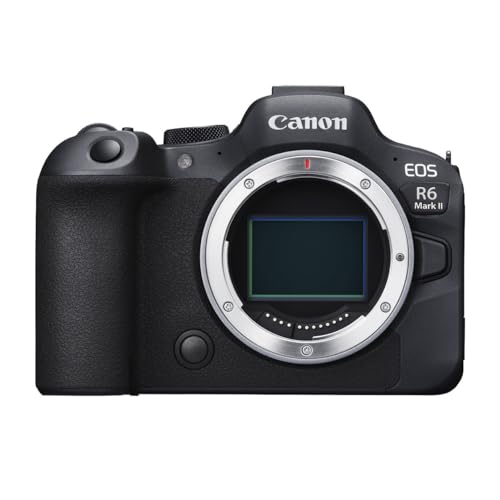
Canon EOS R6 Mark II — Best Overall for Semi-Pro Video
Ask working shooters which single Canon hybrid they would take to a paid job sight unseen, and this body collects the votes. Its 4K footage is oversampled from a higher-resolution readout, which shows up on screen as fine detail without the brittle, over-sharpened edge that marks lesser pipelines. More importantly, it records that footage in 10-bit C-Log3, so the files accept a real grade: skies hold together, mixed venue lighting can be talked into agreement, and a second camera’s footage can be matched without a weekend of penance.
Stabilisation changes the economics of a solo shoot. The in-body system, cooperating with stabilised RF lenses, delivers gimbal-adjacent smoothness for walk-throughs, venue reveals, and handheld interview cutaways — not a gimbal’s replacement for choreographed moves, but enough to leave the gimbal at home for half the jobs that once demanded it. Fewer accessories means faster setups, smaller bags, and a shooter who looks like a guest rather than an occupying force at weddings and corporate events alike.
Growth headroom seals the recommendation. An external recorder unlocks RAW output over HDMI for productions that want maximum post-production latitude, while the body’s stills performance — fast, confident, low-light capable — keeps it employable on hybrid photo-video contracts that pure cinema bodies cannot serve. Audio provisions include proper input and headphone monitoring, the unglamorous pair that separates recordable sound from hopeful sound.
Thermal honesty completes the portrait. As a sealed hybrid, its longest, hottest formats carry ceilings that planners must respect: narrative takes, interviews with breaks, and event coverage in rotated clips suit it beautifully, while an unbroken hours-long 4K record in summer heat belongs to the cinema rows below. Shooters who understand that distinction get a camera that punches at professional level for years; shooters who ignore it get one famous disappointment and a lesson this guide has now given them for free.
- Colour: 10-bit C-Log3, grade-ready
- Detail: oversampled 4K pipeline
- Stabilisation: in-body, lens-cooperative
- Growth: external RAW via recorder
- Role: the semi-pro hybrid benchmark
Strengths
- Gradable 10-bit log with clean oversampled detail
- Stabilisation that shrinks the working kit
- Hybrid stills strength for photo-video contracts
Trade-offs
- Passive cooling caps the longest hot takes
- Micro-HDMI demands careful cable management
- Serious codecs eat fast, costly cards
Best for: semi-professional hybrid shooters grading their own footage. Not suited for: unbroken multi-hour recording in hot venues.
Canon EOS R5 C — Best Cinema Step-Up
Prose-only in this guide and unapologetically aspirational, the R5 C answers a precise frustration: the hybrid that shuts down. Canon rebuilt its flagship stills body as a Cinema EOS machine, adding active cooling so that high-resolution recording stops being a countdown. For videographers whose interviews run long, whose stage work cannot pause, or whose clients equate a stopped camera with an amateur, that fan is not a feature — it is the entire argument, purchased with money and meant seriously.
The cinema identity runs deeper than cooling. Menus, recording formats, and monitoring tools follow the Cinema EOS logic that working camera departments already speak, including RAW recording options at resolutions that future-proof masters and terrify storage budgets in equal measure. Footage from this body is built for post-production pipelines: colourists, editors, and effects work all receive files with room to move, and productions can rent matching cinema glass and accessories from an ecosystem that treats this camera as a colleague rather than a guest.
Who should actually climb here? The shooter whose diary already contains the evidence: long-form interviews booked monthly, multi-camera work beside dedicated cinema bodies, deliverables that specify robust codecs and colour depth. For that shooter, the R5 C replaces rental invoices with ownership and standardises a kit. For everyone earlier in the journey, it remains what this guide intends it to be — a clearly described destination that makes the hybrid rows’ value easier to appreciate, not a dare to overspend before the work demands it.
- Cooling: active fan for sustained recording
- Lineage: Cinema EOS menus and formats
- Ceiling: high-resolution RAW options
- Audio/monitoring: cinema-grade provisions
- Role: the long-take hybrid graduate
Strengths
- Cooling removes the hybrid countdown
- Cinema workflow language throughout
- Resolution headroom for years of deliverables
Trade-offs
- Prose-only here; a serious step-up in cost
- Storage and editing demands escalate sharply
- Overkill for short-form and social-first work
Best for: established shooters with long-take, cinema-pipeline work. Not suited for: beginners or lightweight run-and-gun kits.
Canon EOS C70 — Best Dedicated Cinema Body
The C70 is what happens when every compromise is interrogated by people who shoot for a living. Its Super 35 sensor uses a dual-gain architecture that reads the image two ways at once, defending highlight detail and shadow cleanliness simultaneously — dynamic range you feel in window-lit interviews, where a subject’s face and the bright street behind them both survive the exposure. This is the prose-only cinema benchmark against which the hybrids’ colour should be judged, and judged kindly, because it costs what dedicated tools cost.
Internal ND filters are its party trick and its daily bread. Neutral density built into the body lets a shooter hold a wide aperture — and therefore a cinematic depth of field — under brutal noon sun, adjusting exposure in smooth steps without screwing filters onto lenses or contaminating colour. Documentary crews crossing thresholds between interiors and exteriors bless this feature hourly. Add professional audio inputs, timecode provisions, and a body designed to live inside a rig rather than visit one, and the C70 reads less like a camera than like a small, complete production department.
The rigging point deserves emphasis, because beginners underestimate it until their first cage arrives. Cinema work accumulates handles, monitors, matte boxes, wireless receivers, and batteries; the C70’s form and mount ecosystem absorb that accumulation gracefully, with the RF lens shelf shared with the hybrid rows. A production can therefore run a C70 as its A-camera and an R6 Mark II as its B-camera, matching Canon colour across both — the exact two-body architecture many small crews standardise on, and a growth path this guide’s linked rows feed directly into.
- Sensor: Super 35 dual-gain design
- Exposure: internal ND filters built in
- Audio: professional inputs on the body
- Form: rig-native cinema ergonomics
- Role: the A-camera of small crews
Strengths
- Dynamic range that rescues window-lit interviews
- Internal ND transforms bright-location work
- Built to anchor a full production rig
Trade-offs
- Prose-only here; cinema-tier investment
- No stills ambitions worth mentioning
- Rig costs follow the body home
Best for: documentary and commercial crews needing a true A-camera. Not suited for: hybrid shooters or discreet travel filming.

Canon EOS R10 — Best Value Video Hybrid
Every craft needs an honest doorway, and for Canon videography this body is it. The R10 records high-frame-rate 4K — including a finer-quality mode drawn from a higher-resolution readout at standard frame rates — inside the most attainable RF body that still behaves like a professional tool: real controls, a proper grip, a hot shoe that speaks to modern digital audio accessories, and autofocus that tracks faces and subjects with the family talent Canon is known for.
Slow motion is this row’s teaching gift. Elevated frame rates let a beginning videographer study movement — water, athletes, dancers, machinery — and deliver the polished slow passages clients love in event films and product clips. Learning to shoot for the edit, to gather establishing shots and cutaways and reactions, matters more at this stage than any codec argument, and the R10’s speed and handling encourage exactly that gathering instinct. Its stills burst ability doubles the practice, because frame-grabbing a moving world is composition school by another name.
Limitations are stated without drama: the highest-quality video modes carry crop and heat considerations that planners should learn early, the stabilisation story leans on lenses rather than the body, and the colour pipeline, while offering log on this class of body via its picture profiles ecosystem, rewards careful exposure more than heroic grading. None of that prevents serious work. It defines the apprenticeship: master exposure, audio, and coverage on the R10, and the step to the R6 Mark II becomes a purchase of headroom rather than a rescue.
Budget the system, not the body. A fast card, a real microphone, and one versatile zoom teach more videography than a pricier body recording scratch audio onto slow media. The R10’s value is precisely that it leaves money for its own supporting cast — the only entry-level strategy that has ever worked in any production craft.
- Video: high-frame-rate 4K options
- Autofocus: subject tracking with Canon manners
- Audio: digital accessory shoe ecosystem
- Stills: fast bursts for composition training
- Role: the apprenticeship body
Strengths
- Most attainable route into RF video
- Slow-motion modes that teach movement
- Leaves budget for audio and media
Trade-offs
- Top modes bring crop and heat planning
- No in-body stabilisation
- Grading headroom trails the R6 Mark II
Best for: learners and value-focused shooters building a first rig. Not suited for: long unattended recordings or stabilisation-free handheld work.

Canon EOS R50 — Best Compact Creator Body
Solo shooters carry a particular burden: they are the talent, the crew, and the quality department simultaneously. The R50 was designed inside that burden. Its 4K is oversampled from a richer readout at standard frame rates, so a one-person production — a tutorial channel, a small-business film service, a musician documenting a tour — opens with image quality that flatters the subject, while Canon’s subject detection keeps a presenter’s eyes sharp as they move, gesture, and demonstrate.
Automation here is a feature, not an insult. Scene intelligence, guided interfaces, and product-showcase focus behaviour that snaps to an item held toward the lens all reduce the operator’s workload to the decisions that matter: framing, light, and words. Vertical-video provisions acknowledge where much solo work is published, and the compact body with its vari-angle screen mounts on small tripods and gimbals without turning a desk setup into scaffolding. For creators filming in bedrooms, workshops, and cafés, that smallness is a working method.
The videography ceiling is real and should be respected rather than resented. Extended high-quality recording invites the same thermal planning as every passive hybrid, audio monitoring provisions are thinner than the R6 Mark II’s, and the body’s compact controls suit deliberate solo work better than chaotic multi-operator events. Positioned honestly, though, the R50 is the Canon that turns a promising channel into a professional-looking one — and its files teach their owner exposure and colour lessons that transfer upward intact when the work outgrows it.
Pair it deliberately: a small shotgun microphone, a fast card, and the kit zoom cover ninety percent of solo production, while one bright prime transforms evening and interview footage into the soft-background look audiences associate with money. Total the kit before envying the cinema rows; a complete R50 system in hand outproduces an incomplete flagship on a wishlist, on every deadline ever set.
- Video: oversampled 4K at standard rates
- Focus: presenter and product-showcase detection
- Screen: vari-angle for solo framing
- Size: desk- and travel-friendly rig footprint
- Role: the one-person production company
Strengths
- Image quality that flatters solo subjects
- Automation that reduces operator workload
- Compact rigs for small spaces
Trade-offs
- Thermal planning for long sessions
- Thinner monitoring than bigger siblings
- Compact controls suit solo work best
Best for: solo creators and small-business filmmakers. Not suited for: multi-operator events or marathon recording.

Canon PowerShot G7 X Mark III — Best Pocket B-Camera
Professional kits contain humble tools doing specific jobs superbly, and this pocket Canon is the classic of that category. Its day job on a serious production is threefold: the camera already in your jacket when a cutaway appears, the discreet second angle at ceremonies and interviews where a rigged body would intrude, and the streaming camera that lives on a desk, ready to broadcast with clean output while the A-camera rests. Judged as a main camera it invites criticism; judged as a B-camera it keeps being rehired.
The streaming résumé is genuine. Clean output for capture, a microphone input that pocket cameras of its era usually lacked, vertical-video awareness, and Canon’s flattering colour for skin make it a broadcaster’s spare room that fits in a coat. Travel filmmakers exploit the same virtues: a bright built-in lens, honest low-light manners for a compact, and a silhouette that security staff and venue hosts read as tourist rather than production — a social specification no cinema body can match.
Colour matching is the craft this row teaches. Its footage will not grade like the R6 Mark II’s 10-bit log, and pretending otherwise wastes an edit. Shoot it in a gentle profile, expose carefully, keep its clips short and purposeful — establishing shots, reactions, inserts — and its material intercuts gracefully. Ask it to carry a moody, heavily graded feature and it will decline, visibly. B-cameras earn their keep through discipline about their lane, and this one’s lane is valuable precisely because the bigger bodies cannot enter it.
Ownership economics finish the case. No lenses to buy, no cage required, a battery-and-card ritual a child could run: the total cost of keeping this capability in a working kit is the lowest in the guide. Videographers building toward the cinema rows should still consider one, because productions are remembered for the moments captured, and this is the camera most likely to be present, powered, and pointed when an unscripted moment happens.
- Form: pocketable fixed-lens body
- Streaming: clean output, microphone input
- Colour: flattering Canon skin tones
- Access: discreet, venue-friendly presence
- Role: B-camera, streamer, travel insert
Strengths
- Always-present cutaway capability
- Streaming provisions rare in a pocket body
- Zero lens or rig spending required
Trade-offs
- Limited grading depth beside 10-bit log
- Fixed lens defines its framing forever
- Not a long-form main camera
Best for: B-camera duty, streaming desks, and travel inserts. Not suited for: carrying a production as the only camera.
Colour, Heat, and Workflow: The Comparison
| Pick | Colour architecture | Take profile | Natural job |
|---|---|---|---|
| Canon EOS R6 Mark II | 10-bit C-Log3, oversampled 4K | Long clips with thermal planning | Semi-pro hybrid A-camera |
| Canon EOS R5 C | Cinema formats, RAW options | Sustained, fan-cooled | Long interviews and stage work |
| Canon EOS C70 | Dual-gain dynamic range | Sustained, rig-based | Documentary A-camera |
| Canon EOS R10 | Canon profiles, careful grading | Short-to-medium clips | Learning and value productions |
| Canon EOS R50 | Oversampled 4K, guided colour | Solo sessions with breaks | Creator and small-business films |
| Canon PowerShot G7 X Mark III | Gentle baked profiles | Short inserts and streams | B-camera and desk streaming |
Read the middle column as the purchase. Colour can be improved with skill, lenses can be rented for a weekend, but a body’s relationship with time and heat is constitutional. Productions fail at minute forty of a sixty-minute record, not in the specification comparison the night before. Choose the body whose take profile swallows your longest honest day, then enjoy its colour with a clear conscience.
How Do You Build a Rig Around a Canon Video Body?
Rigging begins with the shot, not the catalogue. A handheld documentary rig wants a top handle, a monitor the operator can actually see outdoors, and audio riding close to the body. A tripod interview rig wants the opposite emphasis: a matte box for controlled light, a follow focus for repeatable pulls, and power that outlasts the conversation. Cages earn their cost by giving every accessory a home that survives transport; handles and grips should be bought after a weekend of shooting reveals where your hands actually ache.
Power and media are the rig’s invisible half. Working shooters standardise on one battery family across bodies where possible, label cards by capacity and duty, and treat card speed as a recording specification rather than a shopping detail — demanding codecs stutter or stop on media that merely claims the right numbers. Cable discipline completes the picture: short, strain-relieved runs, spares for the two cables whose failure ends the day, and a pre-shoot checklist that a tired operator can follow at dawn. None of this photographs well for social media, and all of it is what clients are actually paying for when they hire a videographer instead of borrowing a nephew.
How Should Audio Be Handled on Canon Video Shoots?
Audiences forgive soft focus sooner than bad sound, and Canon’s video bodies reward shooters who plan audio as a separate production. On-camera microphones capture the room; production audio comes from placing a microphone near the subject — a lavalier on a lapel, a shotgun on a boom just outside the frame, a recorder hidden in a lectern. The body’s role is to record that placed audio cleanly, monitor it through headphones without exception, and keep levels conservative enough that an excited laugh never clips into distortion.
Workflow habits matter as much as hardware. Record a few seconds of room tone at every location, because editors use it to stitch silences invisibly. Slate or clap when a separate recorder runs, so picture and sound marry without archaeology. Check the first take’s audio before shooting the second, because the fault you catch at minute two is a story you tell proudly, while the fault discovered in the edit is a reshoot you beg for. The cinema rows build these habits into their connectors and metering; the hybrids achieve the same results with one external recorder and discipline, which is cheaper than any camera upgrade in this guide.
What Mistakes Do Canon Videographers Make Most Often?
Chasing resolution while starving colour leads the list. A shooter who records the highest format in eight-bit standard colour owns enormous files with nowhere to go in the grade, while the colleague shooting oversampled 4K in 10-bit log delivers footage that bends beautifully. Second comes thermal optimism: planning a day around a format’s headline capability instead of its sustained behaviour, then meeting the shutdown warning during the one unrepeatable moment of the event.
Audio neglect takes third place, followed closely by rig theatre — cages stacked with accessories that solve no problem the shoot actually has, adding weight that shortens handheld takes and intimidates subjects. A quieter mistake is lens monoculture: one versatile zoom asked to do everything, when a single bright prime would transform interviews and evening work. Finally, neglecting the edit while shooting — no cutaways, no room tone, no second angle on key moments — leaves videographers with beautiful footage of an unbuildable film. The cameras in this guide are innocent of all six mistakes; their owners commit them anyway, which is why this section exists.
How Do You Expose and Monitor Log Footage Correctly?
Log punishes casual exposure because its flat preview hides both danger zones. Underexpose it and the grade lifts noise into visibility; overexpose recklessly and highlights clip beyond rescue despite the profile’s reputation. Working shooters therefore expose deliberately — often slightly brighter than instinct suggests, protecting highlights while keeping shadows fed — and they monitor with tools rather than eyeballs: waveform displays for brightness truth, false colour for skin and highlight placement, zebras as an early-warning system rather than a decoration.
A viewing LUT belongs in the monitor, not the recording. Clients watching over a shoulder deserve to see an approximation of the finished image, and operators judge focus and exposure more honestly against contrast that resembles reality. The file underneath stays flat and flexible. Practise the whole chain on unimportant footage first — expose, monitor, grade, deliver — because the first wedding or product launch is an expensive classroom, and log’s learning curve, while short, is unforgiving of being climbed in public.
How Do Frame Rates and Slow Motion Fit a Canon Video Kit?
Frame rate is a storytelling decision disguised as a number. Standard rates carry dialogue and documentary reality; they feel like the world. Elevated rates exist to be slowed, stretching a gesture, a splash, a winning point, or a machine’s motion into inspectable beauty — and clients request that beauty constantly, because slow motion signals production value more loudly than resolution ever will. A videographer’s kit should therefore be judged partly on how gracefully it handles its high-frame-rate modes: what quality survives, what crop arrives, and how the files behave in the timeline.
Discipline separates slow-motion artists from slow-motion addicts. Shoot the backbone of a piece at its delivery rate, reserve elevated rates for moments whose emotion or mechanics deserve dilation, and remember that slow footage consumes light, media, and thermal budget at a multiplied rate. Audio, of course, leaves the slow world entirely, so coverage planning changes: the slow camera gathers texture while a standard-rate camera protects sync sound. Crews who internalise that division stop returning from shoots with gorgeous fragments and unusable stories — the most common failure in early videography, and the most preventable.
Delivery thinking completes the lesson. A film destined for a cinema-paced platform, a broadcast slot, and a vertical social cut may need three rate strategies inside one production day, and the Canon bodies here span that range from the R10’s accessible high rates to the cinema rows’ format depth. Choose rates in pre-production, write them into the call sheet, and let the cameras execute a plan rather than improvising one at the expense of the thermal and media budgets discussed earlier.
Which Lenses Serve Canon Videography Best?
Video asks lenses different questions than stills do. Focus breathing — the subtle zooming as focus shifts — distracts in a rack focus where a stills photographer would never notice it. Parfocal behaviour, smooth aperture control, and quiet motors matter on set in ways no portrait session reveals. Canon’s RF shelf answers with a growing family of video-conscious zooms and primes, and the working rule is simple: one versatile standard zoom for coverage, one bright prime for interviews and evenings, one wider option for interiors and gimbal work. That trio, owned or rented, covers the overwhelming majority of paid videography.
The standard zoom is the documentary spine. It reframes without a lens change during unrepeatable moments, and its moderate aperture is forgiven by modern sensors and stabilisation. The bright prime is the interview artist: shallow depth separates a subject from a cluttered office, low-light manners rescue evening events, and its fixed focal length imposes a compositional calm that zooms rarely achieve. The wide lens earns its place in real estate, architecture, and any room whose walls are closer than the story deserves.
Rent before you canonise a kit. A weekend with a lens on a real job teaches more than a month of reviews — its weight in hour three, its focus behaviour in take nine, its rendering of the skin tones your clients actually have. Canon’s ecosystem depth is a strategic advantage here: rental houses stock RF glass widely, secondhand shelves keep filling, and the cinema bodies above share the mount, so a lens bought for today’s hybrid keeps working on tomorrow’s A-camera. In videography, glass is the longest-lived investment; bodies are merely its current hosts.
How Should a Shooter Plan a Two-Camera Canon Setup?
Two cameras transform an edit. Interviews gain a reaction angle and a cutaway that hides every edit point; ceremonies gain a wide safety that never sleeps and a close camera free to hunt emotion; stage work gains the ability to be in two places during the one song that matters. Planning such a setup begins with roles, not bodies: decide which camera protects the unrepeatable whole and which is licensed to risk beauty, then assign operators, positions, and recording formats accordingly — the safety camera in its most sustainable mode, the beauty camera in its richest.
Matching is the craft that separates a two-camera shoot from two simultaneous one-camera shoots. White balance set manually to the same value, picture profiles chosen for compatibility, exposure judged against a shared reference — these unglamorous agreements are what let an editor cut between angles without the audience feeling the seam. Canon colour science is famously consistent across its line, which is one reason mixed Canon kits, like the C70 and R6 Mark II pairing described earlier, are a small-crew standard rather than a compromise.
Audio anchors the whole architecture. One recorder or camera owns the programme sound — the lectern feed, the lavalier receiver, the room microphones — while the second camera records scratch audio purely for synchronisation. Batteries and cards are swapped on a schedule set in pre-production, never on a warning light during vows. Rehearse the choreography once, at home, with the actual kit; the fifteen minutes spent discovering a missing cable in your kitchen is the cheapest insurance in this entire guide.
What Does a Sensible Upgrade Path Through Canon Video Look Like?
Start where the work is, not where the ego points. A learner with an R10, a microphone, and fast media can book real jobs within a season, because clients buy reliability and storytelling long before they buy specifications. The first upgrade that matters is rarely a body: it is the bright prime that transforms interviews, the lighting kit that makes any camera look expensive, the second battery family that ends power anxiety. Bodies enter the path when a specific, recurring limitation — thermal ceilings, grading depth, a second angle needed weekly — can be named in a sentence and costed against the income it protects.
The R6 Mark II is the natural second chapter for most readers: it keeps every lens, card habit, and colour lesson from the entry rows while removing the ceilings that paid work eventually finds. From there, growth branches honestly. Some shooters add the pocket B-camera and stay gloriously mobile for years. Others feel the cinema pull — long-form work, crews, specified deliverables — and the C70’s arrival reorganises the kit around it, with the hybrid demoted, happily, to the B-camera role it was secretly rehearsing all along.
Notice what this path never does: it never sells a lens to buy a body, never chases a format the clients have not requested, and never confuses a new camera with a new career. Videography rewards the shooter whose kit grows at the speed of their diary. Canon’s ladder, from the R50’s desk to the C70’s rig, is unusually climbable precisely because each rung shares mounts, colour, and habits with the next — which is, in the end, the strongest technical argument this guide can make for the system as a whole.
Should You Record Internally or Through an External Recorder?
External recorders promise two gifts: formats the body cannot record alone — RAW over HDMI on the R6 Mark II being the headline example — and a large, bright monitor that makes focus and exposure judgement easier on real sets. They also move some processing heat outside the body, which thermal planners quietly appreciate. Against those gifts stand cost, cabling, power, and one more device to fail, mount, and charge. The decision should be made per production, not per identity: a narrative short with a crew may deserve the recorder’s latitude, while a wedding run-and-gun kit may deliver better footage simply by being lighter, faster, and harder to knock out of alignment.
A practical test settles most arguments. Grade a test scene both ways — internal log against external RAW — through your actual editing pipeline, on your actual computer, against your actual delivery deadline. If the difference survives that journey visibly and the workflow survives it calmly, the recorder has earned its place. If the difference vanishes by delivery or the file sizes bend your schedule, internal recording was the professional choice all along, whatever the forums insist.
How Should Video Files Be Protected From Card to Archive?
Videography’s cruellest losses happen after the shoot, at a desk, in a hurry. Professional habit treats a card as sacred until its contents exist in two places: ingest to the editing drive and a backup drive before any formatting is even discussed, verify the copies open and play, and only then return the card to the wallet. Shoots with clients add a third copy kept apart from the building, because fire and theft do not respect deadlines. File naming that encodes date, project, and camera turns next month’s search from archaeology into administration.
Archive thinking completes the discipline. Masters and project files outlive delivery files; storage is bought by the year, not by the panic; and a videographer who can re-deliver a client’s film in five years owns a reputation no camera in this guide can purchase. None of this is glamorous, and all of it is the difference between a hobby that records and a practice that produces. Choose the Canon whose footage you love — then protect that footage like the business asset it is.
How Does Livestreaming Change the Choice?
Livestreams invert several videography virtues. Resolution matters less than reliability, clean output matters more than recording formats, and the thermal question becomes absolute: a stream that ends at minute fifty has not degraded, it has failed, in public, in front of the audience the client gathered. Desk-based streamers solve this elegantly with the G7 X Mark III’s clean output and a capture device, or with a hybrid body in its most sustainable mode, powered from the wall and ventilated like the small computer it effectively is.
Venue streaming — services, conferences, school events — belongs to the same planning family as the two-camera setups above: one sustainable wide shot as the programme feed, audio taken from the house system or a placed microphone rather than the camera’s position, and a rehearsal at streaming settings, because a body that behaves beautifully in short recordings can still surprise its owner across a two-hour broadcast. Test the full duration before the audience exists; livestreaming forgives almost everything except optimism.
Final Recommendation
For most readers of this guide, the Canon EOS R6 Mark II is the purchase: genuine 10-bit log colour, oversampled detail, stabilisation that lightens the kit, and a growth path toward external RAW and cinema companions. Build beneath it if you are learning — the EOS R10 teaches the craft at the kindest total cost, and the EOS R50 serves solo creators whose sets are desks and workshops. Keep the PowerShot G7 X Mark III in the coat pocket of any of those systems as the B-camera that saves unscripted moments. And let the prose-only cinema pair, the R5 C and the C70, stand as the honest horizon: when your diary fills with long takes, crews, and clients who specify deliverables, that is where Canon videography graduates — spelled with one n in the middle, and earned one production at a time.
One last discipline before any purchase: rent or borrow the finalist for one real shoot day. Thermal behaviour in your climate, menus under your pressure, files inside your editing machine — a single working day reveals more of a camera’s character than a month of comparison charts, and Canon’s wide rental availability makes the test cheap. Buy the body that survived your day, then stop reading camera guides for a season and go make the footage the next guide will envy.
Related guides
Frequently Asked Questions
Is “cannon” a different brand from Canon?
No. In camera searches, “cannon” is simply a common misspelling of Canon, the Japanese camera maker behind the EOS and PowerShot lines. Retailers and search engines usually understand the intent, but using the correct spelling in searches, rental bookings, and lens compatibility checks prevents expensive misunderstandings — there is no separate Cannon camera system to buy into.
Do I really need 10-bit log for paid video work?
For work that will be graded, matched between cameras, or shot in mixed lighting, yes — the combination is the practical threshold for professional flexibility. For fast-turnaround social clips delivered in standard colour, a good eight-bit workflow can be entirely rational. The honest question is what your deliverables demand; the R6 Mark II’s appeal is that it answers both ways without forcing a second body.
Which Canon here is safest for a full wedding ceremony?
For an unbroken, unattended ceremony record, the cinema approach wins: sustained cooling and rig-friendly power, as described in the R5 C and C70 rows, exist for exactly that duty. Hybrid shooters cover ceremonies successfully by working actively — varied clips, rotated bodies, a B-camera like the G7 X Mark III holding a wide safety angle — rather than asking one sealed body to record indefinitely in summer heat.
Can the EOS R50 or R10 handle client work?
Yes, within their take profiles and with audio taken seriously. Many small-business films, tutorials, and event highlights are delivered from bodies of this class every week. Their limits appear in long continuous recording, extreme grading demands, and chaotic multi-operator environments. A shooter who knows those boundaries, plans around them, and invests the savings in microphones and media will out-deliver a careless owner of far costlier equipment.
What is the first accessory a Canon videographer should buy?
A proper microphone and the habit of monitoring through headphones, before any cage or gimbal. After audio, buy media fast enough for your chosen codec and a second battery, then let a month of real shoots nominate the next purchase. Rigs built from evidence stay light and useful; rigs built from anticipation become expensive shelves.
Should I save for a cinema body instead of buying a hybrid now?
Only if your booked work already shows cinema symptoms: long takes, crew collaboration, specified deliverables, rental invoices repeating monthly. Otherwise a hybrid bought now earns money, builds a lens shelf the cinema body will share, and teaches the judgement that makes a cinema purchase wise later. The C70 will still be there when your diary — not your ambition — asks for it.
Related Guides
Continue with best cameras for videography for the cross-brand field, best Canon cameras for video creators for the creator-focused Canon view, and best mirrorless cameras for filmmaking when your ambitions turn toward narrative work.


