kajuandouglas.com is reader-supported. When you buy through links on our site, we may earn an affiliate commission.
Where to Buy
Start with the honest disclosure this search deserves: the best cameras phones for seniors is really two questions wearing one coat — which camera phones suit an older user, and which simple cameras do the same job without a phone contract at all. Our verified camera pool contains no telephones, so the phone picks in this guide are written as prose-only guidance: real categories of phone, described honestly, with no invented listings and no links we cannot stand behind. The cameras, by contrast, are verified picks you can buy today, chosen because for many seniors they are not the consolation prize but the better answer — a device with one job, big honest buttons, and nothing to update, charge-manage, or accidentally subscribe to.
The senior in this guide is not a stereotype. She may be a seventy-eight-year-old who ran a business and wants technology to stop condescending to her; he may be a grandfather whose hands are strong from sixty years of work and whose patience for small print is, reasonably, gone. What unites the readers of this guide is a design brief, not an age: large controls, legible screens, forgiving automation, and a device whose failure modes are gentle. Every pick was judged against that brief, whether the buyer is the senior or the adult child doing the research at midnight.
The guide’s structure honours the two-question search. Two picks are camera phones, described in prose: the large-button senior phone built for calls and simple photographs, and the mainstream big-screen smartphone configured kindly. Four picks are dedicated cameras from our verified pool: two instant cameras that print the photograph in the hand — a feature no phone has ever matched for this audience — and two simple digital cameras that take the family-grade picture without the smartphone’s thousand distractions.
One promise about tone: nothing here claims health benefits, monitors anything medical, or pretends a camera is a safety device. These are instruments for photographs, calls, and connection — for the grandchild’s recital, the garden in June, the cruise, the new great-grandchild — and they are ranked on how joyfully and simply they do those things.
Key Takeaways
- Our pool has no phones, so both phone picks are honest prose-only guidance; the four camera picks are verified and linked.
- The Fujifilm Instax Mini 12 is the simplest camera here: point, press, and hold the photograph a minute later.
- The Polaroid Go Generation 2 is the pocket instant — tiny, cheerful, and made for being carried to the occasion.
- The Sony ZV-1F is the easy digital: automatic everything, a screen that faces the user, and video for the family calls’ bigger moments.
- The Canon PowerShot G7 X Mark III is the step up for the senior who wants real photographs of travel and family, still without a lens collection.
- For phones: a large-button senior handset serves calls-and-snaps users best; a big mainstream smartphone, set up kindly by family, serves everyone else.
In this guide
Quick Picks
| Badge | Pick | Why it stands out |
|---|---|---|
| Simplest Camera of All | Fujifilm Instax Mini 12 | One button, automatic exposure, and a printed photograph in the hand. |
| Best Pocket Instant | Polaroid Go Generation 2 | The smallest instant camera, built to be carried to the occasion. |
| Best Easy Digital | Sony ZV-1F | Automatic focus and exposure with a face-forward screen for video. |
| Best for Real Photographs | Canon PowerShot G7 X Mark III | A proper zoom camera that still asks very little of its owner. |
| Best Phone for Calls and Snaps | Large-button senior mobile phone (prose-only) | Physical buttons, a loud speaker, and a camera for everyday moments. |
| Best Phone for Family Connection | Big-screen mainstream smartphone, kindly configured (prose-only) | Video calls, shared albums, and large-type settings on a familiar platform. |
How We Chose These Picks
The judging panel for this guide was the design brief itself, applied without sentimentality. Controls: can the essential actions — take a picture, review it, share or print it — be performed with large targets, honest labels, and no gestures that must be memorised from a video? Legibility: is the screen or viewfinder readable in garden sunlight and lamplight alike? Forgiveness: when the user does nothing at all — no settings, no modes — does the device still return a good photograph? And gentleness of failure: when something goes wrong, is the remedy a button, or a helpline?
We weighted the complete absence of maintenance as a first-class feature. Devices that demand updates, cloud accounts, password resets, and storage management transfer their upkeep to the family member who set them up — a hidden tax this guide counts honestly. The instant cameras score perfectly here, which is not nostalgia but arithmetic: film in, picture out, nothing to sync, nothing to back up, nothing to expire.
We also refused two common condescensions. The first is the assumption that simple must mean poor: several picks here make genuinely lovely photographs, because an easy interface and a good lens are not enemies. The second is the assumption that the buyer is always the senior: much senior technology is bought by adult children, and the picks were judged on how they serve that relationship — easy to give, easy to support from another city, hard to break by accident.
What Does “Easy to Use” Actually Mean in a Camera?
It means the distance between intending a photograph and having it is short, visible, and the same every time. A shutter button that is a button — findable by touch, pressable without a glance. An automatic mode that is the default rather than a setting buried three menus deep. A review screen that shows the picture just taken, large, without asking the user to learn a gallery’s filing system. Ease is not the absence of features; it is the presence of a short, well-lit path to the one feature that matters.
It also means the device respects the user’s existing knowledge instead of taxing it. A lifetime of film cameras taught a generation that you compose, press, and the photograph exists; the instant cameras in this guide honour that contract literally, print and all. A lifetime of telephones taught that you press the green button to talk; the senior phone pick honours that. Devices that demand a new mental model for every task are not “modern”; for this audience they are simply rude, and this guide has ranked rudeness as a defect.
Ease also has a sound. A device that announces every action with chirps, spoken menus, and confirmation dialogues trains its owner to dread touching it; a device that simply does the thing, with one honest click of a shutter, respects the room it is in. The picks here lean quiet and direct, because the occasions they serve — the recital, the service, the sleeping grandchild — are occasions where the camera should be the least noticeable object present. Manufacturers rarely list discretion among their specifications, which is a pity, because for this audience it ranks above most of the ones they do list.
Finally, ease includes the body: weight that a wrist accepts for an afternoon, a grip that arthritic hands — no, let us say it plainly, hands that have done sixty years of work — can hold securely, and a strap or case that forgives the occasional drop. The picks were handled in the imagination with those hands, at a family lunch, in a garden, on a ship’s deck. The ones that only made sense on a reviewer’s desk did not make the list.
Camera or Phone: Which Serves a Senior Better?
The phone’s case is connection. It is already carried, already charged by habit, and it collapses the distance between taking a photograph and sending it to the family group chat into a single gesture. For the senior whose joy is sharing — the garden photograph in the family thread before lunch — the phone is not one option among many; it is the whole point, and the prose picks below take that seriously.
The camera’s case is separation, and separation is underrated. A camera cannot interrupt a photograph with a scam call, a software update, or a notification that a password has expired. It asks for no contract, keeps no account, and its single job means its single button is always where the user left it. For the senior who wants photographs without adopting a pocket computer — a wholly reasonable preference — the dedicated camera is not a lesser phone; it is a different and honourable philosophy.
There is a budget honesty to insert here, because families often approach this purchase braced for a large number. The dedicated cameras in this guide are, as a class, gentle purchases — and the peaceable senior handset gentler still — while the configured smartphone is the one that carries a contract’s long tail of monthly cost. None of that decides the question by itself, but a household comparing a flagship phone contract against an instant camera plus a simple handset should notice that the cheaper combination is also, for many seniors, the happier one. Expensive and kind are not synonyms in this market; sometimes they are not even acquaintances.
Many households will land, correctly, on both: the phone for calls and connection, the camera for occasions. The pairing this guide recommends most warmly is the senior phone or configured smartphone for daily life, plus an instant camera for gatherings — because the printed photograph passed hand to hand at a birthday does something no shared album has ever done, and the seniors in our lives have known that all along.
Which of the Best Cameras Phones for Seniors Fits Your Family?

Fujifilm Instax Mini 12 — Simplest Camera of All
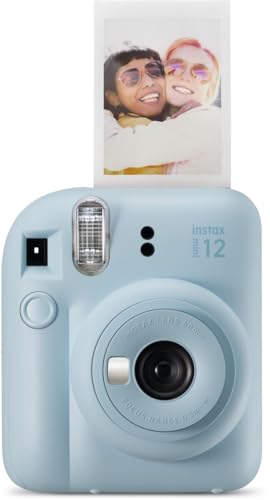
The Mini 12 reduces photography to its oldest and happiest form: point the camera, press the one button, and hold the photograph while it develops in your palm. There is no screen to squint at, no menu to get lost in, no file to find later. The camera meters the light itself, adjusts itself, and even the close-up mode is engaged by twisting the lens — a mechanical gesture a lifetime of cameras has already taught. For a senior who has been defeated by a smartphone’s camera app, handing them this is not a downgrade; it is a homecoming.
The print is the feature that out-argues every specification in this guide. A photograph that exists physically can be given — to the grandchild who posed for it, to the friend at lunch, to the fridge door by tonight. Seniors’ homes are full of albums because their generation understood that a photograph’s destination is a hand or a wall, not a cloud. The Mini 12’s credit-card-sized prints revive that economy at exactly the scale of a wallet, a handbag, a letter sent by actual post.
Watch it at a family gathering and the social physics are unmistakable: the camera passes around the table, everyone poses, everyone laughs at the developing image, and the photographs are distributed like party favours before dessert. No other device in this guide — and no phone at any price — produces that scene, because the scene depends on the photograph being an object. The Mini 12 is the only pick whose output can be stuck to a fridge with a magnet, and it is not a small thing.
Its costs are honest and recurring: film is a per-photograph expense, the prints are small, and there is no zoom for the recital’s distant stage. Buy it as what it is — the gathering camera, the gift camera, the joy camera — and those costs read as the price of admission to a kind of photography the digital world misplaced.
- Operation: one shutter button, automatic exposure
- Close-ups: engaged by twisting the lens ring
- Output: credit-card-sized prints, developed in hand
- Power: ordinary batteries, no charging ritual
- Maintenance: none — no accounts, updates, or storage
Strengths
- The shortest distance from intention to photograph
- Prints that can be given, kept, and posted
- Nothing to configure, ever
Trade-offs
- Film is a continuing per-photo cost
- Prints are small; no distant-stage reach
- No digital copy unless you photograph the print
Best for: gatherings, gifts, and seniors who want photography without a computer. Not suited for: travel archives or photographing distant stages.

Polaroid Go Generation 2 — Best Pocket Instant
The Polaroid Go is the instant camera shrunk to the size of the occasions it serves. It is genuinely tiny — the kind of object that lives in a coat pocket or a small handbag and is therefore present at the café, the market, the grandchild’s school gate — and presence, as every section of this guide insists, is the first virtue of a senior’s camera. The finest camera at home in a drawer photographs nothing; the Go photographs the week.
Its operation keeps faith with the instant covenant: frame through the simple viewfinder, press, receive the photograph. The little mirror beside the lens serves the self-portrait with a grandchild — a genre this audience practises more than any reviewer demographic — and the double-exposure and selfie modes are reachable without a manual’s worth of study. Polaroid’s film renders in the soft, warm register the brand invented, which flatters faces and afternoons alike.
The Go and the Mini 12 above are cousins, and the choice between them is temperament and format rather than quality. The Go’s prints are smaller still, its film its own, its charm more miniature and jewel-like; the Mini’s prints are a touch larger and its film a touch easier to find worldwide. A senior who travels to family in other countries might weigh the film’s availability; a senior whose camera must vanish into a pocket will weigh the Go’s size and forgive the rest.
Charge it, load it, and the obligations end — there is no account, no application clamouring for attention, no storage warning arriving mid-holiday. For the senior whose technology budget of patience is spent, rightly, on people rather than devices, the Go is the camera that spends none of it.
- Size: the smallest instant camera in this guide
- Operation: viewfinder, one press, print in hand
- Selfies: a small mirror beside the lens
- Output: miniature Polaroid prints, warmly rendered
- Power: rechargeable, with no account or app required
Strengths
- Present at occasions because it is pocketable
- Instant covenant kept: no digital chores
- Self-portraits with grandchildren made easy
Trade-offs
- The smallest prints in this guide
- Its film is its own — stock up before travel
- No zoom and no screen to review on
Best for: seniors who carry a camera to life rather than staging life for a camera. Not suited for: large prints or distant subjects.

Sony ZV-1F — Best Easy Digital
Between the instant cameras and the smartphones sits a country many seniors actually want to live in: digital photographs and video, on a memory card, with a real screen — and no telephone attached. The ZV-1F governs that country kindly. Its lens is fixed, so there is nothing to change or choose; its focus and exposure look after themselves; its screen flips to face the user, which makes it the only pick here equally at home filming a message for the family or photographing the garden. It is a camera that has removed decisions the way the instant cameras removed computers.
The video dimension is this pick’s quiet headline. A senior’s camera in this decade is also a presence machine — the birthday message recorded for a grandchild abroad, the reading of a story for a great-grandchild’s tablet, the garden tour filmed for a sister who can no longer visit it. The ZV-1F was designed for exactly that talking-to-camera work: a wide lens that takes in the speaker and the room, focus that holds a face, and a microphone arrangement tuned for a clear voice at arm’s length. No phone in the prose picks is as single-minded about that job.
Daily handling stays within the brief. The body is light, the controls are few, and the files it writes are ordinary photographs and videos that any family member can copy from the card in a minute — no proprietary maze between the senior and a helpful grandchild with a laptop. When support is needed, it is the easy kind: “the card goes in here” rather than a password reset performed over the telephone.
Its ceiling is the fixed lens’s: no zooming into the distant grandchild on stage, and evenings are handled willingly rather than brilliantly. Within the easy-digital brief — photographs and talking video, simply, without a phone — it is the most complete answer our verified pool offers.
- Lens: fixed and wide — nothing to change or choose
- Screen: flips forward for messages and self-recording
- Focus: automatic face care while talking
- Files: ordinary photos and video on a standard card
- Audio: voice-tuned built-in microphones, plus an input
Strengths
- Digital ease without a telephone attached
- Video messages are its home genre
- Supportable by family in one sentence
Trade-offs
- No zoom for distant subjects
- Low light is willing, not brilliant
- Files live on a card until someone copies them
Best for: seniors wanting digital photos and family video without a smartphone. Not suited for: wildlife, stages, or any subject that stays far away.

Canon PowerShot G7 X Mark III — Best for Real Photographs
Some seniors do not want a simpler camera; they want a good one that respects them. The G7 X Mark III is this guide’s answer to the retired engineer, the lifelong photography-club member, the traveller whose albums are the family’s archive. It is a proper camera — a zoom lens that travels from the wide room to the distant detail, a sensor a class above the pocket crowd, Canon’s flattering way with faces — folded into a body that still fits a jacket and still defaults, graciously, to doing everything itself when its owner would rather look at the view than at a menu.
The zoom is the headline for this audience’s actual subjects. Grandchildren are rarely at arm’s length when they are being wonderful; they are across a stage, down a football pitch, up a climbing frame. The G7 X reaches them from the seat the grandparent is actually sitting in, and its image stabilisation forgives the hand that is also holding a programme. Photographs that would have been specks on a fixed lens become the framed print on the hallway wall.
Yet nothing about the daily contract is demanding. It charges like a phone, writes ordinary files to an ordinary card, and its screen tilts for the low garden shot and the high crowd shot alike. The photography-club past is honoured — manual controls exist for the owner who wants them — but they wait politely in the menus rather than standing between the owner and the moment. Competence without obligation: that is the precise flavour of respect this audience asks technology for.
Its costs are the class’s: it is the dearest camera in this guide, its small body packs controls tighter than the instant cameras’ single buttons, and it still asks its owner to manage a card and a battery like any digital camera. For the senior whose photography is a pleasure and a practice, those are fair terms, and this is the pick that treats them as a photographer.
- Lens: zoom from wide rooms to distant grandchildren
- Sensor: a class above the pocket cameras
- Screen: tilts for low and high compositions
- Controls: automatic by default, manual when wanted
- Colour: Canon’s kind rendering of faces
Strengths
- Real photographic reach in a jacket pocket
- Competence that never obstructs the moment
- The traveller’s and club member’s instrument
Trade-offs
- The dearest camera in this guide
- Controls are denser than the instant picks
- Card and battery management, as with any digital
Best for: seniors who are photographers and want a camera that knows it. Not suited for: anyone wanting one button and no decisions at all.
Large-Button Senior Mobile Phone — Best Phone for Calls and Snaps (Prose-Only)
This pick is described rather than linked, because our verified pool holds no telephones — and the description matters more than any single model, because this category is a design philosophy sold by several makers. The senior handset, in its flip or simple bar form, is built around physical buttons you can feel, a speaker that respects older ears, an unhurried menu in large type, and often a dedicated emergency button on the back that calls a chosen contact. Its camera is modest and honest: daylight photographs of family, garden, and documents, taken with one press and reviewed on a small but legible screen.
Choose this phone for the senior whose telephone life is calls, texts from the family, and photographs of occasions — and whose relationship with technology is happiest when the device behaves like the telephones of the last fifty years, only kinder. Battery life is measured in days rather than hours, the charging cradle on the hall table replaces the nightly cable ritual, and there is no app store through which a scam can arrive dressed as a game. For a great many seniors this is not the limited option; it is the correctly sized one.
The family’s homework is light but real: programme the numbers, set the emergency contact, agree the photograph routine — the pictures live on the phone until someone copies them, and a monthly “photo harvest” when family visits keeps the archive safe. Buy the handset from a maker whose support line answers in a human voice, on a simple tariff without a thicket of add-ons, and the total cost of ownership stays as gentle as the interface.
Its limits are the philosophy’s: the camera will not zoom to the stage or glow in the dark, there are no video calls with the grandchildren abroad, and messaging is the family’s group thread only if the thread lives in texts. Seniors whose connection-hunger is bigger than that should take the next pick. Seniors whose hunger it matches exactly will find this the most peaceable technology in the house.
- Controls: physical buttons, findable by touch
- Screen: large type, unhurried menus
- Camera: one-press daylight photographs
- Battery: days between charges, cradle-charged
- Safety: an emergency button for a chosen contact (a calling feature, not a medical device)
Strengths
- Behaves like the telephones of a lifetime, only kinder
- Almost nothing to break, update, or be scammed through
- Peaceable cost and peaceable ownership
Trade-offs
- Camera is for daylight and near subjects
- No video calls or app-based family threads
- Photographs need a family harvest routine
Best for: seniors whose phone life is calls, texts, and everyday photographs. Not suited for: video-call families or photography beyond the everyday.
Big-Screen Mainstream Smartphone, Kindly Configured — Best Phone for Family Connection (Prose-Only)
The second phone pick is the ordinary smartphone — the same platform the family uses — chosen in its larger-screen form and then, crucially, configured by someone who loves the user. The hardware argument is simple: a big, bright screen is the kindest interface an older eye can be offered, the cameras on mainstream phones are superb and utterly automatic, and the video call with grandchildren on another continent is, for many seniors, the single most valuable function any device in this guide can perform. No dedicated camera in these pages can do that trick; honesty requires the phone’s crown to be acknowledged.
The configuration is where this pick is won or lost, so this guide prescribes it like a recipe. Enlarge the type until it is generous, not merely adequate. Strip the home screen to the dozen icons that matter — phone, messages, camera, photos, the family video app, the torch — and banish the rest to a drawer. Turn on the platform’s simplified or easy mode if it has one. Set the photographs to back up automatically to the family-shared album, so the archive problem solves itself. And write the three essential routines on a card that lives by the charger: how to answer, how to call back, how to take and send a photograph.
Support is the ongoing half of the gift. The family member who configures the phone becomes its help desk, and should budget for that role with good humour: a monthly check-in on updates and storage, a standing rule that any message asking for money or passwords is a scam until proven otherwise, and remote-help tools set up before they are needed. A smartphone given without this covenant is a chore disguised as a present; given with it, it is the most connecting object a senior can own.
The camera itself needs one paragraph of respect: in automatic mode, a mainstream phone now out-photographs most dedicated cameras a senior would carry, especially indoors and at night, and it files, backs up, and shares the results without a single cable. The senior who takes this route is not accepting a compromise camera; they are carrying the most capable one in this guide, wrapped inside the most demanding device in this guide. The configuration covenant exists to keep the capability and retire the demand.
- Screen: the largest, brightest the budget allows
- Camera: fully automatic, excellent in ordinary light
- Connection: video calls and shared family albums
- Setup: enlarged type, a dozen-icon home screen, easy mode
- Support: a family covenant — updates, scam rule, photo backup
Strengths
- The most capable camera here, and it makes video calls
- Photographs share themselves once configured
- One device for connection, camera, and daily life
Trade-offs
- Demands a configurator and an ongoing help desk
- Scams and updates are a standing weather system
- Battery is a nightly ritual, not a weekly one
Best for: seniors whose family life runs through video calls and shared albums. Not suited for: anyone who wants a device with no upkeep at all.
Senior Options Compared: The Table
| Pick | Kind | Upkeep | Defining virtue |
|---|---|---|---|
| Fujifilm Instax Mini 12 | Instant camera | Film only | A photograph in the hand |
| Polaroid Go Generation 2 | Instant camera | Film only | Pocketable presence |
| Sony ZV-1F | Easy digital camera | Card and charging | Video messages, no phone |
| Canon PowerShot G7 X Mark III | Zoom camera | Card and charging | Real reach, real photographs |
| Large-button senior phone | Phone (prose-only) | Almost none | Calls and snaps, peaceably |
| Big-screen smartphone | Phone (prose-only) | A family covenant | Connection itself |
The upkeep column is the table’s honest centre. Read it as the question every senior-technology purchase is really asking: who will maintain this, and how often? The rows answer from “nobody, ever” to “a loving relative, monthly” — and neither extreme is wrong, because they serve different households. What is wrong is buying a high-upkeep row while imagining a low-upkeep life; the table exists to prevent exactly that mismatch.
The kind column carries the second lesson: cameras and phones are not rivals here but specialists. The camera rows win every contest about photographs as objects and occasions; the phone rows win every contest about distance abolished. Most families, reading honestly, will find their answer is one row from each half of the table — and the budget that buys both an instant camera and a peaceable phone is often smaller than the flagship smartphone bought alone and configured by nobody.
How Should Family Set Up a Senior’s Device?
Together, at the kitchen table, with the senior’s hands on the device and the relative’s hands in their lap. Setup done to a person teaches helplessness; setup done with a person teaches the three routines that matter and reveals, immediately, which parts of the interface genuinely confuse — knowledge no review can supply. Keep the session short, write the routines on a card in large print, and leave the card where the device charges. The card, not the relative’s memory, is the help desk’s first tier.
Configure for the failure days, not the demonstration day. What happens when the battery dies mid-week, when the film runs out at the gathering, when the phone asks a question in small print about an update? Rehearse each gently, once, while everyone is calm — the remedy is always a button, a spare, or a phone call to family, and a senior who has rehearsed the remedies owns the device in a way a senior who has only seen the successes does not.
Choose the gift’s presentation with the same care as the gift. A camera handed over in its shrink-wrap with a cheerful “you’ll figure it out” is a homework assignment wearing a bow; the same camera, charged, loaded, with the routines card tucked into the box and the first photograph — of the giver, smiling — already taken on it, is an invitation. The first photograph matters more than it should: it proves the device works, it proves the senior is expected to use it on people they love, and it gives the first practice session a subject who will forgive anything. Wrap the invitation, not the assignment.
Agree the photograph pipeline before the first occasion depends on it. Whose job is the card harvest, the album backup, the printing of the favourites for the wall? Technology for seniors fails socially before it fails technically — the photographs stranded on a device nobody empties are the classic casualty — and a named, monthly, almost social routine (“photo harvest Sunday”) keeps the pipeline a pleasure rather than an archaeology project.
What Mistakes Do Families Make Buying for a Senior?
The flagship gift leads the list: the most powerful phone, bought with love, configured by no one, and quietly relegated to a drawer within a season — while the senior returns to the old handset whose buttons their fingers remember. Power was never the brief; kindness of fit was. The second mistake is its mirror: the patronising purchase, so stripped and toy-like that it insults a competent adult. Every pick here was chosen to avoid both ditches — simple where simplicity serves, capable where capability delights.
The third mistake is buying for the family’s convenience disguised as the senior’s: the device whose real purpose is monitoring, checking, and managing at a distance. Connection flows both ways or it curdles; a camera phone given so the family can look in, rather than so the senior can reach out, will be felt as surveillance within a month and resented accordingly. Buy the device that enlarges the senior’s world — their photographs, their calls, their occasions — and the family’s peace of mind will arrive as a by-product, which is the only way it ever honestly arrives.
A fifth mistake, subtler than the rest, is teaching too much on the first day. The giver, eager and fluent, demonstrates twelve features; the senior, polite and overwhelmed, retains the route to none of them. Teach the shutter, the review, and the charger — then leave, and let a week of garden photographs do the teaching that enthusiasm cannot. The second visit can add one more routine. Devices adopted at that pace tend to stay adopted, because each function arrived attached to a success rather than to a lecture.
The fourth is neglecting the accessories of dignity: the case that makes the grip secure, the strap that forgives the drop, the large-print card of routines, the spare film or battery that prevents the dead-device moment at the family occasion. These cost little and decide much, because a device that fails publicly at the birthday teaches its owner to leave it at home — and a device left at home might as well not exist.
How Do Photographs Get From the Device to the Family?
Each pick answers differently, and the answer should be rehearsed before it is needed. The instant cameras answer physically: the print is handed over, posted, or photographed by a relative’s phone for the family thread — a charmingly hybrid pipeline that gatherings operate instinctively. The digital cameras answer by card: a relative copies the files during a visit, or the senior posts the card — no, simpler, the senior keeps a second card and swaps, handing the full one over like a roll of film in the old days, a ritual many will find pleasantly familiar.
Prints deserve a pipeline of their own, because the framed photograph is where this audience’s archive has always lived. Agree which prints get framed, where the albums live, and who is allowed to throw a photograph away — the answer to the last being, in most families, nobody, ever, and the storage boxes in the spare room testify to the policy’s long success. The instant cameras feed this pipeline at the source; the digital ones feed it monthly; both pipelines end at the same hallway wall, which is the real destination of every device in this guide.
The phones answer by air. The senior handset’s photographs travel as picture messages or wait for the harvest visit; the configured smartphone’s travel automatically into the shared album, where grandchildren comment and the family’s archive builds itself. Neither answer is superior in the abstract — the print handed across a table has a warmth no album matches, and the album has a reach no envelope matches — but a household should know which answer it bought, and should build the small routine that makes the answer happen every month rather than at Christmas.
How Do Travel and Days Out Change the Choice?
Travel is where senior cameras earn their keep and where their differences sharpen. The coach tour, the cruise, the family holiday in a rented house — the subjects are distant stages, bright harbours, dim churches, and grandchildren in motion, and the photographer is working from a seat, in a crowd, with no second chances. The G7 X’s zoom and stabilisation were built for precisely those constraints, and its pocket size means it is present for the unscheduled moments — the street musician, the sunset from the promenade — that tours are actually remembered by.
The instant cameras travel differently: as social instruments. A Mini 12 or a Go on a group tour makes friends — prints are given to fellow travellers, to the guide, to the café owner — and the senior becomes the tour’s beloved documentarian rather than another person photographing lunch. Pack film generously, keep a spare pack in the day bag rather than the suitcase, and remember that airport scanners and film are old acquaintances that mostly get along in hand luggage; the senior who flew with film for forty years will need no instruction from this guide on the point.
The phones travel on their own terms: the senior handset’s week-long battery is a genuine travel virtue in a world of nightly charging, while the smartphone’s maps, translation, and video calls home are virtues of another order entirely. The travelling senior’s honest answer is often the phone they already carry plus the camera that serves the trip’s photography — which is why this guide keeps refusing to crown a single winner and keeps insisting on the pairing instead.
What About Photographing Grandchildren, Specifically?
They deserve their own section because they are, candidly, the subject of most photographs this guide’s readers will ever take — and they are difficult subjects: fast, small, unimpressed by photography, and usually either very close or inconveniently far. The close case belongs to the instant cameras and the ZV-1F’s wide lens: the lap, the kitchen table, the story being read. The far case — the stage, the pitch, the pool — belongs to the G7 X’s zoom, operated from the seat with the programme in the other hand.
The middle case is the one families fumble: the birthday, the gathering, the once-a-year assembly of everyone. Here the winning move is delegation and volume — the instant camera passed around the table so the senior appears in the photographs too, the digital camera taking many frames rather than few, and nobody’s afternoon sacrificed to staging the perfect group shot when three candid ones would hold more of the day. A senior’s camera should serve the gathering, never conscript it.
One practical covenant completes the section: the photographs of grandchildren should flow to the family archive by the routine agreed earlier, because those are the files the whole family will want in thirty years. The print on the fridge, the card harvested monthly, the album that backs itself up — whichever pipeline the household chose, the grandchildren’s photographs are the reason to keep it running when the routine feels skippable.
How Long Should a Senior’s Device Last, and What Replaces It?
Longer than the technology industry would prefer, and the picks were chosen with that longevity in view. A dedicated camera has no contract, no operating system ageing it out of its own apps, no battery sealed behind a two-year replacement sermon; the Instax and the G7 X bought this year will take the same photographs in five years, asking only for film, cards, and the occasional battery. That durability is part of their kindness: a senior who has made a device their own should not be forced to relearn its replacement on a manufacturer’s schedule.
Phones age faster and should be bought with their replacement in mind: the senior handset’s simplicity means its successor is identical in spirit, while the smartphone’s successor should be the same platform as the family’s, so the configuration covenant transfers rather than restarting. When replacement day comes, the family’s job is to make the new device behave like the old one — same home screen, same routines card, updated — before handing it over. Continuity is a feature, and it is one the family manufactures.
The end-of-life question has a gentle answer, too: the retired camera becomes the spare, the grandchild’s first camera, the one that lives at the holiday house. Devices that served occasions tend to be kept, and a camera kept in the family is a small archive of its own — its card, if anyone remembers to look, holding the rehearsals for all the photographs that were eventually framed.
How Should a Senior Practise With a New Camera?
Gently, privately, and with the stakes at zero. The first roll of film or the first card should be spent on the garden, the cat, the view from the window — subjects that cannot be disappointed and occasions that cannot be missed — so the hands learn the button, the twist, the screen, before the grandchild’s recital asks them to perform. Families can help by asking for photographs: a picture of the garden for the family thread, a portrait of the dog for a grandchild’s bedroom wall. Being asked is the difference between a device practised with and a device merely owned.
Review together, kindly, once. Sit with the first prints or the first screenful and let the senior narrate what they were reaching for; the gap between intention and result is where the one useful tip lives — step closer, turn toward the window’s light, hold still a breath longer. One tip per sitting, never a curriculum. The photographers this guide imagines have been taking pictures longer than the reviewers have been alive; practice is not instruction, it is reunion — the hands remembering a pleasure, with a new instrument that has finally stopped arguing with them.
Final Recommendation
For the senior who wants photographs without a pocket computer, give the Fujifilm Instax Mini 12 for gatherings and joy, or the Polaroid Go Generation 2 when the camera must live in a pocket. For digital photographs and video messages without a telephone attached, the Sony ZV-1F is the kindest instrument here; for the senior who is a photographer, the Canon PowerShot G7 X Mark III respects that completely.
For the telephone half of the search: choose the large-button senior handset when calls, texts, and everyday snaps are the whole brief, and the big-screen smartphone — configured with enlarged type, a stripped home screen, automatic photo backup, and a family support covenant — when video calls and shared albums are the point. Remember that our pool verifies no phones, so those two picks are guidance, not listings; the cameras are verified and linked. Buy for the senior’s hands and habits, rehearse the routines together, and the device will be used daily — which is the only review that matters.
Frequently Asked Questions
Why are the phone picks not linked like the cameras?
Because our verified camera pool contains cameras only, and we do not attach purchase links to products we cannot verify. The phone sections therefore describe the two categories honestly — what to look for, how to set them up, what they cost in upkeep — so a family can shop for them anywhere with clear criteria.
Is an instant camera a serious suggestion or nostalgia?
Serious, on the evidence of the design brief: no menus, no accounts, no updates, no storage, and a photograph that can be given away in the hand. For gatherings and gifts it outperforms every digital option in this guide on the only metric that matters there — whether the photograph reaches the people it was taken for.
What if the senior’s hands shake or grip is limited?
Favour light bodies, secure straps, and cameras that forgive: image stabilisation in the G7 X, the instant cameras’ generous shutter buttons, and table-top shooting for video messages. Avoid heavy interchangeable-lens systems for this brief. (This is handling advice, not medical advice — for anything health-related, the family’s clinician is the right source, not a camera guide.)
Can a senior manage a smartphone camera at all?
Very many do, superbly — the deciding factor is rarely the senior and usually the setup. Enlarged type, a home screen stripped to the essentials, automatic backup, written routines, and a patient family help desk turn the smartphone from an ordeal into the most connecting device in this guide. Bought without that setup, the same phone is the one most likely to end in a drawer.
How do we get prints from the digital cameras?
The same way as from any camera: copy the files from the card to a computer or phone, then use any photo-printing service or a home printer. Many families make it a monthly ritual — harvest the card, choose the favourites together, print a few for the wall and the album. The instant cameras, of course, skip the question entirely.
What is the best first purchase if the budget allows only one device?
Match it to the senior’s dominant joy. If that joy is occasions and giving, the Instax Mini 12. If it is seeing distant grandchildren’s faces, the configured smartphone — with the setup covenant honoured. If it is photography itself, the G7 X. The wrong answer is the device that serves the family’s convenience while serving none of the senior’s joys.
Related Guides
Continue with the companion reading: best cameras for beginners for the wider easy-camera map, best cameras for family events for the gatherings these cameras live for, and best cameras for video calls for the connection half of the brief in depth.


