kajuandouglas.com is reader-supported. When you buy through links on our site, we may earn an affiliate commission.
Where to Buy Cameras for a Home Server Setup, and an Honest Word About Plex First
The best cameras for plex server households need one clarification before a single model is named, because the phrase hides a small misunderstanding that wastes people’s money. Plex itself does not record security cameras. Plex is a media server: it organises and streams your films, shows and music, and while its ecosystem has brushed against live TV and DVR features for broadcast tuners, it has never been a network video recorder for IP cameras. So the honest reading of this search — and the one this guide is built on — is that you run a self-hosted home server, quite possibly a NAS or a small always-on PC that also happens to run Plex, and you want cameras whose footage lands on that machine under your control instead of in a vendor’s cloud.
That reading changes what “best” means. A camera that only works inside its own app, with footage locked behind a subscription, is a poor citizen in a server household no matter how sharp its lens is. What matters here is local storage, continuous or scheduled recording, open or at least exportable streams, sensible behaviour on a local network, and apps that treat the camera as yours. The pool of cameras we are allowed to link on this site is a consumer pool — webcams and home security models rather than professional ONVIF surveillance gear — and we will say plainly where that limits the dream. Several picks below genuinely record to microSD around the clock and play nicely alongside a NAS workflow. None of them turns Plex into a security DVR, and any guide that promises otherwise is selling you something.
Why bother with the server route at all? Three reasons bring people here. Privacy: footage of your hallway should not need to visit another continent to reach the phone in your pocket. Permanence: cloud plans delete old clips on a rolling window, while a hard drive in your own cupboard keeps what you tell it to keep. And independence: when a vendor sunsets a product line — as the industry keeps doing — a camera with local recording keeps working, while a cloud-only camera becomes e-waste with a lens. If those reasons resonate, you are the reader this guide was written for, and the six picks below were ranked by how respectfully they treat them.
One more piece of housekeeping before the picks. Your server and your cameras will live on the same network, so think of them as one system: a router that can hold a steady local network, cameras placed within honest Wi-Fi range or wired where possible, and storage sized for the retention you actually want. A single camera recording continuously at high resolution can chew through a surprising volume of disk in a month. The picks below were chosen partly for how gracefully they let you tune that appetite — resolution, frame rate, motion-only recording — because in a server household, the settings menu is where the product really lives.
Key Takeaways
- Plex does not record cameras — read this guide as cameras for a self-hosted home server or NAS household.
- Local recording to microSD is the feature that decides everything else in this category.
- The Wyze Cam v4 is the easiest honest start: sharp, cheap to run, and happy recording locally.
- The REOLINK Argus PT Ultra suits detached buildings and yards where wiring is not an option.
- The eufy Indoor Camera E30 and TP-Link Tapo C210 cover indoor rooms with pan-and-tilt reach.
- Keep expectations calibrated: these are consumer cameras beside a server, not a professional NVR rig.
In this guide
Quick Picks
| Camera | Badge | Why it earns a place in a server household |
|---|---|---|
| Wyze Cam v4 | Best overall for local recording | Sharp 2.5K video, microSD continuous recording and an app that does not fight you. |
| eufy 4K Indoor Camera E30 | Best indoor detail | 4K clarity and pan-tilt coverage for the room your server cannot see. |
| TP-Link Tapo C210 | Best value pan-and-tilt | Generous local storage support and smooth tracking at a modest cost of entry. |
| eufy Indoor Cam E220 | Best for smart-home households | Pan-tilt coverage with broad platform friendliness for mixed ecosystems. |
| REOLINK Argus PT Ultra | Best wire-free outbuilding pick | Battery and solar-friendly pan-tilt coverage where cables cannot go. |
| Blink Outdoor 4 | Best set-and-forget yard camera | Very long battery life and a local-storage accessory path via its sync module. |
How Did We Choose These Cameras for a Server-First Home?
Our first filter was a refusal: any camera whose footage exists only inside a subscription cloud was cut, however good its reviews elsewhere. A server household is making a philosophical choice about where its data lives, and the picks had to honour it. Every camera below records locally to a memory card or a local hub, so the footage physically sits in your home before any app gets involved.
Second, we looked at how each camera behaves as a network citizen. Does it hold a stable connection for weeks without a reboot ritual? Does its app let you review footage by timeline rather than only by cloud-style event thumbnails? Can recordings be pulled off the card or hub in ordinary video files a computer can read? These unglamorous questions decide whether a camera integrates into a self-hosted life or merely tolerates it.
Third came the recording model itself. Continuous recording suits a driveway; motion-triggered recording suits a hallway and stretches storage dramatically. We favoured cameras that let you choose, schedule, and tune sensitivity without paying a monthly toll for the privilege, and we noted honestly where a brand nudges you toward its plan for the smarter detection features.
Finally, we weighed the exit test. If the vendor vanished tomorrow, what still works? Cameras that keep recording to their card and streaming to their app on your local network pass. That resilience is the entire point of pairing cameras with your own server rather than renting someone else’s, and it shaped the ranking as much as any resolution figure.
What Should Your Server and Network Setup Actually Look Like?
Start with the boring truth that the server is the easy half. Any modest NAS or small PC that already runs your media library has processing power to spare for storing camera footage, because in most of these setups the camera does the encoding work and the storage simply receives files. The harder half is the network path between camera and cupboard: walls, distance and interference decide whether your 2 a.m. footage is smooth or a slideshow.
Place cameras with the router’s reality in mind. Run a quick test at each intended mounting spot with your phone before drilling anything: if the signal there is weak for a phone held in your hand, it will be weaker for a camera in a corner. Mesh Wi-Fi nodes earn their keep in server households precisely because camera positions are chosen by what they can see, not by where the signal happens to be strong.
Storage maths deserves thirty honest seconds. Continuous high-resolution recording from one camera can fill a modest drive faster than a media library does, because video that never stops never stops growing. Decide your retention window first — a fortnight is a common, sane choice for a home — then size the drive and the memory cards to it, and prefer motion-based recording indoors where hours of empty room help nobody.
Give the cameras their own tidy corner of your network life. A guest network or a separate SSID for household gadgets keeps your server, your laptops and your cameras from tripping over each other, and makes it far easier to reason about what can reach what. It is a small afternoon of setup that pays rent for years, and it is the closest thing this category has to a professional habit worth copying.
Which Recording Style Fits a Self-Hosted Household?
Continuous recording is the purist’s answer and the right one for outward-facing views: the driveway, the gate, the approach to a door. Crime and accidents do not schedule themselves inside motion-detection zones, and the seconds before a trigger fires are often the seconds that explain everything. The cost is storage and review time, which is why continuous recording belongs outdoors and at thresholds, not in the kitchen.
Motion-triggered recording is the pragmatist’s answer indoors. A hallway camera that wakes for movement gives you every arrival and departure with a fraction of the disk usage, and its timeline stays reviewable in minutes rather than hours. The discipline it demands is tuning: sensitivity high enough to catch a person, low enough to ignore the cat, the curtain and the afternoon sun crawling across the floor.
The hybrid most server households settle into is scheduled awareness: continuous at the perimeter during the night hours, motion-based by day, gentler still in private indoor spaces. Every pick below supports some version of that rhythm through its app. Treat the first fortnight as calibration, not failure — walk your own approaches, check what was caught, adjust a zone, and let the system learn your house by your corrections.
And keep a humane rule in view: cameras inside a home record the people you love going about ordinary life. Point them at doors, valuables and vulnerabilities rather than at sofas and beds, tell guests they exist, and let the server in the cupboard serve the household rather than surveil it. The technology in this guide is neutral; the placement is the ethics.

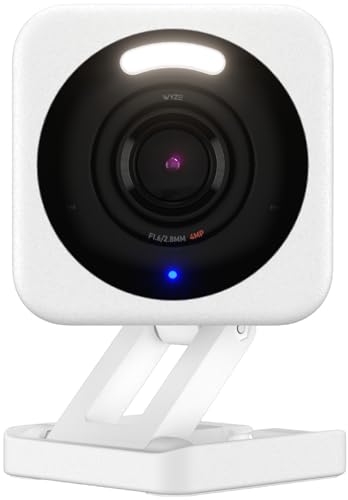
Wyze Cam v4 — Best overall for local recording
If a server-minded friend asked for one camera to start with, the Wyze Cam v4 is the answer that needs the fewest footnotes. It records sharp 2.5K video, runs continuously to a microSD card without demanding a subscription for the privilege, and its colour night vision makes evening footage genuinely usable rather than a grey guess. In a household that already keeps its own storage, a camera this willing to write to a card in your own home is speaking your language from the first day.
The ownership experience is where it quietly wins. The app presents a timeline you can scrub, the settings expose the levers a self-hoster actually wants — resolution, detection zones, schedules — and the camera’s small, weather-resistant body works as happily on a porch bracket as on a bookshelf. Wyze does offer cloud plans and smarter detection tiers, and the app will mention them; the distinction that matters is that the local recording underneath is real, not a demo of the paid tier.
Its limits are the honest limits of its class. It is a Wi-Fi camera, so its manners depend on your network’s strength at its mounting point, and pulling footage in bulk means removing the card or working through the app rather than mounting a network share. Plan retention around card size, and treat the camera as a self-contained recorder that lives beside your server rather than inside it. Understood that way, it is the most cooperative camera in this guide.
Picture the role it settles into: the front approach, recorded around the clock to its own card, reviewed from the sofa in the vendor app, with the server household’s wider archive habits — backups, retention, organisation — applied by you on your schedule. It asks little, complains rarely, and its footage is yours in the most literal sense available at this price of admission. That combination is why it leads the list.
- Recording: continuous or motion-based to microSD
- Video: 2.5K with colour night vision
- Body: compact, weather-resistant for sheltered outdoor use
- Power: wired, so no battery routine
Strengths
- Genuine local recording without a subscription gate.
- Evening footage stays in colour and stays readable.
- Settings depth suits a tinkering, server-minded owner.
Trade-offs
- Footage export is app-or-card, not a network share.
- Wi-Fi only — placement must respect signal strength.
- Smarter detection features live in the optional paid tier.
Best for: the main approach or driveway view in a self-hosted home. Not suited for: anyone wanting footage to appear on the server automatically with no card handling.
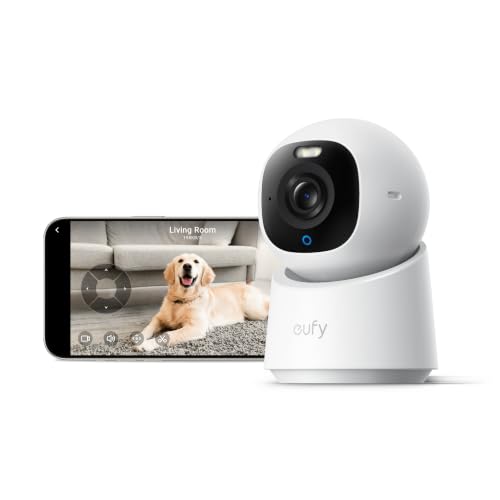
eufy 4K Indoor Camera E30 — Best indoor detail
Indoor cameras in a server household have a specific job: the room where things are kept, the hallway that connects everything, the nursery-adjacent landing you want awareness of without intrusion. The eufy 4K Indoor Camera E30 approaches that job with the sharpest indoor eye in this guide. Its 4K resolution is not a spec-sheet vanity here — when you zoom into a recorded frame to read which box was moved or which face passed the door, those extra pixels are the difference between knowing and guessing.
The pan-and-tilt mount multiplies that eye. One E30 placed in a corner can sweep a whole open-plan floor, track movement across it, and return to a home position watching the door. For a household counting cameras against rooms, that coverage arithmetic matters: fewer devices, fewer cards to manage, fewer holes in the ceiling of your network’s attention. eufy’s ecosystem also leans local by design philosophy, with on-device processing for detection and local storage paths that suit the self-hosted temperament.
The caveats are placement-shaped. It is an indoor camera with a mains lead, so its world is the radius of a power socket, and its 4K appetite fills cards faster than the 2K models here — size your storage with that appetite in mind and consider motion-based recording for quiet rooms. The app is polished, occasionally keen to introduce you to the wider eufy universe, but the core local functions stand on their own without a plan.
Where it earns its keep in practice is the review moment. Something is not where you left it; a parcel shown as delivered is not on the mat; the dog has allegedly been on the sofa. The E30’s footage answers in detail rather than in silhouettes, and its sweep means the answer is rarely just out of frame. In a house that already runs a server because it likes its data close and legible, that legibility is the point.
- Video: 4K with pan-and-tilt coverage
- Detection: on-device processing for people and pets
- Storage: local card recording
- Placement: indoor, mains-powered
Strengths
- The clearest indoor footage in this guide.
- One unit covers a large room honestly.
- Local-first design philosophy fits server households.
Trade-offs
- 4K recording consumes storage quickly.
- Mains lead limits placement to socket range.
- Indoor only — no weather ambitions.
Best for: the main living floor or valuables room where detail matters. Not suited for: outdoor mounting or battery-powered placement.

TP-Link Tapo C210 — Best value pan-and-tilt
The TP-Link Tapo C210 is the camera this guide recommends when the plan calls for several indoor viewpoints and the budget has opinions. It pans and tilts through a wide arc, records to a generously sized local card, and tracks motion across a room with a smoothness that embarrasses models costing noticeably more. TP-Link’s networking pedigree shows in its connection manners: it joins, it stays joined, and it gets on with recording while other gadgets are still negotiating with the router.
For a server household specifically, the C210’s charm is its lack of drama. Setup through the Tapo app is quick, the recording settings are plainly laid out, and the camera does not treat local storage as a grudging concession. Households building toward a multi-room setup — hall, landing, back door interior — can standardise on the C210 and learn one app, one card routine, one set of quirks. Standardisation is an underrated virtue in any system you maintain yourself, and this camera is easy to standardise on.
Its resolution sits a step below the sharpest picks here, and in a wide room that step shows when you zoom hard into a frame. Night footage is competent monochrome infrared work rather than colour, so evening identification leans on shape and movement. And like most of its class, its stream lives in its own app rather than presenting itself as an open feed for third-party recorder software — the recurring honest limitation of this whole consumer pool.
None of that dents its role. Think of the C210 as the infantry of a home setup: affordable enough to place where you need eyes, capable enough that its footage settles arguments, and simple enough that a household’s second and third cameras stop feeling like projects. Server households grow by accretion, and this is the camera that makes accretion painless.
- Coverage: pan-and-tilt with motion tracking
- Storage: local card, generously sized support
- Video: clear HD with infrared night vision
- App: Tapo, with plain recording controls
Strengths
- Excellent coverage per unit of money spent.
- Stable networking behaviour from a networking brand.
- Easy to deploy in multiples under one app.
Trade-offs
- A step behind the leaders for fine detail.
- Night footage is infrared monochrome.
- App-centred viewing rather than open recorder feeds.
Best for: multi-room indoor coverage on a sane budget. Not suited for: the single most detail-critical viewpoint in the house.

eufy Indoor Cam E220 — Best for smart-home households
Some server households are also smart-home households, and the two hobbies share a cupboard and a philosophy: things should work together, locally, without begging distant servers for permission. The eufy Indoor Cam E220 is the pick for that overlap. It pans and tilts to cover a room, records in crisp 2K to local storage, and — the trait that earns its badge — plays unusually well with the wider smart-home world, including voice-assistant ecosystems that many rival cameras treat as an afterthought.
That friendliness changes daily life more than any resolution figure. The camera can be glanced at from the same screen that shows your lights and locks, called up by voice while your hands are full of shopping, and folded into the routines a smart home already runs. For the self-hoster, whose server exists partly to make the house feel like one system rather than a drawer of apps, a camera that joins the system gracefully is worth real money in patience saved.
The E220’s recording story matches the household philosophy: local card storage with on-device detection for people and pets, and no requirement to rent cloud space to make the camera feel complete. Its night vision is infrared and honest. Where it concedes ground to its newer sibling, the E30 above, is raw resolution — 2K against 4K — and in a small or medium room you will rarely feel the difference outside of aggressive digital zoom.
Deploy it where integration matters most: the entrance hall whose camera should appear in the household’s main dashboard, the family room covered by routines, the study where a pan-tilt sweep reassures you while travelling. It is the diplomat of this list — not the sharpest eye, but the one every other system in the house gets along with, and diplomacy is a feature when you are the one maintaining the peace.
- Video: 2K with pan-and-tilt room coverage
- Integration: broad smart-home platform support
- Detection: on-device people and pet awareness
- Storage: local card recording
Strengths
- Best ecosystem manners in this guide.
- Local recording and detection without a plan.
- Pan-tilt coverage from a compact indoor body.
Trade-offs
- 2K detail trails the 4K pick when zooming.
- Mains-powered and indoor-only.
- Some advanced features sit inside eufy’s app world.
Best for: smart-home households wanting the camera inside their main system. Not suited for: maximum-resolution evidence gathering.

REOLINK Argus PT Ultra — Best wire-free outbuilding pick
Every server household eventually faces the building the network forgot: the garage across the yard, the workshop at the fence line, the gate that no cable will ever reach. The REOLINK Argus PT Ultra exists for that geography. It is a battery-powered pan-and-tilt camera with 4K video, designed to sip power, wake for events, and — paired with a small solar panel — live outdoors indefinitely without a cable of any kind. Reolink’s background is dedicated camera-making rather than general gadgets, and the focus shows in the hardware’s weather sealing and mounting sense.
Its recording model suits its power budget: event-based clips to a local card, with person and vehicle detection doing the triage so the battery is spent on moments that matter. For a server household this is the perimeter scout rather than the archive keeper — it will not record continuously, because no battery camera honestly can, but it watches the places your wired cameras cannot see and reports back with sharp, colour-capable footage.
Set expectations with its physics in mind. Battery life depends on how busy its view is; a camera watching a lively street will snack where one watching a quiet gate fasts. Solar pairing turns maintenance from a ladder chore into a rarity in most climates, but midwinter at northern latitudes still tests any panel. And its footage lives on its card and in Reolink’s app — retrieving it is a deliberate act, which suits an outbuilding sentinel’s role.
Within those truths, it solves a problem nothing else in this guide touches. The wired picks assume power and proximity; the Argus PT Ultra assumes neither and still delivers a panning 4K eye at the far end of the property. For the server household whose map includes a detached garage, a stable, a boat shed or a long drive, it is not a compromise pick — it is the only shape of answer that fits the question.
- Video: 4K pan-and-tilt, colour night capability
- Power: rechargeable battery, solar-panel friendly
- Recording: event clips to local card
- Detection: people and vehicle awareness
Strengths
- True wire-free placement anywhere in Wi-Fi reach.
- Sharp 4K footage from a battery camera.
- Solar pairing nearly ends battery maintenance.
Trade-offs
- Event recording only — no continuous archive.
- Busy views shorten the gap between charges.
- Footage retrieval is manual, via card or app.
Best for: garages, gates, workshops and yards beyond cable range. Not suited for: continuous recording of a busy main approach.

Blink Outdoor 4 — Best set-and-forget yard camera
The Blink Outdoor 4 plays a longer game than any other camera here. Its party trick is endurance: battery life measured in seasons rather than weeks, from a compact weather-resistant body that you mount, aim, and then largely forget exists. For the server household, that forgettability has a systems value — every camera that does not need feeding is a camera your maintenance routine can carry for years without resentment.
Blink’s local story runs through its sync module accessory, which can hold footage on local USB storage for the cameras paired to it. It is a hub pattern a self-hoster will recognise instinctively: devices in the field, storage in the cupboard. The arrangement is less flexible than a true NAS workflow and Blink would still love you to join its cloud plan, but the local path is real, documented, and enough for households whose priority is a watched yard rather than an archived one.
Honesty about its footage: the video is clear HD rather than the sharpest here, its field of view is fixed where you aim it, and its personality is event-driven — it notices, records a clip, and goes back to sleep. A server purist wanting continuous perimeter recording should look at the Wyze at the top of this list for the main approach and treat the Blink as the wide-net layer: side gate, garden, bins, the approach nobody uses except the person who should not be there.
That layered role is genuinely how resilient home setups get built. One tireless camera at the important door, recorded properly; a scatter of patient cameras at the secondary places, noticed only when they matter. The Outdoor 4 is the best patient camera in this pool, and in a household already disciplined enough to run its own server, patience is a specification you already understand the value of.
- Power: very long battery life from AA lithium cells
- Storage: local option via sync module and USB
- Video: HD with infrared night vision
- Body: compact and weather-resistant
Strengths
- Months of unattended operation per battery set.
- Local storage path through its hub accessory.
- Cheap to scatter across secondary viewpoints.
Trade-offs
- Event clips only; no continuous recording.
- Footage detail trails the 2.5K and 4K picks.
- Full smart features lean toward the paid plan.
Best for: side gates, gardens and second approaches you want watched quietly. Not suited for: the main door’s continuous evidence record.
How Do You Troubleshoot the Three Failures Everyone Meets?
The offline camera at the worst moment tops the list, and its cause is almost never the camera: it is the router’s channel crowded by a neighbour’s new network, the mesh node unplugged by a cleaner’s vacuum, the camera placed one wall beyond its honest range. The fix is diagnostic order — check the network map before the camera, test the live view standing beside the router, then at the mount — because a camera blamed for a network’s sins gets replaced by another camera that inherits them.
The mysteriously short recording history is the second classic. The card is smaller than the retention imagined, the resolution was raised in a moment of enthusiasm, or motion recording was quietly switched to continuous by a helpful relative. Every cause lives in the settings screen, which is why this guide keeps returning to the monthly five-minute check: scroll the timeline, read the earliest hour it holds, and compare it with the window you believe you chose. The gap between those two numbers is the whole troubleshooting session.
The third failure is the app that will not show what the camera plainly recorded — a login expired, a household member’s phone on the wrong account, a firmware update waiting for permission. The remedy is administrative rather than technical: one household account, shared deliberately with the people who should see the cameras, its password in the same manager that guards the server’s own credentials. Self-hosted households are good at credential discipline; the cameras simply join the congregation.
Notice what is absent from the failure list: the cameras themselves, dying. Modern name-brand cameras in this class fail rarely and usually loudly, with a dead live view that announces itself at the monthly check. The system’s soft parts are network, storage and accounts — the same soft parts as the media server beside them — and a household fluent in one is fluent in the other. That fluency, in the end, is why this pairing of hobbies works.
What Does a Worked Example Look Like? One House, Built in Stages
Consider a household much like the reader’s: a two-storey home, a media server in the hall cupboard, a driveway in front, a garage the car shares with a workbench and two good bicycles. Stage one, in spring, is a single Wyze Cam v4 above the porch at face height, recording continuously to its card. Within a month the household has learned its own rhythms from the footage — the hours the street is quiet, the neighbour’s cat’s patrol route, the exact dusk when the porch light starts earning its electricity — and has stopped imagining threats the footage does not support.
Stage two answers the month’s actual anxieties rather than hypothetical ones. The garage, it turns out, is the room the household thinks about when travelling, so the Tapo C210 takes its interior corner, sweeping from the door to the workbench. The back garden’s gate, used by nobody legitimate after dark, gets the Blink Outdoor 4 and its patient batteries. Nothing indoors is added, because the footage never asked for it — a sentence worth rereading, because it is where most home systems go wrong and buy their way into unease.
Stage three, in autumn, is about the room where the valuables and the server itself live. The eufy E30 takes the study’s corner, its 4K eye on the door and the desk, its detail sufficient to read which drive enclosure was lifted if the worst ever happens. The E220 joins the household’s smart-home dashboard in the entrance hall, less a security device than the house’s own receptionist — a glance for the returning family, a check on the dog’s afternoon, a presence in the app they already open for the lights.
The Reolink arrives last and goes farthest: the workshop shed at the garden’s end, beyond every cable’s patience, solar-fed and panning over the fence line. With it, the map is complete — not because every room is watched, but because every threshold the household cares about has exactly one honest eye, and the living rooms remain gloriously unrecorded. Total apps: three. Total subscriptions: none. Total footage stored outside the house: zero. That is the worked example’s whole thesis, and it is achievable with the six picks in this guide in any order your own first month’s footage dictates.
Which Rooms Deserve a Camera, and Which Deserve Privacy?
The server household’s map of cameras should be drawn by valuables and vulnerabilities, not by the novelty of watching. The entrance layer earns its cameras first: front approach, back door, the side passage nobody uses. These are the thresholds where strangers announce themselves, and a camera at each is security in the plain sense. The garage and the outbuildings follow, because they hold the household’s concentrated portable wealth — tools, bikes, the server rack’s own cousins — and because they are the rooms nobody hears being entered.
Inside the living space, restraint becomes the design principle. A camera in the main hallway watches comings and goings at the doors, which is information a household legitimately wants. A camera in the lounge watches life, which is information nobody needs recorded, and its presence changes how the room feels to the people who live in it — including you, on your own sofa, in your own home. The picks in this guide include graceful indoor options precisely so the hallway and the valuables room can be covered without turning the family’s soft rooms into sets.
Children’s spaces deserve the most careful thought of all. A nursery camera for a sleeping baby is a parenting tool with a clear, temporary purpose; the same camera in an older child’s room is a different object entirely, and households should retire or re-aim cameras as children grow, the way they retire stair gates. Guests, too, are stakeholders: a camera in a guest room or bathroom is never acceptable, and a line in the house’s ordinary conversation — “there are cameras at the doors” — keeps hospitality honest.
The test that resolves most placement arguments is the visitor test: if a thoughtful friend, told where the cameras are and why, would nod rather than flinch, the map is well drawn. Server households are good at systems; the wisdom is remembering that this system records a home, and a home’s trust is worth more than any single camera’s view. Draw the map generously at the thresholds and sparingly at the hearth, and the setup will serve the family instead of auditing it.
How Much Should a Server Household Spend, and in What Order?
The economics of this category reward sequencing more than splurging. The first purchase should be the main approach camera — the Wyze at the top of this guide — because a single well-placed continuous recorder delivers the majority of the system’s lifetime value. Live with it for a month. Its footage will teach you your own household’s patterns: which door the family actually uses, where the light fails at night, how much retention you truly review. Every later purchase gets smarter from that month’s evidence.
The second tranche belongs to infrastructure nobody photographs for social media: the mesh node that strengthens the far camera’s signal, the larger memory cards that make retention a choice rather than an accident, the small UPS that keeps the router and server alive through a power cut’s first hour — which is, not coincidentally, an hour when cameras earn their keep. Households that run servers understand this ordering instinctively: platform before features, always.
Only then do the additional viewpoints earn their budget, in the order the first month’s footage argues for them: the indoor detail camera for the room that worried you, the pan-tilt for the floor that needed two fixed cameras’ worth of coverage, the wire-free eye for the building the cables never reached. Bought in that evidence order, each camera answers a question you actually asked, and the fleet stays coherent — two apps at most, one card routine, a map you can draw from memory.
The total, honestly reckoned, stays modest against the server hobby’s other line items — less than a drive array, spread across a year of deliberate additions. What the money buys is not surveillance glamour. It buys the quiet knowledge that the house watches its own thresholds, keeps its own footage, and answers to nobody’s subscription department. For the household that built a server to own its media, that is simply the same idea, finished.
How Do You Keep a Camera Setup Healthy Month After Month?
A server household already knows the rhythm of maintenance — updates, backups, the occasional drive that announces its retirement — and cameras join that rhythm gracefully if you invite them. The monthly five minutes: open each camera’s live view, confirm the timestamp is honest, and glance at the recorded timeline for gaps. A gap is a message — a card filling silently, a Wi-Fi dropout pattern at the same hour each day, a camera that rebooted and came back facing the wall after a knock. Caught monthly, each is a five-minute fix; caught after an incident, each is a story about the footage that should exist.
Memory cards are consumables and deserve to be budgeted as such. Continuous recording writes relentlessly, and a card that has served a year of it has earned replacement before it fails rather than after. Buy cards rated for endurance or surveillance duty where the pick supports them, rotate the oldest out at the New Year whether it complains or not, and keep one spare in the drawer — the household that runs a media server understands spares instinctively, and cameras are simply smaller servers with lenses.
Firmware is the other quiet discipline. Vendors patch security flaws in these devices as they do in routers, and a camera fleet left on ancient firmware is the softest door in a network that otherwise takes itself seriously. Enable automatic updates where offered, or tie a quarterly check to the same calendar reminder as your server’s own maintenance. The cameras in this guide all maintain their firmware actively, which is part of what a name-brand pool buys a self-hoster.
Finally, document the system the way you documented the server build. A note — physical or digital — listing each camera, its card size, its install date and its retention setting turns a future troubleshooting session from archaeology into reading. When you add the third camera in a year’s time, that note is the difference between a coherent system and a drawer of unrelated gadgets that happen to blink.
Can You Watch These Cameras Alongside Your Media Setup?
The living-room question deserves a straight answer, because it is the one that sends people down this search path in the first place: you want the doorstep on the big screen the way your films are. The honest position is that these consumer cameras live in their own apps, on phones and tablets, and they do not feed a media server’s library as if they were another folder of films. Anyone picturing camera tiles inside their media interface should retire that picture before spending money on it.
What is achievable is still pleasant. Most of these ecosystems cast or mirror to a television through the usual phone and streaming-box routes, several appear on smart displays for a voice-summoned glance, and a tablet retired to the kitchen counter makes a superb always-on doorstep monitor that guests assume is a much grander system. The server household’s real win is not integration theatre — it is that the footage exists locally, on a schedule you set, whether or not any screen is watching.
There is also a division of labour worth respecting. Your media server is brilliant at the past: the library, the archive, the things kept. Cameras are creatures of the present and the recent — live views, last night’s events, the clip from Tuesday. Set the retention honestly to that role, a fortnight or a month of rolling record, and the two systems stop competing for the same disks and the same expectations. The household runs calmer when each machine does the job its design intended.
If true recorder integration is the dream that survives this honesty — one timeline, many cameras, server-side recording — then the correct purchase is a dedicated recorder ecosystem, and the correct reading of this guide is as the layer around it: the wire-free outbuilding eye, the smart-home room camera, the patient battery sentinel. Consumer cameras and a media server make excellent neighbours. This guide has simply insisted they be introduced truthfully.
How Do the Six Compare Side by Side?
| Camera | Recording style | Power | Best post in the house |
|---|---|---|---|
| Wyze Cam v4 | Continuous or motion, local card | Wired | Main approach |
| eufy 4K Indoor Camera E30 | Local card, pan-tilt sweep | Wired | Main indoor room |
| TP-Link Tapo C210 | Local card, motion tracking | Wired | Hallways and landings |
| eufy Indoor Cam E220 | Local card, pan-tilt | Wired | Smart-home dashboard room |
| REOLINK Argus PT Ultra | Event clips, local card | Battery / solar | Outbuildings and gates |
| Blink Outdoor 4 | Event clips, hub storage | Long-life battery | Secondary yard views |
What Mistakes Do Server Households Make With Cameras?
The classic mistake is buying cloud-first cameras and discovering the philosophy mismatch after the return window closes. The box promises easy everything; the reality is footage that lives elsewhere, expires on a schedule, and stops entirely if a subscription lapses or a product line is retired. Households that run their own media server have already voted on where their data should live — the camera purchase should match the vote.
A second mistake is architectural: expecting consumer cameras to behave like professional surveillance gear. The picks here are app-centred devices with local storage, not open-standard recorders that stream to any software you point at them. Wanting them to be the latter leads to forum expeditions and fragile workarounds. Accept the shape of the product — excellent local recording inside a tidy app — and the ownership experience is calm. Fight the shape and no camera in this class will ever satisfy you.
The third mistake is neglecting the unglamorous layer: weak Wi-Fi at the mounting point, undersized memory cards, no retention plan, passwords left at defaults. A server household understands maintenance in every other context; cameras deserve the same discipline. Strong unique passwords, firmware left on automatic update, cards sized to your retention window, and a quarterly five-minute check that each camera is still recording will prevent nearly every horror story this category produces.
Final Recommendation
Build the system in layers and in the order this guide ranks them. Start with the Wyze Cam v4 at your main approach, recording continuously to its own card — that single purchase delivers most of what people imagine when they search for cameras to pair with a home server. Add the eufy E30 indoors where detail matters, the Tapo C210 where rooms multiply, and the E220 where the smart home needs a citizen rather than a guest. Send the Reolink to the buildings your cables cannot reach, and let Blink’s patient batteries watch the quiet corners.
Keep the founding honesty in view as you buy: Plex will keep serving your films, your server will keep holding your library, and these cameras will keep their footage on cards and hubs inside your own walls. That is not the fully integrated surveillance dream some listings imply — it is something better suited to real homes: local, legible, and yours. Buy the layer you need first, live with it for a month, and let your own footage tell you where the next eye belongs.
Frequently Asked Questions
Can Plex itself record these cameras?
No. Plex organises and streams media; it is not a camera recorder. In these setups the cameras record to their own cards or a local hub, and the server household’s role is philosophy and infrastructure — your network, your storage discipline, your retention rules — rather than Plex ingesting video feeds.
Do any of these cameras need a subscription to record?
Every pick here records locally without one. The brands offer optional plans that add cloud backup or smarter detection, and their apps will advertise them, but the local recording described in this guide keeps working if you never subscribe to anything.
How much storage does continuous recording use?
It varies with resolution and scene activity, but plan generously: a continuously recording high-resolution camera can fill a mid-sized memory card in days rather than weeks. Decide your retention window first, then choose card sizes — and the server’s spare drive for archived clips — to match it.
Will these cameras work if the internet goes down?
Local recording generally continues during an outage, because the card is in the camera; what you lose temporarily is remote viewing through the app. That resilience is one of the quiet arguments for the local-first approach this guide is built on.
Can I view all the cameras in one place?
Within each brand’s app, yes; across brands, each ecosystem keeps its own window. Households that standardise on one or two brands — a practical reason the Tapo and eufy picks pair well — keep the daily checking experience simple.
What is the first upgrade after the cameras themselves?
Network, almost always. A mesh node near the farthest camera improves every feed at once, and it is the rare upgrade that makes existing hardware feel new. After that, larger memory cards buy retention more cheaply than any other purchase in this category.
Should the cameras share Wi-Fi with the rest of the house?
They can, but a separate network or SSID for household gadgets is tidier and safer: it keeps camera traffic away from your main machines, simplifies passwords when a device is replaced, and makes the fleet easier to reason about. Server households, of all households, will find the half hour of setup familiar and worthwhile.
What happens to recordings when a memory card fills?
These cameras typically overwrite the oldest footage and keep rolling, which is why retention is a setting to choose rather than a surprise to discover. Size the card to your chosen window — and pull any clip that matters to the server’s storage before the window rolls past it.
Related Guides
Keep building the self-hosted household with our guides to the best cameras for home security without a subscription, setting up a home NAS for family media and backups, and the best outdoor cameras for yards and driveways.


