kajuandouglas.com is reader-supported. When you buy through links on our site, we may earn an affiliate commission.
Where to Buy Apartment Cameras, and Why Renting Changes Every Rule
Finding the best cameras for my apartment sounds like a smaller version of shopping for a house, and it is not. Apartment living rewrites the brief in three ways at once: you usually cannot drill into walls you do not own, your floor plan compresses every viewing angle into a handful of multipurpose rooms, and your front door opens onto a shared hallway where other people’s privacy begins a few feet from your peephole. The six cameras below were chosen against that exact brief — renters first, homeowners in small flats a close second.
Start the buying conversation with placement freedom rather than image quality. Nearly every modern indoor camera shoots video sharp enough to identify a face across a living room, so the deciding questions are duller and more practical. Can it sit on a shelf without a bracket? Does its cable reach an outlet without crossing a walkway? Will it still make sense when you move in fourteen months and the next flat has a different shape entirely? A camera that answers those questions well will serve you across three leases; a technically superior camera that needs screws and a ladder often ends its life in a drawer.
Renters also carry a paperwork burden homeowners skip. Many leases restrict alterations to the unit, and a camera pointed through a window at a shared courtyard can draw complaints even when it breaks no rule. The picks here favour tabletop designs, adhesive-friendly bases and indoor-only duty, and the guide sections below walk through the etiquette and the settings that keep a camera useful to you without making it a problem for the people living around you.
There is also the matter of who else holds a key. Cleaners, dog walkers, the landlord’s contractor, a flatmate’s partner — rented homes have a busier cast of legitimate visitors than owned ones, and a camera’s real daily work is often simply witnessing that the right people came and went at the right times. That witnessing function asks little of a sensor and much of an alert system, which is why this guide keeps returning to notification quality rather than pixel counts.
One more apartment reality shapes the list: your rooms multitask. The living room is also the office, the guest room and the package-receiving zone, and a single well-placed camera with a wide field of view and honest motion alerts often outperforms two narrow cameras fighting over the same space. Read the picks as coverage strategies for small footprints, not as a spec-sheet contest.
Key Takeaways
- Shelf-sitting, drill-free designs matter more in a rental than any resolution figure on the box.
- The Wyze Cam v4 and Blink Mini 2 cover a studio or one-bedroom flat for the cost of a takeaway dinner each.
- Pan-and-tilt models like the eufy E220 and Tapo C210 let one camera sweep a whole open-plan room.
- The Google Nest Cam is the pick when alerts need to tell a person from a pet from a parcel.
- Point cameras at your own doorway and living space, never into shared hallways or a neighbour’s windows.
- Local storage keeps footage working when the building Wi-Fi has one of its evenings.
In this guide
Quick Picks
| Camera | Badge | Why it suits apartment life |
|---|---|---|
| Wyze Cam v4 | Best all-round apartment camera | Sharp 2.5K video, colour night vision and local recording in a cube that sits anywhere without tools. |
| Blink Mini 2 | Best budget starter | A tiny plug-in camera with an LED spotlight that covers a first flat’s essentials for very little money. |
| Ring Indoor Cam (2nd Gen) | Best for Ring households | A physical privacy cover, tidy app and easy pairing with a Ring doorbell watching the building entrance. |
| eufy Indoor Cam E220 | Best pan-and-tilt coverage | Rotates to follow motion across an open-plan room and records locally without a required subscription. |
| TP-Link Tapo C210 | Best value pan-and-tilt | 3K resolution, smooth tracking and generous local storage at a price that suits a deposit-conscious budget. |
| Google Nest Cam Indoor (Wired, 3rd Gen) | Best smart alerts | Google intelligence separates people, pets and vehicles, and it blends into a Google Home flat seamlessly. |
How Did We Choose the Best Cameras for an Apartment?
Every candidate was scored first on tenancy: no drilling, no hardwiring, no permanent trace when you leave. Models that demanded a mounted bracket as their only option fell away early, however good their sensors were. What remained were cameras designed to live on bookshelves, kitchen counters and the top of a wardrobe, powered by ordinary USB cables from ordinary sockets.
Coverage per camera came next, because apartment budgets rarely stretch to one device per room. Wide fields of view scored well, pan-and-tilt mechanisms scored better, and we paid attention to how honestly each camera handles the geometry of small rooms — close walls, steep downward angles, a sofa three feet from the lens rather than thirty.
Alert quality was judged on a bad week, not a good demo. A camera in a flat hears the neighbours, sees the hallway light bleed under the door and watches curtains move in radiator heat, so we weighted person detection, adjustable sensitivity and activity zones heavily. Cameras that cried wolf hourly were marked down no matter how crisp their footage looked.
Finally we considered the exit costs: subscription dependence, cloud-only recording and proprietary ecosystems. Renters move, budgets wobble, and a camera that turns into a paperweight when a plan lapses is a poor recommendation for anyone whose housing costs already eat the month.
We also lived with the shortlist the way a tenant would, which surfaced criteria no datasheet mentions. How loud is the camera’s click when it switches to night mode at 2 a.m. in a studio where the bed is four steps away? Does the status light have a true off setting, or does it blink at guests like a tiny accusation? Can a flatmate without the app mute the thing during a party, or does every adjustment route through the owner’s phone? These small frictions, multiplied by every evening of a tenancy, decide whether a camera stays plugged in — and an unplugged camera has a detection rate of exactly zero, whatever its sensor can do.
The scoring therefore weighted staying power alongside sharpness. Models that annoyed us in week one were marked down even when their footage impressed us, because the history of home security is littered with excellent cameras retired to drawers by households that simply got tired of them. The six survivors are the ones we would still be using, without resentment, at the end of a two-year lease.
What Should You Check Before Putting a Camera in a Rented Flat?
Read your lease before you read any camera manual. Most tenancy agreements ban alterations rather than cameras themselves, and a freestanding camera on your own furniture is rarely an alteration — but adhesive mounts on painted walls, screws into a door frame or a camera fixed in a shared corridor can each cross the line. When in doubt, a short polite message to the landlord, answered in writing, is worth more than any legal guesswork.
Shared spaces deserve special care. Your camera’s job begins at your own front door, viewed from inside. Filming a communal hallway, a shared laundry room or the courtyard your neighbours cross daily collects other people’s lives as a by-product, and several jurisdictions treat that very differently from filming your own rooms. Keep the lens inside your four walls and the microphone’s limits in mind too, since audio recording rules are stricter than video rules in many places.
Power and Wi-Fi decide the practical rest. Walk the flat with the camera’s cable length in mind, because the perfect corner is useless if the nearest socket sits behind the sofa on the opposite wall. Check your router’s reach as well; thick masonry between the router and a back bedroom defeats cameras that perform beautifully in the shop. A quick phone speed test at the intended shelf spots trouble before the box is opened.
Which Features Actually Matter in a Small Space?
Field of view is the headline feature for flats, and wider is genuinely better here. In a room twelve feet across, a narrow lens shows you a portrait of one armchair; a wide lens shows the door, the window and the desk in a single frame. Diagonal figures above 120 degrees begin to feel like whole-room coverage, though edges stretch and faces near the frame’s sides distort — acceptable for awareness, less ideal for identification.
Night vision splits into two philosophies. Infrared keeps the room dark and renders the scene in grey, which suits bedrooms and light sleepers. A small spotlight gives colour footage and doubles as a mild deterrent, which suits entryways. Several picks below offer one or the other; match the choice to the room rather than chasing whichever sounds newer.
Two-way talk earns its keep in flats more than in houses. It lets you answer the door from the office, calm a dog from the train, or tell a delivery driver which neighbour’s mat is safe — all through a speaker the size of a thumbnail. Audio quality varies wildly between models, so the detailed reviews note where voices stay intelligible and where they turn to soup.
Storage is the quiet budget line. Cloud plans are convenient and keep footage safe if the camera itself is stolen, but they bill monthly forever. A microSD card records locally for a one-off cost and keeps working through internet outages, at the risk of leaving with a thief. Many apartment users sensibly run both: card for everything, cloud only during a holiday absence.

Wyze Cam v4 — Best all-round apartment camera
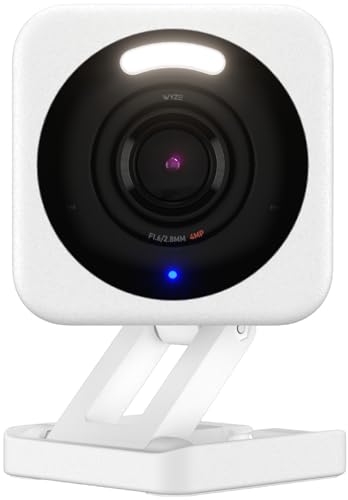
The Wyze Cam v4 is the camera we would hand a friend moving into their first rental, because it refuses to make any part of the process difficult. The little cube sits flat on any shelf, its base folds into a stand or a wall plate if a landlord ever grants permission, and setup runs through the app in minutes. What comes out of that simplicity is startlingly capable: 2.5K video with colour night vision that keeps a dim living room readable in something close to true colour, plus a built-in spotlight and siren for the doorway role.
Apartment life specifically flatters this camera’s design. Its wide view swallows a studio’s sleeping corner and kitchenette in one frame, and the magnetic base sticks to a fridge door or a metal shelving unit — two of the few mounting surfaces a renter can use without leaving a mark. Motion and sound detection are adjustable enough to ignore a radiator’s ticking, and person alerts arrive quickly when the optional plan is active, while the microSD slot means the camera never fully depends on that plan.
Picture quality in daylight is crisp enough to read a parcel label across the room, and the colour night mode holds up better than infrared rivals when the only light is a streetlamp through blinds. The speaker is serviceable rather than lovely; your voice arrives understandable, if slightly flattened. Wyze’s app carries more menus than it needs, and finding a specific setting can take a tap or three longer than it should.
Day-to-day ownership in a rented flat is where this camera quietly wins its badge. The detection zone tools let you mask out the window where buses pass and the hallway door that swings in frame, and once tuned, the alert stream settles into the rhythm a renter actually wants: a person at the door, a sound worth checking, silence otherwise. During a two-week holiday the microSD card simply keeps rolling, overwriting the oldest hours, and the footage is there when you return regardless of what the building’s internet did in your absence. It also behaves politely on shared networks, streaming at modest bitrates that will not strangle a flatmate’s video call. Taken together — the price, the local recording, the magnetic mounting, the colour night picture — the v4 is less a single clever feature than a complete absence of rental-hostile ones, and that is exactly what this category rewards.
- Form: compact cube, freestanding or magnetic mount
- Video: 2.5K with colour night vision and spotlight
- Storage: microSD local recording plus optional cloud plan
- Extras: built-in siren, two-way talk, Alexa and Google support
Strengths
- Colour night footage that keeps a dark flat genuinely informative.
- Magnetic base exploits fridge doors and metal shelves — renter gold.
- Local recording keeps it useful with no subscription at all.
Trade-offs
- The app buries some settings deeper than a beginner will enjoy.
- Person detection at its smartest sits behind the paid plan.
- The speaker flattens voices at the far end of a room.
Best for: renters wanting one capable camera that asks nothing of the walls. Not suited for: anyone who wants every smart feature free forever.

Blink Mini 2 — Best budget starter
Small budgets and first flats are natural partners, and the Blink Mini 2 is built precisely for that meeting point. It is a plug-in camera the size of an ice cube with a wide view, an LED spotlight for colour night footage and a weather-resistant rating that quietly expands its options — a balcony door or a covered parking spot falls within its abilities where most indoor rivals would be out of their depth.
Within an apartment, its charms are practical ones. The adjustable stand tilts on a kitchen counter to watch the front door, the cable is long enough to forgive awkward socket placement, and the Blink app keeps the experience deliberately simple: live view, motion clips, arm and disarm. Renters sharing with flatmates will appreciate how painless it is to schedule the camera off during the hours everyone is home, because a security camera that records your own household’s every move becomes a source of friction fast.
For a student flat or a first solo rental, that honesty is a virtue. The Mini 2 asks for almost nothing: one socket, one shelf, a few minutes in the app. It then covers the questions a new renter actually lies awake about — did I lock up, is the cat fine, did the parcel arrive — without pretending to be a forensic instrument. Households that later grow into the Blink doorbell or outdoor cameras will find the Mini 2 slots into the same app and the same storage plan, so the cheap start is not a dead end. It is also small enough to travel: renters who split time between a term-time flat and a family home can unplug it and re-home it in minutes, something the more elaborate picks in this list make considerably more tedious.
Footage is 1080p and honest about it — faces across a room are recognisable, fine detail at distance is not its party trick. The ecosystem economics need a clear eye: a Blink subscription unlocks cloud clips and person detection, while a Sync Module with local storage is the alternative route. Either way the entry price is so low that a two-camera setup for a one-bedroom flat still undercuts a single premium rival.
- Form: miniature plug-in camera, adjustable stand
- Video: 1080p HD with LED spotlight for colour at night
- Storage: cloud plan or local via Sync Module
- Extras: two-way talk, works indoors or under cover outdoors
Strengths
- Cheapest credible way to watch a first flat properly.
- Spotlight colour night video beats grey infrared at this price.
- Scheduling and arming are simple enough for shared households.
Trade-offs
- 1080p detail fades on faces at the far side of larger rooms.
- The best features assume a subscription or extra hardware.
- No pan or tilt — placement has to do all the work.
Best for: first-time renters covering one or two rooms on a tight budget. Not suited for: anyone wanting subscription-free smart detection out of the box.

Ring Indoor Cam (2nd Gen) — Best for Ring households
Plenty of apartment blocks already have a Ring doorbell at the building’s main entrance or on a neighbour’s door, and the Ring Indoor Cam (2nd Gen) is the natural inward-looking partner. Its party piece is disarmingly physical: a swivelling privacy cover that clicks over the lens and cuts the microphone, ending arguments about whether the camera is watching. In a studio flat where the camera shares your sleeping space, that mechanical certainty beats any software toggle.
Beyond the cover, this is a tidy 1080p camera with colour night vision, a swivel mount that works freestanding on a shelf, and the polished Ring app that millions already know from the doorbell side. Motion zones are easy to draw, alerts are prompt, and linking the indoor camera to a doorbell creates a simple story of any visit: who arrived at the building, and whether they reached your door.
That privacy cover deserves a second paragraph, because it solves the defining social problem of apartment cameras. In a house, the camera can live in a hallway nobody relaxes in. In a studio or a shared flat, the camera shares the room where people sleep, dress and unwind, and a glowing lens poisons the atmosphere even when nobody can prove it recorded anything. Ring’s click-shut cover converts an argument about trust into a visible fact: lens covered, microphone off, discussion over. Flatmates who would veto any other camera on this list routinely accept this one, and a camera the household accepts is infinitely more useful than a superior camera that gets unplugged by Friday.
The honest caveat is the subscription gravity. Without a Ring plan, you get live view and alerts but no recorded history, which for many renters is the entire point of the camera. Factor the plan into the true cost and the Ring still makes sense for households already inside the ecosystem; as a first camera for someone with no Ring products, the rivals above ask less of your wallet over time. The camera itself, though, is well made, discreet and flatmate-friendly in a way few competitors bother to be.
- Form: compact cylinder with manual privacy cover
- Video: 1080p HD, colour night vision
- Storage: cloud recording with Ring subscription
- Extras: privacy mode cuts audio and video, Alexa integration
Strengths
- The physical lens cover settles privacy debates instantly.
- Pairs beautifully with a Ring doorbell at the building door.
- App polish and alert speed are among the best here.
Trade-offs
- No local storage option at all — the plan is mandatory for history.
- 1080p only, where similarly priced rivals now offer more.
- Value drops sharply if you own nothing else from Ring.
Best for: Ring doorbell households and studio dwellers who value a real privacy shutter. Not suited for: subscription refuseniks of any description.

eufy Indoor Cam E220 — Best pan-and-tilt coverage
Open-plan flats defeat fixed cameras. The kitchen bleeds into the lounge, the desk hides behind the sofa, and a static lens ends up guarding one armchair beautifully while the rest of the home goes unwatched. The eufy Indoor Cam E220 answers with a motorised head that pans a full circle and tilts generously, following detected motion across the room and returning to its guard position afterwards — one camera doing the honest work of two.
Eufy’s local-first philosophy suits renters particularly well. Footage records to a microSD card in the camera, the app works without any subscription, and on-device processing handles person and pet detection without sending every clip on a cloud round trip. For a tenant in a building with temperamental shared Wi-Fi, that independence is not a luxury; it is the difference between a camera and a ornament.
Pet owners in flats should read this pick twice. The E220’s pet detection plus tracking turns the camera into a daytime companion feed: it follows a cat’s patrol from window to sofa, logs the dog’s afternoon pacing, and lets you talk through the speaker when the pacing turns anxious. Because detection happens on the device, those clips exist even if you never pay eufy a penny, and the privacy posture — footage on a card inside your own home rather than a distant server — appeals to renters who think about such things. Set a patrol position facing the door and the camera doubles as an entry guard at night, sweeping to investigate sounds the fixed cameras would only hear.
The 2K sensor produces noticeably crisper clips than the 1080p crowd, and the tracking is smooth rather than frantic, panning at a pace that keeps a walking cat or a wandering toddler in frame. Two-way talk is clear, and integration with HomeKit, Alexa and Google covers most smart-flat setups. The design is more obviously a camera than the discreet cubes elsewhere in this list — some will read that as deterrent, others as decor failure — and the pan motor’s faint whir is audible in a silent room at night.
- Form: pan-and-tilt camera, 360-degree horizontal sweep
- Video: 2K with infrared night vision
- Storage: microSD local, no subscription required
- Extras: on-device person and pet detection, motion tracking
Strengths
- One unit genuinely covers an open-plan living space.
- No subscription needed for recording or smart detection.
- 2K detail holds up when you zoom into a clip later.
Trade-offs
- The motor’s movement is faintly audible on quiet nights.
- It looks like surveillance equipment, because it is.
- Infrared night footage is monochrome, unlike spotlight rivals.
Best for: open-plan flats and pet owners who want following coverage without monthly fees. Not suited for: bedrooms where a moving, whirring camera would disturb sleep.

TP-Link Tapo C210 — Best value pan-and-tilt
TP-Link’s Tapo C210 takes the pan-and-tilt formula and prices it for people who have just paid a rental deposit. The specification reads a class above its cost: 3K video, a wide pan range with smooth motion tracking, infrared night vision with respectable reach, and local recording to cards far larger than most rivals accept. On a bookshelf in the corner of a living room, it quietly surveys the entire flat’s social space.
Renters will get particular value from the Tapo app’s privacy mode and scheduling, which let the camera stand down during the hours the flat is occupied and wake when the last flatmate leaves. Sound detection joins the usual motion alerts, so the camera can flag a crying baby, a barking dog or a shattering glass sound — useful in a flat where thin walls already tell you too much about the neighbours and you would rather hear only about your own rooms.
Consider the C210 the thinking renter’s second camera as well as a first. Pairs of them — one sweeping the living space, one watching the bedroom corridor — still cost less than a single premium fixed camera, and the Tapo app handles the pair without fuss. The night range is genuinely useful in long, thin flats where the camera sits at one end of a hallway and the door at the other, and the tracking handoff, while not seamless, keeps a moving subject in view far longer than any static rival at this price. For a tenant furnishing a whole flat on a spreadsheet, this is the line item that feels like a loophole.
Where the budget shows is in the intelligence layer. Person detection exists and works, but the richer classifications and cloud conveniences lean on the Tapo Care plan, and the app, while capable, presents its features with less grace than Ring or Nest. None of that prevents the C210 from being the coverage-per-cost champion of this list; it simply asks you to meet it halfway on polish.
- Form: pan-and-tilt camera with privacy mode
- Video: 3K, infrared night vision
- Storage: microSD local recording, optional Tapo Care cloud
- Extras: motion tracking, sound detection, two-way talk
Strengths
- 3K detail and full-room panning at a deposit-friendly price.
- Generous local storage support stretches recording history.
- Sound alerts catch events the lens might be facing away from.
Trade-offs
- The app feels utilitarian next to Ring and Nest software.
- Smarter detection tiers sit behind the optional plan.
- Night footage is infrared grey, not colour.
Best for: budget-conscious renters who still want one camera to sweep the whole living space. Not suited for: buyers who judge a camera mainly by its app’s elegance.
Google Nest Cam Indoor (Wired, 3rd Gen) — Best smart alerts
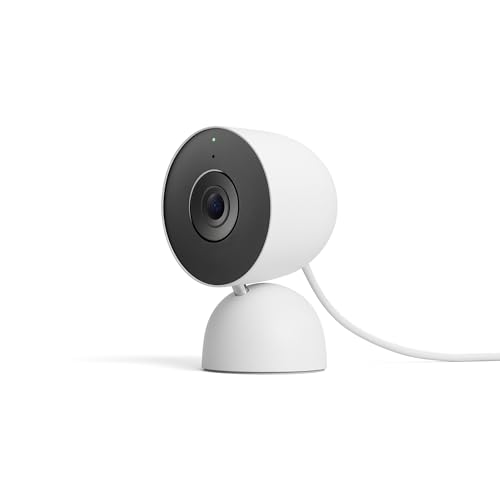
Most apartment cameras tell you that something moved. The Google Nest Cam Indoor (Wired, 3rd Gen) tries to tell you what moved, and in a flat — where the cast of characters includes flatmates, a landlord with a key, a cleaner, two cats and a robot vacuum with delusions of personhood — that distinction is the whole product. Google’s detection separates people, animals and vehicles, learns familiar faces with the right plan tier, and delivers alerts that read like information rather than alarms.
The hardware is deliberately furniture-like: a smooth pebble of a camera on a weighted stand that sits on a sideboard without announcing itself. Video is HDR-assisted 1080p with a wide view, and while rivals out-resolve it on paper, the processing produces natural colour in the mixed lighting of real rooms — warm lamps, grey daylight, a television painting the walls blue. It records a rolling buffer of recent event history even without a subscription, which softens the ecosystem’s usual paywall.
There is also a design argument, and in small flats design is not trivial. Every object in a 40-square-metre home is on display, and most security cameras look like props from a warehouse. The Nest Cam’s soft, fabric-friendly aesthetic lets it sit on a bookshelf without turning the room into a control centre, which matters more to daily happiness than an extra hundred lines of resolution. Visitors stop asking about it. Flatmates forget it exists — until the day it correctly reports that the person at the door was a courier, not a stranger, and the forgetting turns to gratitude.
Google Home households will feel the integration immediately: the camera appears beside the thermostat and the doorbell in one app, routines can arm it when the last phone leaves the building, and a Nest display in the kitchen pulls up the feed with a voice request. The counterweight is commitment — this camera makes the most sense inside Google’s walls, and its wired design ties it to wherever the cable reaches, which in an older flat may not be the corner you dreamed of.
- Form: weighted tabletop stand, wired power
- Video: 1080p HDR with wide field of view
- Storage: short free event history, longer with Nest Aware
- Extras: person, pet and vehicle alerts, familiar-face learning on plan
Strengths
- Alert intelligence that meaningfully reduces notification fatigue.
- Natural colour in the mixed lighting real flats actually have.
- Deep, easy integration with Google Home routines and displays.
Trade-offs
- 1080p ceiling where cheaper rivals offer 2K or 3K.
- The cable fixes placement more firmly than battery rivals.
- Full value depends on living inside Google’s ecosystem.
Best for: Google Home flats that want alerts worth reading. Not suited for: renters planning to mix brands freely or avoid subscriptions entirely.
Where Exactly Should an Apartment Camera Sit?
Placement is the cheapest upgrade in this entire guide. The classic position is high in the corner of the main living space, angled down toward the entry door, because that single viewpoint captures faces at identification height as people enter, keeps the lens above casual tampering, and surveys the room’s valuables in the same frame. In a studio, that corner should be the one farthest from the bed, so the camera’s working view centres on the door and kitchen rather than your sleeping space.
Height deserves a moment of thought. Too low and the camera films the tops of heads and the backs of sofas; too high and faces shrink into hats. Somewhere between two and two and a half metres, tilted gently down, is the band where faces, hands and doorways all stay readable. Bookshelves and the top of a wardrobe land naturally in that band, which is another reason freestanding placement beats the drill: the furniture already solved the geometry.
Windows are the trap in every flat layout. A camera facing a bright window spends its life exposing for the daylight and silhouetting everything indoors, while a camera with its back to the window sees the room lit like a stage. If the door and the window share a wall, compromise by angling the camera along the wall rather than straight across the room, and use the camera’s wide dynamic range settings if it offers them. Test at noon and at dusk; a position that works at both hours will work all year.
Finally, walk the view yourself before trusting it. Open the live feed, stand where a visitor would stand, wave, walk to the kitchen, and check what the camera made of you. Thirty seconds of this theatre finds the blind corner behind the door swing and the plant that blocks the hallway — problems no specification sheet will ever confess.
How Should You Set Up Alerts So the Camera Stays Useful?
The first week with any camera in this list will produce too many notifications, and how you respond decides whether the camera survives the month. Resist the urge to simply lower sensitivity until the alerts stop; that path ends with a camera that records everything and reports nothing. Instead, shape the alerts. Draw the activity zone tightly around the door and the path to it. Exclude the window, the radiator and the television’s flicker zone. Then let person detection — built in on the eufy and Nest, plan-assisted on others — do the final filtering.
Scheduling is the second lever, and flats need it more than houses do because the residents and the protected space are the same people in the same rooms. Arm the camera for working hours and nights out; stand it down for the evenings everyone is home, unless a specific worry — a pet’s health, a landlord’s visit while you travel — argues otherwise. Geofencing, where the app arms the camera when the last household phone leaves, removes the remembering from the routine entirely.
Review the saved clips once a week for the first month. Patterns emerge quickly: the 7 a.m. shadow that is only the sun, the neighbour’s cat on the fire escape, the cleaner who always arrives twenty minutes early. Each pattern is a zone adjustment or a sensitivity nudge, and after a month of this light gardening, the alert stream becomes what it should be — rare enough that every buzz of the phone deserves your attention.
How Much Should a Renter Actually Spend on All This?
Think in total cost over the length of a lease rather than the price on the box, because the six picks divide sharply on what happens after checkout. A camera with local recording costs what it costs on day one and nothing thereafter. A cloud-dependent camera keeps a small monthly appointment with your bank account, and over a two-year tenancy that appointment quietly grows until it rivals the hardware itself. Neither model is dishonest — cloud storage buys off-site safety and smarter features — but the renter who compares only sticker prices will misjudge every camera on this page.
A sensible pattern for most flats runs like this. Spend the core of the budget on one good camera for the living space, chosen from the top half of this list. Add local storage immediately, since a memory card costs less than a month or two of most cloud plans. Then live with the setup for a season before buying anything else. The second camera, if the flat still asks for one, can be the cheapest model that shares the same app, because its job will be narrow — a hallway, a nursery corner, the door to a balcony.
Accessories deserve a small, deliberate slice of the budget. A longer USB cable in the wall’s colour, a small shelf or bookend arrangement that aims the camera without adhesive, and a spare memory card together cost very little and solve the three problems that make renters abandon cameras: ugly cabling, wobbling placement and a full card discovered after the fact. What the budget does not need is a second subscription tier, a hub for a single camera, or resolution beyond what your rooms can use. In a flat, geography is short and light is close; the mid-range camera aimed well beats the flagship aimed badly, every single week of the lease.
Finally, remember the deposit arithmetic that frames this whole category. Every camera here costs less than the deduction for one improperly drilled wall, one repainted patch or one disputed cleaning claim that footage could have settled. Renters sometimes apologise for buying the cheap option; in this category the cheap, removable, well-placed option is not a compromise at all — it is the strategy.
How Do the Six Apartment Cameras Compare Side by Side?
| Camera | Movement | Night footage | Storage style | Apartment sweet spot |
|---|---|---|---|---|
| Wyze Cam v4 | Fixed, wide view | Colour via spotlight | microSD or cloud | Studios and first rentals |
| Blink Mini 2 | Fixed | Colour via LED spotlight | Cloud or Sync Module | Tightest budgets |
| Ring Indoor Cam (2nd Gen) | Fixed | Colour night vision | Cloud only | Ring doorbell homes |
| eufy Indoor Cam E220 | Pan and tilt, tracking | Infrared | microSD, no plan needed | Open-plan rooms |
| TP-Link Tapo C210 | Pan and tilt, tracking | Infrared | microSD or cloud | Value coverage |
| Google Nest Cam Indoor | Fixed, wide view | HDR night vision | Cloud tiers | Smart-alert seekers |
One pattern in the table deserves underlining for renters specifically: every camera here can be running within an hour of the delivery arriving, and every one can be packed into a moving box in under five minutes when the lease ends. That symmetry — fast in, invisible out — is the apartment category’s defining virtue, and any camera that breaks it needs an extraordinary excuse.
Read the table as a map of philosophies. The fixed cameras bet on placement and intelligence; the pan-and-tilt pair bet on mechanics, covering space by moving rather than by knowing. Neither bet is wrong for a flat — the right answer depends on whether your rooms are many and small, which favours fixed cameras per doorway, or few and open, which is where a single tracking camera earns its motor.
What About Pets, Parcels and the People You Live With?
Ask renters why they bought a camera and the honest answers cluster around three subjects: the pet alone at home, the parcel left in the hallway, and the flatmate situation — not burglars, who trail a distant fourth. The picks above serve all three, but each deserves its own setup logic.
For pets, the camera belongs at animal height in the room where the animal spends the day, not in the security corner by the ceiling. A pan-and-tilt model earns its motor here, following a restless dog between door and sofa, and two-way talk should be used sparingly: some animals find a disembodied owner voice comforting, others find it bewildering, and you will know which within one attempt. Pet detection, which the eufy and Nest handle natively, keeps the day’s clips organised around the animal rather than around every passing shadow.
For parcels, the geometry flips: the camera needs the door, ideally the moment it opens, and a view of the mat inside. Couriers in apartment buildings rarely linger, so motion pre-roll and fast wake-from-idle matter more than resolution. A camera that starts recording as the door moves — rather than two seconds after — is the difference between identifying a delivery and identifying a closing door. Pair the indoor camera with a note in your delivery instructions and most parcel anxiety simply evaporates.
For shared flats, diplomacy is the feature. Agree the camera’s hours, its zones and who holds the app password before it goes on the shelf, and put the agreement in the group chat where everyone can find it. Visitors deserve a word too; a small sign by the door or a sentence as they arrive keeps you on the right side of both etiquette and, in many places, the law. Cameras in flats fail socially far more often than they fail technically, and the households that talk first are the ones still using theirs a year later.
What Mistakes Do Apartment Camera Buyers Keep Making?
Mounting first and asking later tops the list. A camera screwed into a rented wall can cost a slice of the deposit, and it is almost never necessary: shelves, bookcases and the top of a tall dresser give equal or better angles with zero holes. Try the camera freestanding for a fortnight before even thinking about adhesive.
Buying for the hallway is the second classic error. Filming shared corridors feels like extra security and behaves like extra liability — neighbours object, building rules bite, and the footage rarely helps because your own door, filmed from inside, is where identification actually happens. Keep coverage inside the flat.
Ignoring the audio question comes third. Many regions restrict recording conversations you are not part of, and a camera in a shared flat records flatmates as faithfully as intruders. Use privacy modes, schedules and honest conversations with the people you live with; a camera that makes your home feel watched has failed at its job.
Forgetting the move-out day is a quieter mistake that only reveals itself at the worst moment. Keep the box, the cable ties and the original stand, and photograph the wall behind the camera’s shelf on the day you install it. When the tenancy ends, the camera leaves with you in ten minutes, the flat looks exactly as the inventory described it, and the deposit conversation stays boring. Renters who improvise mounting with whatever tape is in the drawer spend their last weekend scrubbing adhesive off paintwork instead — a miserable trade for a problem the freestanding picks in this guide never create.
Finally, shoppers overbuy resolution and underbuy placement. A 1080p camera at head height near the door identifies more faces than a 3K camera stranded in a far corner behind a plant. Spend the savings on a longer cable, a bigger memory card and ten minutes of testing angles before the first night.
So Which Camera Should Guard Your Flat?
For the typical renter, the Wyze Cam v4 is the recommendation to beat: colour night vision, local recording, a magnetic base that treats rental rules as a design brief, and footage sharp enough for every realistic apartment scenario. Add a second one before upgrading to anything fancier.
A word about timing the purchase to the tenancy. Buy the camera when you move in, not after the first worry, because its quietest value is the baseline it builds: the normal rhythm of the flat, the usual sounds, the door’s ordinary day. Alerts mean more against a known background, and footage from the calm months is what makes an unusual night legible. The camera also documents the flat’s condition from the start, a side benefit that has settled more than one end-of-lease conversation in a tenant’s favour.
Choose the eufy E220 or Tapo C210 when your living space sprawls open-plan and one viewpoint cannot see it all, and choose the Nest Cam when your real enemy is alert fatigue rather than image quality. The Blink Mini 2 remains the honest answer when the budget is the budget, and the Ring Indoor Cam completes a Ring household with a privacy cover everyone in the flat will appreciate. Match the camera to the lease, the layout and the people — in that order — and any of the six will serve the flat well.
Frequently Asked Questions
Can my landlord stop me using a camera inside my own flat?
Rules vary by jurisdiction and lease, but a freestanding camera filming your own rooms is broadly accepted in most places, while fixed installations and filming of shared areas are where objections arise. Check the lease’s alteration clause, keep the camera removable, and keep its view inside your unit. If the lease is silent and the camera is furniture, you are usually on firm ground — and a courteous note to the landlord removes doubt cheaply.
Will one camera really cover a whole apartment?
For a studio or compact one-bedroom, yes — especially a pan-and-tilt model placed in the main living space with a view of the entry door. Larger flats with separated bedrooms usually need a second camera for the hallway or the room where valuables live. Start with one in the living area; the gaps in coverage will announce themselves within a week of real use.
Is it legal to record audio as well as video?
Audio is the legally sensitive half. Many regions apply wiretapping or two-party-consent rules to recorded conversations, which is stricter than the standard for silent video of your own space. If your flat is shared or guests visit often, consider disabling audio recording and relying on video plus alerts. When in doubt, local tenant advice services answer this precisely for your area.
Do apartment cameras work during an internet outage?
Cameras with local microSD recording — the Wyze, eufy and Tapo picks here — keep recording through an outage and show you the footage when the connection returns. Cloud-only cameras pause their history until the internet recovers. Building Wi-Fi in older blocks drops often enough that local storage is a genuine feature for renters, not a spec-sheet footnote.
Can a camera help with a dispute about damage or deposits?
It can, within limits. Time-stamped footage of the flat’s condition — recorded with the landlord’s knowledge at move-in or move-out — settles arguments about when a mark appeared far better than memory does. What a camera cannot do is substitute for the formal inventory your tenancy agreement describes, and covert recordings of other people may be inadmissible or unlawful depending on where you live. Use the camera as a memory aid, keep the paperwork as the record, and tell everyone involved that filming is happening.
How do I stop the camera filming my flatmates?
Use the tools the picks provide: schedules that disarm during occupied hours, privacy modes, geofencing tied to your phones, or — in the Ring’s case — a physical cover over the lens. Agree the arrangement with the household before the camera goes on the shelf. A camera everyone trusts gets left plugged in; one that feels like surveillance gets quietly unplugged, and then it protects nothing.
Related Guides
Once the flat itself is covered, the neighbouring questions arrive quickly: which doorbell suits a building you cannot rewire, and how to watch a pet without watching your flatmates. Start with our guide to doorbell cameras for renters, continue with the best pet cameras for small homes, and finish with a plain-English explainer on camera privacy settings before your next lease signing.


