kajuandouglas.com is reader-supported. When you buy through links on our site, we may earn an affiliate commission.
Where to Buy Cameras for iSpy, and What the Name Actually Means
Plainly first, because this keyword deserves it: iSpy is surveillance software — the long-running open-source program, continued today in its Agent DVR form — that turns a home computer or server into a recording studio for camera streams. So the best cameras for ispy are not a style of camera; they are the cameras that cooperate with that software: models offering standard RTSP or ONVIF streams your own machine can record, motion-detect, and archive on your own drives, without renting your footage back from a cloud. This guide ranks exactly that cooperation.
Where to buy: the linked names below lead to those cameras’ Amazon listings; the two picks outside the verified pool are recommended prose-only, by description, because their architecture matters to an iSpy system even where this guide cannot link them. Budget honestly for the whole recorder — cameras, a PoE switch if you go wired, drives sized for your retention, and the small PC that will run it all — because iSpy’s economics are infrastructure economics: pay once, own the archive.
The six divide into the architecture’s layers. Two friendly Wi-Fi cameras stream to the server while keeping their apps for the family; a battery pan-tilt guards the position cables cannot reach, on its hub’s terms; a tracking camera runs the room that must think for itself; and two wired ONVIF cameras — the professional shapes — form the permanent core a serious build graduates to. Read them as one system in six pieces.
A word on expectations: open systems reward a household willing to configure — camera accounts, fixed addresses, detection zones drawn on a real screen. In exchange they offer the only surveillance bargain that never changes its terms: your footage, on your drives, under your rules, forever. Households that want that bargain will find this list written for them; households that want an app and a subscription have four other guides on this site, all excellent, none of them this one.
So the six below should be read as a parts list for one honest machine: the watching machine a household owns outright. Assemble it in the order given, verify each stream with your own eyes before trusting it with a night, and the machine will keep the only promise in surveillance that compounds — it will still be yours, and still be working, when every subscription on the street has changed its terms twice.
Key Takeaways
The open-system summary, for readers with a server humming already:
- iSpy — continued today as Agent DVR — records camera streams on your own PC or server, so the best cameras for it are the ones that speak standard RTSP or ONVIF and hand over their footage without a subscription’s permission.
- The TP-Link Tapo C210 is the friendly foundation: pan-tilt coverage with a stream the server can record.
- The Wyze Cam v4 multiplies coverage cheaply — confirm its RTSP arrangement’s current state before building on it.
- Battery and ecosystem cameras join on their hub’s terms; keep the system’s core wired and open.
- Wired ONVIF PoE cameras — the Amcrest and ANNKE shapes here — are the permanent core serious builds graduate to.
- Your footage, on your drives, under your rules, in formats that outlive companies: the open bargain never changes its terms, never raises its price, and never holds your own hallway hostage.
- Label the cables and write the setup down — the future troubleshooter is you, at midnight, with no memory of this weekend’s brilliance.
In this guide
Quick Picks
One system in six pieces — streamers, an outpost, an autonomous room, and the wired core.
| Camera | Badge | Why it earns its place here |
|---|---|---|
| TP-Link Tapo C210 | Best iSpy-Friendly Camera for Most Homes | Pan-tilt coverage with an RTSP stream your PC or server can record around the clock. |
| Wyze Cam v4 | Best Budget Camera That Still Streams | Colour night vision and an RTSP path (via its app settings) at whole-house prices. |
| REOLINK Argus PT Ultra | Best Wire-Free Camera for an iSpy-Style Setup | Battery pan-tilt freedom for the door or yard corner your recorder could never reach by cable. |
| eufy Indoor Cam E220 | Best Tracking Camera With Local Manners | Pan-tilt tracking and NAS-leaning local options for rooms the server cannot see into. |
| Amcrest 5MP PoE Bullet Camera | Best Wired ONVIF Pick for a Serious Recorder | A Power-over-Ethernet bullet with full ONVIF manners — the iSpy native, sold without a link here. |
| ANNKE C800 PoE Turret Camera | Best Value ONVIF Turret for Multi-Camera Builds | A turret-form ONVIF camera priced for the four-camera build a house actually needs. |
How Did We Choose the Best Cameras for iSpy?
Cooperation came first: a discoverable, standards-based stream — RTSP for the Wi-Fi picks, ONVIF for the wired ones — that iSpy or Agent DVR can record continuously or on motion, plus honest behaviour when the network or the server restarts. We favoured cameras whose streaming does not depend on a subscription’s mood, and we labelled plainly the picks whose integrations run on a maker’s terms or evolve with firmware, because an archive built on a misunderstood feature is a disappointment with a date on it.
Second, the recorder’s whole cost and character: local recording as a fallback layer, night streams with enough information for software detection, and forms — pan-tilt, bullet, turret — matched to the positions a house actually has. Third, candour about effort: open systems ask configuration of their owners, and each pick states what it asks.
What we discounted: closed cameras that refuse third-party recording entirely, however polished their apps. They may be excellent products; they are not answers to this keyword, and this guide declines to pretend otherwise.
Finally, we weighted the community’s memory: the models and architectures that iSpy’s own forums have run for years without drama carry a presumption no launch review can confer. Surveillance is a long game played against entropy, and this list was drafted by listening to the players who are a decade in.
What Does iSpy Actually Do With a Camera Stream?
Everything a cloud does, at home. The software records — continuously, on a schedule, or when its motion and object detection judge the moment worthy — writes the footage to drives you own, in formats you can open, and alerts you through channels you choose. It can watch a dozen cameras’ worth of driveways and nurseries with a patience no app matches, because a PC’s storage is measured in weeks where a camera’s card is measured in days.
That architecture inverts the usual surveillance relationship: the cameras become replaceable witnesses, and the intelligence and the memory live in one place you control. It is why the iSpy community cares about stream standards the way audiophiles care about connectors — the stream is the contract, and a camera that honours it can serve for a decade across three generations of software.
Wi-Fi Streams or Wired PoE: Which Should an iSpy System Use?
Both, in their places — with a bias the community earned the hard way. Wi-Fi cameras like the Tapo and Wyze here install in minutes and serve indoor positions beautifully, provided the signal at the position is honest and the router gives them fixed addresses. Their weakness is shared air: a congested network drops frames from every camera at once, usually during the neighbourhood’s busiest evening, which is also incident o’clock.
Wired PoE is the grown-up answer for permanent and outdoor positions: one cable for power and video, immune to congestion and interference, addressed forever. Its cost is the installation afternoon. The layered verdict this guide builds on: stream by Wi-Fi where the house is finished and the positions are kind; wire the entries, the perimeter, and any camera whose footage you would subpoena.
Which Cameras Cooperate With iSpy? The Six Picks in Detail
Judged on the stream, the archive, and the honesty of each camera’s terms.

TP-Link Tapo C210 — Best iSpy-Friendly Camera for Most Homes
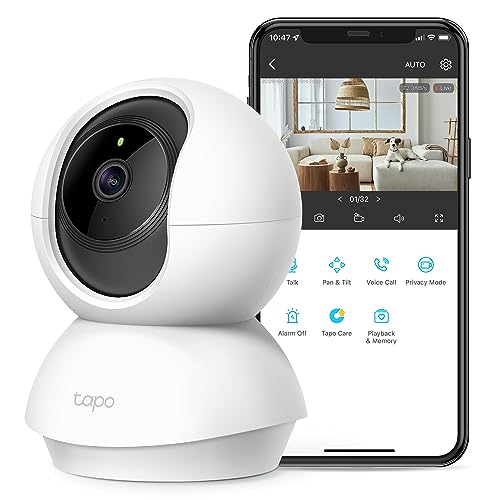
If iSpy brought you here — the long-running open-source surveillance software, now carried forward in its Agent DVR form — your question is specific: which cameras will actually hand their video to your computer, to be recorded, motion-detected, and archived on your own drives? The Tapo C210 is the answer most households should start with. Behind its friendly pan-and-tilt exterior sits the feature the whole category turns on: a standard RTSP stream that iSpy and Agent DVR can discover and record, alongside local card recording for the hours the PC sleeps.
Two modes form one hybrid watch: the Tapo app for casual glances, your server for the serious archive. Set the camera account up once in the app — the RTSP credentials live there — add the stream in Agent DVR, draw your detection zones on the PC’s bigger screen, and the system becomes a proper recorder: continuous or motion-led recording to your own storage, alerts routed your way, and a timeline that no subscription can switch off. The camera’s pan-tilt presets even survive the arrangement, patrolling viewpoints the software schedule commands.
Its detection story in an iSpy household is happily redundant: the camera’s own person detection can run the app’s alerts while the server’s deeper analysis — the reason iSpy exists — handles recording triggers with a sophistication no camera app attempts. Owners who enjoy tuning will find the combination genuinely powerful; owners who do not can leave the camera’s own manners in charge and still keep the archive.
Honest debits: the stream setup requires creating the camera account in the app and keeping the camera on a sensibly addressed network — a fixed IP reservation in the router is the difference between a system and a weekly mystery. Wi-Fi congestion shows up as stream hiccups before it shows up anywhere else, so place the camera where the signal is honest. None of this is difficult; all of it is the iSpy way, and this camera walks it more gracefully than any rival at its station.
Choose it as the foundation of a home iSpy system: one at the entry, its stream recorded by the house server, its card as the understudy. It is the camera the software’s own community reaches for first, and communities that record everything are rarely wrong about what records well.
Renters building a first recorder love its reversibility: no cables run, no holes drilled, and the whole system — camera, laptop server, card archive — moves house in one box. Open surveillance, it turns out, is also portable surveillance.
Its stream has a quiet second talent: because it is a standard feed, the household’s other tools can drink from it too — the wall tablet’s dashboard, the TV’s picture-in-picture at the doorbell’s ring. Standards compound; that is their whole argument.
- Type: pan-and-tilt indoor camera
- Signature: RTSP stream for PC recording
- Archive: your drives, via iSpy/Agent DVR
- Backup: local card when the PC sleeps
- Role: the iSpy household standard
Strengths
- Stream discovery is painless.
- Patrol presets serve the archive.
- Card covers the server’s downtime.
Trade-offs
- Needs a camera account for streaming.
- Wi-Fi quality decides stream quality.
- Fixed IP reservation recommended.
Best for: iSpy and Agent DVR households, home-server owners, and tinkerers.
Not suited for: buyers wanting a closed app-only system.

Wyze Cam v4 — Best Budget Camera That Still Streams
The Wyze Cam v4 is how an iSpy system covers a whole house without a flagship budget: a sharp little camera with colour night vision, local card recording, and — the detail that earns it this page — an RTSP streaming option in its settings that lets iSpy-class software pull its feed like the Tapo’s. Multiplied by three or four rooms, that combination turns a single-PC recorder into a whole-house archive at a total cost the subscription ecosystems cannot approach.
Redundant coverage, layer over layer, defines this setup. Each Wyze records to its own card, streams to the server, and keeps its app manners for the family’s casual glances, so the failure of any one layer — card, network, PC — leaves the other two standing. iSpy households prize exactly this belt-and-braces geometry, because surveillance that depends on a single component is a story about that component’s worst day.
Its colour night vision earns a specific place in a recorder’s system: the server’s motion detection works on whatever the camera sends, and a colour night stream gives both the software and the reviewing human more to work with — clothing, vehicles through windows, the difference between the cat and a coat. Evidence is a colour science too.
Caveats belong in plain type: the RTSP path’s availability has historically depended on app and firmware arrangements that Wyze adjusts over time, so buyers should confirm the current state of the feature for this model before building a system on it — the camera remains excellent value on its card-and-app merits regardless. Account hygiene and current firmware are, as ever with this brand, the owner’s standing duties.
Choose it to multiply an iSpy system across rooms, to keep colour in the night archive, and to hold a spare on the shelf — at its station, a spare camera is a sane line item, and iSpy households are nothing if not sane about failure.
Garage and workshop positions suit it particularly: the stream feeds the archive while the card watches the tools, and colour night vision distinguishes the red toolbox from the grey one in the incident that, statistically, is a family member borrowing without asking.
Its price makes it the experimental camera of iSpy builds — the one placed, moved, and re-placed until the floor plan’s truth is known, before the wired cameras are committed to their permanent holes. Reconnaissance is a legitimate layer of architecture.
- Type: wired indoor camera with card slot
- Signature: value with a streaming path
- Night: colour, for better evidence
- Redundancy: card, stream, and app
- Role: the multiplier camera
Strengths
- Whole-house coverage economics.
- Colour night stream aids review.
- Three layers of recording.
Trade-offs
- Confirm RTSP’s current availability.
- Firmware and account care required.
- App is busier than premium rivals.
Best for: multi-room iSpy systems and budget archivists.
Not suited for: buyers needing guaranteed enterprise streaming.

REOLINK Argus PT Ultra — Best Wire-Free Camera for an iSpy-Style Setup
Every iSpy household has one position the wired cameras cannot serve: the side gate, the outbuilding, the tree at the drive’s bend — close enough to matter, too far for a cable’s dignity. The Argus PT Ultra is the wire-free answer with a pan-and-tilt eye: battery-powered, solar-extendable, and built to watch a wide arc from a single mounting. In a Reolink-centred system it records to the brand’s Home Hub or a card; households should note honestly that battery cameras speak to recorders on their own terms, through the hub and the brand’s ecosystem, rather than as always-on RTSP fountains — a distinction this guide will not blur.
Mounted high as a perimeter outpost, it patrols its presets or wakes on motion, sending clips to the hub while the house’s wired cameras feed the server. For the iSpy-minded owner, the sensible architecture is layered — open streams indoors where the cables are easy, the Reolink outpost where they are impossible — and this camera is the outpost’s best current instrument, with night vision and spotlight manners sized for outdoor evidence.
Its image quality serves the identification brief at driveway distances, its pan-tilt sweep covers the corner that two fixed cameras would argue over, and its battery discipline — motion-led, solar-assisted — suits positions visited by events rather than traffic. The app and hub timeline give the household its casual view; the serious archive stays indoors, as designed.
Debits are the wire-free class’s: batteries are a maintenance rhythm, continuous recording is not the battery’s language, and the deepest integrations run through Reolink’s own hub rather than open software. Buyers whose brief is a pure, open iSpy system should keep it as the outpost, not the foundation — a role it fills better than anything else here.
Choose it for the position the cables cannot reach, inside a layered system whose core stays open and wired. It is the exception that proves the architecture.
Farm and rural households have adopted the outpost pattern at scale: the barn, the gate, the fuel tank watched by battery eyes reporting to the hub, while the house’s core stays wired. Distance is the rural condition, and this camera is built for distance’s terms.
Its solar pairing deserves the practical praise: a well-sited panel turns the battery’s rhythm from a chore into a season’s non-event, which is exactly what a perimeter camera should be — present, patient, and beneath notice until the night it is neither.
- Type: battery pan-and-tilt, outdoor-ready
- Signature: wire-free wide-arc watch
- Recording: hub or card, motion-led
- Power: battery with solar options
- Role: the perimeter outpost
Strengths
- Covers the unreachable corner.
- Pan-tilt replaces two fixed views.
- Night evidence at driveway range.
Trade-offs
- Not an always-on open stream.
- Battery rhythm to maintain.
- Deepest features live in its hub.
Best for: side gates, outbuildings, and layered systems.
Not suited for: pure open-stream iSpy purists.

eufy Indoor Cam E220 — Best Tracking Camera With Local Manners
The E220 earns its place in an iSpy-flavoured guide as the room-level specialist: a pan-and-tilt camera that follows its subjects itself, detects people and pets on-device, and offers local-recording arrangements — card and NAS-leaning options in its app — that suit households building archives at home. Where a room needs a witness with its own judgement, rather than a dumb stream for the server’s, this is the camera that brings one.
Rooms without a server — the nursery wing, the workshop, the rental flat across town — get an autonomous watch from this one device. Its tracking turns a single device into a room’s whole story, its sound alerts catch what motion misses, and its footage stays in the house’s own storage philosophy. In a mixed system — server-recorded streams at the core, autonomous cameras at the edges — the E220 is the edge at its most capable.
Interoperability honesty, as with the Wyze: streaming arrangements and NAS features in consumer apps evolve, and the buyer building on a specific integration should verify its current state for this model before purchase. What does not evolve is the camera’s core competence — tracking, detection, local manners — which justifies it in any architecture that values them.
Its debits echo its design: a moving lens with a motor’s presence, tracking that can be led by the busiest mover, and an app whose ecosystem assumptions differ from the open-server world’s. Households should deploy it where autonomy is the brief rather than forcing it into the server’s uniform.
Choose it for the room that must think for itself — and for households whose archive philosophy is local first, server where it helps. It is the iSpy system’s most talented freelancer.
Home-office workers use its tracking as a meeting-room witness for the hours the office is a warehouse: packages, prototypes, and the cleaner all accounted for, with the footage local enough to satisfy a paranoid employer of one.
Its sound alerts have a workshop career too — the crash, the alarm, the machine left running — sounds a camera that only watched would file too late. An ear in the room is half a watchman.
- Type: pan-and-tilt indoor camera
- Signature: tracking with on-device judgement
- Storage: local and NAS-leaning options
- Audio: sound alerts, two-way talk
- Role: the autonomous room
Strengths
- Follows the room’s whole story.
- Detection lives on the device.
- Local-first storage philosophy.
Trade-offs
- Verify streaming features’ current state.
- Motor presence in quiet rooms.
- App ecosystem differs from servers’.
Best for: nurseries, workshops, and remote rooms without servers.
Not suited for: uniform open-stream system builders.
Amcrest 5MP PoE Bullet Camera — Best Wired ONVIF Pick for a Serious Recorder
This pick is prose-only in this guide — it sits outside the verified link pool, so it is recommended by description rather than by a shopping link — and it represents the architecture iSpy was born for: a wired PoE bullet camera with full ONVIF compliance, drawing power and sending video down one Ethernet cable to the switch, the server, and the archive. No Wi-Fi weather, no battery rhythm, no app account standing between the lens and your recorder. For a permanent installation, it remains the professional’s default shape.
Thinking in infrastructure, not gadgets, changes every installation decision. A PoE camera is installed like wiring — once, properly, at the choke point, with the cable run finished and the stream addressed permanently — and then forgotten for years while the server does the remembering. iSpy and Agent DVR discover ONVIF devices with their profiles and capabilities largely negotiated automatically, which is the open-standards dividend: the camera and the software were strangers, and within minutes they are colleagues.
Its image serves the identification brief at entrances and driveways with the steadiness wired power allows — continuous recording is simply what it does, all night, in all weathers the housing is rated for. There is no app to charm a family, and that absence is the point: this is a component in a system its owner operates, not a service a company rents.
The debits are installation’s: cables must be run, a PoE switch or injector joins the basket, and the camera offers none of the consumer picks’ friendly guidance. Beginners should start with the Tapo and graduate here when the system becomes permanent; the graduation is a rite of passage in the iSpy community, and the community’s documentation will walk you through it.
Choose it when the recorder is a fixture, the positions are permanent, and open standards are the household’s religion. It is the camera your server would buy for itself.
Installers of a certain age grow lyrical about the PoE discipline: test the cable, crimp it clean, and the camera will out-serve three generations of wireless fashion. In a hobby of firmware, copper is the conservative investment.
Its bullet form has a deterrent honesty the discreet forms lack: it looks like what it is, at the position it guards, and a meaningful share of its career is spent preventing the footage it exists to record. The archive’s emptiest camera is sometimes its most successful.
- Type: wired PoE bullet, ONVIF
- Signature: one cable, open standards
- Recording: continuous, server-led
- Install: permanent, like wiring
- Role: the infrastructure camera
Strengths
- ONVIF discovery just works.
- Continuous recording, no batteries.
- No app account in the chain.
Trade-offs
- Cable runs are real work.
- Needs PoE power equipment.
- No consumer-friendly guidance.
Best for: permanent iSpy installations and PoE households.
Not suited for: renters and first-week beginners.
ANNKE C800 PoE Turret Camera — Best Value ONVIF Turret for Multi-Camera Builds
The second prose-only pick — again outside the verified link pool, recommended on its architecture rather than linked — answers the iSpy system’s scaling question. Serious home recording rarely stops at one camera, and the C800-class turret is the shape multi-camera builds standardise on: PoE power, ONVIF streaming the server discovers, a turret form that aims precisely and resists the casual knock, and a price posture that makes the fourth camera a decision rather than a debate.
Identical cameras at the entry, the side path, the garage, and the back door — all discovered by Agent DVR the same way, all recording to the same archive, all maintained with one set of knowledge — make uniformity the system’s quiet strength. Uniformity is an underrated surveillance virtue — every exception in a system is a future troubleshooting session, and the turret build eliminates exceptions by the box.
Its night manners suit the residential brief: infrared reach sized for gardens and drives rather than car parks, and a form less conspicuous than a bullet’s at a family home’s eaves. Paired with the server’s detection, the system watches in the layered way this guide keeps recommending — cameras as witnesses, the PC as the judge, the household’s own drives as the memory.
Debits are the class’s honest ones: installation effort per camera, a recorder PC that must be sized for the streams it is fed, and consumer comforts — talking cameras, friendly apps — left to the indoor picks. This is the outdoor and perimeter layer of a system whose centre is a server, and it should be bought as such, in a planned set, with the cable and switch budgeted beside it.
Choose it when the build is real: four positions, one server, open standards throughout. It is how an iSpy hobby becomes a house’s infrastructure.
Turret sets photograph a house’s perimeter like a professional’s plan: matched views, matched nights, one maintenance rhythm. Insurers and buyers alike read such a system as seriousness, which, in the event of a claim or a sale, is a currency of its own.
Its value posture changes the design conversation: when the fourth camera is affordable, coverage stops being triage and becomes completeness — the side path gets its witness, and the system’s blind spots shrink to the ones the owner chose knowingly.
- Type: PoE turret camera, ONVIF
- Signature: built for uniform sets
- Night: residential infrared manners
- Form: discreet at the eaves
- Role: the scaling camera
Strengths
- Four-camera builds stay sane.
- ONVIF discovery, identical setup.
- Turret form suits family homes.
Trade-offs
- Install effort per position.
- Server must be sized for streams.
- No consumer app comforts.
Best for: multi-camera iSpy builds and perimeter layers.
Not suited for: single-camera or app-first households.
How Do the Six Compare at a Glance?
The system in one table — each camera’s stream, its archive, and the terms it honestly keeps.
| Camera | Character | Watch out for |
|---|---|---|
| TP-Link Tapo C210 | RTSP pan-tilt for server recording | Setup rewards network care |
| Wyze Cam v4 | Budget streaming with colour nights | Verify RTSP before building |
| REOLINK Argus PT Ultra | Wire-free pan-tilt outpost | Ecosystem terms, not open stream |
| eufy Indoor Cam E220 | Autonomous tracking room camera | Integration details evolve |
| Amcrest 5MP PoE Bullet Camera | ONVIF PoE infrastructure pick | Installation effort upfront |
| ANNKE C800 PoE Turret Camera | Value ONVIF turret for sets | System thinking required |
How Do You Set Up an iSpy System That Survives Its First Month?
Start with one camera and finish it completely: stream discovered, recording tested, a motion event triggered by a volunteer stranger, an alert received on the phone, the footage found again the next day. That completed loop — not the camera count — is the system, and every later camera is a copy of it. Give cameras fixed addresses in the router before adding the second one, name everything as if a tired future self will troubleshoot it at midnight, because one will.
Size the archive honestly: continuous recording eats drives at a rate that surprises every beginner, so begin with motion-led recording and a retention you can afford, then expand storage rather than shrinking standards. And keep the server boring — a small, quiet, always-on machine whose only job is the watch. iSpy systems fail socially when the recorder is also the gaming PC that reboots; give the watch its own small keeper.
What Are the Most Common Mistakes in iSpy Builds?
The first is building on an unverified feature: a streaming option a maker’s firmware moved, renamed, or retired between the forum post and the purchase. Verify the current state of any specific integration — this guide flags the ones to check — and favour standards (ONVIF especially) over favours. The second is Wi-Fi optimism: six cameras on a struggling router, each blaming the others. Wire what matters, as the previous section argued, and let wireless serve the kind positions.
The third mistake is detection by default: the software’s factory zones and sensitivities recording every moth and headlight into an archive nobody can search. Draw zones on the real view, exclude the road and the tree, and test with a walk-through at day and night. An iSpy system’s intelligence is mostly its owner’s first weekend, formalised.
How Much Storage Does a Home Recorder Really Eat?
More than the first guess and less than the fear, once motion-led recording is in charge. A busy entry camera’s triggered archive is a fraction of its continuous twin’s, and the community’s working pattern — continuous for the one critical position, motion for the rest, retention measured in weeks for events and days for the ordinary — fits household drives comfortably. The honest method is empirical: run the system a week, measure, and buy drives against evidence rather than arithmetic.
Keep the archive’s tiers in mind as it grows: the server’s live drives for the current season, an external copy for the incidents that earn permanence, and nothing at all for the ten thousand hours of an empty driveway ageing gracefully into deletion. An archive with tiers is a memory; an archive without them is a hoard with a search box.
How Do You Secure a System That Watches Your House?
With the seriousness of a lock, because that is what it is. The server gets a strong unique password and every update its maker offers; the cameras get their own credentials, changed from every default; the network keeps the camera system on the household’s trusted side, with remote access arranged deliberately — through the software’s own secured channels — rather than by exposing ports to the internet on a forum’s say-so. Convenience arranged carelessly is how watchers get watched.
Audit quarterly, the way this site’s other guides advise for app cameras: who has access, which accounts still exist, whether the ex-housemate’s login survived the farewell. Open systems give their owners total control, and total control includes total responsibility — the community’s elders state it as a motto because it is one.
What Does the iSpy Community Know That App Users Do Not?
That formats outlive companies. A decade of app cameras includes beloved products orphaned when a maker pivoted, was acquired, or simply stopped paying for servers — their footage formats proprietary, their cameras eloquent bricks. The open archive, written in standard formats from standard streams, is immune to that obituary: change the software, keep the footage; change the cameras, keep the system. Longevity is the open bargain’s least advertised, most compounding virtue.
It is also why this guide’s wired ONVIF picks matter beyond their specifications. They are the cameras least likely to be stranded by anyone’s business model — including, a community member would add dryly, their own maker’s. Buy the contract, not the charm, and the system ages like infrastructure instead of like a gadget.
How Should an iSpy System Handle the Doorbell Moment?
Gracefully, by division of labour. The doorbell — usually a closed, app-led device — owns the conversation: the ring, the voice, the visitor’s face at conversational range. The iSpy system owns the context: the approach down the path, the vehicle at the kerb, the departure, recorded continuously by the wired witness above the door. Households that stop demanding one device do both jobs end up with each job done properly.
Keep the timelines reconcilable: clocks synchronised across cameras, doorbell, and server, so the doorbell’s clip and the archive’s footage tell one story with one set of times. Evidence is a narrative with timestamps, and a system whose clocks argue is a system whose story frays exactly when it is needed.
What Is the Right First Weekend Project for a New iSpy Owner?
One camera, one position, complete victory. Mount the Tapo at the entry, reserve its address, discover its stream, record a day, trigger a night alert with a volunteer’s help, retrieve the footage, and delete it on purpose to prove the archive obeys you. That loop, finished, teaches more than a month of forum reading — and it converts the second camera from a project into a photocopy.
Write down what you did, in the household’s own words, and tape it inside the server cupboard. Open systems accumulate folk knowledge; the household that documents its own becomes its own community of one, immune to the midnight amnesia that turns a settings change into an archaeology expedition.
How Does an Open System Age Across a Decade?
In layers, replaced one at a time, which is the entire economic argument. The cameras of year one retire to lesser positions as their successors arrive; the server is replaced when it dies, not when a maker wishes it; the archive migrates drive to drive, readable throughout, because its formats belong to no one. A decade in, the system’s owner has spent less than the subscription household and owns more: the footage, the skills, and the independence.
That independence has a civic flavour the community does not hide: a watched home whose watching answers to its owners is a different social object from a home reporting to a platform. Households choosing iSpy are often choosing that difference as much as any feature, and this guide respects the choice by treating it as a first-class criterion rather than a hobbyist’s quirk.
How Do You Choose Stream Resolution Without Drowning the Server?
By the identification distance, not the specification sheet. A camera watching a door at conversational range sends a modest stream that identifies perfectly; a camera admiring a whole yard earns its higher resolution honestly. Mismatching them — flagship streams from hallway cameras, thumbnails from the driveway — taxes the network and the archive in exactly the wrong places. Set each stream to its job, let the server’s detection work on a sensible sub-stream where the software offers one, and the whole system breathes.
Test under load: the evening when every camera sees motion at once is the system’s true specification, and a build that survives it in rehearsal will survive it in fact. iSpy households learn to rehearse the way theatres do — because the performance, when it comes, allows no second take.
What Should Neighbours and Family Know About Your Recorder?
That it exists, what it watches, and where its eyes stop. A perimeter camera’s view ends at your boundary in intention even where physics lets it wander, and the zones and masks the software offers exist to make that intention mechanical. Tell the neighbours the driveway camera watches the driveway; show the family which rooms are unwatched and keep the promise in the configuration, where promises become settings.
The open system’s transparency is a social asset: because the archive is yours, you can answer a neighbour’s legitimate question — did your camera see the night the fences were tried — with a clip and a cup of tea. Surveillance that serves a street’s trust, on its owners’ terms, is the version of this technology that ages best in every sense.
How Do You Expand From One Camera to a System Without Chaos?
By template, not by enthusiasm. The first camera’s completed setup — address scheme, credentials pattern, stream settings, detection philosophy, naming — becomes the document every later camera is configured from, so the fourth camera takes twenty minutes and behaves identically to the first. Chaos in growing systems is rarely technical; it is the archaeology of four different weekends’ improvisations, and a one-page template is its entire cure.
Expand by position priority, too: entry, then the route every entrant crosses, then the perimeter’s blind side, then the comforts. A system grown in that order is useful at every size, including the sizes it pauses at for a year — which, in real households, is most sizes.
Why Does the Community Insist on Testing Alerts With a Volunteer Stranger?
Because systems lie politely until they are exercised. The camera reports motion; whether the motion becomes a recording, the recording an alert, the alert a phone’s noise, and the noise a human’s attention are four separate promises, each with its own failure mode. A volunteer walking the route at day and night audits all four in ten minutes, and the audit’s findings — a muted category, a zone drawn shy of the door — are the cheapest surveillance improvements a household will ever make.
Repeat the audit when anything changes: a camera moved, a router replaced, a season’s foliage grown into the view. Systems decay by inches and are restored by rehearsals, and the iSpy household that rehearses owns a recorder, while the one that merely installed owns a hope with a power light.
What Hardware Does the Recorder Itself Deserve?
Boring excellence: a small machine with a modern efficient processor, memory enough for the stream count, a system drive that is solid-state, and recording drives chosen for surveillance duty — built to write all day without complaint — rather than whatever was spare. Cooling and quiet matter because the machine lives in the house it watches; a recorder that sounds like a hairdryer in the hall cupboard will be switched off by acclamation, and a switched-off archive is a memoir of good intentions.
Add the small battery backup that carries the recorder and router through a power cut’s first minutes, and the system’s worst-case story changes completely: the outage that used to blind the house becomes the best-recorded hour of the year. Resilience, in this architecture, is a shopping list — and a short one.
How Should an iSpy Household Think About AI Detection?
As a promising employee who still needs supervision. The software’s object detection — people, vehicles, animals — genuinely transforms an archive’s searchability, turning a week’s footage into a query. But its confidence should be calibrated like any witness’s: test it against your own volunteer’s walk, tune its thresholds per camera, and keep a motion-based safety net under the positions where a missed classification would matter most.
The layered pattern this guide recommends for cameras applies to intelligence too: the camera’s own detection for the casual alert, the server’s analysis for the archive, and a human’s weekly review for the truth. Systems that keep all three layers honest age better than systems that crown any single one of them infallible.
What Buying Mistakes Do iSpy Shoppers Make?
Buying closed cameras for an open system is the foundational error — the polished app camera that will not stream to anything but its maker’s cloud, purchased on a forum rumour. The defence is this guide’s first criterion: a documented, standard stream, verified current, or the camera belongs to a different architecture and possibly a different household.
The second mistake is underbuying the recorder: a heroic camera count on a wheezing PC and a single small drive, producing dropped streams and a three-day archive. iSpy’s software may be free; its physics are not. Budget the machine and the storage with the cameras, or the system’s memory will be shorter than its ambitions.
A third mistake is neglecting time itself: cameras and server disagreeing by minutes because nobody enabled synchronisation, discovered for the first time when two clips of one event refuse to align. Set every clock to the same master in the first weekend; evidence is a story told in timestamps, and the storyteller must agree with itself.
And do not skip the boring purchase: the battery backup for the recorder and router. It is the least exciting item in the entire build and the one most likely to be thanked, by name, on the one night the street goes dark and something interesting happens in it.
Final Recommendation
For most households beginning with iSpy, the foundation is the TP-Link Tapo C210 — friendly enough for the family, open enough for the server — multiplied by the Wyze Cam v4 where the budget needs rooms covered kindly. The Reolink Argus PT Ultra guards the cable-forbidden corner on its hub’s terms, and the eufy E220 runs the room that must think for itself.
And when the system grows permanent, the wired ONVIF pair — Amcrest’s bullet and ANNKE’s turret, recommended here by description — are waiting as its core. Build the loop with one camera, wire what matters, verify every feature you depend on, and the archive is yours: your footage, your drives, your rules, indefinitely.
Begin this weekend, with one camera and the complete loop. The open archive is not built in a purchase; it is built in a Saturday, and every Saturday after that it simply continues.
One last piece of community wisdom, offered free: label the cables. The system you build this year will be troubleshooted by a future self who has forgotten everything except where the labels are, and that self will bless your name — or the alternative — in direct proportion to your labelling. Open systems reward the owners who write things down.
Frequently Asked Questions
Is iSpy the same as Agent DVR?
They are generations of the same project: iSpy is the long-running open-source original, and Agent DVR is its modern successor from the same stable, with current development and a friendlier interface. The camera advice in this guide — standard streams, honest networking — applies equally to both.
Can any Wi-Fi camera work with iSpy?
No — the camera must offer a stream the software can consume, typically RTSP or ONVIF. Many polished app cameras deliberately do not. That is why this guide leads with streaming cooperation, flags the models whose arrangements need verifying, and recommends ONVIF cameras for permanent builds.
Do I need a powerful PC to run an iSpy system?
A modest, modern, always-on machine handles a household’s cameras, especially with motion-led recording; stream count and resolution set the real requirement. What matters more than power is dedication — a boring, reliable keeper that nobody reboots for games.
Can battery cameras record to iSpy continuously?
Not realistically: battery cameras are motion-led by physics, and the Reolink pick here works through its hub on those terms. Continuous recording belongs to powered cameras — Wi-Fi at kind positions, PoE everywhere it matters.
Is my footage really private in an iSpy system?
It is as private as your own network and drives, which is the strongest privacy consumer surveillance offers: no maker’s cloud holds your hallway. The corresponding duty is yours — secure the server, keep accounts strong, and treat the archive with the respect you would want from a company.
What should I buy first for a new iSpy setup?
One Tapo C210, a memory card for it, and a weekend: build the complete loop — stream, record, detect, alert, retrieve — before buying anything else. The second purchase will then be obvious, and it is usually storage.
Related Guides
Build the open system with our companion guides to recorders, storage, and networking: how to size storage for a home recording server rtsp and onvif explained for homeowners fixing camera streams: a router troubleshooting guide


