kajuandouglas.com is reader-supported. When you buy through links on our site, we may earn an affiliate commission.
Where to Buy a Camera for Inside the House, and What You Will Actually Use It For
The best cameras for inside house watching are bought for burglars and used for dogs. Ask owners a year after installation what their indoor camera actually does all day and the answer is a litany of small reassurances: the teenager is home, the puppy is asleep, the cleaner came, the parent is up and making tea, the house survived the storm. This guide takes that honest brief seriously — it ranks inside-house cameras by how well they answer a family’s daily questions, not by how dramatically they might perform in a crime.
Where to buy: each linked name below leads to that camera’s Amazon listing, and the sensible order adds the unglamorous essentials in the same basket — a memory card for the models that record locally, a longer cable for the shelf you actually want, and perhaps a second camera, because inside-house questions are rarely singular and several picks here are priced for plurality.
The six divide by the shape of the household’s curiosity. Two pan-and-tilt cameras — one friendly, one forensic — follow and read the main room; a value champion covers the whole house kindly; a tiny Blink watches the one worrying room; Ring extends the family ecosystem with a privacy cover everyone can trust; and a Tapo patrols the empty house through the long holiday. Somewhere in that list is the exact shape of your own glancing at your phone at lunchtime.
One agreement before the list, because it decides whether the system survives: everyone who lives in the house gets a say in where cameras are, when they watch, and which rooms are never watched at all. Inside cameras fail socially before they fail technically, and a household that has agreed its watching keeps its cameras; a household that discovers one unplugs it, usually during an argument the camera then cannot record.
So choose the camera the way you would choose any household fixture that will see your family daily: for its manners as much as its eyes, its price as a system rather than a gadget, and its fit with the one question your household asks at lunchtime. The six below each answer a different household best — find yours.
Key Takeaways
The reassurance summary, for households buying their first inside eye:
- Inside-house cameras are bought for security and used for reassurance — the dog, the arrivals, the parent’s kettle — so buy for the daily questions your household actually asks, in the rooms where it asks them.
- The eufy E220 follows the room’s story; the eufy E30 zooms in and reads the small print of domestic life.
- The Wyze Cam v4 covers a whole house kindly, with colour night vision and local recording.
- Pan-and-tilt patrols from the Tapo C210 keep an empty holiday house visited on schedule.
- Ring’s physical privacy cover is the trust feature every watched household eventually wants.
- Agree the watched rooms as a household first — agreed cameras stay plugged in for years.
- Test the talk and the night view in week one, while repositioning is still free.
In this guide
Quick Picks
Six answers to the lunchtime glance, matched to the shape of each household’s questions.
| Camera | Badge | Why it earns its place here |
|---|---|---|
| eufy Indoor Cam E220 | Best for Watching the Whole Room at Once | Pan-and-tilt tracking that follows the dog, the toddler, or the robot vacuum across an open-plan home. |
| Wyze Cam v4 | Best for Covering a Whole House Kindly | Colour night vision and card recording at a price that puts a friendly eye in every room that needs one. |
| eufy 4K Indoor Camera E30 | Best Detail for Checking the Small Things | A high-resolution pan-tilt eye for reading the thermostat, the stove dial, and the pet’s expression. |
| Blink Mini 2 | Best for the One Room That Worries You | A tiny, simple camera for the nursery landing, the rental entry, or the studio flat’s only door. |
| Ring Indoor Cam (2nd Gen) | Best for Families Already Living With Ring and Alexa | The indoor extension of the doorbell ecosystem, with a privacy cover guests can see and trust. |
| TP-Link Tapo C210 | Best for Holidays, Sitters, and a House Left Alone | Preset patrols and local recording for the home that must look after itself for a fortnight. |
How Did We Choose the Best Cameras for Inside a House?
We ranked by the check-in: how quickly and completely each camera answers the questions households actually ask at lunchtime, at the airport, and at 2 a.m. That meant weighting a clear live view, alerts that distinguish the dog from a person, two-way talk that sounds like a voice rather than a tannoy, and a timeline that shows the morning without an archaeology degree.
Second, household fit over household fear: local recording where families prefer their footage at home, privacy controls with physical credibility, sharing that survives a house-sitter, and prices that allow the second camera every one-camera household eventually orders. Night colour, pet manners, and sound alerts all counted, because inside a house the night and the animals are the story.
What we discounted: outdoor heroics, deterrent theatre, and specification races. An inside camera is a member of the household staff, and it was interviewed like one — for judgement, discretion, and whether the family would still like it in a year.
A final criterion, applied without sentimentality: every camera here had to be one we could imagine a family still liking in year three — its app maintained, its company attentive, its manners proven in other people’s homes. Inside watching is a long relationship with a small object, and this list was written for the relationship, not the unboxing.
What Questions Do Inside-House Cameras Really Answer?
The honest taxonomy has four questions. Is everyone all right — the child home, the parent up, the dog calm? Did the expected happen — the sitter, the cleaner, the delivery brought inside? Is the house all right — no water where water should not be, no window behaving oddly in the storm? And the question nobody admits to buying for: what does the pet actually do all day, which turns out to be the footage the family keeps, shares, and remembers when the camera is long obsolete.
Each pick here has a favourite question. The tracking cameras answer the pet’s novel; the Wyze answers the whole house’s roll call; the E30 answers the small specific worry; the Tapo answers the empty house. Choosing well means knowing which question your household asks most — and most households, interrogated honestly, discover it is the dog.
Where Do Inside Cameras Belong — and Never Belong?
Belong: the entry hall, aimed at the door; the family room’s corner, with the household’s agreement; the kitchen, where half of domestic evidence lives; the hallway outside bedrooms rather than inside them; the basement corner that watches the pipes and the sump. The pattern is routes and thresholds — the places a house’s events must pass through — covered at heights that catch faces and paws rather than ceiling fans.
Never belong: bathrooms, bedrooms of anyone old enough to object, a guest room during the guest, and any space whose watching would change how the family behaves at home. A house that cannot relax inside itself has paid too much for its security, whatever the cameras cost. The privacy covers and modes in this list exist so the boundary can be physical and daily, not theoretical.
Which Cameras Belong Inside a House? The Six Picks in Detail
Matched to the household’s real questions — the dog, the door, the dial, the empty fortnight.

eufy Indoor Cam E220 — Best for Watching the Whole Room at Once
A house, from the inside, is a story that moves. The dog patrols from window to window, the toddler migrates toward whatever was just forbidden, the cat conducts its afternoon inspection of every surface — and a fixed camera records whichever rectangle of that story it was aimed at in March. The E220 leads this guide because its lens moves: it pans and tilts to follow the action across a whole room, so the lunchtime check-in from work shows the pet’s actual day rather than an empty rug and a rumour.
One glance is all it takes to get an answer. Owners of inside-house cameras are rarely investigating; they are reassuring themselves — is the dog asleep, did the kids get in, is the new puppy still on the right side of the gate? A tracking camera answers those questions in one continuous view instead of a scavenger hunt across three fixed feeds, and its preset viewpoints let one tap swing the lens from the front door to the dog’s bed to the kitchen where the action, legally speaking, usually is.
Its household manners are well judged: detection for people and pets runs on the device, sound alerts notice a cry or a crash, two-way talk is clear enough for a word with the dog or a reminder to the teenager, and footage can live on local storage rather than a subscription. For the peace-of-mind brief — which is what inside-house cameras are actually bought for — that combination of movement, intelligence, and independence is the class’s sweet spot.
The honest costs are mechanical and social. A rotating lens has moving parts and a faint motor presence; its tracking can be led astray by the busiest mover in a chaotic room; and a camera that visibly follows people around a room will divide a household that has not agreed to be followed. Place it in the shared spaces, agree its hours, and those costs shrink to footnotes.
Choose it for the open-plan heart of the home, for pets whose days are novels, and for anyone whose check-ins have outgrown a single rectangle. It is the inside camera most likely to show you the thing you actually opened the app to see.
Apartment therapy in the literal sense: in open-plan flats the E220 is often the only camera, and its sweep turns one device into the whole address’s witness — door, kitchen, sofa, dog — without the multi-camera budget or the multi-app fatigue. Small homes with big questions are its natural parish.
Its sound detection has a second career in elder care at a distance: a fall’s thump or a call from the kitchen reaches an adult child’s phone faster than a phone call the parent cannot make. Agreed with the parent and aimed at shared rooms, that ear is among the kindest features in this guide.
- Type: pan-and-tilt indoor camera
- Signature: follows the room’s story
- Detection: people, pets, and sounds
- Talk: two-way, genuinely usable
- Role: the living room’s eye
Strengths
- Tracking answers the actual question.
- Presets tour the room in one tap.
- Local storage, no forced plan.
Trade-offs
- Motor and movement divide households.
- Busiest mover can hijack tracking.
- Needs a corner with a full sweep.
Best for: open-plan homes, pet owners, and parents of roaming toddlers.
Not suited for: households wanting invisible, fixed watching.

Wyze Cam v4 — Best for Covering a Whole House Kindly
Most inside-house questions are plural: the dog and the door and the kids’ hallway and the basement where the pipes freeze. The Wyze Cam v4 is how a normal budget answers a plural question — a sharp, colour-night-vision camera with local card recording, priced so that three of them cost what one flagship does. Coverage is the kindness here: no room that worries you has to stay unwatched because the camera budget ran out at the front hall.
Check-ins spread naturally across the whole house instead. A Wyze by the door confirms the teenager’s arrival; one in the family room narrates the dog’s afternoon; one watching the sump and the furnace turns a winter holiday from a worry into a glance. Its colour night vision is the feature owners mention first, because the night is when houses need watching and colour — the coat’s red, the car’s shade in the driveway window — is information grey infrared throws away.
Local recording keeps the household’s footage in the household, on a card, without a monthly toll, while the optional plan adds smarter labels for the clips for owners who want them. That arrangement — the basics owned outright, the intelligence rented only if desired — suits the inside-house brief perfectly, because the footage of your family’s ordinary days is exactly the footage many households least want living on a stranger’s server by default.
Trade-offs are the value class’s usual ones: the app is busier than the flagships’, the detection without the plan is simpler, and account hygiene — strong password, two-factor sign-in, current firmware — is the owner’s job, as it should be with every camera and must be with this one’s accessible price bringing it into more homes. None of it dents the coverage argument.
Choose it to watch a whole house rather than a single doorway, to keep the family’s footage at home, and to learn — cheaply and kindly — which rooms your household actually checks. The answer usually surprises, and it starts with the dog.
Second homes double its case: a Wyze at the cabin door and another on the pipes turns a six-hour drive of worry into two glances, and local recording keeps the evidence through the rural internet’s moods. Owners of two houses consistently become owners of four Wyzes.
It is also the foster-pet camera of choice in the rescue community’s folk wisdom: cheap enough to dedicate to the foster room, clear enough to document a shy animal’s progress for adopters, and kind in colour when the progress happens at night. Reassurance, it turns out, is also an adoption tool.
- Type: wired indoor camera with card slot
- Signature: colour night vision
- Coverage: priced for every room
- Recording: local first, plan optional
- Role: the whole-house answer
Strengths
- Colour nights identify more.
- Three rooms for one flagship.
- Footage stays in the house.
Trade-offs
- App busier than premium rivals.
- Smart labels live in the plan.
- Security hygiene is on you.
Best for: multi-room homes, pet households, and holiday travellers.
Not suited for: single-room flagship intelligence seekers.
eufy 4K Indoor Camera E30 — Best Detail for Checking the Small Things
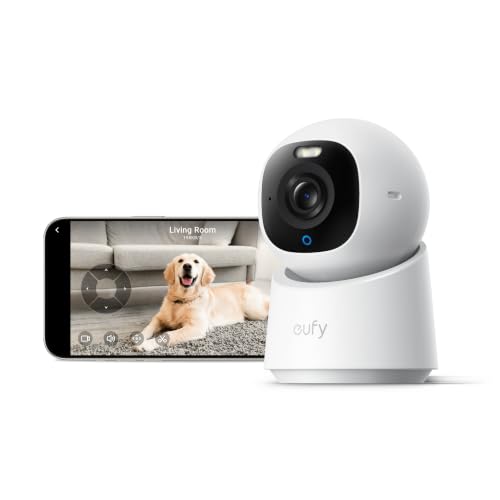
Some inside-house questions are small and specific: did I leave the stove on, what is the thermostat set to, is that the cat on the counter or a shadow, has the parcel been brought inside the porch door? The E30 answers with resolution — a 4K-class view on a pan-and-tilt mount, so the check-in can zoom from the whole kitchen to the one dial that matters and actually read it. Detail, in the peace-of-mind business, is not vanity; it is the difference between reassurance and another hour of wondering.
One glance here usually settles the question definitively. Where lesser cameras produce a probably, the E30 produces an answer: the puppy is asleep and the gate is shut; the plant sitter has been and the leaves are wet; the elderly parent’s kettle is on the counter where the morning routine says it should be. Its tracking follows the household’s movers between those glances, and its on-device intelligence keeps the alerts about people and pets rather than about light.
As the household’s one serious camera, it justifies the flagship-of-the-home role: local storage options keep the archive in the house, the app presents the day as a timeline a family member can actually search, and two-way talk handles the word with the dog-sitter. It is the camera for the main room of a home whose other rooms may wear simpler Wyze-class eyes — a common and sensible architecture.
Its costs follow its class: it is the considered purchase rather than the impulse one, its resolution asks more of the home Wi-Fi than the budget cameras do, and a pan-tilt flagship in the wrong room is as socially loud as its smaller sibling. Give it the room where the household’s questions live — usually the kitchen-family room axis — and it earns its station daily.
Choose it when your check-ins end in a zoom, when one great eye should anchor the house, and when the small print of domestic life — dials, notes on the fridge, the dog’s actual expression — is what you keep wishing your current camera could read.
Fridge-note readers, rejoice: the E30 is the camera that finally settles the household’s written arguments — the shopping list photographed by the person at the shop, the school notice read from the office, the whiteboard calendar checked from the train. Half its owners bought it for security and kept it as a reading lamp for the house’s paper trail.
Interior designers have quietly adopted it for a legitimate trick: reviewing a room’s light across a whole day in its timeline before committing a client to a scheme. A camera that can read a dial can also read a room, and the E30 reads both beautifully.
- Type: high-resolution pan-and-tilt
- Signature: zoom in and read it
- Intelligence: on-device people and pets
- Storage: local options, no forced plan
- Role: the house’s anchor camera
Strengths
- Detail settles small questions.
- Tracking plus presets cover the axis.
- Timeline is searchable by humans.
Trade-offs
- Asks more of home Wi-Fi.
- A considered, not impulse, price class.
- Visible presence in quiet rooms.
Best for: kitchens, family rooms, and detail-driven check-ins.
Not suited for: blanket multi-room coverage on a budget.

Blink Mini 2 — Best for the One Room That Worries You
Not every inside-house brief is a house. Sometimes it is one room: the studio flat whose door is the whole security question, the rental hallway the landlord’s rules keep project-free, the spare room where the new kitten is quarantined. The Blink Mini 2 is built for exactly that scale — a compact camera that sits on a shelf, watches its rectangle honestly, and asks for almost nothing: no installation, no settings odyssey, no presence in the room’s life beyond a small, ignorable silhouette.
A single-purpose watch, kept well, suits this camera perfectly. Because the camera is simple, owners aim it carefully — at the door, at face height, across the path anything entering must cross — and its alerts stay meaningful because its world is small. In the Alexa households it was designed for, it announces itself on the kitchen display and answers to a voice request for a look at the hall, which is the entire feature list many households genuinely want.
For new pet owners it has become a quiet favourite: the kitten cam, the puppy’s first week, the elderly cat’s favourite room during a work trip. Two-way talk lets a voice from the office say the dog’s name in the tone that means settle, and the small camera’s footage of an animal’s ordinary day turns out to be the content owners keep long after the worry that bought it has passed.
Its limits are the limits of modesty: a fixed view that cannot follow, recorded history and person detection that live in its subscription, and night vision sized for rooms rather than halls of any grandeur. Households should adopt it with the plan understood, the way one adopts any small appliance with a service attached — eyes open, brief matched.
Choose it for the one room, the first flat, the temporary worry. It is the camera most likely to be bought on a Tuesday and answering questions by Tuesday night, and in the inside-house category, that speed to reassurance is a genuine virtue.
Its second career is the travel camera for the house left behind: the one-room watch over a flat during a long trip, brought inside the door, announcing arrivals to a phone in another hemisphere. Smallness, in the empty-flat brief, is not a compromise but the entire specification.
Students in shared houses rate it for a subtler virtue: it watches the front door and nothing else, which is exactly the watching a communal household can agree on. The camera that respects the boundary is the camera that survives the house meeting.
- Type: compact wired indoor camera
- Signature: smallness and simplicity
- Ecosystem: Alexa displays and routines
- Plan: history and person detection
- Role: the one-room answer
Strengths
- Up and answering in minutes.
- Disappears into a room’s life.
- Pet check-ins delight owners.
Trade-offs
- Fixed view cannot follow.
- History lives in the plan.
- Night range suits small rooms.
Best for: rentals, studio flats, and single-room worries.
Not suited for: tracking or whole-house coverage briefs.

Ring Indoor Cam (2nd Gen) — Best for Families Already Living With Ring and Alexa
For the millions of homes where a Ring doorbell already stands at the front and Alexa already runs the kitchen, the indoor question answers itself: the camera that joins the existing system wins, because a household’s watching is only as good as its one-timeline, one-app coherence. The Ring Indoor Cam is that extension — simple to place, fluent in announcements and routines, and equipped with the feature this guide wishes were universal: a physical privacy cover that clicks shut and shows the room it is not watching.
Families treat this as a system, not a gadget. Parents share access in the app they already share; the camera by the kids’ hallway joins the doorbell’s timeline, so the evening’s story — arrival, dog, door — reads in one place; the house-sitter gets temporary access that expires with the holiday. Inside-house watching is mostly family logistics, and Ring’s logistics are the most practised in the business.
Its manners in shared spaces deserve the emphasis: the swivelling privacy cover is not a settings page but an object, visible across a room, operable by a grandparent. Households with teenagers, guests, or a cleaner will find that object settles arguments software cannot, because trust in a watched home runs on evidence, and a closed cover is evidence anyone can read.
The familiar Ring terms apply and should be adopted knowingly: recorded history and the richer alerts live in the subscription, and the camera assumes an Amazon-flavoured household. Within those terms, detection is competent, video is honest at room distances, and the whole arrangement has the great virtue of being finished — set up in minutes, understood by everyone, still working next year.
Choose it when the doorbell already says Ring, when relatives will inherit the system, or when the privacy cover’s honesty is the feature your household has been waiting for. It is the inside camera as family infrastructure, and infrastructure should be boring in exactly this way.
The cover has an unexpected social benefit: it gives children a way to understand the system. A child who can close the camera for a birthday party and open it at bedtime has learned the household’s whole privacy philosophy in one gesture, which is more civic education than most appliances provide.
Extended families sharing a holiday house have made it their standard for the same reason: one account structure the whole clan already half-knows, cameras the grandparents can operate, and a cover that makes the watching optional in the rooms where the clan gathers.
- Type: wired indoor camera, privacy cover
- Signature: ecosystem coherence
- Sharing: family access practised
- Privacy: physical, visible, clickable
- Role: the family system camera
Strengths
- Joins the doorbell’s one timeline.
- Privacy cover settles arguments.
- Setup every relative survives.
Trade-offs
- History rents by subscription.
- Detection is competent, not cleverest.
- Assumes an Alexa household.
Best for: Ring and Alexa families, shared households, and guest-heavy homes.
Not suited for: subscription-free local recording briefs.

TP-Link Tapo C210 — Best for Holidays, Sitters, and a House Left Alone
Every inside-house system meets its examination in the same fortnight: the long holiday, when the house is empty, the sitter visits twice a day, the plants need evidence of watering, and the owners are in another time zone trying not to think about pipes. The Tapo C210 is built for that fortnight. Its pan-and-tilt patrols preset viewpoints — door, kitchen, the plant shelf, the boiler corner — on a schedule, recording locally to its card whether or not anyone’s subscription is current, and its person detection keeps the holiday alerts to the sitter’s arrivals and anything that is not the sitter.
Watching runs to a schedule owners actually set. Owners set the patrol before departure the way they set the timer on a lamp, and the camera’s rounds turn an empty house from a single anxious rectangle into a visited place. Baby-cry detection, designed for nurseries, doubles in empty-house service as a general ear for the sounds a house should not make, and the two-way talk lets an owner speak to the sitter — or, once in most owners’ lives, to the person who should not be there — from another continent.
Its openness suits the holiday brief too: footage on the card in the house, streams the household’s own network can record, no plan expiring mid-trip because a card detail changed in March. Households with a NAS fold it into the archive they already keep; households without one still get the card, the app, and a timeline that answers the only holiday questions — who came, when, and did the house behave?
Trade-offs are mild and mostly about polish: the app’s intelligence is a step behind the flagship ecosystems, and the patrol’s presets reward an unhurried setup afternoon before the taxi comes. Neither matters at 30,000 feet, which is where this camera is designed to be judged.
Choose it for the house that empties regularly — the holiday home’s other half, the work-travel flat, the family that summers elsewhere — and for any household that wants its watching to keep working when nobody is home to supervise the watching. That is, when it matters most.
Its patrol has a party trick for the plant-owning classes: a slow scheduled tour of the plant shelf produces, over a holiday, a time-lapse of survival or a timely alert of surrender, and owners have rescued more houseplants with this camera than with any watering gadget ever sold to them.
For the work-travel household it pairs naturally with a smart lock’s log: the Tapo shows what the log merely states, and together they turn a week away into a reviewed, verified, boring story — boring being the highest praise an empty house can earn.
- Type: pan-and-tilt indoor camera
- Signature: scheduled preset patrols
- Recording: local card, plan-free
- Audio: sound alerts, two-way talk
- Role: the empty-house keeper
Strengths
- Patrols make an empty house visited.
- Local recording survives everything.
- Person alerts suit sitter schedules.
Trade-offs
- Presets reward a setup afternoon.
- App intelligence a step behind.
- Pan-tilt presence in quiet rooms.
Best for: holiday homes, work travel, and sitter-managed houses.
Not suited for: flagship ecosystem polish as the priority.
How Do the Six Compare at a Glance?
The lunchtime glance, tabulated: which camera answers which household question, and what each answer costs in manners.
| Camera | Character | Watch out for |
|---|---|---|
| eufy Indoor Cam E220 | Tracking camera for shared rooms | Visible movement needs agreement |
| Wyze Cam v4 | Whole-house value coverage | App polish is mid-pack |
| eufy 4K Indoor Camera E30 | High-detail anchor camera | Wi-Fi appetite is real |
| Blink Mini 2 | Compact one-room camera | Fixed view, plan for history |
| Ring Indoor Cam (2nd Gen) | Ecosystem family camera | Plan carries the history |
| TP-Link Tapo C210 | Patrol camera for empty houses | Setup afternoon required |
How Do You Watch Pets Without Becoming a Prison Warden?
Frame it as correspondence, not surveillance. The pet camera’s best self sends the lunchtime photograph — the dog in the forbidden sunbeam, the cat mid-inspection — and its two-way talk is for a familiar voice saying a familiar word, not for remote discipline, which animals experience as a haunted house. Owners who use the camera to learn the pet’s day end up improving it: the walk retimed to the restless hour the footage revealed, the puzzle feeder placed where the pacing happens.
Share the footage generously; it is the household’s best content. But keep the watching kind in the other direction too — a pet’s camera that runs all day produces an archive of an animal’s private life, and the family that laughs at the counter-surfing should also delete kindly and often. Even the dog is entitled to some unrecorded afternoons.
How Should Cameras Work Around Children as They Grow?
In stages, renegotiated honestly. The baby’s room is a sound-alert brief every parent understands; the toddler’s playroom is a tracking camera’s natural parish; the school-age child’s hallway is a door-and-arrival question; and the teenager’s home is a negotiation in which cameras retreat to entries and shared spaces, on terms the teenager helped set, or the system loses the household’s consent at exactly the age its alerts matter most.
The cameras here support the retreat gracefully — privacy modes, covers, schedules — and households should use those features as the visible machinery of trust. A teenager who can close the cover owns a share of the system; a teenager who is merely watched owns a grievance. The long game of family safety is played in consent, and it is won by parents who trade a little coverage for a lot of credibility.
What Are the Most Common Mistakes With Inside-House Cameras?
The first is the secret camera, discovered — a small object that detonates trust out of all proportion to its price. The second is the unwatched watch: alerts left untuned until the phone’s notifications are a wallpaper of dogs and curtains, at which point the one real event scrolls past unread. Tune in the first week, test by entering as a stranger, and prune the categories until the alerts read like news again.
The third mistake is buying one camera for a three-question house and aiming it at the compromise position that answers none of them. Inside questions are plural and specific; the value picks here exist precisely so the door, the dog, and the basement can each have their own small witness rather than sharing one blurred opinion.
How Do You Introduce a Camera to a House Sitter?
With a tour, a sentence, and a share. Show the sitter where the cameras are, say plainly what they watch and what they never watch, and grant app access that expires when the holiday does. Sitters who are told behave exactly as the household hoped; sitters who discover a lens at midnight in the hallway leave reviews of a different kind, and some leave altogether. The conversation costs ninety seconds and purchases the entire arrangement’s legitimacy.
Leave the courtesy reciprocal: a camera-free room for the sitter’s own evenings, the privacy cover’s operation demonstrated, and the household’s emergency numbers beside the camera app in the welcome note. A watched house that respects its watcher is a house that gets watched well, and the footage from such houses is famously, reassuringly dull.
What Is the Right Retention for a Family’s Ordinary Days?
Shorter than the systems default to, deliberately chosen. The incident clip earns its archive; the ordinary Tuesday does not need immortality. Set the rolling window the household is comfortable with — days, not months, for most — and save deliberately the clips that earn it: the puppy’s first week, the toddler’s patrol, the storm the house survived. Curation is the difference between a family archive and a surveillance hoard.
The same discipline protects the household’s feelings about itself. A family that knows its ordinary days evaporate on schedule relaxes inside its own home; a family that suspects every breakfast is archived forever starts performing. Expiry, in the inside-house category, is a feature of the soul, and the local-recording picks here make it a setting rather than a hope.
How Do Inside Cameras Help With Deliveries and the Porch Economy?
The inside camera’s unglamorous triumph is the parcel’s last ten feet. Aimed at the entry from within, it confirms the delivery brought inside by a neighbour, the groceries’ arrival during the sitter’s watch, the signature-free drop that the courier swears happened at two. Households that receive their lives by post — which is now most households — find the entry camera paying its rent in settled arguments with the logistics industry.
Pair the confirmation with kindness: the same view shows the courier’s name-day struggle with the gate and the neighbour’s child returning the escaped dog. The entry camera, intended as a witness, becomes the house’s memory of its own doorstep community — and most owners, reviewing a year of it, find the community acquitted.
How Should a Watched House Handle the School Holidays?
Renegotiate, because the house’s population inverts: children home all day in rooms that are watched all day is a recipe for a summer of grievances. The holiday settlement most families reach is schedules and covers — living spaces private while the house is occupied, entries always watched, the agreement revisited when term returns. The cameras here make the settlement mechanical rather than argumentative, which is precisely what a long summer needs.
Use the season’s footage dividend too: the holidays are when the pet’s day is shared with its whole audience and the house’s ordinary glory — dens built, gardens raided, grandparents visiting — passes the family room’s lens. A household that watches kindly finds its cameras have been keeping the summer album all along.
How Do You Keep the Watching From Eating the Phone’s Attention?
By editing the alert diet to the household’s real appetite. Person at the door: always. Pet in the family room: the lunchtime digest, not the live ping. Sound in the nursery: during the baby’s years, instantly; after them, never. Every camera here allows some version of that menu, and the households that set it deliberately report the paradoxical result — fewer alerts, more watched footage, because an alert stream that respects attention gets read, and a read stream gets acted on the one time it matters.
Review weekly rather than constantly. A Sunday pass through the week’s saved clips — the dog’s highlights, the arrivals, the storm — keeps the household fluent in its own system without living inside it. Surveillance should be a sense the house has, not a programme the family watches.
What Does the Second Camera Usually Turn Out to Be For?
Not what the first was bought for. The first camera answers the stated brief — the door, the dog, the nursery — and teaches the household its actual curiosity, which is usually one room over: the basement’s pipes, the side door the deliveries use, the elderly parent’s kitchen across town folded into the same app. Budget conversations should expect the second camera the way renovation budgets expect the second skip: not as scope creep but as the plan revealing its true shape.
That is another argument for the value and ecosystem picks in this list: systems that make the second camera cheap, identical, and already understood. The household that standardises early — one app, one set of manners — adds eyes without adding administration, and inside-house watching lives or dies on its administration.
How Can an Inside Camera Help an Elderly Parent Stay Independent?
By watching the routine rather than the person. A camera agreed upon together, aimed at the kitchen’s morning route and the front door, lets an adult child verify the day’s shape — kettle on, post collected, walk taken — without a single checking-up phone call that both parties dread. The parent keeps the house and the dignity; the child keeps the worry at bay; and the camera, aimed at thresholds rather than armchairs, keeps the arrangement respectful enough to last.
Consent is the whole design: the parent holds the app too, knows the watched hours, and can close the watching for visitors and evenings. Families who build it that way report the unexpected — the parent starts using the two-way talk as a doorbell for the family, and the surveillance becomes, in the gentlest sense, a visiting instrument.
What Should You Check in the First Week With a New Inside Camera?
Four things, in order. The night view: is the room’s dark version legible, or a grey soup with eyes? The alert truth: walk the routes as a stranger and as the dog, and grade what the phone reports. The talk test: a conversation through the camera at room distance, judged by the person in the room, not the person holding the phone. And the household test: ask everyone who lives with it, at week’s end, the only question that predicts year two — does it feel like ours yet?
Fix what fails while the receipt is young: reposition before you upgrade, retune before you replace, and renegotiate any placement the household has voted against with its behaviour. Inside cameras are domestic arrangements wearing electronics, and the first week is when the arrangement is set.
How Does an Inside Camera Change the House’s Story About Itself?
Slowly, and mostly for the better. Households with a year of inside footage describe a new kind of family knowledge: the dog’s character documented, the children’s arrivals and departures woven into a timeline, the house’s own behaviour in storms and seasons observed like a member of the family. The camera begins as a security purchase and matures into the house’s memory of its ordinary life, which is why the footage’s manners — consent, curation, expiry — matter more than its resolution.
Keep the memory kind and the system will be renewed by every generation of the household, including the ones who arrive as teenagers with strong opinions. The watched homes that work are not the ones with the most cameras; they are the ones where being looked after and being looked at were never allowed to become the same sentence.
What Buying Mistakes Do Inside-House Shoppers Make?
Buying the security flagship for a reassurance brief is the expensive classic: maximum intelligence aimed at a household whose actual question is whether the dog is asleep. Match the camera to the question — tracking for stories, detail for dials, coverage for roll calls — and the flagship money usually dissolves into two or three perfectly matched smaller eyes.
The second mistake is forgetting the household’s other members in the purchase: the partner who hates being watched in the kitchen, the teenager whose consent was assumed, the cleaner who was never told. A camera bought by one member for all the others starts its life as an argument; the same camera, agreed in five minutes at the kitchen table, starts as infrastructure.
A third mistake is technical and silent: starving the cameras of the Wi-Fi they need, then blaming their picture for the router’s geography. Inside cameras stream from the rooms they watch; a household that would not accept that signal for a work call should not accept it for the nursery. A mesh node near the watched rooms is the least glamorous, most effective upgrade in this entire guide.
Final Recommendation
Name one camera for the most houses and it is the eufy Indoor Cam E220: it follows the story, answers the glance, and keeps the footage at home. Houses with many rooms and one budget should multiply the Wyze Cam v4 instead; houses with one big question and a taste for certainty should anchor on the eufy E30’s readable detail.
The Blink Mini 2 keeps the single room, Ring keeps the ecosystem family, and the Tapo C210 keeps the empty house through the long holiday. Choose by your household’s favourite question, agree the watched rooms out loud, and let the cameras become what the best ones become — unremarkable, trusted, and quietly beloved for the dog footage alone.
Start with one room and one question, live with the answer for a month, and let the household — all of it — vote on the second camera. Inside watching that grows by consent never has to be defended, and it is the only kind still running in year five.
And if the whole enterprise still feels faintly futuristic, remember what the first month teaches every household here: the camera’s real subject was never the intruder. It was the ordinary, beloved, unrepeatable traffic of a home — and being able to glance at it, kindly, from anywhere, turns out to be worth a small lens on a shelf.
Frequently Asked Questions
Is it normal to feel strange about cameras inside my own home?
Completely, and the feeling is useful data. Most households resolve it with boundaries — entries and shared rooms watched, private rooms never, privacy modes during family evenings — and find the strangeness dissolves once the system’s manners are proven. If a placement still feels wrong after a month, it is wrong; move it.
Which camera is best for checking on my dog during work?
The eufy Indoor Cam E220, because it follows the dog across the room and its two-way talk lets you say the settling word. For several rooms of dog, add Wyze Cam v4 units where the dog’s day actually happens — usually the sunny room and the door.
Can I watch my house on holiday without a subscription?
Yes — the Wyze Cam v4 and Tapo C210 record locally to memory cards and alert without a plan, and the Tapo’s preset patrols actively tour an empty house. Tell the sitter the cameras exist, share access for the trip, and revoke it at the airport home.
Should I tell my house-sitter and cleaner about the cameras?
Yes, plainly and in advance — it is courteous, it is the law in many places, and people who know behave exactly as you hoped they would anyway. Point out any camera-free rooms too; the honesty is what makes the arrangement comfortable for everyone who keeps your house running.
Do inside cameras record audio, and does it matter?
Most can, and it matters legally and socially: audio recording is regulated more strictly than video in many jurisdictions, and households often find video alone answers their questions. Check your local rules, consider disabling audio in shared spaces, and never record conversations you would not announce.
How many inside cameras does a house need?
Start with the questions, not the rooms: most households settle at two or three — the entry, the main living space, and one worry room such as the basement or nursery. Add the second camera only after a month of knowing what the first one cannot see; experience is a better surveyor than anxiety.
Related Guides
Complete the household’s peace of mind with our guides to placement and pet watching: best cameras for watching pets while you work where to place indoor cameras: a room-by-room guide privacy modes and covers: keeping a watched home relaxed


