kajuandouglas.com is reader-supported. When you buy through links on our site, we may earn an affiliate commission.
Where to Buy
The best cameras for developers solve a peculiar modern problem: the programmer’s face and desk have become a workplace. The developer in this guide records product demos and walkthroughs, streams pair-programming and builds in public, appears on a dozen video calls a week where seniority is partly judged by presence, and films the occasional conference talk or course lesson. Their camera lives on a monitor, points at a face lit by screens, and must cooperate with a desk already colonised by keyboards, monitors and the hardware being demonstrated — a workflow closer to a broadcaster’s than a photographer’s, conducted by someone whose real job is code.
This guide ranks for that desk: webcams that turn calls into presence, tracking cameras that follow a presenter between whiteboard and screen, and creator cameras for the developer whose demos have become a channel. Buy through the Amazon listings linked below, and note the desk worker’s first law — the microphone and the light change how you sound and look more than any camera upgrade, so the budget keeps its discipline even here.
Key Takeaways
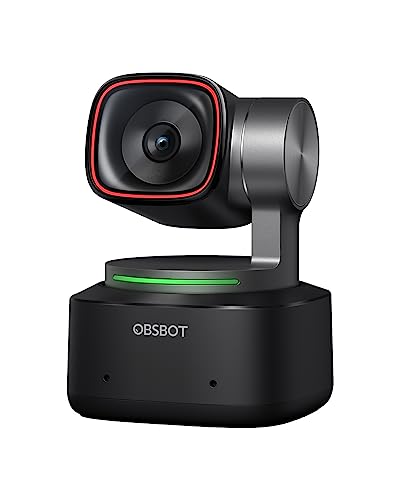
- The OBSBOT Tiny 2 is the developer’s desk flagship — 4K, AI tracking, and gestures that direct the shot mid-demo.
- Logitech’s Brio 4K is the reliable professional standard for calls, interviews and recorded walkthroughs.
- The Elgato Facecam is the streamer’s choice — fixed focus, honest colour, software that behaves.
- Logitech’s StreamCam suits the developer-creator recording demos and vertical content at the desk.
- Sony’s ZV-E10 II is the graduation camera for developers whose demos have become a real channel.
- The DJI Osmo Pocket 3 films the hardware itself — desk tours, device demos and conference vlogging.
In this guide
Quick Picks
| Pick | Badge | Why it earns its place |
|---|---|---|
| OBSBOT Tiny 2 | Best developer desk camera | AI tracking, gesture control and 4K presence — the camera that directs itself during demos. |
| Logitech Brio 4K | Best call standard | The dependable professional: sharp, sane framing options, and drivers that simply behave. |
| Elgato Facecam | Best streamer webcam | Fixed-focus honesty and software built by streaming people for streaming people. |
| Logitech StreamCam | Best creator-desk hybrid | Desk calls plus vertical content and demos, in one friendly camera. |
| Sony ZV-E10 II | Best channel graduation | When demos become a channel: interchangeable lenses, showcase focus, real production. |
| DJI Osmo Pocket 3 | Best hardware and tour camera | Desk tours, device close-ups and conference vlogging with a gimbal’s calm. |
How Did We Choose Cameras for a Desk, Not a Studio?
We judged from the chair the developer actually sits in. Call presence came first: how each camera renders a face lit by monitors in a dim room, at the distance a desk imposes, inside the small window a meeting grid allows. Demo behaviour followed — whether the camera can shift attention from the presenter’s face to the hardware in their hands and back, by tracking, by focus, or by a second angle. We weighed software manners as a feature, because a developer’s camera is an peripheral: drivers that behave, settings that persist, and controls that can be driven from the keyboard matter more than a photographer’s dials. Finally, we scored the graduation path — how each choice fits the arc from calls, to demos, to a channel — since the developer-creator is now a career, and its equipment should not need replacing at every stage.
Why Does a Developer’s Camera Presence Matter Professionally?
Because the remote workplace reads presence as competence’s proxy, unfairly and unavoidably. In a grid of nine faces, the one that is sharp, well-lit and framed like a broadcaster’s is granted an attention the blurry ceiling-cam forfeits before a word is spoken — in the standup, in the design review, above all in the interview loop and the client call where trust is the product. Developers, whose work is otherwise judged by artefacts, meet this visual judgement in exactly the rooms where the artefacts are not present. The investment case follows: a developer’s camera is used more hours than any tool they own except the editor, and its cost divides across thousands of calls into nothing. This guide’s desk picks were chosen to buy that presence without buying a studio — the leap from laptop camera to any of them is the largest single improvement available, and it is mostly framing, light and a sensor that treats a dim room kindly. The rest of the guide is refinement; that first leap is the career move.

OBSBOT Tiny 2 — Best developer desk camera
The Tiny 2 is the desk camera a developer would design: it follows you. Stand to whiteboard the architecture and it pans to keep you framed; sit to code and it settles; hold up the device and a gesture tells it to zoom to your hands. For the developer who demos, teaches or streams alone — which is to say, all of them — that self-direction removes the camera operator problem entirely, and its 4K image and low-light manners give calls and recordings a presence the laptop camera cannot approach.
Its controls reward the keyboard-minded: an app and remote that configure it like a peripheral, profiles that persist, gestures that become muscle memory in a week. It is a webcam at the end of the taxonomy — a dim enough room will find its sensor’s floor — but within the desk’s real conditions it is the most capable instrument here, and the one whose absence, once used, is felt on every call.
- Type: 4K PTZ webcam, AI tracking
- Control: gesture, voice, app and remote
- Connection: USB-C to the workstation
- Lighting: strong low-light manners
- Role: the self-directing desk camera
Strengths
- Follows a presenter between desk and board.
- Gesture control mid-demo, hands free.
- Call presence a class above laptops.
Trade-offs
- A webcam’s sensor floor in true dim.
- Tracking wants a clear view of you.
- Premium price for the category.
Best for: developers who demo, teach and stream solo. Not suited for: cinematic channel production.

Logitech Brio 4K — Best call standard
The Brio is the desk camera of record for professionals who cannot afford surprises, and developers — who debug for a living — will appreciate a peripheral that never becomes a ticket. Its 4K image downsamples into calls with a crispness the grid rewards, its field-of-view choices let the framing be set like a configuration rather than endured, and its low-light correction keeps the evening call from becoming a cave painting. It mounts, it works, it persists its settings, and it has done so across more operating system updates than any rival’s promises.
It does not track, it does not gesture, and its image — while excellent — is a webcam’s honest best rather than a mirrorless body’s. For the developer whose camera life is calls, interviews and recorded walkthroughs at a fixed desk, those are the right compromises, and the Brio’s decade of boardroom trust is a feature no specification lists. Buy it, frame it once, and forget it for years — the highest praise a peripheral can earn.
- Type: 4K USB webcam
- Framing: adjustable field of view
- Lighting: automatic low-light correction
- Mounting: monitor clip and tripod thread
- Role: the call and interview standard
Strengths
- Reliability across years of updates.
- Framing set like a configuration.
- Evening calls stay presentable.
Trade-offs
- No tracking or gestures.
- A webcam’s image ceiling.
- Fixed at the desk by design.
Best for: developers whose video life is calls and interviews. Not suited for: moving presentations.

Elgato Facecam — Best streamer webcam
The Facecam’s design makes a developer’s argument: remove the failure modes. Its fixed focus cannot hunt because it cannot move — the desk’s working distance is simply always sharp — and its uncompressed-minded image pipeline and streaming-native software treat the camera as a broadcast peripheral rather than a photographer’s toy. For the developer who streams builds, pair-programming or game development to an audience, that philosophy delivers the two things live work cannot forgive: predictability and control from the keyboard.
Its fixed focus is also its boundary — step back to a whiteboard and the sharpness stays at the desk’s plane — and its low-light manners ask for the desk light this guide keeps prescribing. Within the streamer’s chair, it is the connoisseur’s webcam: the one chosen by people who have tried the others and stayed for the software. Developers, who choose tools by their interfaces as much as their outputs, will understand it immediately.
- Type: streaming webcam, fixed focus
- Software: broadcast-grade control app
- Focus: always sharp at desk distance
- Connection: USB-C
- Role: the streamer’s desk camera
Strengths
- Focus that can never hunt.
- Software streamers actually praise.
- Predictable, professional image.
Trade-offs
- Fixed focus punishes standing up.
- Wants the desk light provided.
- Calls are served, streaming is home.
Best for: developers who stream regularly. Not suited for: whiteboard-and-walk presentations.

Logitech StreamCam — Best creator-desk hybrid
The StreamCam serves the developer whose desk work has a public side: it handles the day job’s calls with Logitech’s customary reliability, then rotates — physically, in its mount — into vertical framing for the short-form demo, the release announcement, the sixty-second walkthrough the platforms now reward. Its autofocus is a genuine one, unusual in its class, which lets a held-up device or a sketched diagram take focus as the demo requires, and its image has the clean, modern look that reads as intentional on a channel page.
It sits between stools by design — less specialised than the Facecam for streaming, less capable than the Tiny 2 at following a presenter — and its value is exactly that middle: one camera for the developer-creator’s whole desk life before the channel justifies a mirrorless graduation. For the developer testing whether the public side of the work is a hobby or a direction, it is the honest instrument of that experiment.
- Type: webcam with autofocus
- Orientation: landscape and vertical mounts
- Use: calls, demos, short-form content
- Connection: USB-C
- Role: the developer-creator’s bridge
Strengths
- Vertical content without a second rig.
- Real autofocus for held-up hardware.
- One camera for job and channel.
Trade-offs
- Middle of every specialism.
- No tracking for presenters.
- A bridge, meant to be crossed.
Best for: developers building a public side to their work. Not suited for: dedicated streamers or pure call use.

Sony ZV-E10 II — Best channel graduation
There is a moment in many developers’ public work when the desk camera’s ceiling becomes the content’s ceiling — the course that needs cinema’s grammar, the hardware review that needs a macro’s eye, the conference talk filmed like a keynote. The ZV-E10 II is that moment’s camera: a mirrorless body whose product-showcase focus was practically designed for device demos, whose lenses cover the desk, the device and the room, and whose image steps the channel into a class a webcam cannot enter.
It brings a production’s obligations with it — light, audio, a desk rearranged around a camera rather than a camera perched on it — and it should be bought when the channel’s audience, not the gear instinct, asks for it. Developers will recognise the pattern: it is the rewrite, undertaken when the prototype has proven the product. Keep the webcam for calls; graduate the content to this, and the desk becomes a studio in the hours the calendar allows.
- Format: APS-C mirrorless, E mount
- Focus: product showcase for devices
- Audio: microphone input, production-grade
- Lenses: desk to macro range
- Role: the channel’s camera
Strengths
- Device demos with showcase focus.
- A channel-class image.
- Lens growth for courses and reviews.
Trade-offs
- A production’s obligations included.
- Overkill for calls alone.
- Desk must make room for it.
Best for: developers whose demos have become a channel. Not suited for: call-only desk use.

DJI Osmo Pocket 3 — Best hardware and tour camera
The developer’s second angle is a camera that can look at the work: the Pocket 3 glides over a desk setup, tilts down a device’s ports and seams, follows its owner through a conference hall, and turns the physical side of a software life — the hardware, the office, the event — into footage with a production’s smoothness. Its close focus handles the device detail that demos are made of, and its subject tracking keeps a walking presenter framed through a hackathon’s chaos.
It is a complement in the classic pattern of this guide: the desk cameras above own the face, this owns everything the face is talking about. Developer-creators who add one find their demos acquire the B-roll that separates a recording from a production — the keyboard’s travel, the board’s traces, the room’s life — shot in the minutes between the work itself, by a camera that asks for one hand and no decisions.
- Type: pocket gimbal camera
- Focus: close for device detail
- Tracking: walking presenter following
- Handling: one-handed, anywhere
- Role: B-roll, tours and events
Strengths
- The desk’s physical world, smoothly.
- Device close-ups without a rig.
- Conference vlogging in a pocket.
Trade-offs
- A complement, not the desk camera.
- Fixed lens perspective.
- Session battery life.
Best for: developer-creators filming hardware and events. Not suited for: the primary call camera.
What Makes a Good Product Demo Recording?
Clarity of attention. A demo fails when the viewer’s eye does not know where to live — the presenter’s face, the screen, the device in hand — and succeeds when the camera work assigns attention as deliberately as the narration does. The desk tools in this guide divide that labour: tracking cameras that reframe as the presenter moves between whiteboard and desk, showcase-focus bodies that snap to the hardware held up for inspection, and the humble second angle — the Pocket 3 looking down at the device — that turns ‘as you can see’ from a lie into a fact. Audio carries the same duty; a demo is a lecture with props, and its microphone outranks its camera in every budget. Developers already think in this structure when they write documentation — overview, detail, example — and the demo is documentation performed. Film it in that order, keep each shot’s subject singular, and the camera that merely obeys will look like a production.
How Should a Developer Light a Desk for Video?
With one soft source, placed like a thought rather than a lamp. The desk’s native light — monitors — is blue, flickering in spirit and unflattering in fact, casting the face in the pallor of a person lit by a spreadsheet. A single key light, large and diffused, placed high to the side the camera favours and dimmed to coexist with the screens, replaces that pallor with modelling; a faint fill or a practical lamp behind gives the background depth so the presenter separates from the room. Colour discipline matters in miniature here: the key’s temperature chosen once, the monitors’ night settings respected, the camera’s white balance locked rather than wandering as windows open and close in the IDE. The whole apparatus fits in a corner and a modest budget, and it transforms every camera in this guide by the same multiplier — which is why this guide repeats, for the last time in this batch, that light precedes lenses. A developer would never ship code without tests; the desk’s light is the test suite for the face.
How Do You Record a Screencast and Face Camera Together?
As two productions that agree to share a timeline. The screen capture is the primary document — crisp, cursor-disciplined, recorded at a resolution the platform will not mangle — and the face camera is its presenter, sized and placed by the edit’s grammar rather than the recorder’s default corner. Record the two separately wherever the tools allow, because the composite baked in live cannot be reframed when the demo’s emphasis changes, and the developer’s future self, re-editing for a different platform, will bless the separation. Audio is recorded once, cleanly, as the master clock both pictures obey. The desk cameras in this guide serve the face half with their various intelligences; the discipline — separate files, one clock, an edit that decides the layout — is the developer’s own. Practise the workflow on a five-minute demo before the course or the launch depends on it, and save the project template, because a developer of all people knows that a pipeline built once, properly, is the difference between a hobby and a practice.
What Desk Setup Serves Both Calls and Content?
One desk, two configurations, switched by habit rather than by rebuild. The call configuration is the camera on the monitor, the key light at its working angle, the background as the room honestly is. The content configuration adds the second angle or the graduated camera, the backdrop or background discipline, and the microphone arm swung from its parked position to its working one. The trick is that every element lives in both configurations’ reach — nothing is fetched from a cupboard, because a setup that requires fetching will be skipped on the tired days that decide a channel’s fate. Cable the desk once, with the same seriousness as the workstation itself, and label the switch-points the way the church team labels its desk. Developers will recognise the pattern as environment configuration: the desk as code, versioned, reproducible, and boring in the way that lets the interesting work happen on top of it.
How Should a Developer Film a Conference Talk or Meetup?
Portably, redundantly, and with the organiser’s blessing obtained in writing beforehand. The Pocket 3 in this guide is the talk’s natural instrument — it films the speaker’s own perspective for the vlog, the audience’s reaction for the B-roll, and, on a small tripod at the room’s edge, a respectable record of the talk itself where the event’s own recording is not guaranteed. Audio is the talk’s survival: a wireless lapel on the speaker, or the desk’s feed where the venue offers it, because a conference recording with room-echo audio is a souvenir, not a resource. Record in two places whenever the talk matters — the camera and a phone in the speaker’s pocket have saved more conference content than any other system in this guide’s world. Afterwards, publish promptly with the slides linked and the timestamps chaptered; the developer community’s currency is shared knowledge, and a talk that exists, findable and watchable, compounds in value for years.
Why Do Developers Underestimate Audio More Than Other Creators?
Because their professional formation taught them that content is text and text is silent. The developer’s artefacts — code, docs, posts — make their arguments in a medium without a voice, so the first demos are filmed with a writer’s instincts and a laptop’s microphone, and the audience’s verdict arrives as a mystery: strong material, abandoned at minute two. The correction is a single experiment — record the same sixty seconds through the laptop and through any real microphone, and listen on the headphones the audience uses — after which no developer in this guide’s experience has ever un-bought the microphone. Position it close, arm it out of the keyboard’s way, and treat its level with the same respect as a production deploy. The desk cameras here will make you look like a broadcaster; the microphone is what makes you sound like one, and in the developer’s rooms — the interview, the demo, the course — sound is where the trust is actually audited.
How Do You Build a Public Developer Practice Without Burning Out?
By making the equipment disappear into a routine small enough to survive a release week. The developers whose channels endure are not the ones with cinema rigs but the ones whose recording setup is a keystroke and a light switch — the desk in this guide’s earlier section, configured once — so that a demo costs twenty minutes, not a production day. Batch the public work the way the work itself is batched: demos filmed in one session, edited in another, published on a rhythm the job’s crunch cannot assassinate. Choose the camera tier that matches the routine’s honesty — the Tiny 2’s self-direction and the StreamCam’s bridge exist precisely for creators whose crew is themselves at midnight. And let the practice serve the career visibly: the talk, the course, the reputation are the returns, and they compound at the pace of consistency, not of production value. The best camera for a developer is the one still being used in year two, which is a sentence about friction, not about sensors.
What Is the Developer’s Equivalent of the Self-Tape Corner?
The demo corner: a permanent, ready state of the desk where a recording can begin in under a minute. Its elements are the church corner’s and the actor’s, translated — the camera framed and focused on the presenter’s mark, the light at its angle, the microphone armed, the screen’s notifications silenced by a profile rather than by hope, and a template project that opens with the layout already built. Developers will recognise the pattern as a well-kept development environment, and should maintain it with the same rituals: dependencies updated in the quiet weeks, the configuration documented, the whole thing reproducible after the inevitable machine rebuild. The demo corner’s existence changes the economics of sharing knowledge — the bug explained on video instead of in a thread, the feature walked through instead of described — because the cost of starting approaches zero. Build it once, defend it from the desk’s entropy, and the public practice this guide describes becomes a habit rather than a project.
How Should a Developer Choose Between Tracking and Fixed Cameras?
By how much of the performance is movement. The seated demo — face, screen, the occasional held-up device — is served by fixed cameras whose sharpness never wanders, and the Brio and Facecam in this guide divide that parish by temperament. The teaching performance — whiteboard, standing desk, the architecture sketched in the air — needs the Tiny 2’s following eye, because a fixed frame amputates it. Many developers’ work contains both in a single video, and the honest answers are the tracking camera’s zoom gestures or the two-camera edit, chosen by budget and by how often the standing work truly happens. Audit a month of your own recordings before buying: the ratio of seated to standing minutes is written in them, and it, rather than any reviewer’s enthusiasm, should cast the vote. Tools follow diaries in every craft in this batch of guides; the desk is no exception.
What Privacy and Employer Considerations Attach to a Developer’s Camera?
More than most creators face, because the developer’s screen is a workplace and its contents are often someone else’s property. The demo that shows a proprietary codebase, a customer’s data in a dashboard, a colleague’s message in a notification — each is a small incident with a long tail, and the disciplines are the profession’s own: demo data by default, a separate profile or machine for recording, notifications silenced by configuration, and the employer’s policy on public work read before the channel, not after the first video. Many employers encourage the public practice within those lines, recognising its recruiting value; the developer who asks first and records cleanly builds the practice on rock. The camera itself is innocent in all of this — but the developer, of all creators, knows that a system’s safety is a property of its configuration, and the recording desk deserves the same threat model as any other production environment.
How Does Remote Pair Programming Change the Camera Brief?
It makes the camera a collaboration tool rather than a broadcast one, and the brief changes accordingly. Pairing sessions are long, unscripted and intimate — two people thinking aloud for hours — so the camera must disappear for durations no demo demands: no thermal sulks, no focus breathing during a long consideration, a frame wide enough for the gestures thinking makes. The audio brief inverts, too: the pairing microphone must catch the muttered half-sentence without catching the keyboard’s percussion, a proximity and placement puzzle the guide’s microphone sermon applies to directly. Presence in pairing is about trust at low bandwidth — the partner reads attention from the frame, and a camera that holds a natural, well-lit, unmoving portrait of a thinking person is doing deep work with no visible effort. The Brio’s stamina and the Tiny 2’s settled framing both serve it; the choice is whether the pairing is seated and fixed or moves between desk and board. Either way, the pair that can see each other properly thinks together better, which is the closest this guide comes to a productivity claim for a webcam.
How Do You Choose a Monitor Arm and Camera Position That Flatter?
By treating the camera’s position as a portrait decision, because it is one. The lens belongs at eye level or a whisper above — the angle of a colleague across a desk — never at the laptop’s grovelling tilt or a shelf’s surveillance height. Its distance sets the framing’s honesty: close enough that the face fills the call window’s attention, far enough that gestures survive. A monitor arm or a small tripod behind the screen achieves what stacks of books rehearse, permanently and without the weekly collapse. Light follows the position — the key placed for the camera’s actual eye, not the room’s convenience — and the background is composed from the camera’s viewpoint, audited on screen rather than by standing in the room and guessing. Developers, who arrange their physical desk with a configurator’s care, will recognise the task as interface design with themselves as the interface. Spend one evening on it, photograph the result, and save the settings; the position, once right, should become as unconsidered as the chair.
What Is the Best Way to Record a Coding Session for an Audience?
In segments, with the narrative built before the code is. A raw hour of coding is a surveillance tape; a course is a story with the code as its evidence. The working method records in deliberate chapters — the problem stated to camera, the attempt filmed at the desk with the face camera small, the breakthrough given its moment, the recap delivered straight to the lens — and the edit assembles the chapters into the argument the viewer enrolled for. The cameras divide the labour as this guide has mapped: the desk camera for the presenter, the screen capture as the primary document, the Pocket 3 for the hardware when the code touches the world. Silence is edited as ruthlessly as error; the audience’s time is the budget, and the developer who respects it in the edit is repaid in completion rates, the metric every platform actually grades. Record the chapters out of order if the work demands it — the recap often films best when the outcome is known — and let the template project hold the series’ shape, so episode twelve costs an afternoon rather than a reinvention.
How Should a Developer Handle Two Cameras on Calls?
Mostly by not needing to — and by knowing the exception. The single desk camera, well placed, serves ninety percent of a developer’s call life, and complexity on a call is a tax paid in the first minute’s fumbling. The exception is the demo-heavy meeting — the design review with hardware, the client walkthrough with a device — where a second angle earns its invitation. The graceful pattern is the desk camera as the default and the second view as a deliberate share: the Pocket 3 or a phone on a stand, switched to intentionally, narrated as it happens, so the audience experiences a production rather than an accident. Rehearse the switch until it is a sentence long. And return to the single camera for the discussion, because faces are where meetings happen. The developer who masters that choreography is remembered as the person whose demos simply worked — a reputation, in remote companies, that attaches to promotions with a reliability no one discusses and everyone observes.
What Ergonomics Does a Camera Desk Need for Long Days?
The camera’s presence should cost the body nothing. The monitor at its ergonomic height with the camera riding it, so the gaze that reads code is the gaze that meets the call. The key light placed to serve the face without shining in the eyes across an eight-hour day — soft, indirect in feel, dimmable for the evening’s calls. The microphone arm parked where the keyboard’s work never collides with it, swung in for the call and out for the build. These are small arrangements, and their sum is the difference between a desk that performs for an hour and one that performs for a career. Developers, who will spend money on a chair’s lumbar argument, should recognise the camera desk as the same discipline wearing a lens: the body is the first peripheral, and its comfort is a production value because fatigue photographs beautifully clearly. Set the desk once, at the standard of a whole day, and the calls inside the day inherit the ease.
How Do You Keep a Desk Setup Working Across OS Updates and New Machines?
By documenting it like infrastructure, because that is what it has become. The camera’s settings saved and screenshotted, the app’s profile exported where the app allows, the cable map and the mount positions recorded in the same note that holds the workstation’s other rebuild knowledge. Developers rebuild machines the way other people move house — regularly and with feeling — and the recording desk that must be rediscovered each time will eventually not be. Prefer cameras whose settings live in the device rather than in a vendor’s cloud mood, whose drivers the platform treats as citizens, and whose software the community has stress-tested across versions — the Brio’s and Facecam’s reputations in this guide rest substantially on exactly this boring excellence. Test the whole chain after every major update in a private call before the interview does it for you. Reliability is a feature that only appears in retrospect; buy the tools whose retrospect is longest.
What Is the Developer’s Lighting Upgrade Path?
One light, then control, then depth — in that order, at the pace the footage requests. The first light is the key: a soft panel at the working angle, transforming every camera in this guide at a stroke. Control comes second — the dimmer, the curtain or flag that keeps the key off the background, the monitor brightness disciplined into the same exposure story — because a light you cannot shape is a flood with ambitions. Depth is third: the faint background practical or the gentle fill that separates the presenter from the room, the touch that reads as ‘studio’ in a call window’s thumbnail. Each stage is a modest purchase and a permanent one, since lights outlive cameras by a generation. Stop when the calls stop noticing — the desk’s lighting is finished when it disappears, and the developer who keeps buying past that point is decorating, which is allowed, but should be filed honestly in the budget under joy rather than under equipment.
How Should a Developer Evaluate a Camera’s Software?
As the product, because at a desk it is. Read the software the way you would a dependency: does it persist settings across reboots and updates, does it expose its controls without a mouse safari, does it behave when three video apps contend for the device, and what is its maintenance history — the changelog’s cadence is the vendor’s character reference. The community’s issue trackers and forums tell the truth that marketing omits, and developers are professionally equipped to read them. Prefer the camera whose failure modes are known and boring. The Tiny 2’s app, the Facecam’s streaming suite and Logitech’s utilities each represent a philosophy; choose the one whose philosophy matches how you already work, because the camera you configure weekly is the camera whose image will drift, and the one configured once is the one that will still be right at the interview. In desk video, the sensor proposes and the software disposes.
What Is the Conference and Travel Version of the Desk Setup?
A kit that fits the laptop bag’s margins and assembles in a hotel room in five minutes. The laptop’s own camera is the fallback, not the plan: a compact webcam from this guide’s desk family, a mini tripod that puts it at eye level on a stack of the room’s furniture, and the discipline to use the window’s light or the desk lamp’s, arranged as the home desk taught you. The Pocket 3 covers the conference itself — the talks, the hallway track, the city between venues — as this guide has described. Audio travels as a small USB or wireless microphone, because hotel rooms echo like stairwells and the recorded interview is the trip’s deliverable. Test the kit at home, packed and unpacked against a clock, because the travel setup that needs a manual is luggage, not equipment. The developer whose presence survives travel intact is practising the same lesson as every craft in this batch: the setup is a system, and systems are what travel.
How Do You Make a Small Room Look Like a Studio on Calls?
By subtraction and one light. The call frame reads as ‘studio’ when the background is calm, dimmer than the face, and free of the room’s narrative clutter — achieved less by buying a backdrop than by turning the desk toward the room’s plainest wall and letting a shallow depth and a dim background do the rest. The key light at its angle supplies the modelling; a faint practical behind — a lamp, a shelf’s glow — supplies the depth cue the eye reads as production. The cameras in this guide, given that arrangement, produce call images that clients describe as professional without knowing why. Audit the frame on a recorded test call, from the audience’s seat, and fix what the recording confesses: the door that opens mid-frame, the window that blows out at noon, the poster whose joke does not survive the crop. A room becomes a studio the way code becomes a product — by removing everything that is not the point, and testing what remains from the user’s side.
What Is the Minimum Viable Streaming Setup for a Developer?
A camera that behaves, a microphone that is close, a light that is soft, and a scene layout saved as a template — four items, each chosen once. The Tiny 2 or Facecam class covers the camera with self-direction or discipline; the microphone on its arm covers the voice; one panel covers the face; and the streaming software’s saved scene covers the production. Everything beyond the four is refinement with diminishing returns, purchasable later from evidence. The setup’s virtue is its startup cost in willpower: stream in under two minutes from the decision, because a practice that requires an hour of assembly will be assembled rarely. Developers understand minimum viable products instinctively; the streaming setup deserves the same respect — ship the four, learn from the audience of the first ten streams, and let their evidence, not the catalogue, write the roadmap. The developers still streaming in year two are, without exception in this guide’s observation, the ones whose version one was small enough to survive their own schedules.
How Should a Developer Record a Tutorial Series Consistently?
With a template that makes every episode’s production a fill-in exercise. The series’ look — framing, light, lower-third, intro — is decided once and locked into the project template; the camera’s settings are saved and sacred; the recording checklist is the demo corner’s, reused. Consistency is the series’ brand and its economics: the audience learns the format’s grammar and stops spending attention on it, while the producer’s per-episode cost falls toward the cost of the knowledge alone. Film in the batches this guide described for makers — the desk configured once, several episodes’ pieces to camera in one session — and keep an episode bank against the weeks the job consumes. When the series outgrows the desk, the graduation to the ZV-E10 II class happens between seasons, with the template rebuilt and the audience told a cheerful lie about a ‘new studio’. Consistency, in tutorials as in APIs, is a kindness to the consumer that compounds; break it only for a version worth migrating for.
What Mistakes Do Developers Make on Camera?
Shipping the default is the first: the laptop camera’s angle — up the nose, against a ceiling — accepted for years by people who would never ship default settings in anything else. Second is audio by laptop microphone, the voice arriving through a keyboard’s echo chamber while a microphone that costs an hour’s wage sits unbought. Third is the unlit face, lit only by monitors, wearing the pallor of the screen into rooms where presence is being judged. Fourth is demo chaos: recordings that wander the desktop, notifications performing uninvited, the viewer’s attention unmanaged — cured by the same preparation a good commit gets. Finally, developers over-buy the camera and under-buy the system around it, when the desk’s truth is the reverse: framing, light, audio and a camera that merely behaves will outperform a cinema body perched on a monitor in a dark room, every call, every demo, every time.
Comparison Table
| Camera | Desk strength | Best developer role | Watch out for |
|---|---|---|---|
| OBSBOT Tiny 2 | Tracking and gestures | Solo demos and teaching | Sensor floor in dim rooms |
| Logitech Brio 4K | Reliability and framing | Calls and interviews | No movement intelligence |
| Elgato Facecam | Fixed focus, software | Streaming | Sharp only at desk plane |
| Logitech StreamCam | Vertical and autofocus | Creator-desk bridge | Middle of specialisms |
| Sony ZV-E10 II | Production image | Channels and courses | A studio’s obligations |
| DJI Osmo Pocket 3 | Gimbal B-roll | Hardware and events | Not a call camera |
Final Recommendation
Start where your hours are: calls and interviews belong to the Brio’s reliability, solo demos and teaching to the Tiny 2’s self-direction, streaming to the Facecam’s discipline, and the public experiment to the StreamCam’s bridge. Graduate the content to the ZV-E10 II when the audience asks, and give the work its second angle with the Pocket 3. In every case, buy the light and the microphone in the same month as the camera — a developer’s presence is a system, and the camera, as ever in this batch of guides, is only its most visible component.
Related guides
Frequently Asked Questions
Is a webcam enough, or do I need a mirrorless camera?
For calls, interviews and most demos, a good webcam is not a compromise but the correct tool — it lives on the monitor, never needs charging, and its image in a meeting window is indistinguishable from a mirrorless rig’s. The mirrorless graduation is for content: courses, reviews and channels where the footage is the product and is watched full-screen by people who chose it. Let the audience’s attention, not the catalogue, make the call.
Why do I look washed out and tired on calls?
Monitor light. Your screens are lighting you with blue-grey light from below eye level, the least flattering arrangement known to portraiture. One soft key light, higher and warmer, placed to the side the camera favours, replaces it — and every camera in this guide will look a class better for the same inexpensive reason. Lock the white balance afterwards so your IDE’s colour scheme stops redecorating your face.
How do I demo hardware without the focus hunting?
Give the camera a decision it can keep. Tracking and showcase-focus tools — the Tiny 2’s zoom gestures, the ZV-E10 II’s product mode — exist for exactly the held-up device moment; failing those, pre-focus on your hands’ position and bring the device to the focus rather than asking focus to find the device. Light the desk well and every autofocus system in this guide becomes braver.
What microphone should a developer buy first?
A USB microphone on an arm, close to the mouth and out of the keyboard’s line of fire — proximity defeats the room, the arm defeats the typing, and the combination makes every recording and call sound like a studio’s. Headset microphones serve the call-only life honourably. Either outranks any camera upgrade in this guide for perceived quality, which is why it is this FAQ’s most repeated sentence across the batch.
Can I use one camera for calls and streaming?
Yes — every desk pick here does both, and the choice is about emphasis. The Brio is the call professional that streams competently; the Facecam is the streamer that takes calls with discipline; the Tiny 2 directs itself through both. Pick by which room judges you more harshly, and let the other room enjoy the overflow of a good tool.
How do I look professional on a job-interview call?
Rehearse the frame like a demo: camera at eye level, face lit by your key light, background tidy and dimmer than you, framing at the chest-up composition interviews read as standard. Test the whole chain in the actual app the night before — permissions, audio device, the virtual background’s temptation resisted. Interviewers form the presence judgement in the first minute; the developer who treats that minute as a production has understood the assignment.
How should I arrange a second camera angle for desk demos without cluttering my workspace?
Place the overhead or side view on a small arm clamped behind your monitor, keeping cables routed away from keyboard travel and mouse movement. Aim that view at a plain mat where components, notebooks, or hardware prototypes enter and leave cleanly without crossing coffee cups. Mark two discreet tape points showing where hands should pause, then test readability by recording thirty seconds and watching at normal size. If labels remain legible and reflections stay controlled, lock every joint firmly. Remove the arm between filming blocks if your ordinary programming posture starts suffering for the sake of occasional footage.
What recording habits make editing a coding tutorial far less painful later?
Pause briefly before each new step, state the goal aloud, and leave a clean silence after errors instead of apologising while typing continues. Record terminal output at a font size viewers can read on laptops, zooming the editor before explanations rather than during frantic mouse movements. Keep a timestamped scratch note whenever you change branches, install dependencies, or skip a command for brevity. Those small markers become chapter boundaries during editing, turning a long capture into navigable lessons. Finish by filming a short recap facing the camera, because future viewers often decide within moments whether your teaching style suits them.
Related Guides
Keep exploring: best cameras for studio interviews, best cameras for filming youtube, and best cameras for campus.


