kajuandouglas.com is reader-supported. When you buy through links on our site, we may earn an affiliate commission.
Where to Buy
The best cameras for Blue Iris are decided by one unglamorous question: will the camera hand Blue Iris a standard video stream it can record, motion-detect and archive on your own PC? Blue Iris is Windows software that turns a computer into a proper network video recorder, and it speaks the open languages of the camera world — RTSP streams and ONVIF discovery and control. The best cameras for Blue Iris are therefore the ones that speak those languages fully and locally, without routing your footage through a manufacturer’s cloud, a subscription, or an app that can be discontinued. Buy through the Amazon listings linked in this guide, confirm the exact model name before ordering — camera families reuse similar names across incompatible models — and treat any camera that cannot stream locally as a different product category altogether, however good its own app may be.
That last point eliminates some famous names, and this guide will say so plainly rather than pretend otherwise. Battery cameras from the big doorbell ecosystems generally cannot feed Blue Iris a continuous local stream; they are designed around cloud clips and their makers’ subscriptions. If your heart is set on Blue Iris — for its recording depth, its motion detection, its freedom from monthly fees — then the picks below are the cameras that respect that choice, ranked by how completely they integrate, how they are powered, and what they are genuinely good at watching.
Key Takeaways
- The TP-Link Tapo C210 is the easiest indoor start with Blue Iris: pan-and-tilt coverage, local recording options and an RTSP stream the software can pull.
- eufy’s Indoor Cam E220 offers sharp 2K footage and an RTSP option for local servers, in a camera that also behaves well standalone.
- The eufy 4K Indoor Camera E30 is the detail pick for indoor Blue Iris setups where faces and number plates at the door matter.
- REOLINK’s Argus PT Ultra covers the outdoors without wiring, but battery Reolink models reach Blue Iris through Reolink’s hub or NVR path rather than a direct stream.
- The Wyze Cam v4 is the budget experiment: capable hardware whose streaming support has varied across Wyze’s history, so verify before building around it.
- A wired PoE camera such as Amcrest’s 5MP turret remains the Blue Iris old-school benchmark — no stream drama, ever — though it sits outside this guide’s linked pool.
In this guide
Quick Picks
| Pick | Badge | Why it earns its place |
|---|---|---|
| TP-Link Tapo C210 | Best indoor starting point | Pan-tilt coverage and a local stream Blue Iris can record around the clock. |
| eufy Indoor Cam E220 | Best balance of app and server | 2K clarity, pan-tilt range and an RTSP route to your own recorder. |
| eufy 4K Indoor Camera E30 | Best indoor detail | 4K capture for doorways and tills where identification matters. |
| REOLINK Argus PT Ultra | Best wire-free outdoor route | Solar-friendly pan-tilt outdoor coverage that joins a Reolink-based system. |
| Wyze Cam v4 | Best budget experiment | Strong hardware value; confirm the streaming path before committing. |
| Amcrest 5MP PoE Turret Camera | Best wired benchmark | The traditional Blue Iris answer: ONVIF-clean, PoE-powered, no cloud required. |
How Did We Choose These Cameras for Blue Iris?
Integration came first, defined strictly: can Blue Iris discover or be pointed at the camera, pull a continuous stream, receive motion events or record continuously, and keep doing it if the manufacturer’s cloud vanished tomorrow? Cameras that pass fully rank above cameras that pass through an intermediary, which rank above cameras whose support is historical or firmware-dependent — and the verdicts below say which is which, because a Blue Iris user burned by a camera that stopped streaming after an update does not forgive the guide that hid the caveat. Power came second: wired and PoE cameras suit a recorder that never sleeps, while battery cameras are episodic by design and enter a Blue Iris system only through their makers’ hubs. Third was the camera’s own quality — resolution, night vision, field of view — judged for the indoor and outdoor posts these cameras actually fill. Finally, we kept one prose-only benchmark in the list, the kind of wired PoE camera Blue Iris was built around, because a guide that only ranked app-era cameras would mislead the reader about where the reliability ceiling actually sits.
A note on expectations: Blue Iris rewards the tinkerer. Every camera here needs an IP address you can find, a stream path you may need to enter by hand, and a PC that stays awake. Readers who want a sealed appliance with an app should buy one of these cameras for its own ecosystem instead — several are excellent that way — but this guide’s rankings serve the reader who has chosen the recorder and wants cameras worthy of it.
What Do RTSP and ONVIF Actually Mean for Your Setup?
RTSP is the stream itself — the address Blue Iris opens to receive video, usually written as a URL with the camera’s IP, a port and a path. ONVIF is the handshake around it: discovery so the software finds the camera, profiles that describe its streams, and in fuller implementations the pan-tilt commands and event notifications that let Blue Iris move the camera and react to its motion detection. A camera can offer one without the other, and the difference shows in daily use: RTSP alone gives you recording with Blue Iris doing its own motion analysis, which many users prefer anyway, while ONVIF done well gives you two-way convenience. When a listing claims ONVIF support, the honest follow-up questions are whether it covers the profile your software needs and whether enabling it requires the maker’s app, an account, or a firmware that can change. The picks below were sorted with those questions asked, and their trade-offs name the answers we could stand behind.

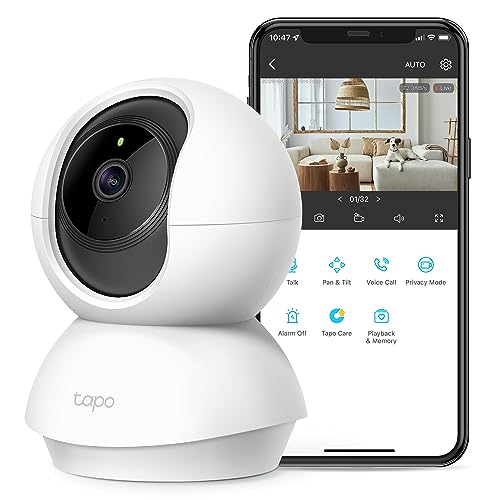
TP-Link Tapo C210 — Best indoor starting point
The C210 is where a Blue Iris beginner should start indoors: it pans and tilts to cover a whole room from one shelf, records locally to its own card as a fallback, and offers the camera-account RTSP streaming that lets Blue Iris pull a continuous feed for recording and motion work. Setup follows the pattern this whole category shares — create the camera account in the Tapo app, note the IP address your router assigns, and add the stream in Blue Iris — after which the camera becomes a quiet, reliable room sentinel. Tapo’s ecosystem has historically nudged users toward its cloud plans, and firmware changes deserve a watchful eye, but the local path exists and works, which is the entire ballgame for this guide. As a camera it is honest mid-range work: clear enough to identify a face across a room, night vision that covers domestic distances, and two-way talk for the moments a recording is not enough.
- Type: indoor pan-and-tilt Wi-Fi camera
- Streaming: RTSP via camera account for local servers
- Storage: microSD local recording plus Blue Iris archive
- Night vision: infrared for room-scale distances
- Extras: two-way audio, motion tracking
Strengths
- A documented local-stream path that Blue Iris can use continuously.
- Pan-tilt range replaces two fixed cameras in most rooms.
- Easy first camera for learning the Blue Iris workflow.
Trade-offs
- Wi-Fi only; a weak signal means a wavering stream.
- Cloud-plan prompts in the app require ignoring with intent.
- Keep firmware notes: verify streaming after major updates.
Best for: first-time Blue Iris users covering living spaces, hallways and home offices. Not suited for: outdoor duty or mission-critical wired installations.

eufy Indoor Cam E220 — Best balance of app and server
The E220 is the diplomat of this list: a polished standalone camera — sharp 2K image, smooth pan and tilt, pet and person awareness in its own app — that also offers an RTSP stream for owners who run their own recorder. That dual citizenship matters because many households are split: one person wants the app, the other wants Blue Iris, and this camera serves both without a fight. In Blue Iris it behaves as a well-mannered indoor stream; in the app it remains the camera you check from holiday. Its limits are the indoor Wi-Fi limits shared by the category — no PoE, no weather sealing, dependence on your wireless coverage at the far end of the house — and eufy’s settings for RTSP live inside its app, so keep the app account even if you rarely open it.
- Type: indoor pan-and-tilt Wi-Fi camera, 2K
- Streaming: RTSP option for NAS and local servers
- Storage: microSD, plus optional maker cloud
- Detection: person and pet awareness in-app
- Audio: two-way talk
Strengths
- Genuinely good both inside Blue Iris and outside it.
- Image quality a clear step above entry cameras.
- Pan-tilt coverage for open-plan spaces.
Trade-offs
- Stream setup depends on the maker’s app and account.
- Indoor only, and Wi-Fi only.
- Advanced detection features live in eufy’s world, not Blue Iris’s.
Best for: households splitting the difference between an app camera and a real recorder. Not suited for: purists who want zero manufacturer accounts anywhere in the chain.
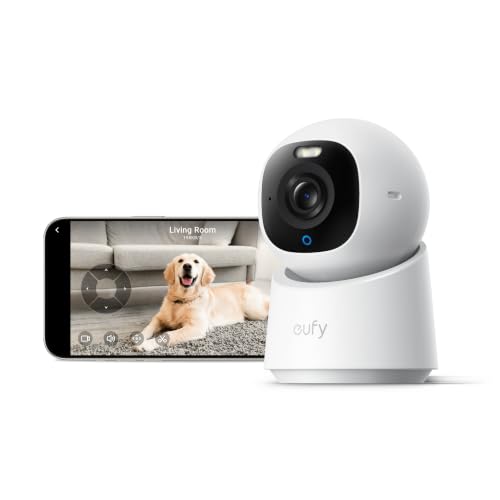
eufy 4K Indoor Camera E30 — Best indoor detail
Where the E220 balances, the E30 specialises: its 4K sensor exists for the doorways, tills, workshops and hallways where a Blue Iris archive is later asked the hard question — who exactly was that? That resolution, streamed to your recorder, turns stored footage from a suggestion into an identification, and its pan-tilt coverage means the detail can be pointed where the value is. The costs of 4K are the usual ones, paid in bandwidth and storage: a 4K stream asks more of your Wi-Fi and fills drives four times as fast as a modest one, so Blue Iris users should record it with intention — continuous at the door that matters, motion-only elsewhere, or at a reduced sub-stream for live view with the full stream archived. Like its sibling, its streaming is enabled through eufy’s app, and it is an indoor camera entirely.
- Type: indoor pan-and-tilt Wi-Fi camera, 4K
- Streaming: RTSP option for local recording
- Storage: microSD plus your Blue Iris drives
- Best post: entrances and detail-critical indoor spots
- Audio: two-way talk
Strengths
- Identification-grade detail in a Blue Iris archive.
- Pan-tilt lets one camera guard a whole entry zone.
- Shares the E220’s app-polish when used standalone.
Trade-offs
- 4K streams are hungry: plan bandwidth and disk.
- Overkill for a nursery or a quiet spare room.
- App-mediated setup, as with the E220.
Best for: front doors, home businesses, workshops and anywhere faces must be nameable later. Not suited for: large multi-camera systems on modest PCs, where its streams add up.

REOLINK Argus PT Ultra — Best wire-free outdoor route
This pick comes with the guide’s most important honesty label: battery cameras do not stream continuously, and Reolink’s Argus line reaches a recorder through Reolink’s own hub or NVR ecosystem rather than by offering Blue Iris a direct always-on RTSP feed. Within that truth, the Argus PT Ultra is a genuinely useful outdoor camera — 4K detail, pan and tilt to sweep a yard, colour night vision, and solar-friendly power that makes a wire-free post at a gate or outbuilding practical. Treat it as a Reolink-system camera that can sit alongside a Blue Iris installation, or route it through Reolink’s hub gear if your setup uses it, rather than as a native Blue Iris citizen. Buyers whose first requirement is direct Blue Iris integration outdoors should take the wired benchmark below as their template instead.
- Type: outdoor battery pan-tilt camera, 4K
- Power: rechargeable battery, solar panel compatible
- Integration: via Reolink hub or NVR ecosystem
- Night vision: colour with spotlights
- Storage: microSD local, hub options
Strengths
- Real outdoor coverage where no cable can go.
- Pan-tilt sweep from a single wire-free post.
- Strong standalone and Reolink-system behaviour.
Trade-offs
- Not a direct continuous-stream Blue Iris camera.
- Battery life depends on traffic and sunlight.
- Event-based recording can miss pre-roll moments.
Best for: gates, outbuildings and yards needing wire-free eyes within a Reolink-leaning setup. Not suited for: anyone whose definition of the system is Blue Iris recording every second directly.

Wyze Cam v4 — Best budget experiment
The Wyze Cam v4 is excellent hardware for its class — colour night vision that embarrasses dearer cameras, a compact weather-resistant body that works indoors and out, and an app ecosystem many households already run. Its place in a Blue Iris guide, however, must be labelled an experiment: Wyze’s relationship with RTSP has changed across generations and firmware programmes, and support that exists for one model or era cannot be assumed for another. The right way to buy this camera for Blue Iris is as a cheap trial — one unit, streaming verified on your own network with your own firmware, before any multi-camera commitment — or as a standalone camera whose footage lives in Wyze’s world while Blue Iris handles other posts. Bought with those eyes open, it is a bargain; bought on an assumption, it is the classic forum thread.
- Type: compact indoor/outdoor Wi-Fi camera
- Night vision: colour, a class highlight
- Streaming: historically variable — verify before relying
- Storage: microSD local recording
- Body: weather-resistant for sheltered outdoor posts
Strengths
- Night images that punch far above its price.
- Cheap enough to trial a streaming setup safely.
- Works indoors and in sheltered outdoor spots.
Trade-offs
- Blue Iris streaming path is not guaranteed across versions.
- Maker’s subscription features are heavily promoted.
- Wi-Fi only, with the usual placement caveats.
Best for: tinkerers testing Blue Iris cheaply and Wyze households adding a camera cautiously. Not suited for: a planned multi-camera Blue Iris build bought in one order.
Amcrest 5MP PoE Turret Camera — Best wired benchmark
We include this camera without a link, as the benchmark the app-era picks should be measured against, because cameras of its kind are what Blue Iris was born to run: powered and networked by a single Ethernet cable, discoverable by ONVIF without an account or an app, streaming RTSP continuously for years without asking anyone’s permission. A turret of this class on a porch or driveway gives Blue Iris the most reliable footage in this entire guide — no Wi-Fi dropouts, no battery naps, no firmware surprises — at the price of running cable, which is a weekend of work that pays out for a decade. If your Blue Iris system has a post that truly matters, this is the shape of camera that should fill it, and the Wi-Fi picks above should be understood as the flexible supporting cast rather than the foundation.
- Type: wired PoE turret camera, ONVIF
- Streaming: direct RTSP, full ONVIF discovery
- Power: Power over Ethernet, single cable
- Night vision: infrared for driveway distances
- Account: none required for local operation
Strengths
- The most dependable Blue Iris citizen in this guide.
- No cloud, account or subscription anywhere in the chain.
- Set-and-forget reliability measured in years.
Trade-offs
- Requires Ethernet cabling and a PoE switch or injector.
- Fixed view: no pan and tilt to forgive placement.
- Installation effort is real, if one-time.
Best for: the critical outdoor posts of a serious Blue Iris system. Not suited for: renters and anyone forbidden from running cable.
How Do You Set Up a Camera in Blue Iris, Step by Step?
The ritual is the same for every camera in this guide, and learning it once makes the second camera a ten-minute job. First, install the camera in its maker’s app just far enough to get it onto your network and note the IP address it receives; then, in your router, reserve that address so the camera keeps it forever — more Blue Iris misery traces to a changed IP than to any other cause. Second, enable the local-stream option the camera offers: a camera account and RTSP on the Tapo, the RTSP setting in eufy’s app, ONVIF simply present on the Amcrest. Third, add the camera in Blue Iris, choosing ONVIF discovery where offered or entering the RTSP address by hand, and confirm both the main stream and the lighter sub-stream if the camera provides one. Fourth, set recording deliberately: continuous for the posts that matter, motion-triggered for the rest, with Blue Iris’s own motion zones masking the road, the tree and the neighbour’s cat-flap of false alarms. Fifth, live with it for a week before judging: check the overnight footage, the rainy-night footage, the moment the Wi-Fi was busy, and adjust placement and settings from evidence. A Blue Iris system is tuned, not installed, and the tuning week is the difference between an archive you trust and a hard drive full of weather.
What Mistakes Do Blue Iris Beginners Make?
The founding mistake is buying cameras for their apps and discovering the streaming caveats afterwards — the entire reason this guide grades integration before image quality. Second is under-powering the recorder: a PC asked to decode many high-resolution streams needs real headroom, and sub-streams exist precisely so live view and motion analysis do not consume the machine. Third is recording everything at maximum quality forever, then acting surprised when the drive fills; retention is a decision — a week of the hallway, a month of the driveway — and Blue Iris’s storage management only works when someone has made it. Fourth is exposing the system to the internet carelessly for remote viewing; use a VPN or the maker’s secured routes rather than forwarded ports, because a camera network is a map of your home. Fifth is forgetting the unglamorous hardware: a UPS for the recorder, a drive actually rated for surveillance workloads, and cables tested before the ladder comes down.
How Should You Tune Motion Detection So Alerts Mean Something?
A Blue Iris system lives or dies by its alerts, and alerts live or die by tuning. Out of the box, every system cries wolf: shadows move, rain falls, headlights sweep the driveway, and the phone buzzes until its owner silences it forever — the true failure mode of home surveillance. The cure is layered. Start with zones: draw the detection area over the ground where a person must actually walk, excluding the road, the swaying hedge and the sky. Add size and contrast sense — a person at the gate is a large, slow object; a moth at the lens is a small, fast one — and let the software’s object filters learn the difference. Use the cameras’ own schedules and Blue Iris’s profiles together, so the hallway is watchful at night and relaxed at breakfast. Where your version of the setup supports AI confirmation, let it arbitrate the borderline cases; a person-shaped verdict is worth a dozen raw motion triggers. Then audit weekly for the first month: every false alert has a cause, and the cause is always findable in the footage. A month of this discipline produces the system owners actually want — silent for weeks, and believed instantly the one time it speaks.
What Network Habits Keep a Camera System Healthy?
Cameras are network citizens with particular needs, and a little structure prevents most grief. Give every camera a reserved address, as the setup section insists, and keep a simple written map of which address watches what — future you, replacing a router at midnight, will be grateful. Put cameras on their own network segment or VLAN if your equipment allows, because a camera system is a collection of small computers that rarely receive updates, and isolating them protects the rest of the household’s devices as much as the cameras themselves. Feed wired cameras from a PoE switch with headroom in its power budget, not a collection of wall adapters on a power strip. Keep the recorder’s connection wired even if every camera is wireless; the PC is the one device whose network dropouts multiply across the whole system. And test the failure modes once, deliberately: pull the internet and confirm recording continues, reboot the router and confirm every camera returns to its address and its stream. A system that has survived rehearsed failures can be trusted through real ones.
How Do the Costs of Blue Iris Compare With Cloud Cameras Over Five Years?
The arithmetic surprises people. A cloud camera looks cheap at purchase and then rents its own usefulness back monthly, per camera, forever — and the features held behind the rent are often the basic ones, like person detection and longer clip history. A Blue Iris system inverts the shape: a software licence, a PC you may already own, drives that wear out on a schedule, and cameras that are yours outright, with recording depth no subscription tier matches. Across five years and several cameras, the local system is usually the cheaper one as well as the more capable and the more private — but its costs arrive as maintenance rather than invoices: a drive in year three, an afternoon when an update needs attention. Households that enjoy that trade keep Blue Iris for decades. Households that would rather pay monthly and never think about a router should buy the cloud cameras honestly instead, and several picks in this guide — the eufy pair especially — serve them well standalone. The mistake is only ever the mismatch: subscription cameras bought for a local recorder, or a local recorder bought by someone who wanted an appliance.
Which Posts Should a Typical Home Cover First?
Resist the urge to watch everything; coverage has a priority order earned from bitter experience. The front approach first — door and driveway — because that is where deliveries, visitors and problems all arrive. The rear entry second, because it is the approach nobody watches from the street. Interior coverage third and chosen with restraint: an entry hallway tells the essential story, while bedrooms and living spaces deserve a household conversation about who is recorded, when, and who can view it — a conversation Blue Iris’s scheduling and user permissions support properly when someone bothers to configure them. Outdoor side passages and outbuildings follow as budget and cabling allow, which is where the wire-free Argus earns its keep. A system that covers the approaches excellently beats a system that covers everything indifferently, in evidence, in alert quality and in the owner’s willingness to keep it tuned.
How Do You Maintain a Blue Iris System Across Years?
Maintenance is light but real, and it clusters into habits. Monthly, glance at the archive: confirm every camera recorded last night, because a silently dead camera is worse than none — it provides confidence without coverage. Quarterly, clean outdoor lenses and check mounts, because spiders regard infrared illuminators as prime real estate and a web across the lens turns night footage into abstract art. When a camera’s firmware offers an update, read what the community says before accepting if that camera’s streaming is app-mediated; the Tapo and eufy picks reward a verify-after-update habit that takes two minutes. Yearly, review retention and drive health, replace the drive that the software’s diagnostics have started to mutter about, and re-audit your alert zones against the garden’s new growth and the neighbour’s new fence. None of this exceeds an hour a month in total, and it is the entire difference between a system that is found working on the one night it matters and a system that is found, on that night, to have been a ornament since spring.
What About Privacy — Yours, Your Family’s and Your Neighbours’?
A local recorder is the privacy-respecting architecture: footage lives on your drive, under your password, leaving the house only when you send it. That architecture still carries responsibilities. Point cameras at your own approaches, not into a neighbour’s garden or windows, both as courtesy and because recording law in many places has opinions about the difference. Tell household members and regular guests where interior cameras are and when they record; Blue Iris schedules make it easy to keep cameras off during the hours the house is simply living. Secure the system itself — strong passwords on every camera, changed from defaults, and remote access through a VPN rather than an open port — because a camera network compromised is a privacy failure of exactly the kind local recording was chosen to avoid. Handled this way, a Blue Iris system is the rare piece of surveillance technology that increases the household’s privacy overall: watchful over the approaches, silent about the life inside, and answerable to its owners alone.
How Do You Choose Between Pan-Tilt and Fixed Cameras in a Recorder System?
Pan-and-tilt tempts every beginner and satisfies fewer than expect. In a recording system, a moving camera is a camera that was looking elsewhere when the moment happened — the archive’s cruelest sentence. Fixed cameras with honestly chosen fields of view record everything in their frame, all the time, which is the entire point of an archive. Pan-tilt earns its place in exactly two roles: the single-camera room, where its sweep substitutes for coverage the budget cannot multiply, and the live-check camera, where a human is actively looking and can aim it. That is why this guide’s pan-tilt picks are indoor room cameras, while its outdoor benchmark is a fixed turret. The mature pattern in real systems is fixed cameras for the record, and perhaps one pan-tilt for the pleasure of looking around — bought knowingly, as a telescope rather than a sentry.
What Should You Do When a Camera Stops Streaming?
Troubleshoot in the order faults actually occur. First, power and presence: is the camera on the network at its reserved address — checkable in your router’s client list in seconds. Second, the stream itself: open the RTSP address in a desktop player; if it plays there, the camera is innocent and Blue Iris’s settings are the crime scene. Third, credentials: camera-account passwords changed in an app update are a classic silent killer. Fourth, the recent-change question — what updated, moved or rebooted in the last day — because systems fail from changes, not from spite. Keep a one-page record of each camera’s address, stream path and account as you build, and the worst streaming fault becomes a fifteen-minute repair instead of a weekend. This unglamorous documentation habit, more than any brand loyalty, is what separates Blue Iris owners who praise the system from those who abandon it.
How Does Night Vision Actually Behave on These Cameras?
Night is where camera marketing and camera physics part company, so judge by behaviour rather than claims. Infrared cameras see in monochrome to the distance their illuminators reach, and the honest limits are set by that reach and by reflective surfaces — a white wall near the lens floods the exposure and darkens everything beyond it. Colour night vision, the Wyze v4’s party trick, trades illumination for sensitivity: it needs some ambient light — a porch light, street lighting — and rewards it with footage a human can describe to police in colours. Spotlight cameras like the Argus create their own light and their own deterrent, at the price of announcing themselves. In a Blue Iris archive, what matters is identification at the distance of your post: walk your own driveway at night, review the footage, and learn whether faces are nameable at the gate or only at the door. That five-minute test, done once per camera, is worth more than every night-vision specification ever printed, and repositioning a camera five metres closer beats upgrading it in nine cases out of ten.
Can Blue Iris Grow From Two Cameras to a Whole Property?
Gracefully, if the foundations were laid as this guide describes: reserved addresses, a written camera map, a recorder with headroom, and storage treated as a managed resource rather than an afterthought. Growth usually follows the priority order — approaches, entries, interior sentinel, outbuildings — and each addition is the same ten-minute ritual plus an evening of alert tuning. The walls arrive in a predictable order too: first Wi-Fi capacity, answered by cabling the busiest posts; then decoding load, answered by sub-streams and sensible frame rates; then storage, answered by retention decisions rather than reflexively larger drives. Systems that stall are usually stalled on an undocumented tangle — addresses nobody recorded, passwords nobody kept — which is why this guide repeats its paperwork sermon. A Blue Iris installation is infrastructure, and infrastructure rewards the boring virtues at compound interest.
What Is the Sensible First Purchase Order for a New Blue Iris Build?
Buy in the order the system teaches. First the recorder foundations: confirm the PC, add the surveillance drive, and install the software before any camera arrives, because a camera without a recorder is just an app with ambitions. Second, one indoor camera — the Tapo C210 is this guide’s designated teacher — and live with the full workflow for two weeks: addressing, streaming, zones, alerts, archive review. Third, the wired outdoor benchmark for the main approach, accepting the cabling weekend while enthusiasm is fresh. Fourth, expand by post priority with the eufy pair, the wire-free Argus or further wired cameras as each position’s constraints dictate. This sequence costs the same as buying everything at once and returns something bulk buying cannot: knowledge that compounds, so the fourth camera is installed by someone who has already made and fixed the beginner’s mistakes on cameras one through three.
How Do You Review Footage Like Someone Who Finds Things?
An archive’s value is realised in the search, and searching is a skill. Learn your system’s timeline and event navigation until they are reflexes; use the motion events as an index rather than scrubbing hours by eye. Cross-reference cameras by timestamp — the driveway clip’s ending is the hallway clip’s beginning — and export the relevant minutes immediately when something matters, because retention clocks are always running. Note number plates, clothing and direction of travel in writing while you watch, because memory edits footage in ways drives do not. And practise once on a nothing event — find the delivery that definitely happened Tuesday — so the first real search is not also your first search. Blue Iris gives a household an evidence-grade memory; the review habits above are how that memory gets consulted rather than merely stored.
How Should Renters and Non-Drillers Build a Blue Iris System?
The wired benchmark is honest advice for owners; renters need a different geometry. Their system leans on the Wi-Fi picks — Tapo and eufy indoors on shelves and window mounts that leave no trace — and accepts the trade-offs knowingly: streams that depend on the building’s wireless, outdoor coverage limited to what a window view or a battery camera can see. The Argus PT Ultra, mounted without cable where a landlord permits a bracket, covers a parking spot or yard that no indoor camera reaches. Renters should also keep the whole system portable in conception — reserved addresses and a camera map travel to the next home, where the same ritual rebuilds the system in an afternoon. What renters should not do is buy cloud-locked cameras out of installation despair: the local-stream discipline matters more, not less, when the system must be rebuildable anywhere.
What Separates a Camera That Streams From a Camera That Belongs?
Time. A camera streams on day one; it belongs after a winter of firmware updates it survived, a router replacement it re-joined without drama, and a hundred nights of archive that were simply there when looked for. This is why the guide’s tone toward the wired benchmark borders on affection and toward the variable-streaming budget pick borders on caution, regardless of their day-one image quality. When you read any camera recommendation for a recorder system — this one included — translate every feature claim into a durability question: will this still be true after the next update, the next router, the next owner of the manufacturer’s product roadmap? The cameras that answer yes are rarer than the cameras that stream, and they are the ones a Blue Iris system should be built from.
How Do You Test a Camera in Its First Week Before Trusting It?
Run the week as an examination with five papers. Night: walk every post after dark and grade the footage for identification, not attractiveness. Weather: review the first rainy night for the streaks, reflections and false motion that dry nights hide. Load: stream everything at once during the household’s busiest network hour and watch for the camera that stutters. Absence: leave the house for a day and confirm the alerts that arrived were the ones you would have wanted, in number and in kind. Recovery: reboot the router once, deliberately, and time how long each camera takes to return to the archive. A camera that passes all five has earned its post; a camera that fails one has told you cheaply what it would otherwise have told you on the worst possible night. This examination habit, applied to every addition, is the real quality system behind reliable Blue Iris installations — and it costs nothing but a week of attention.
How Do Sub-Streams Quietly Make or Break a Multi-Camera System?
Most cameras here can send two versions of themselves: a full-quality main stream and a lightweight sub-stream. Blue Iris’s most important performance trick is dividing labour between them — record the main stream untouched, while live view and motion analysis sip from the sub-stream. A system configured this way can run a surprising number of cameras on an ordinary PC; the same system decoding every main stream for motion will melt the same hardware and be misdiagnosed as needing a new computer. When you add each camera in this guide, take the extra minute to configure both streams and assign their roles. It is the single highest-value setting in the entire hobby, it costs nothing, and it is the reason experienced owners’ modest machines hum along under camera counts that defeat beginners’ gaming rigs.
What Should You Write Down the Day You Install Each Camera?
One page per camera, kept where the recorder lives: its name and post, its reserved address, its stream paths for main and sub-stream, the account names it depends on, the date its firmware last changed, and where its power comes from. Add the household’s network facts on the first page — router model, switch ports, the recorder’s own address. This document feels excessive on installation day and priceless on every subsequent day anything changes, which in networking is all of them eventually. Blue Iris itself can be backed up too, settings exported and stored with the camera pages, so a failed PC drive becomes an afternoon’s rebuild rather than a system’s death. Paperwork is the least photographic advice in this guide and, over a system’s lifetime, very possibly the most valuable.
Why Do Owners Stay With Blue Iris for Decades?
Ask long-term owners and a pattern emerges: the system respects their ownership. The footage is theirs, the rules are theirs, the cameras are commodities replaceable one at a time without renegotiating a subscription or relearning an app. Skills compound — the zones tuned, the network mapped, the archive habits formed — and the system grows more valuable the longer it runs, which is the opposite of the cloud camera’s slow drift toward the next pricing tier. That is the context in which this guide’s fussiness about streams and standards should be read: a camera that honours open protocols is not merely compatible today, it is a citizen of a system designed to outlast product cycles. Choose citizens, document them, and the recorder will repay the care for as long as you care to run it.
Comparison Table
| Camera | Blue Iris path | Best post | Watch out for |
|---|---|---|---|
| TP-Link Tapo C210 | Direct RTSP stream | Rooms and hallways | Wi-Fi dependence |
| eufy Indoor Cam E220 | RTSP via app setting | Shared living spaces | App account stays in the loop |
| eufy 4K Indoor Camera E30 | RTSP via app setting | Doors needing identification | Storage and bandwidth appetite |
| REOLINK Argus PT Ultra | Via Reolink hub or NVR | Wire-free outdoor posts | Not a direct continuous stream |
| Wyze Cam v4 | Verify per version | Trials and spare posts | Support has varied historically |
| Amcrest 5MP PoE Turret | Native ONVIF and RTSP | Critical outdoor posts | Cabling effort required |
Final Recommendation
Build the system in rings of trust. Put a wired PoE camera of the Amcrest kind on the post that matters most, even if it is the only cable you ever run. Add the Tapo C210 indoors to learn the workflow, then the eufy E220 where app and server must coexist, and the E30 where identification is the point. Use the Argus PT Ultra knowingly, as wire-free cover inside its own ecosystem’s gravity, and trial the Wyze v4 before trusting it. That layered system — wired spine, flexible Wi-Fi flesh — is what experienced Blue Iris owners converge on, and it will still be recording on the day the cloud cameras are asking for a new subscription.
Related guides
- Best Cameras for Surveillancve: Home Surveillance Picks That Actually Record What Matters
- Best Cameras for Sharing: Fast, Friendly Picks Your Family Will Actually Receive
- Best Cameras for MacBooks: Webcams and Mirrorless Options That macOS Actually Likes
- Best Cameras for iSpy: 6 Picks That Stream to Your Own Recorder
Frequently Asked Questions
Do Ring and Blink cameras work with Blue Iris?
Not in the way Blue Iris users mean. Those ecosystems are built around cloud clips and subscriptions, and they do not offer the open local streams Blue Iris records; workarounds circulate but break regularly and sit outside anything this guide can recommend. If Blue Iris is the plan, buy cameras that publish a local stream — that single criterion, applied before purchase, prevents nearly every disappointment in this hobby.
How powerful a PC does Blue Iris need?
It scales with your cameras: a couple of indoor streams run on modest hardware, while a houseful of 4K streams wants a modern processor with hardware decoding help and room to spare. Use sub-streams for live view and motion analysis, let the main streams record directly, and the same machine serves far more cameras than its specification suggests. Storage, not processing, is usually the first wall a growing system hits.
Can Blue Iris cameras work without internet?
The system can, and that is much of its appeal: cameras streaming locally to a local PC keep recording through an internet outage, and several picks here — the wired benchmark above all — need no cloud contact at all. App-mediated cameras may need their account for setup or settings changes, which is a dependency worth knowing about rather than discovering during an outage.
Is Wi-Fi good enough, or should I run cable?
Cable is better wherever it can go — for reliability, for power, for streams that never stutter when the household’s devices wake up. Wi-Fi is good enough for indoor posts near decent coverage and for the flexible, moveable cameras that make a system adaptable. The layered recommendation in this guide exists because most homes need both: cable for the spine, wireless for the rest.
How much storage does continuous recording use?
More than intuition suggests, and it varies enormously with resolution, frame rate, scene motion and codec efficiency — a busy 4K street view can consume in a day what a quiet 2K hallway uses in a week. Plan retention first (how many days of which camera you truly need), use motion recording and sub-streams where they fit, and size drives from a week of your own real footage rather than from anyone’s table of estimates.
Can Blue Iris send alerts to my phone?
Yes — through its companion app and other notification routes, with alerts filtered by camera, zone and time so the phone buzzes for the driveway at night rather than the hallway all day. Alert discipline is the difference between a system that protects your attention and one that trains you to ignore it, so set the filters as carefully as the cameras themselves.
Can I mix brands freely inside one Blue Iris system?
Yes — that freedom is the point of open standards, and this guide’s own list mixes four ecosystems around one recorder. Mixing works when each camera individually honours its stream; the recorder does not care whose badge is on the housing. Buy per post, not per brand, and let the priority order and each position’s constraints choose the camera.
What happens to my recordings if the PC fails?
They live on the recording drive, which usually survives the PC — one reason to record to a dedicated drive rather than the system disk. With Blue Iris’s settings backed up and your camera pages documented, a replacement machine rebuilds the system and the archive’s history remains intact. Test the restore once, before you need it, like every other failure rehearsal in this guide.
Do I need a static public IP or port forwarding to view cameras away from home?
No, and you should avoid port forwarding for a camera system. Use a VPN into your home network, or a secured remote-access method you trust, so the recorder stays invisible to the open internet while remaining reachable to you. The convenience difference is minutes of setup; the security difference is the whole ballgame.
How many cameras can one Blue Iris system realistically run?
More than most homes need — the licence and software scale to dozens, and the practical ceiling is set by your PC’s decoding headroom, your network and your storage discipline rather than by the software. Grow in the staged order this guide recommends, configure sub-streams from the first camera, and the system will tell you honestly, in performance headroom, when the hardware’s turn to upgrade has come.
Should I replace working cloud cameras when I adopt Blue Iris?
Not necessarily on day one. Run the systems in parallel while the Blue Iris build proves itself post by post, and replace cloud cameras as their subscriptions come due or their posts are re-covered by streaming cameras. A migration measured in months costs less, teaches more, and never leaves a night unwatched in the name of purity.
Is Blue Iris itself hard to learn?
Its surface is friendly and its depths are real — the honest shape of professional tools. A beginner can record a first camera in an afternoon; mastery of zones, profiles and storage arrives across the first season. The community documentation and forums are deep, and this guide’s staged build exists so the learning happens on one camera at a time.
Related Guides
Keep exploring: best cameras for cars and home security outdoor, best cameras for chrome laptop, and best cameras for campus.


