Disclosure: As an Amazon Associate, kajuandouglas.com earns from qualifying purchases. Links on this page are affiliate links; they cost you nothing extra. Prices and availability change often, so check the current Amazon listing before you buy.
Ask a keyboard forum cherry vs oem keycaps which is better and you will collect a hundred verdicts and very little understanding, because the question is really about geometry: two sculpted profiles, two different relationships between your fingers and the rows, and a set of consequences — for typing angle, for sound, for switch interference, for which boards each profile even fits — that follow from a few millimetres of height. This comparison takes the question seriously as an engineering one. It measures the two profiles row by row, walks through who each one serves, corrects the myths that cling to both, and finishes with four verified keycap sets — two per profile — so the decision can end in a purchase that fits your board and your hands rather than in another evening of forum archaeology.
Key takeaways: Cherry profile is lower and more sculpted, sitting closer to the plate, and it flatters most typing and most desks. OEM profile is taller, flatter in its sculpt and historically the stock profile on gaming boards, and its height clears some cases and lighting setups that Cherry cannot. Neither is “better” in the abstract: Cherry wins on ergonomics and sound depth for most typists; OEM wins on compatibility with north-facing boards and on preserving a stock gaming board’s intended height. The tiebreaker is your board’s LED orientation and your fingers’ verdict after a week — in that order.
Cherry vs Oem Keycaps Which Is Better: The Geometry: What “Profile” Actually Means
A keycap profile is the shape of the keycap family across the keyboard’s rows — how tall each row stands, how its top surface tilts, and how deeply the cap is sculpted to cup the fingertip. Both profiles in this comparison are sculpted, meaning each row has its own height and angle, but they sculpt differently. Cherry profile, descended from the caps on vintage Cherry-manufactured boards, is the lower of the two: its rows step down gently, its tops tilt to meet the finger’s natural arc, and the whole set sits close to the switches beneath. OEM profile — named for the original-equipment sets that shipped on generations of gaming and office boards — stands noticeably taller, particularly on the upper rows, with a flatter, more uniform sculpt. The difference sounds trivial and feels enormous, because your fingers live at a specific height above the desk: raise every key by a few millimetres and you have raised the entire typing surface, changed the wrist angle that serves it, and altered the acoustic chamber inside every cap. Profile is not a style choice. It is the keyboard’s altitude map.
In this guide
Row by Row: Where the Millimetres Go
Walk the board from the number row down and the profiles diverge in a pattern worth knowing. On the top rows, OEM stands tallest relative to Cherry — the height difference is at its maximum there, which is why OEM boards feel “proud” under the reaching fingers and why tall-profile sets make compact boards feel like small towers. Through the middle rows the gap narrows but persists, and the sculpt difference shows: Cherry’s rows tilt more deliberately toward the typist, cupping the home row in a shallow valley, while OEM’s flatter tops ask the fingers to travel slightly further between rows. At the bottom row and spacebar, the profiles converge in height but not in feel — Cherry’s spacebar sits low and quiet, OEM’s rides higher with a larger air volume beneath it, which is one reason the same board’s spacebar sounds deeper in Cherry and hollower in OEM. None of this is visible in a product photograph, which is why profile is the most mis-bought specification in the keycap market: it is a dimension you experience with your hands over weeks, purchased from images that show only colour.
The Interference Question: The One Technical Trap
Cherry profile carries one genuine technical caveat, and an honest comparison must state it plainly. On keyboards whose switches are mounted “north-facing” — LEDs toward the typist’s far side — Cherry-profile caps on the home rows can physically contact the switch housings at the bottom of the keystroke, producing a subtle interference that some typists feel as a scratch or a deadened bottom-out. It does not damage anything, and many owners never notice it, but it is real, it is documented, and it is the single strongest argument for OEM on such boards: OEM’s extra height clears the housing entirely. South-facing boards — the modern custom standard, and the orientation on every kit in this cluster’s build guides — have no such issue, and Cherry profile runs on them perfectly. So the decision tree begins with a fact about your board, not a preference: north-facing board and sensitive fingers, lean OEM; south-facing board, choose freely by feel. Any comparison that skips this point and goes straight to taste is selling you half the answer.
Sound, Feel and the Week-Long Verdict
With compatibility settled, the remaining differences are experiential, and they are consistent enough to describe. Cherry profile sounds deeper: the caps sit closer to the plate, the air volume under each cap is smaller, and the typing voice drops and tightens — which is why the custom world’s sound-focused builds default to it. Its feel is the lower-effort one: fingers glide row to row with less vertical travel, long typing sessions accumulate less lift, and many typists find their speed rises slightly once the lower altitude becomes familiar. OEM profile sounds brighter and feels more deliberate: the taller caps give each keystroke a larger chamber and a slightly longer journey, which some typists experience as satisfying substance and others as unnecessary altitude. Gamers raised on stock boards often prefer OEM precisely because it is the height their muscle memory was built on — a legitimate reason that no profile evangelist should argue with. The honest method for the undecided is the one-week test: type on a set for a full week before judging, because the first two days measure only unfamiliarity, and profiles are a decision your hands should make after the novelty has left the room.
Four Sets, Two per Profile, Verified

Womier Double-Shot PBT, Cherry Profile — the Cherry reference set
Badge: Best Cherry-profile starting set
- Profile: Cherry, sculpted
- Material: PBT, double-shot legends
- Coverage: 138 keys — 60 to full-size layouts
- Colourway listed: brown and grey retro
- Compatibility: MX-style switches
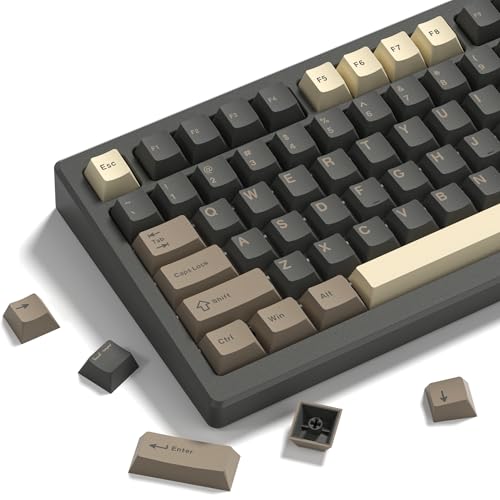
Womier’s 138-key double-shot set is the Cherry side of this comparison made purchasable: full coverage for everything from a 60 percent board to a full-size one, PBT that will not shine, legends moulded rather than printed so they cannot fade, and a retro colourway that suits the profile’s vintage lineage. As a first Cherry set it is close to ideal — complete enough that no key is left wearing a stranger, priced in the sane tier, and representative enough that your verdict on it is a verdict on the profile itself, which is what a reference set is for.
- Strengths: complete 138-key coverage
- Strengths: double-shot PBT durability
- Strengths: honest representative of the profile
- Trade-offs: retro colours are a taste commitment
- Trade-offs: non shine-through legends
- Trade-offs: north-facing interference caveat applies
Best for: south-facing boards and profile explorers. Not suited for: RGB-first builds wanting lit legends.
GMKWTL XVX Double-Shot PBT, Cherry Profile — the maximal coverage set
Badge: Best Cherry set for unusual layouts
- Profile: Cherry, sculpted
- Material: PBT, double-shot
- Coverage: 216 keys — ANSI and ISO layouts
- Style listed: jade translucent
- Compatibility: 61 to 108-key boards
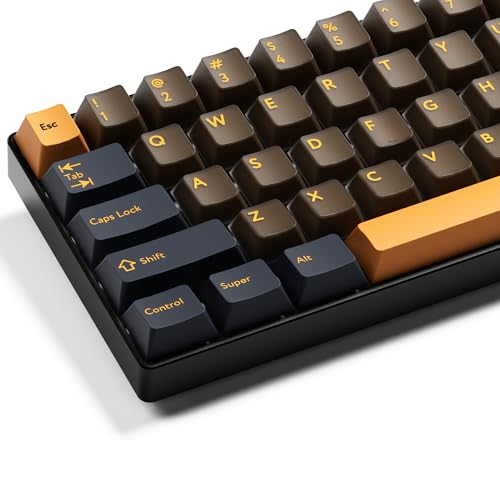
The XVX set answers the Cherry explorer whose board is not standard issue: 216 keys covering ANSI and ISO, compact and full layouts, the odd shifts and extra keys that smaller sets leave behind. Its jade translucent styling is a stronger aesthetic statement than the Womier’s — a set bought as much for the look as for the geometry — and its completeness makes it the Cherry recommendation for split, ISO and otherwise non-standard boards, where coverage failures are the rule rather than the exception.
- Strengths: exceptional 216-key coverage
- Strengths: ISO support included
- Strengths: double-shot PBT
- Trade-offs: distinctive colourway divides taste
- Trade-offs: many keys will live in the box
- Trade-offs: interference caveat on north-facing boards
Best for: ISO and non-standard layouts in Cherry profile. Not suited for: minimalists who resent spare keys.

JSJT OEM Profile PBT Set — the OEM reference set
Badge: Best OEM-profile starting set
- Profile: OEM, sculpted
- Material: PBT
- Coverage: 110 keys — 61 to 108-key layouts
- Style listed: multi-colour, non-backlit
- Compatibility: MX-style switches
The JSJT set is the OEM reference: a straightforward PBT set in the stock profile, covering the standard layouts, without shine-through pretensions. Its job in this comparison is to be the fair trial — the set an owner of a north-facing board, or a gamer whose hands were raised on stock height, buys to confirm that OEM is their profile before spending more on it. It performs that job exactly, and its multi-colour styling keeps the experiment cheerful.
- Strengths: true OEM geometry in PBT
- Strengths: clears north-facing housings
- Strengths: broad layout coverage
- Trade-offs: non-backlit legends
- Trade-offs: styling is playful, not sober
- Trade-offs: 110 keys — fewer spares than the big sets
Best for: north-facing boards and OEM loyalists. Not suited for: shine-through seekers.

XVX Side-Print Shine-Through, OEM Profile — the OEM set for lit boards
Badge: Best OEM set for backlit boards
- Profile: OEM, sculpted
- Material: PBT, double-shot
- Coverage: 136 keys
- Legends: side-printed, shine-through
- Style listed: gradient purple
The XVX OEM set exists for the board whose lighting is part of its identity: side-printed shine-through legends that let the LEDs do the talking, double-shot PBT underneath, and the tall OEM geometry that keeps everything clear of north-facing housings. It is the set that proves OEM is not the plain option — with the right board beneath it, this is the most theatrical of the four sets here, gradient and glow included.
- Strengths: shine-through side-print legends
- Strengths: OEM clearance plus PBT durability
- Strengths: generous 136-key coverage
- Trade-offs: side legends are a style commitment
- Trade-offs: gradient colourway is specific
- Trade-offs: taller profile feel is not for everyone
Best for: backlit gaming boards in OEM geometry. Not suited for: low-profile typing purists.
Myth vs Fact: The Profile Folklore, Corrected
Myth: Cherry profile is a premium feature. Fact: it is a geometry, available at every price tier — the Womier set above is not a luxury item. The association with expensive boards is historical, not technical. Myth: OEM is the “cheap stock” profile and always worse. Fact: OEM’s height is a deliberate engineering choice with real advantages — clearance, a familiar altitude for stock-board hands, and a brighter sound some typists prefer. Billions of keystrokes of muscle memory are not wrong; they are trained. Myth: profile determines keycap quality. Fact: material, moulding method and legend process determine quality; a double-shot PBT set in OEM will outlast a thin pad-printed set in Cherry by years. Profile is where the cap sits; quality is what it is made of. Myth: you can tell your profile from a photograph. Fact: you can tell a set’s colourway from a photograph. Its profile you will learn from your hands across a week — which is why reference sets exist, and why this guide recommends buying one representative set per curiosity rather than a flagship set per hunch. The folklore, corrected, leaves the real decision standing: geometry, clearance and feel, in that order — a smaller and more honest decision than the forums make it sound.
The Neighbouring Profiles, for Orientation
Cherry and OEM do not exhaust the map, and a sentence each on their neighbours prevents the next confusion. SA profile is the tall, spherical, retro-sculpted family — dramatically higher than both of today’s profiles, beloved for sound and looks, and a commitment your wrists should approve first. DSA and XDA are uniform profiles — every row the same height — which makes them flexible for odd layouts and flat in feel. KAT and MT3 are sculpted alternatives with their own philosophies. And the board-makers’ house profiles — Keychron’s OSA, taller and rounder than OEM, in the set at the double-shot vs dye-sub keycaps comparison — remind you that “profile” is a family name, not a standard: two sets both labelled with familiar words can still differ. Today’s question, though, is the common one, and it deserves its clean answer: between the two profiles that dominate the market’s shelves, the differences are height, sculpt, clearance and sound — and now you know all four.
The Wrist-Angle Audit: What the Altitude Does to Your Body
The profile question has a physical dimension that pure feel-talk misses, and it deserves a section of its own, in the comfort register this subject requires. Your wrists type at an angle set by the total height of the typing surface above the desk — case height, switch height and keycap height summed. OEM’s extra millimetres raise that sum; Cherry’s lower profile reduces it. For most desks and most wrists the difference is absorbed without comment, but at the margins it matters: a tall case on a thick desk with OEM caps stacks three heights at once, and the typist whose wrists already ride high is the one who will feel Cherry’s lower altitude as relief. The audit is simple and takes a minute: sit at your board, rest your fingers on the home row, and look at your forearms — the comfortable posture is roughly level, neither climbing to the keys nor dropping to them. If your current setup climbs, a lower profile is one of the cheapest corrections available, alongside desk and chair adjustments that this guide will always rank ahead of any product. And if your setup already sits level and your hands are happy, then the wrist has no vote in this comparison, and feel and sound may decide it alone. Profile is partly an ergonomic specification; treating it as one — once, with your own forearms as the instrument — is what separates a considered purchase from a hopeful one. The broader comfort conversation, for readers whose wrists are asking louder questions, continues in the ergonomic mechanical keyboards and wrist comfort guide.
How Layout Size Changes the Answer
The same profile feels different on different boards, and the pattern is predictable enough to use. On full-size and tenkeyless boards — long rows, conventional spacing — both profiles behave as described, and the choice is the pure one: orientation, sound, feel. On compact boards the calculus shifts, because compact layouts already ask the hands to work in a tighter, denser geography: Cherry’s lower altitude tends to flatter them further, reducing the small tower effect that tall caps give a 65 percent board, while OEM on a compact board can feel disproportionately tall, like a mezzanine on a cottage. The exception runs the other way for gaming compacts: a 60 percent board used primarily for play, on a north-facing PCB, with shine-through legends wanted — that board is OEM’s home turf, and the XVX set above exists for it. Height interacts with footprint; the bigger the board, the more the profiles converge in experience, and the smaller the board, the more Cherry’s lowness reads as elegance and OEM’s height as emphasis. Know your board’s size class before you generalise from anyone’s review — including, especially, the reviews of full-size boards in a compact owner’s search results.
The Two-Set Experiment: The Cheapest Way to Actually Know
For the reader who has finished this comparison still undecided, there is an honourable exit from indecision, and it costs less than the flagship set you were about to buy on a guess. Buy the two reference sets — the Womier Cherry and the JSJT OEM, both deliberately chosen in this guide as honest, mid-priced representatives — and run the experiment properly. Week one on Cherry, week two on OEM, same board, same desk, with three lines of notes at each week’s end: speed impression, fatigue impression, sound impression. Then keep the winner on the board and let the loser become what every second set becomes in this hobby — the alternate colourway, the guest set for the second board, the lending set for a curious friend. The experiment’s total cost is roughly one premium set, its information is worth more than any review, and it converts the profile question from a forum argument into a personal fact. Every later keycap purchase you make — the GMK keycaps guide‘s sculpted ABS sets, the dye-sub collections, the artisan accents — will be made in a known profile, on evidence, which is the difference between collecting and guessing. The hobby rewards the experimenters; this is the cheapest experiment it offers.
What About the Keycaps You Already Own?
A final practical word for the majority of readers, who are not buying a first set but a replacement. Your current board’s stock caps are almost certainly OEM profile if the board is a gaming or office model, and Cherry or a house variant if it is a recent custom board — and that starting point should frame the purchase. If you are happy with your altitude and merely want better material or legends, buy your current profile in better substance: the JSJT or XVX sets for the OEM content, the Womier for the Cherry content. If you are unhappy in a way you cannot quite name — the board feels tall, the typing feels effortful, the sound feels thin and high — a profile change is one of the few single purchases that addresses all three complaints at once, and the experiment above is your safest route. And if you are building new, the profile belongs on the parts list from the start, beside the case decision in the guide to mechanical keyboard cases and the kit decision in the build first custom keyboard guide — because altitude, like layout, is a skeleton decision, and skeletons are cheapest to choose before the body is built around them.
Reading a Keycap Listing Like a Specification
Since profiles must be bought from listings, the listing deserves decoding, because the profile word is often the least prominent honest thing on the page. Hunt first for the profile name itself — Cherry, OEM, or a house name — and treat a listing that never names a profile as a listing selling colour alone; the geometry you receive will be whatever the factory’s default mould is, which is a lottery this guide exists to help you avoid. Second, find the key count and the coverage statement: a set that names its layouts — 61 through 108, ANSI or ISO — is a set whose maker has thought about your board; a set that shows only beauty photographs has thought about your eyes. Third, the material and legend method, which this cluster’s double-shot vs dye-sub keycaps comparison covers in full: double-shot PBT is the durability summit in both profiles. Fourth, the stem and spacebar details — standard MX stems are universal across all four sets here, but split boards and unusual spacebars deserve a listing that acknowledges them. A listing that answers profile, coverage, material and legends in plain text is a specification; one that answers none is an advertisement, and the price difference between the two kinds is usually smaller than the disappointment difference.
The Profile Decision Inside a Full Build
For readers assembling a keyboard rather than dressing one, the profile choice does not live alone — it interacts with the case, the mount and the switch height, and the interactions are worth one section. A tall case with a high front lip already raises the hands; pairing it with OEM stacks altitude on altitude, and such builds are the ones whose owners discover the wrist audit of this guide the uncomfortable way. A low, slim case — or a low-profile board entirely, of the kind surveyed in the best travel keyboards for laptops and mobile work guide — pairs naturally with Cherry or lower, keeping the whole instrument close to the desk. Gasket-mounted builds, whose sound ambitions run deep, lean Cherry for the acoustic reasons already given; tray-mounted and gaming builds lean OEM for clearance and tradition. None of these pairings is a rule — they are the grain of the wood, and a build that follows the grain needs less force to finish beautifully. Decide the profile when you decide the case, state both in the build’s notes, and the keycap purchase becomes the execution of a plan rather than a separate adventure with its own surprises.
Care, Wear and the Long Life of Both Profiles
A profile decision lasts years, so the ownership chapter deserves its paragraph. Both profiles in PBT age gracefully: the material resists the shine that makes old ABS sets look greasy, the double-shot legends in three of the four sets here cannot fade because they are structure rather than surface, and a wash in warm water with a drop of soap restores a set’s factory matte in an afternoon. Where the profiles differ in ownership is mechanical rather than chemical. Taller OEM caps present more leverage to an careless puller — remove them with the wire tool pulling straight up, as with any set, and the stems will outlive the board. Cherry’s lower caps sit closer to their neighbours’ business on north-facing boards, which is the interference point already covered, and on south-facing boards they are the set-and-forget option of the hobby. Storage matters more than either: a removed set kept in its tray, out of sunlight, is a set that can return to service in a decade; a set loose in a drawer is a future jigsaw. Buy the profile your hands choose, keep it like the instrument part it is, and the question this article’s title asks will not need asking again for a very long time.
The Verdict Matrix, Compressed
Everything above compresses into a handful of conditionals, offered as the comparison’s working summary. If your board is north-facing: OEM, unless your fingers are insensitive to the interference and your heart is set on Cherry’s sound. If your board is south-facing and you type for a living: Cherry, with the Womier as the reference trial. If your board is south-facing and you game on muscle memory raised by stock boards: OEM is a legitimate loyalty, and the XVX serves its lit variant. If your layout is ISO or otherwise unusual: the 216-key Cherry set’s coverage settles the question before geometry gets a vote. If your wrists ride high on a tall desk stack: Cherry’s altitude is a comfort correction. If you simply do not know: the two-set experiment, two weeks, three lines of notes. The matrix is not a substitute for the article — the reasoning lives in the sections above — but it is the article’s honest skeleton, and a reader who applies it will buy the right profile for the right reason, which is all any comparison can promise.
Why the Industry Keeps Both: A Short History in One Section
The two profiles coexist because they were born answering different questions, and understanding the births explains the present shelves. Cherry profile descends from the keycaps Cherry itself moulded for its own boards in the era when a keyboard was a piece of office engineering — low, sculpted, designed for eight hours of typing by people who never thought about their keyboards at all. Its geometry is an ergonomics answer from the typewriter’s grandchildren. OEM profile descends from the manufacturing standardisation that followed: as keyboard production consolidated, one tall, serviceable profile became the default shipped on the industry’s boards, gaming’s rise dressed it in shine-through legends, and a generation of players built their hands on it. Its geometry is a manufacturing answer that became a culture. Neither origin makes its profile better; together they explain why the market will not converge — the typing world keeps ordering the ergonomics answer and the gaming world keeps ordering its native altitude, and both are correct about their own desks. The buyer who understands this stops looking for the profile that won, because there was never a final — only two long, parallel traditions, and a personal choice between the desks they were designed for.
The Sound Question, Taken One Layer Deeper
Because sound decides so many profile purchases, it earns a second, finer examination. A keycap is a small resonant chamber, and its pitch is set by the chamber’s volume and the stiffness of its walls. Cherry’s chamber is smaller — lower cap, closer to the plate — and its note is correspondingly lower and shorter, with less of the hollow tail that listeners describe as “plasticky” even when the material is identical. OEM’s chamber is larger, its note higher and longer, and on a hollow case the two resonate together in the bright, busy voice that stock boards are known for. Two refinements matter for buyers chasing a specific recording. First, the spacebar dominates: it is the largest chamber on the board, and a profile’s character is most audible there — judge typing tests by their spacebars, as this cluster’s build guide advises for switches. Second, the desk and mat are part of the instrument, and they flatter the lower profile disproportionately, because a deep note through a mat stays deep while a bright note thins. The sound verdict therefore reinforces the geometry verdict rather than competing with it: the profile that sits lower also sounds lower, and a buyer whose target recording is the deep, quiet custom voice is being told the same thing by their ears that the wrist audit tells their forearms. When ears, wrists and clearance all point one way — as they do for most south-facing typists, toward Cherry — the comparison is not close. When they point different ways, as they do for the north-facing gamer, the conflict itself is the answer: buy for the constraint, enjoy the rest.
Three Buyers, Three Correct Answers
Comparisons end best with people, so here are the three buyers this one serves, and the answer each correctly reaches. The writer on a south-facing custom board — a Q-series kit or similar, eight hours of prose a day, a mat under the board and a quiet room around it. Every signal converges: orientation permits, wrists appreciate, ears prefer. She buys the Womier Cherry set, types a week, and the question closes for years. The gamer on a north-facing stock board — a big-brand deck with the LEDs facing him, hands trained since adolescence on OEM altitude, RGB as part of the desk’s theatre. His signals converge the other way: clearance demands, muscle memory insists, the lighting wants shine-through. He buys the XVX OEM set and loses nothing that matters to him. The builder with an ISO board and no strong feelings — a European layout, a south-facing kit, a preference for coverage over theory. Her answer is chosen by the spreadsheet, not the debate: the 216-key Cherry set, because it is the one that covers her board completely. Three buyers, three answers, no contradiction — because the question was never which profile is better, but which profile is better for a board, a body and a history, and those three variables, once named, decide it almost every time. Name yours, and the comparison has done its work.
The Spacebar Deserves Its Own Paragraph
Every profile discussion eventually becomes a spacebar discussion, because the spacebar is where profile geometry is loudest, longest and most felt — the thumb’s drum, struck more often than any other key and heard more clearly. In Cherry profile the spacebar rides low and close, its stroke short and its note deep, and on a well-tuned board it is the most satisfying sound the instrument makes. In OEM it rides higher, with a larger chamber and a longer thumb journey, and its note carries the profile’s brightness in concentrated form — which is why OEM boards are so often judged, fairly or not, by a hollow spacebar that a stabiliser tune-up would have transformed. The practical guidance follows: whichever profile you choose, budget the spacebar its tuning — the stabiliser attention described in this cluster’s build guide — because the difference between a tuned and an untuned spacebar is larger than the difference between the profiles themselves. A buyer who tunes the spacebar and then judges the profile is judging geometry; a buyer who judges first is mostly judging a wire’s rattle, and no purchase fixes a rattle as cheaply as ten minutes and a small brush do.
Resale, Spares and the Set as an Asset
A last, unromantic consideration that experienced buyers quietly include: a keycap set is one of the few computer peripherals that holds its value and its usefulness across boards, machines and years. A complete set in a known profile — with its tray, its spare keys and its coverage intact — fits the next board, lends to a friend’s build, and sells to another enthusiast without apology. This is one more argument for the complete sets recommended here over the partial bargains: the 138 and 216-key sets are assets, while a 61-key set that fits only one board is an expense. It is also an argument for recording your profile verdict somewhere durable — in the build notes, on the tray’s lid — because the next purchase, years from now, will begin with the question this article answers, and your own evidence is the fastest route back to the answer. Profiles, once known, are known for a typing lifetime; the small administration of remembering is all that stands between a buyer and never having to re-run this comparison again.
What Changes If You Type in More Than One Language?
A specialised but real consideration, worth its section because the buyers it affects are numerous and underserved: multilingual typists. Layouts beyond US ANSI — ISO’s taller Enter and extra key, the accented legends of European sets, the dual legends of many Asian-market sets — interact with profile choice through coverage first and geometry second. A profile you love is worthless in a set that lacks your Enter key, which is why the 216-key XVX set’s ISO inclusion earned it its place in this comparison, and why multilingual buyers should sort listings by coverage before reading a single profile opinion. Geometry’s role is subtler: the deeper sculpt of Cherry can make densely printed dual legends marginally easier to read at a glance, since each row’s tilt presents its legends at a slightly different angle, while OEM’s flatter tops present them more uniformly. Neither effect is decisive; both are the kind of detail that matters only after coverage has had its veto. The standing rule for multilingual buyers is therefore the general rule, sharpened: coverage is a constraint, orientation is a constraint, and only then is profile a preference — a sequence that will save this readership more money than any other in the article.
The One-Week Test, Run Properly
The week-long trial has been recommended throughout this comparison, and it deserves a protocol rather than a mention, because a badly run test produces confident nonsense. Days one and two are adaptation: your fingers are mapping a new altitude, errors will rise, and every impression from these days should be written down and then discounted — they measure novelty, not fit. Days three and four are the working sample: normal typing, normal hours, and the two impressions that matter most begin to stabilise — whether your hands feel fresher or more tired at the day’s end than they did on the old set, and whether the board’s voice has become pleasant furniture or a continuing small irritation. Days five to seven are the verdict window: by now the altitude is home, and the honest question — if both sets vanished tonight, which would I re-order tomorrow? — has an answer your hands give without deliberation. Record it, with the three impression lines, wherever your build notes live. A test run this way settles the profile question for years; a test skipped settles nothing, and the question returns with the next sale, the next colourway, the next forum thread — which is why the disciplined week is the cheapest purchase in this entire comparison, costing nothing but patience and returning certainty.
A Note on Children, Shared Desks and Other Realities
Comparisons are usually written for a solitary typist at a dedicated desk, and reality is frequently otherwise, so one section belongs to the shared and the small-handed. On a family or shared desk, the profile that serves the household’s range of hands wins, and the calculus favours the forgiving: OEM’s taller, flatter tops are marginally easier for hunt-and-peck typists and younger hands to read and strike, while Cherry’s sculpt rewards the trained touch-typist the shared desk may not contain. For smaller hands specifically, the lower profile reduces the reach to the number row by the same millimetres this article has been counting, and young or small-handed typists doing real keyboarding work — school essays, coding classes — often settle faster at Cherry altitude. None of this overrides the constraints; it orders the preferences for households where the preference is plural. Buy for the hands that type the most hours, keep the removed stock set as the household’s spare, and let the desk’s democracy be served by the same evidence-based week the solo buyer runs — with more typists voting.
Closing the Comparison: What “Better” Turned Out to Mean
It is worth ending by noticing what the title’s question dissolved into. “Better” sounded like a property of the keycaps; it turned out to be a relationship among four things — a board’s switch orientation, a desk’s total altitude, a pair of hands with a history, and an ear with a preference — and the keycaps are merely where the relationship becomes visible. That is not a evasion of the question but its real answer, and it generalises across this whole cluster of guides: the best switch, the best mount, the best layout all dissolve the same way, into fit. The comparison’s practical residue is small enough to hold in one hand: check the orientation, run the wrist audit, honour the muscle memory, run the week’s test if you are free to choose, and buy a complete set in the profile that survives those four gates. Do that, and the next time the question appears — in a forum, at a friend’s desk, in your own search history — you will answer it the way the experienced do: not with a profile’s name, but with the four questions that decide it. That fluency, more than either set of caps, is what this page was selling.
Travel, Laptops and the Portable Board’s Profile
One more context where altitude earns its keep: the portable setup. A travel board lives in a bag, types on café tables and tray tables, and pairs with a laptop whose own keyboard sits at desk level — and in that company, the lower profile is the better traveller twice over. Cherry’s reduced height keeps the external board’s altitude closer to the laptop’s own, so the hands’ geography survives the transition between machines; and the shallower stack simply packs flatter, a mundane virtue that decides real purchases in the bag-sized economy. The OEM loyalist who travels should not despair of their profile — millions of stock boards commute daily — but the traveller choosing fresh, with no muscle memory to honour, will find the altitude argument quietly decisive, as so many of this comparison’s readers have before them: the constraints choose first, and the preferences merely confirm.
What Reviewers Get Wrong About Profiles
A media-literacy note belongs in any honest comparison, because profile coverage in reviews follows patterns a reader should discount. Reviewers type on a set for days, not weeks, which means their verdicts are disproportionately first-impression verdicts — and first impressions systematically favour the familiar altitude, which for most reviewers is the one their last board wore. Sound comparisons in videos are recorded on the reviewer’s desk and microphone, flattering whichever profile their setup resonates with. And profile is rarely isolated as a variable: a Cherry set reviewed on a gasket board and an OEM set reviewed on a tray board produce a comparison of boards wearing a comparison of caps as a costume. None of this makes reviews useless — it makes them evidence of a particular strength, to be weighted alongside your own constraints and, where possible, your own week’s test. The reader who understands the biases can extract the signal; the reader who does not will buy the reviewer’s desk, one component at a time.
Frequently Asked Questions
Is Cherry profile better for typing than OEM?
For most typists, yes — the lower altitude and deeper sculpt reduce finger travel and tend to suit long sessions, which is why typing-focused and custom boards default to it. The exception is real, though: hands trained for years on OEM height may type faster and happier at the altitude they know. “Better” here means “better for the hands in question,” and the one-week test outranks any general verdict.
Will Cherry keycaps fit my keyboard?
They will fit the switches on any MX-style board, but fit is not the only question: on north-facing boards, Cherry caps can contact switch housings at the bottom of the stroke. Check your board’s LED orientation — south-facing means buy freely; north-facing means weigh the caveat or choose OEM. Stem and stabiliser compatibility is standard across all four sets here.
Why do gaming keyboards ship with OEM profile?
History and clearance: OEM became the stock profile across the industry, it clears every switch orientation without thought, and its taller stance suits the visual drama of backlit boards. It persists because it works and because millions of gamers’ muscle memory is calibrated to it — both respectable reasons.
Do keycap profiles change the sound that much?
Noticeably, yes. Cherry’s lower chamber deepens and tightens the board’s voice; OEM’s taller chamber brightens it and gives the spacebar a hollower note. The change is smaller than a switch swap and larger than a cable swap — profile is the second-most-audible keycap decision after material.
Can I mix Cherry and OEM keycaps on one board?
Physically, yes; sensibly, rarely. A mixed board has an uneven altitude map that most typists find distracting, and the rows will not line up as sculpted families intend. The legitimate exception is a single accent key or a spacebar experiment. For a full set, commit to one geometry — your fingers are learning a landscape, and landscapes should not change altitude mid-row.
Which profile should a complete beginner buy first?
The one their board’s orientation recommends — OEM for north-facing, either for south-facing — in a complete, mid-priced reference set like the two starters above. Judge it after a week of real typing. A beginner’s first profile is a hypothesis; the second set, bought with a week’s evidence, is the verdict.
So: cherry vs oem keycaps which is better resolves into a decision with a spine — check your board’s orientation, respect your hands’ training, then choose by the feel you want to live at. If you take one sentence from this page to the store, take this one: the profile is the altitude your fingers will live at for years, so choose it the way you would choose a chair’s height — by sitting in it, not by looking at it. The sets above are the chairs this comparison trusts: two honest altitudes, each in a durable material, each with the coverage to finish the job. The rest is a week of typing, and your hands’ verdict, which no reviewer — this one included — can file on your behalf.
A closing administrative note, offered because it saves real money: whichever set you buy, photograph your board before the swap and keep the stock caps in their replacement’s tray. The photograph is your reassembly map if you ever revert, and the kept set is your board’s resale completeness and your household’s spare. Small disciplines, but the profile decision — like every decision in this hobby that lasts — rewards the buyer who treats it as a long arrangement rather than a passing enthusiasm. Cherry for the lower, deeper, typist’s altitude on boards that welcome it; OEM for the taller, brighter, clearance-proof standard that gaming grew up on. Either way, buy a complete set, give it a week, and let your fingers file the final report.