Disclosure: As an Amazon Associate, kajuandouglas.com earns from qualifying purchases. Links to Amazon on this page are affiliate links; they cost you nothing extra. Listing details such as price and availability change often, so check the current Amazon listing before you buy.
Where to buy
Every linked pick in this guide to best video cameras under 2000 is sold on Amazon, where you can check the current price, availability and delivery options on the listing itself before you order. Orders are placed on Amazon, and qualifying purchases made through links on this page may earn a commission at no extra cost to you. Listings in this category change often and sellers frequently group variants on one page, so confirm the full model name and bundle contents on the listing match the pick reviewed below.
- AKASO Brave 7 LE Action Camera — the budget pick with a front screen for vlogging-style framing.
- Sony ZV-E10 II Mirrorless Creator Camera (Body Only) — the strongest all-round creator answer, with 10-bit 4K and E-mount lens choice.
- Canon EOS R50 Mirrorless Camera with RF-S 18-45mm Lens Kit — the friendliest first mirrorless kit here, with oversampled 4K and guided menus.
- Sony Alpha a6700 Mirrorless Camera (Body Only) — the APS-C video flagship here — 4K 120p, IBIS and AI autofocus in one body.
- DJI Osmo Pocket 3 Vlogging Camera — the smoothest walking-and-talking footage here, from a camera that fits in a pocket.
- Panasonic LUMIX S5II Mirrorless Camera — full-frame depth, open-gate 6K and no record-limit anxiety for long shoots.
Read the full guide ↓
Shopping for best video cameras under 2000 usually starts with a wall of near-identical listings and very little clarity about which differences you will actually feel. This guide narrows the field to six picks chosen for shooting capable video inside a $2000 ceiling, explains the specifications that matter in plain language, and is honest about trade-offs, so you can order once and get on with filming. Every linked pick was verified against current catalogue data for this site on 2026-11-20; where no single model could be linked with confidence, the pick is presented as a prose-only recommendation instead of a link.
Read the badges first, because they are the shortcut through this guide: the badge on a pick stays the same in the quick picks table, the full review and the comparison table, so you always know which job each camera is being recommended for. The order is a shortlist order, not a claim that the first pick is right for everyone — for some readers the runner-up is the correct answer, and the trade-offs sections will tell you if that is you.
This guide is written for buyers working to a $2000 budget. That angle shapes everything below: the picks are ordered for shooting capable video inside a $2000 ceiling, the buying guide concentrates on the specifications that decide success at it, and the setup section assumes the locations and light you will really face. The budget framing is explicit — a $2000 ceiling — and value is judged inside that frame rather than against cameras that ignore it. By the end you will know which pick fits you, which specifications deserve your attention, which mistakes to avoid, and how to set the winner up when it arrives.
Key Takeaways
- For shooting capable video inside a $2000 ceiling, autofocus reliability and stabilization matter more than headline resolution.
- Start with the pick badged Best Overall — AKASO Brave 7 LE Action Camera — unless its trade-offs rule it out for you.
- No static prices are printed here on purpose: use the check-price links to see the live figure on Amazon.
- Budget for the working kit — a fast card, a spare battery and the mount or case your filming needs.
- Linked picks were verified against catalogue data on 2026-11-20; prose-only picks are honest recommendations to research by name.
- Audio decides whether audiences stay: check the mic options for video camera picks before you order.
In this guide
Quick Picks
The table below is the whole guide in miniature: six picks for best video cameras under 2000, each with the badge describing the job it does best. Read the full reviews before ordering — the trade-offs matter as much as the strengths — but if you are short on time, start with the pick whose badge matches your situation.
| Badge | Pick | Why it stands out | Link |
|---|---|---|---|
| Best Overall | AKASO Brave 7 LE Action Camera | the budget pick with a front screen for vlogging-style framing | Check price on Amazon |
| Best Budget | Sony ZV-E10 II Mirrorless Creator Camera (Body Only) | the strongest all-round creator answer, with 10-bit 4K and E-mount lens choice | Check price on Amazon |
| Best for This Brief | Canon EOS R50 Mirrorless Camera with RF-S 18-45mm Lens Kit | the friendliest first mirrorless kit here, with oversampled 4K and guided menus | Check price on Amazon |
| Best Premium | Sony Alpha a6700 Mirrorless Camera (Body Only) | the APS-C video flagship here — 4K 120p, IBIS and AI autofocus in one body | Check price on Amazon |
| Runner-Up | DJI Osmo Pocket 3 Vlogging Camera | the smoothest walking-and-talking footage here, from a camera that fits in a pocket | Check price on Amazon |
| Best Second Camera | Panasonic LUMIX S5II Mirrorless Camera | full-frame depth, open-gate 6K and no record-limit anxiety for long shoots | Check price on Amazon |
How These Picks Were Chosen
Selection started with the cameras buyers working to a $2000 budget actually buy, then applied the same filters to every candidate: verified specifications for the exact model, a feature set that serves shooting capable video inside a $2000 ceiling, build and support from a maker with a track record in this category, and honest value at its tier. Models with vague specifications, discontinued support or a pattern of avoidable compromises were cut early. Because prices move constantly, no static prices are printed; each linked pick points to the current Amazon listing so the figure you act on is live today.
- Verified specifications: every specification quoted traces back to the manufacturer’s published data or the current listing for that exact model.
- Real-world fit: each pick suits a recognisable buyer — a beginner, an upgrader, a working shooter or a specialist — rather than being average at everything.
- Support and longevity: warranty terms, firmware support and accessory availability counted toward the ranking.
- Honest trade-offs: each review names three genuine limitations alongside three strengths; a pick with hidden compromises did not stay.
- Value at its tier: entry, mid and premium picks were judged against their own tier, not against flagships.
The Best Video Cameras Under $2000
Six picks follow, in the same order as the quick picks table. Each review covers who the pick suits, its verified specifications, three strengths, three honest trade-offs and a clear verdict, so you can compare video camera options on equal terms and shortlist the two or three that deserve a closer look at their listings.

AKASO Brave 7 LE Action Camera
Badge: Best Overall
| Video | 4K 30fps |
| Photo | 20MP |
| Stabilization | EIS 2.0 |
| Design | Touch screen, front screen, 131ft waterproof with case |
The AKASO Brave 7 LE Action Camera is a budget action camera that still includes a front-facing screen for self-framing, EIS 2.0 stabilization and a waterproof case rated to 131 feet. For shooting capable video inside a $2000 ceiling, that combination matters because it addresses the problems this kind of filming actually throws at you: changing light, subjects that will not repeat the moment, and setups that have to work first time. It sits in the entry tier of this guide, and its review below is written for buyers working to a $2000 budget weighing it against the other five picks.
In daily use, the pattern that emerges is consistency. The controls and menus are laid out for the way this class of camera is really used, the headline modes are reachable without spelunking through settings, and the output holds up when you review it on a proper screen rather than the camera’s own display. Where it asks something of you — a battery routine, a heavier rig, a shallower feature set — the trade-offs section says so plainly, because for shooting capable video inside a $2000 ceiling the wrong compromise costs you footage you cannot reshoot.
It also earns its place on value within its tier rather than on a single spectacular mode. Cameras in this class are bought to be used weekly for years, so the review weights reliability, support and accessory availability alongside image quality. If your filming leans toward the strengths listed next, this pick deserves to be on your final shortlist of two; if the trade-offs collide with your non-negotiables, the neighbouring picks in this guide cover the same brief from a different direction.
Strengths
- Front screen makes self-filming far easier than on most budget rivals
- Comes with remote control and waterproof case in the box
- EIS 2.0 smooths casual riding and walking footage well
Trade-offs
- 4K is 30fps — fast action looks less fluid than 60fps rivals
- Low-light quality is the usual budget-class story
- App experience is more basic than GoPro or DJI
Choose it if you want self-framing on a tight budget. Skip it if you film high-speed sports in fading light.
Best for: budget vloggers, snorkellers and first-time action camera buyers / Not suited for: fast-action shooters who need 4K 60 or better

Sony ZV-E10 II Mirrorless Creator Camera (Body Only)
Badge: Best Budget
| Sensor | APS-C Exmor R, 26MP |
| Video | 4K up to 60p, 10-bit 4:2:2 |
| Mount | Sony E-mount |
| Screen | 3-inch vari-angle touchscreen |
The Sony ZV-E10 II Mirrorless Creator Camera (Body Only) is a creator-first APS-C mirrorless body with 4K 60p 10-bit recording, fast hybrid autofocus and a fully articulating screen. For shooting capable video inside a $2000 ceiling, that combination matters because it addresses the problems this kind of filming actually throws at you: changing light, subjects that will not repeat the moment, and setups that have to work first time. It sits in the mid tier of this guide, and its review below is written for buyers working to a $2000 budget weighing it against the other five picks.
In daily use, the pattern that emerges is consistency. The controls and menus are laid out for the way this class of camera is really used, the headline modes are reachable without spelunking through settings, and the output holds up when you review it on a proper screen rather than the camera’s own display. Where it asks something of you — a battery routine, a heavier rig, a shallower feature set — the trade-offs section says so plainly, because for shooting capable video inside a $2000 ceiling the wrong compromise costs you footage you cannot reshoot.
It also earns its place on value within its tier rather than on a single spectacular mode. Cameras in this class are bought to be used weekly for years, so the review weights reliability, support and accessory availability alongside image quality. If your filming leans toward the strengths listed next, this pick deserves to be on your final shortlist of two; if the trade-offs collide with your non-negotiables, the neighbouring picks in this guide cover the same brief from a different direction.
Strengths
- 4K 60p 10-bit 4:2:2 recording gives real grading headroom for a body in this class
- Fast, sticky hybrid autofocus with product-showcase and background-defocus helpers for creators
- Huge Sony E-mount lens catalogue, so the body grows with you
Trade-offs
- Body only — you still need to budget for a lens if you do not own E-mount glass
- No in-body stabilization, so handheld work leans on lens OSS or a gimbal
- Rolling shutter is visible in fast pans at the highest frame rates
Choose it if you want a creator body that will not cap your quality as your channel or client work grows. Skip it if you want an all-in-one camera with a built-in zoom and in-body stabilization.
Best for: creators who want 10-bit 4K and a lens system to grow into / Not suited for: shooters who need in-body stabilization for run-and-gun handheld work

Canon EOS R50 Mirrorless Camera with RF-S 18-45mm Lens Kit
Badge: Best for This Brief
| Sensor | APS-C CMOS, 24.2MP |
| Video | 4K 30p oversampled from 6K |
| Lens | RF-S 18-45mm f/4.5-6.3 IS STM kit |
| Screen | Vari-angle touchscreen |
The Canon EOS R50 Mirrorless Camera with RF-S 18-45mm Lens Kit is a beginner-friendly APS-C mirrorless kit whose 4K is oversampled from 6K for crisp footage, with Canon’s guided menus and a vari-angle screen. For shooting capable video inside a $2000 ceiling, that combination matters because it addresses the problems this kind of filming actually throws at you: changing light, subjects that will not repeat the moment, and setups that have to work first time. It sits in the mid tier of this guide, and its review below is written for buyers working to a $2000 budget weighing it against the other five picks.
In daily use, the pattern that emerges is consistency. The controls and menus are laid out for the way this class of camera is really used, the headline modes are reachable without spelunking through settings, and the output holds up when you review it on a proper screen rather than the camera’s own display. Where it asks something of you — a battery routine, a heavier rig, a shallower feature set — the trade-offs section says so plainly, because for shooting capable video inside a $2000 ceiling the wrong compromise costs you footage you cannot reshoot.
It also earns its place on value within its tier rather than on a single spectacular mode. Cameras in this class are bought to be used weekly for years, so the review weights reliability, support and accessory availability alongside image quality. If your filming leans toward the strengths listed next, this pick deserves to be on your final shortlist of two; if the trade-offs collide with your non-negotiables, the neighbouring picks in this guide cover the same brief from a different direction.
Strengths
- Oversampled 4K 30p looks noticeably crisper than basic 4K in this class
- Guided, phone-like menus make it the easiest mirrorless here to learn on
- Kit lens included, so it shoots the day it arrives
Trade-offs
- 4K tops out at 30p — no 4K 60p for smooth slow motion
- RF-S native lens selection is still smaller than Sony E-mount’s
- No in-body stabilization; the kit lens’s IS does the heavy lifting
Choose it if you want Canon colour, a flip screen and menus that teach you as you go. Skip it if you plan to shoot a lot of 4K 60p slow motion.
Best for: first-time mirrorless buyers and new creators who value ease of use / Not suited for: shooters who need 4K 60p or a deep native lens catalogue today
Sony Alpha a6700 Mirrorless Camera (Body Only)
Badge: Best Premium
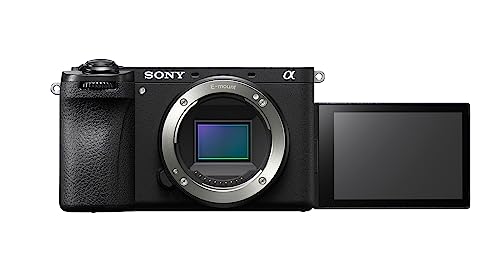
| Sensor | APS-C Exmor R BSI, 26MP |
| Video | 4K up to 120p, 10-bit 4:2:2 |
| Stabilization | 5-axis in-body stabilization |
| Autofocus | AI processing unit, real-time recognition |
The Sony Alpha a6700 Mirrorless Camera (Body Only) is Sony’s flagship APS-C hybrid, pairing 4K 120p 10-bit video and 5-axis in-body stabilization with an AI processing unit for subject recognition. For shooting capable video inside a $2000 ceiling, that combination matters because it addresses the problems this kind of filming actually throws at you: changing light, subjects that will not repeat the moment, and setups that have to work first time. It sits in the premium tier of this guide, and its review below is written for buyers working to a $2000 budget weighing it against the other five picks.
In daily use, the pattern that emerges is consistency. The controls and menus are laid out for the way this class of camera is really used, the headline modes are reachable without spelunking through settings, and the output holds up when you review it on a proper screen rather than the camera’s own display. Where it asks something of you — a battery routine, a heavier rig, a shallower feature set — the trade-offs section says so plainly, because for shooting capable video inside a $2000 ceiling the wrong compromise costs you footage you cannot reshoot.
It also earns its place on value within its tier rather than on a single spectacular mode. Cameras in this class are bought to be used weekly for years, so the review weights reliability, support and accessory availability alongside image quality. If your filming leans toward the strengths listed next, this pick deserves to be on your final shortlist of two; if the trade-offs collide with your non-negotiables, the neighbouring picks in this guide cover the same brief from a different direction.
Strengths
- 4K 120p opens up high-quality slow motion that most APS-C rivals cannot match
- 5-axis in-body stabilization steadies any E-mount lens, stabilised or not
- AI-based subject recognition keeps people, animals and vehicles locked on
Trade-offs
- Body only and priced at the top of the APS-C class
- 4K 120p uses an additional crop, which narrows your field of view
- Menu depth is generous — expect a learning curve to master it
Choose it if you shoot fast-moving subjects or want slow-motion headroom in a compact body. Skip it if you mostly shoot locked-off talking-head video and would not use the extra modes.
Best for: serious video shooters who want flagship features without full-frame cost and bulk / Not suited for: beginners who want the simplest possible first camera

DJI Osmo Pocket 3 Vlogging Camera
Badge: Runner-Up
| Sensor | 1-inch CMOS |
| Video | 4K up to 120fps |
| Stabilization | 3-axis mechanical gimbal |
| Screen | 2-inch rotatable touchscreen |
The DJI Osmo Pocket 3 Vlogging Camera is a pocketable 1-inch-sensor camera on a 3-axis mechanical gimbal, with a rotatable screen that switches between horizontal and vertical framing instantly. For shooting capable video inside a $2000 ceiling, that combination matters because it addresses the problems this kind of filming actually throws at you: changing light, subjects that will not repeat the moment, and setups that have to work first time. It sits in the mid tier of this guide, and its review below is written for buyers working to a $2000 budget weighing it against the other five picks.
In daily use, the pattern that emerges is consistency. The controls and menus are laid out for the way this class of camera is really used, the headline modes are reachable without spelunking through settings, and the output holds up when you review it on a proper screen rather than the camera’s own display. Where it asks something of you — a battery routine, a heavier rig, a shallower feature set — the trade-offs section says so plainly, because for shooting capable video inside a $2000 ceiling the wrong compromise costs you footage you cannot reshoot.
It also earns its place on value within its tier rather than on a single spectacular mode. Cameras in this class are bought to be used weekly for years, so the review weights reliability, support and accessory availability alongside image quality. If your filming leans toward the strengths listed next, this pick deserves to be on your final shortlist of two; if the trade-offs collide with your non-negotiables, the neighbouring picks in this guide cover the same brief from a different direction.
Strengths
- Mechanical gimbal stabilization beats electronic stabilization for walking shots
- 1-inch sensor holds up far better indoors and at dusk than phone-sized rivals
- Rotatable screen makes switching to vertical video a one-second job
Trade-offs
- Fixed lens — no optical zoom and no interchangeable lenses
- Not waterproof; rain and splashes need the optional case or care
- Small body means small controls; gloved or large hands may find it fiddly
Choose it if smooth, ready-to-post footage matters more to you than lens flexibility. Skip it if you film distant subjects or need a weather-sealed body.
Best for: vloggers and travellers who shoot while moving / Not suited for: shooters who need zoom reach or interchangeable lenses

Panasonic LUMIX S5II Mirrorless Camera
Badge: Best Second Camera
| Sensor | Full-frame, 24.2MP |
| Video | 6K open gate, 4K 60p 10-bit |
| Autofocus | Phase Hybrid AF |
| Stabilization | Active I.S. in-body stabilization |
The Panasonic LUMIX S5II Mirrorless Camera is a full-frame hybrid with phase-detection autofocus, 6K open-gate recording and unlimited 4:2:2 10-bit capture thanks to active cooling. For shooting capable video inside a $2000 ceiling, that combination matters because it addresses the problems this kind of filming actually throws at you: changing light, subjects that will not repeat the moment, and setups that have to work first time. It sits in the premium tier of this guide, and its review below is written for buyers working to a $2000 budget weighing it against the other five picks.
In daily use, the pattern that emerges is consistency. The controls and menus are laid out for the way this class of camera is really used, the headline modes are reachable without spelunking through settings, and the output holds up when you review it on a proper screen rather than the camera’s own display. Where it asks something of you — a battery routine, a heavier rig, a shallower feature set — the trade-offs section says so plainly, because for shooting capable video inside a $2000 ceiling the wrong compromise costs you footage you cannot reshoot.
It also earns its place on value within its tier rather than on a single spectacular mode. Cameras in this class are bought to be used weekly for years, so the review weights reliability, support and accessory availability alongside image quality. If your filming leans toward the strengths listed next, this pick deserves to be on your final shortlist of two; if the trade-offs collide with your non-negotiables, the neighbouring picks in this guide cover the same brief from a different direction.
Strengths
- Phase Hybrid AF finally gives LUMIX full-frame bodies fast, confident video autofocus
- 6K open gate lets you reframe for vertical and horizontal from one take
- Active cooling supports unlimited recording in its main 10-bit modes
Trade-offs
- L-mount lens ecosystem is smaller than Sony E or Canon RF
- Body is larger than APS-C rivals — less discreet for casual travel
- Autofocus, while much improved, still trails Sony’s best in erratic light
Choose it if you record long events or interviews and cannot risk a recording limit. Skip it if you already own a deep Sony or Canon lens collection.
Best for: hybrid shooters and event filmmakers who record long takes / Not suited for: minimalists who want the smallest possible travel kit
Comparison Table
Side by side, the six picks differ less in headline appeal than in the details that shape daily use for shooting capable video inside a $2000 ceiling. Use this table to check the specifications that matter most before reading the buying guide, and remember that the current listing is where you confirm the exact variant, included accessories and delivery details.
| Pick | Sensor | Video | Stabilization |
|---|---|---|---|
| AKASO Brave 7 LE Action Camera | — | 4K 30fps | EIS 2.0 |
| Sony ZV-E10 II Mirrorless Creator Camera (Body Only) | APS-C Exmor R, 26MP | 4K up to 60p, 10-bit 4:2:2 | — |
| Canon EOS R50 Mirrorless Camera with RF-S 18-45mm Lens Kit | APS-C CMOS, 24.2MP | 4K 30p oversampled from 6K | — |
| Sony Alpha a6700 Mirrorless Camera (Body Only) | APS-C Exmor R BSI, 26MP | 4K up to 120p, 10-bit 4:2:2 | 5-axis in-body stabilization |
| DJI Osmo Pocket 3 Vlogging Camera | 1-inch CMOS | 4K up to 120fps | 3-axis mechanical gimbal |
| Panasonic LUMIX S5II Mirrorless Camera | Full-frame, 24.2MP | 6K open gate, 4K 60p 10-bit | Active I.S. in-body stabilization |
Buying Guide: How to Choose a Video camera for Shooting capable video inside a $2000 ceiling
Start with the filming itself, not the camera. For shooting capable video inside a $2000 ceiling, write down where you will shoot, how far you will be from the subject, how long your sessions run and what the footage is for. Those four answers decide your sensor size, your zoom or lens needs, your battery and media budget, and whether stabilization or autofocus deserves the biggest share of your money. Buyers who start from that list choose well; buyers who start from a feature list usually overbuy in one place and underbuy in another.
Next, separate the specifications into three groups. The decisive group — for this brief, sensor size, autofocus behaviour and stabilization — deserves most of your budget and attention. The supporting group — screen quality, audio options, battery endurance and card speed — decides daily satisfaction. The decorative group — headline modes you will test once — should never break a tie. The reviews in this guide are organised the same way, so you can map each pick against your own three groups quickly.
The Specifications That Decide Success at shooting capable video inside a $2000 ceiling
Sensor size is the quiet specification behind most image quality. Larger sensors gather more light, which means cleaner footage in the dim venues, dawn starts and indoor spaces where shooting capable video inside a $2000 ceiling so often happens, plus shallower depth of field when you want subjects to separate from backgrounds. The cost is size, weight and price. Smaller sensors fight back with reach — long zooms and deep focus that keep everything sharp — which is why the camcorders and pocket zooms in this guide remain the right answer for distant subjects.
Autofocus and stabilization are the working specifications. For moving subjects, subject-detection autofocus that recognises people, animals or vehicles is worth more than any resolution bump, because a sharp 4K clip beats a soft 8K one every time. Stabilization splits into three kinds — optical in the lens, sensor-shift in the body, and the mechanical gimbal of the Pocket class — and they stack differently per pick; the reviews state plainly which kind each pick relies on, because walking footage exposes the difference immediately.
What to Check on the Listing Before You Order
Camera listings group variants aggressively, so slow down at the final step. Confirm the exact model name and generation at the top of the listing, the sensor and video specification in the listing’s own detail section, and — for kits — the precise lens and accessories included. Check which memory card speed class the top video mode requires, whether a battery and charger are in the box, and the returns terms in case the camera’s handling does not suit you. Two minutes of checking prevents the most common disappointment in this category: a good camera in the wrong variant.
Be honest about budget while you check. This keyword sets a $2000 ceiling, and the honest reading of that frame is that the best pick is the one that covers your decisive specifications inside it — not the one that merely squeezes under it while skipping the card, battery and mount you still have to buy. Prices change often, which is why this guide sends you to the live listing rather than printing a figure; judge value there, with the full kit cost in view.
How Do You Set Up a Video Camera for the First Time?
Good setup is worth more than a small specification advantage, because a well-configured mid-tier pick outperforms a neglected premium one in daily use. Follow these steps in order the first time you set up your video camera, even if you have owned something similar before — defaults change between generations, and habits carried over from older gear are a common source of early frustration for buyers working to a $2000 budget.
- Charge fully and format the card in-camera. Charge the battery completely before the first shoot, then format your memory card inside the camera, not on a computer. In-camera formatting sets the file system the camera expects and prevents the card errors that ruin first shoots.
- Update the firmware before you change settings. Check the manufacturer’s site or app for a firmware update and apply it first. Updates routinely improve autofocus and fix early bugs, and updating first means you learn the current menus, not an outdated version.
- Set your core video format deliberately. Choose your resolution and frame rate as a decision, not a default: 4K 30p for general work, 60p when you may slow footage down, and a flat or log profile only if you actually plan to grade. Set white balance behaviour and stabilization modes to match how you shoot.
- Test audio before the real recording. Record a minute of test footage speaking at your normal distance, then listen on headphones. Check levels, room echo and any handling noise, and set microphone levels manually if the camera allows it — auto gain often pumps audibly in quiet rooms.
- Run a real-world test in your actual location. Film where you will really work: your field, sanctuary, studio or street. Review the footage on a big screen, not the camera display, and adjust exposure and stabilization settings based on what you see.
- Register the warranty and note your settings. Register the camera with the manufacturer, store the receipt, and photograph or note your final settings. If you ever reset the camera or send it for service, restoring a known-good setup takes minutes instead of an evening.
Troubleshooting
Problem: The camera will not connect to the app or computer — Bring the camera and phone or computer close together, confirm Wi-Fi and Bluetooth are on for both, and restart both before retrying. Forget any half-completed pairing entry and pair fresh; most first-connection failures are a stale pairing record or a pending firmware update.
Problem: Footage looks softer or noisier than expected — Check the basics in order: lens clean, correct resolution actually selected (many cameras default lower), adequate light for the sensor size, and stabilization mode matched to whether you are on a tripod or moving. Small sensors ask for light; give it to them and quality jumps.
Problem: Recording stops early or the camera overheats — Confirm the card is fast enough for your bitrate — slow cards cause most early stops — then check ambient temperature and direct sun. For long sessions, open the screen away from the body, remove cases that trap heat, and drop one resolution step if the venue is hot.
Problem: Autofocus hunts or locks onto the wrong subject — Set the subject-detection category to what you are filming, give the camera a single clear target area instead of the whole frame, and add light if you can. Contrast-based systems hunt in dim, low-contrast scenes; a smaller focus area and a steadier hand fix most of it.
Common Buying Mistakes
Most disappointment with best video cameras under 2000 is avoidable, and it usually comes from the buying process rather than the product. These are the mistakes that show up most often for buyers working to a $2000 budget, with the simple check that prevents each one.
Assuming the newest model is automatically the right model. New generations sometimes trade proven reliability for headline features, and the previous model often becomes the smarter buy. Compare generations on the specifications that matter for your filming rather than assuming newer means better for you.
Buying on a single headline specification. A bigger resolution or zoom number often hides a smaller sensor, weaker stabilization or slower autofocus everywhere else. Compare the full specification set of the exact variant you are ordering, and weight what you will notice daily — focus reliability, stabilization and handling — above the one number on the box.
Ignoring audio until the first real shoot. Audiences abandon muffled video faster than soft video. Check whether the camera has a microphone input, how its built-in microphones behave outdoors, and whether wind protection exists for it, before you order — not after your first event comes back windy and distant.
Skipping the accessory and media budget. Fast cards, spare batteries, a case and the right mount are part of the real cost of any camera in this guide. Add them before comparing options; a cheaper body with expensive essentials can cost more over a year than the pick that includes them.
Choosing the cheapest listing of a similar name. Near-identical model names hide different variants, regions and bundle contents. Match the full model name on the listing to the pick reviewed here, and be suspicious of listings borrowing photographs from a higher-tier sibling.
Overbuying for filming you do not do. Flagship modes are impressive and wasted when your real work never touches them. Be honest about your actual subjects and output: most buyers are better served by a well-chosen mid-tier pick and the accessories they will use weekly than by a flagship bought for a mode tested once.
What Else Is Worth Knowing Before You Buy
Support and community are quiet forms of value. A camera from a maker with active firmware support, available spare parts and a large user community is easier to keep, easier to learn and easier to sell on than an orphan product with a slightly better headline specification. Before you order, glance at the manufacturer’s support page for your exact model and confirm manuals, updates and accessories are all still offered; that two-minute check predicts years of ownership better than any single feature.
Audio is the specification beginners undervalue and audiences never forgive. Viewers tolerate imperfect images far longer than muffled, echoing or wind-blasted sound, so weigh the microphone input, the quality of the built-in microphones and the availability of wind protection as heavily as any video mode. If a pick lacks a mic input, plan around it: record audio separately, stay close to the camera, or choose a different pick — the reviews flag audio limits wherever they matter.
Do not overlook the second-hand and renewed market as a legitimate strategy in this category. Cameras are durable, model cycles are fast, and a previous-generation body bought renewed through a reputable programme often outperforms a new budget model at the same ceiling — the trade-off is a shorter warranty and the need to check condition carefully. Where this guide includes renewed-class picks, they are there because the value is real, not as filler.
Final Recommendation
For most buyers, start with AKASO Brave 7 LE Action Camera — the Best Overall pick. It balances image quality, handling and support better than anything else at its tier for shooting capable video inside a $2000 ceiling, and it is the option least likely to need replacing early. The runner-up, DJI Osmo Pocket 3 Vlogging Camera, is the better choice if your priorities lean toward its particular strength; read its badge and trade-offs carefully, because for the right buyer it is not a compromise at all.
If the budget is the deciding factor, the value pick in this guide keeps everything that matters for everyday filming and trims what most people never touch — spend the difference on the card, battery and mount you will actually use. And if none of the linked picks fits your exact setup, the prose-only picks are worth a manual search by name. Whichever direction you lean, buy once and buy deliberately: confirm the exact variant on the listing, keep the packaging until the first real shoot is done, and spend the twenty minutes on setup that separates a good purchase from a frustrating one.
Related Guides
- best video cameras for movies
- best video cameras for travel bloggers
- best video cameras under 400
- best video cameras under 100
- best video cameras under 500 dollars
Frequently Asked Questions
Which of these cameras is best for a complete beginner?
The pick badged Best Value or Best Budget in this guide is the beginner answer: it keeps the controls simple, includes the lens or accessories you need to start, and forgives mistakes with reliable automatic modes. Beginners filming shooting capable video inside a $2000 ceiling should prioritise easy autofocus and a screen they can frame themselves with over maximum resolution. Every pick here can grow with you for a while, but the beginner badge exists so your first months are about filming, not about fighting menus.
Do I really need 4K, or is Full HD enough?
For shooting capable video inside a $2000 ceiling, 4K earns its keep in two situations: when you crop or reframe in the edit, and when your audience watches on large screens. If you publish straight to social platforms and never crop, clean Full HD from a larger sensor often looks better than noisy 4K from a tiny one. The reviews in this guide flag which picks record genuinely detailed 4K and which treat it as a headline feature, so match the mode to your real workflow rather than the box.
How much should I budget beyond the camera itself?
Plan for the working kit, not just the body: at minimum a fast memory card sized for your longest session, one spare battery, and a case or mount suited to your filming. For shooting capable video inside a $2000 ceiling, add the one accessory your environment demands — wind protection outdoors, a small tripod for static work, or a cage and handle for rigged shooting. This guide prints no prices, so check the current listing for each item; the point is to compare total kit costs between picks, not sticker prices.
Can one of these cameras replace my phone for filming?
For planned filming, yes — every linked pick here outclasses a phone in at least one decisive way: optical zoom, a larger sensor, real stabilization, better audio options or unlimited recording without a phone heating up in your hand. For spontaneous moments, the phone in your pocket still wins on convenience. Most serious shooters end up using both: the camera for shooting capable video inside a $2000 ceiling when it matters, the phone for everything else, and the reviews above make clear which camera strengths justify carrying the extra device.
What is the difference between the linked picks and the prose-only picks?
Linked picks were verified against current catalogue data for this site, so the link takes you to that exact model’s Amazon listing. Prose-only picks are real recommendations — a class of product or a model whose current listing could not be verified with confidence — presented without a link so you can search for them by name and judge the listing yourself. Treat prose-only picks as a shortlist for manual research, not as lesser cameras; in a few briefs they are exactly the right tool.
How do I check I am ordering the exact model reviewed here?
Match three things on the listing before you order: the full model name including any suffix or generation marker, the sensor and video specification in the listing’s own details, and the bundle contents if it is a kit. Listings in this category frequently group variants on one page, so confirm the selected variant at the top of the listing matches the pick’s name in this guide. If a detail disagrees with the review, trust the manufacturer’s specification for that exact model.


