People asking do doorbell cameras need wifi usually want one of two things: permission to use one where internet is poor, or an explanation of why their camera keeps complaining about signal. The honest answer is that a doorbell camera can record without Wi-Fi if it has local storage, but nearly everything that makes it a smart doorbell — phone alerts, live view from anywhere, cloud recordings, smart speaker announcements — runs through Wi-Fi and the internet.
This explainer separates what works offline from what does not, explains why the front door is one of the worst Wi-Fi spots in a house, covers the alternatives (local storage models, cellular options, wired camera systems), and gives practical ways to fix weak door-side Wi-Fi. It also covers what happens to your camera during an internet outage, which surprises many owners.
Disclosure: As an Amazon Associate, kajuandouglas.com earns from qualifying purchases. Links to Amazon on this page are affiliate links; they cost you nothing extra. Listing details such as price and availability change often, so check the current Amazon listing before you buy.
Do Doorbell Cameras Need Wi-Fi? The Direct Answer
For the full smart-doorbell experience, yes — Wi-Fi is required, because alerts, live view and cloud video travel from the camera through your router to your phone. Without Wi-Fi, a doorbell camera with local storage can still record motion events to its memory for later review, and the button can still ring a local chime on some models, but you will not be notified, cannot answer visitors remotely, and cannot check in live. Treat Wi-Fi as effectively mandatory, and local recording as a useful fallback rather than a way of life.
In this guide
What Works and What Stops Without Wi-Fi
Without a Wi-Fi connection, the camera’s local functions survive in proportion to its design. Models with built-in storage or a home base can keep recording motion-triggered clips locally. The physical button press still registers, and a paired plug-in chime in the house may still sound on models where the chime link is direct. Everything involving your phone stops: no alerts, no live view, no two-way talk, no cloud backup, no smart speaker announcements, and no firmware updates. Subscription cloud features obviously stop too, which is why an internet outage at home temporarily turns even the best cloud doorbell into a local recorder at best.
This also explains outage behaviour: when your broadband drops, most doorbell cameras keep watching locally if they support it, then upload or resync when service returns — behaviour varies by brand, and some cloud-only models simply miss events during the gap. If outages are frequent in your area, local-storage models are the resilient choice.
Gear for This Guide
The two architectures this explainer contrasts, in verified products:

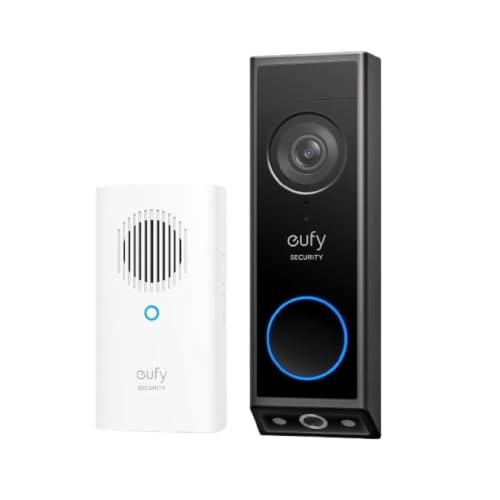
eufy Security Video Doorbell E340 Kit with Chime, 2K FHD, Built-In 8GB — eufy’s E340 kit is the local-storage example: its built-in storage keeps recordings in the home, which is exactly the design that degrades most gracefully when internet fails. Check price on Amazon.

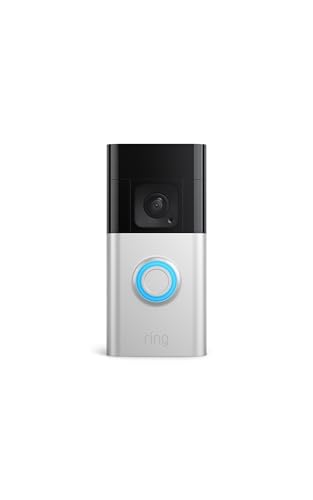
Ring Battery Doorbell Plus (2nd Gen), Head-to-toe HD+ video — Ring’s Battery Doorbell Plus represents the cloud-first design, where Wi-Fi carries alerts, live view and recorded history to the app. Check price on Amazon.
With and Without Wi-Fi
Feature by feature:
| Feature | With Wi-Fi | Without Wi-Fi |
|---|---|---|
| Visitor alerts to your phone | Instant, anywhere | None |
| Live view and two-way talk | Yes, from anywhere | No |
| Motion recording | Cloud and/or local | Local storage models only |
| Doorbell chime in the house | Yes | Usually yes, if chime is paired directly |
| Smart speaker announcements | Yes | No |
| Video history in the app | Full | Only after reconnecting / local review on some models |
| Firmware updates | Automatic | Paused until reconnected |
Why the Front Door Is a Wi-Fi Dead Zone
The camera sits outside the building envelope, behind brick, stone, insulation, foil-backed plasterboard or a metal-skinned door — materials that attenuate Wi-Fi severely — while the router usually sits deep inside the home. The result is that the weakest signal in the house is exactly where the most bandwidth-hungry device lives. Symptoms are diagnostic: delayed alerts, live view that buffers or drops to low resolution, failed uploads, and battery drain, because a camera straining to hold a weak connection works its radio harder. The app-reported signal strength at the camera is the number to check before blaming any camera fault.
Alternatives When Wi-Fi Is Impossible
If a property genuinely has no broadband — a remote outbuilding, an empty property between tenants — options narrow but exist. A local-storage doorbell camera records for later review, which suits deterrence and evidence after the fact. A camera system with its own recorder (the traditional CCTV pattern) records continuously without internet, viewed on a monitor at the property. Cellular-connected cameras exist for remote sites, using mobile data instead of Wi-Fi, at the cost of a data plan. What does not exist is a way to get phone alerts and remote live view with no internet connection of any kind — physics and networking are firm on this point.
Fixing Weak Wi-Fi at the Door
Work from cheapest to most thorough. Move the existing router toward the door side of the home, ideally line-of-sight-ish through one wall rather than three. Add a mesh Wi-Fi node inside the home near the front door — this is the single most effective upgrade for doorbell cameras, giving the camera a strong nearby signal. Prefer the 2.4GHz band for the camera if offered, since it penetrates walls better. Keep the router’s firmware updated, and re-check the camera’s reported signal after each change. These steps also extend battery life, because a camera with a strong signal spends less energy transmitting.
Common Misconceptions
First, that a camera with local storage ‘does not need Wi-Fi’ in the same sense a cloud camera does not — it records without it, but the smart features still do. Second, that strong Wi-Fi on your phone indoors predicts the camera’s signal outdoors; walls make the two unrelated. Third, that a Wi-Fi extender anywhere in the house helps the door — placement near the door is what matters. Finally, that wired-power doorbells must have wired data too: hardwired models still use Wi-Fi for video, which is why a professionally wired camera can still go offline from a network problem.
Data, Bandwidth and What the Camera Sends
A doorbell camera’s internet appetite is bursty: idle, it sips almost nothing maintaining its connection; triggered, it uploads a video clip; watched live, it streams continuously for as long as you watch. On ordinary broadband this is trivial. On slow rural connections or capped plans, a busy camera can matter — hundreds of clips a day from a street-facing door adds up — which is another practical reason tight motion zones are the master setting of doorbell ownership: they cut data, battery drain and alert fatigue with one gesture.
Upload speed, not download, is the figure that governs doorbell performance, and it is the smaller number on most home plans. If live view stutters while everything else in the house streams fine, suspect upload headroom shared with cloud backups, video calls and other cameras. Staggering heavy uploads away from the household’s peak hours, or prioritising the camera in the router’s quality-of-service settings where available, resolves contention that looks like camera failure.
Within the home, the camera’s conversation is with the router, not your phone — the phone may be on another continent. This is why the camera can be flawless while your phone struggles on hotel Wi-Fi, and vice versa. Diagnosing ‘the camera is slow’ therefore starts at the door’s signal and the home’s upload, not at the viewing phone — a distinction our troubleshooting guide builds on.
Local Networks, Hubs and Recorders
Some ecosystems soften the Wi-Fi dependency with a home base: the camera talks to a hub inside the house over a short, strong link, and the hub handles storage and the internet connection. This architecture survives broadband outages more gracefully, keeps recordings at home, and can improve the camera’s connection where the router is far away — the hub sits nearer the door. If your property layout defeats ordinary Wi-Fi, a hub-based system is a design answer, not just a product category.
Traditional recorder systems take the logic further: cameras wired or wirelessly linked to a network video recorder that stores everything locally and needs the internet only for remote viewing. These are the systems for properties where recording must never depend on a cloud — farms, workshops, empty properties — and they trade the doorbell camera’s app polish and visitor interaction for independence and capacity. Many households run both patterns without conflict: a smart doorbell for the door’s social life, a recorder system for the property’s serious watching.
Whichever architecture, the principle for buyers is to ask where recordings live and what still works when the internet does not. The answers, obtained before purchase, predict your satisfaction during the first outage far better than any resolution figure.
Security Implications of the Connection
A camera that needs Wi-Fi also needs the account behind it defended: the connection that brings you alerts is the same one an intruder would use if your account fell. Unique passwords and two-factor authentication are therefore part of the answer to this explainer’s question — the camera needs Wi-Fi, and Wi-Fi-connected things need account hygiene. Keep the router’s firmware updated too, since the router is the camera’s gatekeeper.
Network separation is the advanced option worth knowing: many routers offer a guest or IoT network, and placing cameras on it keeps them away from your computers and storage if a device is ever compromised. It also gives cameras a stable 2.4GHz home, solving band-steering dropouts as a side effect. For most households this is a one-time, twenty-minute configuration with permanent benefits — the rare security measure that also improves reliability.
Improving Wi-Fi Without Buying Anything
Before spending on mesh hardware, exhaust the free geometry. Routers radiate best elevated, central and unobstructed; a router on the floor behind a sofa, in a metal cabinet or in the far corner from the door is a self-inflicted dead zone. Moving it even a room toward the door, raising it onto furniture, and orienting it as its manual suggests can transform a doorbell’s signal at zero cost. Rebooting an elderly router clears its own accumulated confusion, and updating its firmware occasionally adds stability that no camera setting can imitate.
Check also what competes: a microwave oven leaking interference on the camera’s band, a neighbour’s network on the same channel in a dense block, a baby monitor from another era. Router apps and free analysers reveal channel congestion, and switching the 2.4GHz channel to a quieter one is a two-minute fix that occasionally performs miracles. Only when placement, channels and firmware have all had their chance does new hardware earn its purchase — at which point a mesh node near the door, as this explainer recommends, is money spent on evidence rather than hope.
Looking More Closely at the Details That Decide It
Most discussions of what a doorbell camera can and cannot do with, and without, a Wi-Fi connection stay at the level of headlines, yet the outcome is usually decided by smaller details that only appear once you live with the decision. Three of those details deserve attention before anything else: router placement and mesh nodes as fixes before new cameras are blamed, live view, alerts and cloud clips travelling through Wi-Fi and the internet, and the split between recording locally and the smart features that need a network. None of them looks dramatic on a specification sheet. Together they decide whether your doorbell keeps recording through an outage or goes blind with the router, and whether a ring reaches your phone.
Start with router placement and mesh nodes as fixes before new cameras are blamed. Signal at the door is not a single speed figure but a path through walls, and the last metre outside the house is usually the weakest. Test the live view from the doorstep at your busiest evening hour and again at dawn, and write down when it stutters. A short note about the hour the picture froze beats a confident belief that the broadband is fast.
Points to keep in mind
- Judge router placement and mesh nodes as fixes before new cameras are blamed in your own setting before trusting a general verdict.
- Treat live view, alerts and cloud clips travelling through Wi-Fi and the internet as a first-order factor, not a footnote.
- Write down, in one plain sentence, whether you are accepting cloud dependence, local-only recording, or a mesh node.
Then consider live view, alerts and cloud clips travelling through Wi-Fi and the internet. Households usually discover a cloud dependence late, often only after the return window has closed or the installation is finished. Test the arrangement at its edges instead: the live view during the evening streaming peak, the alert while the broadband is down, and the clip you need from an outage hour. A setup that only works in average network conditions will fail exactly those moments, which are what generate the complaints.
Finally, weigh the split between recording locally and the smart features that need a network alongside the first two rather than in isolation. Local recording that survives any outage can mean giving up remote viewing, and full cloud cleverness can mean a doorbell that goes dumb when the internet drops. A mature decision about doorbell Wi-Fi question names that trade-off out loud. Naming it lets you choose the compromise your household needs, instead of discovering in six months that you bought unwanted cloud dependence.
How This Plays Out in Real Situations
Abstract advice becomes useful when it meets a real household, so consider a holiday home that sits empty with the internet switched off. At an empty holiday home the priority is rarely the smartest feature set; it is whether the basics, local recording and a working chime, survive contact with an ordinary unattended month. Keep the offline plan plain at first: a camera that records to itself, a test visit to review the footage, and only then refinements like cellular alerts. Owners of empty homes often find a modest local-recording doorbell outperforms an ambitious cloud one that records nothing while the internet is off.
Contrast that with a thick-walled house where phones lose signal on the front step. Thick walls rewrite the priorities, because reach now matters more than any cloud feature the camera might offer. A speed compromise that barely mattered in a flat becomes the whole decision here, while the instant live view everyone praised fades into irrelevance. This is why copying a friend’s conclusion about doorbell Wi-Fi question so often disappoints: the friend optimised for a life that is not quite yours, with rooms, routines and patience that differ from your own.
Points to keep in mind
- Answer the WiFi question honestly: most smart doorbell features quietly depend on that connection working well.
- Ask neighbours about outage behaviour, then test your own door’s signal.
- Let the outage pattern you live with, not the one dramatic storm, decide how much offline recording you need.
A third pattern appears with a user hoping to run a doorbell camera entirely without home internet. For that user, the answer has to be settled quickly and honestly, because half the features on the box quietly assume a connection that will never exist. Ten minutes listing which features survive offline, local recording and a physical chime among them, prevents the month of disappointment that follows an optimistic purchase. If you recognise yourself here, put verified offline behaviour above every clever network extra.
There is also the quieter case of a flat where the router cannot move from a back room. The doorbell connects, the app opens, yet live view takes long enough that callers give up before the picture arrives. A signal that dips when the microwave runs, a wall that eats the 5GHz band, a router cupboard nobody may open: together they decide whether Wi-Fi at that door is workable. Naming the exact weak link points at its remedy, whether that is a mesh node in the hall, the 2.4GHz band, or a camera with local storage that forgives dropouts.
A Practical Method You Can Repeat
When opinions conflict, a repeatable method settles the question of what a doorbell camera can and cannot do with, and without, a Wi-Fi connection better than another hour of reading. The method has four moves. First, state the network job in one sentence: what must keep working with Wi-Fi, and what must survive without it. Second, gather evidence in that exact setting. Third, change or compare one variable at a time. Fourth, judge each model against the offline list you wrote before shopping, so one glossy cloud feature cannot move the goalposts.
In practice that means actions such as these: choose local-storage models deliberately if offline recording matters; plan what the camera should do during an outage, not just on a good day; and try router and node placement changes before buying accessories. Each is deliberately unglamorous. Their strength is sequence: signal first, storage second, smart features third, so the Wi-Fi question resolves into three answers. Followed in order they leave a trail you can retrace if the result surprises you. Jumbled together in one weekend, they produce the familiar result where every fix was tried and none can be credited.
Points to keep in mind
- keep router firmware and camera firmware current and note changes
- separate internet faults from local Wi-Fi faults when something fails
- test signal at the closed door, in the exact camera position
Equally important is what to record. Useful notes for doorbell Wi-Fi question include the date and time, the place, what else was happening at the time, and a simple verdict in your own words. Across a week those notes expose what one speed test cannot: live view collapsing when everyone streams, alerts arriving after the router’s nightly restart, the door signal vanishing in rain. Wi-Fi decisions built on those patterns stay sound, and if a camera fails early, dated notes are exactly what support will ask for.
Expect the honest testing to take a little longer than trusting the signal bars on the box. The patience is repaid at the first real outage, when your doorbell keeps recording while hasty buyers discover what cloud-only means. Most people do not need more information about doorbell Wi-Fi question; they need their own information, gathered calmly in their own setting, and this method is simply a way of collecting it without drama.
Living With the Decision Over Time
The first week with any choice about what a doorbell camera can and cannot do with, and without, a Wi-Fi connection is a poor predictor of the first year. In week one the router sits where it always sat, no outage has tested the offline plan, and the neighbours’ networks have not yet clashed with yours on a busy evening. Judge it at six months: a router has been replaced or moved, a mesh node has joined or left, and the doorbell still has to record and recover unaided.
Long-term satisfaction usually rests on unexciting qualities connected to 2.4GHz reach compared with 5GHz speed at an outside wall and mobile-data and cellular options for unusual properties. Qualities like a signal that survives the front wall, a camera that reconnects by itself, and footage stored where an outage cannot erase it decide whether the setup serves you or becomes a chore. When you compare arrangements, weight those lasting qualities above headline speeds, because a reviewer tests Wi-Fi for days while you will live with your front-door signal for years. Ask anyone who has run a doorbell through a full year of outages what still bothers them, and it is rarely the download figure that persuaded them.
Points to keep in mind
- Test signal strength at the front door monthly, because routers move and neighbours networks change.
- Owners without WiFi often settle for a simple chime and local recording quite happily.
- Reconsider a no-WiFi setup if you start wanting phone alerts while travelling or working away.
Maintenance deserves a plan rather than good intentions. Tie the network checks to routines you already keep: glance at the router’s position when you dust the hall shelf, re-test the door signal after any engineer visit, and check the storage card when you review clips. That steady rhythm keeps the connection honest: you spot a weakening signal while it is a node move, not after an outage exposes it. In the context of doorbell Wi-Fi question, that plan mainly means keeping an eye on temporary outages versus a door where Wi-Fi will never be reliable before it turns into a bigger problem.
Finally, leave the network plan open to revision when your life changes. Moving home, changing work, a new household member or a new device can all reorder the priorities around doorbell Wi-Fi question. An arrangement that suited a flat with fibre at the door is not a failure because a stone cottage with no reliable signal now needs local recording instead. Going back to your signal notes turns that switch into a quick upgrade instead of another month of conflicting advice.
Mistakes to Avoid and Signs You Chose Well
Connectivity assumptions mislead doorbell owners repeatedly, so the familiar Wi-Fi traps deserve naming first. One is this: forgetting upload speed, which matters more than download for clips. Another, just as common, is the opposite excess — blaming the camera for a router placed in the worst possible corner. And a third, quieter error is assuming no Wi-Fi means no recording of any kind, in every model. Look at the three and they share a root: each is an attention lapse about the network rather than a lack of intelligence. Every one begins when a single vivid factor, usually a headline broadband speed or one dramatic outage, stands in for the whole picture of signal at your door.
Avoiding them does not require expertise, only a pause. Before you commit to an arrangement, challenge it directly: what would have to be true about my signal for this choice to disappoint me, and have I checked it? Which network moment, the evening streaming peak, the router restart, the dead spot behind the front wall, have I not yet tested at the door? What am I assuming about local storage, hubs and recorders changing what survives an outage that I have not verified? Ten minutes of hostile questioning, aimed at your own favourite option, is the cheapest insurance available in the whole process of what a doorbell camera can and cannot do with, and without, a Wi-Fi connection.
Points to keep in mind
- Doubt your assumed connection plan before depending on it.
- Judge success by quiet, ordinary evidence over several weeks.
- Try small corrections before concluding that replacement is necessary.
How will you know the decision was right? Watch for ordinary evidence: how alerts and live view behave during your busiest evening hour; what footage survives a short, deliberate internet outage test; and how the system recovers by itself after the router restarts. None of these announces itself with fanfare. You notice them as absences: the outage that cost no footage, the live view that simply opens, the alert that arrives before the courier leaves. That quiet resilience is what the Wi-Fi decision actually buys, and it is a more trustworthy verdict than any bars icon on the packaging.
When the network evidence disappoints, respond in proportion before replacing the camera. Many disappointments with doorbell Wi-Fi question yield to a small correction — a setting, a position, a habit, an accessory — rather than a complete replacement. Work through the small corrections first, one network change at a time with a day of door traffic after each. Keep a camera swap for structural mismatches, such as a cloud-only model fitted at a door where no signal will ever reach. Holding that line calmly will save you more over the years than any single connectivity tip in this guide.
One More Round of Checks Before You Settle
Before you blame the camera, run the signal audit patient owners do, testing live view at the door in the busiest evening hour even when midday looks strong. It concerns bandwidth use across a busy day of clips and live views and temporary outages versus a door where Wi-Fi will never be reliable, two aspects that reveal themselves slowly. Test both deliberately: pull the internet for ten minutes on a normal evening and watch what records, what alerts and what recovers, without intervening. The aim is not fault-hunting but learning where your arrangement’s comfortable limits lie, while improving the signal is still cheap.
Tell the rest of the household what those outage checks revealed. A setup for doorbell Wi-Fi question is a household system, not a personal gadget, and other people’s routines will find edges yours never touches. Hearing their complaints in the first fortnight, while the arrangement can still change, stops the slow drift into a doorbell nobody trusts that later gets blamed on the camera itself. Settle together what the camera should do when the internet drops, note it where a guest can find it, and treat that note as part of the installation.
Points to keep in mind
- Stream live view at peak hour once, before visitors need it.
- Write your router password and doorbell network name somewhere visitors house-sitting can find quickly.
- Stop chasing signal fixes once live view opens at your busiest hour and an outage costs no footage.
Then stop optimising. Every network setup reaches a point where one more node or setting trades real life for a gain nobody at your door will ever feel. If your signal log, the record of prompt live views and survived outages you have been keeping, says the system works, then let it work. Put the router settings down and save your attention for something in the house that genuinely misbehaves. A later round of checks can wait until your routine or your home changes, and your notes will make it shorter than this one. With doorbell Wi-Fi question, that stopping point usually arrives once how the system recovers by itself after the router restarts stops changing from week to week.
Worked Examples That Make the Trade-Offs Concrete
One outage story teaches more than theory, so follow it closely. Imagine a household whose camera works all day but drops at night. Faced with those nightly drops, most people reach for a new camera instead of asking what changes in the house after dark. Yet the binding constraint in that picture is usually router placement and mesh nodes as fixes before new cameras are blamed, and no amount of spending elsewhere relaxes it. That example only resolves well when the router’s position and schedule are addressed first, because a better camera on the same dying signal is decoration.
What to watch for
- Name the signal bottleneck before blaming cameras.
- Translate every example into your own walls, router corner and outage history before trusting its conclusion.
- If you keep rebooting the router for the same dead doorbell, the signal plan is wrong, not the camera.
Now change one variable: imagine a user hoping to run a doorbell camera entirely without home internet. The camera and the connectivity advice stay exactly the same, yet the correct answer flips, because what the household needs the network to do has changed. This is the single most transferable lesson in the whole subject of what a doorbell camera can and cannot do with, and without, a Wi-Fi connection: context is not a detail around the decision, it is the decision. Read every Wi-Fi verdict against your own walls and broadband, and distrust advice that insists those details do not matter.
A third example works as a warning. Picture a household that skipped the early checks, committed quickly, and spent the following month applying fixes for forgetting upload speed, which matters more than download for clips and then for leaving default network security unchanged. Each remedy bought a quieter week, because each calmed the symptom it aimed at while the dying signal underneath stayed exactly as it was. The cost was not only money; it was confidence. By the time the household finally measured its upload speed and secured its network properly, nobody trusted their own connectivity judgement any more. These examples exist so your household skips that sequence entirely: test the connection at the real door, with the real household, before blaming any camera.
Use these examples as templates rather than stories. Swap their details for your own router position, your own wall materials and your own outage pattern, then run the same reasoning again. If a different arrangement wins once your walls and outages go in, the Wi-Fi question has just shown you what your household truly values. If the same arrangement wins under several versions of your household, you have found a robust setup, one worth keeping through the next router or the next house. Applied to doorbell Wi-Fi question, the detail that most often changes the conclusion is security practices for a camera that sits on your home network.
A Decision Flow When You Feel Stuck
Indecision about doorbell Wi-Fi question usually means two good criteria are pulling in opposite directions, not that you lack information. When that happens, stop researching and start ranking. Write your connectivity criteria down, the four to six that genuinely matter, from offline recording to alert speed, and force them into a strict order. Ranking feels forced for a minute, then it bites, because rival arrangements rarely fail across the board: each falls down on one criterion, and the ranking tells you whether that criterion tops your list.
What to watch for
- Order your connectivity priorities before pricing any more routers.
- Cross out any model that fails a genuine offline deal-breaker, then test what survives at your door.
- Between improving WiFi and replacing the doorbell, fix the signal first; it is usually cheaper.
Next, apply a simple elimination pass connected to mobile-data and cellular options for unusual properties. Strike off any option that fails a true connectivity deal-breaker, and be strict about the word: a deal-breaker means a flaw that will still irritate you on a plain weekday next winter, not a line that merely looks weak in a comparison chart. This pass is often brutal and always useful. What remains is a handful of arrangements you can genuinely test at your door, and confidence from those tests lasts.
Then test the survivors against upload reliability for longer clips, not only snapshots and whether night-time drops follow a pattern worth investigating in your own setting, on the same day if you can, so conditions stay comparable. Jot a score beside each test straight away, while the frozen live view and the missing clip are still fresh in your mind. Most people are startled by how different that written score looks from the verdict in their heads, because memory keeps the one dramatic outage while notes keep the typical evening.
If the two finalists still tie, break the tie on daily-life grounds and feel no guilt about it: which arrangement is kinder to reconnect, simpler for a partner to manage, and easier to replace if it fails in year three? A dead heat between a cloud model and a local model is common, and at that point either will serve your doorway perfectly well. Settling on an arrangement today beats a week hunting for a difference your daily alerts will never reveal. For doorbell Wi-Fi question, the easiest option to live with is usually the one that handles mobile-data and cellular options for unusual properties with the least fuss.
Seasonal, Household and Long-Term Angles Worth Planning For
Conditions change across the year, and a decision about what a doorbell camera can and cannot do with, and without, a Wi-Fi connection that is tested in only one season carries hidden risk. Wet winter walls weaken signals that behaved in summer, holiday guests flood the network at exactly the wrong hours, and storm season tests outages and recovery together. Testing all four seasons beforehand is impossible, so ask the winter question out loud: in the darkest, busiest week of your year, will this signal, storage and recovery plan still cope?
What to watch for
- Winter closed doors and summer garden use both change WiFi reach at the doorstep noticeably.
- Confirm a less technical housemate can reconnect the doorbell after a router restart unaided.
- Keep a wired chime fallback in mind if your broadband proves unreliable month after month.
Households also change from inside. A network arrangement chosen by one confident user gets inherited by partners, children, grandparents and guests, each with different patience for routers and passwords. The arrangements that last are ones a newcomer can make sense of cold: a doorbell that reconnects by itself, a note saying which band it uses, and no weekly reboots. When you evaluate doorbell Wi-Fi question, spend one minute imagining the least technical person in your life facing it alone. That minute is a surprisingly accurate quality test.
Count the total effort each arrangement will ask of you across its whole working life, not just the effort of setup day. Count the ongoing attention honestly: the router reboots, the signal re-tests, the storage checks, the password updates, and ask whether that rhythm fits the time your household has. A network arrangement that wants weekly attention from a household that can only offer monthly attention will slowly decay, however fast its headline speed. Matching the upkeep rhythm to the household matters just as much as matching the camera to the signal. With doorbell Wi-Fi question, the recurring effort worth counting most honestly is the effort tied to router placement and mesh nodes as fixes before new cameras are blamed.
Finally, think about the exit before you need it. When you change broadband provider or move house, can the doorbell rejoin a new network without a factory reset and a lost month of clips? Keep a note of the network name, band and storage you settled on, so a future change stays a calm job. That is not pessimism; it is what turns one purchase into accumulated household knowledge, so the next decision about doorbell Wi-Fi question starts from experience instead of from a search box.
Questions Worth Asking Before You Spend Anything
Answering a few questions about signal, storage and outages now prevents most costly connectivity mistakes later. First: what exactly is the connectivity problem I am solving at this door, stated without naming any product or band? If your problem statement names a router model, rewrite it until it describes your doorway: a signal that dies at the step, an outage that erases the evening, a house with no internet. Solutions chosen for a life-shaped problem age far better than solutions chosen for a catalogue-shaped one, especially with doorbell Wi-Fi question.
What to watch for
- Describe the connection gap at your door, not the gear.
- Write down the signal facts you know about your front door, and mark the untested ones honestly.
- Ask who else is affected, especially anyone whose streaming shares the connection, before the decision is final.
Second: what evidence do I already have? You know more about your own home’s signal than you credit yourself with. You know which room’s streaming stutters first, which hour the street comes online, and which household members will resist anything complicated. Getting that signal knowledge onto paper before you shop stops a confident broadband pitch from overwriting it. Mark the gaps in that evidence honestly as gaps: a gap you can see can be tested at the door, while an assumption you never noticed quietly becomes the foundation of a bad connectivity choice. For doorbell Wi-Fi question, that existing evidence usually includes what you already know about temporary outages versus a door where Wi-Fi will never be reliable in your own setting.
Third: when, not if, this connection needs attention in a year, what will you actually do about it? Routers get replaced, passwords change, furniture moves in front of the signal, networks change, children grow. A choice with a calm answer to that question, involving steps like plan what the camera should do during an outage, not just on a good day, is worth more than a choice with a slightly better specification and no answer at all. An arrangement that records locally and reconnects by itself is resilient, even though resilience never appears in a feature list.
Fourth, and last: who else should have a say? Decisions about what a doorbell camera can and cannot do with, and without, a Wi-Fi connection often affect people who were not in the room when the research happened, and their late objections can sink an otherwise sound setup. Ask the household early, while the arrangement is still on the table: here is the connection plan, what would annoy you about it? The final plan may be the very one you first favoured, but it will be an arrangement the household has accepted, and accepted arrangements get maintained while resented ones get quietly abandoned.
Related Guides
- best Wi-Fi security cameras for home
- best security cameras for front door
- best home security cameras for under 200
- best security cameras for home without subscription
- how to choose a doorbell camera
- how to fix a doorbell camera that keeps going offline
- wired vs wireless doorbell camera
Frequently Asked Questions
Will my doorbell camera record during an internet outage?
If it has local storage, usually yes — it keeps recording motion events internally and may sync them when service returns, depending on the brand. Cloud-only models typically cannot record new cloud clips during an outage. Either way, alerts and live view stop until the connection returns, because they travel through the internet to your phone.
Can I view my doorbell camera without the internet, at home?
Generally no through the normal app, which routes via the maker’s cloud even when you are home. Some systems with a home base or recorder allow local viewing on the home network. For most consumer doorbell cameras, assume the app needs internet. If local-only viewing is a requirement, shop specifically for systems designed around a home hub or recorder.
How strong does Wi-Fi need to be at the door?
The camera app usually reports signal strength — you want a comfortably strong reading, not a marginal one, because weather, doors closing and network load all eat margin. Practically, if live view opens instantly and stays sharp from outside the closed door, the signal is adequate. If it buffers, a mesh node near the door is the reliable fix.
Does a doorbell camera use a lot of data?
Only when it is recording or streaming. A quiet door uses modest data; a busy street-facing camera uploading clips all day uses much more, and live-viewing frequently adds up too. On capped broadband, tighten motion zones so the camera uploads events that matter. Battery models with constant false triggers are the worst case for both data and power.
Can a doorbell camera work on mobile data instead?
A few specialist cameras use cellular connections for remote sites, but mainstream doorbell cameras are Wi-Fi devices. You can technically connect one to a mobile hotspot, and some people do at building sites or empty properties, but expect data costs and battery drain on the hotspot. For a normal home, broadband Wi-Fi is the intended and practical route.
Why does my camera go offline at night?
Night itself is not the cause; the usual culprits are router schedules or band-steering quirks, the camera’s battery sagging in cold night air, or interference patterns that change when neighbours’ networks get busy. Check the signal and battery reports in the app, and see our linked troubleshooting guide for the full offline diagnostic routine.
How long should I test my doorbell with and without Wi-Fi?
For most households, a focused week of ordinary use tells you more than a month of occasional reading about what a doorbell camera can and cannot do with, and without, a Wi-Fi connection. Test the doorbell at the evening peak, during a deliberate short outage and on one quiet morning, keep the short notes above, and then decide. Stretching the trial beyond that point seldom changes the verdict; it mostly postpones a decision your own signal evidence has already settled.
What should I check first if the camera fails without Wi-Fi?
Return to the simplest explanation before replacing anything. Recheck the basics connected with security practices for a camera that sits on your home network, repeat your most reliable test in your most familiar setting, and change one variable only. If a calm retest still disappoints, the mismatch is probably built into the connectivity choice, and your notes will pinpoint whether signal, storage or recovery failed you.
Is a pricier offline-capable doorbell worth it for my home?
Only when the higher tier improves something your own routine actually stresses, such as why the front door is often the weakest Wi-Fi spot in the whole home. If your notes show the frustration comes from a dying router or a cloud-only design, extra camera features will change nothing you feel. Judge any pricier tier against evidence from your own doorstep, not the manufacturer’s best-case demonstration.