Understanding how to protect a smartphone means defending it on two fronts at once: the physical one, against drops, scratches, water and theft, and the digital one, against malware, phishing, account takeovers and the data loss that follows a lost handset. Most people handle one front and forget the other, usually buying a case while leaving the phone signed in to everything with a four-digit code.
This guide builds a complete, realistic protection routine: the physical gear that actually helps, the settings that lock down your data, and the habits that stop the most common attacks. None of it requires expertise, and most of it is free — it just needs doing once, properly.
Disclosure: As an Amazon Associate, kajuandouglas.com earns from qualifying purchases. Links to Amazon on this page are affiliate links; they cost you nothing extra. Listing details such as price and availability change often, so check the current Amazon listing before you buy.
The Short Answer
Fit a case with raised edges and a tempered glass screen protector, then set a strong passcode with biometric unlock, enable Find My or Find Hub tracking, and turn on automatic updates and backups. Add two-factor authentication to your email and cloud accounts, review app permissions, and only install apps from the official stores. Those steps cover the overwhelming majority of real-world phone disasters.
In this guide
Gear for This Guide
Physical protection starts with the two accessories that absorb the damage phones actually suffer: drops and screen impacts.

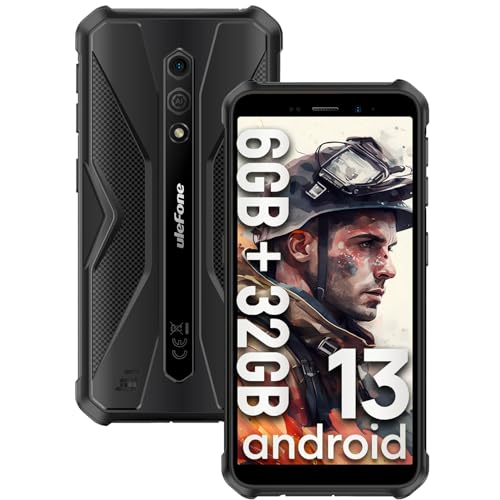
Ulefone Armor X12 Rugged Smartphone, Waterproof Phones Unlocked, Octa-core Android 13… — A rugged smartphone built for drops, dust and water, worth considering if your work or hobbies regularly put a normal phone at risk. Check price on Amazon.
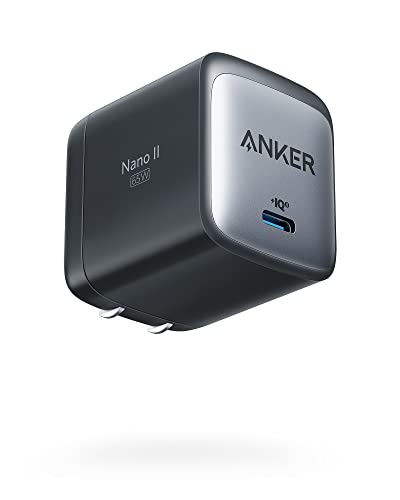
Anker Nano 65W GaN II PPS USB C Charger, Fast Compact Foldable Charger — A compact fast charger from a reputable maker; using quality charging gear from known brands is part of protecting the battery and the phone. Check price on Amazon.
Physical Protection That Actually Works
Drops cause the vast majority of phone damage, and two inexpensive accessories prevent most of it. A case with raised lips around the screen and camera keeps glass off flat surfaces in a fall, and corner reinforcement matters because phones usually land on a corner first. A tempered glass screen protector sacrifices itself on impact and takes the scratches that keys, coins and grit would otherwise carve into the real screen.
Water resistance ratings help against rain and spills but are not a licence to swim with the phone. Seals weaken with age, drops and repairs, and no manufacturer warranty covers liquid damage. Treat the rating as accident insurance, rinse nothing under taps, and dry the charging port fully before plugging in if the phone gets wet.
Heat is the quiet enemy. Leaving a phone on a car dashboard in summer or charging it under a pillow degrades the battery and can warp adhesives. Protect the battery by avoiding chronic heat, not leaving the phone at full charge in hot places, and using chargers from reputable makers that manage power properly.
How to Protect a Smartphone Step by Step
Step 1: Set a strong lock and biometrics
Use at least a six-digit passcode, or an alphanumeric one, alongside fingerprint or face unlock. Biometrics give you convenience; the passcode is the real security, and it protects you when biometrics fail or are unavailable. Set the phone to lock quickly when the screen turns off.
Step 2: Turn on device tracking and remote wipe
Enable Find My on iPhone or Find Hub on Android and test signing in from a computer. These services locate a lost phone, display a contact message on it, and can erase it remotely — the difference between a lost phone and a lost identity.
Step 3: Enable automatic updates and backups
Automatic system and app updates close security holes as vendors patch them, and automatic backup means a stolen phone does not take your photos and data with it. Both settings take a minute and protect you every day afterwards.
Step 4: Add two-factor authentication to key accounts
Your email account is the master key to password resets everywhere, so protect it and your Apple or Google account with two-factor authentication first, then banking and social accounts. Use an authenticator app or hardware-backed prompts rather than text messages where you can.
Step 5: Review app permissions
Go through permissions for location, microphone, camera, contacts and photos, and revoke anything an app does not genuinely need. A flashlight or game has no business with your contacts. Repeat this review every few months and whenever you install something new.
Step 6: Install only from official stores
The official app stores screen apps and can remove malicious ones remotely. Sideloading apps from random websites is the main route malware takes onto phones. Keep the setting that blocks unknown sources switched on unless you have a specific, trusted reason.
Protecting Against Theft and Loss
Theft protection starts before anything is stolen. Register the phone’s serial or IMEI in your records at home, keep the purchase receipt, and make sure your cloud account recovery details are current so you can act fast from any computer. Know the sequence: locate the phone, lock it with a message, mark it lost with your carrier, and erase it if recovery looks unlikely.
In public, small habits matter: keep the phone in a zipped pocket or bag rather than a back pocket or table edge, be wary of distraction thefts in cafés, and never hand your unlocked phone to a stranger asking to make a call — offer to dial for them instead. A phone snatched while unlocked bypasses most of its security.
Consider whether insurance or a protection plan makes sense for your situation. For an expensive flagship carried by someone accident-prone or working on site, a plan can be rational. For a mid-range phone with a good case, self-insuring by keeping the old phone as a spare is often the cheaper strategy.
Digital Hygiene for the Long Term
Phishing is now the main threat to phone users, arriving by text, email and messaging apps with links that mimic banks, delivery companies and the tax office. The defence is procedural: never follow a link to a sign-in page from a message; open the official app or type the address yourself. Urgency in a message is itself a warning sign.
Public Wi-Fi deserves caution. Avoid banking and sensitive sign-ins on open networks, prefer your mobile data for anything important, and forget networks after use so the phone does not rejoin lookalike hotspots automatically. A reputable VPN adds a layer on networks you must use, such as hotels.
Finally, audit your accounts occasionally. Remove old devices from your Apple or Google account, check which apps and websites have sign-in access, and change reused passwords with the help of a password manager. Phones accumulate digital clutter exactly like physical clutter, and a short audit twice a year keeps both under control.
Protecting the Accounts the Phone Unlocks
A modern phone is less a possession than a keyring: it unlocks email, banking, messaging, cloud storage, home security and often the car and the front door. Protecting the phone therefore means protecting the accounts behind it, because a thief who defeats the phone’s lock inherits the keys. The passcode is the first wall, and the second is making sure the accounts themselves resist a new sign-in from an unknown device even if the phone is compromised.
Start with the email account, because password resets for nearly everything flow through it. Give it a unique, strong password stored in a password manager and two-factor authentication using an app or security prompt rather than text messages where possible. Then protect the Apple or Google account the same way, since it controls backups, tracking and remote wipe — the very tools you would need after a theft.
Work outward through banking, payment and social accounts, enabling two-factor authentication wherever it is offered and reviewing which devices and apps are signed in. Remove old phones and forgotten sessions. This audit takes an evening at most, and it converts a stolen phone from an identity emergency into an expensive inconvenience, which is the realistic goal of all phone security: not invulnerability, but damage contained.
Physical Security in Specific Situations
Different environments threaten phones differently, and protection adapts. At the beach or pool, the enemies are water, sand and opportunistic theft from towels: a waterproof pouch for the phone you must carry, a habit of never leaving it visible on a lounger, and rinsing nothing under taps afterwards — a gentle wipe once home, since water resistance is accident insurance, not a swimming licence. Sand deserves special respect; a single grain in the charging port or under a case edge does quiet damage for weeks.
On building sites, farms and in workshops, drops onto concrete and dust ingress dominate. A rugged case with port covers, a lanyard or belt holster that prevents the pocket-to-concrete fall in the first place, and a screen protector you treat as a consumable are the working kit. Workers who destroy a normal phone annually often find a purpose-built rugged phone cheaper over two years than repeated repairs, however unglamorous it looks beside a flagship.
While travelling, theft and loss outrank damage. Keep the phone in a zipped, front-facing pocket or bag in crowds, use the hotel safe for your spare rather than leaving both devices together, enable every tracking and theft-deterrence feature before departure, and know your cloud sign-in details by heart or through a password manager accessible without the phone. A traveller who can locate, lock and, if needed, erase a phone from any borrowed computer has already won most of the battle.
The Protection Audit: Thirty Minutes, Once a Year
Protection decays quietly. Cases crack at the corner and stop protecting, settings revert after updates, accounts accumulate forgotten signed-in devices, and the backup you trust has been failing since the storage filled in March. An annual audit — thirty minutes with the phone and a computer — catches the decay while it is still free to fix. Work through it as a checklist and the phone’s protection becomes a maintained system rather than a set of good intentions from purchase day.
Start physically: remove the case and inspect it for cracks, stretched corners and a lip that no longer stands proud of the screen; replace it if it has taken a serious fall, because a case that has absorbed one big impact has spent its protection. Inspect the screen protector for cracks and lifting edges, the charging port for lint, and the phone’s frame for damage that might have compromised its water resistance. Photograph the IMEI screen and store the image in your cloud library while you are here.
Move to the digital side: confirm the operating system and apps are current, the backup shows a recent successful date, and device tracking locates the phone correctly from a computer. Review the signed-in devices on your Apple or Google account and remove anything you no longer own. Skim app permissions for anything that has quietly gained location, microphone or photo access it does not need.
Finish with the accounts: email and cloud accounts have two-factor authentication on, recovery details point at your current number and address, and the password manager holds no duplicates of your most important passwords. Check that your lock-screen emergency information is current, because protectors change numbers too.
Put the audit in the calendar on a date you will honour — a birthday, the new year, the phone’s purchase anniversary. Protection is not a product you buy once; it is a small recurring act of attention, and thirty minutes a year is the entire price of keeping every other measure in this guide true.
Common Mistakes to Avoid
- Using a pattern or four-digit code everyone can guess. Birth years and simple patterns are tried first by thieves. A longer passcode with biometrics for daily convenience is the practical standard.
- Skipping the screen protector to keep the phone slim. One grit scratch or one corner drop costs more than a lifetime of protectors. Tempered glass preserves both the screen and the phone’s resale value.
- Leaving tracking and remote wipe off. Without them, a lost phone is gone along with its data. With them, you can often recover it, and always erase it.
- Reusing the same password everywhere. One breached website then unlocks your email and banking. A password manager makes unique passwords effortless.
Pro Tips
- Photograph your phone’s IMEI and serial page and store it in your cloud photos; police and carriers ask for it after theft.
- Set your lock-screen emergency contact and medical information; it helps good samaritans and responders without unlocking the phone.
- When travelling, enable any extra theft-deterrence features your platform offers, such as requiring biometrics for setting changes.
Physical Protection Beyond the Case: Habits That Prevent Most Damage
A case and a screen protector absorb accidents, but habits decide how many accidents happen. The classic drop zones are predictable: getting out of a car with the phone on your lap, carrying it loose with keys and coins, balancing it on a bathroom sink edge, and handing it to a child over a hard floor. Building tiny routines around those moments prevents more damage than any accessory. Phone goes in the same pocket, alone, every time. It charges on the same stable surface, never on a bed where it can be knocked to the floor or overheat under bedding. It never rides on a car roof, a washing machine, or the arm of a sofa, however briefly, because briefly is exactly how long a forgetful moment takes.
Pocket choice matters more than people think. Back pockets bend phones when you sit, front pockets full of keys scratch them, and shallow jacket pockets eject them when you bend over. A zipped pocket, a belt pouch for physical work, or an armband for running keeps the phone attached to you rather than negotiating with gravity. At the gym, in a workshop, or on a building site, consider leaving the phone in a locker or vehicle and using a connected watch or earbuds for calls, because the most protective case is the accident that never gets the chance.
Water deserves its own habit set. An water-resistance rating describes a new phone tested in clean, still water in a laboratory; it is not a promise about hot showers, soapy bath water, seawater, or a phone whose seals have aged or whose screen has been replaced. Keep the phone away from steam where you can, rinse salt water exposure promptly with fresh water if the maker advises it, and never charge a phone whose port is still wet. Treat water resistance as insurance against rain and spills, not as an invitation to film underwater, and that insurance will still be there when you genuinely need it.
Digital Protection: Locks, Updates and the Settings That Matter Most
The strongest physical case in the world does nothing if the phone itself is open to whoever picks it up. Set a proper passcode of at least six digits, enable biometric unlock for convenience so you are not tempted to weaken the code, and set the screen to lock quickly when idle. Check what is visible from the lock screen: message previews, wallet access and voice-assistant actions can all leak information or capability to a stranger, so restrict sensitive notifications to show content only after unlock, especially for banking, email and messaging apps.
Updates are protection, not housekeeping. Security patches close holes that are actively used against real phones, and delaying them for months leaves known doors open. Turn on automatic updates for the system and for apps, and restart occasionally so pending protections actually apply. Be equally deliberate about what you install: apps from official stores, from developers you can identify, asking for permissions that make sense for their job. A torch app that wants your contacts and location is telling you what it really sells, and the correct response is to delete it and choose another.
Find-my-device features only help if they were enabled before the loss, so verify them today: location services on, the device visible in your account from a computer, and a lock-screen message with a contact number that is not the phone’s own number. Practise signing in from another device so the first time you use the system is not in a panic. Know, too, what these tools cannot do: they cannot locate a phone that is off, wiped, or in a place with no signal, which is why the backup and account protections elsewhere in this guide matter just as much.
Permissions worth reviewing every few months
- Location: limit always-on access to maps, weather and safety apps that truly need it.
- Microphone and camera: remove access from apps you no longer use for calls or photos.
- Photos: grant selected-photo access instead of your whole library where the system offers it.
- Background tracking and advertising identifiers: restrict anything you do not recognise.
- Accessibility and device-admin apps: this list should be very short and entirely familiar.
Protection on the Move: Travel, Work and Shared Spaces
Travel concentrates every risk at once: unfamiliar places, distractions, public charging, shared networks and the cost of losing the phone far from home. Before a trip, back up fully, note your carrier’s process for suspending a line, and store your accommodation and emergency contacts somewhere other than the phone. In crowded places keep the phone in a zipped, front-facing bag rather than a back pocket or an open tote, and be wary of the distraction theft where a stranger creates a commotion, covers your phone with a map or paper, and lifts it from a cafe table in one motion.
Public charging cables and ports are a convenience with a small but real risk, and public Wi-Fi is a larger one. Prefer your own charger and a wall socket, use your mobile data or a reputable virtual private network on networks you do not control, and avoid logging into banking from a shared computer in a hotel lobby. None of this requires paranoia; it requires the same situational awareness you apply to a wallet, extended to a device that now holds the wallet, the keys and the photo album all at once.
At work, protection includes separation. If your employer manages your phone or your work profile, understand what they can see and what they can erase, and keep personal photos and accounts in your personal space rather than inside managed apps. On shared family devices, individual profiles and separate accounts stop a child’s game download from becoming your security problem. When you sell, give away or recycle a phone, sign out of every account, remove it from your trusted-device lists, then factory reset it, in that order, so activation locks do not strand the next owner and your accounts do not travel with the hardware.
When Protection Fails: A Calm First Hour After Loss or Damage
The first hour after a phone is lost or stolen decides most of the outcome, and panic is the enemy. From any computer, locate the device, lock it remotely and display a contact message. If the location shows it somewhere safe, such as a shop you visited, arrange collection rather than confronting anyone. Change the password on your main email account first, because email resets everything else, then your banking and primary accounts. Tell your carrier to suspend the line so calls and texts, including verification codes, stop reaching the missing SIM, and ask about blocking the handset itself.
For damage rather than loss, the priorities are data and safety. A phone with a swollen battery should not be charged, carried in a pocket, or posted through the mail; place it on a non-flammable surface away from soft furnishings and contact the manufacturer or a reputable repairer promptly. A cracked screen can still be backed up before repair if the touch layer works, and that backup matters because some repairs, and nearly all replacements, return a wiped device. Photograph the damage for any insurance or warranty claim before anyone opens the phone, and keep receipts and reference numbers together in one email to yourself.
After the crisis, close the loop. Remove the lost device from trusted lists, review recent account activity for anything you do not recognise, replace cards held in the phone wallet if your bank advises it, and write down what you wish you had set up beforehand. Then set it up on the replacement while the lesson is fresh. Protection is not a product you buy once; it is a short checklist you revisit each time the phone, the software or your life changes.
Insurance, Warranties and the Economics of Repair Versus Replace
Protection includes a financial plan for the day physical protection fails. Start by inventorying the cover you already have before buying any more: many bank accounts, cards and household policies include gadget cover with terms that surprise their owners, and manufacturer warranties cover defects but never accidents. Dedicated phone insurance and maker protection plans fill the accident gap at a monthly or upfront cost, with excess charges per claim that belong in your maths from the start. The honest comparison is total cost over your likely ownership period, including excesses and any claim limits, against the price of the one repair you are statistically most likely to need, which for most people is a screen, followed by a battery.
Repair economics have shifted in the owner’s favour. Authorised repairs preserve water resistance and warranty, independent repairers often offer speed and value on mainstream models, and battery replacement in particular remains the best-value intervention in all of phone ownership, routinely returning a tired phone to full usefulness for a fraction of a replacement’s cost. Before insuring or replacing, get a real quote for your actual damage on your actual model; decisions made on imagined prices are usually wrong in both directions at once. A phone written off in your head as beyond saving is frequently one screen or one battery away from two more years of faithful service.
Know your consumer rights as part of the same plan. In many regions, goods must last a reasonable time regardless of the printed warranty, and a defect appearing early in a phone’s life may be the seller’s problem rather than yours or your insurer’s. Keep receipts, photograph damage promptly, note dates and names, and make claims in writing. None of this is exciting, and all of it is the difference between a broken phone being a bill and being a process that someone else funds. Protection, properly understood, is as much paperwork done calmly in advance as it is glass, rubber and good habits.
Protecting Children, Parents and the Phones You Are Responsible For
Many adults are the unofficial protection department for a whole family’s phones, and each generation needs a different version of it. Children’s phones need physical toughness, content and purchase controls, location sharing agreed openly rather than imposed secretly, and a backup that treats their photos and schoolwork as seriously as an adult’s documents. Set spending limits and purchase approval requests on their accounts from day one, because it is far easier to loosen a sensible system as a child matures than to retrofit one after an expensive or upsetting surprise, and review their app permissions together at intervals as an ordinary family routine rather than an investigation.
Parents’ and grandparents’ phones need protection against a different threat profile: scams, confusing permission requests, and well-meaning taps on malicious messages that arrive dressed as banks, delivery firms and grandchildren in trouble. Simplify their home screens, restrict installs to the official store, turn on automatic updates so security does not depend on their decisions, and agree a family rule that any message asking for money, codes or urgent secrecy gets verified by a phone call to a known number before anything else happens. Write the rule down and put it where it can be seen in a frightening moment, because people under stress follow the rule they can see, not the one they were once told.
For every dependent phone, hold the keys responsibly and transparently. Know, with permission, how each device can be located, locked and restored, keep a note of whose account holds what, and review the arrangement as children mature and parents’ needs change. Protection given as care feels different from control exercised as surveillance, and families that discuss it openly get both the safety and the trust. The goal is a household where a lost, stolen or broken phone, anyone’s, is a solved problem within the hour, handled by people who rehearsed the solution on a calm afternoon.
Environmental Protection: Heat, Cold, Dust and the Places Phones Suffer
Temperature is the slow enemy that never makes headlines. Batteries age rapidly in sustained heat, so a phone that lives on a sunny dashboard, beside a kitchen hob or in a hot workshop is ageing far faster than its desk-bound twin, whatever its owner does about cases and chargers. Cold is kinder but not harmless: a chilled battery delivers less power and may shut down outdoors in winter, recovering when warmed, which alarms owners into imagining faults where none exist. Keep the phone near body temperature in extremes, let a cold phone warm gradually indoors rather than charging it immediately, and never use external heat, radiators or hair dryers to hurry the process along.
Dust and grit wage the other slow war. They enter ports, abrade coatings beneath cases, jam buttons and mute speakers, and they are worst exactly where phones are most useful: building sites, beaches, farms, workshops and kitchens. Port covers, sealed pouches for genuinely filthy environments, and the end-of-day brush-down described in the cleaning guidance are the defences, and they work by never letting accumulation reach the level where it becomes damage. Sand deserves a special warning of its own: it is harder than the coatings on phone glass and ubiquitous exactly where phones are carried carelessly, so a beach phone belongs in a pouch, not loose in a towel bag with the sun cream and the shells.
Finally, protect the phone from its own accessories when they are chosen carelessly. Poorly made magnetic mounts can stress ports and cases, cheap car chargers can deliver dirty power for years, and counterfeit cables can wear or damage the socket they wobble in, one journey at a time. Accessories are part of the protection system, not an afterthought to it. Buy the few you need from makers you can name, retire them when they loosen, fray or overheat, and your phone will live its whole life inside a small environment that is consistently on its side, which is the deepest and least dramatic form of protection there is.
Protecting Your Number, Your Identity and Your Accounts Beyond the Handset
A stolen phone endangers more than itself, because the phone number it carries has become an identity document. Criminals who control a number can intercept verification codes, reset accounts, and impersonate the owner to their own bank, a technique built on persuading carriers to move a number to a new SIM. Ask your carrier what protections they offer on your account, such as a port-out lock or a PIN required for changes, and set every one of them. Use authenticator apps or hardware-backed methods instead of text codes wherever a service allows it, so that even a compromised number does not open the doors it once guarded.
Your accounts deserve the same audit as your handset. A unique password for your main email, stored in a password manager, protects the reset pathway to everything else. Recovery email addresses and phone numbers should be current and should not all terminate on the same device. Review which apps and websites are signed in on the phone and can be used by whoever holds it unlocked, and sign out of the ones that do not need permanent residence. The phone’s lock screen is a wall, but account hygiene decides how much of your life is standing behind it when the wall is tested.
Act on the same principles before travel and after any loss in the family, because these are the moments when numbers and accounts actually move. Tell your carrier promptly about a lost phone, change the master passwords from a safe device, and review account activity with the calm suspicion of an auditor rather than the panic of a victim. Owners who have set carrier locks, strong recovery options and app-based authentication in advance experience a stolen phone as a hardware problem. Owners who have not experience it as an identity problem, and the difference between those two experiences is an hour of setup on an ordinary evening.
Screen Protectors Compared: Glass, Film and When Each Earns Its Place
Not all protectors protect equally, and the differences are practical rather than mysterious. Tempered glass protectors absorb impacts by sacrificing themselves, feel like the screen they cover, and preserve touch sensitivity and clarity best, which is why they are the default recommendation for most phones. Their weakness is fit: on strongly curved screens they may adhere only at the edges, lift at the corners, or interfere with cases that wrap tightly. Film protectors follow curves beautifully, heal minor scratches in some formulations, and add almost no thickness, but they feel softer under the finger and offer less defence against a hard drop onto a corner or a stone.
Privacy and matte variants solve specific problems at specific costs. A privacy protector narrows the viewing angle so a stranger on a train cannot read your messages, and it also narrows your own angle, dims the display slightly, and can fight with brightness in sunlight. A matte protector kills reflections and fingerprint visibility, a genuine blessing outdoors and in bright offices, at the price of a fine grain over text that readers notice. Choose the variant for the problem you actually have, in the place you actually use the phone, rather than for the longest feature list, and replace any protector the moment it cracks, because a cracked protector has spent its protection and its sharp edges are now a hazard of their own.
The Two-Minute Monthly Protection Audit
Protection decays quietly, so audit it briefly and regularly, ideally on the same day as your backup check so the two habits hold each other up. Inspect the case for cracks and looseness, the protector for chips at the edges, and the charging cable for fraying at its ends. Confirm find-my-device still locates the phone from a computer, that the system and apps are updated, and that the last backup is recent enough to be useful. Glance at the battery health figure and at the port, with a torch, for the lint that this guide’s cleaning companion describes. Two minutes, honestly spent, catches every slow failure before it becomes a fast one.
Extend the audit to the accounts twice a year. Review which devices are trusted on your main accounts and remove the ghosts of phones you no longer own. Check that recovery numbers and addresses are current, that your carrier’s protections against number theft are still in place, and that the apps with the deepest permissions, location, accessibility, device administration, are all familiar and justified. Protection is a garden rather than a wall: it is not built once but tended briefly and often, and the owners who tend it are the ones whose phones, accounts and photographs survive the decade intact.
A Word on Second-Hand Phones and Inherited Risk
A used phone arrives with a history you cannot see, so protect it from its past before trusting it with your future. Confirm it has been properly signed out of the previous owner’s accounts and reset, check its battery health and update status, and update everything before installing your own life on it. Fit a new protector and a sound case, because the old ones carry the old owner’s drops. A second-hand phone treated this way, bought from a reputable programme with a warranty, is a sensible and sustainable choice; the same phone trusted blindly is a stranger’s device holding your banking.
Related Guides
- best cases for smartphones
- best screen protectors for smartphones
- best smartphones for privacy
- best antivirus for smartphones
- best smartphones for seniors
- how to clean a smartphone
- how to back up a smartphone
- how to choose a smartphone
Frequently Asked Questions
Do I need antivirus on my phone?
For most people who install apps only from the official stores and keep the system updated, the built-in protections — Play Protect on Android and the sandboxed design of iOS — are sufficient, and a separate antivirus adds little. It can be worth considering if you sideload apps, use an old phone that no longer receives updates, or want the bundled anti-theft and web-protection extras. No antivirus compensates for installing apps from random websites.
Is a case or a screen protector more important?
If you must choose one, choose the case with raised edges, because corner drops are the leading cause of cracked screens and a good case protects the whole device, camera included. The ideal is both: the protector handles scratches and face-down impacts while the case handles drops. Together they cost a small fraction of one screen repair and keep the phone looking new for trade-in.
What should I do immediately if my phone is stolen?
From another device, sign in to Find My or Find Hub, locate the phone, and put it in lost mode with a contact number displayed. Report the theft to your carrier so the SIM and IMEI can be blocked, change your email and banking passwords, and file a police report with the IMEI for insurance and records. If recovery looks unlikely, erase the phone remotely; your backup lets you restore everything to a replacement.
Are biometric locks secure enough?
Yes, for everyday protection. Fingerprint and face systems on modern phones are resistant to casual attempts and are backed by attempt limits that force the passcode after repeated failures or restarts. The passcode remains the foundation, so make it strong. In higher-risk situations you can temporarily disable biometrics — both platforms offer a quick way — leaving only the passcode active.
Does a VPN protect my phone?
A VPN encrypts your connection on untrusted networks, which protects data in transit on public Wi-Fi, and it can hide your browsing from the network operator. It does not protect against phishing links, malicious apps or weak passwords, and a poor-quality free VPN can itself collect data. Treat a VPN from a reputable provider as one layer for travel and public networks, not as complete security.
How do I protect a child’s smartphone?
Set up the platform’s family controls first: Family Sharing and Screen Time on iPhone, Family Link on Android. Restrict app installs and in-app purchases with approval requirements, set content filters, share location, and agree charging and bedtime rules. Fit a sturdy case and protector, enable backup, and revisit settings as the child grows — the goal is protection that gradually hands over responsibility.
Is a screen protector still necessary with modern toughened glass?
Modern glass resists shattering impressively but still scratches, and scratches are the damage most owners actually live with. Sand, keys in the wrong pocket, grit on a desk and the small abrasives of daily life mark glass coatings and eventually the glass itself, while a protector takes those marks instead and can be replaced in minutes for very little. If you keep phones for years, sell them on, or simply dislike looking through a web of fine lines, a protector remains one of the cheapest forms of protection per day of use ever sold.
What should I do immediately if my phone is stolen?
Work in order and work calmly. Locate and lock the phone from another device and display a contact number. Change the password on your main email account first, because email resets everything else, then your banking and other important accounts. Tell your carrier to suspend the line and block the handset, and report the theft to the police if you need a record for insurance. Finally, review your accounts for unfamiliar activity over the following days, and remove the stolen device from your trusted lists once you are sure it is not coming back.
Does water resistance mean I can take my phone swimming?
No. Water resistance ratings describe a new phone, undamaged, tested briefly in clean, still, fresh water under laboratory conditions. They do not cover swimming pools with chemicals, seawater, hot showers, soapy water, or a phone whose seals have aged, been repaired or survived drops. Treat the rating as insurance against rain, spills and an accidental dunk followed by prompt retrieval, and keep the phone out of water deliberately. If it does get soaked, do not charge it while wet, let it dry in moving air, and have it checked if anything behaves strangely afterwards.