Disclosure: As an Amazon Associate, kajuandouglas.com earns from qualifying purchases. Links on this page are affiliate links; they cost you nothing extra. Prices and availability change often, so check the current Amazon listing before you buy.
Sa Vs Dsa Vs Oem Vs Cherry Vs Xda Keycap Profiles: The Five Shapes, Compared
Anyone researching sa vs dsa vs oem vs cherry vs xda keycap profiles is really asking what shape of plastic their fingers should live on, because profile, the height and contour of a keycap, changes a keyboard’s feel, sound, posture, and look more than any other single part you can swap in five minutes. The five profiles in this comparison cover the whole map. SA is the tall, sculpted vintage giant. DSA is its low, uniform descendant. OEM is the tall-ish sculpted profile that ships on most gaming keyboards. Cherry is the lower sculpted profile the enthusiast world treats as its reference. XDA is the flat, wide, uniform modern alternative. Learn these five shapes and you can read any keycap listing in the world with confidence.
Two ground rules govern the product sections. First, the verified sets linked here cover SA, DSA, and XDA with real, purchasable examples confirmed against Amazon’s catalog data. Second, no profile-pure OEM or Cherry set was isolated in the verified results for this page, so OEM and Cherry are covered thoroughly in prose, their shapes, heights, and behavior, without pretending any linked set is one of them. That honesty matters, because relabeling a set’s profile is the commonest small lie in keycap marketing, and this comparison exists to make you immune to it.
In this guide
The Vocabulary: Sculpted, Uniform, And Row Numbers
Three ideas unlock everything that follows. A sculpted profile gives each row a different height and angle, following the natural arc of fingers reaching forward and back; SA, OEM, and Cherry are sculpted. A uniform profile gives every row the same height and angle, so caps can move between rows freely; DSA and XDA are uniform. Row numbers name positions in sculpted sets, counted from the number row down or the function row in taller sets, and they matter when buying single replacement caps or mixing sets. Height itself is the third idea: measured loosely as tall, medium, or low, it decides whether your board feels like a typewriter, a modern keyboard, or a laptop, and whether a wrist rest becomes optional or essential. Hold those three ideas and each profile below becomes a personality rather than a spec.
SA: The Tall Sculpted Statement
SA descends from the Signature Plastics family designed for vintage terminals, and it looks it: very tall caps with deeply dished, spherical tops and a sculpt that cradles each fingertip. Typing on SA feels like playing a pipe organ in the best sense, with long key travel to the top of the cap, a deliberate cadence, and a deep, resonant sound that thick SA walls make deeper. The height raises the whole typing plane, so most owners pair SA with a wrist rest and a slightly higher desk posture. Gamers are divided: the cups hold fingers securely, but the tall tops and sculpt can feel slower for frantic lateral movement. SA sets are also the most material-hungry, which shows in their premium positioning. If your taste runs vintage, maximal, and tactile, SA is not one option among five; it is the destination.

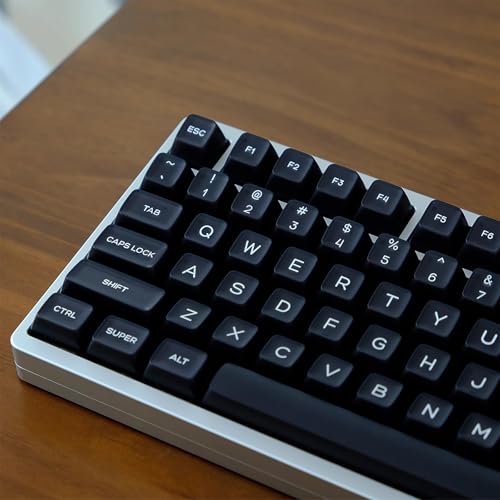
142-Key SA Profile PBT Doubleshot Set (Black Translucent)
Badge: The SA exemplar. This 142-key set puts the SA shape in durable PBT with double-shot legends and a black translucent finish, covering boards from 61-key compacts to full 108-key layouts on standard stems. As a teaching example it is ideal: everything the prose above describes, the height, the cups, the sound, is present, in a set whose key count forgives almost any standard board.
- Profile: SA, tall sculpted
- Material and legends: PBT, double-shot
- Coverage: 142 keys, 61 to 108 layouts
- Positioning: enthusiast tier
Strengths
- The full SA experience with legends that cannot wear and a surface that will not shine.
- Broad kit coverage makes it one of the safer SA purchases for mixed fleets of boards.
- Thick walls give SA’s signature deep sound its best chance on any case.
Trade-offs
- The height demands a wrist rest and an adjustment period for most typists.
- Tall caps on tall boards can crowd smaller desks and monitor sightlines.
- The translucent black style is a strong aesthetic commitment.
Best for: vintage lovers and typists who want maximum sculpt and sound. Not suited for: low-profile setups or speed-first gaming. Check price on Amazon
DSA: The Low Uniform Minimalist
DSA takes SA’s spherical tops and compresses the whole idea: low height, uniform across rows, with a gentle dish that still centers the fingertip. The result is the minimalist’s profile, clean rows of identical caps that suit compact boards, ortholinear layouts, and anyone who remaps keys and wants to move caps without row consequences. DSA’s low plane keeps wrists happier without accessories, and its sound is tighter and less resonant than SA’s, a neat tap rather than a toll. Its honest cost is guidance: with no sculpt, your fingers navigate by memory and by the key tops alone, which confident touch typists love and hunt-and-peck typists should test before committing a whole board.

YMDK DSA Profile PBT Blank Keycap Set (Ergo/Ortho)
Badge: DSA for split and ortho boards. This blank PBT DSA set is cut for the ergonomic and ortholinear world, Ergodox, Planck, Preonic, and Lily58 layouts named in its listing, where uniform caps are not a preference but a requirement, because staggered sculpted rows cannot tile a grid. Blank legends complete the philosophy: a board configured entirely by its owner, labeled only in memory.
- Profile: DSA, low uniform
- Material and legends: PBT, blank
- Coverage: ergonomic and ortholinear layouts
- Positioning: specialist enthusiast tier
Strengths
- Correct uniform geometry for split and grid boards that sculpted sets cannot serve.
- Blank caps make any layout, any language, any remapping equally valid.
- PBT texture and durability suit the heavy daily use ergo boards get.
Trade-offs
- Blank means blank; there is no legend safety net for symbols or rare keys.
- Coverage targets ergo layouts, so standard staggered boards should choose the ANSI sibling below.
- The uniform feel is a commitment that not every typist enjoys.
Best for: split and ortholinear owners and confident remappers. Not suited for: legend-dependent typists. Check price on Amazon

YMDK DSA Profile Blank PBT Keyset (61/64/68 ANSI)
Badge: DSA for standard compact boards. The same low uniform idea sized for the mainstream compact world: thick PBT, blank, covering 61, 64, and 68-key ANSI boards of the GH60 family and its descendants. This is the set that lets an ordinary 60 percent board wear the minimalist profile without entering the ergo ecosystem.
- Profile: DSA, low uniform
- Material and legends: thick PBT, blank
- Coverage: compact ANSI boards
- Positioning: accessible enthusiast tier
Strengths
- Lowers and unifies a compact board’s feel in one swap.
- Thick PBT deepens small boards’ typically thin sound.
- Blank uniformity makes gaming remaps and alternate layouts trivially movable.
Trade-offs
- No legends, with the same confidence requirement as its ergo sibling.
- Compact coverage only; larger boards need a different set.
- Uniform rows remove the sculpt cues some typists rely on.
Best for: compact-board minimalists and touch typists. Not suited for: full-size boards or legend readers. Check price on Amazon
OEM: The Profile You Already Own (Prose)
OEM is the sculpted profile that ships on most mainstream gaming and office mechanical keyboards, which makes it the invisible default of the entire hobby. It stands a little taller than Cherry profile, with a pronounced sculpt and cylindrical tops that feel familiar to anyone who has typed on a store-bought board. Its virtues are availability and familiarity: countless boards wear it, countless cheap sets copy it, and no typist needs an adjustment period. Its vices are the flip side of its height: a slightly top-heavy feel compared with Cherry, and a sound that trends brighter on thin stock caps. When an article or listing says a board feels standard, it usually means OEM-shaped. Owners upgrading from stock caps often move laterally in material first, keeping OEM geometry, before experimenting with the other four shapes in this guide, which is a sane order of operations.
Cherry: The Enthusiast Reference (Prose)
Cherry profile is named for the company whose original keycaps defined it, and it is the sculpted shape the custom world treats as its baseline: lower than OEM by a small but feelable margin, with a gentler sculpt and cylindrical tops. That lowered height does three things owners love. It reduces finger travel between rows, which fast typists register as speed. It lowers the typing plane enough that wrist rests become optional for many. And it produces a slightly deeper, tighter sound than taller profiles on the same board. Cherry profile is also the shape most premium sculpted sets imitate or refine, which means choosing it buys into the deepest catalog in the hobby. Its one famous footnote is interference: on some boards with north-facing switches, thick Cherry-profile caps can contact the switch housing at full press, a pairing-specific quirk worth a quick search for your exact board before ordering any thick sculpted set.
XDA: The Flat, Wide Modern Field
XDA is the uniform profile for people who found DSA a touch small: same height on every row, but with larger, wider key tops and a shallower dish, giving fingers a broad, forgiving landing field. It photographs beautifully, suits retro and minimalist builds, and its uniform rows make it the remapper’s friend alongside DSA. Typing feel is distinct: less guidance than any sculpted profile, more surface than DSA, and a sound that sits between DSA’s neat tap and a sculpted set’s resonance. XDA’s height is low-to-medium, so desks stay low and wrists stay neutral. Its honest trade-off is precision at speed for some typists, who find the wide flat tops less centering during frantic passages, while others find exactly that width reduces their errors. Only your hands can settle that one, which is why XDA sets are among the most borrowed and lent in the community.

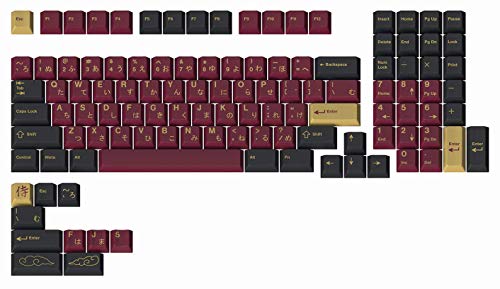
Guffercty kred XDA Profile PBT Keycap Set (125 Keys, Ember)
Badge: XDA in retro dress. This 125-key dye-sublimated PBT set wears XDA’s flat, wide geometry in a retro Ember colorway for ANSI layouts. It is the friendly face of the uniform idea: colorful, movable between rows, and durable, aimed at builders whose boards are styled as much as typed on.
- Profile: XDA, uniform
- Material and legends: PBT, dye-sublimated
- Coverage: 125 keys, ANSI US
- Positioning: accessible enthusiast tier
Strengths
- Wide tops forgive sloppy strikes and suit relaxed, fast typing styles.
- Uniform rows adapt to compact and unusual layouts without row math.
- Dye-sub legends are embedded permanently in the PBT surface.
Trade-offs
- Flat geometry offers no sculpt guidance for returning fingers.
- The retro colorway dictates the build’s palette.
- Dye-sub contrast depends on legend darkness against each cap color.
Best for: retro builds, tinkerers, and relaxed typists. Not suited for: sculpt devotees. Check price on Amazon
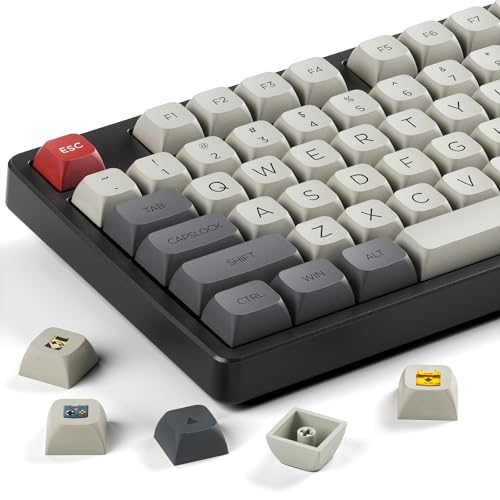
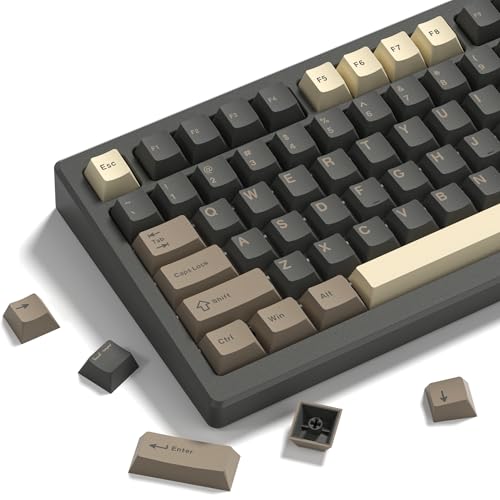
XDA Profile PBT Keycaps (Retro Game Console, XVX)
Badge: XDA as a themed build’s foundation. This dye-sublimated XDA set dresses the same uniform geometry in a retro game console theme, sized across 65, 80, and full-size boards on standard Gateron and Cherry MX-style switches. Two XDA sets in one comparison is deliberate: it shows how completely a colorway can change a profile’s personality while the geometry underneath stays constant.
- Profile: XDA, uniform
- Material and legends: PBT, dye-sublimation
- Coverage: most 65/80/100 percent boards
- Positioning: themed enthusiast tier
Strengths
- Broad size coverage across the common enthusiast layouts.
- The theme is executed across the whole set rather than as a few novelty keys.
- Uniform XDA geometry keeps the themed set practical to type on daily.
Trade-offs
- A console theme is a commitment that not every desk wants to make.
- Uniform flatness carries XDA’s usual guidance trade-off.
- Themed sets date a build to its owner’s current enthusiasms.
Best for: themed builds that still need to function as daily keyboards. Not suited for: professional desks or sculpt loyalists. Check price on Amazon
Five Profiles, One Table
| Profile | Height | Shape | Feel in one line | Best for |
|---|---|---|---|---|
| SA | Tall | Sculpted, spherical tops | Deep, cupped, deliberate | Vintage builds, sound chasers |
| DSA | Low | Uniform, spherical tops | Neat, minimal, movable | Compact, ortho, split boards |
| OEM | Medium-tall | Sculpted, cylindrical tops | The familiar standard | Stock boards, first upgrades |
| Cherry | Medium-low | Sculpted, cylindrical tops | Low, quick, refined | Fast typists, premium sets |
| XDA | Low-medium | Uniform, wide flat tops | Broad, forgiving, modern | Retro builds, remappers |
Buying Guide: Choosing Your Profile On Purpose
Choose by what your hands do all day. Touch typists who live on the home row should start with Cherry or OEM sculpting, because the rows guide returns you make ten thousand times a day; between them, choose Cherry for speed and a lower plane, OEM for familiarity and zero adjustment. Gamers should weigh security against speed: SA’s cups hold fingers during intense movement, Cherry’s low sculpt moves fastest between keys, and XDA’s width forgives the sloppy strikes of tired late-night sessions. Remappers, alternate-layout users, and split-board owners should go uniform, DSA for low minimalism and ortho correctness, XDA for width and style. Sound chasers should know that height and mass sing: SA deepest, sculpted profiles next, uniform profiles tightest. And everyone should respect the desk: tall profiles raise the board’s effective height, so a low desk and chair setup pairs better with DSA, XDA, or Cherry than with SA’s grandeur.
How To Test A Profile Before Committing
- Buy or borrow a small sample first where possible: a partial set, a numpad set, or a friend’s spare board in the profile you are courting.
- Install the trial caps on your main typing cluster, not just one row, because profile feel lives in row transitions.
- Type real work for three full days; day one measures novelty, day three measures truth.
- Play your main game for a full session and note movement keys specifically: security, speed, and error rate.
- Check your wrists and shoulders at day’s end, especially with SA, whose height is its only real ergonomic demand.
- If the trial set is uniform, test your symbol and number accuracy explicitly, since that is where uniform profiles bill their users.
- Commit to the full set only when the trial survives all three days without a recurring complaint you have been excusing.
Common Mistakes When Choosing A Profile
The first mistake is buying SA for its looks and discovering your desk ergonomics cannot pay its height, the commonest return in the category. The second is assuming uniform means beginner-friendly; DSA and XDA are advanced in their own way, presuming confident typing. The third is mixing profiles carelessly, such as adding SA accent keys to a Cherry board, which creates a height cliff your fingers will trip on for months. The fourth is ignoring switch orientation interference with thick sculpted caps on north-facing boards. The fifth is believing a listing’s profile label without checking the shape in photos, the exact failure this guide’s prose-only treatment of OEM and Cherry is designed to teach you to catch.
Final Recommendation
There is no best profile here, only best fits. Default to Cherry if you want the enthusiast standard and type fast for a living. Stay with OEM if your stock board’s shape already disappears under your hands and only its material bothers you. Choose SA when the keyboard is a joy object and sound is half the point. Choose DSA when minimalism, compactness, or an ortholinear layout runs your desk. Choose XDA when you want uniform freedom with modern width and style. Buy one set, live with it for a season, and let your next profile be chosen by experience rather than by comparison articles, this one included. And if the season ends with the discovery that your stock OEM board was right for you all along, treat that as a successful experiment rather than a failed upgrade: you will have spent a modest sum to convert an assumption into knowledge, your spare set will fit the next board or the next owner, and your hands will never again have to wonder what the other shapes feel like at 2 a.m. in the middle of a deadline. Certainty, in a hobby built on preference, is the rarest product of all, and it is the one this comparison most hopes to have sold you.
Where Each Profile Came From
Profiles have genealogies, and knowing them explains their personalities. SA and DSA both descend from Signature Plastics’ work for industrial and terminal keyboards, where tall sculpted keys suited operators striking keys all day at fixed stations, and where DSA’s low uniform variant served compact and specialized panels. Cherry profile began as the house shape of Cherry’s own keyboards in Germany, engineered for efficient office typing, which is why its virtues are speed and neutrality rather than theatre. OEM is not one company’s design so much as the industry’s convergent answer, the shape mass manufacturers settled on when mechanical keyboards became gaming products, tall enough to feel substantial and cheap to mold at scale. XDA is the youngest, a product of the modern custom scene’s love of uniform layouts, split boards, and retro-modern styling, designed in an era when buyers rearranged keys as a hobby in itself. When you choose a profile, you are choosing which era’s idea of typing your desk will live in, and the fact that all five eras remain in production tells you none of them lost the argument.
Height, Posture, And Your Desk Setup
Profile height interacts with everything on your desk, so treat it as an ergonomic variable with real numbers behind the vibes. SA adds the most height above the switch, effectively raising your board’s typing plane by roughly the difference between a standard board and a board on a stand; owners compensate with wrist rests, lower desks, or higher chairs, and should budget the rest as part of the SA purchase. OEM sits next, tall enough that many owners use rests too, especially on already-tall gaming boards. Cherry lowers the plane meaningfully, which is one unglamorous reason for its enthusiast dominance: it fits under monitor sightlines and into keyboard trays that SA cannot. XDA and DSA keep the plane lowest, suiting laptop-style setups, standing desks adjusted for standard boards, and split boards whose tenting already adds height. If your current setup causes wrist extension, choosing a lower profile is a legitimate ergonomic intervention; if your setup is dialed and pain-free, change profiles for feel and sound, not for posture promises.
Sound, Profile By Profile
Because sound sells keycaps in the video era, here is each profile’s voice stated carefully. SA, with its height, mass, and hollow volume under each cap, produces the deepest and most resonant note, and on a solid case it is the profile most likely to be described as thocky without any other modification. Cherry profile sounds tighter and slightly higher than SA but deeper than its height suggests, because its walls are often thick in premium sets; it is the balanced reference voice. OEM on stock thin caps is the brightest and hollowest sound in the comparison, though the same geometry in thick PBT improves dramatically, proving that profile and construction share the blame. DSA sounds neat and compact, a short tap with little resonance, flattering to quiet builds. XDA sounds broader and softer than DSA, its wide tops spreading the note, and it pairs famously with foam-tuned boards chasing a muted, creamy signature. None of these voices is a quality ranking; they are instruments, and the case is the hall they play in.
Profiles By Board Size
Full-size boards wear sculpted profiles most naturally, because their standard rows are exactly what sculpted sets are drawn for, and SA on a full-size board is the complete vintage statement. Tenkeyless changes nothing except the numpad’s absence. Compact 65 and 75 percent boards introduce the right-column complications, non-standard key sizes and shifted rows, where uniform profiles quietly shine because their movable caps absorb layout weirdness that sculpted sets need special kits to cover. Sixty percent boards accept everything but reward uniform profiles for the same reason, plus the aesthetic of a tiny board in identical caps. Ortholinear and split boards effectively require uniform profiles, as the DSA ergo set in this guide demonstrates. Numpads and macropads, often bought as profile samplers by the wise, wear anything and make excellent low-cost trial platforms before a full set is committed to.
Profile And Switch Pairings That Work
Profiles do not type alone; they sit on switches, and some pairings are famous for a reason. Tall SA caps on tactile switches create the most deliberate typing experience in the hobby, each press a small event, beloved by writers and divisive among gamers. Cherry profile on linear switches is the speed combination, low travel to the cap top and no bump to interrupt rapid repeats, which is why it dominates competitive custom builds. XDA on quiet linears in a foam-tuned case is the current recipe for the soft, muted sound that fills typing videos. DSA on low-profile-adjacent setups and split boards pairs with lighter switches to keep the whole system low-effort. OEM on clicky switches is the classic gaming roar, unchanged in twenty years. None of these pairings is mandatory, but if you are buying a profile and switches in the same season, choosing a known-good marriage removes one variable from your experiment and leaves your budget for the variable you actually care about.
Artisans, Novelties, And The Accent-Key Question
Sooner or later, profile shoppers meet artisan caps, the sculpted resin novelties sold one at a time for Escape keys and arrow clusters. Artisans are usually cast to sit acceptably among sculpted profiles, and their height beside SA or Cherry neighbours is part of their charm. Beside uniform profiles they tower more noticeably, which owners either embrace as a deliberate exclamation point or avoid by placing artisans on a macropad instead. The practical rule is to buy artisans for a specific board whose profile you know, rather than collecting them in the abstract, because an artisan that matches nothing you own is a paperweight with a fandom. This is also the moment to note that novelty keys inside full sets, the themed extras in the XDA console set above being a mild example, obey the set’s profile, which is one more reason themed uniform sets remain daily-drivable while novelty-heavy sculpted sets sometimes retire to display duty.
Reading A Profile Listing Without Being Fooled
Listings reward the reader this guide has been training. Check the profile name against side-view photographs: sculpted sets show a staircase silhouette, uniform sets show a flat skyline, and any listing whose photos hide the side view is asking you not to verify its central claim. Check whether heights are stated or only implied by adjectives such as high profile, which can mean OEM, SA, or nothing in particular. Check row composition for sculpted sets if you own an unusual layout, and kit coverage for compact boards. Check material and legend method separately, because profile says nothing about either, and a thin pad-printed SA set will disappoint in ways that have nothing to do with SA. Finally, remember this guide’s ground rule in reverse: a seller who relabels profiles loosely will relabel other things too, and the sets linked here were chosen partly because their listings describe their geometry accurately enough to be verified.
The Profile Decision, Compressed
If your fingers want guidance, go sculpted; if they want freedom, go uniform. Within sculpted, height is the dial: SA for ceremony, OEM for familiarity, Cherry for speed. Within uniform, width is the dial: DSA for minimal precision, XDA for broad forgiveness. Buy the profile whose dial setting matches your dominant activity, typing volume, gaming intensity, remapping habits, in that order, and treat every other consideration, colorway, theme, even material, as secondary, because you will feel the profile in every keystroke and see the colorway only when you look down.
What A Week On Each Profile Actually Feels Like
Abstract comparisons fade; schedules do not. A week on SA begins with ceremony and ends with either devotion or a wrist rest purchase, and the middle days are dominated by the sound, which makes ordinary typing feel like an occasion until it becomes simply your board’s voice. A week on DSA begins with small errors, symbols especially, and ends with a desk that looks like a diagram of itself, every cap identical, the board reduced to pure layout. A week on OEM is unremarkable by design, which returning users experience as relief: nothing to learn, nothing to excuse, the profile your hands already speak. A week on Cherry is the week most typists quietly get faster, because the lower rows stop asking for reach, and by Friday the old taller set feels like typing in gloves. A week on XDA is a week of relaxed hands and rearranged keys, the profile most likely to be photographed and the one whose errors, when they come, are whole-finger misses rather than edge catches. None of these weeks is a trial you can shortcut with a video; profiles are the most embodied knowledge in the hobby, which is why the testing protocol earlier in this guide insists on three real days.
Cost And Availability Realities
Profiles carry different economies, stated qualitatively because prices move. SA’s material hunger and smaller production runs keep it premium-leaning, and the second-hand market for desirable SA sets is correspondingly lively. Cherry-profile sets span the widest range in the hobby, from accessible in-stock sets to the most collected group buys, because the profile is the premium market’s default canvas. OEM sets are the cheapest to find and the most likely to be bundled free with a board, which is not the insult it sounds like. DSA occupies a specialist middle, plentiful in blank and ortho configurations, thinner in legended mainstream kits. XDA is the value enthusiast’s friend, widely produced in themed dye-sub sets at friendly tiers, as both linked examples show. A shopper with a fixed budget will therefore find their profile choice partly made by the market’s structure, and there is no shame in letting a well-made XDA set at a fair tier beat a mediocre SA set at a painful one; construction quality outranks geometry when the two conflict.
Profiles For Special Situations
Some desks have constraints that should override general advice. A keyboard tray under a desk has a height budget, and SA will spend it entirely; choose Cherry, XDA, or DSA and keep the tray usable. A standing desk set high for monitor ergonomics often pairs with a lower typing plane for the same reason. A shared family board argues for sculpted profiles with legends, because the least experienced user in the house sets the usability floor, which eliminates the blank uniform sets in this guide no matter how elegant they look. A board used with gloves in a workshop or studio argues for SA’s deep cups or XDA’s broad tops, the two easiest targets to strike without precision. A travel board argues for low profiles that pack flat and survive bags, DSA and XDA again. Naming your constraint before shopping converts a five-way comparison into a one-way decision, which is the correct fate of most buying guides.
Why This Guide Links No OEM Or Cherry Set
A final word on the ground rule stated at the top, because it doubles as the comparison’s most transferable lesson. The verified product data for this page contained excellent SA, DSA, and XDA sets and no set that could be honestly labeled a pure OEM or Cherry profile exemplar. Rather than relabel a near miss, the guide covers those two profiles in prose and links nothing for them. You should demand the same discipline everywhere keycaps are sold and reviewed, because profile is a geometric fact, not a vibe, and a marketplace that blurs it will blur materials, legends, and compatibility next. The two prose profiles lose nothing by the treatment: OEM is under your fingers already if you own a mainstream board, and Cherry’s shape is described here precisely enough to shop for with confidence wherever you buy.
The Second Set: How Owners’ Taste Evolves
Profile loyalty is rarely permanent, and the migration patterns are so regular they deserve recording. OEM owners upgrading for the first time usually move sideways in height and up in material, landing on Cherry profile in PBT, the hobby’s most traveled road. Cherry owners curious about character migrate to SA for a season, and about half return with a deeper appreciation and a wrist rest they keep anyway. Uniform converts, DSA and XDA owners, tend to stay uniform and migrate between the two by width and theme, because the remapping freedom becomes a workflow they refuse to surrender. SA devotees are the most stable population in the hobby, having paid the highest adjustment cost and received the most distinctive reward. Knowing these patterns lets a first buyer skip a step: if your reading of this guide left you torn between Cherry and SA, buy Cherry first, because the road from Cherry to SA is well marked, while SA bought first and disliked is the category’s most expensive lesson.
A Glossary For The Listing Page
Sculpted: rows at differing heights and angles. Uniform: all rows identical. Spherical top: a dished, cupped key surface, found on SA and DSA. Cylindrical top: a gently curved surface, found on OEM and Cherry. Row profile numbers: the sculpt position a single cap belongs to, essential when buying spares. Kit: the collection of caps in a set, whose coverage decides layout compatibility. Base kit, alphas, mods, numpad kit: the common subdivisions of large sets, priced separately in the premium market. Once these seven terms are yours, no keycap listing in any of the five profiles can hide its nature from you, which was the point of this entire comparison.
Children, Beginners, And Learning Typists
One audience rarely addressed in profile guides deserves a direct answer: people still learning to type, including children on their first real keyboards. Sculpted profiles with clear legends are the correct teaching tool, because the rows themselves coach finger returns before memory can, and the height differences make the keyboard legible to eyes and hands alike. OEM’s ubiquity makes it the practical choice, since the board a learner meets at school, at a library, and at home will most likely wear it, and consistency across environments accelerates learning. Uniform blank sets, however beautiful, are the final exam rather than the textbook. Households buying a first board for a young typist should therefore resist the minimalist aesthetic for one product cycle, buy the sculpted legends, and let the learner graduate to the interesting profiles once their fingers no longer need the map.
The One-Set-Per-Board Rule, And Its Exception
Experienced owners converge on a habit worth copying: each board wears one profile, chosen for that board’s job, and spare sets live in labeled trays rather than in rotation on the same board. Rotation sounds economical and feels chaotic, because every swap resets a slice of muscle memory and loosens stems incrementally. The exception is the deliberate experiment, a second profile bought to answer a question, tested by the three-day protocol, and then either adopted or sold while it is still current. Framed that way, a collection of profiles across several boards is a library, while a pile of profiles for one board is usually an unresolved decision. This guide’s five-way comparison is best used to resolve it: choose per board, commit per season, and let the next board, not the next sale, introduce the next shape under your hands.
Final Word: Profile Is The Keyboard’s Accent
Two identical keyboards, same switches, same case, same desk, will be remembered as different instruments if one wears SA and the other wears DSA, because profile is the accent in which the keyboard speaks. Accents are not ranked; they are recognized, preferred, and occasionally changed when life moves to a new region. This comparison has tried to give you the five accents clearly enough to hear them in your imagination: SA’s vintage ceremony, DSA’s minimal diagram, OEM’s familiar standard, Cherry’s efficient reference, XDA’s broad modern field. Choose the accent your daily sentences deserve, buy it in the best construction your tier allows, and type enough that the choice becomes handwriting. That is all any profile can offer, and it is plenty.
A Short Test You Can Run In Any Store
If a shop near you stocks boards in several profiles, five minutes of structured touching beats an hour of browsing. Type the same sentence, ideally one with reaches to the number row and the far modifiers, on every candidate, and rank only two things: how often your fingers landed where they intended, and how the board sounded to you at conversational distance. Then press the spacebar of each ten times; profile differences concentrate there, because the spacebar is the longest lever in every geometry. Finally, rest your hands in typing position without pressing anything and notice your wrist angle against the desk edge; the profile that leaves it most neutral is the one your body is voting for. Record the ranking immediately, because feel memory rewrites itself within the hour, and let that ranking arbitrate any tie this guide leaves you with. Stores exist for exactly this experiment, and using them deliberately is the closest thing the hobby has to a free lunch.
Recap: The Five Profiles As Five Sentences
SA is the tall, sculpted, spherical-topped vintage profile that turns typing into a ceremony and sound into a feature. DSA is SA’s low, uniform, spherical descendant, built for minimalists, compact boards, and the split-keyboard world. OEM is the medium-tall sculpted standard already under most fingers on earth, familiar, available, and quietly competent. Cherry is the medium-low sculpted reference the enthusiast world measures itself against, quicker and lower than OEM in every dimension that matters. XDA is the low, uniform, wide-topped modern field, forgiving to strike, free to rearrange, and styled for the themed era. Five sentences, five shapes, and one of them is the shape of your next year of typing.
One Last Variable: Legends And Profile Together
Legends interact with geometry in ways worth a final note. Tall SA caps carry large legends beautifully and are often bought as much for their typography as their shape. Uniform profiles place legends anywhere, which is why alternate-layout users, Dvorak and Colemak typists among them, depend on DSA and XDA sets or on sculpted sets sold in their layout, a niche the premium market serves at premium patience. Blank sets erase the question entirely at the cost documented throughout this guide. When you shop, check the legend story with the same care as the shape: a profile you love wearing legends you cannot read in your layout is a half-purchase, and the sets linked here were each chosen partly because their legend approach, double-shot, dye-sub, or deliberate blankness, is honestly matched to the boards they serve.
Before You Buy: The Ten-Second Checklist
Confirm the profile name matches the side silhouette in the photos. Confirm the kit covers your layout’s odd keys. Confirm legends exist, or deliberately do not, for your typing confidence. Confirm the material and legend method separately from the shape. Confirm your desk can pay the height if the profile is SA. Five confirmations, ten seconds each once they are habit, and the five-profile landscape in this guide becomes a map you can shop from without a guide at all.
Profile Mixing: The Advanced Move, With Warnings
Experienced builders sometimes mix profiles on one board, and the practice deserves a sober paragraph for readers tempted by photographs of such builds. The legitimate version assigns roles: a uniform low profile like DSA or XDA on the alphas for consistency, with SA or OEM accents on the spacebar, enter, and escape keys where height reads as emphasis rather than error. The illegitimate version, profiles scattered by colorway availability, produces a board whose rows fight each other with every keystroke, because sculpt differences are felt far more than they are seen. The rules that keep mixing honest are few: keep one profile dominant, confine guests to the perimeter and the spacebar, and match stem heights so no cap sits visibly lower than its neighbors. Mixed boards reward the deliberate and punish the improvisational, which is to say they are a fair summary of the hobby itself, and a fitting final lesson for a guide whose profiles each, alone, would serve most readers better than any blend.
Legends And Fonts Across The Profiles
One aesthetic variable rides along with profile choice and deserves naming: the legend. Tall SA caps offer the largest canvas and historically carry centered, vintage-style legends that complete their typewriter quotation. Uniform profiles, DSA and XDA, wear their legends evenly across rows, which suits minimalist and icon-driven sets. OEM and Cherry, the incumbents, carry the conventional top-left legends most buyers’ eyes are trained on. None of this changes a keystroke, but profiles are bought with the eyes as much as the fingers, and a reader choosing between two finalists on every other ground can let the legend style decide without apology.
Frequently Asked Questions
Which profile is best for gaming?
Cherry and XDA split the honest answer. Cherry’s low sculpt moves quickly between keys and dominates enthusiast gaming builds. XDA’s wide tops forgive imprecise strikes during long sessions. SA’s cups feel secure but its height slows some players. OEM remains perfectly serviceable, which is why so many gaming boards ship with it. Your error pattern, not a ranking, should decide.
Which profile is best for typing speed?
Cherry profile is the common answer among fast typists, because its lower sculpt shortens row transitions and its guidance keeps returns accurate. Confident touch typists on uniform profiles can match it, since their accuracy does not depend on sculpting. Beginners gain more from either sculpted profile than from any uniform one.
Can I mix profiles on one keyboard?
Technically yes, tastefully rarely. Adjacent keys at different heights create edges your fingers catch on, and sound varies across the board. Deliberate mixes work when whole zones change together, such as uniform alphas with sculpted modifiers on some custom builds, but random mixing is the fastest way to make a good board feel broken.
Why do my new sculpted caps feel scratchy at the bottom of the press?
That can be the known interference between thick sculpted caps, notably Cherry profile, and north-facing switch housings, where the cap’s wall contacts the housing near full travel. Confirm by testing the same cap on a south-facing board or a different switch. If interference is the cause, a different profile or switch orientation solves it; it is a pairing issue, not a defective set.
Are blank DSA sets practical for everyday use?
For genuine touch typists, yes, and they are common on the split and ortholinear boards the ergo set in this guide serves. For everyone else, symbols, function rows, and rarely used keys become memory tests that grow tiresome. The honest trial is an afternoon of your real work with your current legends covered by tape; your frustration level is the answer.
Does profile affect sound as much as material?
Comparably, yes. Height and mass shape pitch and resonance: tall thick SA sounds deepest, low uniform profiles sound tightest, and sculpted mid profiles sit between. Material sets the surface character while profile sets the geometry of the sound, which is why changing profile often feels like a bigger upgrade than changing plastic on the same shape.
How long should I give a new profile before deciding it is not for me?
Give it at least several full days of normal work, not one dramatic typing test on the evening it arrives. Your fingers need to relearn where the top edges sit, especially moving from a low uniform profile to a tall sculpted one, and early mistakes mostly measure unfamiliarity rather than a bad match. Keep your previous set nearby but resist swapping back mid-task, because constant switching resets the learning each time. Judge at the end of the trial by three things: accuracy on familiar text, comfort in your shoulders and forearms, and whether you still notice the caps at all. A profile that disappears from attention is usually right. One you keep thinking about after a week is telling you something worth listening to.
Do tall profiles like SA need a different wrist or desk setup?
Often, yes, because the extra height raises the whole typing surface even though the keyboard case has not changed. If you already use a wrist support, check that it lifts your hands to meet the taller front row rather than leaving your fingers reaching upward from a low resting position. The support should meet your palms only when you pause, not prop your wrists while you type. Also check the front edge of your desk: tall caps plus a high case front can push your hands further back than you expect. Lowering your chair slightly or moving the board closer can restore a neutral angle. Small geometry changes like these matter more with SA than with DSA or XDA, which sit closer to the desk. Keeping a brief note of those daily impressions helps, because memory tends to rewrite the first awkward days once a profile finally feels normal.
Related Guides
Continue with keycap profiles explained in depth, Cherry vs OEM keycaps compared, and the ultimate guide to picking a keycap set. Material questions live in the PBT vs ABS comparison, and gift shoppers may detour to gifts for keyboard enthusiasts.