Disclosure: As an Amazon Associate, kajuandouglas.com earns from qualifying purchases. Links to Amazon on this page are affiliate links; they cost you nothing extra. Listing details such as price and availability change often, so check the current Amazon listing before you buy.
Learning how to pair a speaker should take two minutes, yet it regularly defeats people — not because the technology is hard, but because every brand hides pairing mode behind a slightly different button press, and a speaker that was paired to another phone last summer will happily ignore yours until it is made discoverable again. The principles, though, are universal, and once you know them you can pair almost any speaker to almost any phone, tablet or computer.
This guide covers Bluetooth pairing step by step, what the flashing lights actually mean, how to pair a second device, how stereo pairing of two speakers differs from ordinary pairing, and the fixes for the three failures everyone meets: the speaker does not appear, it appears but will not connect, or it connects but plays no sound. Wi-Fi speakers and their app-based setup are covered at the end.
How to pair a speaker: The Short Answer
Turn the speaker on, hold its Bluetooth button until it beeps or flashes rapidly — that is pairing mode — then open Bluetooth settings on your phone, tap the speaker’s name, and confirm. If it does not appear, switch the speaker’s Bluetooth off and on, move closer, and check it is not still connected to another device nearby.
In this guide
What You Need
- The speaker, charged or plugged in
- Your phone, tablet or computer with Bluetooth on
- The speaker within a metre or two during pairing
- Other nearby devices that might grab the connection (a partner’s phone, a laptop)
- The speaker’s manual or app name if it is a Wi-Fi/smart model
Step by Step
Step 1: Charge and power the speaker
Pairing a speaker with a nearly flat battery invites half-finished connections that haunt you later. Charge it or plug it in, then power it on and wait for its startup sound or light. Many speakers announce their mode — ‘Bluetooth pairing’, ‘connected’, ‘aux in’ — and listening to that announcement tells you where you are starting from. If the speaker turns on already connected to something, its light will usually be solid rather than flashing.
Step 2: Put the speaker into pairing mode
This is the step most people miss. A speaker that is merely on is not necessarily discoverable. Most models enter pairing mode when you press and hold the Bluetooth button for several seconds, until a tone sounds or the light flashes quickly, often blue and white or rapidly blinking. Some enter pairing mode automatically the first time they are switched on. If nothing flashes, consult the manual’s pairing section — the button combination is the one piece of information that is genuinely model-specific.
Step 3: Find and select the speaker on your device
Open Bluetooth settings on your phone, tablet or computer and wait on that screen while it scans. The speaker appears under its model name — sometimes a generic name the first time. Tap it and wait for the confirmation tone or the word ‘Connected’. If a code is requested, it is almost always 0000 or 1234 on older speakers. Stay within a couple of metres during this first connection; walls and bodies block the weak signal a speaker uses while pairing.
Step 4: Play something and confirm the audio route
Play music or a video and check the sound truly comes from the speaker. Phones can show ‘connected’ while audio still routes to the phone itself, especially after using headphones or a car system. On most phones you can tap the audio output icon in the media player or control centre and select the speaker explicitly. Also test a phone call or a video to make sure the connection is stable, not just established.
Step 5: Pair a second device properly
Many speakers remember several devices but connect to only one or two at a time. To pair a second phone, put the speaker back into pairing mode — this does not erase the first device on most models — and repeat the process. If the speaker keeps reconnecting to the first phone instead, turn that phone’s Bluetooth off for a minute while you pair the second. Household peace is often just a matter of knowing whose phone currently owns the speaker.
Step 6: Set up stereo pairing if you have two speakers
Stereo pairing links two identical or compatible speakers as left and right channels, and it is a separate feature from ordinary Bluetooth pairing. It is usually arranged in the maker’s app or by a button sequence on the speakers themselves: pair your phone to the primary speaker first, then follow the model’s stereo-pair steps for the second. Place them as a normal stereo pair afterwards. Note that stereo pairs often must be the same model, and the feature may work over Bluetooth or Wi-Fi depending on the brand.
Step 7: Fix a speaker that will not pair
If the speaker never appears, it is usually already connected to another device nearby, out of pairing mode, or too far away — eliminate those three first. If it appears but fails to connect, delete it from your device’s Bluetooth list (‘Forget this device’), restart both devices, and pair fresh; stale pairing records cause most stubborn failures. If it connects but stays silent, check the audio output selection and both volume controls. A full reset of the speaker, described in its manual, is the last resort and clears all its pairings.
As you work through this guide, keep the bigger picture in mind. Our roundup of best bluetooth speakers for music shows how the main options compare, and the companion piece on bluetooth vs wired speakers covers the neighbouring decision in the same detail.
How to Pair a Speaker to a TV, Computer or Turntable
Computers pair like phones: open Bluetooth settings, put the speaker in pairing mode, select it, then — the step people forget — set it as the sound output device in the computer’s sound settings, because pairing alone does not always switch the output. TVs vary more: some have a proper Bluetooth speaker menu, others only support Bluetooth for keyboards and remotes, so check before relying on it. Where TV Bluetooth works, expect a little audio delay on speech; a cable remains better for film nights.
Turntables with Bluetooth output pair in the opposite direction — the turntable is the transmitter — and you put the speaker in pairing mode, then press the turntable’s Bluetooth button and wait for the two to find each other, which can take half a minute. Keep them close for this first link. Once paired, they usually reconnect automatically when both are on. If your turntable lacks Bluetooth, a small Bluetooth transmitter plugged into its output does the same job.
Wi-Fi and Smart Speakers Pair Differently
Wi-Fi speakers from systems such as Sonos or voice-assistant speakers from Amazon and Google do not pair through the Bluetooth menu at all. They join your home network through their maker’s app, which walks you through connecting to the speaker’s temporary signal and handing over your Wi-Fi password. The rules that help here are different: have the Wi-Fi password ready, keep the phone on the same network you want the speaker to use, and be wary of guest networks and router band settings that isolate devices from each other.
Once a Wi-Fi speaker is set up, ‘pairing’ a second one usually means adding it in the app and choosing stereo pair or a group. Bluetooth may also exist on these speakers as a secondary feature for guests. If a smart speaker drops off the network repeatedly, the cause is almost always weak Wi-Fi where it sits, not the speaker itself — move it closer to the router as a test before resetting anything, because a reset means doing the whole setup again.
Gear for This Guide

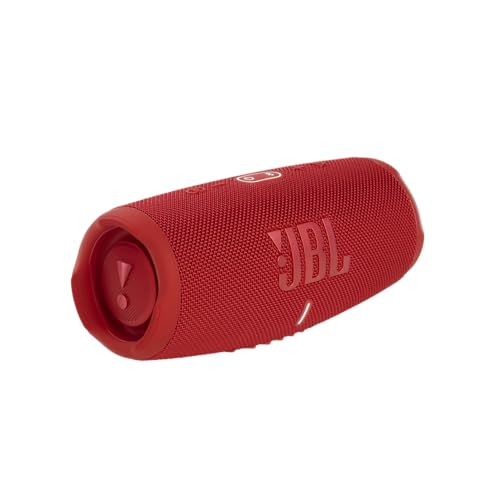
JBL Charge 5 Portable Speaker
A portable Bluetooth speaker with an IP67 waterproof and dustproof rating, designed for bathrooms, gardens and trips away. Its rugged build also makes it a forgiving speaker to clean and to move from room to room. Check price on Amazon.

JBL Xtreme 4 Portable Speaker
A larger portable Bluetooth speaker built for outdoor gatherings, with a shoulder strap and an IP67 rating. Its size gives it fuller bass than pocket-sized portables, at the cost of more weight to carry. Check price on Amazon.

Marshall Emberton II Portable Speaker
A compact portable speaker with Marshall’s amp-inspired styling and an IP67 rating. It suits desks, shelves and travel where a small footprint matters more than maximum volume. Check price on Amazon.
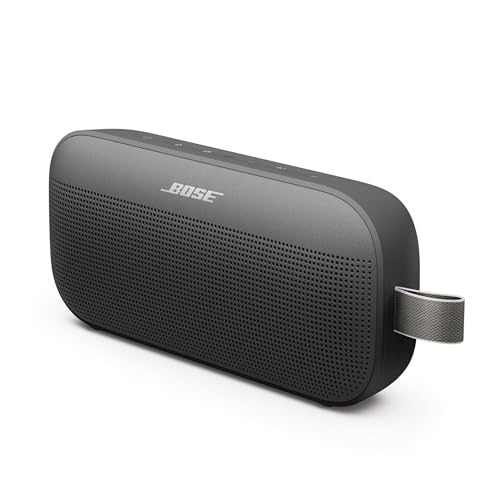
Bose SoundLink Flex Bluetooth Speaker (2nd Gen)
A portable Bluetooth speaker with a waterproof, dustproof build and a strap-friendly shape for moving between rooms, gardens and trips. Bose positions it for clear sound at moderate volumes rather than party-level output. Check price on Amazon.
Common Mistakes
Assuming ‘on’ means ‘in pairing mode’
A speaker that is switched on but connected to another device, or sitting in standby, is invisible to your phone. Pairing mode is a distinct state with a flashing light or tone — always trigger it deliberately.
Pairing from across the room
Pairing signals are weak by design. A speaker that pairs happily at one metre may never appear at eight metres through a wall. Move close for the first connection; afterwards the working range is much more forgiving.
Forgetting the other phone in the house
Speakers reconnect automatically to the last device they served. If your phone cannot find the speaker, someone else’s device probably already has it. Turn that device’s Bluetooth off briefly and try again.
Skipping ‘Forget this device’ when a pairing goes stale
Corrupted pairing records cause repeated failures that look like hardware faults. Forgetting the speaker on the phone and pairing fresh fixes the majority of stubborn cases in two minutes.
Pro Tips
- Pair new speakers at home on your Wi-Fi and Bluetooth before taking them travelling.
- Rename the speaker in your Bluetooth settings if the app allows — ‘Kitchen’ beats a model number.
- Keep the speaker’s firmware updated through its app; pairing bugs are commonly patched.
- If a speaker supports multipoint, enable it deliberately so two phones can share it without a fight.
Going Deeper: Context That Helps
Ageing affects speakers slowly and mostly at the edges. Foam woofer surrounds on older speakers can crumble after a couple of decades, rubber surrounds last longer, and capacitors in crossovers drift with age, subtly changing the balance. None of this matters for a new purchase, but it explains why a vintage speaker may not sound as its measurements once promised. For modern speakers, dust, sunlight and humidity are the main enemies: keep them out of direct sun, wipe dust with dry or barely damp cloths, and avoid placing drinks on top of cabinets, where one spill can stain veneer and swell the wood beneath.
Whatever the product, the cheapest upgrade is usually time spent with the manual and the settings menu. Manufacturers bury genuinely useful options — EQ presets, dialogue modes, level trims, firmware updates — several layers deep, and most owners never find them. An hour spent exploring settings with familiar content playing will teach you more about your system than a week of reading reviews, and it costs nothing. Keep notes of what you changed so you can undo anything that makes things worse, and change one thing at a time so you know which adjustment caused which result.
Returns windows are part of the buying process for audio gear, and you should use them deliberately. Sound is personal and room-dependent, so a product that reviews well can still disappoint in your space. Buy from sellers with clear return policies, keep packaging until you are sure, and test with your own content at your own volumes in the first days — not the night before the window closes. A structured test, with the same three songs or scenes each time, reveals differences that casual listening misses and turns a vague feeling into a decision you can act on.
Hearing safety deserves a mention in any audio guide. Comfortable TV and music listening sits well below the levels that risk hearing damage, but portable speakers at parties, and headphones especially, can creep upward in noisy environments as you compete with background sound. If you have to shout to be heard over your own system, it is too loud for long sessions. Many devices offer volume limiting — worth enabling for children — and taking listening breaks during long sessions protects both your ears and your enjoyment, because tired ears judge sound poorly.
Speaker sound is shaped as much by the room as by the speaker itself. Hard floors, bare walls and large windows reflect sound back at you, which can make even a good speaker seem harsh or echoey, while soft furnishings, rugs and curtains absorb those reflections and calm the result. Before blaming a speaker for disappointing sound, look at the room: a rug between the speakers and your seat, curtains over a large window, or a bookshelf filled with books behind you can change the sound more than a modest upgrade would. This is why the same speaker can sound impressive in a shop demo room and merely ordinary at home — the demo room was treated, and yours is not.
Stereo imaging depends on symmetry. When the left and right speakers are at different distances from you, or one is tucked into a corner while the other sits in open space, the stereo image pulls toward the closer or louder side and voices stop sounding centred. Aim for a rough triangle: the two speakers and your head at the corners, with both speakers the same distance from your seat and at the same height. Small adjustments — ten centimetres here, a slight toe-in there — are free, reversible and often more rewarding than new cables or accessories, so always finish placement before spending money on upgrades.
Bass behaves differently from the rest of the sound. Low frequencies are long waves that build up in corners and along walls, which is why a speaker can sound boomy in one spot and thin a metre away. Moving a speaker even slightly out from a wall reduces the wall’s reinforcement of the bass; moving your seat away from the back wall often fixes boominess that no tone control can. If your system has a subwoofer, its position matters even more, because a single subwoofer excites the room unevenly and your seat may sit in a peak or a null in the bass response.
Speaker sensitivity and impedance explain more about real-world loudness than headline wattage. Sensitivity tells you how loud a speaker plays with a given amount of power; a sensitive speaker on a modest amplifier can easily outplay an insensitive speaker on a powerful one. Impedance, measured in ohms, describes the load the speaker presents to the amplifier — most home speakers are nominally 8 or 6 ohms, and amplifiers are happiest when the speaker’s impedance stays within the range the amplifier is rated for. Matching these two figures sensibly matters far more than chasing the biggest watt number on a box.
Every speaker is a compromise between size, bass and efficiency — engineers call it Hoffman’s Iron Law: pick two, sacrifice the third. A tiny speaker can be efficient or produce deep bass, but not both at once, which is why small portable speakers sound impressive for their size yet cannot reproduce the lowest notes of a film soundtrack. Understanding this trade-off sets honest expectations. If a product promises room-filling deep bass from a box the size of a paperback, physics says the claim needs salt; the sound may still be enjoyable, but the lowest octave will be suggested rather than truly reproduced.
Burn-in and warm-up are debated endlessly, but the bigger variable is your own hearing. Your ears adapt to a new speaker over the first days of listening, which is why a speaker that sounded bright on day one often seems balanced by day five — your brain has recalibrated, not the hardware. The practical lesson is to live with a new setup for a week of normal listening before judging it or changing settings. Judge with familiar recordings you know well, at the volume you actually use, in the seat you actually sit in; first impressions in a shop or in the first ten minutes at home are unreliable.
Frequently Asked Questions
Why does my speaker not show up in Bluetooth settings?
Almost always one of three reasons: the speaker is not in pairing mode (its light is solid, not flashing), it is already connected to another device nearby, or you are too far away for the pairing scan. Put the speaker into pairing mode with its Bluetooth button, bring it within a metre of your phone, and switch off Bluetooth on other household devices for a minute. If it still does not appear, restart both the speaker and the phone and try again.
My speaker says connected but there is no sound. What is wrong?
The connection exists but the audio is routed elsewhere, or one of the two volume controls is down. Check your phone’s audio output selection and choose the speaker explicitly, raise the phone’s media volume (it is separate from ringtone volume), and raise the speaker’s own volume. If you were recently using headphones or a car system, the phone may still prefer that route. Forgetting the speaker and pairing again fixes cases where the profile itself has become confused.
How do I pair two speakers together for stereo?
Stereo pairing is a feature of the speakers, arranged through the maker’s app or a button sequence, and usually requires two of the same model. First pair your phone to one speaker normally; then use the app’s stereo-pair option (or the model’s button method) to link the second speaker as the other channel. Afterwards, position them as a stereo pair, equidistant from your seat. Your phone still sees one Bluetooth device — the pair handles left and right between themselves.
Do I need to pair again every time I use the speaker?
No. Once paired, a speaker and phone remember each other and reconnect automatically when both are on and in range, typically within seconds. You only pair again after forgetting the device, resetting the speaker, or connecting a new phone. If yours demands re-pairing daily, something is wrong: update the speaker’s firmware, check that the phone is not aggressively clearing Bluetooth records, and test with a second phone to find which side is at fault.
Can I pair a speaker to two phones at once?
Some speakers offer multipoint, which holds connections to two devices simultaneously and plays whichever one starts audio — handy for a shared household speaker. Many others connect to one device at a time while remembering several. If yours lacks multipoint, switching means disconnecting the current phone or putting the speaker in pairing mode for the new one. Check the product’s specifications for the word ‘multipoint’ if this matters to you; it is a specific feature, not a default.
What is the Bluetooth pairing code for my speaker?
Modern speakers pair without a code. Older models that ask for one almost always use 0000, with 1234 as the second guess. If neither works, check the manual, because a handful of models print a unique code on a label. A code request appearing for a modern speaker usually means the phone has misidentified the device type; forgetting it and pairing again, with the speaker freshly in pairing mode, normally clears the prompt.
How Pairing Actually Works, and Why It Sometimes Refuses
Bluetooth pairing is a small ceremony of trust. When a speaker enters pairing mode, it advertises itself to the neighbourhood and invites a new relationship. Your phone or computer, scanning, finds that invitation, and the two devices exchange credentials and agree on how they will recognise each other in future. That stored recognition is why later connections are instant: the devices are not meeting, they are resuming. Almost every pairing failure in this guide’s main steps is a breakdown in that story. A speaker that will not enter pairing mode cannot advertise. A phone holding a stale record of the speaker tries to resume a relationship whose terms have changed, and the two talk past each other until the record is forgotten and they meet afresh. A speaker already connected to another device is, from its perspective, busy in conversation and may decline new introductions. Understanding that model turns troubleshooting from superstition into sequence: make the speaker available, make the phone willing, remove old records that confuse them, and keep them close while they talk. Every fix that works works because it repairs one of those four conditions.
Pairing lists, memory limits and the crowded speaker
Speakers remember a limited cast of past partners, and households with many phones, tablets and laptops can fill that memory with ghosts. When a speaker behaves as if it prefers everyone else’s device to yours, it may simply be reconnecting, faithfully, to the last partner it served, which is sitting in another room with its Bluetooth on. The remedies are social as much as technical: turn off Bluetooth on devices not in use, use the speaker’s own method for clearing its pairing list when the confusion becomes chronic, and teach the household which device is the speaker’s usual partner. A speaker at a party, passed from phone to phone, deserves a pairing-list clear afterwards, like a glass washed between guests.
Range, walls and the geography of dropouts
A paired speaker that crackles or drops at a distance is rarely broken; it is negotiating physics. Bluetooth signals weaken through walls, water and human bodies, and the class of radio in both devices sets the honest range, which is always shorter than the box’s optimism once a house intervenes. Keep the source in the same room for critical listening, beware the classic trap of a phone in a pocket on the far side of its owner, and remember that kitchens are hostile territory, full of metal, water and a microwave oven that shouts in the same part of the spectrum. Where dropouts persist at short range, interference from crowded wireless environments is the usual suspect, and moving the speaker a metre can matter more than any setting.
Pairing in Special Situations
Two speakers, one room, several philosophies
The main steps cover stereo pairing within a brand’s own system. Beyond that, households invent arrangements the makers never planned: two different speakers playing the same phone in two rooms, a speaker paired to a television for the evening and a phone for the morning, a portable that serves the garden while its twin serves the kitchen. Some phones can feed two Bluetooth speakers at once, with sync that varies from admirable to amusing, and the honest test is a dialogue-heavy programme, where mismatched delays declare themselves instantly. For music at gatherings, small delays pass unnoticed; for anything with lips, matched systems earn their keep. Manage expectations by source, and most multi-speaker improvisations delight rather than disappoint.
Pairing for people who find pairing baffling
Every family has someone for whom Bluetooth is a rumour. For them, the kindest setups remove the ceremony: a speaker that reconnects automatically to one known device, kept in one place, charged on a schedule, with its pairing button labelled by a small sticker if the iconography is cryptic. Set it up for them completely, test it across a power cut and a phone restart, and write the two recovery steps — turn the speaker off and on, then choose it in the phone’s list — on a card that lives with the speaker. Technology that requires a visiting relative to repair is not finished technology, and a paired speaker should be as operable as a radio.
Cars, boats and borrowed speakers
Pairing away from home adds etiquette to technique. A speaker in a car, boat or holiday rental may hold the previous user’s devices and offer yours a confusing welcome; clearing or simply waiting out its preferences is part of the ritual. When the speaker is borrowed, leave it as you found it: remove your device from its memory if the owner would appreciate it, and never factory-reset someone else’s equipment to solve your afternoon’s problem. Your own speaker, returning from a trip, deserves the reverse courtesy from yourself: a pairing-list tidy and a full charge before it resumes domestic service.
Sound After Pairing: Making the Connection Worth Having
A successful pairing is a beginning. Set the volume relationship between phone and speaker once, at a sensible balance, so neither device spends its life at a strained extreme. Check whether the speaker or its app offers sound adjustments you actually want, and resist stacking enhancements until the original clarity is buried under features. If the speaker supports higher-quality Bluetooth codecs and your source offers them, the pairing may negotiate them automatically; where a choice exists, stability outranks sophistication for most listeners, because a flawless modest stream beats a stuttering ambitious one. Finally, walk the boundary of the connection with your usual content playing, so you learn your own home’s honest range before a party learns it for you. A pairing understood this well stops being a recurring chore and becomes what it was designed to be: invisible.
When Pairing Fails Completely: The Escalation Path
If the main steps and the model above have not produced a connection, escalate in this order, and stop at the rung that works. Restart both devices fully, not sleep, because radios and their software accumulate states that only a clean start clears. Update both devices if updates are available, since pairing bugs are among the most commonly fixed. Test the speaker with a completely different source, and the source with a completely different speaker, to convict one side or the other; this single experiment replaces hours of suspicion. Consult the maker’s support material for your exact model, because a small number of speakers have known pairing quirks with known sequences. Consider a factory reset of the speaker only now, with its consequences understood: all pairings forgotten, all settings returned to birth, a clean slate that cures confusion and erases convenience in equal measure. If a speaker refuses every source after all of that, the fault is hardware or a dying battery confusing the radio, and it is a warranty or repair conversation. Notice what this ladder never does: it never asks you to repeat a failed step louder. Repetition is not a Bluetooth strategy.
Security, briefly and without alarm
Pairing is an agreement between devices, and like all agreements it deserves a moment’s thought. Pair in private where practical, because the ceremony is easiest to hijack in crowded wireless spaces, and decline pairing requests you did not initiate, on any device, as a matter of hygiene. Once paired, your speaker will accept its known partners automatically, which is the convenience you bought; the pairing-list clear described earlier doubles as the way to evict partners that should no longer be welcome, such as a sold phone or a departed housemate’s laptop. That is the whole of sensible Bluetooth security for a home speaker: initiate deliberately, review occasionally, and let the technology’s convenience proceed undisturbed.
Pair deliberately, keep the list of partners tidy, and learn your rooms’ honest range. Do those three things and the small ceremony at the heart of this guide will perform itself, silently, every day, which is the highest compliment wireless technology can be paid.
Pairing Across the Ecosystem: Phones, Computers, Televisions and Watches
Each kind of source brings its own pairing personality, and knowing them prevents misdiagnosis. Phones are the most polished partners, with clear lists, friendly prompts and a habit of remembering speakers forever, which is why the forget-and-repair cure so often applies to them. Computers are more literal: their Bluetooth stacks expose more settings, remember devices in more places, and occasionally need the speaker removed from a system list as well as the Bluetooth list before a clean re-pairing will take. Televisions are the least predictable partners of all, with implementations that range from elegant to eccentric, and with audio delay that must be judged per model; a speaker that pairs flawlessly to a phone and grudgingly to a television is usually reporting the television’s character, not its own decline. Watches and small wearables pair bravely but have tiny radios and tinier batteries, and their honest range is a room, not a house. The diagnostic habit that survives all four is the cross-test from the escalation ladder: pair each side to a known-good partner, and let the pattern of successes and failures point at the culprit before you change a single setting in anger.
Names, duplicates and the two-speaker identity crisis
Households that own two identical speakers own a naming puzzle, because both devices announce themselves identically and phones cheerfully connect to the wrong one, in the wrong room, with total confidence. Solve it at the source where the app allows renaming, with names that describe places rather than products: the kitchen speaker and the study speaker will never be confused, while two identical model names will be confused weekly. Where renaming is impossible, physical discipline substitutes: pair each speaker to its usual source while the other is switched off, so the records form cleanly, and label the speakers discreetly underneath. Stereo pairs deserve extra care, because the two units have a relationship with each other as well as with your phone, and scrambling which is which can unmake the pair. Treat identical speakers like identical twins in a school photograph: label everything, and future confusion evaporates.
The Social Life of a Shared Speaker
A household speaker is a small commons, and pairing is its politics. Decide, as a household, the order of precedence when several known devices are present, because the speaker will otherwise award itself to whichever it saw last or first, and both rules produce grievances. Parties need a plan too: one designated source device, ideally the one plugged into power and loaded with the shared playlist, prevents the music from being hijacked by every guest’s pocket reconnecting to its old friend the speaker. After gatherings, the pairing-list clear restores domestic order. None of this requires sternness; it requires the same thing the technical sections require, which is deliberateness. A speaker whose partnerships are chosen behaves like furniture, present and reliable. A speaker whose partnerships are accidental behaves like a pet, charming and intermittently missing. Households differ in which they enjoy, but they should choose knowingly.
A New Speaker’s First Evening: Setting Up for Years of Silence-Free Service
The hour a speaker arrives decides how the next years feel. Charge it fully before judging its battery or its sound. Pair it, deliberately, to its main source while other household devices have their Bluetooth off, so the first record is the right one. Rename it for its room if you can. Walk its range with music playing and learn where your walls win. Set its volume relationship with the source once, sensibly. Write its pairing quirks — the button sequence, the reset method — on the card that lives with its charger, because the manual will be in a drawer in another postcode of the house when you need it at midnight. Do those things and the speaker joins the household fully formed, rather than accumulating a folklore of workarounds. Skip them, and you will spend small change on the same confusions for years, wondering why a simple device feels complicated. It was never the device.
Keep the card, keep the list tidy, and keep the speaker charged and in its place. Pairing will then do what the engineers intended: vanish, leaving only the music and the mild surprise, years later, that it was ever a subject worth a guide at all.
The thirty-second diagnosis, for the fridge door
Speaker silent or missing? Ask four questions in order. Is the speaker actually in pairing mode, or merely on? Is another household device already connected to it? Is your source’s stored record of the speaker stale, due for forgetting? Are the two within honest range, in the same room, for the ceremony? Those four questions resolve the overwhelming majority of pairing failures, and they fit on the card with the charger. Everything else in this guide is commentary, depth and the occasional escalation, but the fridge-door version is the one that will save your evenings.
Print the card, laminate it if your kitchen is ambitious, and let future pairing problems meet a prepared household. Preparation, in wireless audio as in everything else, is most of the difference between a glitch and a grievance.
And when the pairing simply works, as it now will, notice how little there is to notice. That absence — no cables, no ceremony, no card required — is the technology keeping its promise, and it is worth a moment’s appreciation before the music starts.
Appreciation over, volume up, and enjoy.
The speaker was always ready. Now the household is too, and that was the only pairing that ever really mattered.
One habit for the road
Whenever a new device joins the household — a phone, a laptop, a tablet for a child — decide in its first week whether it is one of the speaker’s partners, and pair it deliberately or switch its Bluetooth expectations off. Households that make that small decision at arrival never hold the Saturday-night inquest into why the music is playing in the wrong room, from the wrong phone, to general bewilderment.
Bewilderment, banished by a five-minute decision, stays banished. That is the economics of every good habit in this guide.
Collect enough of those small economies and the whole system runs itself.
Which is, in the end, the definition of a well-paired life with a wireless speaker.
Live it, and let the connection look after itself.
It will, faithfully, every time you press play.
Press it now, and hear the whole guide collapse into a single, satisfying note of music.
That note is the review that matters.
Approve of it silently, and move on to the listening.
The listening, after all, was the destination of every step, setting and small ceremony in this guide.
Arrive there, and stay as long as the music lasts.
It will last longer, and sound better, in a house where the pairing is understood.
Understanding, here as everywhere in this series, is the upgrade that never becomes obsolete.
Install it once, and every speaker you ever own benefits.
That is a fine return on one guide’s worth of attention.
Spend it, and then spend the evening on the music instead.
The music has been patient long enough.
Play something you love, at the volume the room deserves, through a connection you now understand completely.
Complete understanding, in a wireless speaker, sounds exactly like silence followed by music.
Enjoy both, in that order, every day.
Every day is, after all, the point of a speaker that simply works.
Yours works now. Keep it that way with the card, the tidy list and the occasional deliberate decision.
Those three small things are the whole maintenance schedule.
And it is a schedule anyone can keep.
Keep it, and the speaker keeps its promises.
Starting with the next song.
Related Guides
These guides and roundups cover the closest decisions and fixes in this category:
- best bluetooth speakers under 100
- best portable speakers for music
- best bluetooth speakers for outdoor party
- best bluetooth speakers for phone
- how to connect to a tv a speaker
- how to choose a speaker
Why does my speaker connect to my neighbour’s device or a stranger’s phone?
It almost certainly does not; what usually happens is a device with an identical or similar speaker name appears in your list, or a household device you forgot reconnects first. Rename your speaker distinctly if the model allows it, and clear pairings you do not recognise.
Does pairing drain the speaker’s battery when nothing is playing?
A connected, idle speaker sips a small amount of power staying in touch, and a speaker left in pairing mode advertises more energetically. For storage, switch the speaker fully off rather than leaving it connected or discoverable, and it will greet you with the charge you left in it.