The best Xbox compatible headsets are the ones that simply work the moment they are connected to the console. An Xbox compatible headset should pair without a tangle of adapters, carry game audio and voice chat clearly, and stay comfortable through a long evening of play. Compatibility sounds like a small detail until a headset refuses to connect, drops its wireless link mid-match, or leaves the microphone silent in party chat.
Xbox compatibility comes in several forms, and the differences matter. Some headsets connect directly to the controller with a cable, some use a dedicated wireless USB adapter, and some pair straight to the console over its own wireless protocol. The six headsets below cover all three routes, and each listing states Xbox compatibility plainly: official licensing, a direct Xbox wireless link, or a wired connection that plugs into the controller.
Every headset on this list was checked against its full listing before it earned a link. The brand and the complete model name had to match exactly, the listing had to describe a genuine headset rather than an accessory, and any listing marked as renewed or used was set aside. The result is a short list that runs from the official Xbox headset to premium multi-platform options with base stations.
In this guide
Quick picks: best xbox compatible headsets
| # | Product | Where to buy |
|---|---|---|
| 1 | Xbox Wireless Headset | Check on Amazon |
| 2 | SteelSeries Arctis Nova 7X Wireless Gen 2 | Check on Amazon |
| 3 | Razer Kaira Pro | Check on Amazon |
| 4 | HyperX CloudX Stinger Core | Check on Amazon |
| 5 | Turtle Beach Stealth 700 | Check on Amazon |
| 6 | Logitech G Astro A50 X | Check on Amazon |
How the picks were chosen
Compatibility came first. A headset earned a place here only when its listing named Xbox directly: an official Xbox license, a wireless link made for Xbox consoles, or a wired connection that works with the Xbox controller. Headsets built only for other platforms were not considered, because this article is about headsets that work with Xbox.
Sound and voice were weighed together. A gaming headset has two jobs, and a headset that sounds wonderful but leaves teammates straining to hear is only half a headset. Each listing was read for its driver size, its surround sound support, and the design of its microphone, so the picks below cover both game audio and clear voice chat.
Comfort and battery life decided the close calls. A headset that presses on the ears after an hour is a headset that stays in its box, so memory foam cushions, a light frame, and a sensible weight all counted. For wireless picks, the battery life stated in the listing had to be long enough for a full evening of play without a mid-session recharge.
Quick comparison
| Product | Standout feature | Best for |
|---|---|---|
| Xbox Wireless Headset | Official headset with Dolby Atmos spatial audio | simple, direct Xbox pairing with spatial audio |
| SteelSeries Arctis Nova 7X Wireless Gen 2 | 50+ hour battery with dual wireless | long battery life with multi-platform wireless |
| Razer Kaira Pro | Titanium drivers with supercardioid mic | clear team chat with titanium drivers |
| HyperX CloudX Stinger Core | Value wireless with memory foam cushions | affordable wireless Xbox audio with memory foam |
| Turtle Beach Stealth 700 | 80-hour battery with flip-to-mute mic | 80-hour battery with 60mm drivers |
| Logitech G Astro A50 X | Base station with HDMI 2.1 switching | base station switching between consoles |

Xbox Wireless Headset
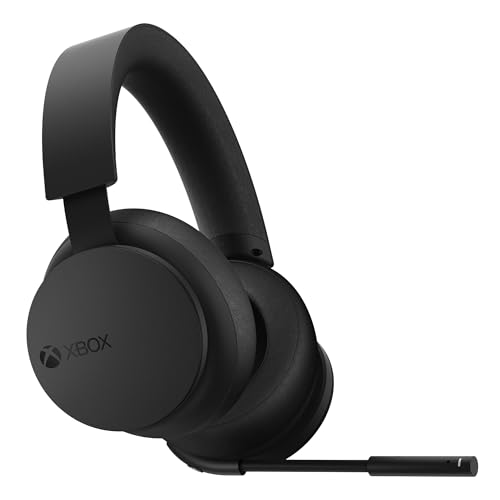
The official Xbox Wireless Headset is the most direct answer to Xbox compatibility, because it is made for the console. Its listing describes a carbon black over-ear headset with spatial audio and Dolby Atmos, and it plays on consoles, PCs, and TVs. There is no adapter to lose and no workaround to learn: the headset pairs with the console the way a controller does.
Spatial audio is the feature that changes how games sound on this headset. Dolby Atmos places sounds in space rather than flattening them into left and right, so footsteps, reloads, and distant vehicles arrive with a sense of direction. For a player who relies on audio cues, that sense of direction is a genuine advantage, and it works across the games that support it.
For a buyer who wants the simplest possible route to a good Xbox headset, this is the natural first pick. It is the official headset, it pairs directly, and its over-ear design with spatial audio covers the basics well. It is also the headset that will always be supported first when the console gains new audio features.
The carbon black finish is the quiet choice on this list: it matches the console, it matches the controller, and it does not draw attention in a living room. Because the headset is made for Xbox, its controls and its pairing behave the way a console player expects, with no manual to read and no adapter to keep track of. For a household with one console and one television, that simplicity is worth more than any extra feature.
Key specifications: Carbon Black; over-ear design; spatial audio with Dolby Atmos; plays on consoles, PCs, and TVs.
This headset fits a buyer who wants the official, no-fuss route to Xbox audio.
Strengths
- Pairs directly with the console, with no adapter to buy or lose.
- Spatial audio with Dolby Atmos gives game sounds a sense of direction.
- Works across consoles, PCs, and TVs, so one headset covers several screens.
Trade-offs
- It is the official headset, so it lacks the extra features of premium third-party picks.
- Buyers who want a base station or a long list of audio presets will want more.
- The over-ear design is a matter of taste, and some players prefer a lighter on-ear fit.
The Xbox Wireless Headset suits a player who wants to pair once and play, without adapters or setup. It fits anyone whose priority is a headset that simply works with the console.
Best for: simple, direct Xbox pairing with spatial audio / Not suited for: a buyer who wants a base station or premium extras
Check price on Amazon: Xbox Wireless Headset

SteelSeries Arctis Nova 7X Wireless Gen 2
The Arctis Nova 7X Wireless Gen 2 is the premium wireless pick for Xbox players who also play elsewhere. Its listing describes a headset with real-time app control, more than 50 hours of play, neodymium drivers, and a mix of 2.4GHz and Bluetooth connections, working across Xbox, PC, PS5 and PS4, Switch 1 and 2, and mobile. The 7X badge is the detail that matters: this is the Xbox-tuned version of the Nova 7 line.
Battery life is the standout number here. More than 50 hours of play means the headset survives a whole week of evening sessions on one charge, and the dual wireless design means it can stay connected to the console over 2.4GHz while a phone stays connected over Bluetooth. The app control lets the sound be adjusted without leaving the game.
For a buyer who plays on Xbox most of the time but also uses a PC, a PlayStation, or a Switch, the Nova 7X Gen 2 is the pick. It is built for Xbox first and works everywhere else second, which is exactly the order a multi-platform player needs.
The mix of 2.4GHz and Bluetooth is the detail that makes this headset work beyond the console. A phone can stay connected over Bluetooth while the game runs over 2.4GHz, so a call or a message arrives without interrupting the match. The neodymium drivers keep the sound clean at high volume, and the real-time app control means the sound can be tuned without pausing the game.
Key specifications: Wireless Gen 2; 50+ HR play; neodymium drivers; Mix 2.4GHz/Bluetooth; real-time app control; Xbox, PC, PS5/PS4, Switch 1/2, Mobile.
This headset fits a buyer who plays on Xbox first and on other platforms second.
Strengths
- More than 50 hours of play covers a week of evening sessions per charge.
- The dual wireless design keeps the console and a phone connected at once.
- Real-time app control adjusts sound without leaving the game.
Trade-offs
- It is a premium headset, so it sits above the budget picks on value.
- Players who only ever play on Xbox may not need the multi-platform support.
- The feature list is long, and some buyers will never use all of it.
The Nova 7X Gen 2 suits a multi-platform player who wants one headset for every screen. It fits anyone who values long battery life and app-based sound control.
Best for: long battery life with multi-platform wireless / Not suited for: a buyer who wants the cheapest Xbox headset
Check price on Amazon: SteelSeries Arctis Nova 7X Wireless Gen 2

Razer Kaira Pro
The Razer Kaira Pro is the wireless Razer pick for Xbox, and its listing states the case plainly: a wireless Xbox gaming headset with titanium drivers and a supercardioid microphone. Titanium drivers are Razer’s way of saying the sound should stay sharp at high volume, and the supercardioid microphone is designed to pick up the voice while rejecting noise from the room.
The microphone design is what separates this headset from cheaper wireless picks. A supercardioid pattern focuses on sound coming from directly in front of the mic, which is where the mouth is, and rejects sound from the sides. In a shared room or a noisy house, that focus is the difference between being heard clearly and being asked to repeat every callout.
For a buyer who talks as much as they listen, the Kaira Pro is the pick. It pairs Razer’s titanium drivers with a microphone built for team chat, and it does it wirelessly. It is the headset for the player who leads the squad.
Razer’s titanium drivers are built to stay sharp when the volume rises, which matters in games where explosions and gunfire sit next to quiet footsteps. The supercardioid microphone is the other half of the design: it focuses on the voice and rejects the room, so teammates hear callouts instead of background noise. For a player who talks as much as they listen, that focus is the difference between being heard and being asked to repeat.
Key specifications: Wireless Xbox gaming headset; titanium drivers; supercardioid mic; black.
This headset fits a buyer who talks constantly in team chat and wants to be heard clearly.
Strengths
- Titanium drivers keep sound sharp at high volume.
- The supercardioid microphone focuses on the voice and rejects room noise.
- Wireless freedom with no cable between the player and the controller.
Trade-offs
- It is a Razer headset, so buyers who prefer another brand’s sound will look elsewhere.
- The listing states no battery life figure, so heavy players should keep a charger handy.
- It has fewer stated extras than the premium multi-platform picks.
The Kaira Pro suits a squad leader or a regular party-chat player. It fits anyone who wants wireless Razer sound with a focused microphone.
Best for: clear team chat with titanium drivers / Not suited for: a buyer who wants a base station or the longest battery
Check price on Amazon: Razer Kaira Pro

HyperX CloudX Stinger Core
The HyperX CloudX Stinger Core is the value wireless pick for Xbox, and its listing is clear about who it is for: a wireless gaming headset for Xbox Series X|S and Xbox One, with memory foam and premium leatherette ear cushions and noise-cancelling. It is the headset for a buyer who wants wireless Xbox audio without paying for a premium badge.
Comfort is where this headset earns its place. Memory foam cushions mould to the ears rather than pressing on them, and the leatherette covering wipes clean after long sessions. The noise-cancelling microphone keeps voice chat clear, which is the part of a budget headset that is usually cut first, and here it is not.
For a buyer who wants the cheapest sensible way into wireless Xbox audio, the Stinger Core is the pick. It covers the essentials, wireless connection, comfortable cushions, and a noise-cancelling mic, and leaves the premium extras to headsets that cost considerably more.
The leatherette ear cushions are the comfort story here. They wipe clean after long sessions, and the memory foam underneath moulds to the ears rather than pressing on them. Because the headset is wireless, there is no cable to catch on the controller or the chair, and the noise-cancelling microphone keeps voice chat clear even in a shared room.
Key specifications: Wireless; for Xbox Series X|S and Xbox One; memory foam and premium leatherette ear cushions; noise-cancelling.
This headset fits a buyer who wants wireless Xbox audio at a sensible cost.
Strengths
- The wireless link frees the player from the controller cable.
- Memory foam cushions stay comfortable through long sessions.
- The noise-cancelling microphone keeps voice chat clear at a modest cost.
Trade-offs
- It lacks the surround sound and app control of the premium picks.
- Buyers who want a base station or multi-platform support will want more.
- It is a value headset, so its materials are simpler than the premium picks.
The CloudX Stinger Core suits a player buying a first wireless headset, or a second headset for a second console. It fits anyone who wants comfort and a clear mic without a premium price.
Best for: affordable wireless Xbox audio with memory foam / Not suited for: a buyer who wants surround sound or app control
Check price on Amazon: HyperX CloudX Stinger Core
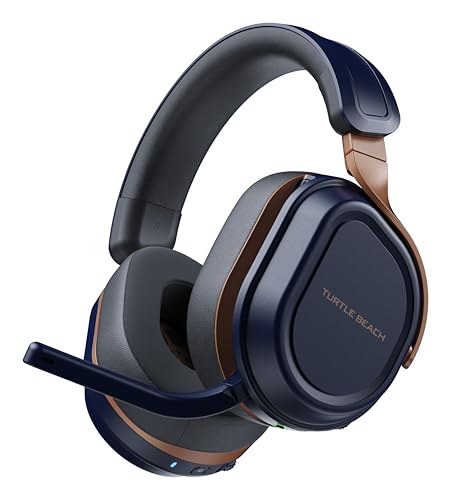
Turtle Beach Stealth 700
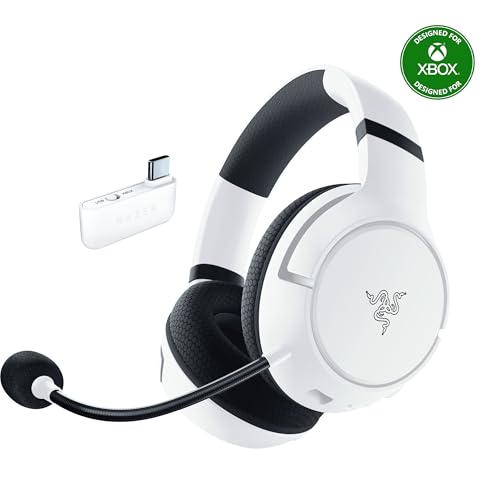
The Turtle Beach Stealth 700 is the long-battery pick on this list. Its listing describes a wireless gaming headset for Xbox, PS5, PC, and mobile, with 60mm dual drivers, an 80-hour battery, a flip-to-mute microphone, and Bluetooth, in a cobalt finish. Eighty hours is the longest battery figure on this list by a wide margin.
The 60mm dual drivers are the sound story here. Larger drivers move more air, which gives low sounds like explosions and engine rumble more weight, and the dual-driver design separates the sound into layers that stay distinct when the action gets busy. The flip-to-mute microphone is the practical touch: a quick flip silences the mic without fumbling for a button.
For a buyer who hates charging headsets, the Stealth 700 is the pick. An 80-hour battery means the headset is charged roughly once a month rather than once a week, and the Bluetooth link keeps a phone connected alongside the console.
The Bluetooth link is the feature that extends this headset beyond the console. A phone can stay connected for calls and music while the game runs over the wireless link, and the flip-to-mute microphone silences the mic with a single motion. The 60mm dual drivers give low sounds real weight, so explosions and engine rumble feel as large as they look on screen.
Key specifications: Wireless; 60mm dual drivers; 80-Hr battery; flip-to-mute mic; Bluetooth; Xbox, PS5, PC, Mobile; Cobalt.
This headset fits a buyer who wants to charge a headset rarely and play for weeks.
Strengths
- An 80-hour battery is the longest on this list by a wide margin.
- The 60mm dual drivers give low sounds real weight.
- Bluetooth keeps a phone connected alongside the console.
Trade-offs
- It is a large headset, and some players will find it heavier than the slim picks.
- The cobalt finish is a bold colour choice that not everyone will want.
- Buyers who want a base station will need to look at the Astro pick.
The Stealth 700 suits a heavy player who games most evenings and dislikes cables and chargers. It fits anyone who wants big sound and a battery that lasts.
Best for: 80-hour battery with 60mm drivers / Not suited for: a buyer who wants the lightest headset
Check price on Amazon: Turtle Beach Stealth 700

Logitech G Astro A50 X
The Logitech G Astro A50 X is the premium base-station pick, and its listing reads like a piece of home cinema gear: a multi-platform wireless gaming headset with a base station for PS5, Xbox, and PC, a PLAYSYNC audio and video switcher, HDMI 2.1 with 4K120 and VRR, 24-bit and 48kHz audio, 2.4GHz wireless, and Bluetooth. The base station is the point: it sits on the desk and switches the whole setup between consoles.
The PLAYSYNC switcher is the feature that justifies the premium. With the base station connected to the television over HDMI 2.1, switching from Xbox to PlayStation is a button press rather than a cable swap, and the 4K120 and VRR support means the video signal passes through without losing the features that make a modern console look its best. The headset itself charges on the base station, so it is always ready.
For a buyer with more than one console and a television setup to match, the A50 X is the pick. It is the most expensive headset here, and it is also the only one that manages the whole living room. Buy it when the setup, not just the headset, is the priority.
The base station is also a charger, which solves the oldest wireless headset problem: a dead battery at the start of a session. The headset lives on the base station when it is not in use, so it is always charged, and the PLAYSYNC switcher means the whole setup changes consoles at a button press. For a living room with several consoles, that combination is hard to beat.
Key specifications: Multi-platform wireless; base station for PS5, Xbox, PC; PLAYSYNC A/V switcher; HDMI 2.1 4K120 VRR; 24bit/48kHz; 2.4GHz; BT.
This headset fits a buyer with several consoles and a television setup to manage.
Strengths
- The base station switches between consoles at a button press.
- HDMI 2.1 with 4K120 and VRR keeps the video signal at full quality.
- The headset charges on the base station, so it is always ready.
Trade-offs
- It is the most expensive headset on this list.
- Buyers with one console will not use the switching features.
- The base station needs desk space and an HDMI connection.
The A50 X suits a multi-console household that wants one headset and one switcher for everything. It fits anyone whose living room is the gaming room.
Best for: base station switching between consoles / Not suited for: a buyer with one console or a tight budget
Check price on Amazon: Logitech G Astro A50 X
Best Xbox compatible headsets: what matters most: what matters most
The first thing to check is how the headset connects. A headset that pairs directly with the console over Xbox wireless is the simplest option, because there is nothing to plug in and nothing to lose. A headset that uses a USB wireless adapter is nearly as simple, but the adapter is a small part that can be misplaced. A wired headset plugs into the controller and never needs charging, which some players prefer, but the cable is always there.
The second thing is the microphone. A headset is a communication tool as much as a listening tool, and the microphone design decides whether teammates hear a clear voice or a muffled one. A flip-to-mute microphone is the most practical design, because muting is a single motion. A detachable microphone is useful for players who also wear the headset for music or films. Noise-cancelling microphones matter most in shared rooms.
The third thing is fit. Headset comfort is personal, and it cannot be judged from a photograph. Memory foam cushions, a light frame, and a headband that distributes weight all help, but the only real answer is time: a headset that feels fine for ten minutes may press on the ears after two hours. The picks on this list all describe memory foam or soft cushions, which is a good starting point.
The fourth thing is the battery, for wireless picks. A headset that dies mid-match is worse than a wired headset, so the battery life stated in the listing should cover a full evening with room to spare. The Stealth 700’s 80 hours and the Nova 7X Gen 2’s 50-plus hours are the longest on this list, and either one will survive a week of sessions on one charge.
Buying guide: choosing Xbox compatible headsets
Start by matching the connection to the console. Xbox Series X|S and Xbox One both accept headsets that pair over Xbox wireless, headsets with a USB adapter, and wired headsets that plug into the controller. The official Xbox headset and the SteelSeries Nova 7X pair directly, the Turtle Beach and HyperX wireless picks use their own wireless links, and the wired picks plug straight into the controller. Any of these routes works; the question is which one suits the way the console is used.
Then weigh wireless against wired. Wireless headsets free the player from the cable, which matters for players who sit back from the screen or move around between matches. Wired headsets never need charging and never drop a wireless link, which matters for players who hate interruptions. The wireless picks on this list all state battery lives of a full evening or much longer, so the charging burden is small.
Finally, think about the rest of the setup. A player with one console and one television needs only a good headset. A player with two consoles, a PC, and a television should look at the multi-platform picks, and the Astro A50 X with its base station exists for exactly that player. Spending more buys switching, presets, and battery life, not better compatibility, so the extra money should match a real need.
Also consider the household. A headset that works on Xbox and on PC, like the official Xbox headset or the Nova 7X Gen 2, is worth more in a house with several screens than a headset that works on one console alone. The Astro A50 X goes further and manages several consoles through its base station, which is the right choice for a living room with more than one machine.
Using and caring for your Xbox compatible headsets
Charge wireless headsets on a routine, not when they die mid-match. The long-battery picks on this list forgive a forgotten charge, but the habit is worth building anyway: put the headset on its charger or its base station after each session, and the battery will rarely be the reason a session ends early. A headset that lives on its charger is always ready.
Keep the microphone positioned close to the mouth and flip it away to mute. The supercardioid and noise-cancelling microphones on these headsets work best when the mic sits near the mouth, and the flip-to-mute designs make muting a reflex rather than a hunt for a button. Clean the microphone cover gently if voice chat starts to sound muffled, because dust and skin oils build up there first.
Store the headset on a stand or a hook rather than tossing it in a drawer. The ear cushions are the part that wears first, and they last longer when the headset is not crushed under other gear. Keep the headset away from direct sunlight and heat, which dry out leatherette cushions and shorten battery life over time.
Clean the ear cushions regularly with a dry or slightly damp cloth. Leatherette cushions pick up skin oils and dust, and a quick wipe after a long session keeps them soft and comfortable. Never use harsh cleaners on the cushions or the microphone, because they dry out the material and shorten its life.
Common mistakes to avoid
The most common mistake is buying a headset made for another platform and assuming it will work with Xbox. PlayStation-tuned headsets and PC-only headsets often use wireless adapters that Xbox does not recognise, and a headset that works on one console may be silent on another. Check the listing for the word Xbox before buying, and prefer headsets that name Xbox Series X|S and Xbox One directly.
The second mistake is ignoring the microphone. Many buyers compare drivers and battery life and forget that the microphone is half the headset. A headset with excellent sound and a poor microphone will frustrate teammates, and in team games that frustration is the whole experience. Read the microphone description as carefully as the driver description.
The third mistake is choosing by battery life alone. A long battery is convenient, but it does not make a headset sound good or fit well. The Stealth 700’s 80-hour battery is genuinely useful, but it matters less than the drivers, the microphone, and the fit. Balance the numbers rather than chasing one of them.
The fourth mistake is buying a headset without checking the return policy. Headset comfort is personal, and a headset that looks right on paper may press on the ears after an hour. Buy from a seller that allows returns, wear the headset for a full evening, and send it back if it hurts. A headset that is not comfortable is not a bargain at any cost.
Budget and value
The value tier is the HyperX CloudX Stinger Core, which covers wireless Xbox audio, memory foam cushions, and a noise-cancelling microphone at the lowest cost on this list. It is the right choice for a first wireless headset or a second headset for another room, and it gives up only the premium extras.
The middle tier is the official Xbox Wireless Headset, the Razer Kaira Pro, and the Turtle Beach Stealth 700. Each of these costs more than the value pick and adds something real: official pairing and spatial audio, a focused supercardioid microphone, or an 80-hour battery with large drivers. A buyer in this tier should pick the feature that matches how they play.
The premium tier is the SteelSeries Arctis Nova 7X Gen 2 and the Logitech G Astro A50 X. The Nova 7X buys multi-platform wireless with a very long battery, and the A50 X buys a base station that manages several consoles. Both are worth the money only when the extra features will actually be used.
Final recommendation
If one headset has to be named, it is the official Xbox Wireless Headset. It pairs directly with the console, it carries spatial audio with Dolby Atmos, and it works across consoles, PCs, and TVs. For a buyer who wants the simplest answer to Xbox compatibility, it is the safest recommendation on this list.
Buyers with different priorities should look elsewhere without hesitation. The Turtle Beach Stealth 700 is the better choice for the longest battery, the SteelSeries Nova 7X Gen 2 is the better choice for multi-platform play, the Razer Kaira Pro is the better choice for team chat, and the Astro A50 X is the better choice for a multi-console living room.
Whichever pick is chosen, the rule that matters is the same: check the listing for Xbox compatibility first, then check the microphone, then check the fit. An Xbox compatible headset earns its keep every session, and the right one is the one that pairs easily, sounds clear, and stays comfortable until the session ends.
Frequently asked questions
Do all of these headsets work with Xbox Series X|S and Xbox One?
Yes, each listing names Xbox directly. The official Xbox headset pairs with the console, the SteelSeries, Razer, Turtle Beach, and HyperX picks all state Xbox Series X|S and Xbox One compatibility, and the Astro A50 X covers Xbox through its base station.
Is a wireless headset or a wired headset better for Xbox?
It depends on how the console is used. Wireless headsets free the player from the cable and the picks here state battery lives from a full evening to 80 hours. Wired headsets never need charging and never drop a link. Both routes work with Xbox, so the choice is about habit, not compatibility.
What is spatial audio, and does it matter?
Spatial audio places sounds in space rather than flattening them into left and right, so footsteps and vehicles arrive with a sense of direction. The official Xbox headset supports it with Dolby Atmos, and the Stealth 600 Gen 2 USB also lists spatial audio. It matters most in games where hearing direction decides the next move.
Do I need a base station for an Xbox headset?
No. A base station is a convenience for players with several consoles, not a requirement. The Astro A50 X uses its base station to switch between Xbox, PlayStation, and PC, but every other headset on this list connects directly or through a small adapter.
Can I use these headsets on a PC as well?
Most of them, yes. The official Xbox headset plays on PCs, the SteelSeries Nova 7X Gen 2 and the Turtle Beach Stealth 700 both list PC support, and the Astro A50 X covers PC through its base station. The HyperX and Razer picks are Xbox-focused but many also work with PC through a cable or adapter.
Can I use an Xbox headset with a PlayStation or PC as well?
Some of them, yes. The SteelSeries Nova 7X Gen 2 and the Turtle Beach Stealth 700 both list PlayStation and PC support, and the Astro A50 X covers PlayStation and PC through its base station. The official Xbox headset also plays on PCs. Always check the listing for the platform before buying, because a headset made only for Xbox will not work elsewhere.
Best Xbox compatible headsets for party chat
Party chat is where microphone quality shows. The Razer Kaira Pro with its supercardioid microphone and the Turtle Beach Stealth 700 with its flip-to-mute microphone are the two picks that treat voice chat as a first-class feature rather than an afterthought, and either one will keep a squad talking clearly.
The official Xbox headset is the safe middle ground for party chat: it pairs directly, its spatial audio helps the player hear teammates clearly, and there is nothing to configure. A player who spends most evenings in party chat should start with one of these three and only look further if a specific feature is missing.
Whatever headset is chosen, the microphone should be checked in a real party chat before the first competitive match. A quick conversation with a friend will show whether the voice is clear, whether background noise leaks through, and whether the mute control is easy to reach. Five minutes of checking saves a season of complaints.
Best Xbox compatible headsets for long sessions
A long session is the real test of a headset, and the two things that matter most are comfort and battery life. The Turtle Beach Stealth 700 with its 80-hour battery and the SteelSeries Nova 7X Gen 2 with its 50-plus hours are the two picks that survive a whole week of evening sessions on one charge, and either one will outlast the player rather than the other way around.
Comfort is the other half of a long session. Memory foam cushions, like the ones on the HyperX CloudX Stinger Core, mould to the ears rather than pressing on them, and a light frame matters more after two hours than after ten minutes. A headset that feels fine at the start of a session and hurts at the end is a headset that stays in its box.
Whatever headset is chosen, the habit matters as much as the hardware: take the headset off between matches, let the ears rest, and put the headset on its charger or its base station after each session. A headset that is charged and rested is always ready, and a player who rests is always sharper.
More guides from KajuanDouglas
gaming headsets for Xbox wireless gaming headsets for Xbox headsets for Fortnite on Xbox