Disclosure: As an Amazon Associate, kajuandouglas.com earns from qualifying purchases. Links to Amazon on this page are affiliate links; they cost you nothing extra. Listing details such as price and availability change often, so check the current Amazon listing before you buy.
Where to buy
Here is the shortlist for the best stereo bluetooth headset for android phones. All six headsets below are sold on Amazon and connect to Android phones over standard Bluetooth, so you can check the current price, availability and delivery window on the listing before ordering. Orders are placed through Amazon, and this site may earn a commission on qualifying purchases at no extra cost to you. Pick by how you split your day between calls and music, then read the matching review in full.
- Jabra Evolve 65 MS Stereo — the proven dual-ear office headset with a noise-cancelling mic and a USB adapter for your computer.
- Poly Voyager Focus 2 UC — the call specialist with active noise cancelling and a real boom microphone.
- Logitech Zone Vibe 100 — the featherweight over-ear you can wear from the first call to the last song.
- Soundcore Q30 by Anker — the budget route to noise cancelling, app EQ and very long playtime.
- JBL Tune 770NC — the music-first over-ear with adaptive noise cancelling and an ambient mode for the street.
- Logitech Zone 301 — the straightforward, wide-compatibility headset for getting work done without fuss.
Read the full guide ↓
Choosing the best stereo bluetooth headset for android phones starts with a simple distinction that listings often blur: stereo means two ears. A dual-ear headset gives you music the way it was mixed, voices centered and clear on calls, and enough isolation to follow a podcast on a train. Single-ear phone headsets have their place for drivers who must hear traffic, but if your headset will carry music, videos and long calls, stereo is the format that does all three jobs properly.
The six picks here are all dual-ear Bluetooth models that pair with Samsung Galaxy, Google Pixel, Motorola and other Android phones without adapters or special software. They range from a proven office headset with a proper boom microphone, through an active-noise-cancelling call specialist and a featherweight over-ear for all-day wear, to music-first headphones whose microphones handle calls capably when they come in. One simple work headset and one budget noise-cancelling model round out the list for buyers who want the essentials done well.
What matters most depends on your day. Callers should rank microphone quality and noise cancelling first, because the person on the other end judges you by your voice, not your playlist. Music listeners should rank comfort and sound, because a headset you remove after an hour fails regardless of its features. Commuters should think about noise cancelling and battery life together. The reviews below score each headset against the job it was picked for, with honest trade-offs, so you can match one to your routine instead of buying the most expensive name.
A word about how these headsets were matched to Android specifically: all six use the standard Bluetooth audio profiles every modern Android phone supports, so pairing, media controls and call handling behave consistently whether your phone is a Galaxy, a Pixel or a Motorola. Where a model adds an app, a USB adapter or platform certification, the review treats those as computer-side or convenience extras rather than Android requirements, because a headset that needs special pleading to work with your phone has failed its first job. The differences that remain — microphones, fit, noise control and battery — are the differences that decide daily satisfaction.
Key Takeaways
- Stereo means dual-ear: for music plus calls on an Android phone, a two-ear headset beats a single-ear phone headset on everything except traffic awareness.
- The Jabra Evolve 65 is the safest all-round pick; the Poly Voyager Focus 2 is the specialist for noisy call environments.
- Microphone quality is what your callers hear — prioritize the boom-mic models if calls pay your bills.
- Multipoint Bluetooth lets a headset stay connected to your phone and a computer at once, which matters if you split the day between both.
- Confirm the exact variant on the listing: several of these headsets come in UC and platform-certified versions that look identical.
In this guide
Quick Picks
Six dual-ear headsets, ordered from the safest all-round recommendation to the most specialized. Badges here match the badges in the full reviews below.
| Badge | Pick | Why it stands out | Link |
|---|---|---|---|
| Best Overall | Jabra Evolve 65 MS Stereo | A long-proven stereo work headset with a proper noise-cancelling microphone and an included USB adapter for computer calls. | Check price on Amazon |
| Best for Noisy Calls | Poly Voyager Focus 2 UC | Active noise cancelling plus a boom microphone makes it the strongest pick when your callers must hear you in a noisy home or office. | Check price on Amazon |
| Best Lightweight All-Day | Logitech Zone Vibe 100 | A lightweight over-ear design with multipoint Bluetooth that disappears during long days of calls and music. | Check price on Amazon |
| Best Budget Noise Cancelling | Soundcore Q30 by Anker | Hybrid noise cancelling, a 50-hour maker-stated battery and app EQ at a budget position in this lineup. | Check price on Amazon |
| Best for Music Lovers | JBL Tune 770NC | Adaptive noise cancelling, a Smart Ambient mode and JBL’s bass-forward tuning for listeners who take calls between songs. | Check price on Amazon |
| Best Simple Work Headset | Logitech Zone 301 | A no-nonsense Bluetooth work headset whose listing confirms compatibility across computers and Android alike. | Check price on Amazon |
How These Picks Were Chosen
These headsets were shortlisted from verified Amazon listings by applying the stereo requirement strictly: every pick covers both ears and carries music in stereo while handling calls through a built-in or boom microphone. Models that were single-ear, motorcycle intercoms or helmet systems were excluded even when their listings used the word headset, because they answer a different search than this one.
Each pick also had to pair over standard Bluetooth with Android phones, come from an established audio or communications brand, and fill a distinct role — office calls, noisy-environment calls, all-day comfort, music-first listening, budget noise cancelling, or simple dependable work use. Microphone and battery claims in the spec boxes come from the verified listing details; prices change too often to print, so each pick links out for a current check instead.
- True stereo, dual-ear design that plays music properly and centers call audio.
- Standard Bluetooth pairing with Android phones, with multipoint valued for phone-plus-computer days.
- A microphone your callers can understand, with noise cancelling where the role demands it.
- Comfort that survives a full working day, not just a twenty-minute demo.
- Battery endurance matched to the role, from call-heavy days to music-heavy commutes.
- A distinct job in the lineup, so each headset is the right answer for a different buyer.
The Best Stereo Bluetooth Headset for Android Phones
Reviews follow the same order as the buying box and Quick Picks. The first headset is the default recommendation; each later pick wins when its specialty matches your day.
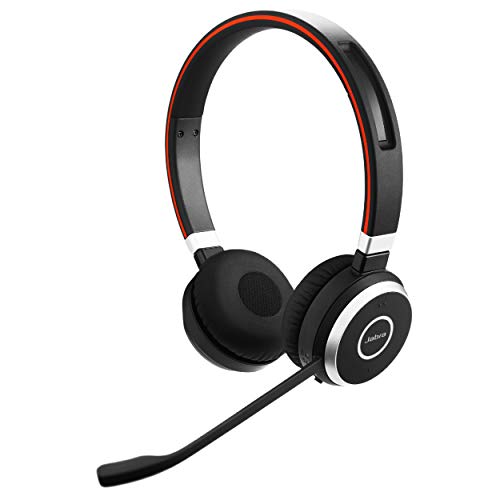
Jabra Evolve 65 MS Stereo
Badge: Best Overall
| Form | Stereo (dual-ear) Bluetooth headset |
| Microphone | Noise-cancelling microphone |
| In the box | Link 370 USB adapter included (per listing) |
| Use | Office and hybrid work calls plus music |
| Brand line | Jabra Evolve series |
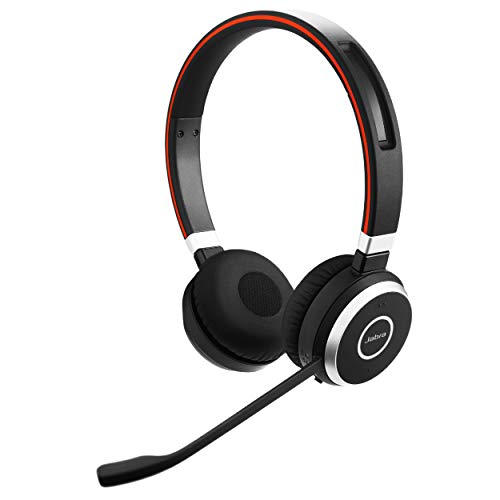
The Jabra Evolve 65 has been the default office headset recommendation for years because it does the core job without drama. It is a true stereo headset, so music and video sound play properly between calls, and its noise-cancelling microphone keeps your voice forward and your room behind you when you are speaking. With an Android phone the pairing is ordinary Bluetooth, and the included Link 370 USB adapter extends the same headset to a computer with a more managed connection than raw pairing usually gives.
The design is on-ear rather than over-ear, which keeps it light through a working day but lets in more room sound than the noise-cancelling Poly below. It is a work tool first and a music headset second: perfectly enjoyable for playlists between meetings, but not the pick for listeners who want deep bass or silence on a plane. For the classic pattern of phone calls, computer calls and music in between, it remains the safest buy in this guide.
A week with the Evolve 65 explains its longevity in offices. It lives on the desk, pairs with the phone in a pocket and the computer through its adapter, and moves between them without the re-pairing rituals that make people abandon headsets. The ear cushions and headband suit the rhythm of office calls — on for a meeting, off for a conversation, on again for focus music — and the microphone boom’s position becomes muscle memory within days. It is not the headset for a long-haul flight or a loud factory floor, and it does not pretend to be. It is the headset for the ordinary professional day, executed with a reliability that flashier models keep failing to match, which is why so many organizations standardized on it in the first place.
Strengths
- Noise-cancelling microphone keeps your voice clear to callers
- Included USB adapter makes computer use as tidy as phone use
- Light on-ear build stays comfortable across long call days
Trade-offs
- On-ear design lets in more ambient sound than over-ear rivals
- No active noise cancelling for travel or open-plan focus
- Music tuning is balanced for work rather than excitement
Choose it if your day mixes phone calls, computer calls and music, and you want one proven headset for all of it. Skip it if you need silence on flights or in a loud open office.
Best for: Office and hybrid workers who live on calls / Not suited for: Frequent flyers who need active noise cancelling

Poly Voyager Focus 2 UC
Badge: Best for Noisy Calls
| Form | Bluetooth dual-ear (stereo) headset with boom mic |
| Noise control | Active noise cancelling |
| Connectivity | USB-A for PC and Mac (per listing) |
| Use | Calls on major platforms (per listing) |
| Brand line | Poly (Plantronics) Voyager series |
The Poly Voyager Focus 2 exists for one situation: you are on an important call and your environment is not cooperating. Its boom microphone puts the pickup close to your mouth, its microphone system works to keep background noise out of your voice, and active noise cancelling quiets the room at your end so you can concentrate. Paired with an Android phone it behaves like any good Bluetooth headset; paired with a computer through its USB connection it becomes a managed work device.
That call focus shapes the trade-offs. It is priced and built as professional equipment, and music listeners will find its tuning sensible rather than thrilling. It is also a headset you wear for work blocks rather than forget about all day. But if your income depends on sounding clear from a kitchen table, a shared office or a home with children and a dog, this is the pick that protects your professional voice the best.
The Focus 2 rewards a short period of deliberate setup. Spend ten minutes choosing the right wearing style, positioning the boom where your voice is captured best, and setting the noise cancelling level for your usual room, and the headset repays you on every difficult call afterward: the toddler in the next room, the delivery at the door and the open window by the road all fade from your callers’ experience. That is the real product here — not silence for you, though the cancelling helps you think, but a professional signal for the people judging your work by your voice. For consultants, support leads, salespeople and anyone whose calls carry consequences, that signal is worth the premium this pick commands.
Strengths
- Boom microphone placement gives callers your clearest voice in this guide
- Active noise cancelling helps you focus in shared and noisy spaces
- Built for the major calling platforms used at work
Trade-offs
- Premium professional pricing for a work-first tool
- Music sound is competent rather than a headline feature
- More headset to manage than the featherweight picks
Choose it if your calls happen in noisy places and sounding professional is non-negotiable. Skip it if you mostly listen to music and take the occasional call.
Best for: Remote workers and call-heavy professionals in noisy homes / Not suited for: Music-first listeners on a budget

Logitech Zone Vibe 100
Badge: Best Lightweight All-Day
| Form | Lightweight wireless over-ear headphones |
| Microphone | Noise-cancelling microphone |
| Bluetooth | Advanced multipoint Bluetooth |
| Compatibility | Works with Teams, Google Meet and Zoom (per listing) |
| Color | Graphite |
Comfort is the Zone Vibe 100’s headline. It is a lightweight over-ear headset in a category full of designs that clamp, and that lightness is what makes it the pick for people whose headset goes on in the morning and comes off at dinner. The over-ear cushions soften the pressure, the noise-cancelling microphone handles calls respectably, and multipoint Bluetooth keeps it connected to your Android phone and your computer at the same time, switching as calls arrive.
It does not offer active noise cancelling, so a loud commute will still sound like a loud commute, and its microphone is a step behind the boom-equipped Jabra and Poly for difficult environments. What it offers instead is the absence of fatigue, which is a feature you appreciate more with every hour of wear. For mixed days of meetings, music and video at a desk or around the house, it is the easiest headset here to forget you are wearing.
The Zone Vibe 100 makes the most sense for the growing pattern of work that is neither office nor travel: the home desk, the kitchen table, the spare room. In those spaces, noise cancelling matters less than not feeling like you are wearing equipment, and this headset’s lightness is a genuine working feature — it is the one people keep on for the unscheduled call, the quick video chat and the focus playlist between meetings. Its multipoint connection suits the home pattern too, where the phone and the laptop are both always half in use. If your current headset gives you a headache by three in the afternoon, the problem this Logitech solves will sound very familiar, and its solution is simply to weigh less and press less.
Strengths
- Lightweight build suits genuinely all-day wear
- Multipoint keeps phone and computer connected together
- Over-ear comfort with a microphone that handles routine calls well
Trade-offs
- No active noise cancelling for commutes or flights
- Microphone trails the boom-mic picks in difficult noise
- Less suited to critical music listening than dedicated headphones
Choose it if you wear a headset for most of the working day and comfort decides everything. Skip it if you need noise cancelling or the strongest possible call microphone.
Best for: Desk workers with long meeting schedules / Not suited for: Noisy-environment callers and frequent flyers

Soundcore Q30 by Anker
Badge: Best Budget Noise Cancelling
| Form | Hybrid active noise cancelling headphones |
| Design | Over-ear Bluetooth headphones |
| App | Custom EQ via the Soundcore app |
| Battery | 50H ANC playtime (maker figure) |
| Color | Black |
The Soundcore Q30 is what happens when headphone features stop being premium exclusives. Hybrid active noise cancelling takes the edge off commutes and office hum, the Soundcore app adds custom EQ so you can shape the sound to your taste, and the maker-stated 50 hours of playtime with noise cancelling on means charging becomes a rare event. With an Android phone it pairs over Bluetooth like everything here, and its built-in microphone covers everyday calls without embarrassment.
Keep expectations aligned with its role and price position: the noise cancelling is helpful rather than class-leading, call quality in wind or heavy noise is a step behind the boom-mic work headsets, and the build feels functional rather than luxurious. As a music-first headset that also takes calls, travels well and costs far less than the professional picks, it is the value standout of this guide.
The Q30’s app deserves a specific mention, because it turns a budget headset into a tunable one. The custom EQ lets a listener who finds the default tuning heavy dial it back, while a podcast devotee can push voices forward; those adjustments, saved to the headset, travel with it between your phone and any other device. Combined with the long battery figure, the effect is a headset that asks very little of its owner: charge it rarely, tune it once, and it covers commutes, study sessions, flights within its cancelling ability and the calls in between. Students and younger professionals, whose days genuinely mix all of those, tend to get the most from it — it is a single purchase that retires the separate cheap earbuds, cheap headphones and borrowed meeting headset all at once.
Strengths
- Hybrid noise cancelling at a budget position
- Very long maker-stated playtime reduces charging to a chore you forget
- App EQ lets you tune the sound instead of accepting one preset
Trade-offs
- Call microphone is ordinary in wind and heavy background noise
- Noise cancelling is good, not best-in-class
- Build and materials feel functional rather than premium
Choose it if you want noise cancelling and long battery life without paying professional-headset money. Skip it if your living depends on crystal-clear call audio in noisy places.
Best for: Commuters and music listeners who also take calls / Not suited for: Call-center style work in difficult noise
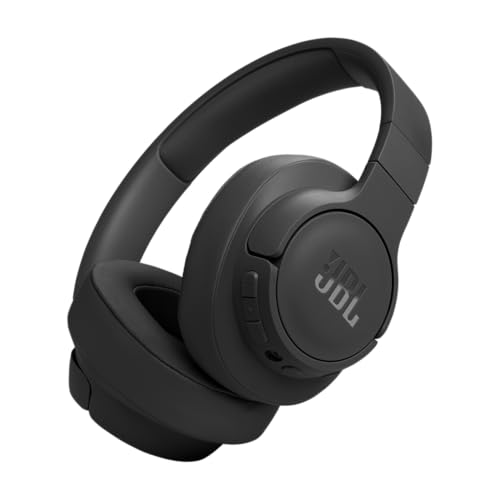
JBL Tune 770NC
Badge: Best for Music Lovers
| Form | Wireless over-ear headphones |
| Noise control | Adaptive noise cancelling with Smart Ambient |
| Bluetooth | Bluetooth 5.3 with LE Audio (per listing) |
| Sound | JBL Pure Bass sound |
| Color | Black |
The JBL Tune 770NC starts from music and works back to calls, which is the right order for a lot of Android owners. Its Pure Bass tuning gives playlists energy, adaptive noise cancelling adjusts to your surroundings, and Smart Ambient lets traffic and announcements back in when you are walking or waiting for a platform call. The microphone handles ordinary calls and meetings fine, which is all a music-first headset needs to do.
Dedicated callers should still look at the boom-mic picks above, because a built-in headphone microphone will never match a boom in a noisy kitchen or a windy street. Battery and comfort suit daily commuting and desk listening, and the over-ear fit helps the noise cancelling do its work. If your headset hours are eighty percent music and twenty percent calls, this is the balance point in the guide.
What lifts the Tune 770NC above generic music headphones for this guide’s purpose is the ambient awareness done properly. Smart Ambient is the feature commuters actually use daily: announcements, traffic and a colleague’s question come through without removing the headphones, then the noise cancelling closes the world out again for the next track. That rhythm — music, awareness, music — is the real texture of listening on the move, and JBL’s tuning gives the music enough body to survive noisy carriages and streets. Take the occasional call and it behaves; spend the day on calls and the boom-mic picks above behave better. As the music-first stereo headset for an Android phone, its priorities are in the right order.
Strengths
- Music tuning with real energy for playlists and video
- Adaptive noise cancelling plus an ambient mode for awareness
- Modern Bluetooth with LE Audio support per the listing
Trade-offs
- Built-in mic is a step behind boom microphones for calls
- Bass-forward tuning will not suit listeners who want a flat sound
- Work-platform polish is thinner than the Jabra and Poly picks
Choose it if music is the main job and calls are the supporting act. Skip it if you spend most of your headset hours talking for work.
Best for: Music-first commuters and students / Not suited for: Full-time callers in noisy environments

Logitech Zone 301
Badge: Best Simple Work Headset
| Form | Wireless Bluetooth headset |
| Microphone | Noise-cancelling microphone |
| Compatibility | Windows, Mac, Chrome, Linux, iOS, iPadOS and Android (per listing) |
| Color | Graphite |
| Brand line | Logitech Zone series |
The Logitech Zone 301 is the headset for buyers who want the decision to be simple. It is a wireless Bluetooth work headset with a noise-cancelling microphone, and its listing confirms compatibility across the usual computers and mobile systems including Android, which makes it a safe choice for households and offices where the headset will meet many devices over its life.
It skips the extras: no active noise cancelling, no flagship microphone system, no music tuning to write home about. What remains is a dependable stereo headset for meetings, classes and calls that also plays your music and podcasts without complaint. For a spare headset, a first work headset or a shared family headset, that restraint is the point, and the Logitech name behind it makes the simple choice an easy one.
The Zone 301’s wide compatibility list, confirmed in its own listing, makes it the headset IT-minded buyers quietly prefer for mixed households and small teams. One model that pairs predictably with the work laptop, the home computer, a Chromebook and everyone’s Android phones simplifies support, spares and replacements — buy two, and any user can grab either. Students moving between a school machine and a personal phone get the same benefit. It will not be the most exciting headset anyone owns, and it is not trying to be: it is the dependable stereo headset that is simply there, charged and pairable, whenever a class, a meeting or a call requires it. In a category full of specialists, there is real value in the generalist that never becomes the problem.
Strengths
- Broad confirmed compatibility across computers and phones
- Noise-cancelling microphone covers meetings and calls well
- Simple, focused design with nothing unnecessary to manage
Trade-offs
- No active noise cancelling
- Music performance is workmanlike rather than exciting
- Fewer extras than the premium picks in this guide
Choose it if you want one dependable work headset that pairs with everything you own. Skip it if you want noise cancelling, premium call audio or music-first sound.
Best for: Students, home offices and shared-device households / Not suited for: Demanding callers and audiophile listeners
Comparison Table
Compare the roles first and the features second: the right headset is the one whose strengths match your longest hours, and the full listing confirms current variants and bundles.
| Pick | Form | Microphone | Standout point |
|---|---|---|---|
| Jabra Evolve 65 MS Stereo | On-ear stereo headset | Noise-cancelling boom-style mic | USB adapter included |
| Poly Voyager Focus 2 UC | Over-ear stereo headset | Boom mic with ANC | USB-A computer connection |
| Logitech Zone Vibe 100 | Lightweight over-ear headset | Noise-cancelling mic | Multipoint Bluetooth |
| Soundcore Q30 by Anker | Over-ear ANC headphones | Hybrid noise cancelling | 50 hours with ANC (maker figure) |
| JBL Tune 770NC | Over-ear ANC headphones | Adaptive ANC with Smart Ambient | Bluetooth 5.3 with LE Audio |
| Logitech Zone 301 | Stereo work headset | Noise-cancelling mic | Wide device compatibility |
Buying Guide: How to Choose a Stereo Bluetooth Headset for an Android Phone
Begin by timing your day honestly. Count the hours your headset will spend on calls against the hours it will spend on music, video and podcasts. Call-dominant buyers should spend on the microphone and noise management, because that is what colleagues and clients experience. Music-dominant buyers should spend on comfort, sound and noise cancelling, because that is what they experience. Most disappointment in this category comes from buying the other person’s headset.
Understand multipoint before you need it. A multipoint headset stays connected to two devices at once, typically your Android phone and a work computer, and switches to whichever one rings or plays. If your calls arrive on both devices across the day, multipoint removes the constant unpairing dance and is worth prioritizing. If everything happens on the phone, it is a convenience you can safely ignore in favor of sound or price position.
Finally, fit is a feature. On-ear headsets run cooler and lighter; over-ear headsets isolate better and support noise cancelling. Heads, ears and glasses differ, and a headset that hurts after an hour is a bad headset regardless of its specifications. If you wear glasses, favor lighter clamping force and softer cushions, and remember that comfort problems show up at hour two, not minute two, so buy from a listing with a workable returns route when you can.
Also decide your wearing pattern before choosing a form. Some people put a headset on and leave it on; others pick it up twenty times a day. Frequent removers should favor light on-ear or quick-donning over-ear designs and avoid anything that needs careful boom positioning each time. All-day wearers should favor the opposite: the headset that settles into a correct, comfortable position and stays there, with controls that can be found by touch. The same headset can be perfect for one pattern and irritating for the other, which is why this guide describes wearing behavior in every review instead of only listing features.
- Score your day: call hours versus listening hours decides the category.
- Choose boom microphones for difficult call environments.
- Pick multipoint if calls arrive on both phone and computer.
- Match on-ear versus over-ear to your climate, glasses and session length.
- Treat comfort as a specification, not a luxury.
Microphones and Noise Cancelling: What Your Callers Actually Hear
Two different technologies hide behind similar marketing. Microphone noise cancelling works on your voice, reducing the room, the keyboard and the traffic behind you so callers hear a cleaner signal. Headphone noise cancelling works on your ears, quieting the world so you can hear the call or the music. A headset can have either, both or neither, and the listings in this guide state which is which in the spec boxes so you can compare honestly.
Microphone placement matters as much as processing. A boom microphone sits near your mouth, capturing your voice loudly relative to the room, which is why the professional picks use one. A microphone built into an earcup works harder with processing and does fine in quiet rooms, then struggles as noise rises. If your calls happen in controlled spaces, either design serves you; if they happen wherever life puts you, the boom earns its keep.
Checking Variants and Compatibility on the Listing
Work headsets are notorious for near-identical variants. The same model may appear in a UC version for general use and a certified version tuned for a specific meeting platform, with different included adapters and slightly different buttons. The headset will pair with your Android phone either way, but the computer experience differs, so read the variant name in the listing title and confirm the adapter type, USB-A or USB-C, matches your machine.
Also confirm what the box contains. Some listings include a USB adapter or a carry case and others sell the bare headset, and replacement ear cushions differ by generation. A two-minute check of the variant, the adapter and the contents prevents the most common return in this category: the right headset in the wrong version.
Battery Life, Charging Habits and Keeping a Headset Alive for Years
Headset batteries age by habits more than by time. A work headset that lives on its charger or stand stays ready for the surprise call, while a music headset benefits from being charged before it is empty rather than after. None of the picks here needs exotic care; they need a home. The headset that is always in the same place, charged, is the headset that gets used, and the one in a bag’s third pocket is the one that is flat on the day of the important call.
Physical care is the other half of longevity. Ear cushions are consumables on every model in this guide and are replaceable on the established brands, which is one more reason those brands dominate the list. Wipe cushions after heavy use, store the headset off your head rather than stretched over a monitor, and replace cushions when they crack rather than replacing the whole headset. A premium pick maintained this way outlasts two budget picks treated carelessly, which quietly changes the value calculation behind the prices you are comparing.
How Do You Pair a Stereo Bluetooth Headset with an Android Phone and a Computer?
Pairing a headset with your phone is a one-time job, and adding a computer through multipoint or a USB adapter takes a few more minutes. Do the phone first, test a call and a song, then add the second device so any problem has an obvious cause.
If your headset offers a companion app, install it after the basic pairing works, not before. The app is for EQ, button customization and updates; layering it over an unproven connection makes troubleshooting harder. Prove the simple path first, then add the extras one at a time.
- Charge the headset before pairing; low batteries cause dropouts that look like pairing faults.
- Put the headset into pairing mode. Most models do this by holding the power or Bluetooth button until the indicator flashes in its pairing pattern.
- On the Android phone, open Settings, then Connected devices or Bluetooth, choose Pair new device, and tap the headset’s name when it appears.
- Play music to confirm stereo sound in both ears, then make a short test call and ask the other person how your voice sounds.
- For computer use, either pair through the computer’s Bluetooth settings or plug in the headset’s USB adapter, which usually connects automatically.
- With both devices connected, play music on the computer, then call your own phone from another number to confirm the headset switches to the call.
- Set the headset as the default speaker and microphone in your meeting app, not just in the system settings, before your first real meeting.
Problem: Sound comes through only one ear → confirm the headset is connected as a media device in the phone’s Bluetooth settings for that headset, and check the phone’s accessibility settings for a mono audio or balance offset.
Problem: Callers say your voice is muffled or distant → reposition the boom closer to your mouth if your model has one, move away from fans and open windows, and test again in a quieter spot to separate fit problems from room problems.
Problem: The headset keeps switching to the wrong device → multipoint follows the most recent activity; pause playback on the idle device, or disconnect the device you are not using for that session.
Problem: The meeting app uses the laptop microphone instead of the headset → open the app’s own audio settings and select the headset for both speaker and microphone; system defaults do not always carry into apps.
Common Buying Mistakes
Buying a single-ear headset for music. Mono phone headsets are driving tools. If music, video and podcasts are part of the job, stereo dual-ear is the correct format and no microphone feature compensates for it.
Judging a headset by its music demo alone. Your callers experience the microphone, not the drivers. If calls matter, the boom-mic picks protect your professional sound in a way a music demo never reveals.
Ignoring variant names. UC and platform-certified versions of the same headset look identical and behave differently on a computer. The listing title carries the variant; read it before ordering.
Assuming noise cancelling covers both directions. Headphone noise cancelling quiets your world; microphone noise cancelling cleans your voice. Many headsets have one without the other, and confusing them leads to exactly the wrong purchase.
Overlooking comfort until hour two. Clamping force and weight feel fine in a quick try-on and miserable by mid-afternoon. Lightweight designs and soft cushions are functional specifications for long wear.
Forgetting the adapter question. If your computer work matters, confirm whether a USB adapter is included and whether it is USB-A or USB-C for your machine, instead of discovering it on delivery day.
Final Recommendation
Buy the Jabra Evolve 65 if you want the balanced default: stereo sound, a trustworthy microphone, tidy computer support through its included adapter and comfort that lasts the day. The Poly Voyager Focus 2 is the runner-up and the better buy when your call environment is genuinely noisy, because its boom microphone and active noise cancelling protect both ends of the conversation.
Choose the Zone Vibe 100 for all-day lightness, the Soundcore Q30 for budget noise cancelling and long playtime, the JBL Tune 770NC when music leads, and the Zone 301 when simple and compatible wins. Whichever you order, confirm the variant and box contents on the listing, pair it with your phone first, and run one test call before the meeting that matters.
One final habit separates happy headset owners from frustrated ones: run the return-window test on your worst day, not your best. Wear the headset through your longest meeting block, your noisiest hour and your longest playlist, and let it fail then if it is going to. Every pick in this guide was chosen to pass that test for its intended buyer — the last step is simply confirming that you are that buyer, while changing your mind is still free.
There is one more audience this guide should acknowledge: the buyer purchasing for someone else — an employee, a parent newly working from home, a student starting online classes. For gifts and team purchases, choose from the top of this list rather than the specialties. The Jabra Evolve 65 forgives the widest range of heads, ears and habits, and the Zone 301 forgives the widest range of devices. A specialist headset bought for the wrong person becomes an expensive spare; a balanced one becomes the headset they reach for daily, which is the outcome a thoughtful purchase is actually aiming at.
Related Guides
- best bluetooth headphones for android phones
- best bluetooth earbuds for android phones
- best earphones for android phones
- best bluetooth for android phones
- best accessories for android phones
- best watches for android phones
Frequently Asked Questions
What makes a headset stereo, and why does it matter?
A stereo headset has a speaker for each ear and plays the left and right channels of music and video as they were mixed. That gives songs their width, centers voices on calls and makes long listening less fatiguing. Single-ear headsets play everything in mono through one ear and are designed mainly for drivers.
Will these headsets work with Samsung, Pixel and Motorola phones alike?
Yes. They all use standard Bluetooth audio, which every modern Android phone supports the same way. Brand apps can add extras like EQ updates on some models, but pairing, music, calls and media controls do not depend on matching the phone brand to the headset brand.
Do I need a USB adapter if my phone has no USB port free?
The adapter included with some work headsets is for computers, not phones. Your Android phone connects over Bluetooth directly and needs nothing plugged in. Use the adapter at your desk computer for a managed connection, and Bluetooth everywhere else.
Can one headset connect to my phone and laptop at the same time?
Headsets with multipoint Bluetooth can. They stay paired to both devices and switch to whichever one is active, so a phone call can interrupt computer audio automatically. The Zone Vibe 100 in this guide offers multipoint; the professional picks achieve similar results through their adapters and dual pairing.
How do I know if the microphone is good enough for work?
Boom microphones and models that advertise microphone noise cancelling are the safest signs, and both professional picks here have them. Test your headset with a real call in your real environment during the return window; a quiet-room demo cannot tell you how it handles your kitchen, office or street.
How long should a work headset’s battery last?
Match it to your longest day rather than a headline figure. Call-heavy headsets are used in bursts and charged at desks, while music and commuting headsets benefit from the longest battery figures, like the maker-stated 50 hours on the Soundcore Q30. Any pick here covers a normal day; heavy users should keep the charger where the headset lives.