Two numbers, one pocket. That is the whole promise of a dual SIM Android phone, and for a surprising number of people it is the difference between a phone that works for their life and a phone that fights it. Maybe you carry a work number and a personal number and you are tired of juggling two handsets. Maybe you travel and want a local data SIM alongside your home line. Maybe you run a small business from the same device you use to call your family. Whatever the reason, the right dual SIM phone does not just accept two SIM cards. It manages them gracefully, keeps both lines reachable, and never makes you think about which number is doing what.
As an Amazon Associate, kajuandouglas.com may earn an affiliate commission from qualifying purchases made through links on this page.
This guide looks at six Android phones that handle two numbers well, from a flagship that does everything to a budget-friendly option that keeps the essentials. Each one has been judged on the things that actually matter for dual SIM life: how the two slots are arranged, whether the second line can stay active during calls, how the software lets you assign calls, texts, and data to each number, and — because a dual SIM phone still has to be a good phone — camera, battery, display, and everyday speed. No phone here is recommended on a single spec. Each earned its place by being genuinely good at the job it is best suited to.
In this guide
Quick picks: best dual sim android phones
| # | Product | Where to buy |
|---|---|---|
| 1 | Samsung Galaxy S25 Ultra | Check on Amazon |
| 2 | Google Pixel 9 Pro | Check on Amazon |
| 3 | OnePlus 13 | Check on Amazon |
| 4 | Xiaomi 15 | Check on Amazon |
| 5 | Motorola Edge 60 Pro | Check on Amazon |
| 6 | Nothing Phone (2a) Plus | Check on Amazon |
Quick comparison: the six picks at a glance
| Phone | Best for | SIM setup | Standout trait |
|---|---|---|---|
| Samsung Galaxy S25 Ultra | Flagship all-rounder | Dual nano-SIM or eSIM plus SIM | Complete package, strongest software controls |
| Google Pixel 9 Pro | Clean software and call handling | Physical SIM plus eSIM | Smartest dual-number call and spam handling |
| OnePlus 13 | Speed and battery for travellers | Dual nano-SIM | Fast charging and long battery life |
| Xiaomi 15 | Compact flagship with two slots | Dual nano-SIM | Small size, big camera, two real slots |
| Motorola Edge 60 Pro | Balanced mid-range value | Dual SIM (Latin American version) | Clean Android, generous storage |
| Nothing Phone (2a) Plus | Budget dual SIM | Dual nano-SIM | Low cost, honest everyday performance |
Before the reviews, one clarification matters more than any spec sheet. There are two kinds of dual SIM phone, and they behave differently when you are on a call. Dual SIM Dual Standby, usually shortened to DSDS, keeps both lines registered on the network, but when one line is on a call the other goes temporarily unreachable — callers hear it as busy or get sent to voicemail. Dual SIM Dual Active, or DSDA, keeps both lines genuinely live at the same time, so a call on one number does not silence the other. DSDA is rarer and usually appears on more expensive phones. For most people DSDS is enough, because the gap only matters during active calls, but if your second line is a business line where a missed call costs money, it is worth knowing which kind you are buying. Every pick below says which arrangement it uses, so there are no surprises.
What to look for in a dual SIM Android phone
The first question is not which phone to buy. It is which kind of dual SIM you actually need, because the answer changes the shortlist completely. Start with the physical layout. Some phones take two nano-SIM cards in a single tray. Some take one nano-SIM and one eSIM, the digital SIM that you activate by scanning a code from your carrier. Some offer both: two nano-SIM slots and eSIM support on top, which is the most flexible arrangement of all. If your carriers both issue physical SIMs, a dual nano-SIM tray is the simplest setup. If one of your carriers supports eSIM, the combination of one physical SIM and one eSIM works just as well and leaves the tray free. The trouble starts when a phone sold in your region has a different SIM layout from the same model sold elsewhere. Samsung, for example, ships some variants with two nano-SIM slots and others with one physical slot plus eSIM. The model name is the same. The tray is not. Always check the SIM configuration of the exact variant you are buying, in the exact region you are buying it, before you pay.
The second question is how the phone handles two lines at once. Good dual SIM software lets you set a default line for calls, a default line for texts, and a default line for mobile data — separately. It should also let you override the default for a single call from the dialler, without digging through settings. It should label incoming calls with which line they arrived on, so you can answer a work call differently from a personal one. And it should let you name the lines — “Work” and “Home”, for instance — so the labels mean something at a glance. Phones that get this right make two numbers feel effortless. Phones that get it wrong make every call a small puzzle, and that friction adds up across hundreds of calls a month.
The third question is the network bands, and it matters most for travellers. A dual SIM phone bought in one country may not support the 4G and 5G bands used by carriers in another country, and if the second SIM cannot connect to a fast network abroad, the whole point of carrying it disappears. Check that the phone supports the bands your carriers use, especially if you plan to use a local SIM while travelling. Unlocked phones sold directly by the manufacturer are generally the safest choice here, because carrier-locked models sometimes restrict which SIMs can be used together.
Battery life deserves more attention on a dual SIM phone than on a single SIM one. Two active radio connections draw more power, and a phone that idles with two lines registered will drain faster than the same phone with one line. The difference is not dramatic, but it is real, and it means the battery figures that matter for dual SIM buyers are the ones measured with both lines active. A large battery and efficient standby behaviour matter more than a headline fast-charging number, though fast charging is a genuine comfort when you are travelling and topping up between flights.
Then there is the ordinary stuff, which still counts. A dual SIM phone is still your camera, your map, your email client, and your evening entertainment. A weak camera or a dim screen will annoy you every day, long after the novelty of two numbers has worn off. The reviews below weigh the whole phone, not just the SIM tray, because the best dual SIM phone is one you would happily use even if you only ever had one number in it.
Finally, think about how you will actually use the two lines. Three patterns cover almost everyone. The first is the work-and-personal split: one number for the office, one for everything else, with the work line silenced after hours. The second is the traveller: a home line that stays active for calls and banking codes, plus a local data SIM bought at the destination. The third is the cost optimiser: two carriers, one for calls and one for the cheapest data plan, switched between as prices change. Each pattern leans on different features. The work-and-personal split needs strong per-line controls and good do-not-disturb scheduling. The traveller needs broad band support and easy eSIM activation. The cost optimiser needs quick data switching and clear per-line data usage tracking. Keep your own pattern in mind as you read the picks, because the best phone for one pattern is not always the best for another.
The best dual SIM Android phones, reviewed

Samsung Galaxy S25 Ultra: the flagship that handles two numbers like a professional
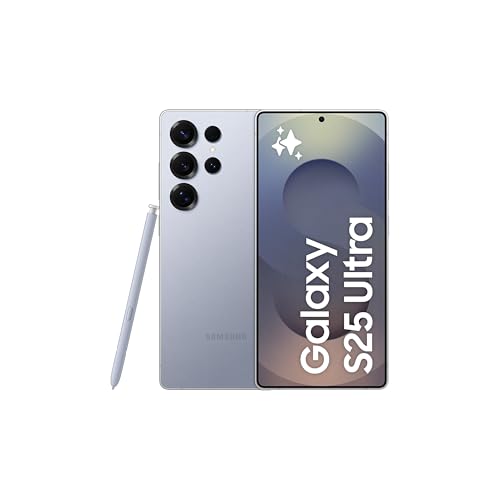
The Galaxy S25 Ultra is the phone to buy when you want dual SIM to disappear into the background of a phone that does everything else superbly. Samsung has been refining its dual SIM software for years, and it shows in the details that matter daily. You can name each line, set separate defaults for calls, messages, and data, and switch the data line from the quick settings panel with a single tap. Incoming calls show which line they arrived on before you answer, and the dialler lets you pick the outgoing line per call without leaving the call screen. These are small things individually, but together they make two numbers feel like one well-organised system instead of two systems sharing a screen.
The SIM arrangement depends on the variant, and this is the one thing to check before ordering. International models of the S25 Ultra carry two nano-SIM slots alongside eSIM support, which is the most flexible layout available: two physical SIMs, or one physical SIM plus an eSIM, or even two eSIMs depending on the carrier configuration. Some regional variants, including the model sold through United States carriers, offer a single nano-SIM slot plus eSIM. The phone is the same in every other respect, but if you need two physical SIM cards, the variant matters more than the model name. Buy the unlocked international variant or confirm the tray layout with the seller first.
On the question of standby behaviour, the S25 Ultra is a DSDS phone: both lines stay registered, and a call on one line means the other line is temporarily unreachable until the call ends. Samsung softens this with call forwarding options that can route the idle line to voicemail gracefully, and with the ability to receive calls on the second line over Wi-Fi calling where supported. For the vast majority of work-and-personal users this is a non-issue, because the unreachable window lasts only as long as an active call. If your second line is a business line where every missed call matters, pair the phone with your carrier’s conditional call forwarding and the gap effectively closes.
Away from the SIM tray, the S25 Ultra is simply the most complete Android phone in this guide. The display is large, bright, and easy to read in direct sunlight, which matters more than it sounds when you are navigating an unfamiliar city with a local data SIM. The camera system covers everything from wide landscapes to distant subjects with a level of consistency that means you rarely need to think about which lens to use. Battery life comfortably covers a full day with two lines active, and the phone’s power management is smart enough to keep the second radio from draining the battery overnight. The stylus, built into the body, is a quiet bonus for people who annotate documents or sign forms on the move — a genuinely useful tool for the work-and-personal crowd this phone serves best.
Strengths: the most polished dual SIM software controls in this guide, with per-line defaults and quick data switching; flexible SIM options on international variants; an outstanding display and camera system; battery life that holds up with two lines active; seven years of software updates, which makes it a long-term investment rather than a two-year purchase.
Trade-offs: it is the most expensive phone here by a wide margin, and its size and weight will not suit everyone — one-handed use is a stretch. The DSDS arrangement means the idle line is unreachable during calls, and the United States variant loses the second physical slot. The charging speed, while adequate, lags behind the fastest phones in this guide.
Who it suits: professionals who carry work and personal numbers and want the dual SIM experience to be invisible, travellers who want the best camera and the widest band support in one device, and anyone who plans to keep a phone for four or more years and wants the software support to match.
If you want one phone that does everything and treats your second number as a first-class citizen, the Samsung Galaxy S25 Ultra, in the variant that matches your SIM needs — check price on Amazon.
Check price on Amazon: Samsung Galaxy S25 Ultra

Google Pixel 9 Pro: the smartest software for living with two numbers
The Pixel 9 Pro approaches dual SIM from a different direction than Samsung. Where the S25 Ultra wins on flexibility and raw completeness, the Pixel wins on intelligence. It is a one-physical-SIM-plus-eSIM phone, and Google has built the software around the assumption that your two lines have different jobs. The call screening feature answers unknown numbers on either line and shows you a live transcript before you decide whether to pick up, which is genuinely useful when one of your lines is a work number that attracts cold calls. Spam filtering works per line, and the phone’s contact suggestions understand which number you usually use for which person, so it stops asking you to choose a line for calls you make every day.
The SIM setup is simple, but it has one limitation to understand before buying. The Pixel 9 Pro has a single nano-SIM tray and one eSIM, so your second line must be on a carrier that supports eSIM. Most major carriers now do, and many let you convert a physical SIM to an eSIM in minutes through their app, but if either of your carriers does not support eSIM, this phone cannot carry both of your numbers. Check with both carriers before you commit. If they both support eSIM, the setup is painless: scan a code, name the line, choose your defaults, and you are done.
The Pixel’s dual SIM behaviour is DSDS, like the Samsung, so the idle line is unreachable while the other is on a call. Google handles this a little differently, with a setting that can automatically forward the idle line’s calls or send them to voicemail with a text reply, and with Wi-Fi calling that keeps the second line reachable in more situations. The phone also makes it easy to see at a glance which line is handling data: the status bar shows both signal indicators, and a long press on the mobile data quick tile lets you switch lines without opening settings. For travellers, the eSIM makes switching to a local data plan almost trivial — buy a data eSIM online before you land, activate it, and set it as your data line while your home line stays active for calls and verification codes.
As a phone rather than a SIM manager, the Pixel 9 Pro is defined by its camera and its software. The camera produces reliably excellent photos in difficult light, and the photo editing tools built into the phone are the kind you actually use, not the kind you try once and forget. The software is clean Android without duplicate apps or heavy skins, and Google’s update commitment means the phone stays current for years. The display is bright and smooth, the speakers are good, and the overall feel is of a phone designed by people who use their phones heavily. Battery life is solid rather than spectacular: a full day with two lines active is realistic, but heavy travellers who spend all day on mobile data with two radios running will want to carry a charger or a power bank.
Strengths: the cleverest dual SIM software here, with call screening, spam filtering, and per-line contact memory; the simplest eSIM setup; the best photo processing of any phone in this guide; clean software with long update support; excellent haptics and call quality.
Trade-offs: only one physical SIM slot, so both carriers must support eSIM for the second line; DSDS means the idle line is unreachable during calls; battery life is good rather than great; the charging speed is modest; and the phone runs warmer than some rivals when both lines are active on 5G.
Who it suits: people who split work and personal numbers and want the phone to manage the boundary for them, travellers who are comfortable with eSIMs, and anyone who values a clean camera and clean software above raw specification numbers.
For the phone that thinks hardest about which number is calling, after confirming both of your carriers support eSIM, the Google Pixel 9 Pro — check price on Amazon.
Check price on Amazon: Google Pixel 9 Pro

OnePlus 13: the traveller’s dual SIM phone, built for long days and fast top-ups
If your dual SIM life involves airports, long days away from a charger, and a second line that exists because you travel, the OnePlus 13 is the pick that understands you. It is a true dual nano-SIM phone on international variants, with two physical slots and no need to involve eSIM at all, which makes it the simplest phone in this guide for people whose carriers still issue physical cards. Slot in two SIMs, name them, set your defaults, and the phone gets out of the way. There is no activation dance, no carrier app to download, and no wondering whether the second carrier supports a digital SIM. For a phone bought to solve a practical problem, that simplicity is a genuine feature.
The OnePlus 13’s greatest strength for dual SIM users is its battery and charging. The battery is large enough to carry two active lines through a long travel day — navigation, messaging on both numbers, and a local data SIM working hard in the background — and when it does run low, the charging is fast enough that a short stop at a café puts hours of use back in. That combination matters more for dual SIM owners than for anyone else, because two radios mean more drain, and because travellers are the people least likely to be near a charger when they need one. The phone also manages standby power well, so the second line does not quietly eat the battery overnight while you sleep.
Dual SIM behaviour is DSDS, and OnePlus handles the idle line sensibly: calls to the idle number are routed to voicemail cleanly, and the phone’s software lets you set up call forwarding rules without making you feel like you need a manual. The dual SIM controls are not as polished as Samsung’s — the settings are a little more buried, and the per-call line override takes one tap more than it should — but everything you need is there, and once you have set your defaults you rarely need to touch them again. The phone shows both signal indicators clearly, and switching the data line between the two SIMs is quick enough to do while walking through an airport terminal.
As a device, the OnePlus 13 is fast in the way that shows up in daily use rather than in benchmark charts. Apps open instantly, the display is smooth and bright, and the phone stays cool under sustained use. The camera system is strong, particularly in daylight, and while it does not quite match the Pixel in difficult light or the Samsung in zoom range, it is more than good enough for travel photography and everyday shots. The build feels premium, the speakers are loud and clear for hands-free calls on either line, and the software is close to stock Android with a few thoughtful additions rather than a heavy redesign.
Strengths: genuine dual nano-SIM slots on international variants with no eSIM dependency; outstanding battery life with two lines active; charging fast enough to matter on travel days; smooth, fast everyday performance; a bright display that stays readable outdoors.
Trade-offs: the dual SIM settings are less refined than Samsung’s, with a couple of controls buried deeper than they should be; DSDS means the idle line is unreachable during calls; the camera is a step behind the Pixel and Samsung in low light; the United States variant’s SIM configuration differs, so check the exact model before buying; and the software update commitment is shorter than Samsung’s or Google’s.
Who it suits: frequent travellers who want two physical SIMs and a battery that lasts the whole journey, people whose carriers do not support eSIM, and anyone who charges in short bursts between meetings or flights rather than overnight.
When your second number exists because you travel, the OnePlus 13, in the international dual nano-SIM variant — check price on Amazon.
Check price on Amazon: OnePlus 13

Xiaomi 15: two real SIM slots in a phone that fits your hand
Most dual SIM flagships are large phones, because the manufacturers that take dual SIM seriously tend to put it in their biggest models. The Xiaomi 15 is the exception, and it is the pick for everyone who has been waiting for a dual SIM phone that does not feel like carrying a small tablet. It is genuinely compact — easy to use one-handed, easy to slip into a jacket pocket, easy to hold on a crowded train — and it still carries two nano-SIM slots on international variants, with eSIM support in some regions as well. If you want flagship performance and a proper dual SIM tray without the bulk, this is the only phone in this guide that gives you both.
The SIM experience is straightforward. Two physical slots, both active, with the phone’s software offering per-line defaults for calls, texts, and data. Xiaomi’s dual SIM controls are solid without being exceptional: everything you need is present, the line labels are clear, and switching the data line is a quick settings operation. The phone is DSDS, so the idle line goes unreachable during a call on the other line, which is the standard behaviour at this size and price. What sets the Xiaomi apart is not a clever software trick but the fact that it refuses to make you choose between a small phone and a dual SIM phone. For people who carry a phone in one hand and a coffee in the other, that is not a minor point.
The camera is the Xiaomi 15’s other reason to exist. Co-developed with a storied camera brand, the lens system produces photos with a character that stands out from the more clinical output of its rivals: rich colour, pleasing contrast, and portraits that look like they were taken with intent rather than by accident. For a phone that will double as a travel camera while its second SIM handles local data, that matters. The main camera is strong in low light, the ultrawide is genuinely useful rather than an afterthought, and the telephoto reaches far enough for the subjects you actually photograph. Video stabilisation is good, and the phone handles 4K recording without turning into a hand warmer.
Battery life is the one area where the compact size shows. The battery is smaller than the ones in the larger phones here, and with two lines active the phone will need a charge by late evening on a heavy day. Fast charging softens this considerably — a short top-up recovers a large share of the battery — but if your days are long and your charger is far away, the bigger phones in this guide are the safer choice. The display is excellent for its size, bright and sharp, and the phone’s performance is flagship-level throughout, with no lag or stutter in daily use.
Strengths: a genuinely compact flagship with two nano-SIM slots; a distinctive, characterful camera system; flagship speed in a one-hand-friendly body; fast charging that compensates for the smaller battery; a bright, sharp display.
Trade-offs: battery life is the weakest of the flagships here, especially with two lines active; DSDS means the idle line is unreachable during calls; the software has more pre-installed apps than rivals and takes a little cleaning up; availability varies by region, and some variants change the SIM layout; and the software update commitment is shorter than Samsung’s or Google’s.
Who it suits: anyone who wants a small phone and refuses to give up dual SIM to get one, photographers who want a pocketable camera with two numbers, and travellers who value a phone that disappears into a pocket rather than dominating it.
If your ideal dual SIM phone is one you forget you are carrying, the Xiaomi 15, in the international dual nano-SIM variant — check price on Amazon.
Check price on Amazon: Xiaomi 15

Motorola Edge 60 Pro: the balanced mid-range pick, in its Latin American dual SIM version
The Motorola Edge 60 Pro is the phone for buyers who want dual SIM done properly without paying flagship money, and this listing is the dual SIM configuration that matters for this guide: the XT2507-1 version with 512GB of storage and 12GB of RAM, NFC, and a 50MP triple camera system behind a 6.7-inch display. That storage deserves emphasis: dual SIM users fill a phone with two lives — two messaging histories, work files, travel photos — and generous storage removes the squeeze that makes a mid-range phone feel old early.
One point must be stated plainly before anything else in this review. This listing is the Latin American, or international, version of the Edge 60 Pro, so check that its network bands match the carriers you plan to use and confirm what warranty cover applies in your country before you buy. The listing names compatibility with T-Mobile, Mint, and Tello alongside global use — a starting point, not a guarantee for every carrier. Five minutes comparing its band list with your carriers’ bands is the difference between a phone that simply works and an expensive lesson in regional variants.
The dual SIM software is clean and uncluttered, which is exactly what you want from a phone at this price. Per-line defaults for calls, texts, and data are easy to find, the line names are editable, and the status bar shows both lines clearly. Motorola’s software is close to stock Android, so there are no duplicate apps competing for your attention and no heavy skin to learn. The phone is DSDS, so the idle line is unreachable during calls, but call forwarding is easy to set. For a work-and-personal setup, the Edge 60 Pro does the job with less fuss than phones costing twice as much.
What you give up compared with the flagships is mostly at the edges. The 50MP triple camera is capable in daylight and respectable in low light, but it does not have the consistency of the Pixel or the range of the Samsung. Performance is fast enough for everything most people do — email, maps, streaming, messaging on two lines at once — but will not match a flagship on heavy gaming. The display is a genuine highlight: a large, bright 6.7-inch panel that makes the phone feel more expensive than it is. Battery life comfortably covers a full day with two lines active, and this listing’s Pantone Sparkling Grape finish stands out from the usual black slabs.
Where the Edge 60 Pro earns its place is in the balance. Nothing about it is the best in this guide, and nothing about it is a weakness either. It does every part of the dual SIM job well, at a price that leaves room for the two plans you are actually paying for — provided the regional check above comes back clean. For a small business owner running work and personal numbers in one pocket, that balance is the whole argument.
Strengths: a genuine dual SIM configuration with 512GB of storage and 12GB of RAM, far above the mid-range norm; clean, near-stock Android with straightforward dual SIM controls; a large, bright display; a capable 50MP triple camera; NFC; solid battery life.
Trade-offs: this is a Latin American or international version, so band support and warranty terms need checking before purchase; the camera is a clear step behind the flagships, particularly in low light; performance is strong for daily use but not flagship-class under heavy load; DSDS means the idle line is unreachable during calls; and the software update commitment is shorter than the leaders.
Who it suits: buyers who want dual SIM flexibility without a flagship price and whose carriers match this version’s bands, small business owners running work and personal numbers, and anyone upgrading from an older dual SIM phone.
For a balanced mid-range dual SIM phone with storage to spare, the Motorola Edge 60 Pro — check price on Amazon.
Check price on Amazon: Motorola Edge 60 Pro

Nothing Phone (2a) Plus: the budget dual SIM phone that does not feel like a compromise
There is a particular kind of buyer who needs dual SIM for practical reasons and has no interest in paying for a flagship camera or a titanium frame. They need two numbers, a phone that lasts the day, and a screen they can read. The Nothing Phone (2a) Plus is built for exactly that person, and it is the most honest phone in this guide: it spends its budget on the things you touch every day and skips the things you would never notice.
The SIM setup is refreshingly simple. Two nano-SIM slots, both active, no eSIM to configure, no carrier app to wrestle with. Put two cards in, name the lines, choose your defaults, and you are finished. The dual SIM software covers the essentials well: per-line defaults for calls, texts, and data, clear labels for incoming calls, and a quick settings tile for switching the data line. It is DSDS, so the idle line is unreachable while the other is on a call, but at this price that is the expected behaviour, and the phone handles the handover cleanly. The transparent back and the light strips around the camera are the phone’s visual signature, but they are also functional: the lights can be set to flash for notifications on a chosen line, which is a small, clever way to tell a work call from a personal one without looking at the screen.
Performance is where budget phones usually show their limits, and the (2a) Plus holds up better than its price suggests. Everyday tasks — messaging on both numbers, maps, email, streaming, browsing — run smoothly, and the phone’s software is clean enough that there is little to slow it down over time. The display is large and bright, the battery comfortably lasts a full day with two lines active, and the charging is fast enough to be useful. The camera is the compromise, honestly stated: good in daylight, serviceable indoors, and not a phone you would choose if photography is your priority. For a second phone, a work phone, or a first dual SIM phone for someone testing whether two numbers suit them, that trade is an easy one to accept.
The software deserves a mention because it is the reason this phone ages well. Nothing’s version of Android is close to stock, with a distinctive visual style but very little bloat, and the company has been consistent about delivering updates. The phone will not feel outdated as quickly as most budget phones, which matters when the whole point of buying it is to solve a practical problem for years rather than months.
Strengths: the lowest cost in this guide by a clear margin; genuine dual nano-SIM slots with simple setup; notification lights that can distinguish between lines; clean software that stays fast; battery life that covers a full day with two lines active.
Trade-offs: the camera is the weakest here, especially in low light; DSDS means the idle line is unreachable during calls; there is no eSIM option, so both carriers must issue physical SIMs; performance is fine for daily use but not built for heavy gaming; and water resistance is more modest than the flagships.
Who it suits: anyone who needs two numbers on a budget, people buying a second phone purely for the work line, first-time dual SIM users who want to try the setup without a large investment, and travellers who want a cheap local-SIM phone they will not worry about.
To get two numbers in your pocket for the least money, the Nothing Phone (2a) Plus — check price on Amazon.
Check price on Amazon: Nothing Phone (2a) Plus
Dual SIM, eSIM, and the travel question
The way most people actually use a second SIM is while travelling, so it is worth spending a moment on how the two technologies fit together. A physical SIM is a card you can move between phones, hand to a colleague, or buy at an airport kiosk. An eSIM is a profile you download, which means you can buy a data plan online before you travel and have it waiting when you land. For the traveller, the combination is ideal: keep your home line active for calls and for the verification codes your bank sends, and run your data on a local eSIM bought at local prices. The phones in this guide that support eSIM — the Samsung, the Pixel, the Motorola, and some variants of the Xiaomi — all handle this pattern well, and it is worth choosing one of them if travel is your main reason for going dual SIM.
There is one practical warning worth remembering. When you arrive in a new country, your home line will try to roam, and roaming charges can be painful. Before you travel, check whether your home carrier offers a travel pass, and consider turning off data roaming on the home line while leaving the local line as your data default. Every phone in this guide lets you set data roaming per line, which is exactly the control you need. Set it before you board the plane, not after you land and the charges start.
The other pattern worth naming is the work-and-personal split, and its best tool is not the SIM tray but the phone’s focus and scheduling features. Set the work line to silence after hours, route its calls to voicemail on weekends, and keep the personal line always reachable. All six phones here support some version of this, and the Samsung and Pixel do it best. The point is that dual SIM is not just about carrying two numbers. It is about drawing a line between them, and the phone that helps you draw that line is the one that will make you happiest a year from now.
How these six made the cut
Every phone in this guide had to pass the same test. First, it had to offer genuine dual SIM operation with both lines registered and usable, not a hybrid tray that forces you to choose between a second SIM and a memory card. Second, it had to let you set separate defaults for calls, texts, and data, and identify incoming calls by line. Third, it had to be a good phone in its own right — a device you would be happy to use even if you only ever carried one number. Phones that failed any of those tests were left out, however well they scored on a single feature. The six that remain cover the full range of budgets and use cases, from the flagship that does everything to the budget phone that does the essentials honestly, and each one is the best answer for a different kind of dual SIM user.
Setting up two numbers without the headaches
The first hour with a dual SIM phone decides whether the next two years feel effortless or mildly annoying, so it is worth setting things up properly from the start. Begin by naming the lines the moment you insert them. “Work” and “Personal” are better than “SIM 1” and “SIM 2”, because every label, notification, and call screen in the phone will use those names, and a year from now you will not remember which number was which. Then set your three defaults separately: which line handles outgoing calls, which handles texts, and which handles mobile data. These do not have to be the same line, and for most people they should not be. A common setup is to make the personal line the default for calls, the work line the default for texts during office hours, and whichever line has the cheaper data plan the default for data.
Next, check your voicemail and call forwarding on both lines. Dual SIM phones do not forward calls between lines by themselves, and the moment you discover this should not be the moment an important client call goes unanswered. Set up conditional forwarding on each line — the kind that only activates when the line is busy or unreachable — so that a call to your idle line during a conversation on the other line still reaches you, either as a voicemail or forwarded to the line you are using. Test it once with a friend calling the second line while you are on a call on the first. Five minutes of testing now saves a missed opportunity later.
Then look at the per-line data controls, because this is where dual SIM owners save real money. Set a data warning or limit on each line separately, and check which line your apps are actually using. Some apps let you choose a line for their own traffic, and messaging apps in particular can be set to use one number for their account while the phone uses another for data. Review the data usage screen after the first week and confirm the split matches what you intended. If your work line is burning through data while your personal line sits idle, the defaults are wrong, and the fix takes thirty seconds once you know where to look.
Finally, think about contacts. Most dual SIM phones let you assign a preferred line to individual contacts, so your manager’s calls always go out on the work line and your family’s calls always go out on the personal line. Setting this for your ten most-called contacts takes a few minutes and removes the one remaining daily decision the phone would otherwise ask you to make. After that, the phone stops asking and starts knowing, which is the entire point. A dual SIM phone that is set up well is one you stop thinking about — and that is the highest praise it can earn.
One more setup job is worth doing in that first hour: deciding which number your apps live on. Messaging apps register to a single phone number, so your chat history, groups, and profile follow whichever line you signed up with, not whichever line happens to be active. If you want both numbers reachable in chat apps, look for the dual apps or app clone feature that Samsung, Xiaomi, and OnePlus build in, which runs a second copy of the app signed in to the second number. Banking and payment apps are stricter still: many bind themselves to the number your bank holds on file and send their sign-in codes there, so that line must stay active and able to receive texts even when it is not your everyday line. Check each important app once, note which number it expects, and you will avoid the locked-out scramble that catches so many dual SIM owners at the worst possible moment.
Which dual SIM phone should you buy?
| Phone | SIM layout | Dual SIM behaviour | Best strength | Main compromise |
|---|---|---|---|---|
| Samsung Galaxy S25 Ultra | Dual nano-SIM or eSIM plus SIM | DSDS | Most polished controls | Highest cost, large size |
| Google Pixel 9 Pro | Physical SIM plus eSIM | DSDS | Smartest call handling | Needs eSIM for line two |
| OnePlus 13 | Dual nano-SIM | DSDS | Battery and charging | Less refined SIM settings |
| Xiaomi 15 | Dual nano-SIM | DSDS | Compact flagship | Smallest battery here |
| Motorola Edge 60 Pro | Dual SIM (Latin American version) | DSDS | Generous storage, clean software | Band and warranty check needed |
| Nothing Phone (2a) Plus | Dual nano-SIM | DSDS | Lowest cost | Weakest camera, no eSIM |
If you want the short answer: buy the Samsung if you want the best overall dual SIM experience and do not mind the price. Buy the Pixel if your carriers support eSIM and you want the phone to manage your two numbers intelligently. Buy the OnePlus if you travel constantly and need battery life above all. Buy the Xiaomi if you want a small phone that still takes two SIMs. Buy the Motorola Edge 60 Pro if you want a well-balanced dual SIM handset with generous storage at a fair price, after the band and warranty check in its review. Buy the Nothing if you need two numbers and nothing more. Each of those is a good answer. The wrong answer is the phone that does not match how you will actually use the second line, so start from your pattern — work and personal, travel, or cost — and let that choose for you.
Frequently asked questions
Can I use two different carriers on a dual SIM Android phone?
Yes, and that is one of the main reasons people buy them. Each line is independent, so you can run one carrier for calls and another for data, or keep a work line on one carrier and a personal line on another. The phone must be unlocked, or at least unlocked for the carriers you intend to use. A carrier-locked phone may refuse a SIM from another network, so buy the unlocked version if you plan to mix carriers.
Will both numbers ring at the same time?
Both lines stay registered on the network, so either number can receive a call at any time. The exception is during an active call: on DSDS phones, which includes all six picks in this guide, the line you are not talking on is temporarily unreachable until your call ends. Callers to that line will hear it as busy or be sent to voicemail. If that matters to you, set up conditional call forwarding with your carrier so the idle line’s calls reach you another way.
Do I need eSIM to use a dual SIM phone?
Not always. Phones with two nano-SIM slots, like the OnePlus 13, the Xiaomi 15, and the Nothing Phone (2a) Plus, work with two physical cards and never need an eSIM. Phones with one physical slot and one eSIM, like the Pixel 9 Pro, do need your second carrier to support eSIM. If both of your carriers issue physical SIMs and neither supports eSIM, choose a dual nano-SIM model.
Does using two SIMs drain the battery faster?
Yes, a little. Two active radio connections draw more power than one, and the difference is most noticeable in areas with weak signal, where both radios work harder to stay connected. In practice the effect is modest — a phone that lasts a day and a half with one line might last a day and a bit with two — but it is one reason battery life matters more for dual SIM buyers. The OnePlus 13 and the Samsung Galaxy S25 Ultra handle this best, because their batteries are large and their standby management is efficient.
Can I use one SIM for calls and the other only for data while travelling?
Yes, and this is the single most useful dual SIM pattern for travellers. Keep your home line active for calls and for the verification codes your bank and email send, set the local SIM as your data line, and turn off data roaming on the home line so it cannot generate charges. Every phone in this guide lets you choose a separate data line and control roaming per line. Set the roaming options before you travel, and buy the local data plan — physical or eSIM — before you need it.
Two numbers in one pocket sounds like a small thing until you live with it. Then it becomes the thing you cannot imagine giving up: the work calls that stop at six in the evening, the local data that costs a fraction of roaming, the single phone that replaces the two you used to carry. Pick the phone that matches how you will actually use that second line, and the rest of the phone — the camera, the screen, the battery — will take care of itself.