Disclosure: As an Amazon Associate, kajuandouglas.com earns from qualifying purchases. Links to Amazon on this page are affiliate links; they cost you nothing extra. Listing details such as price and availability change often, so check the current Amazon listing before you buy.
Where to buy
This is our complete guide to the best 100 speakers for pc: six verified picks, the reasoning behind them, and the setup and buying knowledge to choose well. Every linked pick below is sold through Amazon, where you can check the current price, availability and delivery estimate for your area before ordering. Prices and stock move often in this category, so treat the listing — not any roundup — as the final word on cost. Orders are placed on Amazon, and this site may earn a commission on qualifying purchases at no extra cost to you. For PC sound under a $100 ceiling, these are the six picks worth your money:
- Creative Pebble V3 2.0 USB-C Speakers — one USB-C cable for power and audio
- Creative Pebble Pro 2.0 USB-C Speakers — rGB lighting that can be switched off for work
- Logitech Z207 Stereo Computer Speakers — easy-Switch flips between computer and phone
- Edifier G2000 PC Gaming Speakers — three input types at an entry price
- Logitech Z323 2.1 Speaker System — long-running, proven budget 2.1
- A Compact USB Soundbar for Monitors (Class Pick) (prose-only pick, no single model linked) — fits where pairs cannot
Two habits save money and returns in this category: confirm the exact model variant on the listing — manufacturers revise these products under the same name — and keep the return window in mind until you have lived with the pick for a few days. If a pick below is marked prose-only, it means no single model could be verified with confidence; the review describes the class to buy instead, which is the honest recommendation for that slot.
Read the full guide ↓
A desktop speaker upgrade is the highest-value purchase in PC audio, because the starting point — built-in laptop or monitor speakers — is so weak. The hunt for the best 100 speakers for pc is really three smaller decisions: how much bass you want, how much desk you can give up, and how the speakers should connect to a machine that may already be short of ports.
We verified every linked model against manufacturer data and its live Amazon listing and ranked six picks for PC sound under a $100 ceiling. Prose-only picks are labeled wherever they appear; they describe a class worth buying when no single model could be verified with confidence.
Read the Quick Picks, then the review of anything you are considering — the trade-offs cover the unglamorous truths like USB power limits and subwoofer placement. Finish with the buying guide and setup sections and your desk will sound better within an hour of the box arriving.
Key Takeaways
- Top pick: the Creative Pebble V3 2.0 USB-C Speakers — ranked first for PC sound under a $100 ceiling.
- Budget framing: this guide follows the keyword’s own ceiling (under $100); no fixed prices are printed because listings change constantly.
- At a desk, clarity and fit beat raw power: voices and controls matter more than wattage.
- USB audio is the cleanest connection for modern laptops; check whether ‘USB’ means audio or only power.
- Every linked pick was verified against its current Amazon listing and manufacturer specifications; prose-only picks are labeled honestly where no single model could be verified.
In this guide
Quick Picks
Six picks, ranked for PC sound under a $100 ceiling. The table is the fast answer; the full reviews below explain what each pick does well, where it compromises, and who should skip it.
Badges are consistent through the whole guide: the pick labeled Best Overall in this table carries the same badge in its full review, and the ordering here is the ordering everywhere. Prose-only picks appear in the table without a link by design — they are class recommendations for slots where a single verifiable model does not exist, and their reviews explain exactly what to look for when you shop that class.
| Badge | Pick | Why it stands out | Link |
|---|---|---|---|
| Best Overall | Creative Pebble V3 2.0 USB-C Speakers | one USB-C cable for power and audio | Check price on Amazon |
| Best Budget | Creative Pebble Pro 2.0 USB-C Speakers | rGB lighting that can be switched off for work | Check price on Amazon |
| Runner-Up | Logitech Z207 Stereo Computer Speakers | easy-Switch flips between computer and phone | Check price on Amazon |
| Best for Under $100 | Edifier G2000 PC Gaming Speakers | three input types at an entry price | Check price on Amazon |
| Best Value | Logitech Z323 2.1 Speaker System | long-running, proven budget 2.1 | Check price on Amazon |
| Best Alternative | A Compact USB Soundbar for Monitors (Class Pick) | fits where pairs cannot | Prose-only — see review |
How These Picks Were Chosen
Every pick below was cross-checked against the manufacturer’s published specifications and the current Amazon listing before it earned a place here. Products that could not be verified were either written up honestly as prose-only picks — clearly marked, with no link — or dropped from the list entirely.
The criteria below decided the ranking. They are weighted for PC sound under a $100 ceiling, not for a generic spec-sheet contest, because the right PC speaker for this job is the one that fits how PC users on a budget actually use it.
- Verified identity: Each linked set was matched to manufacturer specifications and its current Amazon listing before ranking.
- Desk fit: Footprint, cable count and subwoofer size were judged against real desks, not showroom photos.
- Voice clarity: Calls, dialogue and podcasts dominate desk listening, so midrange clarity was weighted heavily.
- Connection fit: USB, Bluetooth and analog options were scored against modern laptops that may offer only USB-C.
- Bass appropriateness: 2.1 systems were judged on controlled, desk-scale bass — not room-shaking output nobody can use at a desk.
- Value in tier: Ranking uses qualitative tiers within the keyword’s budget framing rather than volatile printed prices.
One methodological note deserves emphasis: rankings here are weighted for PC sound under a $100 ceiling specifically. A product that tops a generic roundup may sit mid-table here because its strengths point elsewhere, and a quieter product may rank first because everything it does well is exactly what this keyword asks for. If your use case differs from the one in the title, the per-pick verdicts — Best for / Not suited for — will steer you to your own correct answer inside the same list.
A note on price: this guide deliberately prints no fixed product prices. Prices in this category change with sales, model-year turnover and stock levels, so a number printed here would mislead within weeks. Use the budget framing of the keyword itself as your ceiling, and check the live Amazon listing for the current figure before you buy.
The Best 100 Speakers for PC
Here is each pick in full: what it is, the verified specifications that matter, three genuine strengths, three honest trade-offs, and a clear verdict on who it suits. The order matches the Where to Buy list and the Quick Picks table, and the first pick is our headline recommendation for PC sound under a $100 ceiling.
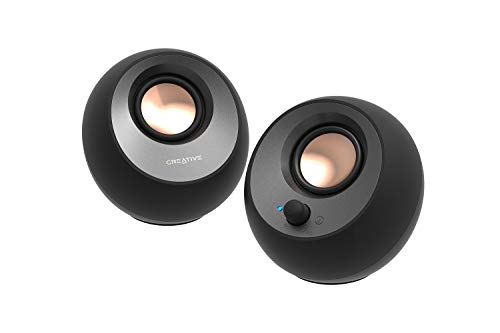
Creative Pebble V3 2.0 USB-C Speakers
Badge: Best Overall
| Configuration | 2.0 desktop, USB-C powered |
| Inputs | USB-C audio, Bluetooth 5.0, aux |
| Design | 45-degree angled drivers |
| Power | USB powered with gain switch |
| Use | PC and laptop desks |
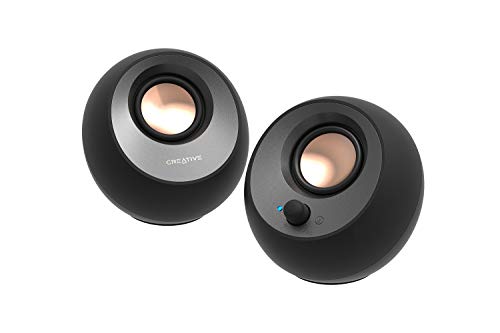
The Pebble V3 is the default desk upgrade: tidy USB-C power, angled drivers and clear near-field sound that makes laptop speakers embarrassing. It asks for nothing but a port.
Judged for PC sound under a $100 ceiling, the appeal here is the complete package — connection options that match modern machines, voicing that flatters voices as much as music, and none of the setup friction that makes people drift back to laptop speakers.
What the specification table cannot show is temperament, and the Creative Pebble V3 2.0 USB-C Speakers has a consistent one: it is built around 2.0 desktop, USB-C powered, and it leans on uSB-C audio, Bluetooth 5.0, aux to do its best work. That temperament suits some buyers exactly and others not at all, which is precisely why the verdict line below is written the way it is. Match the temperament to your own habits and this pick will feel chosen rather than merely bought.
The long view matters for a purchase like this, so consider the Creative Pebble V3 2.0 USB-C Speakers beyond its first month: its compromises — uSB power caps maximum volume among them — are static, knowable and plannable, while its strengths are the ones exercised daily. Products fail their owners when the daily experience disappoints; they merely annoy them when a known limitation needs a workaround. This pick sits firmly in the second category for the audience it is ranked for.
Strengths
- One USB-C cable for power and audio
- Angled drivers aim sound at your ears
- Bluetooth covers phone playback too
Trade-offs
- No subwoofer; bass is modest by design
- USB power caps maximum volume
- Plastic build at an entry price
Choose it if you value what it does best: one USB-C cable for power and audio. Skip it if its main compromise matters to you: no subwoofer; bass is modest by design.
Best for: laptop and office desks wanting tidy, clear sound / Not suited for: bass lovers or room-filling volume

Creative Pebble Pro 2.0 USB-C Speakers
Badge: Best Budget
| Configuration | 2.0 desktop with RGB |
| Inputs | USB-C, Bluetooth, aux |
| Design | Angled drivers, RGB lighting |
| Power | USB-C with optional PD adapter boost |
| Use | Gaming and work desks |
The Pebble Pro adds polish to the Pebble formula: better drivers, tasteful RGB and an optional power boost. It is the version for gaming desks that also do day jobs.
Judged for PC sound under a $100 ceiling, the appeal here is the complete package — connection options that match modern machines, voicing that flatters voices as much as music, and none of the setup friction that makes people drift back to laptop speakers.
A word on expectations: the Creative Pebble Pro 2.0 USB-C Speakers is a entry-tier product, and it behaves like one — strong where its design concentrates, ordinary where it does not. Its 2.0 desktop with RGB and uSB-C, Bluetooth, aux are the honest summary of where the money went. Buyers who read that summary and nod are the buyers this pick satisfies; buyers who need the tier above should take the hint its trade-offs are offering and step up the list instead.
Ownership, reported honestly, includes some friction — most visibly this: still no subwoofer in the box. It is the kind of compromise owners plan around in the first week and then largely stop noticing, rather than the kind that grows teeth over time. Setup and budget decisions made with that point in mind are what separate satisfied long-term owners of the Creative Pebble Pro 2.0 USB-C Speakers from the return statistics, and it is why the point appears in this review instead of being left for buyers to discover.
Strengths
- RGB lighting that can be switched off for work
- Clearer, fuller drivers than the base Pebble
- Optional power adapter unlocks more volume
Trade-offs
- Full volume needs the optional adapter
- Still no subwoofer in the box
- RGB styling is not for every office
Choose it if you value what it does best: rGB lighting that can be switched off for work. Skip it if its main compromise matters to you: full volume needs the optional adapter.
Best for: gaming desks wanting compact style and clarity / Not suited for: bass-first listeners

Logitech Z207 Stereo Computer Speakers
Badge: Runner-Up
| Configuration | 2.0 stereo, pair |
| Power | 10W peak (per listing) |
| Inputs | Bluetooth and 3.5mm with Easy-Switch |
| Controls | Front volume and headphone jack |
| Use | Office and home desks |
The Z207 is the office staple: clear stereo for calls, videos and background music, with a headphone jack and Bluetooth switching. It does the desk basics without fuss.
Judged for PC sound under a $100 ceiling, the appeal here is the complete package — connection options that match modern machines, voicing that flatters voices as much as music, and none of the setup friction that makes people drift back to laptop speakers.
A word on expectations: the Logitech Z207 Stereo Computer Speakers is a entry-tier product, and it behaves like one — strong where its design concentrates, ordinary where it does not. Its 2.0 stereo, pair and 10W peak (per listing) are the honest summary of where the money went. Buyers who read that summary and nod are the buyers this pick satisfies; buyers who need the tier above should take the hint its trade-offs are offering and step up the list instead.
Ownership, reported honestly, includes some friction — most visibly this: no subwoofer; lean bass. It is the kind of compromise owners plan around in the first week and then largely stop noticing, rather than the kind that grows teeth over time. Setup and budget decisions made with that point in mind are what separate satisfied long-term owners of the Logitech Z207 Stereo Computer Speakers from the return statistics, and it is why the point appears in this review instead of being left for buyers to discover.
Strengths
- Easy-Switch flips between computer and phone
- Front headphone jack for private listening
- Simple, tidy and inexpensive
Trade-offs
- 10W class output is for near-field only
- No subwoofer; lean bass
- Basic plastic construction
Choose it if you value what it does best: easy-Switch flips between computer and phone. Skip it if its main compromise matters to you: 10W class output is for near-field only.
Best for: office desks and video-call clarity / Not suited for: music or gaming immersion
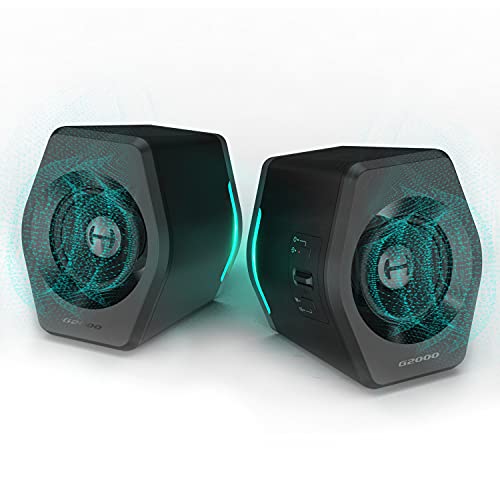
Edifier G2000 PC Gaming Speakers
Badge: Best for Under $100
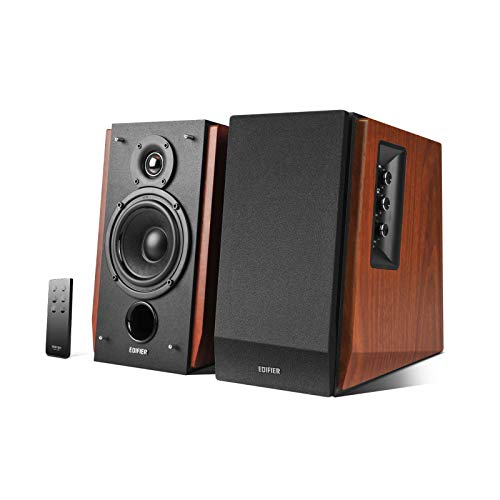
| Configuration | 2.0 desktop, pair |
| Power | 32W (per listing) |
| Inputs | Bluetooth, USB, analog |
| Design | Gaming styling with lighting |
| Use | PC, laptop and Mac desks |
The G2000 is Edifier’s gaming-desk value play: 32 watts, every connection a desk needs and a compact footprint, tuned for the clarity games and calls reward.
Judged for PC sound under a $100 ceiling, the appeal here is the complete package — connection options that match modern machines, voicing that flatters voices as much as music, and none of the setup friction that makes people drift back to laptop speakers.
In practice, the Edifier G2000 PC Gaming Speakers succeeds or fails on integration: 2.0 desktop, pair is only useful if it connects cleanly to what you already own, and 32W (per listing) only matters if it suits the way you actually listen, watch or work. Judged on those terms — the terms of ordinary Tuesdays rather than demo days — it earns the ranking it holds here, with the caveats in its trade-offs list kept in plain sight.
Ownership, reported honestly, includes some friction — most visibly this: bass is modest without a sub. It is the kind of compromise owners plan around in the first week and then largely stop noticing, rather than the kind that grows teeth over time. Setup and budget decisions made with that point in mind are what separate satisfied long-term owners of the Edifier G2000 PC Gaming Speakers from the return statistics, and it is why the point appears in this review instead of being left for buyers to discover.
Strengths
- Three input types at an entry price
- Compact with a gaming look
- Clear near-field voicing for games and calls
Trade-offs
- 32W class output is desk-scale only
- Bass is modest without a sub
- Styling divides opinion in offices
Choose it if you value what it does best: three input types at an entry price. Skip it if its main compromise matters to you: 32W class output is desk-scale only.
Best for: budget gaming desks wanting flexible inputs / Not suited for: music-first or loud-room listening

Logitech Z323 2.1 Speaker System
Badge: Best Value
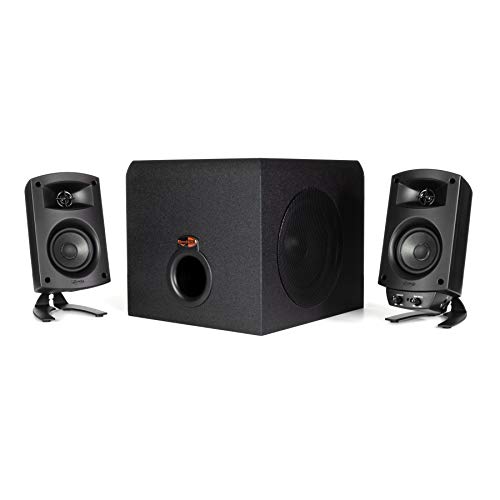
| Configuration | 2.1 with ported subwoofer |
| Design | Omni-directional satellite sound (line) |
| Inputs | 3.5mm and RCA |
| Controls | Wired volume and bass controls |
| Use | PC and TV desks |
The Z323 has sold for years because it works: an affordable 2.1 with a real sub that makes games and films feel bigger. No wireless, no frills, honest value.
For PC sound under a $100 ceiling, this set earns its place by respecting the desk: the footprint is honest, the controls are where your hand expects them, and the sound stays composed at the volumes desk listening actually happens at.
In practice, the Logitech Z323 2.1 Speaker System succeeds or fails on integration: 2.1 with ported subwoofer is only useful if it connects cleanly to what you already own, and omni-directional satellite sound (line) only matters if it suits the way you actually listen, watch or work. Judged on those terms — the terms of ordinary Tuesdays rather than demo days — it earns the ranking it holds here, with the caveats in its trade-offs list kept in plain sight.
The long view matters for a purchase like this, so consider the Logitech Z323 2.1 Speaker System beyond its first month: its compromises — satellites spread sound rather than imaging precisely among them — are static, knowable and plannable, while its strengths are the ones exercised daily. Products fail their owners when the daily experience disappoints; they merely annoy them when a known limitation needs a workaround. This pick sits firmly in the second category for the audience it is ranked for.
Strengths
- Long-running, proven budget 2.1
- Subwoofer adds movie and game weight
- Dual inputs for PC and a second source
Trade-offs
- Older design without Bluetooth or USB
- Satellites spread sound rather than imaging precisely
- Bass can boom if corner-loaded
Choose it if you value what it does best: long-running, proven budget 2.1. Skip it if its main compromise matters to you: older design without Bluetooth or USB.
Best for: budget 2.1 for PC and small TV setups / Not suited for: Bluetooth or USB-audio seekers
A Compact USB Soundbar for Monitors (Class Pick)
Badge: Best Alternative
| Format | Single-bar USB desktop speaker |
| Class highlight | Space-saving sound for small desks |
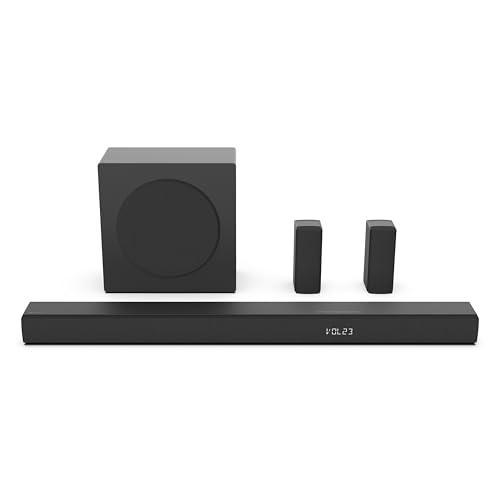
Where two satellites will not fit, a compact USB soundbar that sits under the monitor is the tidy class answer: one unit, one cable, stereo that still clears laptop speakers by a wide margin. Models rotate quickly at this price; shop the class by connection (true USB audio preferred), front controls and honest dimensions against your monitor stand.
For PC sound under a $100 ceiling, this set earns its place by respecting the desk: the footprint is honest, the controls are where your hand expects them, and the sound stays composed at the volumes desk listening actually happens at.
Living with the A Compact USB Soundbar for Monitors (Class Pick) day to day, the detail that ends up mattering most is rarely the headline specification. Its format — single-bar USB desktop speaker — decides how it fits your space and your existing gear, while its space-saving sound for small desks shapes how it behaves once the first-week novelty wears off. Owners who match those two facts to their real habits are the ones still satisfied a year later, which is why this review weights them more heavily than the marketing line on the box.
Ownership, reported honestly, includes some friction — most visibly this: bass is necessarily light. It is the kind of compromise owners plan around in the first week and then largely stop noticing, rather than the kind that grows teeth over time. Setup and budget decisions made with that point in mind are what separate satisfied long-term owners of the A Compact USB Soundbar for Monitors (Class Pick) from the return statistics, and it is why the point appears in this review instead of being left for buyers to discover.
Strengths
- Fits where pairs cannot
- One-cable setup
- Tidy, centered sound for calls and video
Trade-offs
- Stereo separation is minimal
- Bass is necessarily light
- Quality varies widely between brands
Choose it if you value what it does best: fits where pairs cannot. Skip it if its main compromise matters to you: stereo separation is minimal.
Best for: cramped desks and monitor-arm setups / Not suited for: listeners wanting stereo imaging or bass
Comparison Table
The six picks side by side on the specifications that matter most for PC sound under a $100 ceiling. Full reasoning for each row is in the reviews above.
| Pick | Format | Highlight | Tier |
|---|---|---|---|
| Creative Pebble V3 2.0 USB-C Speakers | 2.0 desktop, USB-C powered | USB-C audio, Bluetooth 5.0, aux | Entry |
| Creative Pebble Pro 2.0 USB-C Speakers | 2.0 desktop with RGB | USB-C, Bluetooth, aux | Entry |
| Logitech Z207 Stereo Computer Speakers | 2.0 stereo, pair | 10W peak (per listing) | Entry |
| Edifier G2000 PC Gaming Speakers | 2.0 desktop, pair | 32W (per listing) | Entry |
| Logitech Z323 2.1 Speaker System | 2.1 with ported subwoofer | Omni-directional satellite sound (line) | Entry |
| A Compact USB Soundbar for Monitors (Class Pick) | Single-bar USB desktop speaker | Space-saving sound for small desks | Entry |
Read the table as a map, not a ranking: the ranking lives in the order of the reviews, while the table exists so you can eliminate picks quickly on the two or three facts that decide your purchase — format, the one specification that matters most for PC sound under a $100 ceiling, and tier. Anything the table cannot express — voicing, build, the feel of the controls — is covered in the reviews, and in this category those unquantifiable points decide long-term satisfaction more often than the numbers do.
Buying Guide: How to Choose PC Speakers for Under $100
Decide the configuration first. A 2.0 pair is two speakers and nothing else: the tidiest cable situation, the smallest footprint, and bass limited by small drivers. A 2.1 system adds a subwoofer that lives on the floor or desk corner and supplies the low end the satellites cannot — the right choice for games and films, at the cost of one more box and cable. For PC sound under a $100 ceiling, ask whether your listening is mostly voices and music at moderate volume (2.0 shines) or media and games where effects need weight (2.1 earns its footprint).
Connection is the second decision, and modern laptops force it. USB audio is the cleanest: one cable can carry both power and sound on many models, and it bypasses a noisy laptop headphone jack. Bluetooth adds phone streaming and removes a cable, at the cost of some latency that matters in competitive games. Analog 3.5mm is universal and zero-latency but inherits whatever hiss your computer’s audio output has. The best desk sets offer two of the three, so the PC and the phone both get a clean path.
Finally, consider controls and power honestly. A front volume knob or wireless dial you can reach without thinking is worth more than specifications you will never measure. USB-powered speakers are limited by the port’s power budget — fine for near-field listening, capped for loud rooms — while mains-powered sets play louder and drive subwoofers properly. Match the power source to the room, and the rest of the decision makes itself.
Why Your Laptop Sounds Bad and What Actually Fixes It
Built-in speakers fail for physical reasons: the drivers are tiny, they fire downward or backward through slits, and they share a chassis with fans and keyboards that color the sound. No equalizer fixes a 15mm driver trying to reproduce bass. That is why even an inexpensive external pair transforms calls and video — the improvement is not subtle hi-fi refinement, it is basic physics being respected for the first time.
The biggest wins, in order, are: getting the sound out of the laptop chassis entirely; aiming real drivers at your ears from a few feet away; and adding a subwoofer only if your content needs one. Money spent beyond that buys refinement — better stereo imaging, cleaner highs, nicer controls — which is real but incremental. This is also why chasing wattage in this category misleads: at a desk, two honest watts per channel are loud, and sensitivity and driver quality matter more than the number on the box.
What to Check on the Listing Before You Order PC Speakers
Count the cables in the product photos and match them to your ports: a USB-C-only laptop and a speaker that needs USB-A plus a wall outlet means adapters on day one. Check whether ‘USB’ on the listing means USB audio or merely USB power with an analog audio cable — both exist and they are not the same experience. Confirm the subwoofer’s dimensions against the space under or beside your desk.
Look for the controls you will touch daily: if volume lives on the back of a satellite, you will hate it within a week. If you plan to use the speakers for video, prefer a wired connection or check that Bluetooth latency is acceptable for your tolerance. And verify the return window — desk acoustics vary, and a speaker that sounds bright in one room can sound harsh in a smaller, harder one. The listing’s dimension and input details, read carefully, prevent nearly every disappointment in this category.
How Do You Set Up PC Speakers for the Best Desk Sound?
Desktop speakers are placement-sensitive in ways their size hides. Ten minutes of setup returns more than a tier of spending:
- Place the satellites either side of the monitor, tweeters roughly at ear height — stands, pads or a stack of books all work — and angled slightly toward your chair.
- Keep the speakers at least a few inches from the wall behind the desk to avoid boomy reflections, and symmetric: your chair should sit on the center line between them.
- If the set has a subwoofer, start it in the front corner of the desk or on the floor beside it, then adjust its level until bass sounds like part of the music rather than a separate event.
- Connect by USB where available and select the speakers as the default output in your operating system; set the computer’s volume high and control level at the speaker for the cleanest signal.
- Turn off any ‘enhancements’ or spatial effects in the OS sound settings for a week — judge the speakers honestly before adding processing.
- Route cables behind the desk with a couple of clips; a tidy run prevents the slow cable creep that ends with a satellite pulled off the desk.
- Test with a voice call, a familiar song and a game scene: voices should center between the speakers, and dialogue should stay clear at low volume.
Troubleshooting
Problem: Sound only comes from one side → Check the balance setting in your OS first, then reseat the interconnect cable between the satellites — it is the most common point of failure.
Problem: A buzzing or humming follows the computer’s activity → That is interference through analog or USB power. Try a different USB port, the optical or Bluetooth input if offered, or move the speaker cables away from power bricks.
Problem: Bass is overwhelming at night → Lower the subwoofer’s own level control rather than the master volume, and move the sub out of the exact corner — corner loading multiplies low end.
Problem: Bluetooth audio lags behind video → Switch to the wired USB or analog connection for video and games; Bluetooth latency varies by device and is the wrong tool for lip-sync-critical content.
Keep this sequence nearby the first time you set up, and revisit it after a week: ears adjust, rooms reveal themselves and small placement or configuration changes made once everything is familiar are worth more than a day of first-evening tweaking. Most ‘disappointing’ purchases in this category are one patient setup session away from being the product their owner hoped for.
Common Buying Mistakes
These are the errors that most often turn a good PC speaker purchase into a return or a regret, gathered from the patterns that repeat across this category:
Buying wattage instead of fit. At a desk, sensitivity and driver quality decide how good speakers sound; the wattage figure mostly decides how the box markets itself. A tidy, efficient 2.0 pair beats a loud, boomy system you keep turned down.
Ignoring the port situation. Modern laptops may offer two USB-C ports and nothing else. Speakers that need USB-A, a wall outlet and a 3.5mm cable can still work — but only if you plan the adapters before ordering.
Putting the subwoofer on the desk without thinking. A sub on a hollow desk turns the whole surface into a sounding board. Floor placement beside the desk, or isolation pads, keeps bass tight instead of buzzy.
Judging speakers at maximum volume. Desk listening happens at moderate levels. A set that sounds clean and balanced at conversation-plus volume is the right set, even if a rival plays louder and worse.
Forgetting the headphone question. If you share a space, a front headphone jack or easy Bluetooth switching matters daily. Check how the speakers hand over to headphones before the first late-night session teaches you.
Letting cables pick the placement. Speakers placed where the cables reach, rather than where they sound right, is the most common setup failure. A longer cable costs little; bad placement costs you the whole upgrade.
Notice the pattern across all six: none of these mistakes is about buying a bad product. They are about mismatches — of size, power, format, room or expectation — between a good product and the job it was bought for. Every review in this guide is written to expose exactly those mismatches before your money does, which is why the trade-offs sections are as long as the strengths.
Final Recommendation
If you buy one thing from this list, make it the Creative Pebble V3 2.0 USB-C Speakers. It is the pick that best matches PC sound under a $100 ceiling without forcing compromises elsewhere, and it is the one we would hand to PC users on a budget first. The Creative Pebble Pro 2.0 USB-C Speakers is the right call when its particular strength — covered in its review above — matters more to you than the top pick’s all-round balance.
One last piece of advice: buy for the setup you actually have, not the one you might build someday. Every pick on this page earns its place for PC sound under a $100 ceiling today, and the strongest systems are the ones matched carefully to their room, vehicle or desk from day one.
A final word on the prose-only picks in this list: they are not filler. In slots where no single model could be verified with confidence, a clearly described class — judged by the criteria in this guide — serves you better than a confident link to the wrong product. If you shop one of those classes, apply the buying-guide checks to whatever current model you find, and the result will be a sound purchase even without a name from us.
There is also the question of timing, and it deserves a straight answer: in this category, waiting rarely improves a decision. Model revisions arrive on their own schedule, prices move in both directions, and the difference between the right pick bought today and the marginally newer pick bought in six months is almost always smaller than the difference between the right pick and the wrong one. The exception is a known, dated replacement for a specific model you have already chosen — and even then, the current verified version remains a sound purchase. Decide on fit, verify the listing, and let the calendar go.
One more consideration that separates satisfied buyers from frustrated ones: buy the complete solution, not the headline product. For PC sound under a $100 ceiling, that means thinking through the cables, the placement, the accessories and the second purchase the first one implies, before the first one is ordered. The reviews in this guide flag those implications pick by pick — a required receiver here, a mounting adapter there, a calibration step everywhere. A budget that includes the whole system produces a system that works as a whole, and that, in the end, is the only ranking criterion that matters.
It is worth pausing on how the picks in this guide divide, because the division is the real buying advice. The top of the list concentrates on the complete experience for PC sound under a $100 ceiling — the products whose verified specifications, design decisions and daily manners all point the same way. The middle of the list trades one dimension for another: a little refinement for a lower tier, a little convenience for a little performance. The end of the list serves narrower briefs brilliantly and general ones adequately. None of that is visible in a single score, which is why this guide is long: the differences that decide whether you are happy in month six live in exactly these trade-offs, and compressing them into one number would hide the only information that matters.
Related Guides
Keep researching with these related guides from the same category:
- best wifi speakers for music
- best 6×9 car speakers for bass
- best speakers for classroom
- best affordable speakers for music
- best portable speakers for macbook pro
Frequently Asked Questions
Are 2.0 or 2.1 speakers better for a PC desk?
It depends on your content. A 2.0 pair is tidier, cheaper and entirely sufficient for calls, videos, podcasts and most music at desk volumes. A 2.1 system adds a subwoofer, which games and films genuinely use — explosions, engines and scores all live down there. If your desk time is mostly work and voice, choose 2.0 and spend the difference on a better pair; if media and gaming dominate, 2.1 earns its extra box. Both configurations appear above, ranked for PC sound under a $100 ceiling.
Is USB or analog better for PC speakers?
USB, when it is offered as true USB audio: it bypasses the computer’s often-noisy headphone output and can carry power in the same cable. Analog 3.5mm is universal and zero-latency but inherits your machine’s audio quality, which on some laptops includes audible hiss. Bluetooth is the convenient third option for phones and tablets, with latency that makes it the wrong choice for competitive gaming. The reviews state each set’s connection options plainly.
Why do USB-powered speakers have a volume ceiling?
Because a USB port supplies limited power, and physics collects its debt: there is only so much loudness and bass a few watts can produce. For near-field desk listening that ceiling is usually above comfortable levels, which is why USB-powered sets are so popular. If you need to fill a room or feel game bass in your chest, choose a mains-powered 2.1 system instead — several picks above exist precisely for that reader.
Can PC speakers work with a TV or console too?
Often, yes. Sets with optical inputs connect to TVs directly; analog sets can use a TV’s headphone output where one exists; Bluetooth sets pair with modern TVs and handhelds. The limitation is usually volume control — a TV remote will not adjust a speaker connected by USB. The reviews note multi-device suitability, and the Creative Pebble V3 2.0 USB-C Speakers in particular was ranked with real desk-plus-screen life in mind.
Is Creative Pebble V3 2.0 USB-C Speakers the best choice for PC sound under a $100 ceiling?
For most readers, yes — the Creative Pebble V3 2.0 USB-C Speakers leads because it balances clarity, desk fit and connections for PC sound under a $100 ceiling without an obvious weakness. Its trade-offs are in the review; if your desk or devices clash with one of them, the Creative Pebble Pro 2.0 USB-C Speakers is the alternative we would set up instead, and the comparison table shows the practical difference between them.
Do I need a subwoofer for gaming?
Need is strong, but the improvement is real: a subwoofer carries the low-frequency effects that make games feel physical, and it frees the small satellites to handle voices and detail cleanly. Competitive players sometimes prefer the clarity of a good 2.0 pair for footsteps and callouts. The honest answer is that 2.1 is the better entertainment system and 2.0 the tidier work tool — this guide ranks both for PC sound under a $100 ceiling so you can choose by your own mix.