The best phone headsets with mic solve a problem every office knows: a handset pinned between ear and shoulder while both hands try to type. A good phone headset frees the hands, keeps the voice clear, and stays comfortable through a day of calls. The six headsets below cover the two worlds of phone headsets, the wired desk-phone headset that plugs into an office phone and the USB headset that plugs into a computer for softphone calls, with wireless DECT in between.
Connection is the specification that matters most here, because a headset with the wrong connector cannot be used at all. A desk-phone headset needs an RJ9 or Quick Disconnect connector, a softphone headset needs USB, and a wireless DECT headset needs a base that talks to the desk phone. Each listing below states its connection plainly, and each one was checked in full before it earned a link: the brand and the complete model name had to match exactly, and any listing marked as renewed or used was set aside.
The six picks below span the phone-headset range, from the Plantronics CS540 wireless DECT headset to the Jabra Evolve 20 wired USB headset and the Yealink YHS34 wired desk-phone headset. Each listing comes from the site’s own product lookup, and each one states its connection, microphone, and wearing style plainly so the comparison is honest.
In this guide
Quick picks: best phone headsets with mic
| # | Product | Where to buy |
|---|---|---|
| 1 | Plantronics CS540 Wireless DECT Headset | Check on Amazon |
| 2 | Plantronics HW510 EncorePro Headset | Check on Amazon |
| 3 | Plantronics HW251N SupraPlus Wideband Headset | Check on Amazon |
| 4 | Jabra Evolve 20 Wired USB Headset | Check on Amazon |
| 5 | Jabra Engage 50 Wired Headset | Check on Amazon |
| 6 | Yealink YHS34 QD to RJ9 Wired Headset | Check on Amazon |
How the picks were chosen
Phone compatibility came first. A headset earned a place here only when its listing stated a phone connection, a desk phone, a softphone, or a DECT base, with a microphone for calls. Headsets built only for gaming or music, and headphones without a microphone, were not considered, because this article is about headsets for phone calls. Accessories, adapters, and replacement ear pads that appeared in the search results were set aside, because the article is about complete headsets.
The picks were checked for the whole headset, not the brand alone. Connection type, microphone design, wearing style, comfort, and range for wireless models all decide how a headset behaves through a working day, so each listing was read in full and weighed as a whole. The list mixes wired and wireless designs, single-ear and dual-ear styles, and each listing states its form plainly.
Every listing was verified in full before linking. The brand and the complete model name in the listing had to match the headset described, including the model code that separates one configuration from another. Listings marked as renewed or used were dropped, and any listing whose title described a different model was set aside even when it looked close at first glance.
Quick comparison
| Product | Standout feature | Best for |
|---|---|---|
| Plantronics CS540 Wireless DECT Headset | Wireless DECT with three wearing styles | wireless freedom with three wearing styles |
| Plantronics HW510 EncorePro Headset | Classic wired headset with Quick Disconnect | proven wired desk-phone use with Quick Disconnect |
| Plantronics HW251N SupraPlus Wideband Headset | Wideband audio with a noise-canceling mic | clearest wideband wired desk-phone sound |
| Jabra Evolve 20 Wired USB Headset | Dual-ear USB headset for softphone calls | clear softphone calls from a computer |
| Jabra Engage 50 Wired Headset | Three microphones for the noisiest offices | clearest voice in a noisy call centre |
| Yealink YHS34 QD to RJ9 Wired Headset | Dual-ear desk-phone headset at 129g | dual-ear focus on a desk phone |
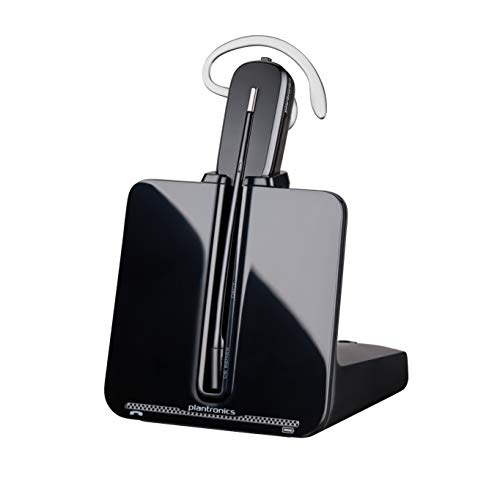
Plantronics CS540 Wireless DECT Headset
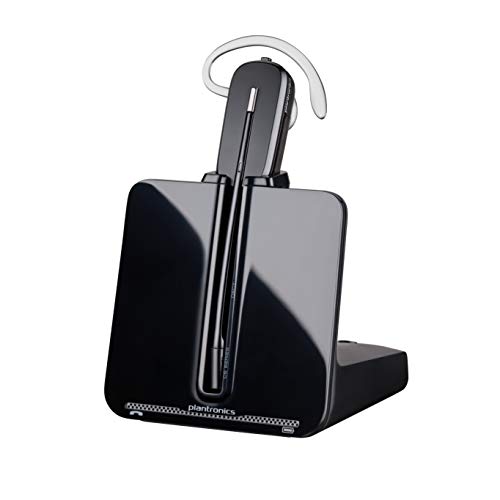
The Plantronics CS540 is the wireless pick on this list, and its listing describes a wireless DECT headset with a single-ear mono convertible design, three wearing styles, a desk-phone connection, and a noise-canceling microphone. DECT is the wireless standard built for office phones: it carries the call clearly, roams far from the desk, and does not fight the office Wi-Fi for airtime.
The three wearing styles are the detail that defines this headset for all-day use. It can be worn over the head, over the ear, or behind the head, so the wearer can change the fit through the day instead of living with one style that starts to hurt. The noise-canceling microphone keeps background office noise out of the call, and the roaming range means a call can continue while the wearer walks to a colleague’s desk.
For a buyer who wants to move freely during calls, the CS540 is the pick. It is the only wireless headset on this list, and its DECT connection, convertible fit, and roaming range make it the most capable pick here for an active office worker. It needs charging, and it costs more than the wired picks, but for a worker who is rarely at the desk, it is the clear choice.
Key specifications: Wireless DECT headset; single-ear mono convertible; 3 wearing styles; connects to desk phone; noise-canceling microphone; hands-free roaming range.
This headset fits a buyer who moves around the office during calls and wants wireless freedom.
Strengths
- DECT wireless frees the wearer to roam away from the desk.
- Three wearing styles let the fit change through the day.
- The noise-canceling microphone keeps office noise out of calls.
Trade-offs
- It needs charging, unlike the wired picks.
- Single-ear design lets in more room noise than dual-ear.
- It is the most expensive tier on this list.
The CS540 suits an active office worker or a manager who walks while talking. It fits anyone who is rarely sitting at the desk.
Best for: wireless freedom with three wearing styles / Not suited for: a buyer who wants dual-ear isolation or never wants to charge
Check price on Amazon: Plantronics CS540 Wireless DECT Headset

Plantronics HW510 EncorePro Headset
The Plantronics HW510 EncorePro is the classic wired desk-phone headset on this list. Its listing describes a noise-canceling over-head monaural headset in black, with a next-generation custom microphone and a Quick Disconnect feature. The EncorePro line is the workhorse of call centres and offices, and the HW510 is its single-ear, over-head form: one ear on the call, one ear on the room.
The Quick Disconnect feature is the detail that defines this headset for office life. It lets the wearer unplug from the phone quickly, for a break or a walk, and plug back in without fumbling, and it provides compatibility with Plantronics USB and desk-phone audio processors and direct-connect cables. The next-generation microphone reduces background noise and interference, so fewer words are missed on a busy call.
For a buyer who wants a proven wired desk-phone headset, the HW510 is the pick. It is simple, durable, and built for the daily grind of an office or call centre, with a microphone that keeps the voice clear and a connector system that fits the desk-phone world. It is single-ear by design, so it suits a worker who needs to hear the room as well as the caller.
Key specifications: EncorePro noise-canceling over-head monaural headset; next-generation custom microphone; Quick Disconnect; compatible with Plantronics USB and desk-phone audio processors and direct-connect cables; black.
This headset fits a buyer who wants a proven wired desk-phone headset for an office or call centre.
Strengths
- Quick Disconnect lets the wearer unplug and reconnect in seconds.
- The next-generation microphone reduces background noise and interference.
- Single-ear design keeps one ear on the room as well as the call.
Trade-offs
- Single-ear design lets in more room noise than dual-ear.
- It needs a Plantronics amp or adapter cable to connect.
- It is a wired headset, so the wearer stays at the desk.
The HW510 suits a call-centre agent or an office worker who needs one ear free. It fits anyone who values proven reliability over wireless freedom.
Best for: proven wired desk-phone use with Quick Disconnect / Not suited for: a buyer who wants dual-ear isolation or wireless
Check price on Amazon: Plantronics HW510 EncorePro Headset

Plantronics HW251N SupraPlus Wideband Headset
The Plantronics HW251N SupraPlus is the wideband pick on this list. Its listing describes model 64338-31: a wideband headset with a noise-canceling microphone, part number 75100-06, a Quick Disconnect connector, wired connectivity, an over-the-head design, and a monaural earpiece. Wideband audio carries more of the voice than narrowband, so the caller sounds clearer and more natural.
The wideband sound is the detail that defines this headset. A narrowband call cuts the voice off at the edges, while a wideband call carries the full range, and the difference is audible in the first minute: the caller sounds like a person in the room rather than a voice down a tube. The noise-canceling microphone filters out background sound, and the Quick Disconnect connector matches the desk-phone world.
For a buyer who wants the clearest-sounding wired desk-phone headset here, the HW251N is the pick. Its wideband audio and noise-canceling microphone make it the best-sounding wired pick on this list for the caller on the other end. It needs a Plantronics amp or a proper phone or USB adapter cable, which the listing states plainly, so the buyer should check the connection before ordering.
Key specifications: Model 64338-31; wideband headset; noise-canceling microphone; P/N 75100-06; Quick Disconnect connector; wired; over-the-head; monaural earpiece.
This headset fits a buyer who wants the clearest-sounding wired desk-phone headset, with wideband audio.
Strengths
- Wideband audio carries more of the voice than narrowband.
- The noise-canceling microphone filters out background sound.
- Quick Disconnect matches the desk-phone world.
Trade-offs
- It needs a Plantronics amp or adapter cable to connect.
- Single-ear design lets in more room noise than dual-ear.
- It is a wired headset, so the wearer stays at the desk.
The HW251N suits an office worker who values call clarity above all. It fits anyone whose callers deserve to hear every word.
Best for: clearest wideband wired desk-phone sound / Not suited for: a buyer who wants wireless or dual-ear isolation
Check price on Amazon: Plantronics HW251N SupraPlus Wideband Headset

Jabra Evolve 20 Wired USB Headset
The Jabra Evolve 20 is the USB pick on this list, and its listing describes the 2025 edition: a wired USB headset with a microphone, in black, with a comfortable dual-ear office design, USB-A and USB-C connections, in-line call control, and foam or leatherette ear cushions, built for office and work-from-home setups. It plugs into a computer, not a desk phone, and it is made for softphone calls on Teams, Zoom, and similar tools.
The dual-ear design is the detail that defines this headset for focused work. Two ears on the call block the room and help concentration, which matters in a noisy home or an open office, and the advanced noise-canceling microphones keep the voice clear on the other end. The in-line call control puts answer, end, and mute within reach, and the USB-A and USB-C connections cover old and new computers alike.
For a buyer who makes calls from a computer rather than a desk phone, the Evolve 20 is the pick. It is the simplest route to clear softphone calls, with a dual-ear design for focus, a microphone that cancels noise, and connections that fit any modern machine. It is wired, so it needs no charging, and its lightweight build suits a full working day.
Key specifications: 2025 edition; wired USB headset with microphone; dual-ear office headset; USB-A and USB-C; in-line call control; advanced noise-canceling microphones; foam or leatherette ear cushions; black.
This headset fits a buyer who makes softphone calls from a computer and wants focus and clarity.
Strengths
- Dual-ear design blocks the room and helps focus.
- USB-A and USB-C connections fit old and new computers.
- In-line call control puts answer, end, and mute within reach.
Trade-offs
- It connects to a computer, not a desk phone.
- It is wired, so the wearer stays at the desk.
- Dual-ear design blocks the room, which some workers dislike.
The Evolve 20 suits a home worker or an office worker on Teams and Zoom. It fits anyone whose phone is now software on a computer.
Best for: clear softphone calls from a computer / Not suited for: a buyer who needs a desk-phone connection
Check price on Amazon: Jabra Evolve 20 Wired USB Headset

Jabra Engage 50 Wired Headset
The Jabra Engage 50 is the call-centre pick on this list. Its listing describes a wired mono telephone headset with a 3-microphone system, super wideband sound, multi-colour status lights on the earcups, and enhanced hearing protection, built for call-centre work. Three microphones is unusual: the system compares their signals to separate the voice from the noise, which is why it suits the noisiest offices.
The 3-microphone system is the detail that defines this headset. A single microphone hears the voice and the room together, while three microphones can tell them apart, so the caller hears the voice clearly even when the office around the wearer is loud. The super wideband sound carries the full voice, and the status lights show colleagues at a glance whether the wearer is on a call.
For a buyer who works in a noisy call centre, the Engage 50 is the pick. Its three microphones and wideband sound make it the clearest-sounding headset on this list for the caller, and its hearing protection guards the wearer through a long day of calls. It is wired and mono by design, so it suits a worker who needs one ear on the room and the clearest possible voice on the line.
Key specifications: Wired mono telephone headset; 3-microphone system; super wideband; multi-colour status lights; enhanced hearing protection; call-centre headset.
This headset fits a buyer who works in a noisy call centre and needs the clearest possible voice on the line.
Strengths
- Three microphones separate the voice from office noise.
- Super wideband sound carries the full voice.
- Status lights show colleagues when the wearer is on a call.
Trade-offs
- It is wired and mono, so it stays at the desk with one ear free.
- Three microphones add complexity for a quiet office.
- It is a specialist call-centre design, not a general headset.
The Engage 50 suits a call-centre agent in a loud office. It fits anyone whose callers must hear every word despite the noise around.
Best for: clearest voice in a noisy call centre / Not suited for: a buyer in a quiet office who wants dual-ear focus
Check price on Amazon: Jabra Engage 50 Wired Headset

Yealink YHS34 QD to RJ9 Wired Headset
The Yealink YHS34 closes this list as the dual-ear desk-phone pick. Its listing describes a QD to RJ9 wired headset with leather ear pads, compatibility with Poly and Snom desk phones, a microphone, a dual-ear design, a weight of 129g, and a 2.1m cable. The QD, Quick Disconnect, connector plugs into the desk phone, and the RJ9 end is the standard desk-phone headset socket.
The dual-ear design is the detail that defines this headset for focused calls. Two leather ear pads block the room and help concentration, which matters in an open office, and the 129g weight keeps the headset light enough for a full day. The 2.1m cable gives room to lean back and reach, and the compatibility list covers Yealink, Poly, and Snom desk phones, so it fits most office phone systems.
For a buyer who wants a dual-ear wired headset for a desk phone, the YHS34 is the pick. It is the only dual-ear desk-phone headset on this list, and its light weight, leather pads, and long cable make it the most comfortable wired pick here for focused work. It needs a desk phone with an RJ9 headset socket, which the listing states plainly, so the buyer should check the phone before ordering.
Key specifications: QD to RJ9 wired headset; leather ear pads; compatible with Poly and Snom desk phones; microphone; dual-ear; 129g; 2.1m cable.
This headset fits a buyer who wants a dual-ear wired headset for a desk phone, with focus and comfort.
Strengths
- Dual-ear design with leather pads blocks the room for focus.
- Only 129g, light enough for a full working day.
- The 2.1m cable gives room to lean back and reach.
Trade-offs
- It needs a desk phone with an RJ9 headset socket.
- It is wired, so the wearer stays at the desk.
- Dual-ear design blocks the room, which some workers dislike.
The YHS34 suits an office worker who needs to concentrate on calls. It fits anyone whose desk phone has an RJ9 headset socket.
Best for: dual-ear focus on a desk phone / Not suited for: a buyer who needs a USB connection or wireless
Check price on Amazon: Yealink YHS34 QD to RJ9 Wired Headset
Best phone headsets with mic: what matters most: what matters most
Connection type decides whether the headset can be used at all. A desk-phone headset needs an RJ9 or Quick Disconnect connector, a softphone headset needs USB, and a wireless DECT headset needs a base that talks to the desk phone. The listings on this list state their connections plainly, and the phone or computer in use should be checked against them before anything else is considered.
Microphone design decides how the caller hears the wearer. A noise-canceling microphone keeps office noise out, a three-microphone system separates voice from noise in the loudest rooms, and a wideband microphone carries more of the voice. The listings state their microphone designs plainly, and the right choice depends on how noisy the office is and how much the caller needs to hear.
Wearing style decides whether the headset stays comfortable. Single-ear designs keep one ear on the room, dual-ear designs block the room for focus, and convertible designs let the wearer change through the day. The listings state their styles plainly, and the right choice depends on whether the worker needs to hear colleagues as well as callers.
Comfort decides whether the headset survives a working day. Light weight, soft ear cushions, and a headband that does not press all matter when a headset is worn for hours, and the listings state their weight and cushion type. A headset that hurts after an hour will not be used, no matter how good its microphone is, so comfort deserves as much attention as sound.
Wireless versus wired is the biggest practical choice. Wireless DECT frees the wearer to roam, at the cost of charging and a higher tier, while wired headsets never need charging and never drop a call. The CS540 is the only wireless pick here, and a buyer who never wants to charge a headset should stay wired.
Buying guide: choosing phone headsets with mic
Start with the phone, because it decides the connection. A desk phone with an RJ9 headset socket needs an RJ9 or Quick Disconnect headset, a computer with Teams or Zoom needs a USB headset, and a phone system with a DECT base needs a DECT headset. Buying the headset before checking the phone is the most common mistake in this category.
Match the headset to the office noise. A quiet office suits a simple microphone, a busy office needs noise canceling, and a call centre needs the three-microphone system of the Engage 50. There is no need to pay for three microphones in a quiet room, and there is no saving in buying a basic microphone for a loud floor.
Read the full listing, not just the headline. The model code, the exact connection type, the microphone design, and the wearing style are what separate one configuration from another, and two headsets with the same model name can differ in all of them. Confirm the listing states the configuration wanted, and set aside any listing marked as renewed or used unless that is explicitly what is being bought.
Check the wearing style and the weight before ordering. A single-ear headset suits a worker who needs to hear the room, a dual-ear headset suits a worker who needs to focus, and a light headset suits a long day. The listings state their style and weight, and those details are worth comparing alongside the microphone.
Think about the total setup, including the cable and the base. A wired headset needs a cable long enough to reach comfortably, a wireless headset needs a charging routine and a base within range, and a headset that needs an amp or adapter cable needs that part ordered too. These are small points at the shop and daily realities afterwards, so they are worth a moment of thought before the order is placed.
Using and caring for your phone headsets with mic
Give the headset a place to live. A hook or a stand keeps the cable from tangling and the ear cushions from being crushed, and a headset that is stored properly lasts years longer than one left on the desk. The wireless CS540 should sit on its base when not in use, so it charges while it waits.
Keep the ear cushions clean. Foam and leatherette pick up sweat and skin oils during a working day, and a gentle wipe with a dry or slightly damp cloth after work keeps them fresh. Harsh cleaners and soaking should be avoided, because they break down the cushion material.
Charge the wireless headset on a routine. The CS540 holds its charge through a working day, but a headset that dies mid-call is a frustration that a nightly charging habit prevents. Docking it on its base at the end of the day, rather than waiting for the low-battery warning, is the practical habit.
Set the audio levels before the first call. The phone or softphone settings control microphone level and speaker volume, and a few minutes there makes the difference between a headset that sounds right and one that is too quiet or too loud. The in-line controls on the Evolve 20 then handle small adjustments during the day.
Common mistakes to avoid
Buying on the brand alone is the most common mistake. Two headsets can share a brand and differ in connection, microphone, and wearing style, and the listing is the only place those differences are stated. The three Plantronics picks on this list show this: same brand, different connections and styles. Read the full listing every time.
Ignoring the connection is the second mistake. A USB headset cannot plug into a desk phone, and an RJ9 headset cannot plug into a computer without an adapter. Check the phone or computer first, then choose the headset whose connection matches.
Forgetting the wearing style is the third mistake. A dual-ear headset blocks the room, which suits focus but frustrates a worker who needs to hear colleagues, while a single-ear headset lets the room in, which suits awareness but hurts concentration. Match the style to the work, not to the specification sheet.
Skipping the full listing check is the fourth mistake. The model code, the exact connection type, and the microphone design are what make a configuration, and a listing that does not state them plainly is not a bargain, it is a question mark. Set aside listings marked as renewed or used unless that is the deliberate choice.
Budget and value
A phone headset is a working tool, and the budget should reflect that. The headsets on this list range from the affordable Evolve 20 to the wireless CS540, and the right tier is the one that covers the calls of the next few years, not just the calls of this month. Spending more buys wireless freedom, a better microphone, or a wider sound, and each of those is worth paying for if it matches a real need.
The value picks on this list are value picks because their hardware is proven, not because it is weak. An HW510 or an Evolve 20 covers everyday calls well, and for many buyers either is the sensible way to get a good phone headset without stretching the budget to wireless or three-microphone tiers.
The wireless and specialist picks are worth their tier only when the features will be used. A CS540 for a worker who never leaves the desk is money spent on freedom that will not be used, and an Engage 50 for a quiet office is money spent on microphones that will not be needed. Match the headset to the work, not to the specification sheet.
Final recommendation
If one headset has to be named, it is the Plantronics CS540. Its wireless DECT connection, its three wearing styles, and its noise-canceling microphone make it the most capable headset on this list: free to roam, comfortable in three ways, and clear on the call. For a buyer who wants one phone headset for an active office life, it is the safest recommendation here.
Buyers with different needs should look elsewhere without hesitation. The Engage 50 is the better choice for a noisy call centre, the HW251N is the better choice for the clearest wired sound, the HW510 is the better choice for proven reliability, the Evolve 20 is the better choice for softphone calls from a computer, and the YHS34 is the better choice for dual-ear focus on a desk phone.
Whichever headset is chosen, the rule that matters is the same: check the connection, check the wearing style, and read the full listing. A phone headset earns its keep on every call, and the right one is the one that fits the phone, the office, and the work it will actually do.
Frequently asked questions
Will these headsets work with my desk phone?
It depends on the connection. The CS540, HW510, HW251N, and YHS34 are made for desk phones, with DECT, Quick Disconnect, or RJ9 connections, while the Evolve 20 is made for computers and the Engage 50 is a wired telephone headset. Check the connection in each listing against the phone before buying.
What is the difference between RJ9 and Quick Disconnect?
RJ9 is the small plug that fits the headset socket on a desk phone, while Quick Disconnect is a connector in the middle of the cable that lets the wearer unplug quickly. The YHS34 uses QD to RJ9, meaning a Quick Disconnect cable ending in an RJ9 plug, and the Plantronics headsets use Quick Disconnect to match their amps and adapters.
Is wireless better than wired for phone calls?
It depends on how the worker moves. Wireless DECT frees the wearer to roam the office during calls, which matters for a manager or an active worker, while wired never needs charging and never drops a call. The CS540 is the only wireless pick here, and the other five are wired.
How long should a phone headset last?
A well-built phone headset lasts years. The Plantronics and Jabra designs on this list are built for daily office use, and the main wear points are the ear cushions and the cable. Storing the headset properly, keeping the cushions clean, and charging the wireless model nightly extends its life well beyond the warranty.
Can I use a phone headset for video calls too?
Yes, for the USB models especially. The Evolve 20 plugs into a computer and works with Teams, Zoom, and other softphones, which covers video calls as well as voice calls. The desk-phone models work with the phone system they connect to, and some can connect to a computer through an adapter.
Best phone headsets with mic for call centres
Call centres are the hardest test for a phone headset. The room is loud, the calls are back to back, and the headset is worn for a full shift, so the microphone, the comfort, and the durability all matter at once. The Engage 50, with its three-microphone system, is the natural call-centre pick here, and its hearing protection guards the wearer through a long day.
The Plantronics wired picks suit call centres too. The HW510 EncorePro is the proven workhorse, with a Quick Disconnect that lets agents unplug between calls, and the HW251N adds wideband sound so callers hear every word. Both are single-ear by design, which suits an agent who needs to hear the room as well as the caller.
The practical details matter in a call centre as well. Spare ear cushions, a cleaning routine, and a headset that can be repaired rather than replaced all extend the life of the fleet, and the status lights on the Engage 50 help supervisors see at a glance who is on a call. Whichever pick is chosen, comfort and microphone quality deserve as much attention as the connection.
Best phone headsets with mic for working from home
Working from home puts a phone headset to a different test. The calls come through a computer as often as a desk phone, the room is shared with family, and the headset needs to block household noise while keeping the voice clear. The Evolve 20, with its dual-ear design and USB connection, is the natural home pick here.
The wireless CS540 suits home working too, for a worker who moves around the house during calls. Its DECT connection needs a desk-phone base, which not every home has, so the USB headsets are the more common home choice. The YHS34 suits a home worker with a real desk phone, offering dual-ear focus and a long cable for a comfortable setup.
The practical details matter for home working too. A headset that blocks the room helps concentration, a microphone that cancels noise keeps the household out of the call, and a wired connection avoids the battery anxiety of a wireless headset in a long meeting. All six picks on this list cover those basics, so the choice comes down to connection, style, and budget.
More guides from KajuanDouglas
bluetooth headsets with mic noise-cancelling headsets with mic wired headsets for phone calls