The best wireless security cameras without monthly fee fix the most annoying part of owning a security camera: the subscription. A camera that records to a memory card, to built-in storage, or to a hub keeps working after the free trial ends, and the footage stays with the owner instead of behind a paywall. That is the whole point of the cameras on this list, and it is why each one was chosen for its local storage as much as for its picture.
Wireless does not mean weak. The cameras below are solar-powered or battery-powered, they record in 1080p, 2K, 3K, and 4K, they pan and tilt, track movement, and see in colour at night, and none of them needs a cable for power or for video. What they need is Wi-Fi and a place to store footage, and the listings state plainly that no subscription is required for that storage.
Every camera on this list comes from the site’s own product lookup, and every listing was checked in full before it earned a link: the brand and the complete model name had to match exactly, and any listing marked as renewed or used was set aside. The picks cover solar cameras, battery cameras, and pan-and-tilt models, so there is a no-fee wireless camera here for a door, a driveway, and a garden.
In this guide
Quick picks: best wireless security cameras without monthly fee
| # | Product | Where to buy |
|---|---|---|
| 1 | eufyCam C37 solar camera | Check on Amazon |
| 2 | eufy SoloCam S340 | Check on Amazon |
| 3 | REOLINK Argus PT Ultra | Check on Amazon |
| 4 | REOLINK Argus MagiCam | Check on Amazon |
| 5 | MUBVIEW wireless security camera | Check on Amazon |
| 6 | Tapo C400 | Check on Amazon |
How the picks were chosen
No monthly fee came first. A camera earned a place here when its listing stated plainly that there is no monthly fee, no subscription, or subscription-free local storage, because the article is about cameras that work without a cloud plan. Cameras that needed a subscription to view or keep recordings were not considered.
The picks were checked for the whole package, not the fee alone. A wireless camera is only useful if its battery or solar panel keeps it running, its picture is clear enough to identify what it sees, and its storage holds enough footage, so power, resolution, night vision, and storage were all weighed. The list mixes solar and battery models, and each listing states its storage and power details plainly so the comparison is honest.
Every listing was verified in full before linking. The brand and the complete model name in the listing had to match the camera described, including the resolution and any suffix that changes the model. Listings marked as renewed or used were dropped, and any listing whose title described a different model was set aside even when it looked close at first glance.
Quick comparison
| Product | Standout feature | Best for |
|---|---|---|
| eufyCam C37 solar camera | Solar power with 360-degree tracking and no fee | a garden or driveway with solar power and no fee |
| eufy SoloCam S340 | 3K dual-lens solar camera with built-in storage | watching a whole yard with one sharp solar camera |
| REOLINK Argus PT Ultra | 4K solar camera with colour night vision and no fee | the sharpest wireless outdoor picture |
| REOLINK Argus MagiCam | Nine months of battery with a magnetic mount | a camera that rarely needs charging |
| MUBVIEW continuous recording camera | 24/7 recording with 8X zoom and no fee | continuous recording with a long zoom |
| Tapo C400 | Up to 180 days of battery with no fee | an affordable camera with months of battery |

eufy Security eufyCam C37 Solar Camera
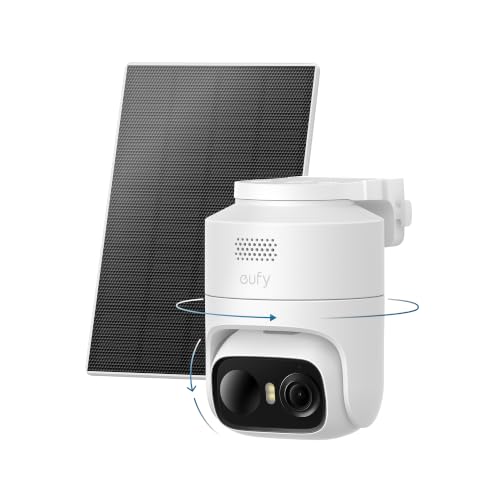
The eufyCam C37 leads this list because its listing states the whole proposition in one line: a solar camera, wireless and outdoors, in 2K resolution, with 360-degree pan and tilt, AI tracking for humans, pets, and vehicles, a flexible solar panel, colour night vision, and no monthly fee. That is a camera that charges itself, watches a wide area, and keeps its recordings without a subscription.
The solar panel is the practical detail that makes this camera easy to live with. A camera that charges from the sun never needs to come inside for charging, and the flexible panel can be angled for the best light, which matters on a wall that does not face south. The 360-degree pan and tilt, with AI tracking, means one camera can follow a person across a garden instead of watching a fixed slice of it.
For a buyer who wants one wireless camera for a garden or a driveway, with no fee and no charging, this is the natural first pick. It is the most complete single camera on the list, and its solar power is what makes it genuinely wireless in practice, not just in name.
Key specifications: 2K resolution; solar cameras wireless outdoor; 360° pan and tilt AI tracking; human, pet, vehicle detection; flexible solar panel; colour night vision; no monthly fee.
This camera fits a buyer who wants one wireless camera for a garden or driveway, with solar power and no fee.
Strengths
- Solar power means no charging and no power cable.
- 360-degree pan and tilt with AI tracking follows movement across a wide area.
- No monthly fee, with recordings kept locally.
Trade-offs
- Solar charging needs daylight on the panel to keep working.
- One camera covers one area, not a whole property.
- The camera needs Wi-Fi where it is mounted.
The eufyCam C37 suits homeowners, garden watchers, and buyers who want a camera that never needs charging.
Best for: a garden or driveway with solar power and no fee / Not suited for: a large property needing many cameras
Check price on Amazon: eufyCam C37 solar camera

eufy Security SoloCam S340
The eufy SoloCam S340 is the sharpest solar camera on this list, and its listing describes a 3K dual-lens solar security camera with 360-degree coverage, pan and tilt, no blind spots, AI detection and tracking, colour night vision, no monthly fee, and 8GB of built-in storage. The dual lenses are the detail that matters: two lenses working together cover a wider area than one, and the 3K resolution keeps the picture sharp across that wider view.
The built-in storage is the feature that makes this camera truly fee-free. Eight gigabytes on the camera itself holds recordings without a card, a hub, or a cloud plan, and the solar panel keeps the camera charged while it records. The 360-degree coverage with no blind spots means one camera can watch a whole yard, and the AI detection tells the difference between a person, a pet, and a passing car.
For a buyer who wants one camera to watch a whole outdoor area, with the sharpest solar picture on this list, this is the pick. It is a premium single camera, and it earns that place with dual lenses, 3K video, and storage built in.
Key specifications: 3K dual-lens solar security camera; 360° coverage; pan and tilt; no blind spots; AI detection and tracking; colour night vision; no monthly fee; built-in 8GB.
This camera fits a buyer who wants one premium solar camera to watch a whole yard sharply.
Strengths
- Dual lenses with 3K video cover a wide area sharply.
- Built-in storage keeps recordings local with no fee and no card to buy.
- Solar power means no charging and no power cable.
Trade-offs
- 8GB of built-in storage holds less footage than a large card.
- It is a premium-priced single camera.
- Solar charging needs daylight on the panel.
The SoloCam S340 suits homeowners, large-garden owners, and buyers who want the sharpest solar camera here.
Best for: watching a whole yard with one sharp solar camera / Not suited for: a buyer who needs weeks of stored footage
Check price on Amazon: eufy SoloCam S340

REOLINK Argus PT Ultra 4K Solar Security Camera
The REOLINK Argus PT Ultra is the highest-resolution camera on this list, and its listing describes a first 4K solar security camera for wireless outdoor use, with 360-degree pan and tilt, auto-tracking, 8MP colour night vision, Wi-Fi 6 on 2.4 and 5 GHz, no subscriptions, and compatibility with a home hub. Four-K video on a wireless solar camera is a serious capability, and it is what makes this the pick for a buyer who wants the finest detail outdoors.
The 8MP colour night vision is the feature that separates this camera from the others after dark. A camera that records colour at night gives a much better description of a person or a vehicle than a black-and-white image, and 4K resolution keeps that detail when the picture is enlarged. Wi-Fi 6 helps the camera move large 4K files over the home network without stuttering, which matters when the picture is this detailed.
For a buyer who wants the sharpest wireless camera here, with solar power and no subscription, this is the pick. It is the most detailed camera on the list, and its pan-and-tilt coverage means one camera can watch a large area at that detail.
Key specifications: 4K solar security camera, wireless outdoor; 360° pan tilt auto-tracking; 8MP colour night vision; 2.4/5 GHz Wi-Fi 6; no subscriptions; home hub compatible.
This camera fits a buyer who wants the sharpest wireless outdoor picture, with solar power and no fee.
Strengths
- 4K video with 8MP colour night vision records the finest detail here.
- Solar power and Wi-Fi 6 keep it wireless without compromise.
- No subscriptions, with recordings kept locally.
Trade-offs
- 4K video uses more storage and bandwidth than 2K.
- Solar charging needs daylight on the panel.
- It is a premium-priced camera.
The REOLINK Argus PT Ultra suits detail-focused buyers, large-garden owners, and anyone who wants 4K outdoors.
Best for: the sharpest wireless outdoor picture / Not suited for: a buyer on a tight budget
Check price on Amazon: REOLINK Argus PT Ultra

REOLINK Argus MagiCam 1080p Security Camera
The REOLINK Argus MagiCam is the longest-running battery camera on this list, and its listing describes a 1080p wireless outdoor security camera with a magnetic mount, dual-band Wi-Fi, no subscription, IP67 weatherproofing, infrared night vision, AI detection, a 9-month battery life, and local storage. Nine months on a charge is the figure that matters most, because it means the camera can be mounted and then largely forgotten about until the seasons change.
The magnetic mount is the practical detail that makes this camera easy to place. A camera that snaps onto a magnetic base can be aimed, removed for charging, and put back in seconds, with no screws to undo and no bracket to adjust, and the IP67 rating means rain and dust will not stop it. AI detection cuts down on false alerts from trees and animals, so the camera only calls for attention when something worth seeing moves.
For a buyer who wants a wireless camera that rarely needs charging, this is the pick. Its 1080p picture is not the sharpest here, but its nine-month battery and magnetic mount make it the easiest camera on the list to live with.
Key specifications: 1080p wireless outdoor security camera; magnetic mount; 2.4/5GHz Wi-Fi; no subscription; IP67; IR night vision; AI detection; 9-month battery life; local storage.
This camera fits a buyer who wants a wireless camera that rarely needs charging, mounted anywhere.
Strengths
- A 9-month battery life means rarely taking the camera down to charge.
- The magnetic mount makes aiming and removal easy.
- IP67 weatherproofing handles rain and dust outdoors.
Trade-offs
- 1080p resolution is lower than the 2K and 4K picks above.
- The magnetic mount suits a metal surface or the included base.
- Battery life depends on how often the camera records.
The REOLINK Argus MagiCam suits renters, busy owners, and buyers who want the least maintenance.
Best for: a camera that rarely needs charging / Not suited for: a buyer who needs the sharpest possible picture
Check price on Amazon: REOLINK Argus MagiCam
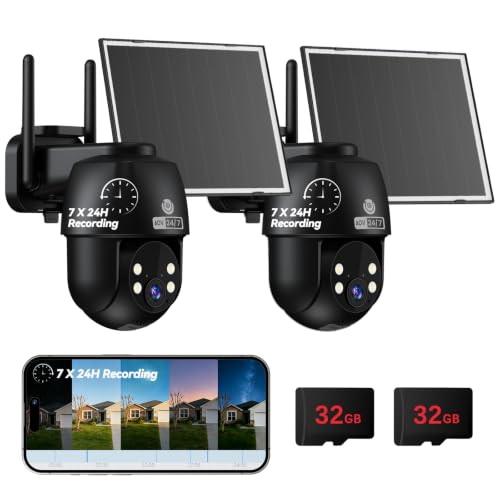
MUBVIEW 24/7 Continuous Recording Wireless Outdoor Security Camera
The MUBVIEW camera is the only one on this list that records continuously, and its listing describes a 24/7 continuous recording wireless outdoor security camera with no monthly fee, 2.4G Wi-Fi, 8X zoom, a 4MP 10W solar panel, 360-degree pan and tilt, auto tracking, an SD card included, and charging even below freezing. Continuous recording is a different way of watching: instead of only recording when something moves, this camera records all the time, so nothing is missed between motion events.
The 8X zoom is the feature that sets this camera apart for watching a large area. A camera that can zoom in eight times can check a gate, a car, or a far corner of a garden without being mounted close to it, and the 360-degree pan and tilt means it can look anywhere from one position. The included SD card means it works from the first day, and the solar panel that charges even in cold weather suits a camera that never stops recording.
For a buyer who wants continuous recording rather than motion-only clips, this is the only pick here that does it. It is a specialist camera, and its continuous recording uses more storage and power than the others, but for a buyer who does not want to miss anything, that trade-off is the point.
Key specifications: 24/7 continuous recording; wireless outdoor; no monthly fee; 2.4G Wi-Fi; 8X zoom; 4MP; 10W solar powered; 360° PTZ; auto tracking; SD included.
This camera fits a buyer who wants continuous recording and a zoom that reaches across a large area.
Strengths
- Continuous recording captures everything, not just motion events.
- 8X zoom checks distant spots from one camera position.
- The included SD card and solar panel mean it works from day one.
Trade-offs
- Continuous recording uses more storage than motion-only recording.
- It needs a good Wi-Fi signal and sunlight for the solar panel.
- It is a lesser-known brand than the eufy and REOLINK picks.
The MUBVIEW camera suits buyers who do not want to miss anything, large-garden owners, and cold-climate homes.
Best for: continuous recording with a long zoom / Not suited for: a buyer who only needs motion clips
Check price on Amazon: MUBVIEW wireless security camera
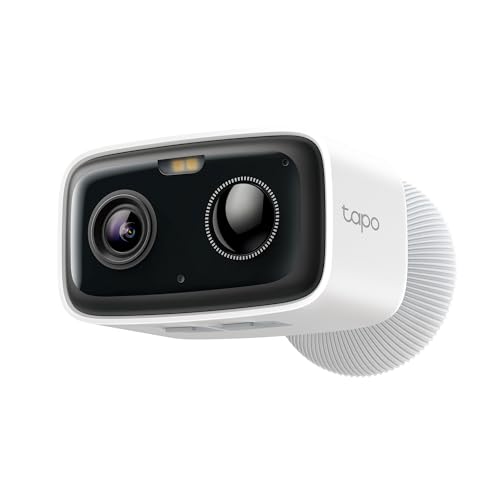
Tapo 1080p Outdoor Wireless Security Camera C400
The Tapo C400 closes this list as the longest-battery budget pick, and its listing describes a 1080p outdoor wireless security camera with up to 180 days of battery, person detection, colour night vision, and subscription-free local storage or optional cloud, working with Alexa and Google Assistant. Six months of battery in a small, affordable camera is the combination that makes this the right choice for a buyer who wants a wireless camera and does not want to think about it.
The person detection is the feature that keeps the alerts useful. A camera that can tell a person from a passing car or a swaying tree only alerts when it matters, and the colour night vision means the picture after dark is still useful for identifying who is there. Subscription-free local storage keeps the recordings at home, and the optional cloud is there for a buyer who wants a backup, not a requirement.
For a buyer who wants an affordable wireless camera with a very long battery, this is the pick. Its 1080p picture is not the sharpest here, but its six-month battery and low cost make it the easiest camera on the list to buy, mount, and forget about.
Key specifications: 1080p outdoor wireless security camera; up to 180-day battery; person detection; colour night vision; subscription-free local storage or optional cloud; works with Alexa and Google Assistant.
This camera fits a buyer who wants an affordable wireless camera with a very long battery.
Strengths
- Up to 180 days of battery means months between charges.
- Person detection keeps alerts useful instead of constant.
- Subscription-free local storage keeps recordings at home.
Trade-offs
- 1080p resolution is lower than the 2K and 4K picks above.
- Battery life depends on how often the camera records.
- The small body suits a door or a porch, not a long range.
The Tapo C400 suits budget buyers, door and porch watchers, and anyone who wants months between charges.
Best for: an affordable camera with months of battery / Not suited for: a buyer who needs the sharpest picture
Check price on Amazon: Tapo C400
Best wireless security cameras without monthly fee: what matters most: what matters most
Local storage is the first thing to check, because it is what makes a camera truly fee-free. A memory card in the camera, built-in storage, or a hub all keep footage at home, while a camera that only records to the cloud will stop recording, or stop letting the owner view recordings, when the trial ends. The listings on this list state their storage plainly, and a buyer should confirm whether a card is included or must be bought separately, because that changes the real cost.
Power decides how much maintenance a camera needs. Solar cameras charge themselves and suit sunny positions, battery cameras need charging every few months, and the battery life in a listing depends on how often the camera records, so a busy camera will need charging sooner than a quiet one. A buyer should match the power type to the position: solar for a sunny wall, long-battery for a sheltered porch, and a camera that is easy to take down for charging when neither is available.
Resolution and night vision decide whether the footage is useful. A 1080p camera is enough to see that something happened, a 2K or 3K camera is enough to identify a face, and a 4K camera keeps detail when the picture is enlarged, while colour night vision gives a better description of a person or a vehicle than black-and-white after dark. A buyer should weigh these features as heavily as the fee, because a free camera that records nothing useful is not a bargain.
Detection decides whether the camera is helpful or annoying. A camera that alerts on every passing car, swaying tree, or neighbourhood cat will be ignored within a week, while a camera with person, pet, and vehicle detection only calls for attention when something worth seeing moves. The AI detection on the cameras in this guide is what makes their alerts worth reading.
Buying guide: choosing wireless security cameras without monthly fee
Start by deciding what the camera must watch. A front door needs a camera that sees faces clearly and alerts on people, a driveway needs a wider view and a longer range, and a garden needs a camera that can pan across the whole area. The job decides the resolution, the field of view, and whether a pan-and-tilt model is worth its extra cost.
Choose the power type that fits the position. A sunny wall suits a solar camera, a sheltered porch suits a long-battery camera, and a position far from the house needs a camera with a strong Wi-Fi signal and a battery that lasts. A buyer should test the Wi-Fi signal in the intended spot before buying, because a wireless camera that cannot reach the network is no use however good its picture is.
Check the storage before ordering. A camera with built-in storage works from the first day, a camera that needs a memory card needs one bought at the same time, and a camera that records continuously needs a larger card than one that only records on motion. The listing should state the storage type, and the buyer should confirm it matches how the camera will be used.
Confirm the weather rating for outdoor positions. An IP67 rating means rain and dust will not stop the camera, while a camera without a rating should stay in a sheltered spot. A buyer should also check whether the solar panel gets enough sun in the intended position, because a shaded panel will not keep a solar camera charged.
Using and caring for your wireless security cameras without monthly fee
Mount the camera where it can see faces, not the tops of heads. A camera mounted too high sees hair and shoulders, a camera pointed at a bright window sees silhouettes, and a camera aimed at a busy road records every passing car. Test the view on a phone, adjust the angle, and only then fix the mount, because a well-aimed camera is worth more than a sharper one pointed at the wrong place.
Keep solar panels and lenses clean. Dust, leaves, and bird droppings cut the light reaching a solar panel and the image reaching a lens, so a quick wipe every few weeks keeps both working. Check the recordings every month, confirm the card is not full, and back up any footage worth keeping, because a camera that nobody checks is a camera that fails quietly.
Update the camera software when the maker offers it. Firmware updates fix detection mistakes and security issues, and a camera that is never updated slowly becomes less reliable. Change the default password, and keep the camera on the home network rather than exposing it directly to the internet.
Common mistakes to avoid
The most common mistake is assuming no monthly fee means the camera costs nothing to run. Solar panels, batteries, and memory cards all wear out eventually, and a larger card or a replacement battery costs money when it is needed. The saving is real, a camera without a subscription costs less over years than one with a monthly bill, but it is a saving, not a promise of zero cost forever.
A second mistake is mounting a solar camera in the shade. A camera under a deep eave or on a north-facing wall may never see enough sun to stay charged, and the owner will only discover it when the camera goes offline. Check the sun on the intended position through the day before mounting, and choose a battery camera instead if the spot is shaded.
A third mistake is ignoring the Wi-Fi signal. A wireless camera at the far end of a garden, behind thick walls, will drop its connection and miss events, and the owner will only discover it when the footage is needed. Test the signal in the intended spot before fixing the camera in place, and add a Wi-Fi extender if the signal is weak.
Budget and value
No-fee wireless cameras repay their cost over time. A camera with a monthly fee can cost more in two years of subscriptions than the camera itself, while a local-storage camera costs the purchase price and then very little. The right comparison is not the cheapest camera on the shelf, but the total cost over three years, and on that measure the cameras on this list are hard to beat.
A single premium camera is the best buy for the spot that matters most, and budget cameras cover the rest. The front door or the driveway deserves the 4K or 3K pick, while a side gate or a back garden is fine with a 1080p camera, and the total cost of that mix is usually less than two premium cameras.
Final recommendation
For most buyers, the eufyCam C37 is the best single wireless camera in this guide: solar powered, 2K, pan-and-tilt with tracking, and no monthly fee. It does the core job, watching an outdoor area clearly without charging or a subscription, and it does it well.
For the sharpest picture, the REOLINK Argus PT Ultra records in 4K with colour night vision, and for the longest battery the Tapo C400 runs up to 180 days on a charge. For continuous recording, the MUBVIEW is the only pick here that never stops, and for a whole yard from one camera, the SoloCam S340 covers it in 3K. Whichever camera fits the spot, the important thing is the same: the footage stays at home, and there is no monthly bill for watching it.
Frequently asked questions
Do these cameras really have no monthly fee?
Yes. Each camera on this list records to local storage, a memory card, built-in storage, or a hub, and its listing states no monthly fee, no subscription, or subscription-free local storage. There is no cloud plan needed to record or to view stored footage.
How long does the battery last on a wireless camera?
It depends on the camera and how often it records. The listings on this list state up to 180 days for the Tapo C400 and 9 months for the REOLINK Argus MagiCam, while the solar cameras charge themselves in daylight. A busy camera will need charging sooner than a quiet one.
Do wireless cameras need Wi-Fi?
Yes. The cameras on this list connect over Wi-Fi to send alerts and let the owner view footage on a phone, and they need a good signal where they are mounted. A camera that cannot reach the network cannot send alerts or footage.
What is the difference between these cameras and a full security system?
A single wireless camera watches one area, while a full system combines several cameras with a hub or recorder. These cameras suit a door, a driveway, or a garden, while a system suits a whole property, and several of these cameras together can cover a home.
Can I add more cameras later?
Yes. Wireless cameras can be added one at a time, each with its own storage and power, so a buyer can start with one camera and add more when a blind spot appears. There is no recorder to replace when expanding.
Is local storage safer than cloud storage?
Local storage keeps footage at home and avoids a monthly bill, while cloud storage keeps a copy off-site if the camera is stolen or damaged. Some owners use local storage as their main recording and back up important clips separately, which gives both benefits.
Solar versus battery: keeping a wireless camera running
Solar cameras are the easiest wireless cameras to live with, as long as their panels see the sun. A solar panel charges the camera during the day, and the battery carries it through the night, so the camera never needs to come inside for charging. The eufyCam C37, the SoloCam S340, and the REOLINK Argus PT Ultra all work this way, and they suit a sunny wall, a garden post, or any position with a clear view of the sky. The check a buyer should make is simple: watch the sun on the intended position through the day, and if the spot is shaded for most of it, choose a battery camera instead.
Battery cameras trade sunlight for a long charge. The Tapo C400 runs up to 180 days on a charge, and the REOLINK Argus MagiCam runs for 9 months, which means either one can be mounted and then largely forgotten about until the seasons change. Battery life depends on how often the camera records, so a busy camera facing a road will need charging sooner than a quiet one facing a garden, and a buyer should expect that variation rather than treating the stated figure as a promise.
The practical answer for most homes is a mix. Solar cameras for the sunny positions, battery cameras for the shaded ones, and a camera that is easy to take down for charging wherever neither is available. A buyer who plans the power for each position, rather than buying one type for the whole property, ends up with a system that stays online with the least fuss.
Do you still need a subscription for anything?
The honest answer is that a subscription is never required for these cameras to record, but some makers offer one for extras. A cloud plan typically adds longer storage, a backup copy off-site, or smarter detection features, and a buyer who wants those extras can pay for them, but the camera records and stores footage locally without any plan. That distinction matters, because it means the camera keeps working if the buyer never pays anything, and the subscription is a choice rather than a requirement.
The extras worth considering are a longer storage history and an off-site backup. Local storage keeps footage at home, which is good for privacy and for cost, but a camera that is stolen takes its recordings with it, and a cloud backup protects against that. A buyer who is worried about theft should consider a cloud plan for the most important camera, or should back up important clips manually, rather than paying for every camera.
The extras not worth paying for are usually the ones the camera already does well. Motion detection, night vision, and basic alerts are included in the cameras on this list without a subscription, and a buyer should not pay monthly for features the listing already promises for free. The right approach is to use the camera without a plan first, see what is missing, and only then decide whether a subscription adds anything worth paying for.
Winter, weather, and keeping a wireless camera online
Wireless cameras live outside, and winter is their hardest season. Short days mean less sun for solar panels, snow can cover a panel entirely, and cold reduces a battery’s capacity, so a camera that runs all summer without attention may need help in January. The practical steps are simple: clear snow from solar panels, angle the panels for the low winter sun, and check the battery level more often in cold months, because a camera that is checked is a camera that stays online.
Rain and wind cause their own problems, mostly false alerts. A camera that watches a tree in a storm will alert on every swaying branch, and a camera facing a busy road will alert on every passing car, so the detection zones and sensitivity should be adjusted for the season. Most of the cameras on this list let the owner draw a detection zone on the phone app, and using it to exclude the road and the trees is the single most useful setting in the whole system.
More guides from KajuanDouglas
outdoor wireless security cameras for home wireless security cameras for business 4K security cameras for home small security cameras for home