A headset for work lives or dies on one thing: whether the person on the other end of the call can hear the speaker clearly. Music quality, battery life, and comfort all matter, but they matter after the microphone. In an open office, a busy home, or a call taken from a kitchen, the microphone must separate the voice from the noise around it, and the noise cancelling must keep the outside world out of the ears. The eight headsets below are built for exactly that job.
This guide is led by the Jabra Evolve2 family, which has become the standard for professional headsets, and rounded out with the Logitech H390, the AOC wireless headset, and the EKSA H8 for buyers who want the same job done at a lower cost. Every headset here has a microphone designed for calls and noise cancelling that works in a real working environment, not just in a quiet room. The choice comes down to wireless or wired, budget, and how many hours a day the headset is worn.
The most important distinction is between the two kinds of noise cancelling. Active noise cancelling removes the sound reaching the ears, which helps the wearer concentrate. Microphone noise cancelling removes the sound reaching the call, which helps the listener understand the speaker. A good work headset needs both, but the microphone side matters more: a headset that sounds quiet to the wearer but noisy to the caller has failed at its main job. The sections below call out the microphone technology for every headset.
There is one more reality that shapes this category: most people buy a work headset after a bad call, not before one. A meeting where nobody could hear the speaker, or a call taken beside a barking dog, is what sends someone shopping. The headsets below are chosen for the worst call, not the best one, because the worst call is the one that decides whether the headset was worth buying. There is one more situation that shapes this category: the call that happens somewhere unexpected. A headset bought for a quiet home office will eventually be used from a car, a cafe, or a hotel room, and the microphone that sounded fine at a desk will be judged in a noisy place. The headsets below are chosen for those calls as much as for the good ones, because the difficult call is the one that decides whether the headset was worth buying.
In this guide
Quick picks: best noise cancelling headsets with mic
| # | Product | Where to buy |
|---|---|---|
| 1 | Jabra Evolve2 65 Bluetooth Wireless Headset | Check on Amazon |
| 2 | Jabra Evolve2 75 Wireless Headset | Check on Amazon |
| 3 | Jabra Evolve2 50 Wired Dual-Ear Headset | Check on Amazon |
| 4 | Jabra Evolve2 30 SE Wired Dual-Ear USB Headset | Check on Amazon |
| 5 | Jabra Evolve2 40 SE Wired Stereo Noise-Cancelling Headset | Check on Amazon |
| 6 | Logitech H390 Wired USB-A Headset | Check on Amazon |
| 7 | AOC Wireless Headset with Mic for Work | Check on Amazon |
| 8 | EKSA H8 USB Headset with Microphone for Work | Check on Amazon |
Quick Comparison
| Product | Key spec | Best for |
|---|---|---|
| Jabra Evolve2 65 Bluetooth Wireless Headset | Wireless, Bluetooth, USB-C adapter, dual-ear | Best wireless headset for work |
| Jabra Evolve2 75 Wireless Headset | Wireless, 8-microphone technology, advanced ANC | Best premium noise cancelling headset |
| Jabra Evolve2 50 Wired Dual-Ear Headset | Wired, dual-ear, noise-cancelling mic | Best wired Jabra headset |
| Jabra Evolve2 30 SE Wired Dual-Ear USB Headset | Wired, dual-ear, USB-A and USB-C, 2025 version | Best value Jabra wired headset |
| Jabra Evolve2 40 SE Wired Stereo Noise-Cancelling Headset | Wired, stereo, 3-microphone call technology, USB | Best wired headset with 3-mic technology |
| Logitech H390 Wired USB-A Headset | Wired, USB-A, noise cancelling microphone | Best budget wired headset |
| AOC Wireless Headset with Mic for Work | Wireless, Bluetooth 5.3, AI noise cancelling, USB-A/C | Best value wireless headset |
| EKSA H8 USB Headset with Microphone for Work | Wired, USB, stereo, noise cancelling mic, in-line control | Best wired headset with in-line controls |
Battery figures describe the talk time of the wireless headsets under normal use. A headset used for music as well as calls will last longer between charges than one used for back-to-back calls, and the wired headsets below need no charging at all. Talk time figures describe the wireless headsets under normal call use. A headset used mostly for music will last longer between charges, and a headset used for back-to-back calls will last less. The wired headsets need no charging at all, which is a real advantage for a fixed desk.
Quick Picks
For the standard professional choice, take the Jabra Evolve2 65. For the noisiest rooms, take the Evolve2 75. For a wired desk, take the Evolve2 50 or the 40 SE. For the lowest cost, take the Logitech H390. For value wireless, take the AOC.
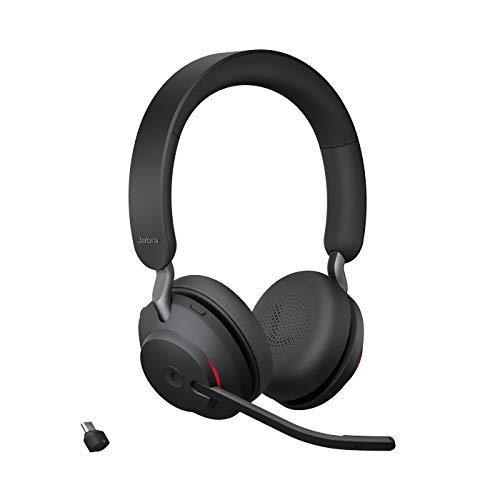
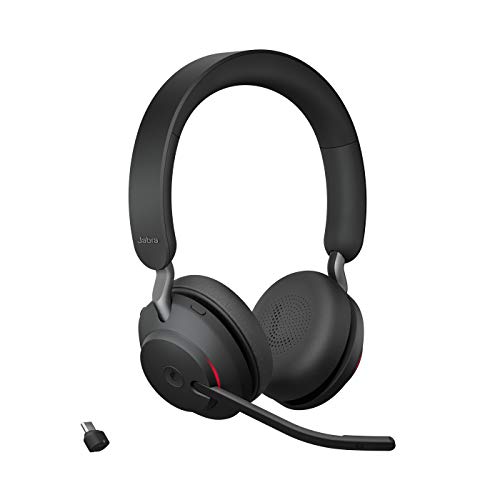
1. Jabra Evolve2 65 Bluetooth Wireless Headset
The Jabra Evolve2 65 is the wireless work headset to start with: a dual-ear Bluetooth headset with a microphone for calls and music, a USB-C adapter for the computer, and up to a full working day of battery life. It is the headset that offices buy in bulk, because it works for almost everyone who wears it.
The Evolve2 65 earns its reputation through a combination that is harder to achieve than it looks: a microphone that keeps the voice clear on a call, speakers that make music sound good between calls, and a fit that stays comfortable through a full day. The USB-C adapter gives the computer a dedicated wireless connection, which is more reliable than a general Bluetooth pairing, and the dual-ear design blocks enough office noise to concentrate without isolating the wearer completely. The busy-light on the earcup tells colleagues not to interrupt, which is a small feature that saves a surprising number of conversations.
The busy-light also deserves a mention, because it solves a problem that has nothing to do with sound. In an open office, a glowing red light on the earcup tells colleagues that the wearer is on a call, which prevents the tap on the shoulder that interrupts a meeting. It is a small feature with an outsized effect on the working day.
What stands out:
- Clear microphone for calls: the voice stays clear on calls, even in a busy office.
- USB-C adapter included: a dedicated wireless connection to the computer, more reliable than plain Bluetooth.
- All-day comfort: a dual-ear design that stays comfortable through a full working day.
Trade-offs to weigh: It is a premium headset at a premium price, and the wireless connection needs the adapter for the best reliability.
Who it fits: Office workers and remote workers who spend hours on calls every day and want the standard professional headset.
Charge a wireless headset overnight, so it is never the reason a morning call fails. Test the microphone on a real call before an important meeting, not during it.
A headset that is comfortable for an hour may not be comfortable for eight: judge it by the end of the day. A headset that hurts after two hours will not be worn for eight, no matter how good it sounds.
Check price on Amazon: Jabra Evolve2 65 Bluetooth Wireless Headset

2. Jabra Evolve2 75 Wireless Headset
The Jabra Evolve2 75 is the flagship of the Evolve2 family: a wireless headset with eight-microphone technology, dual foam ear cushions, and advanced active noise cancelling. It is the headset for workers in the noisiest environments, and for anyone whose calls cannot afford background noise.
Eight microphones sounds like a luxury until the call is taken from a busy office or a kitchen with a dishwasher running. The array separates the voice from the noise around it with a precision that a single microphone cannot match, and the advanced active noise cancelling removes the sound reaching the ears as well. The dual foam ear cushions seal comfortably for long sessions, and the headset is certified for the major meeting platforms, which means it works with the software the office already uses. For a worker whose calls are the job, it is the most capable headset in this roundup.
The certification for meeting platforms also matters more than it appears: a certified headset guarantees that the mute button, the answer button, and the volume controls work with the software the office uses. An uncertified headset may work, but the buttons may not, and that uncertainty is exactly what a professional headset should remove.
What stands out:
- Eight-microphone array: the voice is separated from background noise with exceptional clarity.
- Advanced active noise cancelling: the office disappears from the ears as well as from the call.
- Dual foam ear cushions: a comfortable seal that stays pleasant through long sessions.
Trade-offs to weigh: It is the most expensive headset here, and the advanced features need the companion software to configure fully.
Who it fits: Workers in noisy offices and anyone whose calls are critical enough to justify the best microphone available.
Test the microphone on a real call before an important meeting, since a headset that sounds fine in the ear can sound different to the listener. Keep a wired headset as a spare, so a flat battery never cancels a meeting.
Keep the firmware updated, since manufacturers improve microphone performance through updates. The busiest offices are where the best microphone earns its price, not the quietest ones.
Check price on Amazon: Jabra Evolve2 75 Wireless Headset

3. Jabra Evolve2 50 Wired Dual-Ear Headset
The Jabra Evolve2 50 is the wired member of the Evolve2 family: a dual-ear headset with a noise-cancelling microphone, built for a desk where the headset never moves and the cable never matters. It offers the Evolve2 call quality without a battery to charge or a wireless connection to manage.
A wired headset is the right choice for a fixed desk, and the Evolve2 50 is the best version of that idea. The noise-cancelling microphone keeps the voice clear on calls, the dual-ear design blocks office noise, and the wired connection is as reliable as a cable can be: no pairing, no battery, no dropouts, and no charging at the end of the day. It is also the Evolve2 for buyers who want the call quality without the wireless price. Plug it in, put it on, and the work starts.
The wired design also suits a shared desk or a hot-desking office, where the headset is used by different people on different days. There is no pairing to undo, no battery to check, and no personal settings to reset: the next person plugs it in and starts working, which is exactly what a shared resource should do.
What stands out:
- Noise-cancelling microphone: the voice stays clear on calls, with background noise removed.
- No battery, no pairing: a wired connection that simply works, every time.
- Dual-ear comfort: a comfortable fit that blocks office noise for long sessions.
Trade-offs to weigh: The cable ties the wearer to the desk, and it lacks the wireless freedom of the Evolve2 65 and 75.
Who it fits: Desk-bound workers who want Evolve2 call quality with the simplicity and reliability of a wired connection.
Use the busy-light if the headset has one: it prevents more interruptions than any closed door. Learn where the mute button is before the call starts, not after the dog starts barking.
The mute button is the most used button on a work headset: know where it is before the call starts. Update the firmware when prompted, since microphone improvements often arrive through updates.
Check price on Amazon: Jabra Evolve2 50 Wired Dual-Ear Headset

4. Jabra Evolve2 30 SE Wired Dual-Ear USB Headset
The Jabra Evolve2 30 SE is the value entry to the Evolve2 family: a wired dual-ear USB headset with a microphone, available with USB-A and USB-C cables, in the 2025 version. It is the headset for teams and individuals who want Jabra call quality at the lowest cost in the family.
The Evolve2 30 SE proves that the essential Evolve2 qualities do not need a wireless price. The microphone is built for calls, the dual-ear design blocks enough noise to concentrate, and the wired USB connection works with any computer, with both USB-A and USB-C cables in the box. It is the headset that IT departments buy for a whole team, because it is consistent, reliable, and affordable at scale. For a single buyer, it is the cheapest way into a headset family that is trusted in offices around the world.
The value position also makes the Evolve2 30 SE the right headset for a team that is equipping everyone at once. Buying the same headset for the whole team means one set of spare cables, one set of instructions, and one standard that IT can support, which is worth more than the small saving of buying a different headset for each person.
What stands out:
- Jabra call quality at a value price: the essential Evolve2 microphone and comfort, without the wireless cost.
- USB-A and USB-C included: works with any computer, old or new, with no adapter to buy.
- Dual-ear design: blocks office noise and stays comfortable for long calls.
Trade-offs to weigh: It is wired, so the wearer stays at the desk, and it lacks the active noise cancelling of the higher models.
Who it fits: Teams and budget buyers who want a trusted Jabra headset for daily calls at the lowest cost in the family.
Charge a wireless headset overnight, so it is never the reason a morning call fails. Test the microphone on a real call before an important meeting, not during it.
A headset that is comfortable for an hour may not be comfortable for eight: judge it by the end of the day. A headset that hurts after two hours will not be worn for eight, no matter how good it sounds.
Check price on Amazon: Jabra Evolve2 30 SE Wired Dual-Ear USB Headset

5. Jabra Evolve2 40 SE Wired Stereo Noise-Cancelling Headset
The Jabra Evolve2 40 SE is the wired Evolve2 with three-microphone call technology: a stereo noise-cancelling headset built for clear calls, with a USB connection and a design that suits a full working day. It sits between the 30 and the 50 in the family, offering more microphone technology than the entry model at a wired price.
Three microphones is the step that makes a real difference to call clarity, because the array can distinguish the voice from the noise around it far better than a single microphone can. The Evolve2 40 SE uses that array in a wired headset, which keeps the price down while lifting the call quality up. The stereo design gives music and media a proper sound between calls, and the USB connection works with any computer. For a worker who wants better calls than the entry model offers, without paying for wireless, it is the sweet spot of the wired range.
The three-microphone array also helps in the specific situation that ruins most calls: a speaker who moves their head while talking. A single microphone loses the voice when the head turns; an array tracks it. For a worker who gestures and turns while speaking, that tracking is the difference between a clear call and a fading one.
What stands out:
- Three-microphone call technology: the voice is separated from background noise far better than a single mic can manage.
- Stereo sound: music and media sound proper between calls, not like an afterthought.
- Wired reliability: a USB connection with no battery, no pairing, and no dropouts.
Trade-offs to weigh: It is wired, so movement is limited to the length of the cable, and it lacks the wireless convenience of the 65 and 75.
Who it fits: Workers who want a clear step up in call quality from the entry model, without paying for wireless.
Test the microphone on a real call before an important meeting, since a headset that sounds fine in the ear can sound different to the listener. Keep a wired headset as a spare, so a flat battery never cancels a meeting.
Keep the firmware updated, since manufacturers improve microphone performance through updates. The busiest offices are where the best microphone earns its price, not the quietest ones.
Check price on Amazon: Jabra Evolve2 40 SE Wired Stereo Noise-Cancelling Headset

6. Logitech H390 Wired USB-A Headset
The Logitech H390 is the budget wired headset that has been on desks for years: a USB-A headset with a noise cancelling microphone, built for PC calls and classes. It is the headset for buyers who want a working microphone and a comfortable fit at the lowest sensible cost.
The H390 has survived because it does the essential job well and nothing else. The noise cancelling microphone keeps the voice clear on calls, the USB-A connection works with any PC without drivers or setup, and the padded headband and earcups stay comfortable for a working day. It is not wireless, it does not cancel noise actively, and it will not impress anyone with music. But for a student, a home worker, or anyone who needs a reliable headset for calls and nothing more, it is the most direct purchase in this roundup, and its long history is the proof.
The long history of the H390 also means its weaknesses are well known and its strengths are proven, which is a kind of honesty that new products cannot offer. There are no surprises with the H390: it does what it says, it lasts, and it costs little. For a buyer who has been burned by a new product, that predictability is a genuine selling point.
What stands out:
- Noise cancelling microphone: the voice stays clear on calls, with background noise reduced.
- Plug and play USB-A: works with any PC immediately, with no drivers or setup.
- Long-proven design: a headset that has been trusted on desks for years.
Trade-offs to weigh: It is wired and basic, with no active noise cancelling and modest music quality.
Who it fits: Students, home workers, and budget buyers who need a reliable headset for calls at the lowest sensible cost.
Use the busy-light if the headset has one: it prevents more interruptions than any closed door. Learn where the mute button is before the call starts, not after the dog starts barking.
The mute button is the most used button on a work headset: know where it is before the call starts. Update the firmware when prompted, since microphone improvements often arrive through updates.
Check price on Amazon: Logitech H390 Wired USB-A Headset

7. AOC Wireless Headset with Mic for Work
The AOC Wireless Headset with Mic for Work is the value wireless option: a Bluetooth 5.3 headset with AI noise cancelling, a USB-A and USB-C connection, and a microphone built for calls. It is the headset for buyers who want wireless freedom and modern features without the premium brand price.
The AOC headset brings the features that used to be premium into the value tier. AI noise cancelling on the microphone separates the voice from the room, Bluetooth 5.3 keeps the wireless connection stable, and the USB-A and USB-C options mean it works with any computer without an adapter hunt. The wireless design frees the wearer from the desk, so a call can be taken while making coffee or fetching a file. For a buyer who wants a modern wireless work headset at a sensible price, it is the strongest value in this roundup.
The Bluetooth 5.3 connection also brings a practical benefit that rarely appears in listings: it reconnects quickly and reliably when the headset is switched on. An older Bluetooth headset can take seconds to reconnect, which is long enough to miss the start of a call. The AOC connects fast, which matters every single morning.
What stands out:
- AI noise cancelling microphone: the voice is separated from the room by modern noise cancelling.
- Bluetooth 5.3 wireless: a stable wireless connection with freedom to move around.
- USB-A and USB-C: works with any computer, with no adapter to buy.
Trade-offs to weigh: The brand is less established in headsets than Jabra or Logitech, and the battery needs regular charging.
Who it fits: Value buyers who want a modern wireless work headset with AI noise cancelling at a sensible price.
Charge a wireless headset overnight, so it is never the reason a morning call fails. Test the microphone on a real call before an important meeting, not during it.
A headset that is comfortable for an hour may not be comfortable for eight: judge it by the end of the day. A headset that hurts after two hours will not be worn for eight, no matter how good it sounds.
Check price on Amazon: AOC Wireless Headset with Mic for Work

8. EKSA H8 USB Headset with Microphone for Work
The EKSA H8 is the wired work headset with in-line controls: a stereo USB headset with a noise cancelling microphone and a control on the cable for volume and mute, built for calls where muting quickly matters. It is the headset for buyers who want simple, reliable, and easy to control.
The in-line control is the feature that earns the H8 its place. On a call, the difference between fumbling for a mute button in software and pressing a button on the cable is the difference between a smooth call and an awkward one. The noise cancelling microphone keeps the voice clear, the stereo sound handles music between calls, and the wired USB connection works immediately with no setup. For a home office, a call centre, or a student taking classes online, it is the headset that does the job with the least fuss.
The in-line control also helps in the situation every home worker knows: a call interrupted by a delivery, a child, or a barking dog. One press on the cable mutes the microphone instantly, without hunting for the button on the screen. That second of speed is the difference between a professional pause and an embarrassing broadcast.
What stands out:
- In-line control: volume and mute on the cable, within instant reach during a call.
- Noise cancelling microphone: the voice stays clear, with background noise reduced.
- Plug and play USB: works immediately with no drivers, pairing, or charging.
Trade-offs to weigh: It is a wired headset with a modest brand, and the sound quality is practical rather than premium.
Who it fits: Home workers and students who want a simple wired headset with a mute button they can reach without thinking.
Test the microphone on a real call before an important meeting, since a headset that sounds fine in the ear can sound different to the listener. Keep a wired headset as a spare, so a flat battery never cancels a meeting.
Keep the firmware updated, since manufacturers improve microphone performance through updates. The busiest offices are where the best microphone earns its price, not the quietest ones.
Check price on Amazon: EKSA H8 USB Headset with Microphone for Work
Buying Guide
Microphone quality comes first
A work headset is a microphone with headphones attached, not the other way around. Judge the microphone first: how many microphones does it have, does it cancel noise, and is it positioned close to the mouth. A headset that sounds good for music but noisy on a call has failed at its main job.
Active noise cancelling versus microphone cancelling
Active noise cancelling removes sound from the ears, which helps concentration. Microphone noise cancelling removes sound from the call, which helps the listener. A good work headset needs both, but the microphone side matters more. Check which kind of cancelling each headset offers before buying.
Wireless or wired
Wireless headsets free the wearer from the desk, which matters for calls taken while moving around. Wired headsets never need charging, never drop out, and cost less. For a fixed desk, wired is simpler. For a worker who moves during calls, wireless is worth the extra cost and the charging routine.
Comfort for all-day wear
A headset worn for eight hours must be light, with soft earcups and a headband that does not press. Dual-ear designs block more noise but feel heavier; single-ear designs let the wearer hear the room. Try the weight and the clamping force before committing, since comfort decides whether the headset is actually worn.
Compatibility with meeting software
Most headsets work with the major meeting platforms, but some are certified for specific ones, which guarantees the mute button and the call controls work properly. Check the certification for the platform the office actually uses, and check that the connection (USB-A, USB-C, or Bluetooth) matches the computer.
Buy for the worst call, not the best one
A headset sounds good in a quiet room. The test is the worst call: a busy office, a kitchen, a call taken while the washing machine runs. Judge the headset by how it performs in that situation, because that is the call that decides whether it was worth buying. If possible, test the microphone in a noisy room before committing.
Shared headsets and hygiene
In an office where headsets are shared, hygiene matters as much as sound. Replaceable ear cushions, wipeable surfaces, and a quick clean between users keep a shared headset pleasant to wear. If the headset is personal, the ear cushions still need cleaning occasionally, since sweat and skin oils build up over months. A clean headset lasts longer and feels better, and the habit takes less than a minute.
Frequently Asked Questions
What is the difference between noise cancelling and a noise cancelling microphone?
Active noise cancelling removes sound from the ears, helping the wearer concentrate. A noise cancelling microphone removes sound from the call, helping the listener hear the speaker. A good work headset has both, but the microphone side is more important for call quality.
Are wireless headsets good for work calls?
Yes. Modern wireless headsets use stable Bluetooth connections and dedicated USB adapters that keep calls clear. The battery lasts a full working day on most models, and the freedom to move during a call is a real advantage. Keep the headset charged overnight and the wireless experience is seamless.
Do I need a USB adapter for a wireless headset?
It helps. A dedicated USB adapter gives the computer a direct wireless connection to the headset, which is more reliable than a general Bluetooth pairing. Many headsets include the adapter, and it is worth using even when Bluetooth alone would work.
How do I stop background noise on my calls?
Use a headset with a noise cancelling microphone, sit away from the noisiest part of the room, and close windows and doors during important calls. The microphone does most of the work, but the room matters too: a headset cannot cancel a television playing beside it.
Can I use a work headset for music?
Yes. Most work headsets play music well between calls, though they are tuned for voices rather than for bass and detail. The Jabra Evolve2 models in this roundup sound good for music, while the budget models are adequate. For serious music listening, a dedicated music headphone is still better.
How long does a wireless work headset battery last?
Most wireless work headsets last a full working day of calls, and longer if they are used for music as well. The Jabra models in this roundup are rated for a working day of talk time. Charging overnight keeps the headset ready every morning, and a quick charge during lunch covers the occasional long day.
Should I choose a single-ear or dual-ear headset?
Dual-ear headsets block more noise and sound better for music, which suits most office workers. Single-ear headsets let the wearer hear the room, which suits receptionists and anyone who needs to hear colleagues while on a call. For concentration and call quality, dual-ear is usually the better choice.
A Note on Hearing Health
A headset worn for eight hours a day is close to the ears for a long time, and volume matters. Keep the volume at a level where the caller is clear but not loud, and take the headset off between calls when possible. A headset with good noise cancelling helps here too: when the office noise is removed, the volume can stay lower, which is better for hearing over the long term. If the ears ring after a day of calls, the volume is too high, and the headset is not the problem. The same thinking applies to the room. A headset cannot fix a room that echoes, a television playing nearby, or a window open onto a busy street. Close the door, move away from the noise, and let the microphone do the rest. The best call quality comes from a good headset in a decent room, not from any headset in a bad one. Small changes to the room are often worth more than a more expensive headset.
Conclusion
The best noise cancelling headset with a mic is the one that keeps the voice clear on every call, all day, without hurting to wear. The Jabra Evolve2 65 is the standard wireless choice, the Evolve2 75 is the premium answer for noisy rooms, the wired Evolve2 models cover the desk, and the Logitech H390, the AOC, and the EKSA H8 cover the budget. Judge the microphone first, then the comfort, and the right headset becomes obvious. Judge the microphone first, the comfort second, and the features third. A headset that keeps the voice clear on a bad call, and stays comfortable through a long day, is the right headset, whether it is the flagship Jabra or the budget Logitech. Buy for the worst call, not the best one, and the choice becomes clear.