Disclosure: this article contains affiliate links, and we may earn an affiliate commission when you buy through them, at no extra cost to you.
Almost every monitor sold today either has no speakers at all or has a pair of tiny drivers firing down at the desk, muffled and thin enough that dialogue in a video call sounds like it is coming through a wall. Laptop speakers are no better once you move the machine off a hard surface. So for most people, a set of dedicated PC speakers is not a luxury upgrade. It is the difference between sound you tolerate and sound you actually enjoy, whether that is music while you work, a film in the evening, or hearing footsteps clearly in a game.
The good news is that the desktop speaker market is mature and honest. The physics are well understood, the good designs have been refined for years, and you do not need to spend at a premium tier to get a large, obvious improvement over built-in audio. The confusing part is not quality. It is fit. PC speakers come in two broad shapes — simple two-speaker 2.0 pairs and 2.1 systems that add a separate subwoofer — and they connect in more ways than they used to, from the old 3.5mm plug to USB-C digital audio and Bluetooth. Picking the wrong shape for your desk or the wrong connection for your habits matters more than picking between two good models in the same class.
This guide walks through the six sets we would point a friend toward, across the budget, mid-range, and premium tiers. We do not print prices, because they shift with sales and seasons; each pick is positioned in plain words instead, and you can check price on Amazon when you are ready to decide. First, though, it is worth understanding what actually separates a satisfying desk setup from a disappointing one, because the same speaker can sound rich on one desk and boomy on another.
What to look for in PC speakers
2.0 or 2.1: the subwoofer question comes first
A 2.0 system is two speakers and nothing else. Each cabinet holds the drivers that produce the full range the set can manage, and everything sits on your desk where you can see it. A 2.1 system splits the work: two smaller satellite speakers handle the midrange and treble, and a separate subwoofer — usually a box that lives on the floor under the desk — handles the low bass. Neither layout is automatically better. They solve different problems.
The case for 2.1 is simple physics. Bass needs air movement, and air movement needs either a large driver or a lot of excursion from a small one. A compact desktop satellite cannot do much below the region where kick drums and film effects live, so a subwoofer fills in the bottom octave or two and gives games and movies their physical weight. If your desk time involves action films, electronic music, or games with explosions you want to feel in your chest, a decent 2.1 set will do things no small 2.0 pair can.
The case for 2.0 is everything else. A subwoofer needs floor space, a power outlet, and careful placement — put it in a corner or hard against a wall and the bass turns boomy and uneven; put it too far from the satellites and the sound separates into “voices up here, thump down there.” In a small room, a shared flat, or a home office where you take calls, that low end can also travel through floors and annoy people in the next room in a way desktop speakers never will. A well-designed 2.0 pair with larger cabinets, like the bookshelf-style sets in this guide, produces enough honest bass for music, voices, and everyday gaming, keeps the footprint entirely on the desk, and involves one fewer box, one fewer cable run, and far less setup fiddling. For a crowded desk, a good 2.0 pair is usually the smarter buy. For a dedicated gaming or media desk with floor space to spare, 2.1 earns its keep.
Connections: USB, 3.5mm, Bluetooth, and the latency trap
How a speaker connects to your PC changes both its sound quality and its behaviour. The humble 3.5mm analogue input is universal — every PC, monitor, phone, and games console of the last two decades can feed it — but it relies on the digital-to-analogue converter inside your computer, and on a cheap motherboard that converter can add hiss, hum, or interference noise that you will hear clearly in quiet passages. A USB connection bypasses that entirely: the speaker receives a digital signal and converts it with its own DAC, which is usually cleaner and gives you a consistent result regardless of which machine you plug into. USB-C is simply the modern plug shape for the same idea, and it is worth having if your laptop has dropped its older ports.
Bluetooth is the convenience option, and it is genuinely useful — it lets a phone or tablet play through the same speakers without cable swapping, and it frees a laptop from its tether. But Bluetooth audio carries a delay, typically a noticeable fraction of a second, between the picture and the sound. For music, podcasts, and casual video that delay is irrelevant. For competitive gaming, where you react to audio cues, and for anyone who finds lip-sync drift irritating in films, it is a real problem. The sensible pattern is a wired connection — USB or 3.5mm — as your main link to the PC, with Bluetooth as a bonus for other devices. Every pick in this guide can work that way, and the ones with Bluetooth treat it as a secondary input rather than the main event.
One more connection detail matters on a desk: where the controls live. A volume knob on the front of the right speaker, within arm’s reach, gets used a hundred times more than a remote you have to hunt for or an app you have to open. Headphone jacks on the speaker itself are similarly valuable — plug in at the desk instead of reaching around the back of the PC — and several picks below include one.
Nearfield listening: why desk speakers are not small living-room speakers
PC speakers are nearfield speakers, a term borrowed from recording studios. It means they are designed to be listened to from about an arm’s length away, with the speakers roughly at ear height and angled slightly inward toward your head, forming a triangle with you at the point. At that distance the direct sound from the drivers dominates what you hear, and the room’s reflections matter far less than they do across a living room. That is why a modest desk pair can sound startlingly clear and detailed: you are sitting in the sweet spot it was tuned for, close enough that it does not need to fill a room.
It also means placement is half the product. Speakers sitting flat on a desk, firing at your chest, lose their treble clarity; raising them on small stands, books, or angled foam pads so the tweeters point at your ears transforms the same hardware. Speakers jammed hard against a wall or into a corner exaggerate bass, sometimes pleasantly, sometimes into mud. And stereo separation needs width: the pair should be at least as far apart as they are from you, or the stereo image collapses into mono-ish sound from the middle of the desk. Several picks below are forgiving about placement — that is a deliberate virtue for real desks — but none of them can defeat geometry entirely.
Powered speakers, DACs, and what “bookshelf” really means here
Every set in this guide is powered, meaning the amplifier is built into one of the speakers and you plug them straight into the wall and the PC. Nothing else is required. But two of the picks — the Edifier R1280T and the Audioengine A2+ — come from the bookshelf speaker tradition rather than the computer-peripheral tradition, and the distinction matters if you ever plan to grow the system. Bookshelf-style speakers tend to use larger, more rigid cabinets, real binding-post or RCA connections, and amplifiers voiced for music first. They pair naturally with an external DAC or a turntable or a TV, and they keep working if your desk becomes a listening corner. Peripheral-style speakers, by contrast, optimise for the desk itself: smaller footprints, front controls, headphone jacks, gaming-friendly tuning, and easy USB hookup.
An external DAC deserves one honest paragraph. If your PC’s analogue output is noisy — audible hiss through speakers is the giveaway — a USB speaker or a small external DAC fixes it by moving the conversion out of the electrically noisy computer case. If your analogue output is already clean, an external DAC will not transform good speakers into great ones; the money almost always does more good spent on the speakers themselves or on raising them to ear level. Buy the DAC to solve a noise problem, not as a ritual upgrade.
Stereo pair or soundbar: the desk’s other option
Anyone shopping for desk audio will meet the soundbar question, so it deserves a straight answer. A compact soundbar under a monitor is tidy, and for TV-style viewing it can be a real improvement over built-in speakers. But a desk is the one place where a true stereo pair is easy — you sit centred, at a fixed distance, with room on both sides of the screen — and a separated pair repays that geometry with a genuine stereo image: instruments and effects placed left, right, and centre in a way a single bar can only imitate. Soundbars also tend to voice themselves for films at a distance rather than voices at a metre. Unless your desk doubles as a TV stand and tidiness outranks everything, the stereo pairs in this guide are the better tool for the job. The one exception is the genuinely tiny desk, where a single bar or the Pebble V3’s minimal footprint may be the only things that fit at all.
The specifications that actually tell you something
Once you ignore wattage, a few honest specifications remain. Driver size is the most useful: all else equal, a 4-inch woofer moves more air than a 2.5-inch one, which is why the bookshelf-style pairs in this guide produce fuller sound than the compact sets, and why no specification massage lets the smallest speakers fake bass. Frequency response figures deserve suspicion unless they state a tolerance — a claim of reaching low frequencies means little without knowing how quietly the speaker plays down there, and most compact sets roll off gently rather than stopping dead, which your ears experience as “light bass” rather than “no bass.” Signal-to-noise ratio, when published, hints at how much hiss you will hear in silence; higher is better, and it is one quiet advantage of the USB-connected sets, whose digital path sidesteps the issue. None of these numbers replaces judgment about fit, but together they explain most of the audible differences between the picks below.
Power ratings: why the wattage on the box misleads
Speaker packaging loves wattage numbers, and they are close to meaningless for comparing sets. Manufacturers quote peak power, total system power, or power per channel under generous test conditions, and none of those figures tells you how loud a speaker plays at your desk or how cleanly it plays there. Doubling amplifier power buys only a modest increase in maximum volume — roughly a clearly noticeable step, not twice as loud — and at nearfield distances, even genuinely modest amplifiers reach uncomfortable levels long before they strain. What actually matters is whether the speaker plays cleanly at the volume you use, which depends on driver quality, cabinet design, and honest engineering rather than a headline number. If two sets are on your shortlist, ignore the watts entirely and compare their size, their drivers, and their connections instead.
Desk acoustics: the surface is part of the speaker
A desk is not a neutral platform. A hard, bare desktop reflects sound up at you and adds a subtle hardness to voices; a speaker sitting directly on that surface also couples its vibrations into the desk, which can buzz sympathetically with bass notes. Simple fixes work: a desk mat under the speakers, foam isolation pads, or even a thick book under each cabinet softens both problems at once. Glass desks are the worst offenders and benefit most. Monitors matter too — a large screen between or behind the speakers reflects sound and can narrow the stereo image, which is one more reason to keep the speakers at or outside the monitor’s edges rather than tucked behind it. None of this requires spending; it requires noticing that the last metre between the speaker and your ears is an acoustic space you control.
In this guide
Matching speakers to how you actually use your desk
For gaming: clarity and cues before spectacle
Games ask something specific from speakers: positional clarity. The sound of footsteps on a different surface, a reload behind a wall, a teammate’s callout over the effects — these live in the midrange and in a clean stereo image, not in the sub-bass. That is why a good 2.0 pair with honest midrange, like the Pebble Pro or the R1280T, serves most players better than a cheap 2.1 system whose subwoofer smears everything below it. Players who do want the cinematic weight of explosions should take the Z407 route and keep the sub level disciplined, because an overcooked subwoofer masks exactly the cues that matter. Whatever the set, game on a wired input; Bluetooth latency will cost you reactions you cannot afford.
For music: the desk is a listening room of one
If music is the main event, judge speakers the way you would judge any hi-fi: tonal balance, vocal naturalness, and the ability to play for hours without fatigue. Nearfield listening is a gift here, because you sit closer than any living-room listener and hear detail that room acoustics would smear. The R1280T and A2+ are the two picks built for this, in different sizes and tiers, and both reward decent source material. Streaming at high quality settings, lossless files where you have them, and the simple discipline of raising the speakers to ear level will do more for your music than any accessory. EQ, if your player offers it, should be a seasoning — a gentle bass trim for a corner desk — never a rescue operation.
For the home office: voices, calls, and all-day comfort
Office listening is mostly speech: video calls, webinars, voice notes, the occasional focus playlist. Speech rewards midrange clarity and punishes boom and sizzle, which is why the bookshelf-voiced sets and even the little Pebble V3 — whose whole talent is voices — work so well here. Two practical features matter more than specs: a front volume control you can grab mid-call, and a headphone jack or easy Bluetooth switch for the calls that need privacy. If your desk faces a shared room, a 2.0 set also keeps your workday out of everyone else’s ears in a way a floor subwoofer never will.
For films and TV at the desk: dialogue is the plot
A growing number of desks double as the household’s second cinema, and film sound is a sterner test than it looks: whispered dialogue, then an orchestral hit, then a car chase, all mixed for rooms larger than yours. The failure mode of cheap speakers is dialogue that sinks under the effects, sending your hand to the volume control every scene. Sets with strong, forward midrange — and, for the action end of the scale, a subwoofer that handles the hits so the satellites can concentrate on speech — solve this properly. The Z407 is the natural film pick here; among the 2.0 pairs, the R1280T’s larger cabinets keep voices anchored best. A night or dynamic-range mode in your player, if offered, is worth using after dark.
The best PC speakers, pick by pick
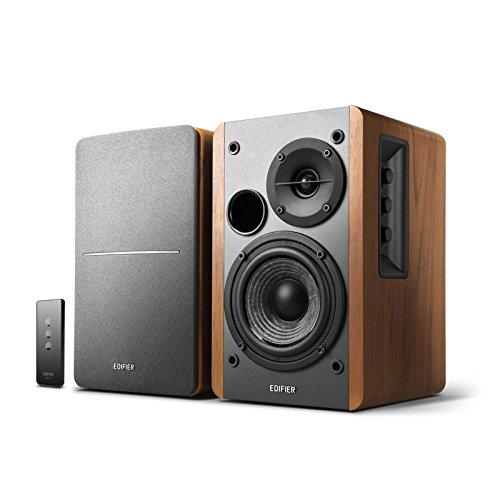
Edifier R1280T: the bookshelf pair that anchors a desk
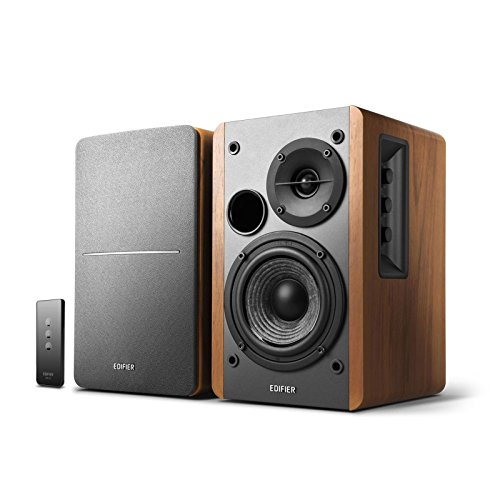
The R1280T is the pick that most often ends the search, because it behaves like a small pair of real hi-fi speakers that happen to sit next to a monitor. Each cabinet is a proper wooden enclosure with a 4-inch woofer and a small silk-dome tweeter, and that cabinet volume is exactly what compact plastic speakers cannot fake: the R1280T produces genuine, tuneful bass down into the region where acoustic instruments and male voices live, without any subwoofer under the desk. For music-first listeners, this is the most complete sound in the guide at its mid-range tier.
Strengths. The sound signature is balanced and easy to live with for long work sessions — no piercing treble, no one-note bass. You get two sets of RCA inputs, so a PC and a second source such as a turntable, a TV, or a games console can stay connected permanently, and a small remote handles volume from across the room. Bass and treble trim controls sit on the side of the main speaker, which lets you tame a boomy desk corner or brighten a carpeted room without software. Build quality feels a class above typical computer speakers, and the classic wood finish suits a home office better than gaming-styled plastic.
Trade-offs. There is no USB input and no Bluetooth, so your PC connects by 3.5mm-to-RCA cable and you inherit whatever quality your computer’s analogue output offers; on a noisy motherboard, a small external DAC may eventually join the setup. There is also no headphone jack on the front, a genuine desk convenience the R1280T skips. The cabinets are the largest of the 2.0 pairs here apart from the Audioengine, and on a shallow desk they will crowd a big monitor. Finally, the remote controls volume only through the speaker’s own amp, which is normal for this class but worth knowing.
One practical note from long-term ownership: the R1280T rewards a little distance. Give the cabinets a hand’s width from the wall behind them and resist the urge to push them into the far corners of the desk, where their bass thickens. On stands or foam pads at ear height they image beautifully, laying out a stereo picture in which a voice sits precisely between the speakers. Owners who later add a record player or a small streaming box tend to keep these speakers at the centre of the new system rather than replacing them, which says more about their staying power than any specification can.
Who it suits. The R1280T suits the person whose desk is primarily a listening and working space: hours of music, video calls that need clear voices, films at moderate volume, and gaming that does not depend on feeling explosions through the floor. If you think you might add a turntable or move the speakers to a small room later, this is the pair that grows with you. When you are ready, check price on Amazon.

Creative Pebble V3: the compact budget pick for tight desks
The Pebble V3 answers a different question: what if there is barely any desk at all? These small, spherical speakers were designed to perch beside a laptop or under a monitor, tilted upward at 45 degrees so their drivers aim at your ears instead of your sternum — a built-in solution to the placement problem most compact speakers ignore. They run from a single USB-C connection that carries both power and digital audio, which makes them the cleanest possible setup for a modern laptop: one cable, no wall wart, no analogue noise.
Strengths. The USB audio path means a built-in DAC and a clean, hiss-free signal from any machine, and a USB-C to USB-A adapter is included for older ports. A gain switch on the underside lets them draw more power from a USB port that can supply it, noticeably lifting their output for a set this small. Bluetooth is built in for phone and tablet playback, and the single front knob handles volume and power with satisfying simplicity. For spoken word — calls, lectures, podcasts, YouTube — the clarity at this budget tier is genuinely impressive, and voices are where most desk listening actually happens.
Trade-offs. Physics collects its debt here: drivers this small cannot produce real bass, so music with low-end weight sounds polite rather than full, and film effects lose their rumble. They are also USB-powered, which caps total volume below what a wall-powered set can reach; in a large or noisy room they will run out of headroom. There is no headphone jack and no separate subwoofer output to grow into. None of this is a design failure — it is the honest cost of the size and the budget positioning — but buyers expecting room-filling sound will be disappointed.
There is also a travel angle to the Pebble V3 that the other picks cannot match. Because they are small, light, and powered entirely from the laptop, they slip into a bag and turn a hotel desk or a borrowed kitchen table into a respectable listening spot for the evening. Anyone who works from changing locations — consultants, students between home and halls, remote workers in short lets — will find that the best speaker is often simply the one that is actually there, and this set is engineered around being there.
Who it suits. The Pebble V3 suits laptop users, students, and anyone whose “desk” is a small table, a dorm shelf, or a hot-desking setup that gets packed away. It is also the natural gift pick and the natural second-room set: simple, tidy, and dramatically better than any laptop’s built-in speakers. If your listening is mostly voices, video, and background music at modest volume, this is the sensible spend, so compare the current listing and check price on Amazon.
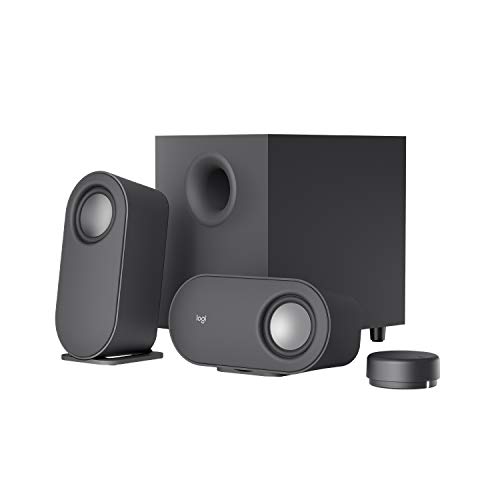
Logitech Z407: the 2.1 system with a wireless control dial
The Z407 is the guide’s clearest expression of the 2.1 idea done for convenience. Two compact satellites sit on the desk, a ported subwoofer goes on the floor, and volume is handled by a separate wireless dial that you place wherever your hand naturally rests — a small thing that turns out to be a daily pleasure, because the thing you adjust most is the thing that should be easiest to reach. The satellites can stand vertically or lie horizontally, which helps them slip under monitors and shelves that defeat taller speakers.
Strengths. The subwoofer gives games and films the low-end foundation the 2.0 pairs in this guide cannot match, and the system plays louder and fuller at desk distances than its modest footprint suggests. Connectivity is the most flexible here: USB, 3.5mm, and Bluetooth, so a PC, a phone, and a console can all take turns without cable swapping. The control dial also handles play, pause, and track skipping over Bluetooth, and it works from across a small room. Setup is quick, the cabling is sensibly long, and the whole system is voiced with a lively, forward character that flatters games and pop music.
Trade-offs. The subwoofer’s bass can overwhelm a small room or a corner placement, and you will want to experiment with its position and level rather than simply dropping it anywhere. The satellites’ midrange is less refined than the Edifier R1280T’s — voices and acoustic instruments sound good rather than natural — because the system’s budget went toward the sub and the wireless dial. The dial needs its battery replaced eventually, and if it is lost, everyday control becomes clumsier. As with all Bluetooth audio, gaming should stay on the wired inputs to avoid latency.
A word about that wireless dial, because it shapes daily life with this system more than any specification. It means the satellites can sit wherever they sound best rather than wherever your hand can reach, and it means a film watched from a chair across the room still has its volume under your thumb. Small quality-of-life details like this are why the Z407 is so easy to recommend to non-technical households: nobody has to learn anything, reach behind anything, or open an app to make the sound louder. The system simply behaves like an appliance, in the best sense.
Who it suits. The Z407 suits the mixed-use desk: work calls by day, games and films by night, phone music in between, all in a room where a floor box is welcome. It is the pick for someone who knows they want bass weight and multi-device convenience and does not want to assemble a bookshelf-speaker setup to get it, which makes it worth a moment to check price on Amazon.

Audioengine A2+: the premium compact pair for music lovers
The A2+ is what happens when a hi-fi company shrinks its bookshelf speaker instead of a peripheral company enlarging a desk accessory. The cabinets are hand-finished, properly braced, and fitted with custom drivers — an aramid-fibre woofer and a silk tweeter — and the electronics include a USB DAC and Bluetooth with the higher-quality aptX codec. It sits at the premium tier of this guide, and the justification is not loudness. It is refinement: the A2+ resolves the texture of a voice or a guitar string in a way that makes you notice recordings you thought you knew.
Strengths. Sound quality per litre of desk space is the headline — these are small speakers that do not sound small, with a smooth, coherent midrange and bass that, while limited in depth, is tight and honest rather than bloated. The USB input gives a clean digital feed, Bluetooth covers phones, and there is a subwoofer output, so the system can grow: add a sub later and the A2+ becomes the top half of a serious 2.1 rig. A variable line-out also lets them feed a headphone amp or a second device. Everything about the fit and finish says these are meant to be kept for a decade, not replaced with the next PC.
Trade-offs. The premium positioning is real, and buyers paying it should know what they are not getting: deep bass. A woofer this size rolls off well above the sub-bass region, so film effects and electronic music lack physical weight unless you budget for the subwoofer the output invites. The volume control sits on the back of the left speaker, which is an daily annoyance on a crowded desk. There is no remote and no front headphone jack. And because they are revealing speakers, poor-quality sources — low-bitrate streams, noisy game audio — sound like what they are.
Consider also how the A2+ behaves at low volume, because that is where refined small speakers quietly separate themselves. Many budget sets need to be turned up before they come alive; their balance thins out at background levels, so evening listening turns either too quiet or too loud. The A2+ keeps its composure turned down — voices remain intelligible, bass stays proportionate, and nothing in the presentation begs for more level. For the listener who works late in a sleeping household, that low-volume grace is not a footnote. It is the feature that gets used every single night, and it is a large part of what the premium tier is actually buying.
Who it suits. The A2+ suits the listener who treats the desk as their main music system, works long hours with headphones off whenever possible, and values build quality and longevity over features. It is the connoisseur’s compact pick, and the one most likely to migrate to a turntable setup or a small living room later, so treat yourself to a look and check price on Amazon.

Creative Pebble Pro: the compact 2.0 pair with RGB and USB-C
Creative’s Pebble Pro takes the pebble-shaped minimalism of the Pebble V3 further up the range. It is still a compact 2.0 pair designed to disappear under a monitor, but the Pro adds the touches a modern desk actually asks for: USB-C digital audio, Bluetooth for the phone or handheld that always wants a turn, an RGB lighting ring at the base of each speaker, and Creative’s Clear Dialog processing, which lifts voices forward in films, calls, and game dialogue. Where the V3 is the tidy budget answer, the Pro is the same idea finished properly.
Strengths. Connection flexibility is the headline: USB-C carries both audio and power from a modern laptop in a single cable, Bluetooth covers everything else, and switching sources does not require a menu dive. The Clear Dialog mode is genuinely useful at desk distances, where dialogue clarity matters more than raw volume, and the angled-driver Pebble design points the sound up at your ears rather than across the desk surface. The RGB ring is tastefully done — a soft glow under each pebble rather than a light show — and it can be set to match the rest of a setup or switched off for work. Build and finish step up from the V3 in ways you notice daily.
Trade-offs. This remains a compact 2.0 set, so the deepest bass of film soundtracks and bass-heavy music is suggested rather than delivered; players who want sub-bass impact should look at the Z407 or choose a set with a subwoofer output. There is no sub-out here, so the system you buy is the system you keep. Maximum volume suits one nearfield listener rather than a room, and the RGB lighting, however subtle, will not suit a strictly formal office desk. Competitive players should also remember that Bluetooth adds latency, so the USB-C cable is the right choice for fast games.
It is worth saying plainly what the Pebble Pro represents in this guide: the point where the compact category stops apologising. Earlier pebble-style speakers asked you to accept netbook-grade sound as the price of a tidy desk; the Pro instead spends its budget on the things a desk listener uses every day — clean USB-C audio, dialogue you can follow at low volume, painless Bluetooth, and a footprint that survives a crowded workspace. For the many desks that will never have room for bookshelf cabinets or a floor subwoofer, that is not a compromise pick. It is the correct one.
Who it suits. The Pebble Pro suits the compact, modern desk — laptop-driven, short on space, long on video calls and evening video — that wants one tidy pair to handle work and play without a subwoofer negotiation. If your PC time mixes calls, music, and video in roughly equal measure, this is the pair shaped for your life, and the listing is there whenever you want to check price on Amazon.
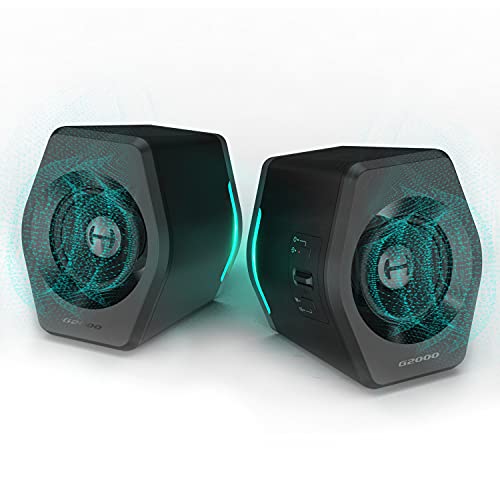
Edifier G2000: the small gaming speaker with a subwoofer output
The G2000 is Edifier’s answer to a very specific desk: the gaming setup in a bedroom or shared space where every centimetre is spoken for. The speakers themselves are compact columns that flank a monitor neatly, with a choice of sound modes for music, movies, and games, subtle lighting accents, and — the feature that lifts them above most mini gaming speakers — a subwoofer output, so the bass the small cabinets cannot produce can be added later without replacing the whole system.
Strengths. Versatility of connection is excellent for the tier: USB, 3.5mm, and Bluetooth cover PC, console, and phone, and the dedicated sub-out makes this the most upgradeable budget gaming set here. The three EQ modes are not gimmicks; the game mode’s lift in the presence region genuinely helps dialogue and effects cut through, and the music mode is sensibly flatter. Build and styling punch above the budget positioning, and the speakers are small enough to travel between a desk and a TV stand. For their size, they play cleanly at the volumes a nearfield listener actually uses.
Trade-offs. Out of the box, without a subwoofer, bass is light — kick drums tap rather than thump — and buyers should treat the sub-out as a planned second step if low end matters to them. Maximum volume is modest; this is a nearfield set for one listener, not a room party speaker. The lighting and styling will not suit a formal home office, and the mode button cycles rather than selecting directly, a small daily friction. As with every Bluetooth path in this guide, serious gaming belongs on the wired inputs.
One more scenario flatters the G2000: the shared family computer. Its inputs cover the PC the parents work on, the console the children commandeer, and the phone somebody always wants to play a song from, and its footprint survives a desk that also holds homework, chargers, and the occasional mug. Sets that demand a single, dedicated user tend to lose that negotiation; this one simply accommodates everyone, which is a genuine design achievement at its tier.
Who it suits. The G2000 suits younger gamers and small-desk setups that want a gaming look and gaming tuning now, with a credible path to real bass later. It is also a smart pick for a console corner, where the TV’s speakers are the alternative and any of these inputs will feel like a transformation, so give the current deal a look and check price on Amazon.
Quick comparison
| Speaker | Layout | Connections | Positioning | Best for |
|---|---|---|---|---|
| Edifier R1280T | 2.0 bookshelf pair | Dual RCA (3.5mm via cable) | Mid-range | Music-first desks, growing into a wider system |
| Creative Pebble V3 | 2.0 compact, USB-powered | USB-C, Bluetooth | Budget | Laptops, dorms, and the tightest desks |
| Logitech Z407 | 2.1 with floor subwoofer | USB, 3.5mm, Bluetooth | Mid-range | Mixed work, games, and films with real bass |
| Audioengine A2+ | 2.0 compact hi-fi pair | USB, 3.5mm, Bluetooth aptX | Premium | Listeners who want refinement in a small footprint |
| Creative Pebble Pro | 2.0 compact pair | USB-C, Bluetooth | Mid-range | Compact modern desks that mix calls, music, and video |
| Edifier G2000 | 2.0 mini gaming pair, sub-out | USB, 3.5mm, Bluetooth | Budget | Small gaming setups that may add a sub later |
Read the table the way you would read a map. If bass weight is your priority and the floor can take a box, the Z407 is the only true 2.1 system here and it earns its place on that basis alone. If sound quality per square centimetre matters most, the argument is between the R1280T’s fuller, larger-cabinet sound and the A2+’s refinement in half the space. If the desk is tiny or the budget is firm, the Pebble V3 and G2000 divide the territory by taste: minimal and tidy, or gaming-styled and upgradeable. And if the desk is compact and laptop-driven, the Pebble Pro is the one that adds USB-C, Bluetooth, and a little RGB polish to the tidy 2.0 formula.
Getting the most from whichever set you buy
The cheapest upgrade in desktop audio is not a product. It is ten minutes with the speakers you already own. Start with height: the tweeters should point at your ears when you are seated, which for most desk speakers means raising them — dedicated stands are ideal, but a stack of books, a monitor riser shelf, or angled foam pads achieves most of the effect. Flat on the desk, angled up like the Pebble V3, is the budget version of the same idea. Next, width: pull the pair apart until they are roughly as far from each other as they are from your head, and toe them in slightly. Then distance from the wall: a few inches of air behind a rear-ported speaker keeps its bass clean, while a front-ported or sealed design tolerates a tighter spot.
With a 2.1 system, treat the subwoofer as an instrument to tune, not furniture to hide. Start with its level low and raise it until you can just tell it is there on music, then stop — the correct setting is the one where the bass sounds like it comes from the speakers, not from the floor. If it booms, move it out of the corner and away from the wall by a few inches before touching any controls; placement fixes what knobs cannot. The classic trick of putting the sub in your chair and crawling around the room to find where it sounds best, then swapping places, sounds ridiculous and works completely.
Finally, mind the signal path. Set the PC’s output volume high — around three-quarters or more — and control everyday listening level from the speaker’s own knob; this keeps the digital signal at full resolution and the analogue stage in its comfortable range. If you hear hiss at idle through a 3.5mm connection, that is your computer’s analogue output talking, and the fixes in order of cost are: try a different port, switch to the speaker’s USB input if it has one, or add a small external DAC. None of the six sets in this guide needs any of this to sound good on day one, but all of them reward it.
Two last habits are worth forming. First, dust and heat are the quiet enemies of powered speakers: the amplifier inside the main cabinet vents through the back, so leave it breathing room rather than packing the speaker into a shelf cubby, and wipe dust from the drivers with a dry cloth rather than anything wet. Second, if a set ever develops a hum, change one thing at a time — cable, port, power outlet — before blaming the speakers; ground-loop hum through a 3.5mm connection is usually cured by powering the PC and speakers from the same strip, and it is the single most common false alarm in desktop audio. Speakers have no moving parts to wear out in normal use beyond the drivers themselves, and a good set should outlive several computers. Buy once, place them properly, and they simply stop being something you think about.
Mistakes to avoid when buying PC speakers
The first mistake is buying for the room you wish you had. A big 2.1 system in a tiny flat, or a delicate nearfield pair expected to fill a open-plan office, disappoints in both directions. Measure your desk, count your floor space, and be honest about your walls’ thinness before you fall for a specification sheet. The second mistake is the opposite: assuming small speakers must sound small. At nearfield distance, a well-made compact pair like the A2+ or even the Pebble V3 covers one listener completely; size matters far less when the listener is a metre away.
The third mistake is judging by the first thirty seconds in a loud shop or a hype-heavy video. Treble-forward speakers sound exciting immediately and exhausting by the end of a workday, while balanced speakers can seem plain at first and prove themselves over weeks. If you cannot listen before buying, favour the sets described as balanced or natural — including the R1280T in this guide — for any desk where long sessions are the norm. The fourth mistake is ignoring the return path: speakers are a taste purchase, desks differ, and a seller with a straightforward returns policy is worth more than a small saving from one without. Buy, set them up properly with the placement advice above, live with them for a few evenings, and only then judge.
The fifth mistake is forgetting the ecosystem around the speakers. A set with only Bluetooth strands you when you want a console connected; a set with no headphone jack sends you crawling behind the PC at midnight; a set with its volume knob on the back panel will quietly annoy you every single day. These small frictions, repeated daily, are what separate a purchase you love from one you merely keep. Every pick in this guide was chosen partly on how it handles those ordinary moments, not just on how it sounds with a favourite track.
Frequently asked questions
Are 2.0 or 2.1 speakers better for a PC?
Neither is better in the abstract; they fit different desks. A 2.1 system with a floor subwoofer produces deeper bass for games and films, at the cost of floor space, extra cabling, and more placement fuss. A good 2.0 pair keeps everything on the desk, sounds more coherent for music and voices at close range, and is the safer choice in small or shared rooms. If most of your listening is music, calls, and video, choose 2.0. If it is games and movies and you have the floor space, choose 2.1.
Will PC speakers sound better than my monitor or laptop speakers?
Yes, dramatically, and it is not close. Built-in speakers are an afterthought squeezed into shrinking bezels, usually firing downward or backward with drivers too small to produce any bass or volume. Even the budget picks in this guide use larger drivers in proper enclosures, aimed at your ears, with real amplifiers. The improvement in dialogue clarity alone — for calls, lectures, and films — justifies the purchase for most people.
Should I connect by USB, 3.5mm, or Bluetooth?
Use USB as your main connection when the speakers offer it, because it bypasses your computer’s often-noisy analogue output and uses the speaker’s own DAC. Use 3.5mm for devices without USB audio, such as older consoles or a monitor’s headphone out. Keep Bluetooth for phones and tablets and casual listening; its built-in delay makes it a poor choice for competitive games and can cause lip-sync drift in video. Several picks here offer all three, so you never have to choose permanently.
Do I need an external DAC with powered PC speakers?
Usually not. If the speakers have a USB input, they already contain a DAC, and it is almost certainly cleaner than a typical motherboard’s analogue output. An external DAC is worth adding in one situation: your speakers only have analogue inputs and you can hear hiss, hum, or interference through them from your PC. In that case a modest DAC solves the problem properly. Otherwise, spend the money on better speakers or on stands that raise them to ear level — both improve the sound far more.
Where should I place the subwoofer from a 2.1 system?
On the floor, near the desk, but not jammed into a corner or hard against a wall, both of which exaggerate and blur the bass. Start with it beside or under the desk, a few inches from the wall, and adjust its level so the low end blends with the satellites instead of announcing its own location. If the bass sounds boomy in your chair but thin elsewhere, move the sub a short distance at a time — small changes in position make surprisingly large differences at these frequencies.
Final word
Every set in this guide will make a desk sound better than it does today; the real decision is which shape of better fits your space, your connections, and the way you actually spend your hours at the screen. Choose the layout first, the connections second, and the specific model last, and the result will keep satisfying you long after the purchase is forgotten.
When your speakers finally sit at ear height, angled in and singing, an ordinary Tuesday playlist at your desk will quietly become the best listening seat in your home.