kajuandouglas.com is reader-supported. When you buy through links on our site, we may earn an affiliate commission.
Where to Buy
The best digital cameras for stop motion animation are not the fastest cameras, the sharpest cameras, or the cameras with the cleverest autofocus — in this craft, most of what makes a stills camera famous must be politely switched off. Stop motion is photography performed frame by frame: a puppet is posed, a frame is captured, the puppet moves a whisper, another frame follows, and twenty-four of those whispers become one second of life. The camera’s job across a shoot that may last weeks is to be a metronome — utterly consistent, utterly predictable, and invisible in the final film.
That reframes every buying criterion. Exposure must lock and stay locked, because a camera that re-meters between frames makes the finished film flicker like a faulty streetlamp. Focus must be manual and immovable, since an autofocus system hunting between frames will breathe the scene in and out. The camera must sit happily on a tripod or rig for hours, accept remote or tethered triggering so the animator’s hands never nudge it, and produce files with enough detail to survive cropping, stabilising, and the scrutiny of a cinema-sized screen.
This guide ranks six cameras for animators at every station of the craft: the student shooting a first clay figure on a desk, the hobbyist building a brick-film studio in a spare corner, the professional whose miniature sets justify full-frame files. Each pick was assessed on consistency above all — how completely it lets the animator forbid automation — and then on the working comforts that decide whether a three-week shoot is a pleasure or a penance: screen articulation for low sets, clean tethering manners, honest battery or mains-power behaviour, and files that grade kindly in post.
Key Takeaways
- The Canon EOS R50 is the student’s sweet spot — full manual discipline, a flip screen for low sets, and an easy tethering life.
- The Sony ZV-E10 II suits creators whose stop motion shares a desk with product videos and livestreams.
- The Fujifilm X-T5 puts exposure on physical dials that cannot drift, with resolution that rewards detailed miniature worlds.
- The Panasonic LUMIX S5II is the full-frame production choice for sets that will be graded, cropped, and projected.
- The Nikon Z50 II balances crisp files, calm menus, and a screen that serves awkward set angles gracefully.
- The Canon PowerShot G7 X Mark III is the tabletop starter — a fixed-lens compact for small sets and first films.
One principle should be underlined before any money moves: in stop motion, the camera is rarely the flicker problem — the light and the automation are. A modest camera under locked settings and steady lamps will outperform a flagship left on automatic everything. The picks below are ordered by how gracefully they accept discipline, not by how impressively they improvise.
In this guide
Quick Picks
| Badge | Pick | Why it stands out |
|---|---|---|
| Student Sweet Spot | Canon EOS R50 | Manual everything that matters, a fully articulating screen, and painless remote triggering. |
| Creator’s Desk Hybrid | Sony ZV-E10 II | Compact interchangeable-lens body that moonlights in the creator’s video work. |
| Dials-That-Cannot-Drift | Fujifilm X-T5 | Physical shutter and sensitivity dials guard exposure across a three-week shoot. |
| Full-Frame Production | Panasonic LUMIX S5II | Files with grading depth for professional miniature cinematography. |
| Calm All-Rounder | Nikon Z50 II | Crisp APS-C detail and unhurried menus for methodical frame-by-frame work. |
| Tabletop Starter | Canon PowerShot G7 X Mark III | A self-contained compact for desk-scale sets, toys, and first experiments. |
The table spans two philosophies. The interchangeable-lens five treat stop motion as cinematography that happens slowly, rewarding the animator with lens choice and file depth. The little Canon treats it as play that happens carefully, removing every obstacle between a beginner and a finished first film. Both philosophies are honourable; the mistake is buying the first when your project is the second.
How We Chose These Picks
Each candidate was put to work the way animators actually work: mounted over a small set, triggered remotely for a sequence of several hundred frames, with a puppet repositioned between exposures and the room’s ordinary chaos — a door opening, daylight wandering, a cat inspecting the production — allowed to happen around it. The resulting sequences were played back and examined for the sins of the craft: exposure flicker, focus breathing, white-balance wander, and any frame in which the camera had quietly reinterpreted the scene.
Lockability was tested control by control. Could exposure be fixed in full manual and stay fixed across a power nap? Could focus be set once, magnified for certainty, and left untouched by the camera’s helpful instincts? Could automatic behaviours — the ones that make holiday photography effortless — be dismissed completely rather than negotiated with daily? Cameras that hid a setting in a menu labyrinth, or re-enabled a helpful feature after sleeping, lost marks that no image-quality advantage could recover.
Working comfort formed the second exam. Animators shoot from odd angles at sets built on tables, floors, and shelves, so screens were judged on their articulation at knee height and overhead alike. Tethering and remote behaviour were assessed for politeness: does the camera announce itself to a computer or phone remote without drama, does it trigger without shaking the rig, does it keep its manners across a long session? A camera that fights the workflow consumes the patience the puppets need.
Finally, files were graded as animators grade them — pushed in exposure, matched across a sequence, cropped for a reframed shot. Sensors that delivered consistent colour from frame one to frame nine hundred, and lenses that stayed sharp at the close distances miniature worlds demand, completed the picture. The six survivors are not the six most famous cameras we tested; they are the six most trustworthy.
Why Does Flicker Ruin Stop Motion — and Where Does It Come From?
Flicker is the craft’s original sin: a subtle pulsing of brightness across the finished film that no viewer can unsee once noticed. It has four usual parents. The first is automatic exposure, re-deciding the scene’s brightness every time the animator’s own body crosses the light between frames. The second is the aperture itself, which in many lenses does not stop down to precisely the same diameter twice, shimmering the exposure by fractions. The third is the lighting — household lamps on unstable power, daylight through a window, cheap LEDs with their own pulse. The fourth is automatic white balance, drifting the scene’s colour temperature as conditions evolve across a long session.
The camera-side cures are discipline and design. Full manual exposure with a fixed white balance removes two parents at a stroke. Shooting with the aperture set deliberately, and understanding that some lenses flicker less at certain settings, addresses the second. The picks in this guide earned their places partly by making this discipline easy to impose — manual modes that are truly manual, settings that persist, magnification tools that confirm focus without touching the lens.
The lighting-side cures belong to the set rather than the camera, but they decide more student films than any body choice: blackout the windows, light the set entirely with your own steady lamps, and wear dark clothing so your reflected brightness stops auditioning in the scene. A camera from this list, locked down under controlled light, produces sequences so steady that viewers assume a far more expensive production than the desk in the spare room.
Which Settings Should an Animator Lock First?
Begin with the trinity of exposure: aperture, shutter speed, and sensitivity, all manual, all chosen for the set’s lighting and then left alone for the entire shot — which may mean the entire day. Choose the white balance next, fixed to a number or a custom reading rather than any automatic mode, because colour drift is flicker’s quieter sibling. Then focus: position the camera, magnify the image on screen, focus manually on the puppet’s eyes or the set’s storytelling plane, and consider a strip of tape on the focus ring as a seatbelt against accidents.
After the trinity comes the hygiene list. Switch off every automatic optimisation that varies frame to frame — dynamic range expanders, automatic lighting corrections, lens corrections are safe to keep since they apply identically, but anything that analyses the scene anew is a suspect. Set the file type with intent: raw gives the post-production room to rescue a drifting lamp; high-quality JPEG gives a student pipeline its speed. Neither is wrong; inconsistency between them mid-shot is.
Finally, rehearse the trigger. Whether the frames are fired from a phone remote, a computer running capture software, or an interval-capable release, the animator’s hands should never touch the camera body during a shot. Every pick here supports at least one clean hands-free route, and the reviews note which route each camera prefers. Consistency in stop motion is not a setting — it is a system, and the camera is only its most expensive component.

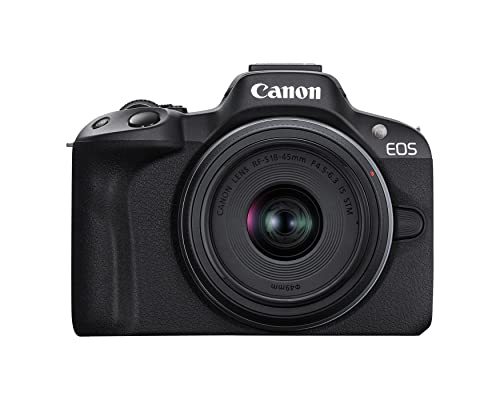
Canon EOS R50 — Student Sweet Spot
The R50 has become the default recommendation in animation classrooms for a reason that has nothing to do with fashion: it removes friction. Its manual controls are direct, its menus explain themselves in plain language, and its fully articulating screen folds to face an animator crouched beside a floor-level set — the exact posture this craft imposes for hours. A student can set the exposure trinity, lock focus with magnification, and be animating within the hour, and the camera will not surprise them on day nine of the project.
Looked at from the production angle, the little Canon’s virtues compound. It triggers happily from a phone or computer, sips power politely on a rig, and its APS-C files carry detail well beyond what student festivals and online platforms demand. Canon’s affordable RF lenses include close-focusing options that miniature sets adore, and the whole kit travels between classroom, bedroom desk, and borrowed studio without a flight case or a hernia. For brick films and clay figures alike, it is the camera that gets out of the story’s way.
The ceiling, when it arrives, is file depth rather than usability: professional colourists will want the full-frame pick below, and very long productions will wish for the mains-power elegance of larger bodies. Most animators meet neither limit in their first several films. The R50 is where the craft’s teachers point beginners, and teachers of a patience-based art are rarely wrong about tools.
- Screen: fully articulating, for floor sets and overhead rigs
- Controls: direct manual exposure with beginner-legible menus
- Triggering: smooth phone and computer remote options
- Files: APS-C detail ample for festivals and streaming
- System: affordable RF lenses, including close-focus choices
Strengths
- The gentlest learning curve in serious stop motion
- Screen articulation built for tabletop working postures
- Reliable tethered and remote manners across long sessions
Trade-offs
- File depth trails the full-frame production pick
- Battery life asks for spares or a power plan on long days
- Body is light — a truly rigid tripod is essential
Best for: students, brick-film makers, and hobbyists building a first real rig. Not suited for: professional productions grading for cinema projection.

Sony ZV-E10 II — Creator’s Desk Hybrid
Many modern stop motion artists are not only animators; the same desk hosts product videos, build-along livestreams, and the behind-the-scenes content that funds the films. The ZV-E10 II is shaped for that double life. As an animation camera it offers a compact interchangeable-lens body, a flip-out screen that faces the animator working in front of the set, clean manual discipline, and Sony’s deep E-mount lens bench, including the close-focus glass miniature worlds require.
Its distinguishing scene is the reveal: the animator finishes a sequence, swings the screen around, and records the making-of segment on the same body without striking the set. That continuity sounds like a convenience and functions like an economy — one camera, one lens family, one colour language across the film and the content that promotes it. Sony’s files also grade consistently frame to frame, and its compactness suits the small, dense rigs that desk animators build from clamps, arms, and optimism.
Reservations are ergonomic. The body leans on touchscreen and menu more than dial, so the animator who loves physical controls should handle one before committing; and like all compact bodies it asks for a serious tripod head to defeat the micro-shifts that ruin sequences. For the creator-animator hybrid it was designed for, those are footnotes rather than objections.
- Screen: flip-out design facing the working animator
- System: Sony E-mount’s wide bench, strong close-focus options
- Size: compact body for dense desk rigs and small sets
- Hybrid life: video and streaming features share the desk
- Files: consistent colour across long frame sequences
Strengths
- One camera for the film and the content around it
- Compact footprint suits clamped, arm-mounted rigs
- Lens bench covers every miniature scale
Trade-offs
- Touch-led controls divide opinion among dial lovers
- Needs a rigid head to defeat micro-movement
- No viewfinder — irrelevant on a rig, noted for completeness
Best for: creator-animators mixing films with desk video and streams. Not suited for: photographers wanting a traditional stills body first.

Fujifilm X-T5 — Dials That Cannot Drift
The X-T5’s argument is written on its top plate. Shutter speed and sensitivity live on physical dials with engraved numbers, aperture on the lens ring — a configuration an animator can verify with a glance and a fingertip in the darkened studio, and one that cannot be nudged by a stray menu dive or a helpful automatic. On a three-week shoot where the camera may sleep between sessions, that physical certainty is a form of insurance no software lock quite matches.
Beyond the dials sits resolution with intent. The X-T5’s high-pixel APS-C files give miniature cinematographers genuine cropping room — reframing a shot in post, punching in for an edit, stabilising a sequence without surrendering sharpness — and Fujifilm’s colour science flatters the painted, handmade textures of puppet worlds. Sets built from felt, clay, and balsa carry a tactility that this sensor renders with unusual respect, and many animators choose the body for that rendering alone.
The costs are pace and price. This is a deliberate camera for a deliberate craft, which suits stop motion perfectly and everything else in life only sometimes; its video talents, while real, sit behind the hybrid picks. Animators who want their exposure carved in metal and their files deep enough to reframe will forgive both without blinking.
- Dials: physical shutter and sensitivity controls, drift-proof
- Resolution: high-pixel files with real reframing room
- Colour: film-inspired rendering kind to handmade textures
- Screen: tilting design for set-level viewing angles
- Focus: magnification aids for precise manual placement
Strengths
- Exposure settings verifiable by touch in a dark studio
- Cropping headroom rescues and reframes shots in post
- Rendering that loves clay, felt, and painted miniature
Trade-offs
- A premium price among the APS-C picks
- Deliberate handling will not hurry for anyone
- Video features trail the creator-focused bodies
Best for: meticulous animators, detailed puppet worlds, long productions. Not suited for: beginners wanting the simplest possible first camera.

Panasonic LUMIX S5II — Full-Frame Production Choice
When a stop motion production grows ambitions — festival projection, commercial clients, sets built to cinema standards — the S5II is the body this guide sends. Its full-frame files carry the grading depth that professional post-production consumes: shadows that open without crumbling, highlights on miniature practical lamps that roll off gently, and colour that can be matched across a sequence shot over a fortnight of evenings. On a locked rig, frame after frame, that depth is the difference between footage that grades and footage that merely survives.
Its working manners suit the studio floor. The body is built to live on support equipment without complaint, its screen articulates for the contorted viewing angles of a large set, and Panasonic’s long history with filmmakers shows in the details animators borrow — clean remote behaviour, dependable tethering partnerships, and an interface that treats manual operation as the default rather than a mode. Paired with a quality macro-capable lens, it photographs miniature worlds with a shallow-focus cinematography that smaller formats imitate but never quite counterfeit.
The invoice matches the ambition, and the kit’s weight demands a rig built with intent rather than a borrowed tripod. Nor does its famous video autofocus matter here at all — a useful reminder that this pick is chosen for its files and its discipline, not its headlines. Productions that need those files will consider the price a line item; animators who do not should choose earlier in this list with a clear conscience.
- Sensor: full-frame depth for grading and projection
- Files: highlight roll-off kind to miniature practical lamps
- Build: studio-grade body at home on serious rigs
- Screen: full articulation for large-set viewing angles
- Heritage: a filmmaker’s interface, manual-first by design
Strengths
- Professional file depth for demanding post-production
- Composure on big sets and heavy support equipment
- Colour consistency across very long sequences
Trade-offs
- The most serious investment in this guide
- Weight demands a rig built deliberately
- Capability far beyond a first film’s requirements
Best for: professional and festival-bound productions with real post budgets. Not suited for: students, casual desk projects, or shaky support gear.

Nikon Z50 II — Calm All-Rounder
The Z50 II brings a temperament to stop motion that the craft rewards: calm. Its menus are unhurried and logical, its manual controls fall where methodical hands expect them, and its APS-C files are crisp without the storage appetite of the highest-resolution bodies. An animator mid-sequence, gloves off between frames, puppets mid-gesture, needs a camera that never startles — and across our multi-hundred-frame test sequences the Nikon simply never became the story.
Viewed from the set-building angle, its screen and ergonomics serve the awkward geometries of real productions: sets on the floor shot from above, sets on shelves shot from a step stool, the camera slung under a horizontal arm for a top-down cooking-scene parody. The Z-mount’s close-focusing lenses keep miniature detail honest, and Nikon’s colour handles the mixed practical lighting of a dressed set — a tungsten practical here, a daylight-balanced panel there — with less drama in post than most.
Its limits are the ecosystem’s youth at exotic lengths, which stop motion rarely visits, and a buffer-and-burst personality tuned for stills photographers rather than animators, which stop motion never visits. As a considered middle path between the student Canon and the professional Panasonic, it may be the most sensibly placed camera in this entire guide.
- Temperament: calm menus and predictable manual behaviour
- Files: crisp APS-C detail without storage excess
- Screen: tilting help for floor, shelf, and overhead sets
- Lenses: close-focusing Z-mount glass for miniature detail
- Colour: forgiving rendering under mixed set lighting
Strengths
- Never becomes the drama during a long sequence
- Balanced files for quality and storage sanity
- Ergonomics that suit contorted set geometries
Trade-offs
- Full-frame grading depth belongs to the S5II
- Lens bench still maturing at the exotic end
- Screen tilts rather than fully articulating
Best for: serious hobbyists and small studios wanting a composed middle path. Not suited for: productions needing cinema-grade grading depth.

Canon PowerShot G7 X Mark III — Tabletop Starter
Not every stop motion epic needs a system camera, and the G7 X Mark III makes the case for beginning small. It is a complete instrument — lens, sensor, screen — in a body that sits on a desk tripod beside a shoebox set and asks nothing of its owner but imagination and patience. For a first film with toys, paper cut-outs, or food, its fixed lens covers the working distances of tabletop worlds, its screen tilts to the animator’s crouch, and its simplicity means the settings trinity can be learned without a lens mount’s worth of distractions.
Consider what the fixed lens gives back. There is no lens to change, therefore no dust introduced mid-production, no focus ring accidentally married to the wrong scale, no decision fatigue at the rental counter. The camera’s whole personality is consistency-by-poverty: fewer moving parts in the workflow, fewer betrayals across a sequence. Young animators in particular flourish under that poverty, because every saved decision is spent on the puppets, where the film actually lives.
The boundaries are equally clear. Manual control exists but with a compact’s shallower authority, the files will not bear professional grading or aggressive cropping, and a growing animator will outgrow it within a few ambitious projects. As the instrument of a first finished film — the one that teaches the craft’s patience — it earns its place without apology.
- Format: complete fixed-lens camera for desk-scale sets
- Screen: tilting view for the animator’s crouch
- Simplicity: no lens changes, no dust, no rental decisions
- Focus: close working range for toys and paper worlds
- Role: the first-film instrument, proudly outgrown later
Strengths
- Nothing between a beginner and a finished film
- Consistency through simplicity — fewer betrayals
- Desk footprint suits the smallest home studios
Trade-offs
- Manual authority shallower than the system cameras
- Files resist heavy grading and cropping
- Ambitious animators will outgrow it quickly
Best for: first films, young animators, tabletop and food subjects. Not suited for: detailed puppet productions or professional post work.
Comparison Table
| Pick | Discipline style | File depth | Best set size |
|---|---|---|---|
| Canon EOS R50 | Friendly manual, articulating screen | Student-strong APS-C | Desk and small studio |
| Sony ZV-E10 II | Touch-led, hybrid workflow | Creator-grade APS-C | Desk rigs with content duties |
| Fujifilm X-T5 | Physical dials, drift-proof | High-resolution APS-C | Detailed puppet worlds |
| Panasonic LUMIX S5II | Studio manual-first | Full-frame professional | Large, cinema-standard sets |
| Nikon Z50 II | Calm, logical, predictable | Balanced APS-C | Home studio, varied geometry |
| Canon PowerShot G7 X Mark III | Simple compact manual | Honest compact files | Tabletop and shoebox sets |
Which Mistakes Do Beginning Animators Make With a New Camera?
The first is leaving anything on automatic — usually white balance, because it hides — and discovering at playback that the scene’s colour has been breathing gently for three hundred frames. The cure is the pre-flight checklist in this guide, recited aloud like a pilot’s, however theatrical that feels on day one. The second mistake is touching the camera to trigger it. A hand on the body moves the rig by fractions that become earthquakes at playback; remote triggering is not an accessory in this craft, it is the price of admission.
The third error is lighting the set with the room. Ceiling lights flicker, windows wander, and the animator’s own shadow auditions in every frame. Blackout the daylight, light only with your own steady lamps, and keep your body behind the light line when you lean in to pose the puppet. The fourth mistake is moving the camera mid-shot for a better angle — there is no better angle mid-shot; there is only a ruined shot and a new shot. Finish the sequence, then move, and let editing marry the two.
The fifth is under-shooting the boring frames. Beginners animate the leap and skimp the landing’s settle, the held reaction, the pause where the audience reads emotion. Cameras are patient; let yours capture the stillnesses. A film’s rhythm lives in its held frames, and the animator who shoots them generously edits with riches.
How Do You Build a Rig That Never Betrays a Sequence?
Start from the floor upward: a table that does not rock, a tripod or arm rated beyond the camera’s weight, and every joint tightened with the sequence in mind rather than the setup. Sandbags are the animator’s oldest technology and still the best — one across the tripod’s spread, one steadying the set’s edge. Where the camera must shoot downward, a horizontal arm with a counterweight outperforms any improvised stack of books, and the first time a rig survives a bumped table without shifting a pixel, its cost is forgotten.
Mark everything. Tape on the floor for tripod feet, tape on the focus ring, a note of the exposure trinity photographed with your phone before the first frame — because the day the rig is knocked, and that day is scheduled by fate for the middle of your best shot, restoration is a procedure rather than a tragedy. Animators who can rebuild their exact frame in five minutes animate boldly; animators who cannot, animate timidly, and the films show it.
Power belongs in the rig conversation too. A long sequence dies politely when a battery fades mid-shot, and the fade can shift settings on some bodies as it goes. Mains adapters, dummy batteries, or a disciplined rotation of charged spares at shot boundaries — choose one system and ritualise it. The camera should be the most predictable object in the studio; everything in this section exists to keep that sentence true.
Final Recommendation
Beginners and students should buy the Canon EOS R50 and spend the savings on lamps, a rigid tripod, and puppets — the unglamorous trio that decides a first film’s quality. Creator-animators whose desk earns money between films should take the ZV-E10 II, while the meticulous and the texture-obsessed will find the X-T5’s dials and files worth every premium. The Z50 II is the composed middle, and the S5II waits, correctly, for the production whose budget and ambitions have earned full-frame depth.
The G7 X Mark III closes the list as the honourable starting pistol: a first film finished on a compact teaches more than a masterpiece postponed for a system camera. Whichever body you choose, recite the checklist, lock the trinity, light the set yourself, and never touch the camera during a shot. Stop motion forgives modest equipment completely and inconsistent equipment never.
How Does Frame Rate Change the Feel of the Finished Film?
Animators speak of shooting on ones or twos — a new photograph for every frame of playback, or one photograph held for two — and the choice is aesthetic before it is economic. Ones produce the liquid, expensive motion of prestige productions, at double the labour. Twos produce the craft’s classic heartbeat, a slight staccato that audiences read as handmade charm, and most beloved puppet films in history were shot substantially on twos. The camera does not care; it simply must be consistent, because a film that drifts between rhythms without intent looks like a mistake rather than a style.
Within a shot, easing matters more than the base rate. Real movement accelerates and settles, so the spacing of poses — tiny moves at the start, larger through the middle, tiny again into the hold — sells weight and life at any frame rate. New animators often move puppets in equal increments and produce robotic motion from beautiful frames. The camera’s contribution to easing is merely honesty: a locked frame that shows each pose exactly as posed, so the animator can judge spacing at playback and correct the next shot’s rhythm.
Plan the rate before the set is lit, because it doubles or halves the session’s length and the lamp hours, the puppet wear, and the animator’s own stamina budget. A three-week shoot on ones is a different life from a ten-day shoot on twos, and choosing deliberately — rather than discovering the arithmetic in week two — is a producer’s skill the camera cannot supply.
What Should a Home Stop Motion Studio Include Beyond the Camera?
Light comes first, as it does in every section of this guide: two or three steady, dimmable lamps with stands that can be positioned low, plus blackout material for the windows. Second, support — the rigid tripod or arm discussed above, with sandbags. Third, the set’s own infrastructure: a baseboard that anchors scenery, reusable mounting putty and wire for poses, spare puppet parts, and the small tools of adjustment, from tweezers to a glue gun, organised within arm’s reach of the animator’s chair.
Fourth, the digital half of the studio: capture software on a computer or tablet that shows the previous frame ghosted over the live view — onion skinning, the animator’s single most valuable tool — plus storage with a backup habit, because a three-week sequence existing in one copy is a heartbreak awaiting its appointment. Fifth, and cheapest, a notebook. Log the shot, the settings, the lamp positions, the frames completed. Productions that write things down resume after interruptions; productions that rely on memory reshoot.
Notice the camera’s position in this inventory: necessary, central, and only one line long. Students who invert the budget — flagship body, household lamps, wobbly tripod — produce flickering films in magnificent resolution. Students who fund the studio first and choose a disciplined body from this list produce films that play like cinema. The guide’s rankings exist to serve that order of spending.
How Do You Move the Camera in a Medium That Forbids Movement?
Stop motion’s most luxurious illusion is the moving camera — the slow push-in across a miniature street, the pan that follows a puppet through a doorway — achieved by moving the locked camera itself by measured fractions between frames. A slider or a geared head becomes a frame-by-frame instrument: expose, advance the carriage a hair, expose again. The technique forgives nothing, because a single inconsistent increment judders at playback, which is why the cameras here were tested for how they behave on arms and rails, not merely on tripod heads.
Plan moving shots as the production’s set pieces. They consume multiples of the time a locked shot takes, demand a rig whose every increment can be repeated after a knock, and reward rehearsal without the puppets — a dry run across the empty set, played back, reveals the judder before the performance is spent. Animators commonly reserve camera moves for the shots that open scenes or deliver revelations, where the audience’s attention justifies the labour, and keep workhorse dialogue coverage locked and efficient.
There is a post-production cousin worth knowing: the digital move, cropping progressively into a high-resolution still sequence to simulate a push-in. This is where the X-T5’s and S5II’s file depth stops being a luxury and becomes a technique — the crop needs resolution to burn. Many polished student films mix one real slider move with several digital ones, and audiences never learn which was which.
What Does Puppet Scale Do to Lens and Lighting Choices?
Scale is the hidden variable of the whole craft. A large puppet — the kind with room inside its head for armatures and expression mechanisms — photographs like a portrait subject, with ordinary lenses at comfortable distances and lighting that behaves as it does on a film set. Shrink the production to desktop figures and the physics changes: depth of field collapses to millimetres, the camera must approach until it shadows the set with its own body, and lamps become suns that can melt, fade, or simply overwhelm a tiny stage.
The picks divide along this line more than their prices suggest. The compact G7 X Mark III and the close-focusing kit lenses of the R50 and Z50 II live happily at desktop scale, where their modest depths of field are a manageable puzzle. The full-frame S5II, glorious at portrait scale, fights its own shallow focus on tiny sets and often works stopped well down — which returns the animator to the aperture-flicker discipline discussed earlier. Neither direction is superior; they are different crafts sharing a name, and the wise buyer names their scale before naming their camera.
Lighting scales with the same logic. Small sets want small, dimmable, cool-running lights placed close, because a powerful lamp at miniature distance is a weather event. The animator who understands scale buys lights the size of the world being lit — and discovers that the camera, any disciplined camera from this list, suddenly seems to perform better.
Why Do Professional Animators Shoot Tests Before the Real Sequence?
The pop test — a quick, rough pass through a shot’s key poses, played back immediately — is the profession’s insurance policy, and it exists because stop motion’s cruellest property is irreversibility. A live-action director who dislikes a take calls for another; an animator who dislikes a finished sequence has spent a week learning so. The test, shot in minutes with the actual camera on the actual rig, exposes the shot’s rhythm, its focus plane, its lighting balance, and the puppet’s readability before the labour is committed.
Tests also calibrate the animator to the individual puppet. Every figure has a centre of balance, a joint that drifts, a head that will not hold a tilt — knowledge that must be in the hands before frame one of the real take. The cameras in this guide support the habit gracefully because their playback and tethered review are immediate: shoot twenty test frames, watch them at speed on a proper screen, adjust the spacing, and only then begin. Beginners skip tests to save time and spend the savings on reshoots; the arithmetic never lies for long.
Keep the tests. Productions archive them beside the finished shots, and they become the next project’s first lesson — a private library of what this puppet, this lens, this lamp could and could not do. A studio’s accumulated tests are, in the end, its real capital.
How Should Continuity Survive a Shoot That Lasts Weeks?
A single shot in a professional production may span days, and a scene may span a month of evenings for a hobbyist whose studio is a desk. Continuity is the discipline that hides those seams: the lamp that was repositioned by a centimetre, the puppet’s scarf re-tied by a different hand, the window light that no longer exists because the set was blacked out properly in week two. The camera’s settings log — the photographed trinity, the noted white balance — is continuity’s first document, and this guide’s insistence on recording settings is really an insistence on being able to resume.
Photograph the set itself at the end of every session, from the camera’s position and from the room’s corners, with the lights as they burn. Those humble reference frames have rescued more productions than any equipment purchase: they show where every prop rested, which practical lamp was lit, how far the backdrop curtain hung. Pair them with the notebook habit from the studio section and a production can survive holidays, illnesses, and borrowed rooms.
The deeper continuity is performance. An animator returning to a shot after a fortnight must re-enter the character’s physical rhythm — the spacing habits, the weight, the pauses — and the pop test is the re-entry vehicle, a rehearsal that reunites hand and puppet before the camera rolls. Films feel unified when their makers treat continuity as a craft rather than a chore, and the audience, who cannot name what they are sensing, simply believes the world on screen exists. That belief is the entire product being manufactured, one locked frame at a time.
How Do You Direct Performance One Frame at a Time?
Performance in stop motion is choreography remembered by the hands. The animator thinks in arcs and holds: a character does not simply raise an arm, the arm anticipates downward, sweeps up with follow-through in the sleeve and head, and settles with a small overshoot that the audience reads as weight. None of that exists in any single frame; it exists in the spacing between frames, which is why playback review after every few dozen frames is not vanity but direction — the animator is the actor, the camera is the mirror, and the rushes arrive twenty frames at a time.
Dialogue sharpens the discipline. Lines are recorded first, broken into phonemes on a chart, and the puppet’s mouth shapes and head beats are animated to that map, so a performance shot across three evenings still lands its syllables. The camera’s role is fidelity: frames so consistent that the voice and the figure fuse. Animators who shoot the chart honestly discover that even simple puppets can act, because acting in this medium is timing wearing a costume.
Emotion, finally, is mostly posture and pause. A head lowered two millimetres and held for twelve frames says more than any sculpted expression, and the held frame — the courage to let a moment sit — is the beginner’s hardest lesson and the professional’s signature. Shoot the pauses generously. The cutting room can shorten a hold in seconds; it cannot invent one that was never photographed.
What Separates a Hobby Desk From a Small Studio?
Less than the catalogues suggest. The dividing line is not square footage or signage; it is repeatability. A studio, however small, is a room where the set can stay standing, the lights can stay rigged, and the camera’s frame can be recovered exactly after a week away. A hobby desk becomes a studio the day its owner stops packing the production into a box each night — because every rebuild costs frames of continuity that no camera can restore.
The second divider is workflow dignity: a dedicated capture screen at a comfortable height, the notebook, the archived tests, the labelled shelf of puppet parts. None of it photographs anything, and all of it decides how much animating happens per hour of available life. The cameras in this guide serve both sides of the line, but they reward the studio side disproportionately — a locked S5II sequence interrupted for a month resumes in an afternoon when the studio kept its memory, while the same camera on a nomadic desk starts every session from suspicion. Build the memory first; the medium will notice.
How Should You Choose a First Project That Actually Finishes?
More first cameras gather dust because of unfinished epics than because of any defect, so project selection belongs in a camera guide. The finishable first film is short — thirty to ninety seconds — built around one character, one set, and one simple event with a beginning and an end: a figure crosses a room and something changes. It contains no dialogue to sync, no crowd to animate, no weather to simulate. Its modesty is not a compromise of ambition; it is the mechanism by which a beginner experiences the complete cycle of the craft, from first frame to a film other people can watch, inside a single month.
Scale the second project by exactly one new difficulty — a second character, or a camera move, or a line of dialogue — and let the third add one more. This staircase is how the profession trains its own, and it protects the most fragile asset in any studio, which is the animator’s belief that films get finished here. The camera chosen from this list will be waiting patiently at every stair; patience, after all, is the one specification every pick shares and the only one the craft cannot proceed without.
What Role Does Sound Play in a Film Shot in Silence?
Stop motion is photographed in a silent room and born in a noisy one: every footstep, door creak, and fabric rustle in the finished film was added afterward, which means the animator is also, whether they planned it or not, a sound designer. This matters to camera choice not at all — and to production planning enormously, because the quiet discipline of the set can seduce beginners into forgetting the soundtrack until the picture is locked and the film feels eerily mute. Professionals record or license the sound world in parallel with the shoot, marking on the same notebook page where the footsteps will fall.
There is a camera-adjacent habit worth borrowing: shoot a few seconds of ordinary video of the set and its surroundings at the end of a session, with the room’s real ambience and the animator handling the props. Those humble clips become reference for the sound edit — the true weight of the puppet’s tread, the actual click of its joints — and they cost nothing but a mode dial’s turn on any hybrid body in this list. The silent craft rewards those who listen to it carefully.
Frequently Asked Questions
Do I need special software, or can the camera work alone?
A camera alone can shoot a sequence — frame, pose, frame — and many first films are made exactly that way. Capture software transforms the work, though: it triggers the camera remotely, stores frames in order, and above all offers onion skinning, the ghost of the previous frame over the live view, which makes smooth motion achievable rather than accidental. Every system pick here partners with common capture tools; the compact works happily in the camera-only style for shorter projects.
Raw or JPEG for stop motion frames?
Raw when the production will be graded seriously or the lighting is imperfect, because it forgives drift and mixed colour in post. JPEG when the pipeline is a student’s — the files are smaller, the workflow faster, and a well-locked camera under controlled light produces JPEG sequences of real quality. The sin is switching mid-shot, which guarantees a visible seam where the pipeline changed.
How many frames does a short film actually need?
Arithmetic first: a minute of finished film at a standard playback rate holds well over a thousand frames, and shooting on twos halves the photographs without halving the poses’ importance. A three-minute short is therefore a few thousand careful decisions. This is not a deterrent but a planning tool — animators schedule by frames per day the way builders schedule by bricks, and the camera’s stamina and the animator’s are budgeted together.
Can I use autofocus if I set it once per shot?
You can use it to find focus, and many animators do — autofocus to the subject, then switch to manual to freeze the result before the sequence begins. What you cannot do is leave it live during the shot, where it will hunt at the puppet’s smallest movement and breathe the frame. Focus peaking and magnification in manual mode, offered across these picks, give the same certainty without the risk.
Why do my frames shift slightly even on a tripod?
Because tripods settle, floors flex, and hands linger. The usual culprits are a centre column extended too far, a head not fully locked, the animator leaning on the table between frames, or the shutter’s own small shock on some bodies — cured by remote triggering and, where available, electronic front-curtain or fully electronic capture. Sandbag the support, trigger from a distance, and give the rig a minute to settle after setup before the first frame.
Is a macro lens necessary for miniature sets?
Not necessary, but transformative for small-scale worlds. A close-focusing lens lets the camera live nearer the set, which deepens the sense of a real place and keeps lighting intimate; standard lenses force a distance that flattens miniature geography. Animators shooting larger puppet scales manage beautifully with ordinary glass. Match the lens to the set’s scale the way you would match a stage to a theatre — the audience should never sense the strain.
Related Guides
Animators building a wider visual practice will find the lighting logic of this guide continued in our best digital cameras for videography, where several of these bodies reappear at full motion. The product-table chapters pair with the best digital cameras for product photography, and those ready to take a finished miniature world outdoors should read the best digital cameras for shooting on sunny days before the set meets the sun.


