kajuandouglas.com is reader-supported. When you buy through links on our site, we may earn an affiliate commission.
Where to Buy
Phones sit outside the verified camera pool behind this guide, so the three phone picks are prose-only: no links, no invented listings, just guidance to carry into a carrier shop or a marketplace listing. Budget phones live and die by the specific deal in front of you — a carrier promotion, an unlocked model at a discount, last year’s version cleared out — so the model classes below matter more than any single listing we could point at. The final three picks are dedicated cameras from the verified pool with Amazon links, included for readers whose real need is a camera rather than a phone contract, and each one is labelled with the role it plays against the budget.
The search for the best cellphone cameras under 200 is really a search for honesty about compromise. Below this budget line — the line comes from your keyword, and it is a real ceiling for many buyers: a teenager’s first phone, a spare handset for travel, a replacement after a screen met a pavement — no camera is good at everything. Each manufacturer decides what to sacrifice, and the sacrifices differ: one keeps a decent main camera and drops the ultrawide, another keeps the screen pleasant and lets low-light photos suffer, a third updates its software faithfully while its camera hardware stays ordinary. This guide’s job is to make those trade-offs visible before the money moves, so the compromise you accept is the one that fits how the phone will actually be used.
Key Takeaways
- At this budget, judge the main rear camera only; ultrawide and macro lenses on inexpensive phones are usually decoration, and a good main camera plus good processing beats three weak lenses.
- Daylight photos from the best budget phones are genuinely pleasing — the gap to expensive phones opens at night, indoors, and whenever the subject moves.
- Software support is a camera feature: phones that keep receiving updates keep receiving camera improvements and security fixes, and they stay safe to hand down.
- Storage fills fast when a camera is the point of the phone; favour models with generous storage or a memory card slot, and check which the specific variant offers.
- Last year’s mid-range phone, discounted into this budget, often out-photographs this year’s budget phone — the classes below explain how to spot that opportunity.
- If the device will mostly be a camera — for a child, a project, or a content experiment — a dedicated budget camera from the linked picks may serve better than any phone at this level.
In this guide
Quick Picks
| Pick | Badge | Why it is here |
|---|---|---|
| Motorola Moto G Class (Current Budget Generation) | Best Clean All-Rounder (Prose-Only) | A tidy Android experience and a dependable main camera for buyers who want no surprises. |
| Samsung Galaxy A1x Class | Best Screen and Support (Prose-Only) | The budget line of the biggest Android maker, with a bright display and long update commitments. |
| Google Pixel a-Series (Discounted) | Best Photos When Found in Budget (Prose-Only) | Flagship-grade photo processing that sometimes falls into this price band on promotion or as a prior model. |
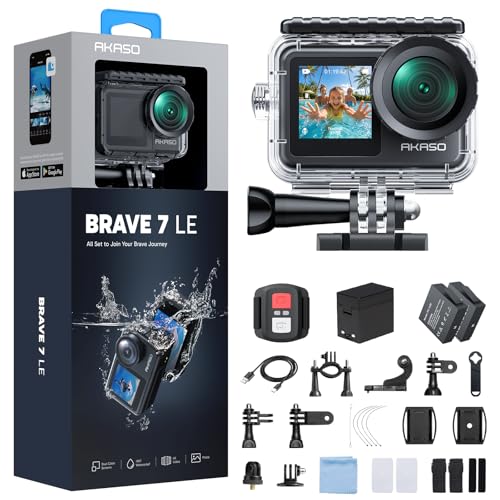
| AKASO Brave 7 LE | Best Camera-Only Alternative | A rugged action camera for buyers whose “phone camera” need is really filming and adventure. |
| GoPro HERO12 Black | Best Previous-Generation Value Camera | An earlier flagship action camera whose video still embarrasses every phone camera near this budget. |
| Sony ZV-1F | Best Step-Up for Video Creators | A vlogging compact for readers who can stretch once and stop fighting a phone’s front camera. |
How We Chose These Picks
We set the test the way the budget’s real owners use a phone camera: family photos in mixed light, a child’s school concert from the tenth row, food and travel snapshots for sharing, short video clips, and the occasional document scan that has to stay legible. Anything that only shines in a studio comparison was discounted. We favoured main cameras with optical stabilisation where the class offers it, processing that handles skin tones and indoor light gracefully, and video that stays steady at the resolution people actually share. We penalised the era’s favourite budget trick — a headline-grabbing main lens flanked by token macro and depth lenses that exist to inflate a spec sheet — because buyers at this level cannot afford to pay for decoration.
Two structural judgements shaped the list. First, classes rather than exact models: budget lines refresh yearly, carrier variants shuffle names, and the honest unit of advice is the family — Moto G, Galaxy A1x, Pixel a — with its known character. Second, the linked cameras are not padding. A meaningful share of “cellphone camera under 200” searches come from people who do not need a phone line at all: a parent equipping a child’s filming hobby, a traveller wanting a sacrificial camera, a seller photographing stock. For them, a dedicated camera near the same money is often the smarter object, and this guide says so in the open, with the roles declared in every review.
What Should You Realistically Expect From a Camera at This Budget?
Expect good days and honest limits. In daylight, the best current budget phones produce photos that would have embarrassed flagships not many generations ago: sharp, colourful, and ready to share without editing. Portraits of family at arm’s length, landscapes on a trip, a dog in a park — the main camera handles these with a competence that makes the budget feel less like a compromise and more like a category. The processing has learned the important tricks: skies that stay blue, faces that stay faces, and a night mode that, given a still subject and a steady hand, can rescue a restaurant table or a street scene after dark.
The limits arrive on a schedule you can predict. Movement in low light is the first wall: a child blowing out candles, a pet indoors, a concert’s encore — the shutter slows, the processing guesses, and faces smear. Zoom is the second wall: without a telephoto lens, distant detail is a crop, and crops at this level dissolve quickly, so the school-concert photo from row ten will be a memory aid rather than a portrait. Video is the third: stabilisation and resolution are serviceable for clips, shakier and softer than the phones above this band, and audio in wind is mostly wind. None of this makes the category a bad buy. It makes it a buy to enter with the right expectations and the right technique — get closer, brace the phone, favour the light — which the how-to section below treats as skills worth more than the next model up.
One expectation deserves its own paragraph because it decides satisfaction: longevity. A budget phone asked to serve three or four years needs battery health, storage headroom, and software updates more than it needs a fourth lens. The picks were chosen partly on their makers’ support habits, and the buying advice throughout assumes the phone is a keeper, not a season’s experiment. Judge accordingly when a deal tempts you toward an unknown brand with a dazzling camera claim and no update policy at all.
Motorola Moto G Class (Current Budget Generation) — Best Clean All-Rounder (Prose-Only)
The Moto G line has spent a decade as the answer to a simple question — what should a person buy when they need a decent phone and refuse to overthink it — and its camera character matches that mission. The main camera is the honest centre of the phone: competent in daylight, respectable indoors, and processed with a restraint that keeps colours near the truth. Motorola’s software stays close to plain Android, which matters to camera use in an unglamorous way: the camera app opens fast, the gallery is where you left it, and the phone does not bury your photos under a manufacturer’s competing cloud. For a gift phone, a first phone, or a family spare, that absence of friction is a feature with daily value.
Generations of the line vary, and the detail to verify on the specific model in front of you is the main camera’s stabilisation and the storage configuration. Some variants in the family offer optical stabilisation, which is worth real money at this level because it rescues exactly the indoor, low-light shots the budget struggles with; others rely on electronic stabilisation alone and should be priced accordingly in your head. Motorola also tends to offer a memory card slot somewhere in the line, a kindness to anyone whose camera roll is the point. Ask the seller to confirm both points for the exact variant, because the family name covers a range of hardware wearing similar clothes.
The compromises are the class’s usual ones, worn openly. Night photography trails the Pixel pick below, video stabilisation is adequate rather than graceful, and Motorola’s update cadence, while improved, is not the longest in this list. The ultrawide, where fitted, is for bright landscapes only. None of that prevents the recommendation: as the balanced, no-drama choice for a buyer who wants the camera to work and the phone to disappear, the Moto G class remains the budget’s centre of gravity, and the one least likely to be regretted by Christmas.
- Format: budget Android smartphone, prose-only pick — no link in this guide
- Camera character: honest main camera, natural colour
- Software: near-stock Android, uncluttered camera app
- Storage: card slot available on many variants — verify the exact model
- Best use: everyday family photography and sharing
Strengths
- Balanced camera and software with no learning curve
- Natural processing keeps family photos looking like the day did
- Line often includes the storage flexibility this budget needs
Trade-offs
- Night and moving-subject photos trail the best in class
- Hardware varies across variants sharing the family name
- Update support is shorter than the Samsung and Google picks
Best for: first phones, gift phones, and anyone who wants a dependable camera without research. Not suited for: buyers whose photography happens mostly at night or indoors at events.
Samsung Galaxy A1x Class — Best Screen and Support (Prose-Only)
The Galaxy A1x line is Samsung’s budget ambassador, and its argument is the whole ownership experience rather than a single camera trick. The screen is the first thing a camera user touches — it is the viewfinder and the photo album both — and Samsung’s displays at this level are bright and pleasant beyond what the budget suggests. Photos are reviewed, edited, and shown to grandparents on that screen, and a good one quietly raises the perceived quality of every picture the camera takes. The main camera itself is capable and vividly processed in Samsung’s house style, which flatters landscapes and food and can be toned down in settings for family faces.
Support is the second argument, and at this budget it may be the decisive one. Samsung has led the inexpensive end of Android in committing to years of updates for its A-series, and a phone that keeps receiving security and feature updates stays safe to bank on, safe to hand down, and — through camera app improvements — occasionally gets better at photography after you own it. For a teenager’s phone expected to survive to graduation, or a parent’s phone that will not be replaced on a whim, that horizon is worth more than a marginal lens advantage on day one.
The debits are familiar. Samsung’s budget processing can oversaturate and over-sharpen, which some eyes love and some find tiring across a whole holiday album — shoot a test set in the shop, including a face under the shop’s lights, and judge with your own taste. The line’s variants differ by region and carrier in memory, storage, and sometimes camera detail, so the exact model code matters; confirm the configuration rather than trusting the family badge. And the extra lenses remain supporting actors: the main camera is the purchase, the rest are scenery. Chosen with those checks done, the A1x class is the budget’s safest long-term home.
- Format: budget Android smartphone, prose-only pick — no link in this guide
- Camera character: vivid processing, capable main camera
- Display: bright, high-quality screen for its class
- Support: among the longest update commitments at this budget
- Best use: keepers — phones expected to serve for years
Strengths
- Screen quality makes shooting and reviewing genuinely pleasant
- Long software support protects a multi-year ownership plan
- Wide availability means cases, repairs, and advice are easy to find
Trade-offs
- Processing style is vivid enough to divide opinion
- Regional and carrier variants complicate exact comparisons
- Secondary lenses contribute little beyond bright-day flexibility
Best for: buyers keeping the phone for years — teenagers, parents, and hand-me-down plans. Not suited for: anyone who prefers natural, unprocessed photo colour above all else.
Google Pixel a-Series (Discounted) — Best Photos When Found in Budget (Prose-Only)
Every budget-camera conversation has a cheat code, and it is a Pixel a-series phone on promotion. Google’s a-line carries the same computational photography philosophy as its flagships — the processing that rescues night scenes, balances impossible indoor light, and makes an ordinary sensor perform above its station — and when a prior model or a carrier deal drops it into this guide’s budget band, it simply out-photographs everything else here. Portraits hold edge detail, night mode produces the class’s most convincing after-dark photos, and the camera app is the one reviewers use as the reference for “point, shoot, done.”
The condition in the badge is the honest part: at full launch pricing, the current a-series usually sits above this budget, so this pick is an instruction to hunt. The hunting grounds are predictable — the previous generation after its successor launches, carrier promotions tied to a plan you were taking anyway, refurbished stock from reputable sellers with a warranty. Verify battery health on refurbished units, because a cheap phone with a tired battery is a camera that dies at the school concert. Also confirm the storage size: Pixel phones offer no card slot, and the smaller capacity fills quickly when photography is the point.
Set against the other phone picks, the Pixel trades breadth for depth. Its video, while improved across generations, has historically been the a-line’s quieter suit compared with its stills; keen video makers should test a clip in the shop. Google’s long update support rivals Samsung’s, and the clean software will please anyone fleeing a cluttered interface. But availability inside the budget is a sometimes thing, and a guide that pretended otherwise would be selling luck as a strategy. Treat this pick as the first thing to check and the easiest to abandon: if a genuine a-series deal is in front of you, take it; if not, the two picks above are in budget every day of the year.
- Format: mid-range Android smartphone at budget via discount, prose-only — no link
- Camera character: flagship-style computational photography
- Night performance: the strongest stills after dark in this guide
- Storage: internal only — choose the larger size when possible
- Best use: photography-first buyers willing to hunt a promotion
Strengths
- Photo processing a class above everything else at this money
- Night and indoor shots stay convincing where rivals smear
- Long update support and a clean, fast camera app
Trade-offs
- Only inside the budget when discounted, refurbished, or a prior model
- No memory card slot, so storage mistakes are permanent
- Video has historically trailed its stills performance
Best for: photography-led buyers who can time a purchase around a deal. Not suited for: anyone needing a phone today at a guaranteed everyday price.

AKASO Brave 7 LE — Best Camera-Only Alternative
Some readers of this keyword do not need a telephone at all. They need a camera a child can drop, a traveller can lend, a cyclist can bolt to a handlebar — and for them the budget buys far more camera when it stops buying a phone. The Brave 7 LE is AKASO’s value action camera: weather-sealed thinking, a front screen for framing yourself, electronic stabilisation for movement, and a box that typically arrives with the mounts and waterproof housing that phone buyers would have to purchase separately. As a filming tool for sports, water, and general chaos, it outperforms every phone in this guide while costing the family nothing in monthly contracts.
Its still photography is where the honesty goes. Action cameras are video instruments with a photo mode attached; the Brave 7 LE’s stills are wide, fixed-focus affairs, fine for a scene and poor for a portrait. If the household’s need is photographs — birthdays, grandparents, the dog — stay with the phones. If the need is footage of the season, the holiday, the first mountain bike descent, this camera is the budget’s best answer, and its replaceable batteries and card storage suit long days better than a phone sealed around its own battery. It also makes a diplomatic gift: no parent has to activate it, insure it, or argue about screen time, because it does exactly one thing.
Ownership is refreshingly analogue. Files live on a card, the camera charges from ordinary USB, and its app is an optional convenience rather than a gatekeeper. Water resistance should be treated as the housing’s job for anything beyond splashes, and low-light video is the budget action camera’s known weakness — dusk footage will be grainy where a Pixel would still be composing itself. Within daylight and movement, though, the Brave 7 LE is the reminder this whole category needs: sometimes the best cellphone camera under the budget is not a cellphone.
- Format: budget action camera
- Video character: stabilised, wide, movement-first
- Screens: front and rear for framing
- Storage: memory card, swappable batteries
- Best use: sport, travel, water, and kids’ filming
Strengths
- Films action and weather that would endanger any phone
- Arrives as a working kit rather than a bare device
- No contract, activation, or screen-time negotiation attached
Trade-offs
- Still photos are wide snapshots, not portraits
- Low-light video is grainy compared with the phone picks
- It cannot, obviously, make a call or run an app
Best for: buyers whose real need is a rugged filming camera for a child or a trip. Not suited for: anyone whose priority is still photography or an actual telephone.

GoPro HERO12 Black — Best Previous-Generation Value Camera
The HERO12 Black demonstrates the same trick the Pixel pick plays, one category over: yesterday’s flagship, bought at today’s discount, embarrasses today’s budget hardware. GoPro’s twelfth Black was a top-tier action camera at launch, with the company’s mature stabilisation, a tall sensor format that suits reframing for vertical and horizontal sharing alike, and a mount ecosystem that every rental shop and sports club on earth already stocks. As newer models take the flagship slot, the HERO12’s street position drifts toward this guide’s budget conversation — check the listing, because the drift varies — and where it lands near the line, it is the strongest video camera in this article by a distance.
For the “cellphone camera” reader, its role is the dedicated recorder: the camera that films the match, the descent, or the holiday while the budget phone stays safely in a pocket being a phone. Its footage will cut together with phone clips without embarrassment, its batteries swap, its cards are cheap, and its toughness removes the low-level anxiety that accompanies filming with a glass slab over concrete. Creators also value its webcam and streaming flexibility at a desk, which extends its working week beyond the weekend’s adventures.
The qualifications mirror the AKASO’s, at a higher level. Stills are an action camera’s stills — wide and honest, not a portraitist’s tool. The front screen does not flip for the vlogger’s framing the way the Sony below does. And GoPro’s best software experiences lean toward its subscription ecosystem, which a budget buyer should evaluate rather than drift into; the camera’s core recording needs none of it. As a value proposition it depends entirely on the day’s listing, so treat this pick as a standing instruction: when a previous-generation flagship action camera sits near your budget line, it deserves to beat every new budget device on the shelf.
- Format: previous-generation flagship action camera
- Video character: mature stabilisation, flexible tall-sensor framing
- Ecosystem: the widest mount and accessory support available
- Power: swappable batteries, card storage
- Best use: dedicated recorder alongside a budget phone
Strengths
- Video quality far beyond any phone near this budget
- Accessory ecosystem makes every filming situation solvable
- Toughness frees the family’s phone from risky filming duty
Trade-offs
- Value depends on the listing’s position on the day
- Stills remain an action camera’s wide snapshots
- Some software extras sit behind a subscription
Best for: video-first buyers who will pair it with any inexpensive phone. Not suited for: buyers wanting one device that is both telephone and best camera.

Sony ZV-1F — Best Step-Up for Video Creators
The ZV-1F is this guide’s deliberate stretch pick, and it is labelled as such: Sony’s vlogging compact usually asks more than the keyword’s ceiling, and we include it because a distinct group of searchers — the new creator pricing a “phone camera” for a channel — is about to spend the budget twice. A budget phone bought for video will disappoint that reader in specific, predictable ways: front cameras are the weakest cameras on any phone, autofocus on a face at arm’s length is a budget phone’s hardest job, and the microphone hears the room. The ZV-1F was designed against exactly that list: a wide fixed lens framed for arm’s-length presenting, a large sensor for a compact, face-focused autofocus, a directional microphone with a windscreen, and a screen that flips to face the presenter.
What the stretch buys, concretely, is a first year of content that looks intentional. Product-showcase focus that racks to the object in your hand, background softness a phone simulates and this camera simply has, colours that flatter skin without a filter — these are the differences an audience feels before it can name them. The camera also works as a webcam for live sessions, so the same purchase covers recording and streaming while a channel finds its feet. For a creator whose alternative was a budget phone plus a ring light plus a microphone plus lingering dissatisfaction, the arithmetic of one correct tool deserves a hearing.
Honesty requires the other side. It is not a phone, not pocketable in the phone sense, and not the answer for family photography on a budget — the Moto G pick serves that reader better for less. Its fixed wide lens is a vlogging choice that landscape photographers will find limiting, and battery life is a compact camera’s, measured in clips rather than days. This pick exists for one reader, clearly named, and everyone else should let it pass without guilt: budgets are real, and the phones above are good. But if your “cellphone camera” search was really a channel looking for its first camera, this is the page’s most valuable paragraph.
- Format: vlogging compact camera with fixed wide lens
- Sensor: large for a compact, with natural background softness
- Audio: directional microphone with windscreen included
- Screen: fully articulating for self-framing
- Best use: talking-head video, product content, streaming
Strengths
- Designed precisely for the arm’s-length video budget phones do worst
- Face autofocus and skin-friendly colour remove the beginner look
- Doubles as a webcam, covering a new channel’s whole workflow
Trade-offs
- Sits above the keyword’s budget — a conscious stretch, not a fit
- Fixed wide lens limits general photography ambitions
- Battery life is measured in sessions, not days
Best for: new creators whose real purchase is a first channel camera. Not suited for: families buying a telephone, or stills photographers on a strict budget.
How Do the Six Picks Compare Side by Side?
| Pick | Linked? | Strongest suit | Weakest suit | Budget fit |
|---|---|---|---|---|
| Moto G Class | Prose-only | Everyday stills, clean software | Night movement | Everyday fit |
| Galaxy A1x Class | Prose-only | Screen and long support | Processing taste | Everyday fit |
| Pixel a-Series | Prose-only | Night and indoor stills | Availability at budget | On promotion |
| AKASO Brave 7 LE | Linked | Rugged action video | Portraits | Within budget class |
| GoPro HERO12 Black | Linked | Serious video quality | Stills | When discounted |
| Sony ZV-1F | Linked | Presenting to camera | Price against the ceiling | A declared stretch |
Two questions sort the table. First: is a telephone actually required? If yes, the three prose picks divide by taste — balance, longevity, or photographic ambition on a deal. If no, the linked cameras divide by subject — action, serious video, or presenting. Second: how long must the purchase serve? Budget hardware bought for a season can chase a deal; hardware bought for years should chase support and storage. Answer those two honestly and the table collapses to one row, which is what a buying guide is for.
How Can Technique Close the Gap Between a Budget Camera and an Expensive One?
More than the marketing of either category admits. The first technique is distance: budget cameras punish zoom and reward walking, so the habit of moving two steps closer improves more photos than any setting. The second is light discipline — face your subject toward the window or the stadium light rather than away from it, because a budget sensor given good light performs like a class above, while an expensive sensor starved of light merely fails more gracefully. The third is bracing: a phone held against a doorframe, a railing, or your own chest with elbows tucked will take night photos its spec sheet says it cannot, because the processing’s enemy is motion more than darkness.
Then come the settings most owners never open. Turn on the grid and keep horizons honest. Tap to focus and expose on the face, not the scene’s centre, and slide exposure down a touch at concerts and night streets to protect highlights the processing cannot recover. Clean the lens — a shirt-tail wipe before the important shot is the cheapest upgrade in photography, and budget phones live in pockets that guarantee smears. Shoot the extra frame: storage is cheaper than regret, and the second shot of a group is reliably the one where everyone is awake. Finally, edit lightly with the phone’s own tools; a small crop and a modest exposure lift rescue more budget photos than any filter pack. None of this turns a budget camera into a flagship. All of it together turns its owner into the person whose photos people ask about — at any budget.
What Mistakes Do Budget Camera Buyers Keep Making?
The lens-count mistake leads the list: choosing the phone with four rear cameras over the phone with one good one, paying for a macro lens that will be used twice and a depth sensor that exists to be counted. Second is buying on storage minimums — the cheapest variant, filled by Christmas, its camera throttled by a full disk and its owner deleting memories at a school concert. Third is ignoring the update policy, which at this budget decides whether the phone is safe and improving in year three or quietly abandoned in year one. Fourth is the case-free month: budget phones are glass too, and the repair of a screen can approach the price of the class itself, so the case and screen protector belong in the budget arithmetic from the start.
The subtler mistake is buying for the photographer you plan to become rather than the one you are. A buyer who photographs children indoors needs stabilisation and processing; a buyer who photographs landscapes needs the screen and the main lens’s sharpness; a buyer who photographs products for a shop needs colour honesty and close focus. The picks in this guide were separated along exactly those lines, and the most expensive error available at this budget is a perfectly good phone chosen against the wrong list. Read the trade-off boxes as descriptions of yourself, and the right row usually names itself.
Should You Buy the Budget Phone Unlocked or Through a Carrier?
The camera does not care how the phone was bought, but the total cost and the phone’s useful life do, and at this budget the difference can exceed the price of the handset. Carrier deals advertise budget phones at seductive headline figures, sometimes effectively free, in exchange for a plan commitment whose monthly cost quietly repays the subsidy several times over. That arithmetic can still favour the carrier when the plan itself is one the household would buy anyway — the Pixel pick in particular often enters this budget through exactly that door. The discipline is to price the whole contract, not the handset: add the months, compare against buying unlocked and choosing a cheaper plan, and let the larger honest number decide.
Unlocked buying buys freedom that has camera value. An unlocked phone can travel — a local SIM at the destination keeps the camera connected for backups and sharing without roaming drama — and it can move between carriers when coverage at the places you photograph improves. It also tends to receive its updates on the manufacturer’s schedule rather than the carrier’s, which returns to the longevity argument running through this guide. Against that, carrier variants sometimes carry storage or memory configurations the unlocked model lacks, in both directions, which is one more reason the reviews above keep insisting on verifying the exact variant. There is no universal winner; there is only the total-cost calculation, done once, in writing, before the shop’s music makes it feel unnecessary.
What Does Video Honestly Look Like at This Budget?
Video is where the budget’s seams show first, and buyers whose real interest is filming should read this section before any other. Daylight clips from the phone picks are perfectly serviceable: colour is lively, stabilisation keeps a walking shot watchable, and for the destinations most clips serve — family chats, social feeds, a school project — the quality clears the bar with room to spare. The seams appear at the edges of the day and the edges of the frame. Low-light video grains and smears as the processing works overtime; fast pans can judder as electronic stabilisation negotiates with motion; and the front camera, the one creators actually live on, is the weakest sensor on every budget phone, soft in indoor light and unforgiving about backlight from a window.
None of this forbids a video life at this budget — it shapes one. Film with the rear camera and a small tripod when the piece matters, turn to face the light rather than letting it halo you, keep clips shorter and closer than your instincts suggest, and record important audio as close to the speaker as the phone can sit. Creators who outgrow those habits have outgrown the category, and the guide’s linked cameras — the HERO12 for recorded action, the ZV-1F for presenting — mark the two directions out. The mistake is not starting on a budget phone; thousands of channels did. The mistake is blaming the phone for limits that a lamp, a window, and two steps closer would have removed for free.
Is a Budget Phone the Right First Camera for a Child or Teenager?
For most families, yes — with the choice made on durability and support rather than on the camera alone. A first phone will be dropped, soaked, lent, and lost in roughly that order, and the budget classes in this guide share a virtue no flagship offers: replacement is a disappointment, not a disaster. Between them, the Galaxy A1x pick’s update horizon suits a phone expected to last through school years, while the Moto G’s simplicity suits a younger child’s first device, where the camera’s job is discovery — photographing everything, learning framing by volume — rather than portfolio quality. Set the storage generously at purchase, because a young photographer’s archive grows faster than any adult predicts and deleting a child’s early work to free space is a small tragedy with a long memory.
Parents should also weigh the honest alternative standing in this guide’s linked half. For a child whose interest is filming — skateboarding, nature, stop-motion experiments — a rugged action camera like the Brave 7 LE offers the creative tool without the phone’s other attentions, and many families deliberately sequence the purchases: camera first, phone later. Neither order is a verdict on anyone’s parenting; they are different answers to what the device is for. What this guide can say firmly is that camera quality should not be the reason a child receives a phone beyond the family’s budget or readiness. The photography available at this level is already good enough to fall in love with the craft, and the craft, once loved, will make its own case for better tools in a few years’ time.
How Should You Test a Budget Phone’s Camera in the Shop?
Budget phones are bought in bright shops that flatter every camera, so the test must smuggle in the conditions that matter. Begin with speed: open the camera from the lock screen three times, because the shot a budget phone most often loses is the one it was still waking up for. Photograph the shop assistant’s face — with permission — under the store’s own mixed lighting, then zoom the result to full size and look at the eyes and the hairline, where processing shortcuts announce themselves honestly. Step to the doorway and shoot the street in daylight for the camera’s best case, then cup the phone toward a dim corner or a stockroom door for its worst, because the distance between those two frames is the distance between the advertisement and your kitchen in December.
Record twenty seconds of video while walking a slow lap, and play it back with the sound on: listen for the shop’s music warbling as stabilisation and microphones negotiate, and watch whether faces stay focused as they cross the frame. Check the front camera against the window light — stand with the window behind you, the classic video-call failure, and see whether the phone exposes for your face or for the glare. Finally, open the storage settings and do the household arithmetic: subtract the system and the apps you will certainly install, then ask how many school terms of photographs the remainder honestly holds. A budget phone that passes these small tests in an unhelpful environment will not surprise you later; the category’s disappointments are almost all visible in the shop, to a buyer who knows where to look.
What Happens to a Budget Phone’s Camera in Years Two and Three?
The camera a budget phone becomes is as important as the one it is on day one, because this class is bought to be kept. Three forces act on it. Software can improve it: manufacturers push camera refinements and processing updates, most reliably from the makers with the longest support commitments, which is why the Samsung and Google picks lean so heavily on that point. Storage quietly degrades it: as the disk fills, everything slows, the camera included, and the household that offloads its archive yearly keeps a sprightlier phone than the one drowning in four years of unreviewed video. And the battery sets the terms of every outing — a phone at the end of its battery health is a camera that must be rationed, which changes what gets photographed long before it changes what can be.
There is also a gentler truth: the photographer improves. The owner of a budget phone in year three is a better photographer than in year one — steadier, closer, kinder to light — and the archive shows it, often to the point where the early flagship envy reads as misplaced. This is the final argument for buying the balanced pick rather than the spectacular deal: the device will be outgrown in skill before it is outgrown in hardware only if the hardware was honest to begin with. Choose the phone whose limits are the predictable ones — night, distance, video polish — and the years will mostly be spent making photographs instead of making excuses.
Which Hidden Costs Belong in a Budget Camera Phone’s Real Price?
The handset’s ticket is the beginning of the bill, and at this level the additions are proportionally large enough to change which pick is truly cheapest. The case and screen protector are not optional garnish on a glass device carried by a teenager or a tradesperson; price them with the phone. A memory card, where the model accepts one, is the cheapest storage upgrade in the industry and should be bought with the phone rather than after the first storage warning. Cloud backup deserves a line too: the free tiers fill within a year of enthusiastic photography, and the small monthly cost of keeping a family’s only copy of its photographs safe is either budgeted or eventually paid in the worse currency of loss.
Then there is the cost nobody lists: the second purchase. A budget phone bought against the wrong priorities — too little storage, no support horizon, a camera chosen by lens count — is frequently replaced inside eighteen months, at which point its owner has spent mid-range money for a budget experience and a drawer phone. The picks and checks in this guide are arranged against that specific waste. Spend the budget once, on the variant with the storage and the support, in the class that matches the photography, and the inexpensive phone stays inexpensive — which was, after all, the entire point of the search that brought you here.
Final Recommendation
For a phone that must simply be good
, take the Moto G class and stop researching. For a phone that must last, take the Galaxy A1x class and its support horizon. For the best photographs this budget can produce, hunt the Pixel a-series deal first — and set a deadline for the hunt, after which the everyday picks take over without shame. If a telephone was never truly required, the AKASO Brave 7 LE and the discounted GoPro HERO12 Black deliver more camera per unit of budget than any handset here, divided by how serious the filming is. And if the search was a channel in disguise, stretch once to the Sony ZV-1F and spend the saved year making videos instead of comparisons. At this budget, the winning move is not finding a flawless device; it is choosing a flaw you will never notice.
Frequently Asked Questions
Can a phone at this budget take genuinely good photos?
Yes — in daylight and in practised hands, routinely. The main cameras of the classes recommended here produce sharp, shareable family photography. The honest limits are moving subjects in low light, distant zoom, and video polish, and the technique section above closes more of that gap than most owners expect. Print is the fairest test of that claim: an ordinary family photograph from any of these picks, printed at the sizes family albums actually use, will satisfy everyone who was in it — and photographs, in the end, are for the people who were in them.
Why does this guide avoid naming one exact model?
Because budget lines refresh yearly and vary by carrier and region, an exact model name would age faster than the advice. The classes — Moto G, Galaxy A1x, Pixel a — keep stable characters across generations, and each review names the specific details to verify on the exact variant in front of you.
Is a refurbished phone a sensible route into this budget?
It can be the smartest route, particularly toward the Pixel pick, provided the seller is reputable, a warranty is included, and battery health is stated or returnable. A discounted previous-generation phone with a healthy battery will out-photograph a new budget phone in most conditions. Give the refurbished unit the same shop tests described in this guide — camera speed, a face under mixed light, a short walking video — and add two of its own: check that the lens glass is unmarked, since a scratched lens quietly taxes every photograph, and confirm the phone is fully unlocked from its previous owner’s accounts, because a bargain that cannot be activated is not a bargain at any price. Bought with those checks passed, refurbished is not a compromise at this budget; it is often the connoisseur’s route through it.
How much storage should a camera-focused budget phone have?
As much as the budget can reach, because photos and video are the least compressible part of a phone’s life and this class is often kept for years. A memory card slot, where the model offers one, relaxes the requirement considerably — which is why several reviews above tell you to verify it on the exact variant. Whatever capacity you choose, adopt the offload habit from the first month: a quarterly move of the archive to a computer or a cloud account keeps the phone fast, the camera responsive, and the family’s photographs existing in two places, which is the only backup strategy that has ever deserved the name.
Should I choose more lenses or a better main camera?
The better main camera, every time, at this budget. Secondary lenses on inexpensive phones are typically low-resolution and narrow in usefulness, while the main camera takes nearly every photo you will ever keep. Lens count is a marketing number; main-camera quality is a daily experience. If two otherwise equal models force the choice in a shop, settle it empirically: photograph the same face, the same shelf of small print, and the same doorway scene on both, at full zoom on the results, and buy the one whose main camera kept the detail. Five minutes of that comparison is worth more than any specification table printed on either box.
When is a dedicated camera better than a budget phone?
When no telephone line is needed, when the filming is rugged or wet, or when the subject is video of yourself presenting. The three linked picks cover those cases in ascending seriousness, and each review states plainly the stills or convenience compromises that come with leaving the phone behind. There is also a household-economics version of the same answer: a family that already owns an adequate phone gains more camera by adding one of the linked devices than by replacing the phone early, because the dedicated camera’s whole budget went into imaging while the phone’s budget was divided among a screen, a modem, and a brand. Readers who arrived here planning a phone upgrade purely for photographs should sit with that thought before spending anything.
Related Guides
Readers equipping a young creator may continue with our budget action camera notes, while anyone whose budget can breathe a little should compare the step-up options in the compact cameras for video guide. If the phone is bought and the photos still disappoint, the phone photography technique primer is the cheapest upgrade available anywhere in this catalogue.


