kajuandouglas.com is reader-supported. When you buy through links on our site, we may earn an affiliate commission.
Where to Buy
A live stream forgives nothing and repeats nothing, which is why the best canon cameras for live streaming are judged by stamina before beauty. A streaming camera must run for hours without overheating, feed a clean signal — by HDMI or USB — with no menus plastered across it, hold focus on a face that talks, gestures and leans, and survive being powered continuously, day after day, like the appliance it secretly is. Pretty footage that quits at minute forty is not a streaming camera; it is a disappointment with good colour.
Canon’s line answers the streaming brief at several levels of seriousness. Its recent mirrorless bodies offer clean HDMI output and, on many models, direct USB streaming that skips the capture card entirely; its compacts serve the desk-bound creator who wants a real lens’s depth without a rig; and its colour science — flattering to faces, kind under household light — is precisely what a person broadcasting from a spare room needs. The table below ranks bodies by streaming duty specifically: endurance, connectivity, and how invisible the camera can make itself while the streamer performs.
Buy from authorised dealers, and think like a broadcaster when you budget: the camera is one line item in a chain that includes light, microphone, mount and power. A stream fails at its weakest link, and it is almost never the sensor. Wherever you shop, reserve funds for the dummy battery or USB power solution that turns a camera into a broadcast appliance — the single purchase that separates streaming setups from filming setups.
Key Takeaways
- Endurance is the streaming specification: hours of clean output beat minutes of spectacular footage.
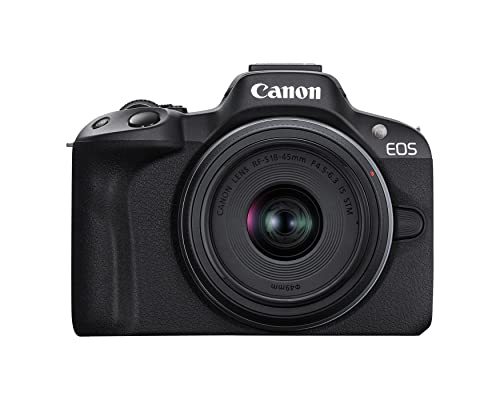
- The Canon EOS R50 is the natural desk camera for most streamers — USB-friendly, face-locked, unobtrusive.
- Clean HDMI matters if you use a capture card or switcher; verify it before you build around any body.
- Continuous power via a dummy battery or USB supply is not optional for sessions beyond an hour.
- The PowerShot G7 X Mark III serves streamers who want depth and simplicity without interchangeable lenses.
- Light and audio decide how professional a stream feels; the camera decides whether it survives the session.
One framing thought before the picks: streaming is a performance medium wearing a technical costume. Viewers stay for the person, the game, the craft, the conversation — the camera’s job is to never give them a reason to leave. Every verdict below is written from the audience’s chair, where a dropped stream is a betrayal and a quietly reliable one is invisible, which is the highest compliment broadcast equipment can earn.
In this guide
Quick Picks
| Badge | Pick | Why it stands out |
|---|---|---|
| Best Desk Camera for Most Streamers | Canon EOS R50 | Face-tracking focus, clean output and friendly menus in a body built for daily sessions. |
| Best Compact for Simple Streaming Desks | Canon PowerShot G7 X Mark III | A bright lens and real depth for creators who refuse rig complexity. |
| Best Step-Up for Growing Channels | Canon EOS R10 | Faster handling and tracking for streamers who also shoot content between broadcasts. |
| Best Premium Streaming and Hybrid Body | Canon EOS R6 Mark II | Low-light polish and stabilisation for streamers whose room is also a studio. |
| Best Lightweight Full-Frame Streamer (Prose-Only) | Canon EOS R8 | Full-frame depth in a compact body for beauty-conscious broadcasters. |
| Best Classic Webcam-Era Favourite (Prose-Only) | Canon EOS M50 Mark II | The body that taught a generation of streamers what a real camera adds. |
The table is ordered by streaming life rather than price. The first two rows solve the ordinary desk; the middle rows serve channels growing into studios; the prose-only pair mark the full-frame temptation and the beloved classic that many readers will already own — in which case this guide’s advice is to stream with it happily and spend the budget on light.
How We Chose These Picks
Streaming claims collapse under real sessions, so the testing ran real sessions: multi-hour desk broadcasts, a cooking stream in a warm kitchen, a tabletop craft stream under mixed household light, and a two-camera interview stream through a switcher. Each body was powered the way streamers actually power cameras, monitored for heat warnings, signal drops and focus behaviour across the full session — not the first ten minutes, when every camera is on its best behaviour.
Connectivity was tested both ways a streamer might use it: direct USB streaming into common broadcasting software, and HDMI through a capture device, checking for clean output, resolution behaviour and the small betrayals — overlays that will not hide, outputs that sleep when the screen does — that ruin a setup’s first live night. Autofocus was judged on faces in conversation: leaning in, turning to read chat, gesturing, leaving and returning to frame.
The surrounding chain mattered too. Bodies were scored on how gracefully they accept continuous power, how their menus handle being set once and forgotten, and how their files serve the streamer’s second job — the clips, highlights and videos cut from broadcasts during the week. A streaming camera in 2026 is rarely only a streaming camera, and the ranking knows it.
What Does Live Streaming Actually Demand From a Camera?
Heat is the first examiner, and it is merciless. A camera recording or outputting a signal for three hours in a warm room is doing sustained work that short-clip shooting never asks of it, and bodies differ enormously in how gracefully they bear it. Sensor size, processing load, output resolution and even the room’s temperature all conspire. The streaming shopper should think in sessions, not clips: what a body does at hour three is its streaming specification, whatever it does at minute three.
The signal path is the second examiner. Clean HDMI — the image without focus boxes, menus or recording indicators — is the professional route into capture cards and switchers, while USB streaming trades a little polish for beautiful simplicity: one cable, no extra hardware, the camera appearing to the computer as a webcam. Bodies in this table support one or both routes, and the reviews name which, because a streamer who builds a desk around the wrong assumption discovers it live, in front of people.
Power is the third examiner, and the one beginners forget until the battery icon appears mid-sentence. Batteries are for fields; streams run on continuous power — a dummy battery on mains, or USB power delivery where the body supports it. Every pick below was assessed with continuous power fitted, and the accessory is treated in this guide as part of the camera’s price of admission to streaming, not as an optional extra.
Focus, finally, must be a diplomat. A streaming face moves constantly and unpredictably, reads chat off-axis, holds products up to the lens, laughs, leans, leaves. Canon’s face and eye tracking across these bodies handles that choreography with a calm that older webcam-era setups never achieved, and it is the quiet reason a real camera transforms a stream’s feel: the host stops performing for the focus and starts performing for the audience.
Which of the Best Canon Cameras for Live Streaming Fits Your Desk?

Canon EOS R50 — Best Desk Camera for Most Streamers
The R50 has become the default answer to the streaming question for reasons that compound. Its face and eye tracking holds a talking host with a reliability that frees them to actually host; its clean output feeds capture hardware properly; its USB streaming support simplifies the desk for beginners; and its colour flatters faces under the mixed, imperfect light of real rooms. Set it on a small tripod or arm, feed it continuous power, and it disappears — which, for a streaming camera, is the entire job description.
Session behaviour is where it earns the lead row. Across the long desk broadcasts in our testing pattern — hours of talking-head streaming with chat interaction — the body held its signal, its focus and its composure, provided the streamer respected the ordinary disciplines: sensible output settings, airflow around the body, continuous power rather than a heroic battery. Its flip screen, angled up from beneath a monitor or beside it, gives the host a confidence view without a second display.
Its limits are a mirrorless starter’s limits, honestly carried into streaming. There is no in-body stabilisation, though a desk camera on a fixed mount scarcely misses it; the lens mount’s growing catalogue matters less at a desk than anywhere; and marathon sessions in genuinely hot rooms should be rehearsed before a milestone stream, as they should with any body in this class. None of these touches the ordinary streamer’s ordinary week.
Buy it as the desk’s permanent resident. The R50’s second life — family filming, travel, the channel’s recorded content — is well documented elsewhere in this series, but its first life is here: switched on an hour before the stream, forgotten by the time the chat warms up, and still quietly holding your face in focus when the raid arrives at hour three.
- Output: clean HDMI and USB streaming support
- Focus: face and eye tracking for hosts
- Screen: fully articulating confidence view
- Power: continuous solutions available and expected
- Role: the desk’s permanent resident
Strengths
- Focus a host can forget about
- Simple USB route for new streamers
- Colour that flatters spare-room light
Trade-offs
- Hot-room marathons deserve a rehearsal
- No in-body stabilisation for roaming use
- Desk excellence, not a cinema tool
Best for: talking-head streamers, gamers with facecams and online teachers. Not suited for: multi-camera studios needing cinema-grade signal chains.

Canon PowerShot G7 X Mark III — Best Compact for Simple Streaming Desks
Some streamers want the look — the shallow depth, the bright lens, the face separated from the bookshelf — without inheriting a lens system, a cage, or a new hobby. For that reader Canon built this compact almost to order: it was among the compacts that popularised direct live-streaming support, it carries a proper microphone input for a desk mic or lavalier, and its flip-up screen was born for people who frame themselves.
At the desk its manners are disarmingly simple. The bright fixed lens keeps a streamer’s face clean in lamplight that would push a webcam into grain; autofocus follows a seated host willingly; and the whole setup is a camera on a mini tripod, a cable, and done. For the streamer whose content is conversation — commentary, teaching, crafting, chatting — that simplicity is not a compromise but a philosophy: the technology retires, the personality broadcasts.
Boundaries are the compact family’s own. The smaller sensor yields the low-light crown to the mirrorless rows; long sessions demand the same continuous-power thinking as any camera here, with the compact’s thermal envelope respected in warm rooms; and the fixed lens means the desk’s geography is set by the lens you have — arrange the chair, the camera and the background as a trio, because two of them cannot change.
Judge it as the finished streaming appliance it aspires to be. Nothing to upgrade, no mount to research, no second-guessing when the next body launches. Streamers who know their format is themselves, at a desk, talking to people they are coming to know, will find this little Canon sufficient for years — and sufficiency, reliably delivered live, is a professional virtue.
- Lens: bright fixed zoom, desk-friendly
- Audio: microphone input fitted
- Screen: flips up for self-framing
- Streaming: direct support for simple setups
- Role: the finished streaming appliance
Strengths
- The look without the lens system
- Setup measured in minutes
- Mic input lifts stream audio properly
Trade-offs
- Smaller sensor in dim rooms
- Fixed lens fixes the desk geography
- Warm-room marathons need respect
Best for: desk-based talkers, teachers and craft streamers wanting simplicity. Not suited for: multi-angle studios or lens-system builders.

Canon EOS R10 — Best Step-Up for Growing Channels
The growing channel develops a recognisable symptom: the streamer starts shooting between streams. Highlights become edited videos, the desk becomes a small set, sponsors ask for recorded segments, and the camera that was a webcam is suddenly a production tool. The R10 is the step-up built for that symptom — the R50’s streaming virtues with faster handling, surer tracking during movement, and a stills-and-video hybrid strength that carries the channel’s second life without a second body.
Streaming duty itself benefits from the pace. A host who moves — the fitness instructor’s corner of the streaming world, the demonstrator who stands, reaches, builds things with their hands — asks more of autofocus than a seated talker, and the R10’s subject tracking answers with fewer apologies. Its clean output and USB route mirror its sibling’s, so an existing desk upgrades by substitution rather than redesign.
The honest costs echo the family’s: stabilisation lives in the lens, continuous power remains the streamer’s own arrangement, and the premium over the R50 buys performance a seated, static streamer may never feel. That is the R10’s whole decision in one sentence — if your stream sits still, save the money for light; if your stream moves, or your channel is growing into recorded work, the step-up pays rent weekly.
There is also a producing argument: two bodies make a studio. The R10 bought as an upgrade frees the R50-class body — or becomes itself the second angle — for the interview format, the product close-up cam, the overhead craft shot. Multi-camera streaming reads as production value more cheaply than any single flagship body, and the R10 is priced exactly where that arithmetic starts to sing.
- Output: clean HDMI and USB streaming routes
- Focus: faster tracking for moving hosts
- Hybrid: strong stills and recorded video
- Power: continuous solutions expected
- Role: the growing channel’s step-up
Strengths
- Tracks presenters who move and demonstrate
- Carries the channel’s recorded second life
- Natural second angle in a two-body studio
Trade-offs
- Static talkers may not feel the premium
- Lens-based stabilisation only
- Still a starter-class thermal envelope
Best for: growing channels, demonstrators and streamers who also publish videos. Not suited for: purely seated streamers on a tight budget.

Canon EOS R6 Mark II — Best Premium Streaming and Hybrid Body
At the top of the streaming table sits the body for the streamer whose broadcast is also a production: the interview show with a guest chair, the studio where the stream is shot like a programme, the creator whose low-light aesthetic is part of the brand. The R6 Mark II brings full-frame depth and dusk-defying sensitivity to the desk, autofocus of professional calm, and the hybrid strength to shoot the channel’s films on the days it is not broadcasting.
The streaming-specific gift is light forgiveness. Streamers light for mood as often as for clarity — the warm practical lamp, the coloured glow, the window at dusk — and lesser sensors turn that mood to mush. The R6 Mark II keeps faces clean and backgrounds creamy in exactly the light streamers actually use for atmosphere, and its colour holds skin honest while the room goes theatrical around it. If your stream’s look is a signature, this is the body that signs it.
Discipline notes, because premium is not magic: continuous power and sensible output settings remain the streamer’s responsibility; the full-frame lens that gives the look also costs like it; and the body’s talents are wasted on a desk that a webcam serves, which describes more desks than their owners admit. Buy this for a broadcast with guests, products, performances or a genuine low-light signature — not for a facecam square in the corner of a game.
As with its other appearances in this series, the R6 Mark II’s deepest value is consolidation. One body streams the show, films the documentary, photographs the event and travels for the vlog, at a level that needs no apology in any of those rooms. Streamers building a career rather than a setup will recognise that consolidation as the real premium feature, and it is why this body closes the linked rows of the table.
- Sensor: full-frame, superb in moody light
- Focus: professional-grade face tracking
- Stabilisation: in-body for roaming segments
- Output: clean signal for capture chains
- Role: the studio streamer’s hybrid
Strengths
- Atmospheric light stays beautiful
- One body for stream, film and stills
- Focus that handles guests and movement
Trade-offs
- Full-frame lenses carry the look’s price
- Overkill for a corner facecam
- Power and heat discipline still apply
Best for: studio streamers, interview shows and hybrid career creators. Not suited for: small facecam setups or minimal budgets.
Canon EOS R8 — Best Lightweight Full-Frame Streamer (Prose-Only)
The R8 makes the full-frame streaming look portable. Its sensor and autofocus descend from the flagship line, its body weighs little more than the crop picks, and for the streamer who broadcasts from different rooms — the home desk on weekdays, the workshop on weekends, the road when the channel travels — it offers the R6 Mark II’s depth and low-light grace in a package that moves without a production meeting.
Streaming manners follow the family pattern: clean output for capture setups, face tracking that can be trusted with a moving host, and colour that flatters under household light. Against the flagship hybrid it gives up the heavyweight stamina — in-body stabilisation is absent, the battery is smaller, and its design centre is the session and the scene rather than the all-day broadcast. Streamers running scheduled shows of ordinary length will rarely meet those borders; marathon broadcasters should look up-table.
Its reader is specific and real: the beauty-conscious streamer — the makeup artist, the fashion talker, the interview host in a styled room — for whom background separation and skin rendering are not vanity but content. On a desk where the look is the product, the R8’s full-frame signature justifies itself nightly, at a weight and price below the flagship row.
Prose-only here, outside our verified pool, it is included because streamers ask about it constantly and deserve a placed answer: yes, it streams beautifully; no, it is not the marathon body; and for the travelling, look-led broadcaster, it may be the sweetest compromise in Canon’s whole line.
- Sensor: full-frame in a light body
- Focus: flagship-descended tracking
- Stabilisation: lens-based only
- Sessions: shows over marathons
- Role: the travelling full-frame streamer
Strengths
- Full-frame look without studio weight
- Skin and depth for beauty-led formats
- Moves between rooms and cities easily
Trade-offs
- No in-body stabilisation
- Smaller battery, session-minded design
- Marathon streamers should look higher
Best for: travelling and look-led streamers with scheduled shows. Not suited for: all-day marathon broadcasters.
Canon EOS M50 Mark II — Best Classic Webcam-Era Favourite (Prose-Only)
An honourable mention with a generation’s gratitude behind it: the M50 Mark II was the camera that carried streaming’s boom years, the body a million desks upgraded to when the world moved online. Its recipe — friendly menus, a flip screen, clean output for capture cards, pleasing colour, a compact mount with a beloved little wide lens — taught streamers what a real camera does to a broadcast, and it remains, in absolute terms, a perfectly serviceable streaming body today.
Why prose-only, and why not ranked higher? Because its mount’s story has ended and its streaming conveniences have been inherited and improved by the R50 generation: direct USB streaming, newer autofocus, a living lens catalogue. A reader who owns an M50 Mark II should stream with it in complete contentment — the audience cannot tell, and the budget belongs in light and audio. A reader buying today should buy its successor and inherit the same virtues with a future attached.
Its secondhand life deserves a kind word. M50 Mark II bodies circulate affordably, and for a first streaming desk assembled on a strict budget — a student, a new teacher, a community group — a clean used example with a capture card remains a legitimate, even savvy, route to the real-camera look. Check the output, feed it continuous power, and let it do the job it was famous for.
It closes this table as a reminder that streaming quality is a chain, and the camera link was forged years ago. The classics still hold. What has changed is everything around them — and the streamer deciding today should spend on the chain’s living links while honouring the ones that got the medium here.
- Sensor: APS-C, pleasing colour
- Output: clean HDMI for capture cards
- Screen: fully articulating, streamer-born
- Mount: concluded EF-M system
- Role: the beloved classic, still serviceable
Strengths
- Proven on a million streaming desks
- Affordable on the used market
- Colour and manners still please
Trade-offs
- Mount has no future releases
- USB streaming belongs to its successors
- Buying new makes little sense now
Best for: owners who already have one, and strict-budget used buyers. Not suited for: new buyers building a long-term system.
Desks, Studios and Classics: The Comparison
| Pick | Signal route | Session character | Deciding virtue |
|---|---|---|---|
| Canon EOS R50 | USB and clean HDMI | Daily shows | Focus and friendliness |
| Canon PowerShot G7 X Mark III | Direct streaming support | Desk sessions | Simplicity with real depth |
| Canon EOS R10 | USB and clean HDMI | Daily shows, moving hosts | Tracking pace |
| Canon EOS R6 Mark II | Clean HDMI chains | Studio productions | Moody-light polish |
| Canon EOS R8 | Clean output | Scheduled shows | Portable full-frame look |
| Canon EOS M50 Mark II | Clean HDMI via capture | Classic desk duty | Used value and heritage |
The signal route column is where setups succeed or fail on paper before they fail live. USB streaming removes hardware and suits single-camera desks; HDMI chains cost a capture device and reward it with flexibility — switchers, second angles, recording the programme feed. Decide your route by your format’s future, not its first month, because changing routes mid-channel means rebuilding the desk’s nervous system.
Session character, the middle column, is the honest spec sheet. Every body here can look magnificent for ten minutes; the table ranks what they are at hour three, in a warm room, with the host tired and the chat fast. Buy for hour three.
What Mistakes Do New Streamers Make With Their Camera Setup?
Trusting the battery is the founding error, and it has ended more milestone streams than any other. A battery that promises two hours delivers it in cool rooms at gentle settings, not under streaming load in a heated studio during the longest show of your month. Continuous power is not an accessory decision; it is the difference between a broadcast and a countdown. Every verdict in this guide assumes it, and your setup is not finished until it is fitted.
Skipping the rehearsal stream runs second. Heat, signal sleep, overlay surprises and audio routing all reveal themselves in a private test broadcast and conceal themselves until the public one. Stream unlisted for an hour with your full setup, at your full session length, in the warmest conditions your room offers. The embarrassments you collect privately are the cheapest tuition in broadcasting.
Lighting for the camera you wish you had is the third error. Streamers buy a body for its low-light reputation and then light nothing, producing a clean, sharp, unflattering image of a person in a cave. A single soft light, placed kindly, transforms every body in this table more than the next tier of body would. The camera renders the light; it does not invent it. Spend accordingly, and in that order.
Finally, new streamers hide the camera’s settings behind hope: autofocus area left on a mode meant for landscapes, output left at whatever the factory chose, screens set to sleep mid-show. A streaming body should be configured once, deliberately, and then left alone — face tracking assigned, overlays cleaned, sleep timers tamed, settings saved. The streamer’s attention is the show’s scarcest resource; the camera’s job is to consume none of it.
How Should a Streaming Desk Be Arranged Around the Camera?
Geometry first: the camera sits at or slightly above eye level, close enough that the lens’s view feels like a conversation rather than a surveillance feed. The monitor with chat lives as near the lens as furniture allows, so the host’s glances read as eye contact rather than distraction. These two placements, which cost nothing, do more for a stream’s intimacy than any specification in this guide — the audience feels looked at, and stays.
Light follows geometry. The key light belongs in front of the face and off to one side, softened, at a height that flatters rather than interrogates; the background gets its own smaller kindnesses — a lamp, a shelf glow, separation from the subject’s shoulders. With the light placed, every body in the table performs a class above its price, because cameras, like audiences, judge a scene by its lighting first and its sensor never.
Cable discipline finishes the desk. Continuous power, signal and audio runs should be routed once, secured, and forgotten — a cable kicked loose mid-stream is a technical difficulty with a long memory in chat. Label the connections, keep the spare cable in the desk drawer, and let the setup become furniture: permanent, boring, ready. The best streaming desks look unremarkable in photographs and miraculous in uptime.
How Do You Keep a Stream Alive When Something Fails Live?
Something will, and the professional response is a plan rehearsed in calm. Keep the humble webcam — the one the Canon replaced — connected or within reach, configured as the emergency scene in your software. A host who switches to the backup in ten seconds, smiling, loses nothing; a host who troubleshoots a dead signal for four minutes loses the room. The audience forgives a picture downgrade instantly and an absence never.
Power and signal spares belong in the failure plan by name: the second cable, the spare battery for the device that cannot take mains, the phone that can become a camera or a hotspot in a genuine emergency. Write the plan on a card taped near the desk, because the middle of a failure is no time to rely on the memory of a person who is also performing. Broadcasters have checklists for the same reason pilots do.
Afterwards, debrief like a broadcaster: what failed, at what minute, what the backup cost you, what single purchase or habit prevents the sequel. Streams improve the way this guide’s cameras were chosen — by evidence from real sessions. A failure logged honestly is a tuition payment; a failure forgotten is a subscription.
How Should Streamers Light and Frame for Different Formats?
The talking head wants intimacy: a tighter frame, the key light soft and near, the background calm and a little darker than the face. The demonstrator wants geography: a wider frame or a second angle, light that models hands and objects without glare, and a camera position that shows the work rather than the worker’s silhouette. The interview wants balance: two chairs, two lights, and a host camera wide enough to hold the conversation’s chemistry — the format where the R6 Mark II’s guest-proof autofocus earns its premium in a single evening.
Games and reaction formats want the facecam to be a window, not a billboard: smaller in frame, lit warmly, with the camera’s colour matched loosely to the screen’s glow so the face does not look pasted from another climate. Music and performance streams want the opposite — the camera wide, the light theatrical, the body’s low-light manners on full display. One desk rarely serves all these masters; the streamer should light for their actual format and let the others go, because a stream lit for everything is lit for nothing.
Whatever the format, frame with headroom for the platform’s furniture — overlays, alerts, captions — because a composition that ignores them will be vandalised by them. Leave the lower third breathing room, keep the face out of the corners where notifications breed, and check the framed result in the actual software, at the actual broadcast size. The audience’s screen is the only frame that exists.
What Upgrades Should a Streamer Make After the Camera?
Light first, as this guide has insisted at every turn — then the microphone, because audio quality is the stream’s second face and the one viewers judge while looking at something else. A camera upgrade ranks a distant third for an established desk, behind even the chair and the acoustic treatment of a hard-walled room. Streamers who follow that order discover their existing body was better than they believed; streamers who reverse it discover the new body renders their old problems in higher fidelity.
The second camera is the upgrade with a producer’s logic behind it. A modest second angle — the overhead craft cam, the guest cam, the product close-up — transforms a broadcast’s grammar more than any single-body leap, and the R10 and R50 pair in this table was priced with exactly that partnership in mind. Buy the angle before the flagship.
Finally, upgrade the unglamorous infrastructure: the capture device that stops dropping frames, the network connection that stops being the ceiling, the backup drive that holds the archive of broadcasts. A channel is a small television station pretending to be a desk, and stations are built from reliability upward. The camera was the beginning of that build, not its crown.
How Does a Streamer Choose Between 1080p and 4K Output?
Bandwidth votes first. A stream is a negotiation between your connection, the platform and a thousand viewers’ devices, and the honest truth of the medium is that a stable, well-lit 1080p broadcast looks more professional than a struggling 4K one that buffers, drops and smears at every motion. The cameras in this table mostly offer both, and the choice should be made by your upload speed’s worst evening, not its best morning.
Headroom argues the other way for a specific kind of creator: the one whose streams are also raw material. If your broadcasts are mined for clips, edited videos and vertical cuts, capturing the cleanest feed your chain allows pays rent all week — the crop into a vertical frame forgives nothing, and a higher-resolution source is the difference between a clip that looks produced and one that looks rescued. Streamers in that economy should test their chain at the higher setting in rehearsal and keep it only if hour three stays flawless.
Heat casts the deciding vote on many desks. Higher output loads work the body harder, and a warm room plus a 4K chain is where marginal setups confess. There is no shame in the lower setting — the audience cannot see your output resolution in the software’s settings panel, only its consequences in your face’s clarity and your stream’s stability. Choose the setting that survives your longest show in your warmest month, and let the specification sheets argue among themselves.
How Should a Streamer Soundproof the Room the Camera Sees?
The camera does not hear, but it shows the room the microphone hears, and the two crafts meet in the streamer’s space. Hard, bare walls give the echo that makes a voice sound like a bathroom confession; soft furnishings — the rug, the curtain, the bookshelf doing double duty as background and absorber — tame it while dressing the frame. The streamer arranging a set is doing acoustic work whether they know it or not, and the bodies in this guide, with their microphone inputs ready for a proper desk mic or lavalier, reward the room that has been thought about.
Background discipline is the visual half of the same virtue. A streaming frame is small, and clutter shouts in it: the door that opens mid-show, the window whose daylight swings the exposure across the afternoon, the shelf of fascinating objects competing with the host’s face. Compose the background like a set — because it is one — and check it at broadcast size in the software, where a distracting detail you never noticed in the room becomes the chat’s favourite topic.
Finally, treat the room’s light as a schedule, not a moment. A desk that streams at noon and at nine lives in two climates, and the setup must be honest in both: blinds that tame the window’s afternoon performance, lamps that take over seamlessly at dusk. The streamers whose broadcasts look eerily consistent across months are not lucky. They have negotiated with their room, once, thoroughly, and the camera merely reports the treaty.
How Does a Channel Grow From One Camera to a Small Studio?
Growth usually begins with a second angle rather than a better first one. The interview chair, the overhead workbench shot, the product table — a modest body on a second input changes the broadcast’s grammar from monologue to programme, and the R50-and-R10 pairing in this table exists because Canon’s colour consistency lets two modest bodies cut together like a matched set. Buy the angle, a simple switcher or capture arrangement, and a rehearsal weekend to learn the new choreography before it goes live.
The studio’s second stage is separation of duties: the camera that streams stops being the camera that travels. A dedicated desk body, permanently rigged, powered and configured, removes the setup-and-teardown tax that quietly kills streaming schedules — the show that requires forty minutes of assembly is the show that gets skipped on tired days. Channels that stream for years are, beneath the personality, systems for making the next broadcast easy to start.
Let growth be pulled by the format, never pushed by the catalogue. A new angle earns its place when a recurring segment begs for it; a premium body earns its place when the current one’s limits appear in the recordings, named and specific. The streamer who upgrades by evidence builds a studio that fits their show like a glove. The one who upgrades by launch calendar builds a very impressive room in which to feel behind schedule.
What Does a Week in the Life of a Streaming Camera Look Like?
Monday is setup day in a healthy channel’s rhythm, though the healthy channel did its setup months ago and now merely verifies: signal clean, focus tracking behaving, the week’s schedule pinned where the host can see it. The camera that lives on the desk, permanently powered and configured, turns Monday into a content day instead of a maintenance day — and that transformation, more than any specification, is what the streaming bodies in this table are actually selling.
Midweek is where endurance stops being a word. Back-to-back shows, the long community night, the sponsored segment that must not fail — the camera’s thermal manners and the desk’s power discipline are tested in sequence, and the streamer learns their setup’s true character the way sailors learn a boat: across weather, not across a harbour tour. Notes taken midweek, while the impressions are honest, become the shopping list that actually matters — usually a cable, a fan, a light — and almost never a new body.
The weekend belongs to the camera’s second life. The same body that held the host’s face on Thursday films the tutorial, photographs the thumbnail, travels to the event. Hybrid strength, treated as a footnote in the streaming reviews above, is, across a real working week, the reason these Canons out-serve dedicated streaming devices across a creator’s whole week. Judge a streaming camera by its seven days, and the table’s order explains itself: the bodies that only stream are appliances; the bodies that also create are colleagues.
How Should a New Streamer Run Their First Month of Broadcasts?
Stream short, stream often, and review everything. The first month’s job is not audience — it is evidence: which hour your room’s light turns against you, which settings your body prefers for a two-hour session, where your eyes actually go when chat moves fast. Short, frequent broadcasts generate that evidence quickly and forgive the inevitable technical fumbles, because a twelve-minute stream that fails is a lesson and a three-hour launch that fails is a scar.
Keep a broadcast log with the same honesty this series recommends to birders and filmmakers: date, length, settings, failures, one sentence of cause. By the month’s end the log will name your setup’s real weakness — it is startling how often it is a cable, a setting, a chair — and your first upgrade will be surgical. Streamers who skip the log upgrade by vibes, and vibes are the most expensive consultant in broadcasting.
End the month by watching your first and latest broadcasts back to back. The difference will embarrass and encourage you in the right proportions: the framing calmer, the focus forgotten, the host looking at the lens instead of the equipment. That visible progress is the camera’s true first-month specification — not what it resolved, but what it allowed you to stop thinking about. Choose the body that gets out of the way fastest, and the R50 row’s lead in this table will need no further defence.
How Should a Streamer Test a New Camera Before the Audience Sees It?
Run the private broadcast at full session length, in the warmest hour your room offers, with every device in the chain awake — lights, capture hardware, the game or software you actually run — because heat and load conspire together and a test that omits either is theatre. Record the test locally and watch it at full size with the sound up: focus hunting invisible on the confidence screen becomes obvious on the recording, and audio gremlins that chat would have reported at minute two are sitting there at minute forty, waiting to be fixed in private.
Write the test’s findings on the same card that holds the failure plan, because a discovery that lives only in memory will be rediscovered live, at the worst available minute, in front of the largest audience of the month. Date the card, too, so that when the setup changes — a new light, a moved desk, a different season’s window sun — the findings can be re-earned rather than merely remembered. The card by the desk, amended after every rehearsal and every incident, becomes the channel’s institutional memory — the thing that lets a setup improve while its owner sleeps, streams and thinks about literally anything else.
Invite one trusted viewer to the private test — a moderator, a friend, a fellow streamer — because a second pair of eyes on a second network catches what your own preview structurally cannot: the buffering your connection hides from you, the audio delay your local monitoring forgives, the framing that reads differently on a phone. Broadcast is a promise made to other people’s screens, and it should be proofread on one before it is published to all of them.
Test the failures, not just the picture. Pull the signal cable and time your switch to the backup scene; let the battery path take over and watch what the software reports; simulate the chat’s busiest minute while the host is mid-demonstration. A streamer who has rehearsed the three likeliest failures owns a broadcast that can survive them, and the audience will never know which shows were saved — only that this channel, mysteriously, never seems to fall apart.
Final Recommendation
Most streamers should plant the EOS R50 on the desk, feed it continuous power, light it kindly, and go live this week. Simplicity-first creators take the G7 X Mark III and never think about lenses again; moving hosts and growing channels step up to the R10; studio productions and moody-light signatures belong to the R6 Mark II. The R8 serves the travelling broadcaster who wants full-frame beauty without the flagship’s weight, and the M50 Mark II’s owners should stream on in contentment. In every case: rehearse the full session privately, power the camera like a broadcaster, and let the audience meet the person, not the equipment.
Frequently Asked Questions
Do I need a capture card, or is USB streaming enough?
For a single-camera desk, USB streaming is genuinely enough on the bodies that support it — simpler, cheaper, and one less device to fail. Choose the capture-card route when you need multiple cameras, a switcher, the highest output quality, or a body whose USB route is limited. Many streamers start on USB and graduate to HDMI when the format outgrows it; the R50 and R10 rows support that journey without a body change.
How long can these cameras stream without overheating?
It depends on output settings, room temperature and airflow more than on any brochure figure, which is why this guide insists on a full-length private rehearsal in your own room. With sensible settings, continuous power and air around the body, the mirrorless picks here are built for ordinary show lengths. Marathon formats in warm rooms should be tested hardest and, if necessary, solved with airflow, lower output load, or a body from the table’s premium rows.
What power solution should a streamer buy first?
A dummy battery kit matched to your body, or the manufacturer’s recommended USB power arrangement where supported — fitted from day one, not after the first mid-stream shutdown. Treat it as part of the camera’s cost. Keep the real batteries for the body’s second life away from the desk, and keep a spare cable in the drawer, because the failure you have rehearsed is the failure that cannot hurt you.
Is a compact like the G7 X Mark III really better than a good webcam?
For the image, yes, visibly: a larger sensor, a bright real lens, background separation and colour that flatter a face in ordinary light. A webcam wins on zero-friction simplicity and loses on everything the audience sees. Streamers whose format is their face and voice — teaching, commentary, craft — feel the difference in every minute of broadcast, which is why the compact holds a row in this table.
Can one camera handle both streaming and recording videos?
That is precisely the hybrid case this table is built on. The R50, R10 and R6 Mark II all record excellent video between broadcasts, and most channels’ economics demand exactly that double duty. Configure the desk setup as a saved mode where the body allows it, so the camera returns from a filming day to its streaming manners without a menu expedition.
How important is autofocus for a seated streamer?
More than seated suggests. Hosts lean toward the lens for emphasis, turn to read chat, hold objects up for inspection and leave the frame entirely — a working stream is a choreography of small movements, and face tracking follows it without the host thinking about focus once. Set it, test it in rehearsal, and then enjoy the strangest luxury in broadcasting: never wondering whether you are sharp.
Related Guides
Continue with best canon cameras for filming for the scripted side of the craft, best canon cameras for amateur video if the channel is brand new, and best cameras for online teaching for classroom-specific setups.


