kajuandouglas.com is reader-supported. When you buy through links on our site, we may earn an affiliate commission.
Where to Buy
A recorded video forgives; a live audience does not. The best cameras to use for youtube streaming are judged here by the unforgiving clock of a broadcast already in progress: clean output that never overlays a battery icon on your face, focus that holds while you lean toward a comment, a connection that survives hour three as calmly as minute three, and an image that stays honest when the room’s light changes at dusk. Streaming is not recording with witnesses — it is a different discipline, and its cameras must be chosen by different evidence.
That is also how this guide differs from our companions on creating and uploading. Creating concerns the launch and the catalogue; uploading concerns the finished file’s journey. Streaming concerns presence: the desk, the game, the lesson, or the conversation happening now, with chat scrolling and no editor standing between a mistake and its witnesses. Every pick below was selected for that live room first.
Two families share the list deliberately. Dedicated streaming cameras and premium webcams win on permanence — mount once, configure once, appear identical every night. Mirrorless bodies win on image ambition — real lenses, real depth, a broadcast that looks like a production. The right family depends on whether your stream is a face talking, a product being demonstrated, a game being played, or a room being hosted, and the guide keeps asking that question on your behalf.
Key Takeaways
- Elgato Facecam leads for desk streamers who want a locked, repeatable image with no recording distractions.
- OBSBOT Tiny 2 follows a moving presenter, freeing teachers and demonstrators from a fixed chair.
- Sony ZV-E10 II is the mirrorless step for streams that must look like productions, with monitored audio.
- Canon EOS R50 offers kind colour and a gentler learning curve for a first mirrorless streaming rig.
- Logitech Brio 4K remains a dependable, sharp webcam for professional calls that become broadcasts.
- Logitech StreamCam suits vertical and mobile-leaning creators who stream simply and often.
In this guide
Quick Picks
| Badge | Pick | Why it stands out |
|---|---|---|
| Best Desk Streaming Camera | Elgato Facecam | Locked settings stored on the device, tuned entirely for a seated presenter. |
| Best Tracking Camera | OBSBOT Tiny 2 | Motorised follow framing for presenters who stand, teach, and demonstrate. |
| Best Mirrorless for Streaming | Sony ZV-E10 II | Interchangeable lenses, product focus, and a complete audio pathway. |
| Best First Mirrorless Rig | Canon EOS R50 | Flattering colour and guided handling for a growing live channel. |
| Best Professional Webcam | Logitech Brio 4K | Sharp, well-exposed desk image with a long record in serious setups. |
| Best Simple Creator Webcam | Logitech StreamCam | Friendly handling and vertical awareness for frequent, casual streams. |
How We Chose These Picks
Evaluation ran long, because streaming faults are long-session faults. Each candidate had to hold focus, exposure, and connection through extended desk sessions, survive the transition from daylight to lamplight without a presenter’s intervention, and restart the next day in exactly the configuration it was left in. Cameras that were brilliant for twenty minutes and temperamental by hour two were marked down without sympathy.
Output cleanliness was checked as a first-class property. A streaming camera must deliver an uncluttered feed — no menus, no status icons, no automatic shutdown sleeping through a finale — whether it connects by USB as a webcam or feeds a capture setup over HDMI. Where a body needs a setting changed or a power arrangement observed to achieve that cleanliness, the pick’s section says so plainly.
Audio pathways mattered because live viewers forgive a soft image far longer than an echoing voice. Bodies and cameras offering proper microphone routes, monitoring, or painless pairing with a streamer’s existing microphone scored accordingly. No pick here includes a microphone good enough to end that conversation; each was judged on how gracefully it joins one.
What Does Live Streaming Demand That Recording Does Not?
Endurance, first of all. A recording session can pause for a battery, a card, or an overheating warning; a live session converts each of those into a public incident. Streaming cameras therefore need honest power arrangements — mains or dummy-battery solutions for mirrorless bodies, bus power for webcams — and thermal behaviour that treats a three-hour broadcast as a normal Tuesday rather than an extreme sport.
Repeatability comes next. The streamer sits down nightly to an audience that reads consistency as professionalism: the same framing, the same exposure, the same colour, before a word is spoken. Cameras that store their configuration, wake in their saved state, and resist helpful automatic drift earn a trust that specification sheets cannot express. Two picks in this guide built their entire design around that trust.
Forgiveness completes the trio. Live presenters glance at chat, lean out of marks, hold products at wrong angles, and laugh mid-sentence. Focus systems must reacquire without hunting theatre, exposure must ride a cloud crossing the window without pulsing, and framing aids — tracking, in one pick’s case — must quietly repair the presenter’s geography. A streaming camera is a crew member, and it is hired for its calm.
Finally, the chain matters as much as the camera. Streaming software, capture routes, and platform settings all touch the image after the lens does, so this guide favours cameras whose behaviour in common streaming software is predictable and well documented. The best live image is the one the whole chain preserves, not the one the sensor briefly achieved.
Should Your Stream Use a Webcam, a Streaming Camera, or a Mirrorless Body?
Choose the dedicated cameras when the desk is the whole stage. A streamer whose format is a face, a voice, and a screen gains nothing from interchangeable lenses except decisions, and the Facecam and its webcam rivals convert that simplicity into nightly reliability. Their image ceiling is real but honest, and for commentary, tutoring, and gameplay-with-facecam formats it sits comfortably above the audience’s threshold of care.
Choose mirrorless when the image itself is part of the programme: a cooking stream where ingredients must glow, a music room where depth flatters the performer, a product channel where the held object is the star, a co-hosted show where two faces at different distances must both live in acceptable focus. Lenses buy control over all of that, at the price of power, cabling, and configuration duties this guide will not minimise.
Choose tracking when the body is the programme. Teachers at whiteboards, fitness and craft demonstrators, makers moving around a bench — these presenters break fixed framing within minutes, and the Tiny 2’s motorised follow exists precisely for them. Its compromise is a smaller sensor’s image; its gift is that no moment of the lesson ever leaves the frame to fetch a remote control.
Hybrid rigs are legitimate and common: a mirrorless main angle for the produced segments, a webcam holding the always-on desk view, the tracking camera borrowed for demonstration days. Build the hybrid only after the single-camera stream runs boringly well, because every added angle multiplies the chain that must not fail live. Ambition sequenced is professionalism; ambition simultaneous is a outage rehearsal.
Which of the Best Cameras to Use for YouTube Streaming Fits Your Broadcast?

Elgato Facecam — Best Desk Streaming Camera
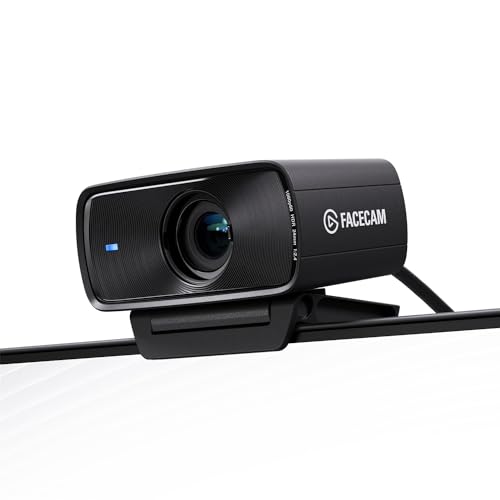
The Facecam was designed by studying streamers rather than photographers, and the study shows in every decision. Its fixed focus covers the seated presenter’s natural geography — leaning in for emphasis, rocking back for a laugh — without a single hunting episode, because there is no autofocus to hunt. Exposure and white balance are set manually, locked, and stored on the device itself, so the camera that greets tonight’s audience is pixel-for-pixel the camera that greeted last night’s, even if the computer, the software, or the room’s operating system has changed around it.
That permanence is a production philosophy. Live channels are brands rendered nightly, and a face that changes colour temperature between Tuesdays spends the audience’s trust on trivia. The Facecam refuses the trivia. Set it once under your actual streaming light, with your actual background, and the configuration becomes furniture — present, dependable, and never the subject of a pre-show negotiation.
Image character suits the desk’s honest work. The rendering favours truth over flattery, which commentary, teaching, and analysis channels should count as respect for their viewers: expressions read clearly, emphasis lands, and nothing in the processing distracts from an argument. Paired with a proper microphone — deliberately absent, because its intended owners already run real audio — the result is a broadcast face of professional steadiness.
Understand the boundary and it never chafes: this camera lives at the desk, expects deliberate lighting, and will not follow you to a demonstration bench or a travel stream. Within the desk’s borders it is the most completely considered streaming instrument in this guide, and the one whose owners most rarely think about their camera at all — the highest praise live equipment can earn.
Long sessions confirm the design. There is no battery to manage, no recording limit ticking in a corner of the mind, no thermal drama at hour three; the camera simply continues, which is the entire job description written as a behaviour. Streamers graduating from a laptop’s built-in camera will feel the upgrade less as spectacle than as relief, and relief, nightly, compounds into a channel.
- Focus: fixed, deep field for seated presenters
- Settings: manual controls stored on the device
- Connection: USB webcam for streaming software
- Image: honest rendering under desk lighting
- Audio: external microphone expected by design
Strengths
- Identical image every night, by design
- No focus hunting during live delivery
- Built purely for long desk broadcasts
Trade-offs
- Desk-bound; no travel or demonstration range
- Requires a separate microphone investment
- Expects the streamer to light the desk well
Best for: commentary, tutoring, analysis, and gameplay facecam streamers. Not suited for: mobile presenters or lens-driven production streams.

OBSBOT Tiny 2 — Best Tracking Camera
Stand up mid-sentence, walk to the whiteboard, crouch by the workbench, hold the finished piece high — the Tiny 2 turns to follow, reframing its presenter with a motorised calm that feels less like a gadget than like a camera operator who never blinks. For the large family of streams whose teaching happens on its feet, that following act removes the format’s oldest constraint: the invisible box inside which the presenter was previously required to live.
Gesture and voice control extend the freedom. A shown palm can start or stop tracking, a spoken command can wake the camera, and presets can swing the view between the desk, the board, and the bench without the presenter touching the computer. Live teaching is a performance of attention, and every control that keeps the teacher’s eyes on the students rather than on a mouse is a small restoration of the classroom’s natural order.
Image quality, judged as a webcam-class device with a larger sensor than most, is bright and detailed at desk distances and entirely respectable across a room, though a mirrorless body will out-resolve it in a beauty contest it was never entering. The contest it wins is presence: the presenter framed, followed, and lit by attention for the whole session, including the unscripted detour that becomes the clip everyone shares.
Privacy and discipline deserve a sentence each. A camera that can move should be parked deliberately when the stream ends, and its indicator habits learned on day one; and tracking, like any automation, should be rehearsed so its occasional confusion — a poster mistaken for a person, a guest stealing the frame — becomes a known behaviour rather than a live surprise. Rehearsed, it is the most liberating streaming camera here.
Streamers who demonstrate with their hands will find a particular joy in its close work: lean toward the lens with a component, a stitch, a chord shape, and the framing obliges. That intimacy, delivered without an operator, is why craft, repair, music, and fitness channels have adopted tracking cameras as their signature angle — the lesson feels attended, because visually, it is.
- Mount: motorised pan and tilt tracking
- Control: gesture and voice commands
- Framing: follows presenters around a room
- Sensor: larger than typical webcam class
- Role: standing teaching and demonstration
Strengths
- Presenter never leaves the frame mid-lesson
- Hands-free control preserves teaching flow
- Presets swing between desk, board, and bench
Trade-offs
- Image ceiling below mirrorless bodies
- Tracking quirks must be rehearsed before going live
- Moving camera asks for deliberate privacy habits
Best for: teachers, demonstrators, makers, and fitness streamers. Not suited for: seated commentary wanting the simplest fixed setup.

Sony ZV-E10 II — Best Mirrorless for Streaming
When a stream graduates from a face at a desk to a programme with production value, this is the body the graduation usually names. Its interchangeable lenses let a streamer choose the room’s rendering — a wide view that includes the set, a faster prime that melts a cluttered background into respectability — while its focus system performs the live presenter’s two hardest tricks: holding an eye through animated delivery, and gliding to a product raised toward the lens without a hunting wobble for the audience to watch.
Streaming integration is treated as a native language rather than an afterthought. USB streaming behaviour covers the straightforward rig, clean HDMI output serves capture-based production, and the audio pathway — microphone input, headphone monitoring, and a digital shoe for tidy wireless microphones — is the most complete in this guide. A live channel’s sound can therefore mature from a first microphone to a monitored, treated setup without the camera ever becoming the bottleneck.
Long-broadcast discipline must be arranged rather than assumed, and this guide states the arrangement plainly: continuous power rather than a battery’s optimism, a configuration saved and rehearsed, and a pre-show check of the clean output exactly as the audience will receive it. Streamers who build that small ritual get a broadcast image of genuine production character, night after night, from a body that also shoots the channel’s recorded catalogue beautifully between streams.
Concede the class’s familiar costs. There is no in-body stabilisation, which matters little on the tripod a streaming rig implies; menus reward one careful evening; and the lens catalogue, while a glorious growth path, will happily absorb future budgets. For a channel whose live room is becoming its flagship product, those are the right costs, paid to the right camera.
Co-hosted and interview streams reveal another depth: the body holds focus etiquette between two faces without nervous switching, and its colour flatters both under the mixed practical lights of a real room. A two-person live show is where webcam-class images most visibly run out of headroom, and where this Sony most clearly justifies its rig.
- Sensor: APS-C, Sony E-mount lenses
- Output: USB streaming and clean HDMI routes
- Focus: eyes and presented products handled gracefully
- Audio: input, monitoring, and digital shoe
- Power: continuous supply arranged for long shows
Strengths
- Production-grade image for flagship streams
- Audio pathway grows with the channel
- Lens choice shapes the set’s whole character
Trade-offs
- Needs a deliberate power and cabling setup
- Menus require an initial configuration evening
- Lens ambitions add future cost
Best for: produced streams, product channels, and co-hosted shows. Not suited for: streamers wanting a mount-and-forget webcam simplicity.

Canon EOS R50 — Best First Mirrorless Rig
A first mirrorless streaming rig has to teach its owner while it broadcasts, and the R50’s guided, plain-language approach makes it the gentlest teacher in this guide. Its colour is the other half of the welcome: faces emerge warm and recognisable under ordinary room lighting, which is where most new streamers actually live, and the audience meets a person rather than a colour-correction project.
The platform logic mirrors the Sony’s with a Canon accent. Begin on the kit lens at the desk, stream over USB for the simple rig or grow into a capture setup, and climb the RF lens staircase when a wider room view or a faster evening prime names itself through experience. Habits learned on the R50 transfer upward through Canon’s range, so the first rig’s education is never wasted when the channel’s ambitions outgrow its first body.
Live manners are well judged for a growing show. Autofocus minds the presenter while chat demands the presenter’s eyes, vertical options serve the short-form clips that advertise the live channel, and the flip screen lets a solo streamer check framing without leaving the chair’s mark. Batch-streamers who record and broadcast from the same desk will appreciate how little reconfiguration the double duty requires.
Apply the mirrorless disciplines honestly: continuous power for long broadcasts, a saved configuration, a spare battery for recorded days, and a pre-flight glance at the output feed. None of this is burdensome once ritualised, and in exchange the streamer owns a rig whose image can grow from a bedroom broadcast to a small studio without a change of system or of muscle memory.
New streamers often underestimate how much confidence a kind image buys. Watching your own broadcast back and seeing a face that looks like you on a good day — rather than a grey stranger under a ceiling bulb — changes the willingness to go live tomorrow. The R50 manufactures that willingness more reliably than any body here except its Sony rival, and for many first rigs, willingness is the specification that decides whether a channel exists in six months.
- Sensor: APS-C, Canon RF mount
- Colour: warm, recognisable skin in room light
- Handling: guided menus for first rig owners
- Output: USB streaming with capture growth path
- Screen: flip design for solo framing checks
Strengths
- The kindest first mirrorless streaming experience
- Colour that builds a new streamer’s confidence
- Platform and habits transfer as channel grows
Trade-offs
- Long shows need arranged continuous power
- Kit lens teaches before it dazzles
- Stabilisation leans on lens and tripod
Best for: new and growing streamers stepping up to mirrorless. Not suited for: presenters needing tracking movement around a room.

Logitech Brio 4K — Best Professional Webcam
The Brio’s long career in serious desk setups rests on a simple reputation: it makes a professional look competent on camera, in ordinary rooms, without a production meeting. Its sharp, well-exposed image, sensible field-of-view choices, and reliable behaviour in the software streamers and companies actually use have made it the default against which other webcams audition — a status earned across years of daily service rather than a launch week’s excitement.
For a YouTube streamer whose live work overlaps with professional life — the consultant’s evening channel, the educator’s public sessions, the analyst who broadcasts after the day job — that dual citizenship is the point. One camera serves the client call at four and the audience at eight with the same composed, credible image, and its adjustable framing lets a tight facecam and a wider desk view live in one mount.
Light handling is its quiet speciality. Backlit windows, mixed office bulbs, and the dusk transition that ambushes evening streams are all ridden with a steadiness that keeps the face present and the background honest. Streamers without a lighting rig — and this guide keeps recommending one anyway — will find the Brio the most forgiving witness to a room as it actually is.
Expect webcam-class boundaries with good grace: a fixed lens, an image that stops short of mirrorless depth, and a dependence on the computer’s software for its refinements. It also expects a separate microphone for broadcast-grade sound, as every pick here does. Within those boundaries, it remains what it has long been — the professional webcam a streamer can mount, configure in an afternoon, and then ignore for years of reliable service.
That ignorability deserves emphasis in a streaming context. Live channels die of friction more often than of image quality, and a camera that never becomes the pre-show problem protects the broadcast habit itself. The Brio’s owners tend to upgrade their microphones, their lights, and their backdrops for years before the camera’s name ever appears on a shopping list again.
- Image: sharp, high-resolution desk picture
- Framing: adjustable field of view options
- Light: steady exposure in mixed office conditions
- Compatibility: broad streaming software support
- Role: professional dual-duty desk camera
Strengths
- Credible professional image with minimal fuss
- Forgiving of ordinary room lighting
- Years-long reputation for reliable service
Trade-offs
- Fixed lens with webcam-class depth
- Broadcast sound needs a separate microphone
- Refinements depend on companion software
Best for: professionals streaming from a working desk. Not suited for: lens-driven production or standing demonstration formats.

Logitech StreamCam — Best Simple Creator Webcam
Some channels live on frequency: the daily check-in, the quick reaction, the casual evening hangout that keeps a community warm between major productions. The StreamCam was shaped for that cadence, with friendly handling, a mount that understands both landscape and vertical framing, and an image tuned to make a creator look present and personable without a configuration project standing between the impulse and the broadcast.
Vertical awareness is its signature courtesy. Creators who clip live moments into short vertical videos, or who stream to audiences arriving from vertical platforms, will appreciate a camera whose physical design treats the tall frame as a first-class citizen rather than a cropped apology. The habit of serving two orientations from one desk setup quietly doubles the value of every live hour.
Focus and exposure behave with the unobtrusive competence the format needs: a face held, a room ridden through its light changes, no drama for the audience to notice. Its image sits a step below the Brio’s professional polish and well above the built-in cameras most creators start with, which is exactly the step a frequent, personality-led channel needs to look intentional.
Boundaries are the webcam family’s usual ones — fixed lens, computer-dependent refinements, a separate microphone for serious sound — plus a personality that suits casual formats better than formal productions. A creator whose stream is a conversation will find it a faithful, low-friction companion; a creator building a produced show should graduate to the mirrorless rows of this guide and let the StreamCam retire, happily, to the travel bag and the second desk.
That second life is worth planning for rather than apologising about. Simple webcams become the backup angle, the guest-feed camera, and the laptop-bag broadcaster for conference trips and borrowed desks. Bought knowingly for a frequent creator’s present, the StreamCam keeps earning its drawer space long after the flagship rig arrives, which is more than many grander purchases manage.
- Framing: landscape and vertical friendly mount
- Image: personable, creator-tuned desk picture
- Handling: simple setup for frequent streams
- Focus: steady face handling for conversation
- Role: casual, high-frequency live companion
Strengths
- Low friction for daily and casual broadcasts
- Vertical work treated as a native format
- Personable image without a setup project
Trade-offs
- Polish sits below the professional webcam tier
- Fixed lens and software-dependent refinements
- Formal productions will outgrow it
Best for: frequent, casual creators and community hangouts. Not suited for: produced shows needing lenses, depth, and monitored audio.


