kajuandouglas.com is reader-supported. When you buy through links on our site, we may earn an affiliate commission.
Where to Buy
Gameplay video looks simple from the viewer’s chair: a game fills the screen, a face sits in the corner, and the two feel like one performance. Behind that illusion is a chain of separate captures — the console or PC renders the game, a capture card or software grabs that signal, and a camera watches the player — and the best cameras for youtube videos gameplay are the ones that understand their exact place in that chain. A gameplay camera is rarely the camera that films the game. It films the human reacting to the game, and it must do so for hours, in a darkened room, without ever becoming the reason a recording session stops.
That distinction reorganises the whole purchase. The mirrorless body with the cleanest HDMI output matters if you route your face through a capture card alongside the console feed. The webcam matters if your whole production lives inside streaming software on one PC. The tracking camera matters if you play standing up, lean out of frame during boss fights, or record in a room where you cannot keep checking your own framing. This guide ranks six cameras by which seat in the gameplay chain they fill best, and it is honest about the seats they cannot fill at all.
One boundary before the picks: the game itself is captured by a capture card, by console sharing features, or by PC recording software — never by pointing any camera at a television. Every pick below is judged as a player camera: facecam duty, room camera duty, or the hybrid main camera for channels that film gameplay segments and talking segments with the same body. If your channel is purely screen content with no face at all, you do not need this guide; you need a capture card and a microphone, in that order.
The judging standard was a real gameplay channel’s week: the four-hour session that must not overheat or drift, the late-night recording under one lamp and a monitor’s glow, the facecam window small on screen but watched constantly by viewers who read reactions the way sports fans read a striker’s face. Cameras that treat a player kindly across that week outrank cameras with finer specifications and shorter patience.
Key Takeaways
- The Elgato Facecam is the facecam built by people who studied streamers: fixed focus, locked settings, zero hunting mid-fight.
- The OBSBOT Tiny 2 follows a player who moves — standing play, VR breaks, and leaning out of frame stop being framing risks.
- The Logitech Brio 4K is the flexible premium webcam for bright, detailed facecam windows and desk work between sessions.
- For the hybrid flagship role, the Sony ZV-E10 II pairs clean HDMI for capture-card chains with a real camera for filmed segments.
- The Canon EOS R50 brings clean-HDMI mirrorless quality to a first gameplay channel at a friendlier cost.
- The Logitech StreamCam serves vertical clips and compact desks, feeding the short-form outposts a gameplay channel lives on.
In this guide
Quick Picks
| Badge | Pick | Why it stands out |
|---|---|---|
| Best Pure Facecam | Elgato Facecam | Fixed focus and settings that stay locked through the longest session. |
| Best Tracking Facecam | OBSBOT Tiny 2 | A tiny gimbal that keeps a moving player framed without a camera operator. |
| Best Premium Webcam | Logitech Brio 4K | Crisp detail and a wide field of view that crops down to the facecam window. |
| Best Hybrid Main Camera | Sony ZV-E10 II | Clean HDMI into the capture chain, plus a full creator camera for filmed pieces. |
| Best First Mirrorless for Gameplay | Canon EOS R50 | Friendly handling and clean output for a channel adding a real camera to the rig. |
| Best for Clips and Small Desks | Logitech StreamCam | Vertical-friendly mounting and tidy software for short-form gameplay clips. |
How We Chose These Picks
The first test was endurance disguised as a specification: can this camera run a full session — warm-up, ranked grind, recording, and the unplanned extra hour when the run finally goes well — without overheating warnings, focus drift, or settings that quietly reset themselves? Gameplay recording punishes fragility more than almost any other genre, because the performance cannot be repeated. A boss kill happens once; a camera that was rebooting at that moment has failed at the only job that matters.
The second test was darkness. Gameplay rooms are lit by monitors and mood, not by the generous window light camera reviewers love. Each pick was judged on the face it produces under one desk lamp and screen glow: skin that still looks like skin, eyes that stay findable by autofocus, and noise levels that survive being shrunk into a corner overlay — where, paradoxically, viewers scrutinise the face more than the game beneath it.
The third test was chain behaviour. Cameras here feed either USB straight into streaming software or HDMI into a capture card, and each route has failure modes — USB bandwidth quarrels, HDMI outputs cluttered with menu icons, resolutions that downscale badly. Picks earned their places by behaving predictably inside a chain, because a gameplay creator’s troubleshooting time is stolen directly from playing time, and playing is the content.
How Does a Gameplay Channel Actually Capture the Game and the Player?
Two separate recordings, married in software. The game feed travels from console HDMI through a capture card into the PC, or is recorded natively on a gaming PC by capture software. The player feed travels from a camera — USB webcam directly, or a mirrorless body through that same capture card’s second input or a dedicated one. Streaming software composites the two, adds the microphone, and records or broadcasts the stack. Understanding that the camera only ever films the player is the insight this entire guide hangs on.
Because the feeds are separate, they can fail separately, and mature gameplay channels design for that. Record the game and the facecam as independent files where your software allows it, and a desync, a crashed overlay, or a ruined reaction shot costs you one layer rather than the whole session. Several picks below were favoured precisely because they make layered recording simple: stable USB identities the software recognises every time, or HDMI outputs that stay clean and constant.
Audio sits on top of the stack and outranks both pictures. Viewers forgive a soft facecam; they leave over echoing game audio bleeding into the microphone or a voice buried under gameplay. None of these cameras is your audio solution — headsets and desk microphones are — but the picks were checked for how gracefully they coexist with a real audio setup, including whether their software fights the microphone for system resources or attention.
Finally, the chain explains the budget order this guide recommends: capture first, microphone second, light third, camera fourth. A creator filming their face on a modest webcam with clean game capture and clear voice will out-publish and out-retain a creator with a flagship mirrorless and a broken chain. The cameras below are ranked within that honest order — each is the right purchase at the moment the camera’s turn actually arrives.
What Should a Facecam Do During a Four-Hour Session?
Disappear. The facecam’s highest virtue is that the player forgets it exists between sitting down and standing up. That means focus that never hunts when the player leans toward the screen at a tense moment, exposure that does not pump when a bright game scene floods the room with light, and a frame that stays composed when the player celebrates, slumps, or reaches for a drink. Every behaviour that reminds the player mid-game that a camera is present is a small tax on the performance the audience came for.
It also means thermal and digital patience. Webcams sip power and run cool indefinitely; mirrorless bodies vary, and a body that needs a battery swap or a cool-down inside a long session imposes an intermission the game may not respect. Session length is a real dividing line in the picks below, and creators whose format is the marathon — RPG streams, ranked climbs, speedrun attempts — should weight it above almost everything else.
The facecam window’s small size cuts both ways. It forgives resolution: a clean, well-lit modest image shrunk into a corner looks sharp. It does not forgive light or focus, because the face is the emotional subtitle of the whole video and viewers read it constantly. Spend the facecam budget on stability and light before detail, and the corner of your screen will outperform corners backed by far more expensive glass.
Which of the Best Cameras for YouTube Videos Gameplay Fits Your Rig?

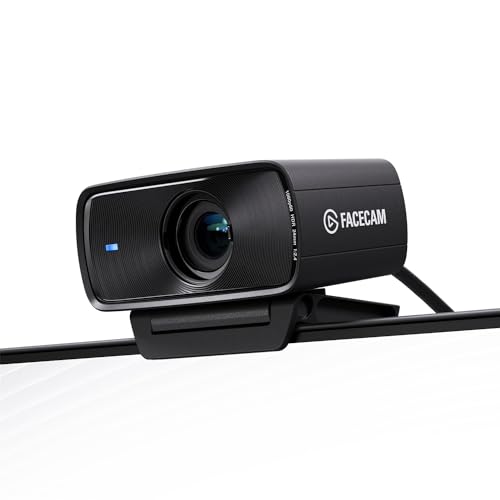
Elgato Facecam — Best Pure Facecam
The Facecam begins from a refusal: no autofocus. Where every rival hunts, breathes, and occasionally loses a face at the worst possible moment, this camera fixes its focus across the seated player’s natural range — lean in for the clutch play, lean back for the victory lap, gesture at the screen — and the image simply stays sharp. For gameplay, where the player’s movement is emotional and unpredictable, that refusal reads less like a missing feature and more like a design philosophy: the camera was specified by people who watched streamers lose shots to hunting focus and decided the cure was to remove the mechanism.
Settings behave the same way. Exposure and white balance are set manually, then stored on the device itself, so the facecam that looked right on Tuesday looks identical on Saturday even if the software was reinstalled in between. Gameplay channels live on recognisability — the same corner, the same face, the same light — and a camera that holds its own configuration is quietly doing brand work every single session.
Picture the ninth game of a ranked evening. The room has gone dark except for the monitor and one lamp; the player is tired, leaning further than they realise, face lit unevenly by an explosion-heavy match. This is where hunting webcams go soft and auto-exposure starts breathing with the game. The Facecam, locked and fixed, returns exactly the image it returned in game one — and the editor assembling the video at midnight finds a corner that needs no rescue at all.
Its demands are honest ones: it has no microphone, because its makers assumed a real one exists; it wants deliberate light, because fixed settings cannot chase a changing room; and it will never leave the desk for filmed segments. Within the facecam seat, though, it is the specialist the other picks measure themselves against.
- Focus: fixed, deep field across a seated player’s range
- Settings: exposure and white balance stored on-device
- Feed: USB straight into streaming and recording software
- Image: unprocessed, honest rendering under desk light
- Audio: none built in — a real microphone is assumed
Strengths
- Never hunts focus during a clutch moment
- Identical corner image across the whole catalogue
- Runs cool and patient through marathon sessions
Trade-offs
- Demands a separate microphone, always
- Fixed settings punish a changing room’s light
- Desk-bound: no filmed segments, ever
Best for: PC gameplay channels whose facecam is a permanent corner fixture. Not suited for: creators who also film away from the desk or move rooms often.

OBSBOT Tiny 2 — Best Tracking Facecam
The Tiny 2 is a facecam with a tiny robot inside it: a two-axis gimbal that physically turns to follow the player. The use case announces itself the first time a creator plays standing — rhythm games, VR sessions with the headset off between rounds, fitness-game content, or simply the kind of expressive play where the chair is a suggestion. Where fixed cameras crop that performance or lose it entirely, the Tiny 2 pans and tilts like a miniature camera operator who never gets tired and never asks for a break.
Gesture control is the detail that sounds like a gimmick until a session depends on it. A raised palm starts or stops tracking mid-game, without alt-tabbing, without a second monitor’s worth of software fiddling, without breaking the run. Gameplay recording is full of moments where the player’s hands are occupied by definition; a camera that accepts instructions from a gesture respects the genre’s basic physical fact.
Consider the creator filming a horror playthrough — the genre where the reaction is the product. They flinch backward out of a fixed frame, cover their face, wheel the chair sideways at the jump scare. The Tiny 2 rides through all of it, keeping the face centred and the terror legible, and the resulting video holds its corner together precisely where a static camera would have shown the audience an empty chair and a shoulder.
The moving parts ask for respect in return: a gimbal is a mechanism, with a desk footprint that wants stability and a tracking brain that can be fooled by a second person wandering behind the player. Solo creators in lively rooms should learn its lock modes. For the moving player, though, nothing else in this guide does what it does at all.
- Tracking: motorised pan and tilt follow the player
- Control: hand gestures start and stop tracking
- Feed: USB, recognised by standard streaming software
- Modes: framing locks for seated play when wanted
- Size: compact body that rides a monitor or mini tripod
Strengths
- Keeps standing and moving players framed
- Gesture control suits occupied hands
- Reaction genres keep their corner intact
Trade-offs
- Moving mechanism wants a stable perch
- Tracking can chase a passer-by if unlocked
- Premium pricing for a single-purpose seat
Best for: standing play, VR-adjacent content, and expressive reaction channels. Not suited for: players who never leave the chair and prefer the simplest possible rig.

Logitech StreamCam — Best for Clips and Small Desks
Gameplay channels no longer live only in long videos. The clip — sixty seconds of vertical brilliance lifted from a session — is the discovery engine, and the StreamCam was designed in that direction before it was fashionable: its mount rotates, so the same camera that sits horizontally for the evening’s recording turns vertical for the short-form version without a rebuild of the desk. Channels feeding two formats from one session will feel the thoughtfulness of that hinge every single week.
Its software partnership is the other half of the pitch. Logitech’s capture tools handle framing and settings in an interface a new creator can learn in an evening, and the camera behaves predictably inside the major streaming suites. For a first gameplay channel, where the creator is simultaneously learning a game, a genre, and a production chain, a camera whose control panel teaches rather than intimidates is worth real money.
Watch it work in its natural habitat: a small desk, a single monitor, a creator recording after work. The StreamCam’s tidy footprint and forgiving field of view frame a face and a hint of room without demanding a rearranged bedroom, and its autofocus — while not the fixed-focus purist of the Facecam above — stays composed through ordinary seated play. The evening’s best moment is clipped, rotated, and posted before the session files have finished copying.
Ceilings exist and should be named: it is a webcam, with a webcam’s low-light manners and no path into a capture-card HDMI chain as a main camera. Creators graduating to mirrorless hybrids will retire it to clip duty and calls. As the camera a gameplay channel starts and clips with, it earns its seat.
- Mount: rotates between horizontal and vertical framing
- Software: beginner-friendly capture and settings tools
- Feed: USB-C into PC recording and streaming suites
- Footprint: small-desk friendly, monitor or tripod perch
- Focus: autofocus tuned for seated creators
Strengths
- One camera feeding long videos and vertical clips
- Gentle learning curve for a first rig
- Tidy presence on a crowded desk
Trade-offs
- Low-light manners are webcam-class
- No role in an HDMI capture chain
- Graduating channels will outgrow it as a main camera
Best for: new gameplay channels publishing sessions and clips from one small desk. Not suited for: capture-card rigs or creators filming segments away from the PC.

Logitech Brio 4K — Best Premium Webcam
The Brio’s gameplay argument starts with surplus. Its wide, detailed image gives the editor something webcams rarely offer: room to crop. Record the full frame, then punch into a tighter facecam window in the edit without the mush that upscaling usually brings — or run the facecam wide for a co-op couch session and tight for solo ranked, from the same unchanged camera position. Flexibility after the fact is a genuine production feature in a genre where the best moment is never the one you framed for.
Adjustable field of view is the same idea at capture time. Narrow the frame for the classic corner portrait; widen it when a second player joins on the couch or the video’s format is a room-scale challenge. The Brio swaps between these personalities in software, which means the desk never gets rebuilt for a format change — a mercy gameplay channels, whose formats mutate with every trending game, will appreciate monthly.
Its low-light behaviour deserves a precise description: it works harder than most webcams to keep a dim room presentable, with exposure logic that favours the face. Under the single-lamp conditions of late-night recording it will not shame the channel, though it remains a small-sensor camera and the mirrorless picks below still own the darkness outright. Judge it as the ceiling of the webcam class rather than a rival to real cameras, and it satisfies.
Between sessions, the Brio moonlights as the desk’s general camera — calls, community streams, the talking-head intro filmed at the same chair. Channels are small businesses, and a premium webcam that serves every desk duty while anchoring the facecam corner justifies its price across the whole operation, not just the gameplay line item.
- Image: high-detail capture that tolerates cropping
- Field of view: adjustable in software, wide to tight
- Feed: USB into streaming and recording software
- Light handling: face-favouring exposure in dim rooms
- Second duties: calls, community streams, desk pieces
Strengths
- Crop freedom in the edit from surplus detail
- One perch serves solo and couch formats
- The strongest all-round desk camera here
Trade-offs
- Still a small sensor after dark
- Costs approach entry mirrorless territory
- No HDMI role in a capture chain
Best for: established PC channels wanting the finest webcam corner and edit flexibility. Not suited for: console-first rigs built around HDMI capture of the player.

Sony ZV-E10 II — Best Hybrid Main Camera
Some gameplay channels outgrow the corner. The face becomes a full segment — the intro filmed properly, the review of the game shot at a desk with the box in hand, the tournament vlog — and the ZV-E10 II is the pick for that channel, because it holds two jobs at professional standard. Through HDMI it feeds the capture chain a clean, uncluttered player image during sessions; on its own card it films the channel’s talking pieces with interchangeable-lens quality. One body, both halves of the modern gameplay channel.
The clean output is the technical heart of the matter. A gameplay chain wants a signal free of focus boxes, battery icons, and menu ghosts, delivered steadily for hours, and this Sony’s creator engineering treats that output as a first-class feature rather than a hidden menu accident. Paired with dummy-battery power for session duty, it becomes infrastructure: switch on, sit down, play, with the camera behaving like a permanent fixture of the rig.
Its autofocus pedigree shows in the filmed segments. The product-showcase behaviour — holding a face, then gliding to a controller or collector’s edition raised toward the lens — is practically a gameplay channel’s native grammar, and the E-mount shelf means the lens for every future format is a purchase, not a platform change. The channel that grows from facecam to full production grows on this body without a rebuy.
Respect the commitments it asks: lenses cost money, a capture card or quality USB path must be budgeted, and long sessions want the power and heat homework done properly. It is the most demanding pick in this guide and the most capable — the correct flagship for a channel that has decided gameplay is a career.
- Output: clean HDMI for capture-card chains
- Lenses: interchangeable E-mount catalogue
- Focus: face tracking with product-showcase shifts
- Power: dummy-battery setups suit permanent rigs
- Dual duty: session facecam and filmed segments
Strengths
- Two professional jobs in one body
- Growth path measured in lenses, not rebuys
- Autofocus fluency in filmed pieces
Trade-offs
- Total rig cost climbs with lenses and capture
- Long sessions need power planning
- Overkill for a corner-only facecam
Best for: gameplay channels filming full segments alongside their sessions. Not suited for: creators who only need a corner facecam and nothing more.

Canon EOS R50 — Best First Mirrorless for Gameplay
The R50 is how a webcam-era channel buys its first real camera without buying a new hobby’s worth of anxiety. Canon’s guided interface teaches the body to its owner in plain language, its colour flatters a face under the mixed light of a gaming room, and its HDMI output plays the clean-feed role in a capture chain with the steadiness the genre demands. For the creator whose facecam is graduating from corner novelty to channel identity, it is the gentlest possible step up.
What the step buys, concretely, is light. The larger sensor keeps a late-night face clean where webcams dissolve into noise, and a fast prime lens — the RF mount’s affordable staircase starts kindly — separates the player from the poster-covered wall behind them with the gentle blur viewers subconsciously read as production value. Reaction shots, the currency of gameplay video, simply read better through this body.
Its webcam behaviour covers the channel’s other life: community streams, Discord-stage events, the live Q&A after a big upload. A first mirrorless that also handles live duty over USB protects the purchase against the channel’s format experiments, because whichever direction the content grows — recorded, live, filmed, streamed — the same body is already sitting in the rig doing it.
Plan around the class’s ordinary limits: a spare battery or dummy power for marathon sessions, and stabilisation that leans on the lens for any handheld filming. Neither touches the seated gameplay core. As the first real camera in a gameplay rig, the R50 asks the least and returns the most of any body here.
- Sensor: APS-C, Canon RF mount lenses
- Output: clean HDMI plus USB webcam behaviour
- Handling: guided menus for first-time owners
- Colour: flattering skin in mixed gaming-room light
- Focus: face and eye detection for the player
Strengths
- The kindest graduation from webcam to camera
- Night sessions stay clean and readable
- Live and recorded duty in one body
Trade-offs
- Marathons want spare or dummy power
- Kit lens teaches rather than dazzles
- Handheld filming leans on lens stabilisation
Best for: gameplay channels adding their first mirrorless body to the rig. Not suited for: pure webcam simplicity or standing, moving play.
Gameplay Rigs Compared: The Table
| Pick | Seat in the chain | Connection | Defining virtue |
|---|---|---|---|
| Elgato Facecam | Permanent corner facecam | USB | Locked, hunting-free image |
| OBSBOT Tiny 2 | Moving player’s facecam | USB | Motorised tracking |
| Logitech StreamCam | Starter and clip camera | USB-C | Vertical-ready mounting |
| Logitech Brio 4K | Premium desk facecam | USB | Crop-friendly detail |
| Sony ZV-E10 II | Hybrid main camera | HDMI / USB | Two jobs, one body |
| Canon EOS R50 | First mirrorless in the rig | HDMI / USB | Gentle, flattering quality |
Read the table by failure mode rather than by specification. Each row is the answer to a different way a gameplay video can go wrong: the focus that hunted, the player who left the frame, the clip that could not go vertical, the corner too soft to read, the channel that outgrew its camera, the night session lost to noise. Buy against the failure you actually suffer, and the table stops being a catalogue and becomes a diagnostic.
Notice, too, what no row promises: none of these cameras captures the game. That honesty is the table’s most useful cell. The creator who understands the chain spends in the chain’s order and ends with a rig where every part does the job it is genuinely capable of — which is the entire secret of gameplay production that looks effortless.
How Do You Sync the Facecam With the Game Feed?
Sync is the gameplay editor’s first craft, and it is learned once and used forever. The classic method costs nothing: on camera, clap once — or tap the controller against the desk — at a moment the game audio also spikes, then align the two waveforms’ peaks in the edit. Modern software’s automatic sync does the same trick by matching audio fingerprints when both recordings carry the game’s sound. Either way, the habit that matters is performing the sync marker at the start of every session, because the session where you forget is the session with the unrepeatable moment in it.
Drift is the subtler enemy. Two recordings started together can wander apart across hours as clocks and capture rates disagree by fractions — invisible at minute five, obvious at hour three when the reaction lands a breath after the scare. The defences are boring and total: record at matched frame rates, keep sessions’ raw files in matched formats, and check sync at the end of a long recording, not just the beginning, before declaring the session usable.
Live channels solve sync differently: everything passes through one compositor in real time, and delay offsets — a few hundred milliseconds added to the faster feed — align the player’s reaction with the gameplay the audience sees. Every pick in this guide behaves predictably enough for those offsets to be set once and trusted, which is another quiet form of the endurance this guide keeps ranking: not just surviving the session, but staying in time for all of it.
How Should You Light a Face That Shares the Screen With a Game?
Light the face as if the game were not there, because the face is competing with the brightest object on the viewer’s screen and losing by default. One soft source, placed beside the camera and slightly above the eyeline, aimed at the player rather than the room, lifts the face out of the monitor’s shadow and gives the camera’s exposure a stable target. The game’s own light — explosions, menus, loading screens — will still play across the face, and that is fine; it reads as immersion once the base light has established the face as the frame’s anchor.
Kill the competing lights behind the player. A bright hallway lamp or window in the background teaches auto-exposure to darken the face, and teaches the audience’s eye to wander. The classic gameplay look — player luminous, background a dim suggestion of shelves and posters — is not an aesthetic accident; it is exposure discipline, and it costs one lamp and one switched-off ceiling light.
Colour deserves one sentence of respect: mixed sources — warm lamp, cool monitor — split the face into two temperatures and make every camera work harder. Bias the room toward one temperature, set white balance against it (the locked-settings picks above make this a one-time job), and the face holds together through the whole session. Lighting is the cheapest image quality in this entire guide, and the facecam corner is where it pays out most visibly.
What Mistakes Ruin Gameplay Recordings Most Often?
Recording the only copy of everything in one composited file leads the list. When the single file corrupts, desyncs, or turns out to have captured the wrong window, the session — and its unrepeatable moments — is simply gone. Layered recording, even just game and facecam as separate files, is the insurance every mature channel eventually buys after learning this lesson the expensive way.
The second mistake is buying the camera before the chain. A beautiful mirrorless body feeding a capture setup that drops frames produces worse videos than a humble webcam in a clean chain, every time. Chain first, microphone second, light third, camera fourth — the order is unglamorous and undefeated.
The third is neglecting the corner. Creators lavish attention on the game feed, which the audience can see anywhere, and starve the facecam, which is the one thing their channel has that no other channel does. The face is the differentiator; the corner deserves the light, the focus check, and the good camera position at eye level rather than the monitor-top perch that looks down a player’s nose for four hours.
How Does a Gameplay Rig Grow From First Upload to Full Production?
In layers, each answering a pain the previous layer revealed. The webcam corner becomes the locked specialist or the tracking camera when the format names its need. The filmed segments arrive and pull a mirrorless body into the rig — at which point the starter webcam retires to community streams rather than to a drawer, because layered channels always have a second seat to fill. Capture grows from software to a dedicated card when console play enters the catalogue.
What should not grow is complexity per session. Every addition earns its place by making the ritual of sitting down to record shorter or safer, never longer. The rigs that survive are the ones their owners can run tired, at midnight, on the third recording day of the week — because gameplay channels are built out of exactly those sessions, and the camera chain that serves them is, in the end, a machine for making starting easy.
How Do Console and PC Gameplay Channels Differ in Camera Needs?
The console channel’s chain is fixed by hardware: the game leaves the console by HDMI, a capture card receives it, and the player camera must join that same electrical world — which is why the mirrorless picks with clean HDMI earn their keep so decisively on console desks. The console player also sits further from the screen, often on a couch, which stretches the facecam’s job across a room: more light needed, a wider or more deliberate frame, and focus distances a desk webcam was never designed around. Couch channels should read the webcam picks above with that distance in mind and the mirrorless picks with genuine interest.
The PC channel’s chain is software-defined and therefore more forgiving and more fragile at once. Everything converges in one machine — game capture, facecam, microphone, recording — which makes layered recording easy and total failure modes correlated: the PC that stumbles stumbles for every layer simultaneously. PC creators benefit most from cameras that behave as stable, boring USB citizens, because the machine already has enough variables. They also sit close, in controlled light, in a chair that never moves — the exact conditions the specialist facecams were engineered for.
Hybrid creators, who play on both, should build the rig around the console chain and let the PC join it, because HDMI discipline generalises downward into software easily while the reverse is not true. A mirrorless body feeding a capture card serves the console session directly and the PC session through the same card, and the webcam that began the channel becomes the community-stream and second-angle camera. One chain, two platforms, no rebuild on game night — that is the hybrid endgame, and the picks above were ranked with it in view.
What Does the Facecam Window’s Size Mean for Camera Choice?
The corner window is typically a small fraction of the screen, and that smallness is a budget gift: it means the facecam’s resolution is the least important number on its box. A modest, clean image downscaled into the corner arrives sharp; an expensive, noisy image downscaled into the corner arrives noisy at a smaller size. What survives downscaling is contrast, colour, focus, and light — the unglamorous virtues — and what evaporates is the fine detail that premium marketing is built on. Buy the facecam for what survives.
Full-screen moments reverse the arithmetic, and every gameplay channel has them: the intro, the post-game debrief, the facecam enlarged over a menu while the player talks strategy. Channels whose format lingers in those moments — commentary-heavy, personality-led — should weight the mirrorless and premium webcam picks accordingly, because their faces spend real minutes at full size where softness shows. Channels that cut hard back to gameplay within seconds can let the corner logic rule the whole purchase.
There is also the thumbnail to consider, which is usually a face at its largest and most scrutinised. The thumbnail face is often lifted from the session itself, and a camera that renders an expressive, well-lit face gives the editor thumbnail material for free. It is one more way the facecam quietly outearns its corner: the smallest window on the screen, doing the largest work in the channel’s discovery.
How Should a Gameplay Creator Test a Camera Before Committing?
Test in the room, at the hour, in the game. Set the camera up on an ordinary evening, record twenty minutes of real play — including a dark level, a bright menu, a lean-in moment, and a celebration — and watch the corner at the size viewers will see it. Every weakness this guide has discussed announces itself inside those twenty minutes: the hunting, the breathing exposure, the noise, the drift. A camera that survives your actual session needs no further audition; a camera that fails it will not be saved by any review, including this one.
Test the chain, not just the camera. Record through the full stack — capture, software, layered files, export — and confirm the session lands on disk the way you intended, in sync, at the size your storage can sustain. More gameplay channels have been wounded by workflow surprises than by image quality, and the wound is always discovered after the unrepeatable session. The test recording is the cheapest tuition in the entire hobby.
Finally, test the ritual. Time the setup from sitting down to recording, honestly, stopwatch in hand. Gameplay channels publish on the strength of ordinary evenings, and the camera whose ritual is shortest gets used on the evenings when motivation is thinnest — which are, not coincidentally, the evenings that decide whether a channel exists next year. Measure the ritual and you have measured the camera’s real contribution to the channel.
How Do Multiplayer and Couch Sessions Change the Camera Brief?
A second player changes the geometry of everything. The frame must widen or the camera must retreat; the single desk lamp now serves two faces at different distances; the microphone arrangement doubles in complexity while the camera’s job quietly transforms from portrait to group shot. Channels built on co-op, versus sessions, or couch commentary should read the wide-field picks — the Brio with its adjustable view, the mirrorless bodies on a wide lens — as their natural shortlist, and treat the tight specialist facecams as solo instruments by design.
Two-player sessions also expose focus behaviour in a way solo play never does. Autofocus asked to arbitrate between two faces at different depths will make choices, and not always the choices the moment wants — the reaction that mattered belonged to the player it did not choose. Locked focus at a shared distance, or a frame composed so both players sit in one plane, solves the problem at the level of staging rather than settings. The couch channels that look effortless have almost always staged the plane and locked the camera, then forgotten both decisions entirely.
Guest sessions argue for the rig’s spare capacity: the second camera for the guest’s angle, the webcam retired from main duty finding its second career. This is where the layered philosophy of this guide pays compound interest — nothing in a well-grown gameplay rig is ever truly retired, it is only reseated, and the couch session is where the reseated equipment earns its shelf space back.
What Role Does the Camera Play in a Gameplay Channel’s Identity?
Viewers subscribe to a person and return for a world, and the camera renders both. The corner frame — its angle, its light, its background of shelves and posters — becomes as recognisable as a logo within a dozen uploads, and subscribers begin to feel the small wrongness when it changes carelessly. That is an argument for choosing a camera and a frame you can hold constant for a year, and for treating any camera change as a set redesign: deliberate, complete, and rare.
The camera also sets the emotional bandwidth of the channel. A tight, well-lit face carries whispered tension and deadpan humour; a distant, dim one flattens both into commentary. Genres live at different bandwidths — the horror channel needs the flinch in high fidelity, the strategy channel can thrive on a calmer window — and the picks above should be read against your genre’s bandwidth the way a singer reads a microphone’s character against their voice.
None of this asks for extravagance. It asks for intention: a frame chosen on purpose, lit on purpose, held on purpose. The cameras in this guide differ in almost every specification, but they share the property that each can hold a deliberate frame faithfully for a very long time — and in gameplay, where the game supplies the novelty, the frame that never changes is the channel’s signature.
How Much Storage and Editing Load Does Gameplay Video Create?
Gameplay is the most storage-hungry genre a small creator can choose, because the sessions are long, the layers multiply the footage, and the unrepeatable moment might be hiding in hour three of a four-hour file. Layered recording — game, facecam, audio stems — can triple the naive estimate, and the camera’s contribution to that load is its recording format and rate: higher detail settings on the facecam buy edit flexibility at the price of disk, and the right setting is the one your archive can sustain for a year, not a week.
The archive deserves a policy before it deserves a bigger drive. Keep the raw layers until the video and its clips are published, keep the finished masters forever, and let the middle — the unedited session middles with no moments in them — go once the highlights are harvested. Channels drown in footage they were afraid to delete; the policy, written once and followed without fresh deliberation, is what keeps the archive a library instead of a swamp.
Budget the archive into the camera decision itself, because the two purchases are secretly one. A creator who spends the whole equipment fund on bodies and lenses, leaving the storage to chance, will meet the full-drive warning in the middle of the best session of the year — and the footage lost that night will be worth more than the lens that was prioritised over the drive. Sensible channels treat storage, backup, and a second copy of the masters as part of the camera system’s price, the way a car purchase quietly includes insurance. The picks above all produce manageable files at sane settings; honouring that manageability with an actual storage plan is the buyer’s half of the bargain.
Editing load follows the same logic. A facecam that arrives stable, synced, and consistently exposed cuts the edit’s mechanical hours to nearly nothing, leaving the creator’s time for the decisions that are actually creative: which moments, which order, which joke survives. This is the final form of the argument running through this whole guide — in gameplay, the camera’s greatest contribution is not the image it makes but the work it refuses to create.
Final Recommendation
Anchor a PC gameplay channel on the Elgato Facecam if your play is seated and your corner must never hunt, drift, or reset itself. Choose the OBSBOT Tiny 2 when your body is part of the performance — standing, reacting, roaming the frame. Take the Logitech Brio 4K for the premium desk that wants crop freedom and all-round duty, and the Logitech StreamCam if you are starting out and feeding clips from the same small desk.
When the channel’s ambitions outgrow the corner, graduate deliberately: the Canon EOS R50 as the first mirrorless step, kind and capable, or the Sony ZV-E10 II as the hybrid flagship that films your segments and feeds your chain at full professional standard. Buy in the chain’s order, record in layers, light the face like it matters — because on a gameplay channel, the face is the content everything else supports.
Frequently Asked Questions
Do I need a capture card as well as a camera?
For console gameplay, yes — the card captures the game; the camera captures you. On a gaming PC, capture software can take the game feed without a card, and the camera still handles your face. The two devices do different jobs and neither substitutes for the other.
Is a webcam enough for a gameplay channel?
For the facecam corner, genuinely yes — most of this guide’s webcam picks exist because the corner rewards stability and light more than resolution. A webcam stops being enough when the channel starts filming full segments: reviews, vlogs, and desk pieces that carry the video on their own.
Why does my facecam lose sync over a long session?
Small clock and frame-rate differences between separate recordings accumulate into visible drift across hours. Record at matched frame rates, perform a sync marker at the start, and verify alignment near the end of long sessions before you stop recording — drift found in the session can be fixed; drift found in the edit is archaeology.
Should the facecam record in the same file as the game?
Record them as separate files whenever your software allows it. Separate layers survive each other’s failures, let you resize or reposition the corner in the edit, and rescue reactions from sessions where the game capture went wrong. The single composited file is simpler and far more fragile.
How do I stop my facecam hunting for focus mid-game?
Either choose a fixed-focus camera built for the desk, or lock focus manually on any camera that allows it once you are seated. Autofocus hunts because movement and changing screen light keep offering it new opinions; a seated player at a fixed distance is the easiest focusing job in video, and it should be set once rather than renegotiated all evening.
What frame rate should the facecam use?
Match the game feed’s frame rate so the composite and the edit stay in step. Consistency between the layers matters more than any single layer’s number, and matched rates are the foundation that sync, drift control, and smooth overlays are all built on.
Related Guides
Keep building the rig with the companion reading: best cameras for youtube creating for the channel-launch camera map, best cameras for streaming for the live side of the same chain, and best cameras for vlogging and video for the filmed segments your channel grows into.


