kajuandouglas.com is reader-supported. When you buy through links on our site, we may earn an affiliate commission.
Where to Buy
The first time my neighbour tried the best cameras for talking to dog owners actually recommend, she was standing in a supermarket queue, phone in one hand, shopping basket in the other, telling her spaniel to leave the sofa alone. He heard her. He looked straight at the little camera on the bookshelf, tilted his head in that way dogs do when a familiar voice arrives from an unfamiliar place, and then — this is the honest part — he climbed onto the sofa anyway. Talking to your dog through a camera is not remote control. It is something smaller and better: a way to check in, to settle a restless animal with a voice he knows, to interrupt a chewing session before it becomes a vet bill, and to find out what your home actually sounds like while you are out.
That small, specific job shapes everything in this guide. A camera for talking to a dog needs a speaker your pet can hear clearly in a real living room, a microphone sensitive enough that you can hear him back — the whine, the bark, the suspicious silence — and an app that connects fast enough for the moment to still matter when the live view finally opens. Picture quality matters, but in a different way than it does for a security camera guarding a driveway. You are not reading number plates. You are reading body language: is that tail wagging or tucked, is the pacing anxious or just the usual pre-dinner patrol, has the water bowl been knocked over again?
Six cameras earn a place here, and they divide into two temperaments. Some pan and tilt, following a dog who drifts from rug to doorway to the sunny patch by the window. Others sit fixed and wide, watching one room completely and asking nothing of you. Both approaches work. Which one suits your household depends on the size of the space, the habits of the dog, and whether you live alone with one animal or share the app with a partner, a dog walker, and a teenager who will definitely use the speaker to say hello at odd hours.
A word of expectation-setting belongs at the top, because the marketing around pet cameras runs ahead of the reality. Two-way talk is a comfort tool, not a training system. Dogs respond to tone, timing, and repetition far more than to words, and a disembodied voice can confuse or even stress some animals the first few times they hear it. Every pick below was judged partly on how gently it lets you introduce the experience — volume you can keep low, a chime or alert tone you can disable where the platform allows it, and motion notifications smart enough that you open the app for real events rather than every passing shadow. Used patiently, these cameras become part of the household furniture. Used carelessly, they become a strange voice shouting from a shelf, and no dog deserves that.
Key Takeaways
- Speaker clarity at normal room distance matters more for this job than headline resolution.
- Pan-and-tilt models suit dogs who roam between rooms; fixed wide views suit one-room routines.
- Fast app connection decides whether a spoken correction lands while it still matters.
- Introduce the voice gradually, at low volume, paired with calm praise rather than scolding.
- The eufy Indoor Cam E220 and Tapo C210 cover roaming dogs without a subscription-first design.
- Households already using Ring or Alexa will find the Ring Indoor Cam the shortest learning curve.
In this guide
Quick Picks
| Badge | Pick | Why it stands out |
|---|---|---|
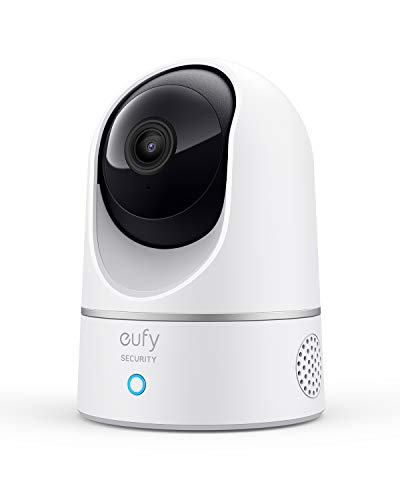
| Best for Roaming Dogs | eufy Indoor Cam E220 | Pans and tilts to follow a dog around the room while you talk him through the app. |
| Best Talk-Back Value | TP-Link Tapo C210 | A rotating view, clear two-way audio and local recording in one tidy unit. |
| Best for Ring Homes | Ring Indoor Cam (2nd Gen) | Slots into a Ring household with a privacy cover you can close by hand. |
| Best Wide Fixed View | Wyze Cam v4 | A broad, sharp picture and a speaker that carries across a family room. |
| Best Compact Talk Camera | Blink Mini 2 | Small enough for a shelf corner, with two-way talk and Alexa close at hand. |
| Best Pan, Tilt and Zoom Reach | Arlo Essential Indoor Pan Tilt | Motorised movement plus zoom for checking a crate or doorway in detail. |
How We Chose These Picks
Selection started with the conversation itself. Each candidate had to offer genuine two-way audio — not a listen-only microphone dressed up in the listing — and a speaker that a person standing across a room could understand without straining. We favoured cameras whose apps open a live view quickly, because a twenty-second connection delay turns a timely “leave it” into a history lesson. Notification behaviour mattered just as much: a dog camera that pings you for every curtain movement trains you to ignore it within a week, and an ignored camera helps nobody.
We also weighed how each system treats recording. Some households want clips stored in the cloud so a funny or worrying moment can be reviewed later and shared with a vet or trainer. Others prefer a memory card in the camera and no ongoing plan at all. Both preferences are legitimate, so this list deliberately mixes the two philosophies rather than crowning one. Where a feature depends on a paid plan, the pick descriptions say so in plain terms, because the real cost of a pet camera is the arrangement you live with for years, not the box you open on the first evening.
Finally, we considered the dog. Cameras were marked down for loud mechanical movement, bright status lights that cannot be softened, and alert sounds likely to startle an animal already unsure about the new object on the shelf. A pet camera succeeds when the dog stops noticing it, and several otherwise capable models missed this list for failing exactly that quiet test.
Will Your Dog Actually Listen to a Voice From a Box?
Sometimes, and the pattern is predictable enough to plan around. Dogs who already respond strongly to their owner’s voice — the ones who appear at the kitchen door when called from another room — usually transfer that response to a camera speaker within a few sessions, especially when the voice arrives alongside something pleasant. Dogs who have learned that only physical presence counts may ignore the speaker entirely, and a few sensitive animals find a bodiless voice unsettling at first. None of these reactions is a verdict on the camera. They are information about how to introduce it.
The introduction that works, according to trainers who use these devices with clients, is boring on purpose. Start while you are still home, in the next room, with the volume modest. Say the dog’s name and a familiar, cheerful phrase, then walk in and reward him as if the voice and your arrival belong together. Repeat across a few days, stretching the distance and the delay. Save corrections for later, and keep them rare: a calm “ah-ah” that interrupts chewing is useful, while a stream of scolding from a shelf teaches the dog either to fear the object or to ignore your voice in person as well, and the second outcome costs far more than any cushion.
There is also a listening dividend owners rarely expect. Hearing your home during the day — the postman’s knock answered by barking that settles in a minute, the long quiet of a dog asleep, the restless pacing that starts an hour before you return — tells you things a evening guess never could. Several owners adjust leaving times, add a midday walker, or move a crate away from a noisy street window based on nothing more exotic than what the microphone revealed. The talk feature gets the attention, but for many households the hearing turns out to be the point.
Where Should a Talk-Back Camera Sit in a Dog’s Room?
Placement decides what the camera can do long before its specifications get a vote. Put it where the dog spends the unsupervised hours, not where the room looks tidiest. For most households that means the living room or the kitchen-diner, at roughly human chest height, angled down slightly so the floor — where dogs actually live — fills the frame. A camera mounted near the ceiling sees the tops of heads and the broad sweep of a room; a camera at shelf height sees faces, eyes, and the exact moment a paw reaches toward the bin.
Distance to the dog’s resting place matters for the speaker. A voice that is clear at two metres can blur into noise across a long open-plan space, especially with a television or washing machine competing. If your dog settles in one favourite spot, favour that spot: frame the bed, the mat, or the crate area first, and let the rest of the room be context. Pan-and-tilt models relax this rule, since they can swing between the bed and the door, but even they speak best when the dog is in the part of the room the camera was aimed at when you pressed the talk button.
Power and Wi-Fi finish the practical picture. Indoor cameras need a socket within cable reach, and trailing leads invite exactly the chewing you bought the camera to watch, so route the cable behind furniture or along a skirting board from day one. Check the signal at the chosen shelf with your phone before drilling anything; a camera that drops its connection whenever the microwave runs will drop it, reliably, at the moment you want to speak. A small repositioning — one shelf along, one room’s router setting adjusted — usually fixes what looks like a defective product.
What About Barking, Neighbours, and Knowing When Not to Talk?
Every dog owner who buys one of these cameras eventually faces the same scene: the app shows a dog barking at the window, a neighbour’s tolerance is presumably wearing thin, and your thumb hovers over the talk button. Sometimes your voice settles it — the dog hears a familiar sound, remembers the household rules, and winds down. Sometimes it does the opposite, convincing the dog that you agree the postman is a crisis worth joining in with. The difference is your dog, and a week of observation teaches you which kind you have faster than any guide can.
Judgement calls like that are the real skill this technology asks for. A camera gives you information and a channel; it cannot supply timing or restraint. Owners who get the most from these devices develop small personal rules: talk for connection and gentle interruption, stay silent during thunderstorms if your voice has become part of the anxiety, and never use the speaker to test the dog for entertainment when friends are watching. The dog did not volunteer to be a smart-home demonstration.
Notification settings support that restraint. Person and pet detection, where offered, can separate a dog moving around from a dog doing something worth your attention, and activity zones can quiet the alerts from a busy doorway while keeping the sofa under watch. Spend the first weekend tuning rather than trusting defaults. The goal is a phone that buzzes rarely and means it — because the afternoon it buzzes about a genuinely stuck, tangled, or unwell dog, you want to be someone who still looks.
How Should a Whole Household Share One Dog Camera Without Chaos?
A talk-back camera in a family home is a shared instrument, and shared instruments need house rules more than they need features. Decide who may talk, and when, before the novelty week teaches the dog that the shelf erupts with voices at random. A sensible arrangement most households settle into: anyone may look, the adults may talk, children may talk when an adult is present, and nobody talks during the dog’s known rest hours unless something is genuinely wrong. That sounds strict written down; in practice it takes one conversation, and it protects the dog from becoming the household’s intercom entertainment.
Shared access also spreads the camera’s real workload usefully. The person who leaves earliest checks the morning settle; the person whose meeting ends first does the lunchtime greeting; the dog walker, given access for the walking hours, can show the dog home and resting afterwards, which closes the loop of reassurance for everyone. Ring and Blink handle this guest choreography most gracefully, but every system here supports some version of it — the discipline is social, not technical. Agree the privacy routine at the same time: who closes the Ring’s cover or enables the Tapo’s privacy mode when the family is home, and who reopens it on a work morning. A camera forgotten in privacy mode films nothing, which is either a relief or a small tragedy depending on what the dog did that day.
There is one more shared-household scenario worth planning for, because it arrives in most dog homes eventually: the holiday. A housesitter or a family member staying over inherits the dog, and the camera lets you check in without phoning them hourly — and lets them show you the dog rather than describe him. Brief them like you would about the boiler: where the camera is, that it can talk, how to shutter it when they want the room to themselves. Guests who understand the camera relax around it; guests who discover it feel watched, and the difference is entirely in the briefing.
What Happens on the Days the Wi-Fi, the Power, or the Plan Lets You Down?
Every owner of an app-connected camera eventually opens the app to a grey screen, and a dog camera should be bought with that afternoon already imagined. Wi-Fi drops are the commonest failure, and the cameras here differ in what they do about it. Models recording to a memory card — the Tapo, the eufy, the Wyze — keep their footage locally through a broadband sulk and hand it over when the connection returns, so the record of the dog’s day survives even when the live conversation does not. Cloud-centred models are more dependent on the connection for their history, though live service usually restores itself without a visit home.
Power cuts are simpler and crueller: none of these mains-powered indoor cameras films through one, and the honest mitigation is not a gadget but an expectation. Dogs weather a two-hour outage the way they weathered them for centuries — by sleeping — and the camera’s absence during it is an owner’s discomfort, not a dog’s emergency. What matters is the recovery: the picks here were favoured partly for reconnecting themselves when power and broadband return, rather than waiting, bricked and blinking, for a human to cycle them. Test yours once, deliberately, on a Sunday. Knowing your camera recovers is worth more than hoping it does.
Subscription lapses deserve the same clear-eyed treatment. If a plan ends, live viewing and talking — the heart of this guide — continue on the systems here, while recorded history shrinks to whatever the plan’s absence leaves. Owners for whom the recordings themselves are the point, perhaps because a trainer is reviewing the dog’s alone-time behaviour, should either keep the plan or choose a card-based camera from the start. Decide which kind of owner you are before the purchase, because changing philosophy mid-year usually means changing cameras.
Finally, the phone itself is part of the system, and the flattest battery in this entire arrangement is usually yours. The camera cannot talk to a dog through a dead phone in a coat pocket. Households that rely on the lunchtime check make it a routine — charger at the desk, app on the home screen, notifications allowed through the work focus mode for this one app. Infrastructure sounds dull until the day the dog is tangled in a blind cord and the dullness is what gets you to him in time.
Which of the Best Cameras for Talking to Dog Owners Fit Your Household?

eufy Indoor Cam E220 — Best for Roaming Dogs
Dogs rarely misbehave in one convenient, camera-facing spot, and the E220 was clearly designed by someone who understood that. Its motorised pan and tilt let you sweep from the dog bed to the front door to the kitchen threshold in a single check-in, and when the dog wanders mid-conversation you can follow rather than shout into an empty frame. For open-plan homes, or a dog whose afternoon involves a slow tour of every sunny surface in the house, that movement is not a luxury feature. It is the difference between a camera that covers the dog’s actual life and one that covers a rectangle of carpet.
The conversation quality holds up its end. Your voice arrives clear enough that a dog who knows his name will lift his head, and the returning microphone picks up the small sounds owners care about — the sigh, the scratch at the door, the toy being demolished in real time. eufy’s approach to recording leans local, with memory-card storage keeping clips in the camera rather than obliging a plan, which suits owners who want evidence of what happened at lunchtime without another monthly line item joining the household budget.
For this particular job, the detail that lingers is how the E220 behaves as furniture. It is quiet in motion compared with cheaper rotating cameras, and a dog who startles at mechanical whirs is less likely to build an association between your voice and a robot turning its head. Introduce it switched off for a day, let the sniffing happen, and most dogs file it under “shelf objects” permanently.
Where it asks patience is the app experience, which packs in more settings than a first-time owner needs and can feel busy until you have arranged it to your liking. Owners who want the simplest possible talk button should compare the Tapo below. Owners who want coverage, local recording, and a camera that can keep a wandering retriever in frame will forgive a denser menu within the first week.
- Movement: pan and tilt across a full room
- Audio: two-way talk through the eufy app
- Recording: local memory-card option alongside cloud choices
- View: detailed indoor picture for reading body language
- Extras: pet and person detection features in app
Strengths
- Follows a roaming dog instead of losing him at the frame edge
- Local recording keeps the no-plan route genuinely viable
- Quiet movement that most dogs learn to ignore
Trade-offs
- App menus feel crowded until customised
- Needs thoughtful placement to use its full sweep
- Advanced detection features vary by setup
Best for: open-plan homes and dogs who patrol several favourite spots during the day. Not suited for: owners who want the barest, simplest app above all else.

TP-Link Tapo C210 — Best Talk-Back Value
The C210 makes the strongest case that talking to your dog should not require a premium ecosystem or a subscription conversation before the first bark. It rotates, it tilts, it records to a memory card if you ask it to, and its two-way audio does the central job — your voice, in the room, recognisable — without fuss. For a first pet camera, bought half out of curiosity and half out of concern for a new puppy, that completeness at a modest position in the range is exactly the right shape.
Tapo’s app has matured into one of the calmer interfaces in this category, and that matters at the moment of use. When the notification says the dog is on the table, you want live view, then talk, in as few taps as possible, not a tour of unrelated smart-home tiles. The C210 also handles the night shift respectably, switching to infrared viewing after dark so an evening check on a dog left during a winter afternoon still shows a dog rather than a rumour of one.
A puppy-specific note: the C210’s motion following and sound detection can be tuned toward the crate or pen area, turning it into a reasonable puppy monitor for the first months — hearing the cry, speaking a settling word, and learning whether the crying stops in two minutes or twenty. That information shapes a training plan better than any amount of arriving home and guessing.
Its speaker is honest rather than powerful. In a kitchen with an extractor fan running it will not win, and owners of large, noisy, open spaces should look at the Wyze or Arlo. In the ordinary living room it was designed for, it carries a calm voice perfectly well — and a calm voice, delivered at sensible volume, is the only kind worth sending to a dog anyway.
- Movement: pan and tilt with a wide combined sweep
- Audio: two-way talk with sound detection alerts
- Recording: memory-card storage supported
- Night: infrared viewing for dark rooms
- Control: Tapo app with privacy mode
Strengths
- Complete talk-back kit without ecosystem lock-in
- Local recording keeps running costs at zero
- App gets you from alert to live view quickly
Trade-offs
- Speaker struggles against loud household appliances
- Plastic build feels functional rather than premium
- Cloud extras are less developed than Ring’s
Best for: first-time pet-camera buyers, puppy owners and anyone wanting local recording. Not suited for: very large, noisy open spaces needing maximum speaker reach.

Ring Indoor Cam (2nd Gen) — Best for Ring Homes
Households already living with a Ring doorbell will understand this camera in about ninety seconds, and that familiarity is a genuine feature when the person checking on the dog might be you, your partner, and a dog walker you have given shared access. The same app, the same alert language, the same clip timeline — the indoor view of the dog simply joins the view of the front step. For multi-person households, where a new gadget’s success depends on everyone actually using it, joining an existing system beats a marginally cleverer standalone.
The physical privacy cover deserves more praise than it usually gets. Slide it across and the lens is blocked and the microphone off, visibly, mechanically, in a way a visiting relative or a housesitter can verify without trusting a software toggle. Dog cameras point at living rooms, and living rooms host lives. A cover you close when the family is home turns the camera into a work-hours tool rather than a permanent eye, and many owners find that boundary is what makes them comfortable owning one at all.
Talk quality sits comfortably in the middle of this list: clear, prompt, and entirely adequate for settling a dog or greeting him when you check in at lunch. Ring’s detection and clip features lean on its subscription for their fullest form, so go in with eyes open — the household that already pays for doorbell recordings will notice no change, while the subscription-averse should weigh the Tapo or eufy more heavily.
One dog-specific habit this camera rewards is the scheduled check-in. Because the app is already on the family’s phones for the doorbell, the midday look at the dog actually happens, day after day, instead of fading after the novelty week. Technology that survives as routine is worth more than technology that dazzles once, and the Ring’s ordinariness is precisely its staying power.
- View: fixed indoor view with colour night options in app
- Audio: two-way talk through the Ring app
- Privacy: manual cover that blocks lens and microphone
- System: shared users and linked Ring devices
- Mounting: flexible stand for shelf or wall
Strengths
- Effortless for households already using Ring
- Physical privacy cover sets a clear home boundary
- Shared access works smoothly for walkers and family
Trade-offs
- Full clip features lean on a Ring plan
- Fixed view cannot follow a dog between rooms
- Less appealing as a first, standalone purchase
Best for: Ring households wanting the dog check-in inside the app they already open. Not suited for: subscription-free buyers or multi-room roaming coverage.

Wyze Cam v4 — Best Wide Fixed View
The Wyze Cam v4 takes the opposite philosophy to the rotating cameras: stay still, see a lot, and make the picture good enough that you do not miss the movement. Its wide view swallows a family room in one frame — sofa, dog bed, doorway, water bowl — and its image holds up after dark better than earlier generations of small Wyze cameras, with colour night viewing when some ambient light exists. For a dog whose routine is settled and whose territory is one room, a complete still picture beats a moving camera that is always pointed at wherever the dog was a minute ago.
Its speaker is among the more assertive here, which cuts both ways and should be used with sense. Across a big room, over the sound of a radio left on for company, your voice arrives intact — genuinely useful for the large open-plan spaces where smaller speakers dissolve. The discipline is volume: start low, because a voice that is merely clear to you can be startlingly loud to a dog lying a metre from the shelf, and the goal is a dog who looks up pleased, not one who leaves the room.
Wyze’s ecosystem adds small pleasures for dog owners. Sound detection can flag barking distinctly enough to build a picture of the day, and the app’s event timeline makes reviewing “when did the chewing happen” a two-minute job rather than an evening of scrolling. Local recording on a memory card remains available for owners who prefer it, keeping the Wyze flexible between the cloud and no-plan camps.
Where the v4 asks compromise is refinement. The app carries adverts and suggestions for the wider Wyze world that some owners find noisy, and the fixed view is a real limit if your dog’s day spans two rooms. Judge it as what it is: a sharp, wide, loud-enough window into one room, doing that single job with unusual competence for its place in the range.
- View: wide fixed frame with colour night viewing
- Audio: two-way talk with a comparatively strong speaker
- Recording: memory-card option plus cloud plans
- Detection: motion and sound events in the app timeline
- Form: compact body with magnetic-style mounting flexibility
Strengths
- Whole-room picture without moving parts
- Voice carries across larger living spaces
- Strong night picture for a small indoor camera
Trade-offs
- Cannot pan to follow a dog out of frame
- App includes promotions some owners dislike
- Speaker volume needs care near a resting dog
Best for: one-room routines, larger living rooms and owners who value night clarity. Not suited for: dogs who split the day between several rooms.

Blink Mini 2 — Best Compact Talk Camera
Some homes do not want another visible gadget, and the Mini 2 is the camera for them. It is small enough to disappear on a bookshelf between the plant and the photo frames, simple enough that a non-technical partner will actually use it, and connected enough — through Blink’s app and Alexa — that checking on the dog can be a voice command to the kitchen speaker rather than a phone hunt. For a calm adult dog in a flat or a small house, that unobtrusiveness is not a compromise. It is the whole appeal.
Two-way talk is present and correct: press, speak, hear the reply of paws on laminate. The Mini 2’s picture improved over its predecessor, with better low-light behaviour for the dim hallway corner where many of these cameras end up living. Its field of view covers a modest room honestly, and for the classic use case — dog on rug, owner at work, lunchtime hello — it asks for nothing more elaborate.
The Blink way of doing things involves its subscription for the richest clip history, though live view and talking — the heart of this guide — are there without ceremony. Battery-free plug-in power suits a permanent indoor post, and the camera’s small appetite for attention extends to maintenance: owners report the familiar pattern of setting it up, adjusting the motion zones once, and then forgetting it exists for months, which is high praise for household technology.
Choose it with clear eyes about scale. A great room, a dog who roams a whole floor, or an owner who wants to zoom into the crate from across the house will outgrow it, and the Arlo below exists for them. As a first talk-back camera for a smaller home, or a second camera covering the dog’s sleeping room while a rotating model watches the living room, the Mini 2 is quietly hard to beat.
- Size: very compact plug-in indoor camera
- Audio: two-way talk in the Blink app
- Voice control: works within the Alexa ecosystem
- Alerts: motion notifications with adjustable sensitivity
- View: improved low-light picture over the first Mini
Strengths
- Disappears into a room better than any rival here
- Simple enough for the whole household to use
- Alexa check-ins suit kitchen-speaker households
Trade-offs
- Fixed, modest view limits big-room coverage
- Richest clip history sits behind Blink’s plan
- No pan, tilt or meaningful zoom for detail checks
Best for: flats, small homes and calm dogs with a settled one-room routine. Not suited for: large spaces or owners wanting to inspect a crate in close detail.

Arlo Essential Indoor Pan Tilt — Best Pan, Tilt and Zoom Reach
Arlo’s indoor pan-and-tilt camera is the investigator of this group — the one for owners whose questions are specific. Is the dog actually in the crate or beside it? Has the water bowl been tipped? Which cat is really responsible? Its motorised movement combined with zoom lets you move from a whole-room establishing view to a close look at the doorway, the crate latch, or the suspicious remains of a houseplant, and then deliver your verdict — canine or feline — through a clear two-way audio channel.
That investigative reach suits particular households disproportionately well. Owners integrating a rescue dog, whose unsupervised behaviour is still an open question, get evidence instead of speculation. Households managing a dog and a baby gate, a dog and an elderly cat, or a dog and a brand-new white sofa get to see the arrangement working rather than hope. Arlo’s app presents the movement controls intuitively, and its detection features aim to surface the events that matter from a long day of footage.
Arlo’s fuller feature set travels with its subscription, as with Ring, so treat the plan as part of the purchase decision rather than a footnote. The camera itself is also the most visibly mechanical here — a dog fascinated by moving objects may take longer to ignore it, and placing it slightly higher, out of direct paw range, is wise during the first fortnight.
In return you get the most complete single-camera coverage in this guide. One Arlo on a hallway shelf can supervise a living room, swing to the front door when it opens, and zoom toward the crate at bedtime, a workload that would otherwise need two fixed cameras and a certain amount of luck. For the owner who wants to know, not guess, it earns its place at the detailed end of the list.
- Movement: motorised pan and tilt with zoom
- Audio: two-way talk through the Arlo app
- Detection: smart alerts for people, animals and sounds
- Privacy: automated privacy features in the Arlo system
- Recording: cloud-centred with plan-based history
Strengths
- Zoom turns a check-in into a genuine inspection
- One camera covers several zones in sequence
- Detection helps surface the day’s real events
Trade-offs
- Best features assume an Arlo plan
- Visible movement can fascinate some dogs
- More camera than a calm, settled dog requires
Best for: rescue-dog settling-in, multi-pet households and owners with specific questions to answer. Not suited for: buyers avoiding subscriptions or wanting the simplest possible setup.
Six Ways to Say Hello: The Talk-Back Cameras Compared
| Pick | Movement | Recording style | Talk-back character |
|---|---|---|---|
| eufy Indoor Cam E220 | Pan and tilt | Local card friendly | Clear voice that follows the dog |
| TP-Link Tapo C210 | Pan and tilt | Local card friendly | Calm, simple, quick to reach |
| Ring Indoor Cam (2nd Gen) | Fixed | Ring plan centred | Familiar to the whole household |
| Wyze Cam v4 | Fixed wide | Card or cloud | Strongest carry across a big room |
| Blink Mini 2 | Fixed | Blink plan centred | Small camera, easy Alexa check-ins |
| Arlo Essential Indoor Pan Tilt | Pan, tilt, zoom | Arlo plan centred | Inspection-grade detail before you speak |
Reading that table as a decision means matching movement to floor plan first. A rotating camera in a one-room flat adds mechanics without adding information, while a fixed camera in a sprawling open-plan home guarantees the dog will conduct his most interesting business just outside the frame. Decide the geography honestly, then choose the recording philosophy you can live with for years, then — only then — compare the talk quality, which across these six is closer than the marketing suggests.
Households with two dogs should also think about the frame rather than the features. Two animals moving independently punish a pan-and-tilt camera, which must choose a subject, while a wide fixed view keeps both in the story. The Wyze and the Ring earn quiet extra credit in multi-dog homes for exactly that unglamorous reason.
Can a Camera Help With Separation Worries, or Does It Just Show You the Problem?
Honesty is required here, because this is the purchase many owners are really making. A camera cannot treat a dog’s distress at being left, and any product implying otherwise should be distrusted. What a camera can do — and it is genuinely valuable — is replace speculation with observation. Owners routinely misjudge their dog’s alone time in both directions: the dog imagined pacing for six hours who in fact sleeps for five of them, and the dog assumed to be fine who cries at the door for the first forty minutes daily. Those two dogs need completely different responses, and only the record can tell you which one lives in your house.
Used that way, the camera becomes a training instrument rather than a comfort blanket. A behaviourist or trainer given a week of event clips can see the pattern — the trigger, the duration, whether the dog settles and stays settled — and build a departure plan on evidence. Owners working through gradual-desensitisation exercises use the live view to time their returns, coming back during calm rather than during a bark, which is the entire mechanics of the method and nearly impossible to judge from outside a front door by ear.
The talk feature’s role in that work is smaller than its marketing and should stay that way. Some dogs settle at a familiar voice mid-exercise; others find the voice raises the very arousal the exercise is lowering. A trainer’s guidance, for your dog, outranks any general advice in a buying guide — this one included. Buy the camera for its eyes and ears first. Let its voice be a pleasant extra, deployed on evidence, and the purchase will still be earning its shelf space years after the novelty of talking to the sofa has worn off.
There is a final, quieter benefit that owners mention once the system has bedded in: the camera changes the owner’s behaviour more than the dog’s. Seeing the long, peaceful sleep that fills most of a dog’s day lowers the guilt that used to leak into evenings; seeing the restless hour before your return moves the walk earlier or the departure toy into service. The dog’s life improves through decisions you make, informed at last by his actual day rather than your imagined version of it. That is the real product being sold in this category, and every camera in this guide, at every level, delivers it.
What Mistakes Do New Pet-Camera Owners Keep Making?
Shouting is the first, and it is understandable: the dog is chewing the remote, you are in a meeting, and the talk button feels like a long-distance telling-off. Resist. A loud, cross voice from a shelf startles more than it teaches, and dogs who learn that the camera predicts scolding simply relocate their chewing to the one blind spot in the room — there is always a blind spot. Interrupt calmly, redirect with a familiar cue, and save the real training for when you are physically present and can follow through.
The second mistake is surveillance creep at the dog’s expense: checking the app twenty times a day, talking every time, until the dog’s alone time — which should be restful — becomes a series of interruptions from an invisible owner. Dogs need boring days. Set two or three natural check-in moments, glance at the event timeline in between if you must, and let the camera be a safety net rather than a presence. Owners who ration themselves usually report calmer dogs and, not coincidentally, calmer owners.
Neglecting the boring setup completes the trio: alerts left at factory sensitivity until the phone buzzes itself into being ignored, a camera aimed at the television’s flicker, a password shared so casually that half the extended family can drop in on the living room. An hour of setup care — zones, sensitivity, sensible sharing, a privacy routine for evenings — is what separates a tool the household trusts from a novelty it abandons by spring.
Does the Dog’s Age or Breed Change Which Camera You Should Buy?
Age changes the brief more than breed does. A puppy’s day is a series of short, dramatic episodes — chewing, crying, sudden sleep — concentrated in a pen or one room, which favours a camera with sound detection and a view of that small territory over any wide-room sophistication; the Tapo near the pen will teach you more in a week than a flagship watching the whole house. An elderly dog’s day is the opposite: long stillness in one or two chosen places, where the camera’s job becomes welfare-watching — has he moved, has he drunk, did he manage the step — and a clear, settled picture of the resting place, like the Wyze’s wide frame, matters more than movement or zoom. The middle years, the roaming, sofa-testing, bin-investigating years, are the pan-and-tilt years, and the eufy and Arlo exist for them.
Breed enters mainly through size and habit. A large dog fills more frame and knocks more furniture, arguing for a camera mounted a touch higher and further back; a small dog disappears behind sofa arms in a wide shot, arguing for the closer, lower placement or the Arlo’s zoom. Vocal breeds make the bark-alert tuning worth an evening’s attention; escape artists make the doorway the frame that matters, whatever the rest of the room is doing. None of this requires a breed-specific product — it requires five honest minutes thinking about your particular animal’s geography before the camera goes up, which is, in the end, the recurring theme of this entire guide.
Final Recommendation
Start from your floor plan and your dog’s temperament, and the shortlist writes itself. Roaming dog, open rooms, no appetite for a plan: the eufy E220 or the Tapo C210, with the Tapo the gentler first purchase and the eufy the more polished long-term resident. A settled dog in one room points to the Wyze Cam v4’s wide stillness or, in a smaller home, the Blink Mini 2’s discretion. Households already fluent in Ring should simply extend that fluency indoors, while owners with a rescue to settle or a mystery to solve will use every degree of the Arlo’s movement and zoom.
Whichever you choose, spend the first week on the introduction rather than the features: low volume, cheerful phrases, rewards on your return, and silence when the dog is resting peacefully. The camera that talks to your dog best is ultimately the one whose voice he is glad to hear — and that outcome is built by you, in those first few days, far more than by anything in the box.
Frequently Asked Questions
Do dogs recognise their owner’s voice through a camera speaker?
Most dogs recognise the combination of name, tone, and familiar phrases even through a small speaker, though the sound is thinner than a real voice in the room. Recognition shows as orientation — ears up, head turning toward the camera — rather than obedience. Pair the voice with a consistent routine and a reward when you return, and recognition strengthens across the first couple of weeks.
Can talking through a camera stop barking?
Occasionally, when the barking is attention or habit based and your voice genuinely settles your particular dog. It rarely helps with barking rooted in fear, frustration at a window trigger, or separation distress, and can sometimes add excitement. Treat talk-back as one tool; persistent barking deserves a training plan, and the camera’s recordings are genuinely useful evidence to bring to that conversation with a trainer.
Is it stressful for a dog to hear a voice with nobody there?
It can be for the first sessions, which is why gradual introduction matters. Keep early interactions short, cheerful, and predictable, and watch the body language on camera: a dog who settles afterwards is coping; a dog who paces, whines, or searches the house repeatedly is telling you to slow down or stop. Sensitive and newly adopted dogs deserve the slowest introductions of all.
Do I need a subscription to talk to my dog?
Live viewing and two-way talk are core functions on all six picks and do not hinge on a plan. Subscriptions mainly deepen recorded clip history, smarter alerts, and longer storage. Owners who want recordings without a plan should favour the Tapo, eufy, or Wyze with a memory card fitted, and accept that reviewing footage happens card by card rather than in a polished cloud timeline.
Where is the worst place to put a pet camera?
Directly above the dog’s bed at close range, where the speaker is loudest and the view is mostly the top of a sleeping dog, and anywhere the cable dangles within chewing reach. A shelf across the room from the bed, at chest height, with the cable routed behind furniture, gives a better picture, a kinder voice level, and a longer-lived camera.
Can the dog walker use the camera too?
Yes, and shared access is one of the practical joys of the app-based systems here — Ring and Blink handle it particularly smoothly. Grant access deliberately, agree the household rules about talking and privacy covers, and remove access when arrangements change. A walker who can show you a settled, post-walk dog through the camera has ended more owner anxiety than any feature list.
Related Guides
Keep exploring with our companion guides: best cameras for toddlers room for family monitoring in the next room, best cameras for time lapse photos for monitoring when the watch is longer and slower, and best cameras for travel affordable for taking the trip instead of watching from home.


