kajuandouglas.com is reader-supported. When you buy through links on our site, we may earn an affiliate commission.
Where to Buy a Camera That Shares, and Why the Group Chat Decides Everything
The best cameras for sharing are judged in the ninety seconds after the shutter clicks. A birthday candle gets blown out, somebody asks “send me that one,” and the camera either drops a clean file into your phone before the plates are cleared or buries it behind a card reader, a laptop and a promise you will forget by Tuesday. Photographers talk about dynamic range; families talk about whether Grandma saw the picture. Both conversations are really about the same thing — how quickly a good image becomes a shared one.
Where you buy matters less than what you buy, but authorised dealers still earn their place here: sharing features live in firmware and companion apps, and a grey-import body whose app pairing region mismatches your phone store can turn a two-minute transfer into an evening of troubleshooting. Buy from a retailer whose returns window covers a weekend of real use, because the honest test of a sharing camera is a real gathering, not a spec sheet. Every pick below was chosen for the journey from sensor to someone else’s screen — wireless that pairs without a fight, files that look finished straight out of camera, and at least one trick that makes people ask for the photo before you offer it.
One warning before the list: sharing speed is a chain, and the camera is only one link. Your phone’s storage, your home network, the app permissions you granted six months ago — any of these can strangle a transfer that the camera itself handles beautifully. The picks below minimise the links you control least, which is why small compacts and creator cameras dominate and why one instant camera, which skips the chain entirely, earns a place no mirrorless body can take from it.
Key Takeaways
- Transfer speed beats sensor size for this job: a photo that arrives tonight gets loved, while a marginally sharper one stuck on a card gets forgotten.
- Cameras with background transfer and phone-as-remote apps remove the two frictions that kill casual sharing — cables and menus.
- Straight-out-of-camera colour matters more than RAW headroom when the audience is a family thread rather than a print wall.
- Instant print remains the only sharing method with a one hundred percent delivery rate across every age group at the table.
- Vertical video support and quick aspect switching decide whether clips fit the platforms your family actually watches.
- Buy the camera whose app your least technical relative can open unaided; that person is the real benchmark.
- Set everything up on a quiet evening before the first big gathering, because a sharing camera configured under party pressure usually stays unconfigured forever.
In this guide
Quick Picks
| Pick | Badge | Why it shares well |
|---|---|---|
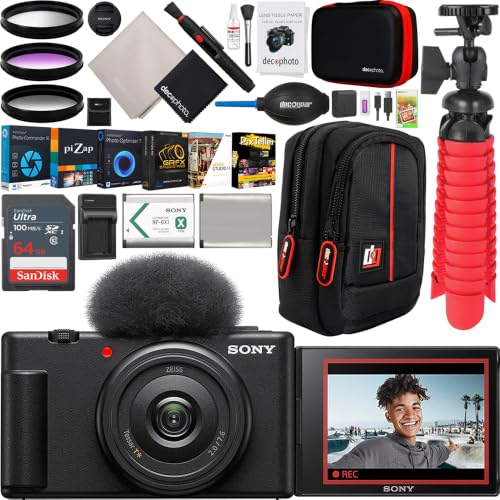
| Sony ZV-1F | Fastest to a phone | Fixed-lens vlogging compact built around one-tap transfers and vertical clips that post without editing. |
| Canon PowerShot G7 X Mark III | Best pocket all-rounder | Strong stills, live-streaming ability and Canon’s mature phone app in a jacket-pocket body. |
| DJI Osmo Pocket 3 | Best for video-first families | Gimbal-smooth clips that move to a phone over a fast wireless link, ready for the family thread. |
| Fujifilm Instax Mini 12 | Shares with no screen at all | Prints a physical photo in about ninety seconds and hands it to a person instead of a platform. |
| Sony ZV-E10 II | Best creator step-up | Interchangeable lenses, polished colour science and a sharing workflow built for daily posting. |
| Canon EOS R50 | Best for growing families | A proper mirrorless system whose Bluetooth and Wi-Fi pairing stays connected between gatherings. |
How Did We Choose the Best Cameras for Sharing?
We timed the unglamorous things. Each candidate had to move a batch of photos to a phone over its maker’s app, reconnect after a week in a drawer, and produce a JPEG a non-photographer would happily forward without editing. Cameras that demanded a fresh pairing ritual at every gathering were marked down hard, because sharing features only count when they survive real life — flat batteries, new phones, relatives who tap the wrong prompt. File quality still mattered: a fast transfer of a muddy image is just a quicker disappointment, so every pick had to hold up on a television screen, not only a handset.
We also lived with the batteries and the bags. A sharing camera that dies at the second hour of a wedding, or that needs its own suitcase, fails its category no matter how elegant its app is — so pocketability, charge-keeping and painless USB charging all fed the scores, and two otherwise capable candidates were cut for treating a family day out like a film set. The survivors are cameras a household can keep in a hallway drawer, charged and paired, ready for the unplanned Tuesday as much as the planned Saturday.
Variety of sharing routes counted too. Some moments want a file, some want a print, and some want a live feed to a relative on another continent. The six below cover all three routes deliberately. We also favoured cameras whose sharing tools sit on the surface — a dedicated transfer button, a send-while-shooting mode — over cameras that bury the same features four menus deep, because a feature you cannot find at a party might as well not exist.
What Actually Makes a Camera Good at Sharing?
Three systems do the work. First, the radio: modern Bluetooth low-energy connections that stay paired in the background let a camera whisper thumbnails to your phone all evening, so the full-resolution file you tap is already half home. Older Wi-Fi-only designs force you to join the camera’s own network, disconnecting you from the house system and from the very upload you were trying to make. Second, the app: the best companion apps let you browse the card, pick keepers, and push them to your camera roll in a few taps, while the worst treat every session like a first date. Third, the file itself — pleasing default colour, skin tones that survive indoor light, and video that arrives in the orientation your platforms expect.
Underneath all three systems sits a fourth, quieter factor: how the camera behaves in the minute before the photograph. Quick start-up, a screen bright enough for a sunny garden, autofocus that finds a face without being introduced to it — these decide whether the shareable moment gets captured at all. A camera can have the finest transfer pipeline in the world and still share nothing but pictures of the moment just after the moment, which is why handling speed was weighted alongside transfer speed throughout our testing, and why several technically generous cameras with sleepy manners did not survive the shortlist.
Notice what is missing from that list: megapixels. A shared photo is viewed on phones and televisions, where every camera here has resolution to spare. What the audience notices is whether faces look alive, whether the white balance coped with kitchen lighting, and whether the clip of the school play is steady. Sharing is a people problem dressed as a technology problem, and the cameras below were picked by people-problem rules.
Which of These Cameras Gets a Photo to Your Family Fastest?
Speed rankings change depending on whether the destination is a phone, a television or a fridge door, so read the six verdicts below against your own habits rather than as a league table. Each pick wins a different household.

Sony ZV-1F — Fastest to a phone
Sony designed this little fixed-lens camera backwards from the share button. The lens stays at a wide, selfie-friendly angle, the screen flips to face you, and the whole body assumes its footage will live on a phone within the hour. Pairing with Sony’s app happens once; after that, clips and stills you mark in playback flow to the handset while the camera goes back in your pocket. Vertical video is a first-class citizen rather than a crop you apologise for later, and the product-showcase and background-defocus touches exist purely to make a quick clip look considered rather than grabbed.
Families who mostly share short clips will feel the benefit most. A thirty-second clip of a toddler’s first steps moves across in the time it takes to find your reading glasses, and the colours arrive warm and finished, with skin that looks like skin under ceiling lights. Stills are the supporting act — perfectly pleasant, occasionally lovely — because the sensor and fixed lens were specified for motion first. Think of it as a dedicated sharing appliance: it does one social job with almost no friction and quietly declines every other job you might invent for it.
- Format: fixed-lens compact, wide fixed focal length
- Video: 4K recording with vertical-shooting support
- Sharing: Bluetooth and Wi-Fi transfer via Sony’s phone app, send-while-reviewing workflow
- Screen: fully articulating touchscreen that faces the subject
- Audio: built-in directional microphone with windscreen included
Strengths
- Mark-and-send transfer removes nearly all the friction between shooting and posting a clip.
- Colours and skin tones arrive finished, sparing relatives your editing backlog.
- Small enough that it actually attends the events it is meant to share.
Trade-offs
- Fixed wide lens cannot tighten up for a face across a garden.
- Stills play second fiddle to video in both handling and ambition.
- No viewfinder, so bright outdoor framing is screen-only guesswork.
Best for: relatives who live on short vertical clips and want them posted before dessert.
Not suited for: photographers hoping to crop distant subjects out of a wide frame later.
One habit unlocks this camera’s whole purpose: shoot with the share already planned. Frame a touch loose, because vertical crops forgive generosity and punish tightness; keep clips short and decisive, since a twelve-second moment transfers like a rumour while a four-minute one travels like luggage. Owners who treat the ZV-1F as a notebook — always present, always ready to send — extract far more from it than owners who save it for occasions, because occasions are exactly when an unfamiliar camera slows its owner down. Charged, paired and riding in the same pocket as the phone, it quietly becomes the family’s fastest correspondent.

Canon PowerShot G7 X Mark III — Best pocket all-rounder
Canon’s long-running pocket flagship earns its place here on the strength of balance. It shoots stills you would happily print, video you would happily post, and it can stream live to an audience when a christening or graduation has relatives on three continents. The zoom range covers the group shot and the tight portrait without a lens swap, and Canon’s phone app — one of the more forgiving in the business — handles browsing, geotagging and transfer with the least hand-holding of any system on this page.
Grandparents feature in this pick’s story more than specifications do. The camera’s automatic modes are genuinely trustworthy, its face detection forgiving, and its files flattering without looking processed, so the least technical person at the gathering can be handed the Canon and return usable pictures. When the files come home, they arrive in an order and format a phone gallery understands immediately. It lacks the newest background-transfer tricks of the Sony above, so big batches still ask for a minute of patience — a fair price for the most complete stills camera that fits a coat pocket.
- Format: premium compact with zoom lens and 1-inch-class sensor
- Video: 4K recording plus live-streaming capability
- Sharing: Wi-Fi and Bluetooth through Canon’s Camera Connect app
- Controls: touchscreen with tilting screen for low and high angles
- Audio: microphone input for cleaner recorded voices
Strengths
- Genuinely good stills and video from one pocketable body, so nothing needs explaining or editing.
- Live streaming turns distant relatives into attendees rather than an audience for highlights.
- Canon colours flatter skin straight from the camera, which is what shared photos live or die by.
Trade-offs
- Transfers of long 4K clips test patience compared with newer background-transfer systems.
- Autofocus in video trails the best creator cameras when subjects move erratically.
- The design is mature rather than fresh, and rivals now pair faster.
Best for: one-camera households that photograph birthdays and stream the occasional ceremony.
Not suited for: creators publishing several long videos every single day.
There is a social intelligence to this Canon that spec sheets miss. Its files need no apology and no explanation: colours relatives recognise as “how it looked,” flash behaviour that behaves at restaurant tables, and a size that never makes a subject feel photographed at. Where the Sony above is a broadcaster, the G7 X is a guest — invited everywhere because it never dominates the room. Households replacing a much-loved older compact usually land here, and the transfer habits they build around Canon’s app tend to outlast the camera itself, which is its own kind of recommendation.

DJI Osmo Pocket 3 — Best for video-first families
Hold this gimbal camera at a school sports day and the sharing argument makes itself: the footage is steady enough to watch on a television, the subject tracking keeps a running child centred without your help, and the file that lands on your phone looks like somebody competent filmed it. The rotating screen switches between horizontal and vertical framing with a twist, so the same moment can feed the family television and a grandparent’s phone feed without a second take. DJI’s app receives clips quickly and offers trimming before export, which means the version you share is the version you meant to share.
Still photographs exist here, but they are souvenirs rather than the point; the Pocket 3 is a cinema camera that shrank into a coat pocket and kept its manners. Its low-light video embarrasses many larger cameras, and the built-in audio pickup copes with commentary from behind the camera surprisingly well. Battery discipline is the habit to learn — the internal cell prefers a top-up between events — and the optional handle and wireless microphone ecosystem grows the kit if your family’s video habit turns serious. As a pure machine for making relatives feel present at events they missed, nothing else on this page touches it.
- Format: pocket gimbal camera with mechanical stabilisation
- Sensor: large 1-inch-class sensor for its size category
- Sharing: fast wireless transfer to DJI’s phone app with in-app trimming
- Screen: rotating touchscreen for horizontal and vertical capture
- Tracking: automatic subject tracking for faces and moving subjects
Strengths
- Gimbal steadiness makes shared clips watchable on big screens, not just phones.
- Subject tracking follows children and pets while you simply walk along.
- Quick wireless offload plus in-app trimming shortens the path to a postable clip.
Trade-offs
- Stills are an afterthought in resolution and in spirit.
- The gimbal head asks for gentler treatment than a slab-shaped compact.
- Internal battery means a power bank joins the kit on long days.
Best for: families whose memories mostly move — matches, recitals, holidays in motion.
Not suited for: stills photographers who only occasionally dabble in video.
Consider also who ends up holding it. Because the Pocket 3 asks so little of its operator — point, and let the gimbal and tracking divide the labour — it is the camera most often handed to a teenager on the touchline or a parent who claims to be “bad with technology,” and it returns footage that flatters them both. That handover quality matters for sharing in a way benchmarks never capture: the best clip of the match is frequently filmed by whoever was free to film it, and a camera that makes every volunteer competent multiplies a family’s archive faster than any single skilled owner can.

Fujifilm Instax Mini 12 — Shares with no screen at all
Every other camera in this guide shares through a network. This one shares through a hand. Press the shutter at a wedding and ninety seconds later a small physical photograph exists, gets passed around the table, provokes an argument about who keeps it, and ends the evening in a wallet rather than a cloud folder. The Mini 12 automates exposure and flash so completely that a child can produce a decent print on the first try, and its selfie mirror and close-up mode handle the two framings instant cameras are actually used for.
Do not mistake the simplicity for a gimmick. In a house with a grandparent who never opens the family thread, the Instax is the only camera whose output reliably reaches its audience, and teenagers — supposedly the most digital generation alive — treat the prints as treasure precisely because they cannot be duplicated with a tap. Film costs money per frame, which quietly teaches deliberate shooting, and the prints fade into keepsakes on fridges and noticeboards. Pair it with any phone-connected camera on this page and the two cover every generation you are ever likely to feed cake to.
- Format: instant camera printing credit-card-sized photos
- Exposure: fully automatic exposure and flash
- Sharing: physical prints developed in roughly ninety seconds, no app or network involved
- Framing: selfie mirror and close-up mode for arm’s-length portraits
- Power: AA batteries, easy to replace anywhere
Strengths
- Delivery rate is absolute: the photo physically reaches the person it was meant for.
- Zero setup, zero accounts, zero pairing — a child or a grandparent can run it.
- Prints become decorations and keepsakes instead of files in a forgotten folder.
Trade-offs
- Film is a running cost that digital picks never charge you.
- No digital copy exists unless you scan or photograph the print afterwards.
- Small prints reward closeness; distant subjects shrink into the scenery.
Best for: parties, weddings and any table where phones stay face-down.
Not suited for: anyone wanting an archive they can back up, search or reprint at large sizes.
Budget honesty belongs in this verdict too. The camera body is the cheap part of instant photography; a season of parties, a wedding and a new baby can consume film at a pace that surprises first-time owners, and the cost per kept photograph dwarfs anything digital. Yet people rarely regret the spend, because the accounting is wrong-headed: you are not buying photographs, you are buying the moment of handing one over, and that moment has no digital equivalent at any price. Buy film in multi-packs, keep a spare set of batteries in the box, and let guests take the prints home — that generosity is the entire point of the format.

Sony ZV-E10 II — Best creator step-up
When sharing stops being occasional and becomes a daily habit — a small business feed, a family channel, a grandchild documented for relatives abroad — the interchangeable-lens Sony starts to justify itself. Its sensor is far larger than the compacts above, the lens catalogue lets you grow from the kit zoom to a bright portrait lens, and Sony’s current app ecosystem supports the mark-and-transfer rhythm that daily posting demands. Picture profiles can be set so footage needs no grading at all, which is the unglamorous feature that separates people who post from people who accumulate footage.
Handling keeps the social purpose in view: a front-facing screen, a tally light so subjects know when they are live, and product-showcase autofocus that snaps to an object you hold up — the grammar of modern sharing, built in rather than bolted on. The honest cost is size and decisions. A lens-changing camera invites a bag, a spare battery and opinions about glass, and relatives who found the ZV-1F effortless may find this one a step too serious. Buy it when the audience has grown beyond the family thread, or when one household member’s hobby clearly has.
- Format: interchangeable-lens mirrorless, APS-C class sensor
- Video: 4K recording with creator-focused picture profiles
- Sharing: Bluetooth and Wi-Fi transfer via Sony’s app, remote control from phone
- Screen: fully articulating touchscreen with recording indicator
- Mount: Sony E, with a deep catalogue of compact lenses
Strengths
- Lens choice lets the same body serve birthdays now and a small channel later.
- Finished-looking colour profiles keep daily posting free of grading chores.
- Creator hardware touches — tally light, showcase focus — remove small daily frictions.
Trade-offs
- A body plus lenses is a kit to carry, not a pocket to forget about.
- Menus and options can overwhelm the relative who just wants the photo.
- No in-body stabilisation, so handheld video leans on lens or technique.
Best for: households with one member who shares daily and is outgrowing a compact.
Not suited for: buyers who want the camera to disappear into a jacket and a routine.
Growing into this Sony is a documented path rather than a leap. Start with the kit lens and the camera’s most automated colour profile; post daily; notice which focal lengths your shared work actually uses; then buy exactly one lens that serves the pattern you found, rather than the pattern a forum predicted. The sharing workflow scales with you — the same app habits carry from the first wobbly clip to a monetised channel — and the body rewards the climb with manual control, better audio options and low-light reach the compacts cannot follow. It is the pick for the household member whose “just sharing photos” has quietly become a practice.

Canon EOS R50 — Best for growing families
Canon’s smallest RF-mount body is the diplomat of this list: a real mirrorless camera that behaves politely in a family setting. Its guided menus explain themselves in plain language, the autofocus finds eyes — people, animals, even vehicles — without being asked twice, and the pairing with Canon’s app, once established, tends to stay established between gatherings, which regular hosts will recognise as the entire ballgame. Stills are its home turf, with video a strong second rather than the headline act.
Picture a household camera that lives on a shelf by the door. School concert on Thursday, grandparents visiting Sunday, a dog doing something unrepeatable in the garden at some point in between — the R50 covers all of it, and the files move to phones with the least ceremony of any interchangeable-lens camera here. The kit lens is a sensible start rather than a destination, and the mount opens onto Canon’s whole RF range when the family photographer emerges. If the compacts feel like appliances and the Sony feels like a workstation, this Canon is the house camera in the older, warmer sense of the term.
- Format: interchangeable-lens mirrorless, APS-C class sensor
- Autofocus: subject detection for people, animals and vehicles
- Sharing: persistent Bluetooth pairing plus Wi-Fi transfer through Canon’s app
- Guidance: on-screen creative assist and plain-language menus
- Mount: Canon RF, from compact kit zooms to serious primes
Strengths
- Pairing that survives between events removes the classic pre-party setup ritual.
- Guided interface lets a nervous beginner succeed on day one.
- Stills quality and lens growth give the purchase a long family life.
Trade-offs
- Video features trail the Sony creator models for daily publishing.
- Small body plus larger lenses can feel front-heavy with ambitious glass.
- Touch-driven controls ask for a short learning curve from dial-lovers.
Best for: a shared household camera that several people of different confidence will use.
Not suited for: solo creators whose output is ninety percent video.
Longevity is the R50’s closing argument. Compact sharing cameras age with their apps; when a maker loses interest, transfers slow and support thins. A system camera spreads that risk across a mount shared by millions of owners, a battery and card format any shop stocks, and files that every future device will still open. The family that buys this Canon is buying a decade of Christmases with one learning curve, and the photographs it sends tonight are, almost incidentally, the best-archived the household has ever made. Few purchases in this guide promise both immediacy and permanence; this one genuinely does.
How Do the Six Sharing Cameras Compare Side by Side?
| Camera | Sharing route | Strongest format | Carry style | Watch out for |
|---|---|---|---|---|
| Sony ZV-1F | App transfer, vertical-ready | Short clips | Fixed wide lens | |
| Canon PowerShot G7 X Mark III | App transfer, live streaming | Stills and video equally | Slower big-file transfers | |
| DJI Osmo Pocket 3 | Fast app offload | Stabilised video | Pocket, handled gently | Stills are secondary |
| Fujifilm Instax Mini 12 | Physical print | Instant photos | Hand or tote bag | Cost of film per frame |
| Sony ZV-E10 II | App transfer, remote control | Creator video | Small camera bag | Complexity for casual users |
| Canon EOS R50 | Persistent app pairing | Family stills | Small camera bag | Video plays second fiddle |
Read the table by destination rather than by specification. If the audience is a phone feed, the first three rows compete; if the audience is a person standing next to you, only the Instax applies; if the audience will still be watching in ten years, the two mirrorless bodies build the archive the compacts cannot. Many households end up owning one row from each family, and that is not indecision — it is recognising that “sharing” names three different acts.
What Does a Week of Real Sharing Actually Look Like?
Abstract speed claims dissolve on contact with an ordinary week, so consider the rhythm these cameras actually live in. Monday brings a school certificate photograph, taken in a hallway, needed by a grandparent before lunch — a job for whichever connected camera is charged, and a reminder that the best sharing camera on a weekday is simply the one that is not in a bag in the car. Wednesday’s football training wants thirty seconds of video, steady enough to survive a television, filmed by whoever is standing nearest the pitch. Saturday is the stress test: a family lunch with fourteen people, three generations of phone literacy, and one person — you — expected to produce the record of it.
Notice how rarely the week’s demands mention image quality in the photographer’s sense. They mention presence, speed, steadiness and reach across generations. That is why this guide ranks a modest instant camera beside serious mirrorless bodies without embarrassment: across a real week, each of the six wins at least one day outright. Shoppers who recognise their own week in that pattern can buy with confidence; shoppers whose week is one long video shoot or one long portrait session should weight the creator and system picks more heavily and treat the rest as supporting cast.
How Much Should You Spend on a Camera Whose Job Is Sharing?
Sharing cameras punish overspending in a particular way: the expensive parts of a camera — sensor size, burst depth, exotic glass — are precisely the parts a phone screen cannot display, while the cheap parts — the app, the pairing, the colour defaults — decide whether the purchase succeeds. Set the budget by the audience’s screen and the photographer’s patience, not by ambition. A household that shares daily and prints rarely is well served by the middle of this list; the money saved buys the second battery, the spare cards and the film stock that keep the system running at the moments that matter.
There are two honourable exceptions. If one person’s sharing has become work — a shop feed, a team page, a channel with sponsors — then the creator picks stop being luxuries and become tools with a payback period, and lenses join the budget honestly. And if the archive matters as much as the audience, the mirrorless bodies repay their cost across a decade in a way no compact can promise. Outside those two cases, the discipline of this category is refreshing: buy the camera whose sharing you will actually use, keep the change, and spend the savings on being somewhere worth photographing.
How Should You Set Up a Sharing Camera on Day One?
Do the boring setup before the first event, not during it. Pair the camera with the phone it will serve most, grant the app its permissions, and run one complete practice transfer of a dozen photos and a short clip while nobody is waiting. Turn on automatic background transfer if your model offers it, set the camera to record a share-ready JPEG alongside any RAW files, and agree a household routine: the photographer marks keepers in playback on the night, and everything marked reaches the family thread before bed. Cameras fail socially when setup is postponed — the first real gathering becomes a troubleshooting session, the camera gets blamed, and it retires to a drawer with its sharing features intact and unused.
Phones deserve equal attention. Clear enough storage for a weekend of video, keep the companion app updated, and make sure the family’s shared album or thread accepts the file sizes your camera produces; a few services quietly compress or reject large clips, and discovering that after a wedding is miserable. Finally, teach one other person the transfer routine. A sharing camera with a single trained operator is a bottleneck wearing a lens cap.
What Mistakes Stop Good Photos From Ever Being Shared?
Shooting only in RAW is the classic. The files are magnificent and enormous, the phone app moves them slowly if at all, and the edit they need never happens — so the technically best version of the family archive is also the least seen. Shoot RAW plus JPEG, share the JPEG tonight, and keep the RAW for the one image a year that earns a big print. A second mistake is treating the camera app as an afterthought: refusing its permissions, never updating it, then concluding the camera’s wireless is broken. Third, families buy for the photographer’s ambitions instead of the audience’s habits — a superb camera whose files need a computer will lose, every single weekend, to a modest camera whose files arrive by themselves.
Hoarding is the quiet final error. Photographers wait for the perfect edit, the complete album, the right moment to post — and the moment passes, because shared photos are conversation, not publication. Send the good-enough frame tonight. The relatives are not grading your highlights; they are looking for the child’s face.
A related failure is sharing everything, which amounts to sharing nothing. Two hundred unfiltered frames from one afternoon train relatives to skim, then to stop opening the album at all. The photographers whose shares get watched behave like editors: a dozen frames that tell the day’s story, one clip that captures its sound, and the discipline to let the rest live quietly in the archive. Cameras with in-playback marking — several on this page — exist to make that edit at the moment of shooting, when your memory of the day is still a reliable guide to what mattered in it.
Finally, do not let one person’s standards govern everyone’s memories. The archivist who deletes every imperfect frame is deleting other people’s keepsakes; a soft photograph of a grandmother laughing is not a failed file, it is the file. Share generously, archive indulgently, and save the ruthless culling for your own portfolio, where it belongs.
How Should You Keep What You Share From Disappearing?
Sharing and keeping are different promises, and connected cameras blur them dangerously. A photograph that lives only inside a messaging thread is a photograph on loan: threads get deleted, accounts change, services compress and eventually discard. Once a month, give the marked keepers a permanent home — a folder on a computer, mirrored to one cloud archive you control — with names a human can search in ten years: the year, the occasion, the people. It takes twenty minutes, it survives every app retirement mentioned in the questions below, and it converts a stream of pleasant messages into the family archive your grandchildren will actually inherit.
The two mirrorless picks make this easiest, because their files arrive with consistent naming and metadata from a real camera clock — set that clock correctly, a detail everyone postpones and everyone regrets at a sorting session in January. Compacts and the gimbal camera reward the same monthly habit with less metadata to lean on, so the folder names must carry more of the story. Prints need the least technology and the most honesty: write names and a date on the back in pencil while the day is still remembered, because an unlabelled print is a mystery within five years and a stranger within twenty.
None of this housekeeping should slow the sharing itself down. The rhythm that works is share tonight, file monthly, print the year’s dozen best at the holidays — a cadence light enough to survive busy lives and strong enough that nothing precious exists in exactly one fragile place. Cameras start the chain; only habits finish it.
Where Does the Phone Fit Alongside a Sharing Camera?
Every reader already owns a sharing machine: the phone in their pocket pairs instantly, uploads without asking, and is present at every event by definition. A dedicated camera must therefore earn its carry, and it does so in the places phones remain weak — optical zoom that reaches across a hall without dissolving into noise, steadiness and audio that survive a windy touchline, low-light files that stay clean after the candles come out, and the simple social fact that a person holding a camera is understood to be making something, while a person holding a phone might be doing anything. The six picks were chosen to complement the phone, never to compete with it: each one hands its results to the phone and lets the phone do the travelling.
That partnership suggests a buying test more honest than any benchmark. Take your phone’s last fifty shared photographs and ask which of them a real camera would have made noticeably better — the zoomed ones, the dark ones, the shaky clips, the portraits where the background deserved softness. If the answer is “most of them,” a camera from this page will be used weekly and loved. If the answer is “hardly any,” spend the money on the Instax and a film stockpile instead, and let the phone keep its job; the prints will still transform your parties. Either way, the audience wins, which was the assignment from the first paragraph.
One more partnership habit is worth adopting whatever you buy: let the camera and phone divide the day rather than duplicate it. Phones take the incidental frames — the menu, the parking spot, the dog asleep — while the camera is reserved, charged and present for the people. Families who draw that line find their shared album improves in both directions: fewer, better camera photographs, and phone snaps that no longer pretend to be the record of the day.
Final Recommendation
Match the camera to the audience’s front door. For a family that lives in a group thread, the Sony ZV-1F or the Canon G7 X Mark III will move more photographs into more hands than any specification upgrade could, with the Canon the safer buy when stills matter as much as clips. Choose the DJI Osmo Pocket 3 when the memories mostly move and somebody abroad watches them on a television. Add the Instax Mini 12 to any household containing a person who does not do apps — it is inexpensive insurance against exclusion. Step up to the ZV-E10 II or the EOS R50 only when a creator habit or a growing archive genuinely demands lenses, and set whichever you buy up properly on day one: the best cameras for sharing are, in the end, the ones whose sharing actually gets used.
How Do You Share Video Without Wrecking Its Quality?
Video is where sharing pipelines quietly do their damage. A clip leaves the camera rich and detailed, then a messaging app — trying to be helpful — crushes it into something that looks filmed through a steamed window. The fix is procedural rather than technical: send the master file through a shared album, a cloud folder or the camera maker’s own app, and reserve the chat thread for the announcement and the jokes. Where a platform is the destination, upload from the phone’s gallery or the platform’s own app at the highest quality setting it offers, because several services treat a file received from another app’s share sheet more harshly than one uploaded directly.
Orientation deserves the same forethought. Decide before the event whether the audience watches on phones or televisions, and hold the camera accordingly; the rotating screen on the DJI and the vertical modes on the Sonys exist because rotating later costs resolution you can feel. Keep clips shorter than your instinct suggests — the forty-second trim is the one relatives finish — and let the camera’s in-app or in-phone trim happen before transfer, not after, so the file that travels is the file that matters. None of this requires talent. It requires deciding that the audience’s screen, not the camera’s card, is the finish line.
Who in the Family Should Own Which Sharing Job?
Households share better when the jobs are divided honestly. Somebody — usually the person reading guides like this one — becomes the archivist: they own the mirrorless body, the backup routine and the shared album’s organisation. Somebody else becomes the correspondent, carrying the compact or the gimbal camera and feeding the family thread in something close to real time. A third role, often filled by the youngest person present, is the Instax operator, whose prints circulate while the digital files are still transferring. Naming these roles sounds bureaucratic; in practice it stops three people filming the same candle from the same angle while nobody photographs the cook.
The division also protects the equipment budget. One good archivist camera outlasts three mid-range compromises, and the correspondent’s tool can be chosen purely for speed because the archive is somebody else’s problem. When a single camera must do everything — the commonest real-world case — the Canon G7 X Mark III and EOS R50 split the difference from opposite directions: pocket convenience with real stills, or system quality with family manners. Choose by which compromise your household will forgive more often.
What About Privacy When a Camera Is Always Connected?
A camera that shares eagerly deserves one sober paragraph. Automatic uploads are wonderful until a private moment rides along with the birthday batch, so review what your companion app syncs by default and turn off anything that moves files you have not marked. Geotags are the second quiet leak: a photograph of a child in a school uniform, posted with location data intact, tells strangers more than the picture shows. Most cameras and phones can strip location on export — enable it for anything leaving the family circle, and keep the tagged originals in the private archive where they belong.
Prints, delightfully, leak nothing. It is worth saying aloud that the Instax’s analogue innocence is a genuine feature in a guide otherwise devoted to radios and apps: some photographs should exist exactly once, in one person’s hands. Connected cameras earn their place by making generosity easy; wisdom is keeping the off switch — and the unconnected alternative — within reach.
If a single sentence must carry the whole guide, let it be this: photographs are social objects, and the camera that respects the audience’s habits will always outperform the camera that merely respects the photographer’s ambitions. Buy for the thread, the television and the fridge door — in whichever order your family actually gathers around them — and the specifications will take care of themselves, because every camera on this page has more than enough of those. What none of them can supply is the decision to send the picture tonight. That part remains, happily, a human feature.
Related guides
Frequently Asked Questions
Can a camera send photos to a phone without Wi-Fi in the house?
Yes. Most cameras here create their own direct link to the phone or use Bluetooth to negotiate one, so transfers work in a park or a rented cottage with no router at all. The upload to relatives then uses the phone’s mobile data, which is worth remembering with large video files.
Do shared photos lose quality when they go through an app?
Only if you let them. Companion apps offer full-size or resized transfer; choose full size for keepers. Separately, some messaging services compress whatever they receive, so send archival copies through a shared album or cloud link and let the chat thread carry the everyday version.
Is an instant camera a serious option or a toy?
Serious, for a specific definition of sharing. It cannot feed a screen, but it reaches people no app reaches and produces the only photographs from most parties that still exist outside a phone. Households often pair one with a digital pick rather than choosing between them.
What if my relative’s phone is old?
Check the app’s minimum system version before buying, and favour Canon’s and Sony’s mainstream apps, which support older handsets longer than most. If the phone truly cannot run any companion app, the Instax route or a camera whose files can be shared from your own phone after a card transfer are the honest fallbacks.
How many cameras does a family actually need for sharing?
Usually one connected camera that somebody enjoys using, plus phones. A second body earns its place when two events happen at once or when one member’s hobby outgrows the household camera — the mirrorless picks above exist for exactly that graduation.
Should I share straight from the camera or edit first?
Share the frame tonight and edit at leisure, if ever. The cameras here were chosen partly for finished-looking default files, so the honest answer for family material is that the straight version is the version. Reserve editing for the handful of images destined for prints or frames, and let the other ninety-five percent travel while the day is still warm.
What happens to sharing features when a phone app is discontinued?
It happens occasionally with older models, and it is the strongest argument for the system cameras and the Instax on this page: their files and prints never depended on a server. With compacts, favour current models from makers who maintain their apps across many product generations, and download your archive to a computer periodically so no app’s retirement can strand it.
Related Guides
Sharing is one stop on a longer road. If your clips are growing into a channel, our guide to the best cameras for vlogging and travel goes deeper on creator setups, while families documenting children should read our picks for everyday family photography. And when the shared archive needs a home screen everyone can gather around, our roundup of cameras with the best phone apps compares the software side in detail. Whichever route you take next, keep the habit this guide keeps returning to: set the sharing up once, properly, on a quiet evening — then let every gathering afterwards be about the people in front of the lens rather than the machinery behind it.


