kajuandouglas.com is reader-supported. When you buy through links on our site, we may earn an affiliate commission.
Where to Buy
The best cameras for cars and home security outdoor share one post with two masters: the driveway. A camera above the garage or on the porch must watch the house’s approaches and the vehicles that sleep outside it — catching the face at the door, the figure at the car window at 3 a.m., and the delivery driver’s honest visit with the same competence. The best cameras for cars and home security outdoor are judged here on the outdoor fundamentals: weatherproofing that survives seasons rather than showers, night vision that identifies rather than suggests, power that does not demand a ladder every month, and detection smart enough to tell a person at your car from the neighbour’s cat crossing the drive. Buy through the Amazon listings linked in this guide, confirm the exact model name before ordering, and decide your power religion before your brand — battery, solar or wired — because that choice, more than any badge, determines whether the system is still watching in year three.
Three of these picks carry links from our verified pool; three are included as prose-only benchmarks because a guide to driveway security that ignored the biggest ecosystems would be lying by omission. Each verdict states plainly which is which, what the subscription reality is, and who should buy what — because in security cameras, the purchase price is the smallest number in the relationship.
Key Takeaways
- The Blink Outdoor 4 is the set-and-forget driveway watcher: extraordinary battery life and a simple app, with footage that lives in Blink’s world.
- REOLINK’s Argus PT Ultra is the pan-tilt solar option for wide drives and yards, covering a car and a gate from one post.
- The Wyze Cam v4 brings colour night vision to the driveway at the friendliest cost, with local recording for the subscription-shy.
- Arlo’s Essential Outdoor line is the polished benchmark for image quality and smart alerts — included prose-only, outside the linked pool.
- Ring’s Stick Up Cam is the natural pick for households already inside Ring’s ecosystem — also prose-only here.
- eufy’s SoloCam family argues for solar power and local storage with no monthly fee — the third prose-only benchmark.
In this guide
Quick Picks
| Pick | Badge | Why it earns its place |
|---|---|---|
| Blink Outdoor 4 | Best battery endurance | Months-to-years battery life watching the drive with minimal attention. |
| REOLINK Argus PT Ultra | Best pan-tilt solar cover | One camera sweeps car, gate and yard with solar-friendly power. |
| Wyze Cam v4 | Best budget colour night | Colour night vision and local recording at a trial-friendly price. |
| Arlo Essential Outdoor Camera | Best polished ecosystem | Image quality and alert intelligence for subscription-comfortable homes. |
| Ring Stick Up Cam Battery | Best for Ring households | Joins an existing Ring doorbell and alarm world seamlessly. |
| eufy SoloCam S340 | Best no-fee solar | Solar pan-tilt with local storage and no monthly rent. |
How Did We Choose These Cameras for Driveway and Home Security?
The driveway brief set the tests. Identification distance came first: a security camera’s footage is graded on the worst night, not the best day, so night vision — infrared range, colour night performance, spotlight behaviour — outranked daytime resolution bragging. Detection quality second, because a camera that alerts for every moth trains its owner to ignore the one alert that matters; person and vehicle detection, and the zones to aim them, were weighted heavily. Power third, as the system’s destiny: battery cameras trade attention for installation freedom, solar softens the trade, and wired removes it at the price of installation day. Fourth, the footage’s home — cloud subscription, local card, hub or recorder — because a security system is a data relationship as much as a camera. Finally, the car half of the brief: the driveway camera doubles as the parked car’s witness, so field of view wide enough to hold the car and the approach, and motion sensitivity that wakes for a figure at the window, were treated as core requirements rather than bonuses.
Where Should Driveway Cameras Actually Be Placed?
Placement defeats specification with embarrassing regularity. The camera wants to be high enough to see faces rather than scalps — but not so high that every visitor is a hat — angled to cross the traffic rather than stare down its path, because a crossing subject spends longer in frame and shows a face to the lens. The car should sit inside the frame’s honest middle, where the lens is sharpest and the night illumination reaches, not at the fisheye’s smeared edge. Light is placement too: a camera facing the streetlight or the sunset will silhouette every subject it exists to identify, so the sun’s path and the neighbours’ security lights are part of the site survey. And every outdoor camera should be placed where its own theft is awkward and its lens can be cleaned — spiders will find it monthly, and a camera you cannot reach is a camera slowly going blind.

Blink Outdoor 4 — Best battery endurance
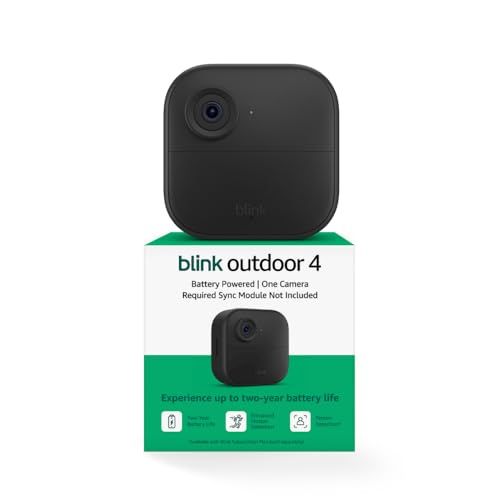
The Blink Outdoor 4’s party trick is absence: months, and under gentle traffic up to years, between battery changes, in a small weatherproof box that a renter can mount in minutes and a homeowner can forget exists. For the driveway brief that matters enormously — the camera that is always awake because nobody had to feed it — and its person detection and improved night work serve the car-and-approach watch honestly. Its compromises are the ecosystem’s: footage lives in Blink’s cloud for its best features, clips are event-based rather than continuous, and a sync module anchors the system to your router’s patience. As the low-attention outer layer of a home’s security — the drive, the side gate, the outbuilding — it is the easiest recommendation in this guide.
- Type: battery outdoor camera, weatherproof
- Power: AA lithium batteries, exceptional life
- Detection: motion with person detection options
- Storage: cloud plans, local via sync module options
- Audio: two-way talk through the app
Strengths
- Battery life that redefines the maintenance schedule.
- Installation a renter can undo without a trace.
- Dependable event clips of the drive and door.
Trade-offs
- Best features live behind the subscription.
- Event clips, not continuous recording.
- Image detail is honest, not class-leading.
Best for: driveways, gates and outbuildings needing watchful neglect. Not suited for: anyone wanting continuous recording or local-only footage.

REOLINK Argus PT Ultra — Best pan-tilt solar cover
Where the Blink watches a frame, the Argus PT Ultra patrols: a 4K pan-and-tilt head on a battery-and-solar diet, able to hold the car in one preset, the gate in another, and sweep the yard between them — with tracking that follows a moving figure across the drive rather than waving it goodbye at the frame’s edge. Colour night vision with spotlights gives the footage description-grade detail, and Reolink’s local-recording habits suit owners who prefer their archive at home. The honest costs: pan-tilt means the camera is sometimes looking elsewhere, battery life depends on how busy your driveway is and how much sun the panel honestly gets, and the app ecosystem is a notch less polished than the subscription giants’. For wide properties with one post to cover much ground, it is the natural centre of the system.
- Type: battery pan-tilt outdoor camera, 4K
- Power: rechargeable battery, solar panel compatible
- Coverage: pan-tilt presets and auto-tracking
- Night: colour with spotlights
- Storage: microSD local recording
Strengths
- One post covers car, gate and yard.
- Tracking keeps a moving subject in frame.
- Local storage without a monthly fee.
Trade-offs
- A moving camera has blind moments by design.
- Solar reality depends on your roofline and season.
- Busy driveways shorten battery intervals.
Best for: wide drives, rural homes and single-post coverage problems. Not suited for: a narrow, busy driveway where a fixed camera sees everything anyway.

Wyze Cam v4 — Best budget colour night
The Wyze Cam v4’s driveway case is its night: colour night vision that lets a 3 a.m. clip say the jacket was red and the car was silver, from a weather-resistant body priced like an experiment. Local recording to its own card keeps the subscription optional, the app is a known quantity in millions of homes, and its size lets it tuck under an eave where bigger cameras announce themselves. The caveats are Wyze’s familiar ones — the best detection features lean toward the subscription, Wi-Fi quality at the driveway’s edge decides its reliability, and it is a camera to verify on your own network before multiplying. As the first camera on a drive, or the third camera filling a gap, its value is difficult to argue with.
- Type: compact wired outdoor-capable camera
- Night: colour night vision, a class highlight
- Storage: microSD continuous or event recording
- Power: wired, so no battery schedule
- Body: weather-resistant for eaves and porches
Strengths
- Night descriptions, not night silhouettes.
- Local recording keeps fees optional.
- Cheap enough to cover the second angle now.
Trade-offs
- Smartest alerts lean on the subscription.
- Needs power and decent Wi-Fi at the post.
- Verify performance before building a fleet.
Best for: porches, eaves and budget-wise second angles. Not suited for: posts beyond your Wi-Fi’s honest reach.
Arlo Essential Outdoor Camera — Best polished ecosystem
Included without a link as the polish benchmark: Arlo’s outdoor cameras produce some of the most watchable footage in the consumer class — clean detail, good colour, night work with authority — wrapped in an app and alert system that subscription households find genuinely refined, with person, vehicle and package intelligence that driveway duty uses daily. The relationship’s price is the plan: Arlo’s cameras are designed as citizens of a subscription, and owners should enter with that arithmetic accepted rather than resented. For a home that wants the driveway and the car watched beautifully and is happy to pay the monthly toll, Arlo remains the name the others are compared against.
- Type: battery outdoor camera ecosystem
- Image: class-leading polish and detail
- Alerts: person, vehicle and package intelligence
- Storage: cloud-first by design
- Integration: broad smart-home support
Strengths
- Footage quality that flatters the evidence.
- Alerts a household can actually live with.
- A refined app for non-technical owners.
Trade-offs
- The subscription is effectively mandatory.
- Battery intervals shorten on busy drives.
- Premium pricing across the whole system.
Best for: households buying polish and paying the toll gladly. Not suited for: subscription refusers and local-storage purists.
Ring Stick Up Cam Battery — Best for Ring households
The second prose-only benchmark earns its place by address rather than specification: if your doorbell, alarm and neighbourhood app already speak Ring, the Stick Up Cam is the driveway camera that joins the family without a second app, a second subscription conversation or a second set of alerts to train. Its footage is competent, its battery manners familiar to Ring owners, and its view of the car integrates with the door’s view of the visitor into one timeline. Outside the ecosystem its case weakens — the subscription assumption and the cloud-first design are the toll — but ecosystem gravity is a real feature in security, where one app that everyone in the house actually opens beats three superior ones nobody does.
- Type: battery outdoor camera, Ring ecosystem
- Integration: Ring doorbells, alarm and app
- Storage: cloud with Ring plans
- Audio: two-way talk
- Mounting: flexible indoor-outdoor placement
Strengths
- One app, one timeline for door and drive.
- Familiar behaviour for existing Ring homes.
- Easy addition to alarm-linked routines.
Trade-offs
- Value collapses outside the Ring ecosystem.
- Cloud plan effectively required.
- Specification sheet trails the specialists.
Best for: Ring households extending cover to the car. Not suited for: first-time buyers with no ecosystem to join.
eufy SoloCam S340 — Best no-fee solar
The third benchmark argues the opposite philosophy to Arlo and Ring: a solar pan-tilt camera with on-device storage and person intelligence, designed to be bought once and never rented. For the driveway brief it brings the Argus’s patrol logic with eufy’s polish — wide coverage, tracking, local clips the owner physically possesses — and a solar panel integrated into the proposition rather than bolted onto it. Its honest limits are the category’s: solar depends on the post’s sunlight, pan-tilt has its blind moments, and eufy’s ecosystem has had its public debates about cloud handling that buyers should read and judge for themselves. As the no-fee flag-bearer, it completes this guide’s map of the three philosophies — subscription polish, ecosystem gravity, and owned outright.
- Type: solar pan-tilt outdoor camera
- Power: integrated solar with battery buffer
- Storage: on-device local recording
- Detection: on-device person intelligence
- Fees: none required for core function
Strengths
- Buy-once economics with real capability.
- Solar power matched to a patrol workload.
- Footage stored in your own home.
Trade-offs
- Shaded posts starve the solar budget.
- Pan-tilt blind moments, as with all patrols.
- App polish a step behind the subscription giants.
Best for: sunny posts and owners who refuse monthly fees. Not suited for: shaded north-facing drives or app-polish perfectionists.
How Do You Stop Security Alerts From Training You to Ignore Them?
A driveway camera’s real product is not footage — it is the owner’s attention, and attention is spent by false alerts and saved by tuning. Start with zones drawn tight around the ground that matters: the car’s doors, the path to the house, the gate — excluding the street, the pavement and the hedge the wind interviews nightly. Set person and vehicle detection to do the filtering, and let the moths and the rain record silently if they must record at all. Schedule by the household’s life: the school-run hour and the delivery window will always be busy, and a system that cannot tell Tuesday morning from 3 a.m. will shout about both equally. Review the first fortnight’s alerts like an audit — every false one has a cause, and the cause is always a zone, a sensitivity or a spider. The goal is a camera that speaks rarely and is believed completely, because the one night it matters, belief is the whole system.
What Mistakes Do Driveway Camera Owners Make?
The founding mistake is mounting for the view you want rather than the face you need — the camera placed for a postcard of the property that records the tops of heads at the car. Second is buying the camera before deciding the footage’s home, then discovering the subscription or the ecosystem after the ladder has been put away. Third is starving the system: a battery camera on a busy drive without solar, a Wi-Fi camera beyond the router’s honest reach, a local card too small for the retention imagined. Fourth is forgetting the car half of the brief — the camera framed on the door while the vehicle, the actual target of half the neighbourhood’s crime, sits at the frame’s dark edge. Fifth is never reviewing: footage unexamined until the morning it is needed, when the lens’s month-old spider web introduces itself. A five-minute monthly ritual — clean the lens, check the view, confirm last night recorded — prevents the entire category of failure.
How Does Night Vision Actually Perform on a Driveway?
Judge night footage by the identification question: at the distance of your car, in the worst weather, can you describe the person? Infrared gives range and monochrome honesty, and its enemies are reflective surfaces — a white garage door near the lens floods the exposure and dims everything beyond it, which is why camera angle relative to your own walls matters as much as the illuminator’s rating. Colour night vision, the Wyze’s strength, needs a little ambient light and repays it with descriptions — jacket colour, car colour — that infrared cannot give. Spotlights, on the Reolink and the SoloCam class, create their own evidence and their own deterrent, at the price of announcing the camera and startling the innocent along with the guilty. The five-minute test settles all claims: walk your own driveway at midnight, at the car’s far door, and grade the footage in the morning. Every camera in this guide passes that test at some distance; the placement’s job is making sure your distance is the one it passes at.
How Do You Build From One Camera to a Watched Property?
In rings, by priority, as the Blue Iris guide in this batch also argues from its different shore. The front approach first — door and drive together, the post this guide is about. The rear and side entries second, because they are the approaches the street cannot see. The outbuildings and the far gate third, where the wire-free picks earn their existence. Interior coverage last and most carefully, because a home’s inside is a privacy conversation before it is a security one. Each ring reuses the same disciplines — placement for faces, zones for attention, power chosen per post — and each addition should be audited against the alert budget, because a system of six chatty cameras is less secure than a system of three believed ones. Grow the system the way the threats actually rank, and stop when the property’s honest approaches are covered; the camera watching the compost heap is a hobby, and should be bought as one.
What Does Weather Do to Outdoor Cameras Across a Year?
Each season files its own complaint. Summer bakes batteries, softens adhesives and fills the night frame with insects drawn to the infrared — the spider’s web across the lens in August is a genre of footage unto itself. Autumn drives rain horizontally into places the weatherproofing ratings imagined vertically, and tests every cable entry and seal. Winter shortens battery chemistry’s patience, frosts lenses at dawn, and makes the ladder work of maintenance a considered decision rather than a chore. Spring returns the birds, who regard camera housings as nesting real estate with excellent views. The cameras in this guide are all honestly rated for outdoor life; the owner’s contribution is the seasonal round — seals checked, mounts re-tightened, lenses cleaned, solar panels wiped — four short rituals that separate a system entering its fifth year from a box of regrets entering its second.
How Should You Talk to Police and Insurers About Your Footage?
Before you ever need to: know how to export a clip in its original quality, because the app’s shared version is often a compressed shadow of the evidence. Keep the original file untouched, note times against a clock you have verified, and preserve the surrounding minutes rather than the dramatic ten seconds — context is what makes footage credible. When an incident happens, export first and review second, because retention clocks and loop overwrites are always running somewhere in the system. None of this requires legal expertise; it requires the same boring archival discipline this batch’s guides keep recommending, applied to the one archive whose value is only ever tested on the worst day.
How Do You Choose Between a Fixed Camera and a Pan-Tilt Patrol?
By being honest about what recording means. A fixed camera records everything in its frame all the time — the archive’s whole promise — and its limitation is only the frame’s width. A pan-tilt patrol sees more ground and guarantees less of it: at any moment, most of its territory is unwatched, and the incident that matters has a talent for the unwatched moment. Patrols earn their place where the territory is wide, the threat is slow, and the camera’s movement itself is a deterrent and a live-view pleasure — the rural drive, the yard with outbuildings, the gate at the end of a long approach. Fixed cameras own the dense, valuable, fast-moving posts: the door, the car’s side, the porch. Mature systems use both knowingly — fixed for the record, a patrol for the reach — and this guide’s list is built to assemble exactly that: Blink or Wyze on the fixed posts, Reolink or SoloCam on the sweep.
What Role Does Lighting Play Alongside the Camera?
Lighting is the camera’s silent partner and often the better purchase. A well-lit driveway gives every camera in this guide better footage than a superior camera in darkness, because identification is made of light before it is made of pixels. Motion-activated lights startle, illuminate and announce simultaneously — the cheapest security upgrade known — and their placement should serve the camera’s angle rather than blind it: light the subject’s face, not the lens. The car’s own environment matters too; a streetlight’s position can be a reason to choose the camera’s post on the other side of the drive. Buy the light first if the drive has none, and let the camera budget follow — the footage will thank you in the only currency that matters, which is faces you can name.
How Should Renters Secure a Driveway Without Drilling?
The renter’s system leans on everything this category does without a drill: battery cameras on clamp and strap mounts, a camera inside a window with the glass’s reflections managed, the car itself watched from the porch’s existing fixtures. The Blink’s traceless installation and the Wyze’s shelf-and-eave life are the natural citizens, and the whole kit should be conceived as portable — the same cameras, re-posted in an afternoon, at the next home. What renters should not do is skip security entirely for want of a drill; the driveway’s threats do not check tenure. Agree the visible basics with the landlord where the lease asks, keep mounts reversible, and let the system’s discipline — zones, alerts, monthly lens care — be the same as any owner’s, because the footage’s job does not know you rent.
How Do You Test a Driveway Camera in Its First Week?
Examine it like a system, not a gadget. Night one: walk the car’s far door and the gate at the hours that matter, then grade the morning’s footage for identification rather than attractiveness. Day two: count the alerts against the day’s known events — the deliveries, the school run, the neighbour’s cat — and tune the zones until the ratio is honest. Midweek: stand where the camera stands and check its blind spots with your own eyes, because every post has one and it is better discovered by you. End of week: simulate the absence — leave for a day, watch the system behave, confirm the battery and the Wi-Fi held their promises under the household’s real load. A camera that passes the week has earned the post; a camera that fails has done so cheaply, in the returns window, rather than expensively on the night it was for. This examination costs an hour across seven days and is the entire difference between a security system and a security ornament.
What Does the Car Half of This Brief Demand That Home Security Does Not?
Vehicles bring their own threat calendar. Catalytic converters, wheels, fuel and the car’s contents each have their seasons and their hours, and the camera’s zones and schedules should be drawn with the car’s calendar, not the house’s — the figure at the car at 3 a.m. matters in a way the figure at the door at noon does not. Cars also move: the camera that watches an empty drive all day must not spend its alerts on the household’s own departures, which is a geofencing and scheduling conversation the better ecosystems handle gracefully. And cars are stolen whole, which makes the camera’s view of the drive’s exit — the direction of travel, the accompanying vehicle — part of the evidence’s value. Design the post for the car’s worst night, and the house’s ordinary nights are covered as a by-product.
How Do Smart-Home Integrations Earn Their Keep Here?
Selectively. The integrations that matter are the ones that act on the camera’s knowledge: lights that answer a person detection, a doorbell’s event that wakes the driveway camera’s best angle, a routine that arms the system when the last phone leaves. Voice-assistant viewing — the camera’s feed on the kitchen display — turns a security system into a household utility, which is how it stays maintained and loved rather than resented. The integrations to refuse are the ones that multiply notifications and dashboards without changing an action; a security system’s value is measured in the owner’s calm, and every integration should be audited against it. The ecosystems in this guide divide by this audit — Ring and Arlo integrate broadly by design, the local-first picks integrate deliberately and sometimes grudgingly — and neither philosophy is wrong for the household that chose it on purpose.
How Should You Maintain the System Across Years?
Security systems decay by neglect in a specific order: first the alerts are tuned out, then the lens goes uncleaned, then a battery dies unnoticed, and the system’s death is discovered retrospectively, in the footage that is not there. The maintenance that prevents it fits in a phone reminder: monthly, the lens and the view; quarterly, the mounts, seals and solar surfaces; at the seasons’ turns, the zones re-audited against the garden’s growth and the new fence. Batteries are replaced on the system’s schedule rather than the camera’s complaint, because a camera that dies at 3 a.m. on the wrong night has failed at its only job. Keep one page of notes — posts, dates, battery changes — with the household’s other infrastructure records. None of this exceeds an hour a season, and it is the whole difference between a system that ages like a roof and one that ages like a resolution.
What Is the Honest Difference Between These Cameras and a Professional System?
Continuity and consequence. A professionally installed wired system records continuously, survives power cuts on its own reserves, and answers to a maintenance contract; the cameras in this guide record events, depend on the household’s power and network, and answer to you. For most homes the trade is right — the consumer system’s footage of the incidents that actually happen to most households is genuinely comparable, at a fraction of the cost and none of the installation. The households that should graduate are the ones whose risk is not ordinary: high-value vehicles, remote properties, a history that has already introduced itself. Knowing which household yours is — without flattery in either direction — is the real purchase decision, and it precedes every camera in this guide.
How Do Delivery Culture and Daily Life Shape the Driveway Brief?
The modern driveway is a logistics hub that occasionally sleeps a car, and the camera’s day job has changed accordingly: packages arrive and, occasionally, leave with the wrong person; tradespeople, dog walkers and school runs cross the frame on schedule; the household’s own comings and goings are the system’s metronome. Package intelligence — the Arlo and Ring ecosystems’ party trick — exists because porch piracy rewrote the brief, and two-way talk has become the driveway’s intercom for a generation that answers the door from the office. Design the system for the day it actually lives — deliveries acknowledged, visitors greeted, the schedule’s rhythm zoned into the alerts — and the night it fears will be handled by the same disciplined attention, because a system tuned for Tuesday is a system that will be believed on the bad night too.
How Do You Decide What Your Household’s Risk Actually Is?
By evidence rather than by news. Walk the property at night and count the approaches a stranger could take unobserved; ask what has actually happened on your street in living memory; price what sleeps outside — the car, the bikes, the tools — against what a camera system costs to cover them. Most households discover their risk is ordinary and their anxiety is imported, which argues for this guide’s middle: two or three well-kept cameras and the maintenance habit. Some discover a specific exposure — the isolated drive, the valuable vehicle, the prior incident — which argues for depth at that post rather than breadth everywhere. Security bought from evidence ages well; security bought from fear expands until it annoys its owners into ignoring it, which is the one outcome worse than none.
What Should You Do the Morning After an Incident?
Export before you analyse: pull the original-quality files for the whole window, not the dramatic seconds, and store them in two places before the system’s retention or your own curiosity can harm them. Write the timeline while it is fresh — times, directions, descriptions — because memory begins editing within hours. Then notify in the order your jurisdiction and insurers expect, with the footage offered rather than broadcast; public posting feels like action and frequently harms the official kind. Finally, audit the system with the incident as its examiner: where was the blind spot, which alert fired late, what would tonight’s version of the system do better — and make those fixes while the lesson is undeniable. A security system that learns from its one examination is worth three that were never tested.
What Is the First Purchase Order for a Household Starting From Zero?
Light before lens, if the drive has none — then one excellent camera on the front approach, lived with for a month while its footage teaches the household its own patterns. The rear entry second, the far post third, and the ecosystem decision made at the first purchase with the whole map in mind, because the second camera’s brand is usually decided by the first one’s app. This staged order costs the same as the bulk buy and returns knowledge at every step: the household that installs its third camera knows things about its driveway that no amount of simultaneous installation teaches. Security, like the bracketing discipline elsewhere in this batch, rewards the patient sequence over the grand gesture.
Comparison Table
| Camera | Power | Driveway strength | Watch out for |
|---|---|---|---|
| Blink Outdoor 4 | Battery, exceptional life | Forgotten-but-watching cover | Cloud for best features |
| REOLINK Argus PT Ultra | Battery plus solar | Patrol of wide properties | Blind moments while panning |
| Wyze Cam v4 | Wired | Colour night on a budget | Wi-Fi reach at the post |
| Arlo Essential Outdoor | Battery, subscription | Polish and alert intelligence | The plan is the price |
| Ring Stick Up Cam | Battery, ecosystem | Ring homes’ natural extension | Weak case outside Ring |
| eufy SoloCam S340 | Solar, local storage | No-fee patrol | Needs honest sunlight |
Final Recommendation
Choose your philosophy, then your camera. For watchful neglect, the Blink Outdoor 4. For one post covering a wide property, the Argus PT Ultra. For colour night vision on a budget with local recording, the Wyze Cam v4. For polish inside a paid ecosystem, Arlo; inside Ring’s, the Stick Up Cam; for owned-outright solar, the SoloCam. Then place it for faces, zone it for the car’s doors, and clean its lens monthly — the unglamorous trinity that decides whether the system protects the driveway or merely photographs it.
Related guides
Frequently Asked Questions
Can one camera really watch both the house and the car?
Yes, if the placement is designed for both — the car in the frame’s honest middle, the approach crossing the view, the door inside the same picture. Wide drives and separated posts defeat single cameras, which is where the pan-tilt picks or a second, cheap angle like the Wyze earn their place. Start with one well-placed camera and let a month of footage, not anxiety, argue for the second.
Do I need a subscription for driveway security to work?
No — but you must choose cameras whose design agrees. The Reolink and Wyze here record locally, the SoloCam is built around no-fee ownership, while Blink, Arlo and Ring reserve their best behaviour for subscribers. The mistake is buying a subscription-shaped camera and resenting the toll; read the philosophy before the specification, as this guide’s verdicts insist.
How do these cameras handle number plates?
Honestly and with limits: a plate crossing the frame in decent light at driveway distances is often legible, while a plate at speed, at the frame’s edge, at night under infrared glare is a hope rather than a promise. If plates are the mission — a shared drive, a gate on a road — that is a specialist camera’s brief, positioned low and close to the vehicle’s path, and none of this guide’s generalists should be bought on a plate promise.
Will a camera stop my car being broken into?
It changes the odds and the aftermath, not the physics. Visible cameras deter the opportunist, spotlights and two-way talk interrupt the bolder attempt, and footage gives police and insurers something memory cannot. Layered with lighting and the car’s own security, the camera is the witness in a system — and witnesses, reliably present, are how driveways stop being easy.
Battery, solar or wired — which should I choose?
Wired where a cable can honestly go, because it removes the power question forever. Solar where the post is sunny and the ladder is tall. Battery where installation freedom matters most and the traffic is gentle — with the Blink’s endurance as the class’s apology for the whole category. Decide by the post, not the brochure: sun, distance and traffic are the specifications that govern the choice.
Are driveway cameras legal to point at the street?
Rules vary by jurisdiction, and the household rules are consistent: aim at your own property, let the street be the frame’s background rather than its subject, mask neighbours’ windows where the software allows, and tell visitors the system exists. A camera placed for faces at your car, as this guide recommends, is also the placement that respects everyone else’s privacy best.
How many cameras does a typical home actually need outside?
Two or three, placed by the priority rings in this guide: the front approach, the rear entry, and the outbuilding or far gate if the property has one. More cameras than that usually means the alert budget breaks before the coverage does. Buy the rings in order, live with each for a month, and let the footage — not the floorplan — argue for the next.
Can these cameras work during a power cut or internet outage?
Battery cameras keep watching locally through both, within their designs — the Blink and the battery patrols record their events without the mains, though live viewing and cloud clips wait for the internet’s return. Wired cameras need the network and power they are fed. If outages are your reality, battery posts and local storage move from conveniences to the system’s spine.
Should the camera be visible or hidden?
Visible, almost always: deterrence is half the product, and a camera a visitor can see changes behaviour before it records it. Concealment has narrow legitimate uses — documenting a recurring problem for evidence — and carries legal and ethical weight that should be considered deliberately rather than by default. The honest camera on the wall is also the one the household remembers to maintain.
What internet speed does a driveway camera need?
Modest bandwidth per camera, but honest Wi-Fi at the post — the driveway is often the house’s wireless edge, through walls and weather, and a camera starving for signal fails in ways that look like camera faults. Test the signal at the post before mounting; a mesh node or a wired pick like the Wyze on a nearer wall is often the real fix.
Do solar panels really keep a camera charged year-round?
At a sunny post with a modest alert load, yes — that is the SoloCam and Argus proposition working as designed. At a shaded post, or a busy drive in a dark winter, the panel becomes a supplement and the battery still wants its seasonal visit. The panel’s rating assumes the sun you actually have; survey the post’s light across a winter day before believing it.
How long do these cameras keep footage?
It is a setting and a budget, not a constant: local cards roll over in days-to-weeks depending on size and traffic, cloud plans keep history for the window the plan describes. Decide your honest need — most households need a fortnight, investigators of an ongoing problem need a season — and configure retention deliberately rather than discovering it after an incident.
Can a driveway camera watch a car parked on the street?
Often, partially — the car at the kerb in front of the house sits inside many posts’ honest range, with the caveats that distance eats identification and the street is public space with public rules. Frame for your own frontage, accept the kerb as the frame’s far edge, and do not promise the footage a precision the geometry cannot give.
What is two-way talk actually useful for outdoors?
Deliveries directed, visitors greeted, and the occasional attempt interrupted by a voice from the house that may be occupied or may be a recording — the intruder cannot tell, which is the point. It is a modest feature with an outsized deterrent ratio, provided the household resists using it to shout at the neighbourhood’s cats.
Should I tell my neighbours about my cameras?
Yes — it is good manners, often legally wise, and practically valuable: neighbours who know the system exists ask for its help when their own property is touched, and a street that watches together is the oldest security system there is. Share the system’s existence and its angles’ courtesy, not its live feed, and the conversation pays for itself for years.
How do I stop my own family’s movements flooding the alerts?
Schedules and geofencing: the better ecosystems quiet down when the household’s phones are home and arm fully when the last one leaves. Set the rhythm once, honestly, around the household’s real pattern — the system that respects Tuesday breakfast will be trusted with Saturday midnight.
Is 4K necessary for a driveway camera?
Helpful at distance, unnecessary at the porch: identification is made of pixels on the subject, and a well-placed 2K camera identifies more than a distant 4K one admiring the whole street. Spend first on placement, light and a second angle; let resolution be the last upgrade, bought for a measured gap rather than a headline.
What happens if the camera itself is stolen?
Cloud-backed systems keep the footage — including, often, a portrait of the thief — while local-storage cameras should be mounted where theft is awkward and their cards treated as replaceable. Report it with the footage exported, and replace the post with the lesson applied: higher, harder, or watched by its sibling camera. Systems designed in rings watch each other; that is not a metaphor.
Can I view all these cameras in one app if I mix brands?
Generally no — each ecosystem keeps its own app, which is why this guide treats the first purchase as an ecosystem decision and why households with strong platform commitments, like the Ring example, should honour them. Mixed systems work best when one recorder or one household member owns the second app deliberately, rather than everyone half-knowing three.
How often should I replace an outdoor camera?
When it stops being believed — failing seals, tired batteries that no longer hold the season, an app abandoned by its maker — rather than on a launch cycle. A maintained camera in this class serves many years; budget its replacement the way you budget a roof’s, by condition inspected annually, and the system will never surprise you with its absence.
Is a floodlight camera better than a separate light and camera?
It is tidier, and the integration of light and detection is genuinely smart — but a separate light can be placed for the subject while the camera is placed for the view, and that geometric freedom usually wins on footage. Choose the combined unit for installation simplicity at a post where one position serves both jobs honestly.
What should I do about a camera that keeps alerting for a tree?
Fix the geometry before the sensitivity: re-aim so the tree leaves the frame or the zone, trim the branch if it is yours, and only then lower sensitivity — because a desensitised camera misses people with the same indifference it misses foliage. Every persistent false alert is a placement message; read it as one.
Do these cameras record audio outdoors, and should they?
Most can, and the household should decide deliberately: audio adds context to an incident and intrudes on every ordinary conversation the driveway hosts, and some jurisdictions regulate it more strictly than video. Many owners disable outdoor audio and keep the picture — a defensible default that this guide recommends starting from.
How do I aim a camera at a car without blinding it with the car’s own reflections?
Angle across the car rather than square onto its glass and paint, keep the camera’s spotlights and the streetlight from firing straight into the lens off the bonnet, and review a night clip before finalising the mount. Reflective glare is the driveway’s version of the interior’s white wall — geometry fixes what settings cannot.
What is the best camera for a shared or communal driveway?
The one the sharing households agree on — which usually means a visible, honestly-aimed camera covering the shared ground, with access and retention agreed in writing before the first clip exists. Technically the Blink’s simplicity suits communal life; socially, the agreement is the product, and the camera is merely its witness.
Should my driveway camera be on the house or on a post?
The house, wherever the house can see the brief — power, Wi-Fi, shelter and maintenance all live there. A post earns its complexity when the house’s angles fail the car’s position, and then it should be built like infrastructure: buried cable or solar honestly surveyed, a mount that survives weather and curiosity, and a camera from this guide’s wire-free ranks.
How do I keep the system’s Wi-Fi reliable at the far post?
Survey before you mount, add a mesh node where the survey fails, and prefer the wired or hub-assisted options where the property is large. Most ‘bad camera’ stories at far posts are network stories wearing a camera’s name — fix the road before blaming the traveller.
Related Guides
Keep exploring: best cameras for blueiris, best cameras for car filming, and best cameras for campus.


