Disclosure: As an Amazon Associate, kajuandouglas.com earns from qualifying purchases. Links on this page are affiliate links; they cost you nothing extra. Prices and availability change often, so check the current Amazon listing before you buy.
The optical vs mechanical switches compared debate begins with a beam of light. A mechanical switch registers a press when two metal contacts touch. An optical switch registers the same press when its stem interrupts — or admits — a beam of infrared light crossing the switch’s throat. No contact, no bounce, no oxidation: the optical pitch writes itself. The mechanical reply is forty years of refinement, a universe of switch designs, and the small matter of feel. This comparison gives both technologies their strongest verified representatives and then argues the criteria one by one, because the winner depends entirely on which criteria your desk votes for.
One framing note before the boards. Optical switches live inside optical boards, and the two ecosystems barely interbreed: an optical switch needs its board’s light path, and a mechanical switch needs its board’s contacts. Choosing optical is therefore choosing a board family, not a switch drawer — the opposite of the mechanical world’s mix-and-match freedom, and the single fact that shapes everything below.
Key Takeaways
- Optical actuation removes contact bounce and contact wear, giving clean, fast registration and a mechanism with fewer ageing parts.
- Modern optical boards have closed much of the speed gap with Hall effect designs, adding adjustable actuation and rapid-trigger-style features on flagship models.
- Mechanical switches answer with variety: hundreds of designs, true cross-brand hot-swapping, and the deepest tuning culture in the hobby.
- Optical switch choice is narrow and brand-bound; when you buy an optical board, its stock switches are close to a permanent arrangement.
- For pure gaming pace inside a mainstream product, optical flagships are formidable; for typing character and modding, mechanical remains the richer country.
In this guide
Optical vs Mechanical Switches Compared: How Each Senses a Press
The mechanical event is metal meeting metal: the stem’s leg presses the leaf’s contacts together, the circuit closes, and the controller — after a debounce interval spent ignoring the contacts’ microscopic bouncing — registers the key. Every part of that sentence has a consequence. The contacts can oxidise or tire across years. The bounce must be waited out. And the actuation point is a physical address machined into the switch, immovable by software.
The optical event is a shadow falling across a sensor. In the common design, an infrared beam crosses the switch’s interior, and the descending stem blocks it — or, in the inverted design, a shutter opens a path for it. The board reads the interruption as the press. With no contacts, there is nothing to bounce, oxidise, or chatter, and the signal is clean from the first microsecond. Because the sensor watches the stem’s passage rather than a single contact point, flagship optical systems can also judge how far the stem has travelled, which is how boards like the Huntsman in this comparison offer adjustable actuation and rapid-trigger behaviour from a beam of light. The stem, the spring, and the housing remain mechanical in every way that matters to your fingers; only the witness changed, from a touch to a shadow.

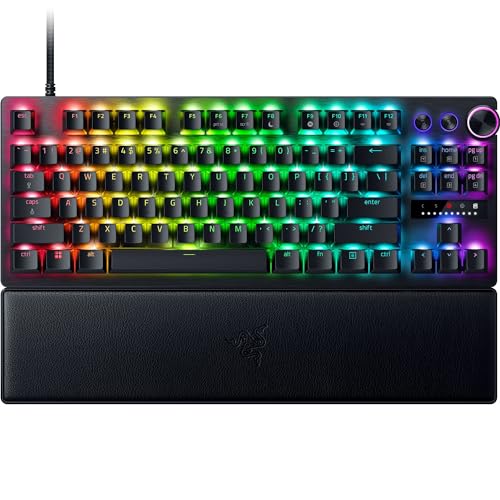
Razer Huntsman V3 Pro TKL — the Optical Flagship
Badge: Analog optical, esports brief
- Configuration per its listing: analog optical switches, TKL esports format
- Features per its listing: Snap Tap, rapid trigger, adjustable actuation
- Extras: media keys and dial, doubleshot PBT caps, wrist rest
- Represents: optical sensing at its most advanced
Strengths
- Its feature set answers the Hall effect challenge directly, inside a mainstream esports product.
- Adjustable actuation per key lets a player tune the board’s temperament in software.
- Razer’s ecosystem and support stand behind a genuinely premium instrument.
Trade-offs
- The switches are Razer’s own; the board’s feel is the board’s feel, permanently.
- Flagship pricing for a feature set typists will mostly leave switched off.
- Its voice is a gaming product’s voice, not a custom board’s.
Best for: competitive players who want optical pace with flagship support. Not suited for: switch collectors or the modding-minded.

SteelSeries Apex 9 TKL — Optical, Hot-Swappable Within Its World
Badge: The swappable optical experiment
- Configuration per its listing: hot-swap optical switches, TKL esports design
- Frame: aluminium alloy, per its listing
- Caps in its listing: double-shot PBT
- Represents: optical sensing with a nod to switch swapping
Strengths
- Hot-swap optical sockets soften the ecosystem lock-in that defines the category.
- Two-point actuation behaviour on its OptiPoint switches adds genuine versatility.
- The chassis and caps are built to a standard typists can respect.
Trade-offs
- Swappable within the optical family is still a small pond beside the MX ocean.
- Its gaming-first tuning leaves the deep-sound hunters unmoved.
- SteelSeries software becomes another ecosystem to live inside.
Best for: players who want optical speed with a little mechanical-era freedom. Not suited for: owners who expect a hundred switch options.

Razer DeathStalker V2 — the Low-Profile Optical
Badge: Optical speed, slim silhouette
- Configuration per its listing: low-profile optical switches, linear red
- Top plate: aluminium, per its listing
- Extras: multifunction roller and media button, Chroma lighting
- Represents: optical sensing in the thin-board genre
Strengths
- Brings optical registration to a slim, desk-friendly form that types closer to the surface.
- The low-profile linear switches suit fast, shallow typing styles.
- A full-size layout with media controls serves the working gamer.
Trade-offs
- Low-profile travel is a taste that MX veterans acquire slowly or never.
- The optical ecosystem’s narrow switch choice applies with full force.
- Its slimness trades away the custom world’s case and cap playground.
Best for: gamers who want optical pace in a slim, grown-up board. Not suited for: tall-profile devotees or switch swappers.
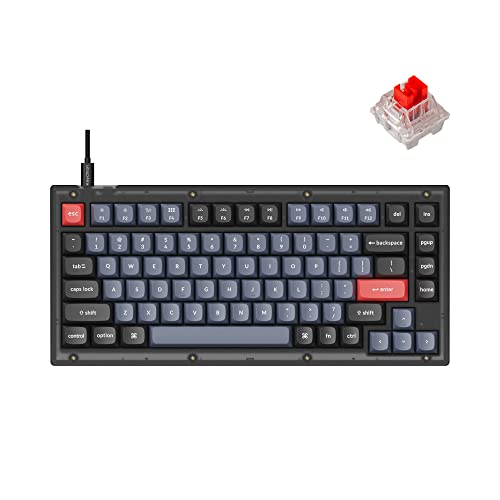
Keychron V1 — the Mechanical Benchmark
Badge: The ecosystem’s ambassador
- Configuration per its listing: 75 percent, QMK/VIA programmable, hot-swappable
- Switches in this configuration: Keychron K Pro Red
- Works across Mac, Windows, and Linux, per its listing
- Represents: mechanical freedom at an accessible tier
Strengths
- Every MX switch ever made is a future personality for this board.
- QMK/VIA remapping remains the deepest customisation in the comparison.
- Its tier makes experimentation cheap enough to be a habit.
Trade-offs
- Fixed actuation and a contact’s debounce are the mechanical facts of life.
- Stock switches are a starting point most owners eventually move beyond.
- No rapid-trigger behaviour can be configured into a contact.
Best for: typists, tinkerers, and the switch-curious. Not suited for: players buying rapid-reset technology.

HyperX Alloy Origins Core — Mechanical, Mainstream, Solid
Badge: The dependable contact board
- Configuration per its listing: tenkeyless, HyperX Red linear switches
- Features per its listing: software light and macro customisation
- Form: compact metal-bodied TKL
- Represents: mechanical gaming at its most established
Strengths
- A proven, sturdy gaming board whose switches are smooth and honest.
- HyperX’s own switches have a devoted following for their consistency.
- The metal body gives it a planted, quality feel at the desk.
Trade-offs
- Soldered-in spirit if not in fact — its identity is its stock switches.
- No analog or rapid features answer the optical side’s challenge.
- Its sound is competent rather than characterful.
Best for: gamers who want a solid mechanical board without homework. Not suited for: feature hunters or modders.
Criterion Rounds
Registration cleanliness and speed
Optical takes this round on physics. A beam does not bounce, so the debounce tax that mechanical boards pay on every press is abolished, and the registration is as fast as the stem’s arrival at the beam. Flagship optical systems then spend that cleanliness on features — adjustable thresholds, rapid reset — that narrow the gap with the Hall effect boards compared in hall effect switches versus mechanical switches. Mechanical’s honest reply is that its latency, debounce included, sits below human perception in ordinary play, and that optical’s advantage, while real, is measured in the margins where elite players live. Both statements are true, and the round goes to optical with the margin noted.
Feel and variety
Mechanical takes this round by the widest margin in the comparison. Optical switches feel good — the flagships in this roundup are smooth, stable linears with a typist-respectable travel — but they feel like what they are: a small set of designs from a small set of makers. Mechanical feel is a library: every stem geometry, spring philosophy, housing material, and sound profile the hobby has produced in forty years, all fitting one socket. A typist with opinions will exhaust optical’s menu in an afternoon and spend a decade in mechanical’s. The round is not close, and it is the round most daily typists should weight heaviest, because feel compounds across every keystroke of every day.
Durability and failure modes
Optical’s contact-free sensing removes the leaf’s whole failure catalogue: no oxidation, no chatter from tired contacts, no debounce drift. What remains is the mechanical furniture — springs, stems, stabilisers — ageing at the usual rates, plus an LED and sensor per key that either work or, rarely, do not. Mechanical’s contacts are rated for lifetimes that dwarf most ownerships, and its failures, when they come, are repairable at the level of a single switch with the crafts this site teaches. Optical’s failures are board-level conversations. The round goes to optical for prevention and to mechanical for cure, which is to say it is a draw with different footnotes — the same verdict the Hall effect comparison reached by a different road.
Sound
Mechanical wins sound the way it wins feel: by variety under owner control. An optical board sounds like its manufacturer’s chosen linear in its manufacturer’s chosen case, competently and permanently. A mechanical board can be voiced from a library whisper to a click-bar concert by its owner’s choices. Owners who care about sound as a feature — and the hobby’s sound-test culture proves many do — will find optical’s fixed voice the comparison’s quietest frustration.
Ecosystem and the second owner
Mechanical’s standard socket gives its boards a second life: switches swap, caps migrate, the second-hand market thrives on inspectable value — the world surveyed in kailh switches a comprehensive guide. Optical boards hold their value as complete instruments, excellent and sealed, more like a fine appliance than a workbench. Neither is a defect; they are different theories of ownership, and the buyer should know which theory their temperament follows before the first board arrives.
Buying Guide: Which Sensing Deserves Your Desk
For the value end of the mechanical world, the trays in outemu switches are they good make the opposite case persuasively. Buy optical if your keyboard is a performance instrument for fast games and you want that performance from a mainstream maker with software polish — the Huntsman for the full flagship argument, the Apex 9 for a swappable flavour of it, the DeathStalker if your desk doctrine is slim. Buy mechanical if your keyboard is a companion and a project: the V1 for the ecosystem at its most accessible, the Alloy Origins Core for a solid gaming board that asks nothing. The reader who games competitively and types seriously should notice the pattern across this site’s comparisons — the two-board endgame keeps appearing because it keeps being true — and budget accordingly, mechanical first for the broader education, optical when the competitive itch proves permanent.
Whichever side you choose, apply the fundamentals from keyboard switches explained: springs still set weight, stems still write feel, and the board around the sensing still conducts the sound. Optical changed the witness, not the instrument.
How to Evaluate an Optical Board Before Buying
Step one: interrogate the switch, since you cannot change it
Type on the exact model, at length, in a shop or through a generous returns window. The stock optical switch is a life sentence, so its weight, travel, and voice deserve the scrutiny you would give a mechanical board’s tenth switch choice, not its first.
Step two: test the software features in your games
Adjustable actuation and rapid-trigger behaviour justify the flagship tier only if your titles reward them. Spend an evening in your actual games with the features on and off before deciding the premium was spent or saved.
Step three: check the ecosystem’s edges
Confirm keycap compatibility, cable and connectivity manners, and the maker’s software support for your operating system. An optical board is an appliance relationship; the appliance’s maker matters more than the switch’s specifications.
Step four: weigh the exit
Ask what the board is worth to its second owner and what its switches’ spares story looks like in three years. Mechanical boards answer these questions with a marketplace; optical boards answer with the maker’s support horizon, which should be read before it is needed.
Common Mistakes in This Comparison’s Shopping
The first is buying optical for typing feel, when feel is the mechanical side’s home ground. The second is assuming optical means faster in every sense, when its cleanest advantages live in registration and features rather than in the stem’s journey. The third is overlooking the Apex 9’s lesson — that swappable optical exists — and writing the whole category off as sealed. The fourth is the mirror error: buying a mechanical board for a competitive need it cannot meet, then blaming the switches for a physics that was disclosed on the box. The fifth is judging either technology by its cheapest boards, a sampling error both camps’ flagships exist to correct.
Final Recommendation
Optical is the better sensor; mechanical is the better switch ecosystem, and the comparison resolves the moment a buyer admits which of those two nouns governs their desk. Gamers chasing registration performance inside a polished product should buy the optical flagship that fits their format and never look back. Everyone else — typists, tinkerers, the sound-obsessed, the budget-wise — should start mechanical, where the choice compounds. The light beam is a genuinely better witness. The contact, after forty years, remains the better story.
A Short History of the Light Beam
Optical sensing in keyboards is older than its current fashion. Industrial and high-reliability keyboards used light-based actuation decades ago, in environments where contacts were the first casualty, and the idea waited patiently for its consumer moment. That moment arrived when esports money met sensor prices: gaming brands in the twenty-teens began marketing optical boards on speed and durability, and the category’s second generation — the flagships in this comparison — added the analog tricks that turned a durability feature into a performance one. The mechanical switch, meanwhile, was enjoying its own renaissance, which is why the present comparison is a contest between two healthy technologies rather than a succession. History’s lesson for the buyer is that neither side is a fad: the contact has forty years of refinement behind it, and the beam has forty years of industrial service behind it, and both are now cheap enough to argue at the same desk.
The Debounce Tax, Explained Once and Properly
Mechanical contacts bounce. When two pieces of metal meet at speed, they do not settle instantly — they rebound microscopically, opening and closing several times across a few milliseconds, and a naive circuit would read that stutter as several presses. Every mechanical board therefore debounces: the controller waits a short, configured interval to confirm that a press is a decision. The wait is small and, for typing, imperceptible. For competitive play it is a real, if tiny, line item in the latency ledger, and it grows worse as contacts age and bounce more enthusiastically. Optical sensing deletes the entire paragraph: a beam is either interrupted or it is not, and the signal is born clean. This is the optical advantage in its purest form — not a faster stem, not a shorter travel, but the abolition of a waiting room that mechanical presses must sit in. Whether that abolition matters to you depends on how much of your keyboard life is spent at the margins where milliseconds are scored, and honesty about that proportion is the beginning of wisdom in this comparison.
Analog Optical: The Flagship’s Second Act
The most interesting development in the category is the analog turn, embodied by the Huntsman’s listing in this comparison: an optical system that does not merely note the beam’s interruption but grades it, judging the stem’s depth from the light it admits. Depth awareness unlocks the flagship feature set — actuation points chosen in software, reset behaviour that mimics rapid trigger, even dual-stage presses where one key carries two commands at two depths. These are the Hall effect party tricks performed with photons, and their arrival means the optical-versus-mechanical argument can no longer be settled by features alone: at the flagship tier, optical boards match the magnetic ones feature for feature in most games. What still separates the categories is everything this comparison’s other rounds describe — variety, repairability, sound, and the switch drawer’s existence — which is why the analog turn, impressive as it is, changes the gaming verdict more than the typing one.
Verdict by Genre and Desk
| Primary use | Recommended side | Reason in one line |
|---|---|---|
| Competitive FPS | Optical flagship | Clean registration plus rapid-reset features |
| Rhythm and fast-twitch titles | Optical flagship | No debounce tax on dense inputs |
| Long-form writing | Mechanical | Switch variety serves a lifetime of preference |
| Programming | Mechanical | Remapping depth and tactile choice win weekdays |
| Shared quiet rooms | Mechanical, silent lines | Optical has no silent-tactile answer yet |
| Slim desk setups | Optical, low-profile | The DeathStalker’s genre is genuinely its own |
The table compresses; the rounds above govern. Notice the pattern that has emerged across this site’s sensing comparisons: the newer technologies win the athletic rows, and the contact wins the daily ones. That is not nostalgia — it is a map of where each physics spends its advantages. A buyer whose life is mostly athletic rows should not be talked out of the beam by essays about switch drawers, and a buyer whose life is mostly daily rows should not be talked into it by latency charts. The comparison’s whole labour is to make that self-knowledge unavoidable.
Maintaining Each Technology Across Years
Optical boards ask for a cleaner’s discipline: the light path is the mechanism, and dust film on a sensor window is the category’s version of contact oxidation — slower, rarer, and cured with air and a soft brush rather than with a switch swap. Keep the board covered, blow it out on the ordinary calendar, and the beam stays honest. Mechanical boards ask for the swapper’s discipline this site teaches everywhere: a switch that tires is a switch replaced in minutes on a hot-swap board, and the board’s life extends indefinitely one citizen at a time. The maintenance philosophies mirror the ownership philosophies — appliance care against workshop craft — and a buyer’s preference between them is diagnostic of the larger choice, worth consulting before the larger choice is made.
The Sound of Light: Optical Boards in the Room
Because optical switches are almost always linears in gaming cases, the category has acquired a sound by association: a bright, brisk clatter, competent and unmemorable, that reads clearly through a headset microphone. That association is unfair to the physics — nothing about a beam demands a thin case or a loud bottom-out — but it is fair to the market, because the boards that carry optical switches are built to gaming briefs where sound ranks below speed. The DeathStalker’s low-profile hush is the exception that maps the alternative: an optical board can be a civilised roommate when its maker designs for the room as well as the leaderboard. Mechanical’s advantage here remains structural rather than acoustic: the owner, not the maker, holds the voicing decisions, and can re-voice the board seasonally as taste and household evolve. A fixed voice, however pleasant, is a compromise that compounds; a chosen voice is a feature that renews.
What Happens Next in This Argument
The categories are converging at the flagship tier and diverging everywhere else, which is a healthy shape for a technology contest. Optical systems will keep absorbing analog features until the flagship spec sheets are indistinguishable from the magnetic ones. Mechanical switches will keep doing what they have done for a decade — multiplying designs, refining materials, deepening the tuning culture — secure in the knowledge that feel is a moat no sensor can cross. The likely settlement is the one this site’s comparisons keep predicting: performance desks running contactless boards as instruments, daily desks running mechanical boards as companions, and a generation of owners fluent in both, choosing per season the way photographers choose lenses. The comparison you are reading is therefore best used as a map of a permanent border, not a prediction of a conquest.
Three Readers, Revisited in a Different Light
The tournament player first: three boards deep into a mechanical education, movement that has stopped improving. For this reader the optical flagship is not a gadget but a hypothesis with a returns window — test the rapid-reset behaviour in their title, on their settings, for a fortnight, and let the scoreboard arbitrate. The staff writer next: a beloved tactile board, deadlines that arrive in thousands of words. Optical offers this reader a smoother linear and a locked door where the switch drawer used to be; the correct purchase is another mechanical set, and the comparison’s service is to say so before the flagship’s marketing says otherwise. Finally the student with the slim desk and the slimmer room: the DeathStalker’s genre — low, fast, grown-up — fits the furniture and the timetable, and the ecosystem’s narrowness costs little to an owner who never intended to open a switch. Three readers, three verdicts, one beam of light falling differently on each desk. That is the comparison working as intended.
The Latency Ledger, Balanced in Full
Since speed sells both categories, the honest ledger deserves one complete statement. A keystroke’s journey to the screen passes through the stem’s travel to the sensing point, the sensing itself, the controller’s processing — debounce included where contacts are involved — the polling interval to the computer, and the software’s own reading of the event. Optical’s savings live in exactly two lines of that ledger: the sensing, which is instantaneous, and the debounce, which is abolished. The stem’s travel, the polling, and the software belong to both technologies equally, and a mechanical board with fast polling can out-ledger a careless optical one. This is why the comparison refuses to crown optical on a stopwatch: its advantage is real but located, a few saved milliseconds at two specific stations of a longer journey. Elite players compete at those stations. Everyone else’s bottleneck is the station labelled practice, and no sensor sells tickets past it.
Optical Switches and the Typing Body
A word for the hands, since comparisons of sensors rarely visit them. Optical boards’ near-universal linearity means the typing body receives no bump’s guidance about where actuation lives, and typists migrating from tactiles often bottom out harder for a season while their fingers learn to trust the screen. The low-profile optical variant changes the body’s geometry more radically — a shallower journey, a flatter wrist conversation — which some hands experience as relief and others as deprivation. None of this is a verdict; it is a reminder that the sensor is the part of the board your body never meets, while the spring and the travel are the parts it marries. Choose the sensor for your games if games govern, but choose the spring and the travel for your hands regardless, because hands outlast games by decades.
Resale and the Three-Year Horizon
Project both purchases three years forward. The mechanical board has been re-switched once, re-capped twice, and carries a documented history that a second owner can inspect and continue; its value is a function of a living ecosystem. The optical board has performed flawlessly as an instrument and depends for its second life on its maker’s software still being maintained and its model still being recognised; its value is a function of a company’s attention span. Neither horizon is a reason to panic — three years is well within any flagship maker’s support habits — but the difference in kind is real, and it is the ecosystem round of this comparison expressed as a calendar. Buyers who rotate gear annually will never meet the difference. Buyers who keep boards for a decade should price it in from the start.
The Comparison’s Small Print: What Neither Side Fixes
Fairness requires a section on the problems both technologies leave untouched. Neither sensor improves a bad stabiliser, and the spacebar will rattle under photons as faithfully as under contacts. Neither fixes a hollow case, a ringing desk, or a keycap set chosen for its photograph. Neither teaches movement, aim, or prose. The sensing argument, for all its genuine stakes, governs one layer of a keyboard’s character — the layer where a press becomes a signal — while the layers above and below it, furniture and physics and practice, belong to the owner’s other decisions. Readers who finish this comparison and buy thoughtfully in those other layers will get more from either technology than readers who buy the winning sensor and neglect the rest. The beam and the contact are both honest witnesses; the testimony still depends on the courtroom.
A Closing Experiment for the Undecided
Comparisons end; hands decide. The undecided reader with access to both technologies — a friend’s boards, a shop’s display wall — should run the only experiment that settles sensing arguments: the same game, the same passage of typing, on both, in one sitting, with notes taken immediately rather than impressions trusted to memory. Note where the optical board’s features changed an outcome and where they merely changed a feeling. Note where the mechanical board’s switch made a sentence easier to write. The notes, not the spec sheets, will name the winner for your desk, and they will name it in your own vocabulary — which is the only vocabulary a purchase this personal should be conducted in. This page’s rounds and tables exist to tell you what to listen for during that experiment. The experiment itself is yours, and it is shorter than the argument that precedes it.
Optical Boards in the Wider Setup
A keyboard does not live alone, and optical boards bring setup considerations their mechanical cousins spare you. Their software suites are heavier citizens — full ecosystems with profiles, lighting choreography, and firmware updates that deserve a maintenance rhythm. Their polling and feature loads assume a modern USB connection and a machine that does not sleep its ports aggressively. None of this is onerous, and all of it is the appliance relationship expressing itself in daily life: the board is a small computer peripheral in the modern sense, with a computer’s update cadence. Mechanical boards, particularly the QMK generation, ask for a different literacy — keymap files, layers, a configurator’s logic — which is homework of a more permanent kind, learned once and owned forever. Choose the homework you would rather do, because one of the two syllabi is coming home with the board either way, and the comparison is incomplete until it admits that software, not sensing, is where owners actually spend their configuration hours.
The Beam’s Weaknesses, Listed Without Pleasure
A comparison that only indicts one side is an advertisement, so the optical ledger’s debit column gets its own daylight. The switch menu is short and brand-bound. A failed sensor is a board’s problem, not a switch’s errand. The tactile and clicky universe has no optical citizens, and the silent universe has few. The second-hand market is thinner, the folklore younger, the repair culture nearly absent. Software dependence is total — an orphaned optical board is a snapshot of its maker’s last update. None of these debits outweighs the credit column for the competitive buyer, and all of them together explain why the mechanical ecosystem, older and messier, continues to outsell the cleaner idea. Technologies do not win on physics alone; they win on the life built around them, and the life around the contact is forty years deep.
And the Contact’s Weaknesses, With the Same Daylight
Symmetry demands the other column. Contacts bounce, and the tax is paid on every press forever. Contacts oxidise and tire, and in hostile rooms they do it on schedule. The actuation point is a machined fact that no software can move, which in the analog era reads increasingly like a limitation the contact’s defenders must argue around rather than deny. The ecosystem’s abundance is also its chaos — a thousand switches is a library to one buyer and a labyrinth to another, and the mechanical world’s quality variance across its long tail is the price of its openness. The contact’s defenders answer with repairability, variety, and feel, and the answers are good. They are not, however, physics, and this comparison has tried to keep the two kinds of argument — the physical and the cultural — in separate columns, because confusing them is how both camps’ marketing writes its cheques.
The Sentence Each Camp Should Be Able to Say
Comparisons mature when each side can state the other’s best case without flinching. The optical advocate should be able to say: the contact’s ecosystem — its variety, repairability, and forty years of feel — is a genuine good that no sensor roadmap currently replaces. The mechanical advocate should be able to say: a beam that never bounces, never oxidises, and can be taught analog manners is a genuinely better witness, and pretending otherwise is loyalty dressed as analysis. A reader who can hold both sentences at once owns this comparison outright, and their purchase — whichever it is — will be the rare kind that survives its first year without a single regretful scroll through the other camp’s reviews. That reader is who this page was written for, and the page’s work is done when they close it and go and press some switches.
A Practical Word on Trying Before the Flagship
Flagship optical boards ask flagship money, and the category’s narrow ecosystems make a wrong flagship a more expensive mistake than a wrong mechanical board, whose switches can be changed for the price of a set. The prudent route runs through the middle: a mid-tier optical board, or a flagship bought under a returns policy generous enough to constitute a trial, will teach a player’s hands everything the flagship promises at a fraction of the commitment. Mechanical ownership teaches the complementary prudence — start with a board whose switches are a beginning rather than a destiny. Both routes share the same moral, which this site’s comparisons repeat until it sounds like a proverb: in keyboards, the cheapest education is the one bought before the expensive certainty, and the most expensive certainty is the one bought to avoid an education.
The Last Word Belongs to the Stem
It is fitting to end a sensing comparison by remembering what the sensors are watching: a small plastic stem on a spring, travelling a few millimetres, carrying a fingertip’s intention to a machine. Both technologies in this comparison exist to witness that journey faithfully, and both, at their best, disappear into it. The buyer who chooses well will stop thinking about beams and contacts within a week, because the board will have become what keyboards are meant to be — transparent equipment for thought and play. Choose the witness whose surrounding life fits yours, keep the board clean and the stabilisers honest, and let the light and the metal argue their case to the next reader. Your desk has work to do, and play to host, and a thousand small journeys of stem and spring to witness — by light or by contact, as you have chosen, faithfully either way.
One More Distinction: Boards Versus Switches as Purchases
A subtle economic point closes the argument. A mechanical switch purchase is a component purchase — reversible, resalable, and small enough to be an experiment. An optical board purchase is an appliance purchase — larger, longer, and judged by the standards of appliances: support, software, and the maker’s horizon. Buyers who internalise that distinction stop making the comparison’s most expensive error, which is shopping for an appliance with a component buyer’s carelessness, or for components with an appliance buyer’s finality. The five boards in this comparison were chosen to honour both kinds of purchase: the optical three as appliances worth their makers, the mechanical two as components’ homes worth their ecosystems. Match the purchase to its kind, and either technology will treat you as well as it treats its best customers.
Frequently Asked Questions
Do optical switches work on Mac and Linux?
The keyboard itself types anywhere, but the configuration software — where the flagship features live — is a Windows-first citizen at most gaming makers, with Mac support varying and Linux support rare. Platform is therefore a first-order buying question for optical flagships in a way it never is for QMK mechanical boards, whose configuration culture spans every system a programmer might run.
Can a beginner feel the difference between the two?
Between the sensing systems, no — a beginner’s fingers cannot audit a beam. Between the boards that carry them, yes, immediately: weight, travel, sound, and the presence or absence of a bump are all beginner-legible. That is why this comparison keeps redirecting attention from the witness to the instrument, and why a beginner’s money is best spent where their senses already work.
Which technology holds its value better?
Mechanical boards with desirable ecosystems tend to hold value through their components’ continued relevance — switches, caps, and cases circulate independently. Optical flagships hold value while their models remain current in their makers’ lineups and soften when a successor ships, the appliance pattern again. Neither is an investment; the mechanical pattern simply decays along a gentler curve.
Is the optical advantage real for casual gaming?
Real and mostly theoretical at casual levels, where the ledger’s other lines — display, network, and the player’s own evening form — swamp the sensing difference entirely. Casual players should buy on feel, format, and the room’s tolerance, all of which they will notice daily, rather than on a registration margin they will notice never. The flagship features remain fun to own; they are simply not the reason to own them at this level.
Does polling rate matter more than switch type?
It can. The polling interval is one of the latency ledger’s larger lines, and a high-polling mechanical board can post a faster total than a low-polling optical one despite paying the debounce tax. Buyers comparing flagships should read both numbers — sensing type and polling rate — as a pair, because the marketing of each technology prefers to quote only its favourite line of the ledger.
What breaks first on each kind of board?
On mechanical boards, the honest answer is usually a stabiliser’s patience or a single switch’s leaf, both cheap and both fixable at the desk. On optical boards, the wear items are the shared furniture — springs, stems, stabilisers — while the sensors themselves sit outside the wear economy almost entirely. The practical difference is repairability’s address: mechanical failures visit the switch drawer, optical failures visit the support page, and owners should know which address their temperament prefers.
Are there tactile optical switches?
Essentially no mainstream ones, and the absence is structural rather than accidental: the category’s makers sell to gamers, and gamers’ flagship briefs specify linears. A tactile stem geometry would work under a beam exactly as it works over a leaf, so the gap is a market decision, not a physics limit — which means it could close if demand ever speaks loudly enough. Until it does, bump-seekers are mechanical citizens by necessity.
Can optical switches be lubed like mechanical ones?
The moving parts can — stems, rails, and springs respond to the same thin-film discipline, and the lubing guides on this site apply with their usual cautions. What must stay clean is the optical path itself: grease anywhere near the beam’s window or the sensor turns a sensing advantage into a sensing mystery. Lube the furniture, respect the window, and an optical switch tunes as obediently as its contact-bearing cousins — the full method lives in how to lube keyboard switches.
Do optical boards need special software to work?
They type as standard keyboards the moment they are plugged in, on any system that accepts a keyboard. The software is where the category’s value lives, though — actuation maps, rapid-reset configuration, lighting, and firmware — so a buyer who refuses vendor software on principle is refusing the flagship features while paying for them. Check the suite’s support for your operating system before the purchase, exactly as you would check a mechanical board’s configurator story.
Will optical switches replace mechanical ones entirely?
The evidence of this comparison says no — not because the beam is flawed, but because the contact’s advantages are cultural and mechanical rather than electrical, and cultures do not deprecate. The likelier future is the settled border described earlier in this page: contactless boards where performance governs, contact boards where daily life does, and owners fluent in both. Replacement narratives make good marketing and poor history; coexistence is what mature technologies actually do.
Which is better for a shared office?
Mechanical, on the strength of its silent and tactile ranges, which let a buyer tune a board to a room’s treaty with precision. Stock optical boards are linears in gaming cases — inoffensive, but voiced by their makers rather than by the room’s needs. An office buyer with a hard requirement for optical sensing should audition the low-profile end of the category, where the voices run calmer, and should still expect to add a desk mat to the treaty.
Are optical switches quieter than mechanical ones?
Not by nature. The sensing is silent, but the sounds a keyboard makes are the stem’s landing, the spring’s ring, and the case’s conduct — all mechanical events that optical boards share. Optical boards are usually linears, which removes the clicky and tactile sound sources, and in that limited sense the category trends quieter. A mechanical board built with silent switches will out-quiet any stock optical board, which is why the shared-room row of this comparison’s table belongs to the contact.
Do optical keyboards work with custom keycaps?
Generally yes — the flagship optical switches carry MX-style cross stems, so the keycap universe is open even though the switch universe is closed. Verify the stem on the exact model before ordering a treasured set, and mind the board’s stabiliser spacing on the wide keys as you would on any board. Caps are the one modding door the optical category leaves wide open, and owners walk through it enthusiastically.
Is optical better for a first gaming keyboard?
If the first keyboard is unambiguously a gaming instrument, an optical board is a defensible first door: the features are present from day one, the maintenance is appliance-simple, and the performance ceiling is high. If the keyboard must also be a daily typing companion and a hobby seed, mechanical remains the safer first country, because its ecosystem forgives changing tastes — and first tastes, in this hobby, always change.
Are optical switches faster than mechanical switches?
Their registration is cleaner and effectively immediate, because no contact bounce must be waited out, and flagship optical boards convert that cleanliness into adjustable actuation and rapid-reset features. In the stem’s physical journey the two are equals — a spring is a spring. Players in fast genres can feel the feature-level difference; typists will not find a speed difference worth the name, because their bottleneck was never the sensor.
Do optical switches last longer?
The sensing element has fewer ways to die: no contacts to oxidise, tire, or chatter. The rest of the switch — spring, stem, housing — ages like any mechanical part, and the board’s electronics become the lifespan’s limiting factor rather than the switches. In practical terms both technologies outlast their owners’ curiosity, with optical holding an edge in hostile environments where contacts suffer most.
Can I put optical switches in my mechanical keyboard?
No. An optical switch needs the board’s light path and sensors; a mechanical board offers it only two contact holes and darkness. The reverse fails symmetrically. The ecosystems share keycaps, cables, and desk space, and that is where the compatibility ends — which is why this comparison is really between boards and their philosophies, not between loose switches.
Do optical switches feel different?
The travel itself is mechanical — spring, stem, housing — so an optical switch feels like the linear it almost always is: smooth, unbroken, bottoming out on a housing floor. What is missing is variety: there is no optical equivalent of the tactile and clicky universe, and the flagship linears, while excellent, are variations on one personality. Readers whose fingers want a bump should hear that absence clearly before buying.
Are optical keyboards good for typing?
Perfectly good, occasionally lovely, and narrow. A quality optical board types with the smoothness of a good linear mechanical board, because mechanically that is what it is. The limitation is the same one this comparison keeps returning to: the switch you get is the switch you keep. Typists who know they love a smooth medium linear can settle happily; typists still forming their preferences should form them in the mechanical ecosystem first.
What is the difference between optical and Hall effect?
Both replace the contact with a contactless witness — light in one, magnetism in the other — and both spend that witness on adjustable actuation and rapid-reset features at the flagship tier. Hall effect sensing reads the stem’s position continuously and analogically, which gives its features a slightly broader vocabulary; optical sensing reads thresholds along the journey. The practical differences today are ecosystem and maker rather than physics: different boards, different software, same revolutionary idea wearing two coats.